How to Capture Extremely Large Webpage Screenshots Beyond 13,500 Pixels
Learn why very tall screenshots fail, how to capture pages in sections, stitch them cleanly, and automate reliable full-page captures.
Short answer: a 13,500-pixel ceiling is not a documented universal browser limit. Full-page screenshot APIs can fail because the browser, operating system, graphics backend, automation library, output format, viewport scale, or available memory cannot produce one very tall raster. Try a full-page capture at CSS-pixel scale first. If it fails, capture overlapping vertical sections, stitch them, and check every seam. For automated workflows, a hosted API such as ScreenshotNeo can remove the browser setup.
What “13,500 pixels” actually means
Separate the page’s layout height from the image’s pixel height:
- CSS height: the document height reported by the browser layout engine.
- Raster height: the number of pixels in the PNG, JPEG, or WebP output.
- Device scale: a scale factor that can multiply the raster dimensions without making the document taller.
Raising device scale can therefore make an oversized capture consume more memory. The often-repeated 13,500-pixel figure should be treated as a report to investigate, not a current cross-browser specification. A 2016 Puppeteer issue records a historical report of long-page constraints, but does not establish a present universal limit (Puppeteer issue #359).
Recommended workflow for extreme pages
- Record the browser and version, automation-library version, operating system, viewport width, document height, and device scale.
- Run the documented full-page method at CSS scale (normally scale 1) and use a compressed format while diagnosing.
- Make lazy content render by scrolling or waiting for the relevant selector before capture.
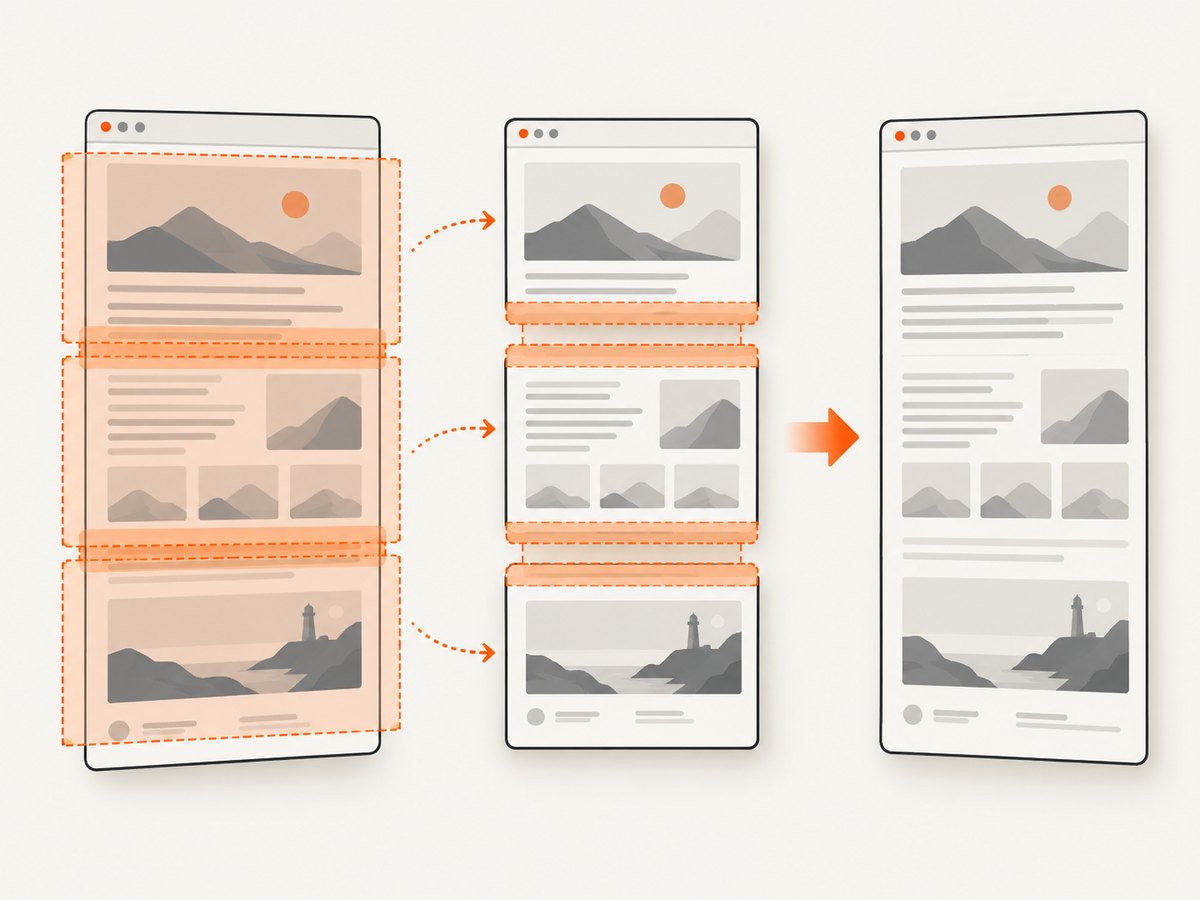
- If one image fails, capture vertical tiles with a modest overlap, then stitch them.
- Inspect overlaps for repeated or missing content, sticky headers, animation changes, and layout shifts.
- Verify the final file’s width, height, bottom edge, and visual continuity before publishing it.
Capture a full page with Puppeteer
Puppeteer exposes fullPage and captureBeyondViewport. Its API describes how those options work, but does not promise unlimited image height (ScreenshotOptions documentation).
import puppeteer from 'puppeteer';

const browser = await puppeteer.launch({headless: true});
const page = await browser.newPage();
await page.setViewport({width: 1440, height: 900, deviceScaleFactor: 1});
await page.goto('https://example.com/very-long-page', {
  waitUntil: 'networkidle2',
  timeout: 90000
});

// Optional: trigger lazy loading before measuring and capturing.
await page.evaluate(async () => {
  await new Promise(resolve => {
    let y = 0;
    const step = () => {
      window.scrollTo(0, y);
      y += 800;
      if (y < document.documentElement.scrollHeight) requestAnimationFrame(step);
      else { window.scrollTo(0, 0); resolve(); }
    };
    step();
  });
});

await page.screenshot({
  path: 'page.png',
  fullPage: true,
  captureBeyondViewport: true,
  type: 'png'
});
await browser.close();
Start with deviceScaleFactor: 1. Increase it only after the CSS-scale capture succeeds and you have checked memory and output-size requirements.
Capture a full page with Playwright
Playwright’s fullPage mode captures the full scrollable page. Its scale option controls whether the output uses CSS pixels or device pixels (Page API and Screenshots guide).
import { chromium } from 'playwright';

const browser = await chromium.launch({headless: true});
const page = await browser.newPage({
  viewport: {width: 1440, height: 900},
  deviceScaleFactor: 1
});
await page.goto('https://example.com/very-long-page', {
  waitUntil: 'networkidle',
  timeout: 90000
});
await page.screenshot({
  path: 'page.png',
  fullPage: true,
  scale: 'css',
  animations: 'disabled',
  type: 'png'
});
await browser.close();
Use scale: 'css' while diagnosing. scale: 'device' creates a larger raster and can expose memory or image-size limits sooner.
Firefox Developer Tools
Firefox documents a built-in full-page screenshot feature and the :screenshot command (Mozilla’s Taking screenshots documentation). The documentation does not establish a supported maximum above 13,500 pixels, so verify the resulting dimensions on your target machine.
Fallback: capture overlapping sections and stitch them
When a single tall raster fails, divide the document into viewport-sized sections. Keep an overlap so you can detect shifts before cropping. The following Playwright script writes tiles; it deliberately uses CSS scale 1.
import { chromium } from 'playwright';

const browser = await chromium.launch();
const page = await browser.newPage({viewport: {width: 1440, height: 1200}, deviceScaleFactor: 1});
await page.goto('https://example.com/very-long-page', {waitUntil: 'networkidle'});
await page.evaluate(() => window.scrollTo(0, 0));

const overlap = 120;
const viewportHeight = 1200;
const total = await page.evaluate(() => document.documentElement.scrollHeight);
let index = 0;
for (let top = 0; top < total; top += viewportHeight - overlap) {
  await page.evaluate(y => window.scrollTo(0, y), top);
  await page.waitForTimeout(250);
  await page.screenshot({path: `tile-${String(index).padStart(4, '0')}.png`, type: 'png'});
  index++;
}
await browser.close();
Remove the overlap only after comparing adjacent tiles. Sticky navigation can appear in every tile; hide it temporarily with injected CSS or crop each repeated region consistently. Freeze animations and avoid capturing pages whose content changes while scrolling.
Stitch tiles with Python and Pillow
from pathlib import Path
from PIL import Image

files = sorted(Path('.').glob('tile-*.png'))
overlap = 120
if not files:
    raise SystemExit('No tile files found')

images = [Image.open(path).convert('RGB') for path in files]
width = max(image.width for image in images)
height = images[0].height + sum(image.height - overlap for image in images[1:])
result = Image.new('RGB', (width, height), 'white')
y = 0
for number, image in enumerate(images):
    result.paste(image, (0, y))
    if number == 0:
        y += image.height - overlap
    else:
        y += image.height - overlap
result.save('stitched.png', optimize=True)
This simple stitcher assumes every tile has the same width and that the overlap is constant. For production use, compare the overlap bands and adjust the crop when a page shifts between captures.
Lazy loading, sticky elements, and dynamic pages
- Lazy images: scroll through the page before capture, wait for image selectors, or use a longer per-tile delay.
- Sticky headers: hide them during tile capture or remove repeated bands during stitching.
- Animations: disable animations where your automation library supports it; otherwise capture can differ between tiles.
- Live data: freeze the page state when possible. A feed or ad slot can change height while you scroll.
- Fonts: wait for
document.fonts.readyto prevent late text reflow. - Consent dialogs and chat widgets: dismiss or hide them before measuring the document, or they may cover content and change height.
await page.evaluate(async () => {
  await document.fonts.ready;
  const style = document.createElement('style');
  style.textContent = '* { animation: none !important; transition: none !important; }';
  document.head.appendChild(style);
});
Troubleshooting
| Symptom | Likely cause | Fix |
|---|---|---|
| Screenshot throws an image-size or protocol error | Raster is too large for the browser or graphics backend | Use CSS scale 1, reduce viewport width, switch PNG to JPEG/WebP, or tile and stitch. |
| Output stops before the bottom | Full-page capture reached a stack-specific limit or the document height changed | Log scrollHeight, disable scale multiplication, then use overlapping tiles. |
| Blank or partially blank tiles | Lazy content was not rendered or the page was captured during navigation | Wait for a selector, scroll first, and wait for fonts and network activity. |
| Repeated headers or missing strips | Sticky elements moved with each viewport | Hide the sticky element while capturing or crop the repeated overlap consistently. |
| Visible seams | Layout shift, animation, different ad content, or incorrect overlap | Freeze animation, increase overlap, wait after scrolling, and inspect adjacent bands. |
| Capture times out | Slow resources, never-ending network requests, or an excessive page | Set a bounded timeout, wait for a specific readiness condition, block unnecessary resources, and capture tiles. |
| Text is blurry | Image was resized after capture or device scale is unsuitable | Capture at the required CSS width, use device scale only when memory allows, and avoid repeated resampling. |
Performance, reliability, and cost considerations
- Memory grows with width × height × color channels, and device scale multiplies both dimensions.
- JPEG or WebP can reduce file size; PNG is preferable when lossless text and transparency matter.
- Section captures can retry one failed tile instead of repeating the whole page.
- Record browser, library, OS, viewport, scale, and final dimensions so failures are reproducible.
- For recurring jobs, cap concurrency and clean up browser processes after failures.
- Validate dimensions and file readability before storing or publishing the result.

Or skip the browser setup
ScreenshotNeo provides a website screenshot API and MCP server. One GET request returns a PNG, JPEG, WebP, or PDF. Its full-page capture supports lazy images, and the service can also capture a selected element, apply custom CSS or JavaScript, set waits, use device presets or custom viewports, and choose a cache TTL. See the ScreenshotNeo documentation for all options.
curl -G "https://api.screenshotneo.com/v1/shot" -d access_key=YOUR_API_KEY --data-urlencode url=https://stripe.com -o shot.webpimport requests
r = requests.get("https://api.screenshotneo.com/v1/shot", params={"access_key": "YOUR_API_KEY", "url": "https://stripe.com"}, timeout=90)
open("shot.webp", "wb").write(r.content)const q = new URLSearchParams({ access_key: 'YOUR_API_KEY', url: 'https://stripe.com' });
const res = await fetch(`https://api.screenshotneo.com/v1/shot?${q}`);Cookie banners, popups, and chat widgets are removed before the shot. Bot checks, blank pages, and failed loads are never billed, and response headers report the page verdict and whether it was billed. An MCP server lets Claude, Cursor, and other MCP clients take screenshots. The Free plan includes 1,000 screenshots each month with no card; paid plans start at $5 for 3,000. Create a free ScreenshotNeo account.
FAQ
Is 13,500 pixels a hard Chrome limit?
No universal current limit is established by the sources for this guide. It is a useful symptom to reproduce on your exact browser and operating system.
Does a higher device scale create a taller webpage?
No. It increases output raster density; the CSS layout height stays the same.
Should I always stitch tiles?
Use a single full-page capture when it succeeds and is within your memory budget. Stitch tiles when the tall raster fails or when retrying individual sections improves reliability.
Can PDF replace a huge image?
It may suit a readable record, but layout fidelity and limits depend on the browser and document. Treat it as an alternative format to evaluate for your page.


