How to Center Full-Width Content in a Landscape Puppeteer PDF
Center landscape Puppeteer PDFs reliably with a full-width wrapper, constrained content, one page-size authority, and fixes for common layout shifts.

Direct answer: Put your report inside a full-width print wrapper, constrain the inner content, and center that inner box with margin-inline: auto. Make one system responsible for paper size and margins: either CSS @page or Puppeteer PDF options. If CSS owns the page size, set preferCSSPageSize: true.
<div class="page">
  <main class="content">
    <h1>Quarterly report</h1>
    <p>This content is centered in the printable landscape area.</p>
  </main>
</div>
@page {
  size: A4 landscape;
  margin: 12mm;
}

html, body {
  margin: 0;
  padding: 0;
}

.page {
  width: 100%;
}

.content {
  width: min(100%, 1100px);
  margin-inline: auto;
  box-sizing: border-box;
}
await page.pdf({
  path: 'out.pdf',
  landscape: true,
  printBackground: true,
  preferCSSPageSize: true
});
A box that is already width: 100% has no spare horizontal space to move. Center the narrower child, or use a flex row when you need to center several children. Puppeteer renders PDFs with the print CSS media type by default, so print-only centering rules must be in the stylesheet that is active during printing. Puppeteer documents the PDF behavior and options, while MDN documents the @page rule.
1. Understand the boxes that are being centered
Landscape orientation changes the page coordinate system; it does not automatically center an element. Think in three layers:

- Paper: the physical page dimensions, such as A4 or Letter in landscape.
- Printable area: paper after CSS or Puppeteer margins are removed.
- Layout boxes: your full-width wrapper and the narrower report content inside it.
The outer .page should span the printable width. The inner .content receives a maximum width and auto margins. If both elements are 100% wide, margin-inline: auto cannot create visible movement because the child already fills its parent.
.page {
  width: 100%;
}

.content {
  width: min(100%, 1100px);
  margin: 0 auto;
  padding: 0 16px;
  box-sizing: border-box;
}
Use text-align: center only for inline content such as a heading or an image. It does not center the containing block itself. For a full-width row whose children should be centered, use flexbox:
.full-width-row {
  width: 100%;
  display: flex;
  justify-content: center;
  align-items: center;
}
MDN describes justify-content as main-axis alignment; in a horizontal flex row, that is the horizontal axis.
2. Make CSS and Puppeteer agree about landscape paper
Most apparent left shifts come from two authorities fighting over dimensions. CSS can define paper size and margins with @page. Puppeteer can define orientation, format, width, height, and margins through page.pdf(). Choose one source of truth for paper dimensions.
Configuration A: CSS controls paper size
Use this when the stylesheet must match other print engines or when the report already has print-specific page rules.
@page {
  size: Letter landscape;
  margin: 0.5in;
}

@media print {
  html, body {
    margin: 0;
    padding: 0;
  }

  .page {
    width: 100%;
  }

  .content {
    width: min(100%, 1050px);
    margin-inline: auto;
    box-sizing: border-box;
  }
}
await page.pdf({
  path: 'letter-landscape.pdf',
  landscape: true,
  printBackground: true,
  preferCSSPageSize: true
});
With preferCSSPageSize: true, the CSS @page size takes priority over Puppeteer’s format, width, or height. The explicit landscape: true makes the intent clear, but keep the actual dimensions and margins in one place.
Configuration B: Puppeteer controls paper size
Use this when your application chooses formats at runtime and CSS should remain independent of a particular paper stock.
await page.pdf({
  path: 'letter-landscape.pdf',
  format: 'letter',
  landscape: true,
  margin: {
    top: '0.5in',
    right: '0.5in',
    bottom: '0.5in',
    left: '0.5in'
  },
  printBackground: true
});
Keep the wrapper relative to the printable area:
.page {
  width: 100%;
}

.content {
  width: min(100%, 1050px);
  margin-inline: auto;
  box-sizing: border-box;
}
Do not combine CSS @page dimensions, Puppeteer format, and separate width and height values unless you deliberately understand which setting wins. If you need custom dimensions, provide width and height in Puppeteer and omit a competing CSS page size.
3. Complete runnable Puppeteer example
The following Node.js program creates a self-contained HTML document, loads it, waits for fonts, and writes a centered A4 landscape PDF.
const puppeteer = require('puppeteer');

(async () => {
  const browser = await puppeteer.launch({ headless: true });
  try {
    const page = await browser.newPage();

    const html = `<!doctype html>
<html>
<head>
  <meta charset="utf-8">
  <style>
    @page { size: A4 landscape; margin: 12mm; }
    html, body { margin: 0; padding: 0; }
    body { font-family: Arial, sans-serif; color: #1f2937; }
    .page { width: 100%; }
    .content {
      width: min(100%, 1100px);
      margin-inline: auto;
      box-sizing: border-box;
    }
    .hero {
      display: flex;
      justify-content: space-between;
      gap: 24px;
      border-bottom: 1px solid #cbd5e1;
      padding-bottom: 12px;
    }
    .wide-table { width: 100%; border-collapse: collapse; margin-top: 24px; }
    .wide-table th, .wide-table td { border: 1px solid #cbd5e1; padding: 8px; text-align: left; }
    @media print {
      .screen-only { display: none; }
    }
  </style>
</head>
<body>
  <div class="page">
    <main class="content">
      <section class="hero">
        <div><h1>Quarterly report</h1><p>Centered inside a full-width landscape wrapper.</p></div>
        <div>A4 · Landscape</div>
      </section>
      <table class="wide-table">
        <tr><th>Metric</th><th>Current</th><th>Previous</th></tr>
        <tr><td>Requests</td><td>18,240</td><td>16,920</td></tr>
      </table>
    </main>
  </div>
</body>
</html>`;

    await page.setContent(html, { waitUntil: 'networkidle0' });
    await page.evaluate(() => document.fonts.ready);
    await page.pdf({
      path: 'report.pdf',
      landscape: true,
      printBackground: true,
      preferCSSPageSize: true
    });
  } finally {
    await browser.close();
  }
})();
Install Puppeteer with npm install puppeteer, save the file as make-pdf.js, and run node make-pdf.js. The call to document.fonts.ready reduces layout changes caused by late font metrics. If images affect line wrapping, wait for them as well:
await page.evaluate(async () => {
  await document.fonts.ready;
  await Promise.all(Array.from(document.images).map(img => {
    if (img.complete) return Promise.resolve();
    return new Promise(resolve => {
      img.addEventListener('load', resolve, { once: true });
      img.addEventListener('error', resolve, { once: true });
    });
  }));
});
4. Centering patterns for real layouts
Constrained report column
.content {
  max-width: 1100px;
  width: 100%;
  margin-inline: auto;
  padding-inline: 20px;
  box-sizing: border-box;
}
This is the safest default. The column grows until 1100px, then equal auto margins consume the remaining printable width.
Full-width background with centered contents
.band {
  width: 100%;
  background: #eef2ff;
}

.band > .band-inner {
  width: min(100%, 1100px);
  margin-inline: auto;
  padding: 16px 20px;
  box-sizing: border-box;
}
The background spans the page while text and controls stay aligned to the report column.
Centered element inside a full-width row
.full-width-row {
  width: 100%;
  display: flex;
  justify-content: center;
}

.chart {
  width: min(100%, 700px);
}
Two-column content
.columns {
  width: min(100%, 1100px);
  margin-inline: auto;
  display: grid;
  grid-template-columns: 1fr 1fr;
  gap: 24px;
}
If a column contains a long unbroken URL or a wide table, add min-width: 0 to grid children so overflow does not push the visual center.
5. Why a landscape PDF looks shifted left
- The child is full width. A 100% child cannot be moved by auto margins. Add a maximum width or center its descendants.
- Browser defaults add margins. Reset
htmlandbody. A default body margin changes the apparent edge alignment. - Page settings disagree. A CSS A4 rule combined with a Puppeteer Letter format can scale or reposition content. Pick one authority.
- Margins are counted twice. CSS
@pagemargins and Puppeteermarginoptions both reduce the printable area when both are active. - The content is wider than the printable area. Fixed pixel widths, tables, images, or transforms can overflow and get clipped or scaled.
- Print CSS changes the layout. Puppeteer uses print media for
page.pdf(). Rules inside@media screendo not control the PDF. - Late assets change line wrapping. Fonts and images that load after the PDF call can change heights and page breaks.
6. Debugging checklist
- Add temporary outlines:
* { outline: 1px solid rgba(255,0,0,.15); }. - Log widths before export:
await page.evaluate(() => ({ page: document.querySelector('.page').getBoundingClientRect().width, content: document.querySelector('.content').getBoundingClientRect().width }));. - Check computed margins and width in the print context.
- Confirm that the PDF call uses the intended
landscapevalue and page-size authority. - Search for fixed widths larger than the printable area, negative margins, absolute positioning, and transforms.
- Test with a simple colored wrapper before reintroducing charts, fonts, and tables.
- Wait for network requests, fonts, and images that affect dimensions.
7. Performance and reliability considerations
Launching Chromium is usually more expensive than applying the CSS. Reuse a browser process for batches, create a fresh page per document, and close pages in a finally block. Set a navigation timeout appropriate to your content and avoid waiting forever for third-party requests.
page.setDefaultNavigationTimeout(30000);
await page.goto(url, { waitUntil: 'networkidle0', timeout: 30000 });
networkidle0 can hang on pages with analytics, streaming, or long polling. In those cases, use domcontentloaded plus an explicit selector or bounded delay, then wait for the assets that determine layout. Keep CSS page dimensions stable and avoid JavaScript that measures the viewport before print media is applied.
For repeatable output, pin your Puppeteer and Chromium versions, use the same fonts in every environment, and keep paper size and margins explicit. If a table must remain readable, allow it to wrap or choose a larger paper format rather than relying on accidental scaling.
8. Or skip the browser setup
If your goal is a clean PDF or image of a URL rather than maintaining Chromium yourself, ScreenshotNeo provides a website screenshot API. Its PDF capture supports paper size, margins, landscape orientation, and page ranges. Cookie and consent banners are accepted before capture, then more than 60 known consent platforms, newsletter popups, and chat widgets are removed; each cleanup step can be disabled. Bot checks, blank pages, timeouts, failed loads, and cache hits are not billed, and the response identifies the result with X-Page-Verdict and X-Billed headers.
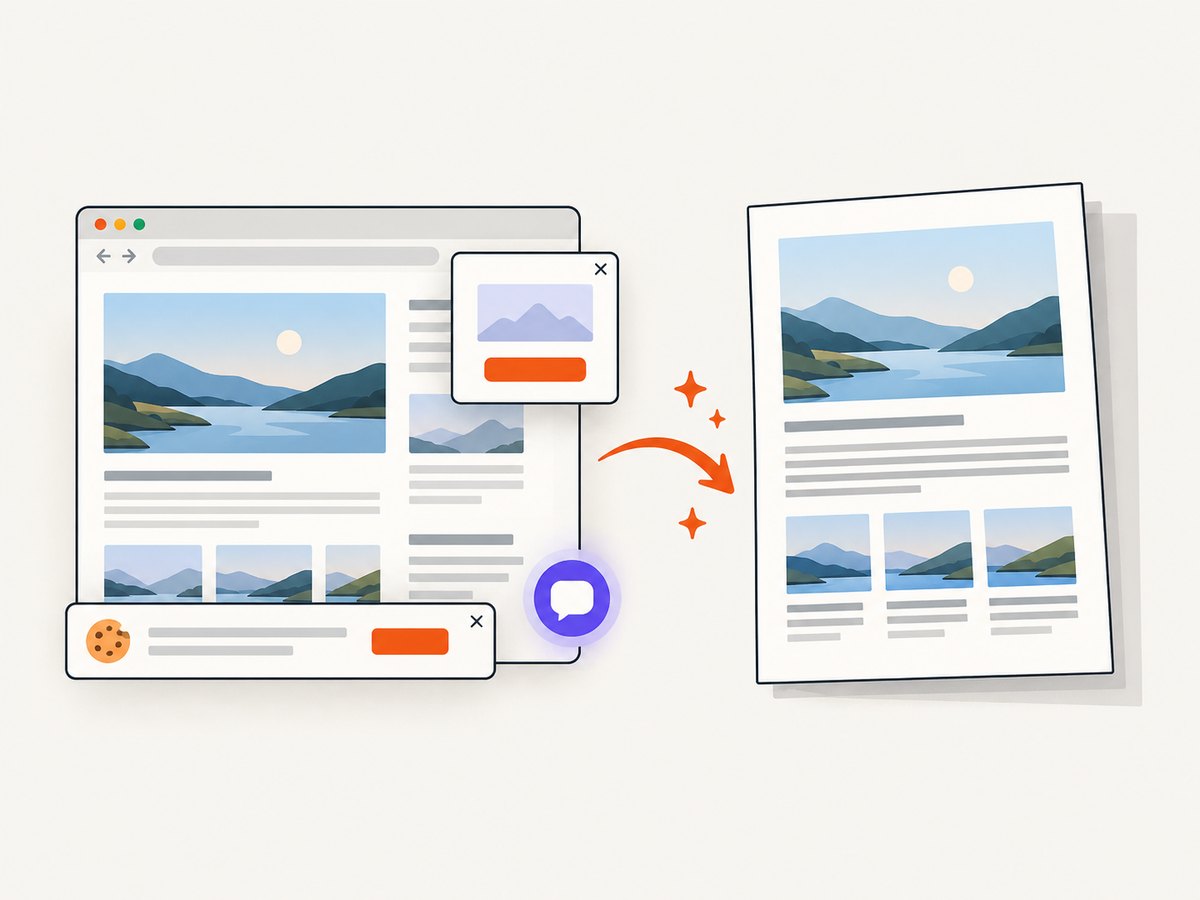
See the ScreenshotNeo API documentation for the complete option list. A direct image request looks like this:
curl -G "https://api.screenshotneo.com/v1/shot" -d access_key=YOUR_API_KEY --data-urlencode url=https://stripe.com -o shot.webpimport requests
r = requests.get("https://api.screenshotneo.com/v1/shot", params={"access_key": "YOUR_API_KEY", "url": "https://stripe.com"}, timeout=90)
open("shot.webp", "wb").write(r.content)
const q = new URLSearchParams({ access_key: 'YOUR_API_KEY', url: 'https://stripe.com' });
const res = await fetch(`https://api.screenshotneo.com/v1/shot?${q}`);
ScreenshotNeo also supports full-page capture with lazy images loaded, CSS-selector element capture, custom CSS and JavaScript, click and wait actions, blocked ads or resource types, custom headers and cookies, timezone and geolocation, transparent backgrounds, resizing, selectable cache TTLs, signed image links, asynchronous jobs with signed webhooks, bulk capture of up to 100 URLs per call, a usage API, and an OpenAPI specification. Its MCP server exposes take_screenshot, get_page_info, and capture_pdf for Claude, Cursor, and other MCP clients.
There is a free allowance of 1,000 screenshots per month with no card. Paid plans start at $5 for 3,000 shots; every feature is available on every plan. Create a free ScreenshotNeo account and try the API with those 1,000 monthly screenshots.
9. Cost and output-quality trade-offs
Local Puppeteer has no per-capture service fee, but you operate Chromium, fonts, memory, concurrency, retries, and storage. A hosted API trades browser maintenance for request pricing and operational controls. Compare the total work required: page setup, consent cleanup, bot-check handling, retries, cache behavior, and PDF delivery.
For either approach, cache deterministic documents, avoid recapturing unchanged URLs, and use a bounded concurrency level. With ScreenshotNeo, you choose a cache TTL and cache hits are not billed. With local Puppeteer, cache the generated PDF or the source data that creates it.
10. FAQ
Should I use landscape: true or @page { size: landscape; }?
Use one page-size authority. If CSS owns paper dimensions and margins, use @page with preferCSSPageSize: true. If your application chooses formats through Puppeteer, use format, width, or height there.
Why does margin: auto do nothing?
The element probably fills its parent. Give it a constrained width or max-width, then apply auto margins.
Can I center vertically as well?
Yes. Use a flex wrapper with align-items: center, but account for multi-page content; vertical centering is usually appropriate for a cover or a fixed-height panel, not a long report.
Does Puppeteer use screen CSS for PDFs?
No. page.pdf() uses print media. If you need screen rules, call page.emulateMediaType('screen') before generating the PDF, then verify page size and pagination.
What if my content must span the entire printable width?
Keep the outer row at width: 100%. Center its children with flexbox, or use a full-width child and center only the text or controls inside it.
How do I prevent a wide table from breaking centering?
Use width: 100%, allow cells to wrap, set table-layout: fixed when suitable, and remove unbounded strings. A table wider than the printable area cannot appear centered without overflow or scaling.


