How to Click a Tree Expand Icon with Selenium WebDriver
Learn how to locate, click, and verify expandable tree nodes in Selenium with stable selectors, explicit waits, keyboard fallbacks, and debugging fixes.

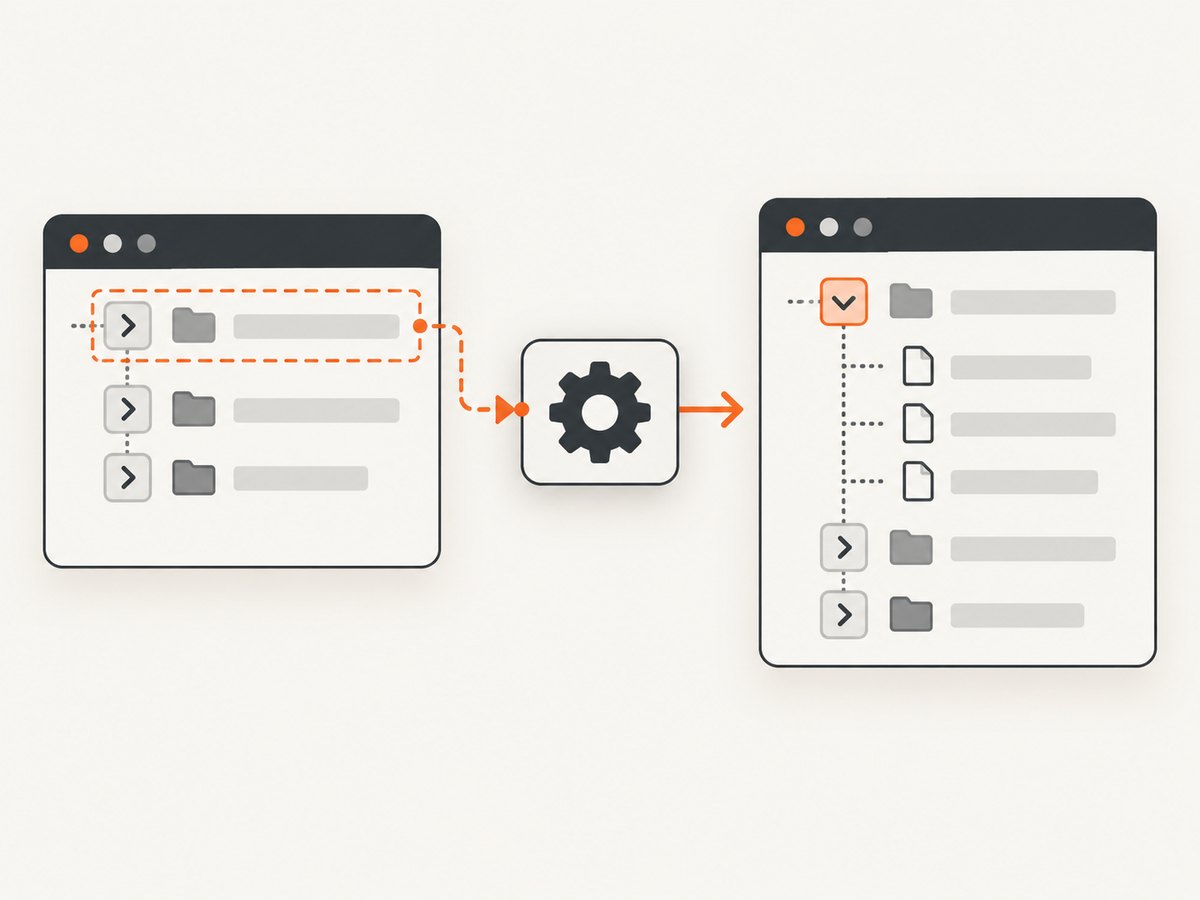
To click a tree expand icon with Selenium WebDriver, locate the semantic tree node or its disclosure button, wait until it is ready, click it, and then wait for a state change such as aria-expanded="true" or a visible child group. The reliable sequence is:
- Inspect the DOM and identify the control that owns expansion.
- Scope the locator to the correct tree and node.
- Use an explicit wait instead of a fixed sleep.
- Click the node or nested button.
- Assert that expansion completed.
Do not use the first SVG, path, or arrow found on the page. Decorative icons often have no click handler, and a page may contain several trees with identical markup.
How expandable trees are represented
Accessible tree widgets normally use tree, treeitem, and group roles. A parent treeitem has aria-expanded="false" while closed and aria-expanded="true" while open. A leaf does not need aria-expanded. This state model is defined by the WAI-ARIA Tree View Pattern.
The clickable element varies by component:
| Markup you find | Preferred target | Useful postcondition |
|---|---|---|
li role="treeitem" aria-expanded="false" |
The treeitem, or its nested disclosure button | aria-expanded="true" |
Treeitem containing button |
The button inside that treeitem | Child role="group" is visible |
| Treegrid row with an expand cell | The row’s dedicated button or cell | New rows appear beneath the parent |
| Custom widget without ARIA | A stable ID, test attribute, or concise CSS selector | A known child selector becomes visible |
Inspect the DOM in browser developer tools while the branch is closed and open. Record which element changes, whether the child group is inserted or merely hidden, and whether a click on the label also toggles the branch.
Choose a locator that survives UI changes
Selenium recommends a unique ID when one exists, followed by a well-written CSS selector. XPath is supported and useful for relationships such as “the treeitem whose label is Reports,” but long absolute XPath expressions are fragile. See Selenium’s locator guidance.
Stable locator order
- Unique
id, for exampleid="reports-node". - A stable
data-testidor component attribute. - ARIA role and state, such as
[role='treeitem'][aria-expanded='false']. - A short relationship-based XPath tied to visible text.
- Structural selectors only as a last resort.
Scope every selector to the intended tree. If the page has multiple trees, start with an ancestor such as #project-tree or [data-testid='file-tree']. For a known label, locate the treeitem containing that label and then find its disclosure control.
tree = driver.find_element(By.CSS_SELECTOR, "[role='tree'][data-testid='file-tree']")
reports = tree.find_element(
    By.XPATH,
    ".//*[@role='treeitem' and .//*[normalize-space()='Reports']]"
)
control = reports.find_elements(By.CSS_SELECTOR, "button, [role='button']")
control = control[0] if control else reports
Python: click an ARIA-aware tree node
This example waits for a closed parent node, prefers a nested disclosure button, clicks it, and verifies the state. Replace the tree and label selectors with those from your page.
from selenium import webdriver
from selenium.webdriver.common.by import By
from selenium.webdriver.support.ui import WebDriverWait
from selenium.common.exceptions import StaleElementReferenceException


driver = webdriver.Chrome()
driver.get("https://example.test/tree")
wait = WebDriverWait(driver, 10)

# Scope the search to one tree and identify the closed Reports parent.
tree = wait.until(lambda d: d.find_element(
    By.CSS_SELECTOR, "[role='tree'][data-testid='file-tree']"
))
parent = wait.until(lambda d: tree.find_element(
    By.XPATH,
    ".//*[@role='treeitem' and @aria-expanded='false' "
    "and .//*[normalize-space()='Reports']]"
))

# A semantic button is preferable to an SVG path or decorative span.
buttons = parent.find_elements(By.CSS_SELECTOR, "button, [role='button']")
control = buttons[0] if buttons else parent
wait.until(lambda d: control.is_displayed() and control.is_enabled())
control.click()

# Verify the UI state, not merely that click() returned.
wait.until(lambda d: parent.get_attribute("aria-expanded") == "true")
child_group = wait.until(lambda d: parent.find_element(
    By.CSS_SELECTOR, "[role='group']"
))
wait.until(lambda d: child_group.is_displayed())
print("Reports expanded")
driver.quit()
If the framework replaces the treeitem during rendering, the original element can become stale. Re-find it inside the wait:
def reports_is_open(driver):
    try:
        item = driver.find_element(
            By.XPATH,
            "//*[@role='treeitem' and .//*[normalize-space()='Reports']]"
        )
        return item if item.get_attribute("aria-expanded") == "true" else False
    except StaleElementReferenceException:
        return False

opened = WebDriverWait(driver, 10).until(reports_is_open)
Python: wait for a child group or known child
Some widgets do not update aria-expanded, or they expose it on a row instead of the treeitem. In that case, wait for the observable result.
parent = wait.until(EC.presence_of_element_located((
    By.XPATH,
    "//li[@role='treeitem' and @aria-expanded='false' "
    "and .//span[normalize-space()='Reports']]"
)))
parent.find_element(By.CSS_SELECTOR, "button, [role='button']").click()

wait.until(lambda d: parent.find_element(
    By.CSS_SELECTOR, "[role='group']"
).is_displayed())

# Or wait for a specific child inserted by the application.
wait.until(EC.visibility_of_element_located((
    By.XPATH,
    "//*[@role='treeitem']//*[normalize-space()='Q1 report']"
)))
Import expected_conditions when using the convenience conditions:
from selenium.webdriver.support import expected_conditions as ECJava: click and verify the expansion
import java.time.Duration;
import java.util.List;
import org.openqa.selenium.By;
import org.openqa.selenium.WebDriver;
import org.openqa.selenium.WebElement;
import org.openqa.selenium.chrome.ChromeDriver;
import org.openqa.selenium.support.ui.WebDriverWait;

public class ExpandTree {
  public static void main(String[] args) {
    WebDriver driver = new ChromeDriver();
    try {
      driver.get("https://example.test/tree");
      WebDriverWait wait = new WebDriverWait(driver, Duration.ofSeconds(10));

      WebElement tree = wait.until(d -> d.findElement(
          By.cssSelector("[role='tree'][data-testid='file-tree']")));
      WebElement parent = wait.until(d -> tree.findElement(By.xpath(
          ".//*[@role='treeitem' and @aria-expanded='false' "
        + "and .//*[normalize-space()='Reports']]")));

      List<WebElement> buttons = parent.findElements(
          By.cssSelector("button,[role='button']"));
      WebElement control = buttons.isEmpty() ? parent : buttons.get(0);
      wait.until(d -> control.isDisplayed() && control.isEnabled());
      control.click();

      wait.until(d -> "true".equals(parent.getDomAttribute("aria-expanded")));
      wait.until(d -> parent.findElement(
          By.cssSelector("[role='group']")).isDisplayed());
    } finally {
      driver.quit();
    }
  }
}
JavaScript Selenium example
const { Builder, By, until } = require('selenium-webdriver');

(async function expandTree() {
  const driver = await new Builder().forBrowser('chrome').build();
  try {
    await driver.get('https://example.test/tree');
    const parent = await driver.wait(
      until.elementLocated(By.css("[role='treeitem'][aria-expanded='false']")),
      10000
    );
    const buttons = await parent.findElements(By.css("button,[role='button']"));
    const control = buttons.length ? buttons[0] : parent;
    await driver.wait(until.elementIsVisible(control), 10000);
    await control.click();
    await driver.wait(async () =>
      (await parent.getAttribute('aria-expanded')) === 'true', 10000
    );
  } finally {
    await driver.quit();
  }
})();
Use explicit waits for synchronization
An explicit wait polls for a condition until it becomes true. Selenium describes this as a loop that checks a specific application condition before continuing; fixed sleeps can be too short on a slow run and waste time on a fast run. See Selenium waiting strategies.
Useful conditions include:
- The tree container is present.
- The target is visible and enabled.
- An overlay has disappeared.
aria-expandedchanged totrue.- A child group or known child is visible.
- A loading indicator disappeared and the branch has finished rendering.
Do not mix implicit and explicit waits. Selenium warns that combining them can produce unpredictable timeout behavior because each poll may inherit the implicit delay.
When a normal click is intercepted
ElementClickInterceptedException usually means an overlay, sticky header, animation, or another element is covering the target. Wait for the blocking element to disappear and ensure the control is in view.
from selenium.webdriver.common.action_chains import ActionChains

wait.until(EC.invisibility_of_element_located(
    (By.CSS_SELECTOR, ".loading-overlay, .modal-backdrop")
))
control = wait.until(EC.element_to_be_clickable(
    (By.CSS_SELECTOR, "#reports-node button")
))
driver.execute_script(
    "arguments[0].scrollIntoView({block: 'center'});", control
)
ActionChains(driver).move_to_element(control).click().perform()
The Selenium Actions API provides lower-level pointer, keyboard, and wheel input when pointer geometry or hover behavior matters. JavaScript arguments[0].click() is useful as a diagnostic, but it bypasses native hit testing and should not replace a real user interaction in an end-to-end test.
Keyboard expansion for accessible trees
Many tree implementations support keyboard activation. Focus the parent node and send Enter when the component documents that behavior. Arrow keys may also move through nodes and expand or collapse them, but follow the widget’s keyboard contract.
from selenium.webdriver.common.keys import Keys

parent = wait.until(EC.presence_of_element_located(
    (By.CSS_SELECTOR, "[role='treeitem'][aria-expanded='false']")
))
driver.execute_script("arguments[0].focus();", parent)
parent.send_keys(Keys.ENTER)
wait.until(lambda d: parent.get_attribute("aria-expanded") == "true")
Common failures and fixes
| Symptom | Likely cause | Fix |
|---|---|---|
NoSuchElementException |
The tree is not rendered yet, or the branch appears after another action. | Wait for the tree and use a locator tied to the rendered state. |
| Click intercepted | Overlay, sticky header, or animation covers the icon. | Wait for invisibility, scroll to center, then use Actions if needed. |
StaleElementReferenceException |
The framework replaced the node after the click. | Re-find the treeitem inside a retrying wait. |
| Click returns but children do not appear | The target is a leaf, the wrong element was clicked, or rendering is asynchronous. | Check aria-expanded, inspect the child group, and wait for the known child. |
| Wrong branch opens | A global selector matched the first arrow. | Scope to the tree container and visible label or test ID. |
| Flaky timing | Arbitrary sleeps or mixed wait strategies. | Use one explicit wait strategy tied to a postcondition. |
| Element is visible but disabled | Data loading or permission logic has not completed. | Wait for enabled state and verify the branch is allowed to expand. |
Dynamic trees, virtualization, and lazy loading
Virtualized trees may remove off-screen nodes from the DOM. Scroll the relevant branch into view before locating it, and do not assume every descendant exists at once. A lazy-loaded branch may show a spinner after the click; wait for the spinner to disappear and for the child group or API-driven row to appear.

When a component reuses identical labels, combine the label with its ancestor path. For example, find the “Reports” node beneath “Finance,” then locate its disclosure button. When a tree is a treegrid, inspect whether aria-expanded belongs to the row, a gridcell, or a button and assert the state on that element.
Test design and reliability checklist
- Use a stable ID or test attribute agreed with the application team.
- Keep the selector scoped to one tree.
- Target a semantic button or treeitem, not an SVG path.
- Wait for visibility and enabled state.
- Assert expansion with ARIA state or a visible child.
- Re-locate elements after DOM replacement.
- Capture a screenshot and page source on failure for diagnosis.
- Keep test data deterministic so the branch exists in every run.
Performance, reliability, and cost considerations
Explicit waits improve test speed because they proceed as soon as the condition is met. Keep timeout values aligned with the application’s normal load time and use a longer, targeted wait only around known network-backed branches. Avoid repeatedly scanning the entire document; scope searches to the tree and cache only short-lived references because expansion can replace nodes.
For CI reliability, run the same browser version and viewport, disable animations where your test contract permits it, and record the DOM state when a postcondition times out. A test that only checks that click() returned can pass while the tree remains closed, so state assertions are essential.
Or skip the browser setup
If your goal is to capture the page after a tree interaction, ScreenshotNeo provides a website screenshot API and MCP server. It can accept consent banners before capture and remove more than 60 known consent platforms, newsletter popups, and chat widgets; each step can be turned off. Only clean shots are billed: bot checks, blank pages, timeouts, failed loads, and cache hits cost nothing, and the response reports the result with X-Page-Verdict and X-Billed headers.
For a direct capture, see the ScreenshotNeo API documentation:
curl -G "https://api.screenshotneo.com/v1/shot" \
  -d access_key=YOUR_API_KEY \
  --data-urlencode url=https://stripe.com \
  -o shot.webp
import requests
r = requests.get(
"https://api.screenshotneo.com/v1/shot",
params={"access_key": "YOUR_API_KEY", "url": "https://stripe.com"},
timeout=90,
)
open("shot.webp", "wb").write(r.content)const q = new URLSearchParams({ access_key: 'YOUR_API_KEY', url: 'https://stripe.com' });
const res = await fetch(`https://api.screenshotneo.com/v1/shot?${q}`);ScreenshotNeo also supports full-page and element captures, custom CSS and JavaScript, clicks, waits for selectors or network idle, blocked resources, headers, cookies, user agents, timezone and geolocation, PDF output, caching with a chosen TTL, signed links, asynchronous jobs, webhooks, bulk capture, and an MCP server with take_screenshot, get_page_info, and capture_pdf for AI clients.
There are 1,000 screenshots per month free with no card. Paid plans start at $5 for 3,000 shots, and every feature is available on every plan. Create a free ScreenshotNeo account.
FAQ
Should I click the arrow or the treeitem?
Click the nested disclosure button when one exists. Otherwise click the treeitem if the component makes the entire row the control.
Why does XPath work locally but fail in CI?
Absolute XPath often depends on layout wrappers or timing. Use a stable ID, test attribute, or scoped relationship-based XPath and wait for the rendered state.
How do I know a node is a leaf?
Inspect its markup. In an ARIA tree, leaf nodes normally omit aria-expanded and have no child group.
Can I use a fixed sleep?
You can, but it makes tests slower and still flaky. Wait for a state change such as expanded ARIA state or a visible child.
What should I log when expansion fails?
Log the locator, current aria-expanded value, visible overlays, page URL, and a screenshot or page source captured at the timeout.


