How to Collect Data from a Website
A practical guide to collecting reliable website data with APIs, HTML parsers, Scrapy, browser automation, validation, and ScreenshotNeo.

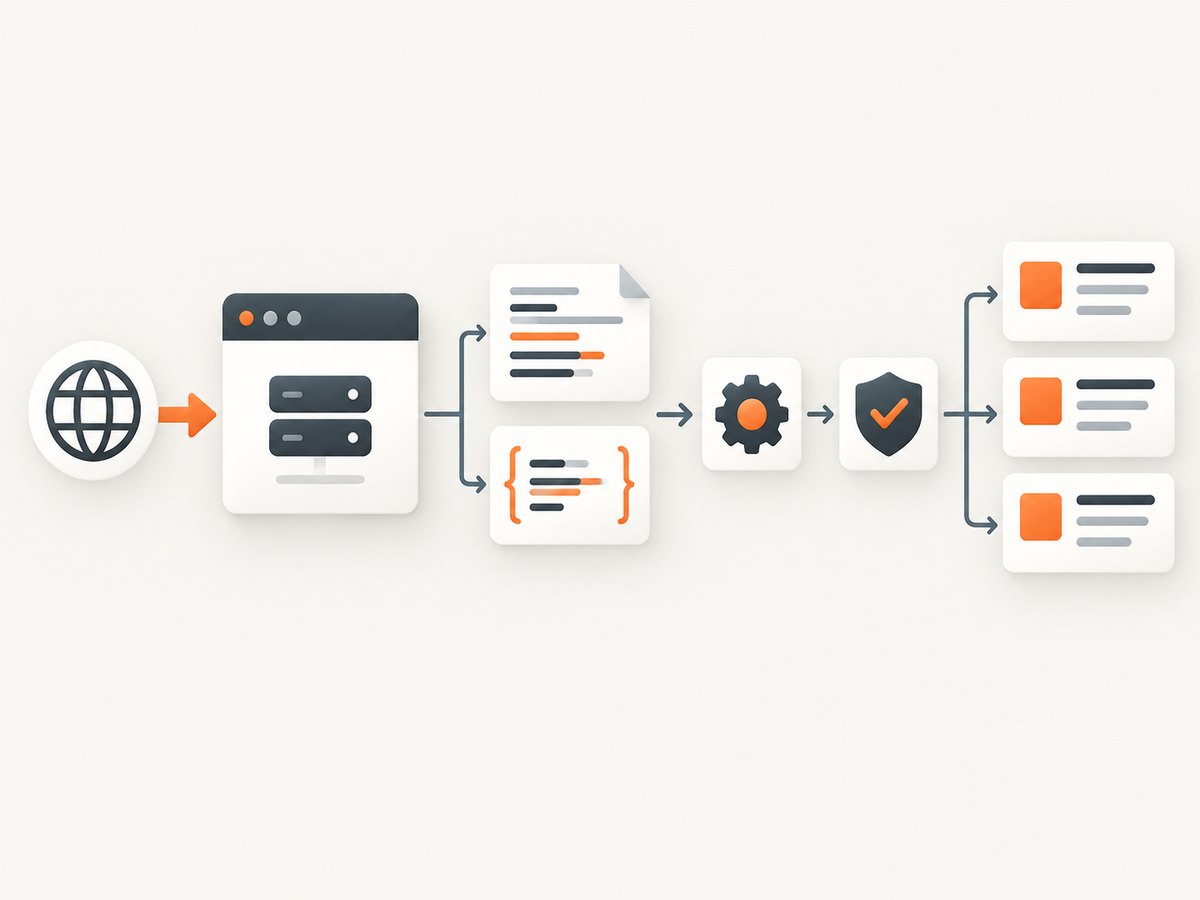
Direct answer: define the exact pages and fields you need, check for an official API or feed, then fetch only the relevant content, extract it with stable selectors, validate every record, and store it in a format your next system can use. Start with ordinary HTTP requests when the data is already in the HTML. Inspect the browser’s network requests when fields are loaded dynamically. Use a headless browser only when reproducing the underlying request is impractical or when the rendered browser output itself is the data you need.
This workflow scales from a short Python script to a controlled Scrapy crawl. It also helps you avoid common collection failures: scraping the wrong endpoint, following every link, silently accepting missing fields, or treating robots.txt as a security boundary.
1. Define the collection job before writing code
Write a small specification before opening a terminal. It should answer:
- Scope: Which domains, URL patterns, pages, languages, and date ranges are included?
- Fields: Which values are required, optional, or derived? For a product page this might be name, price, currency, availability, and canonical URL.
- Frequency: Is this a one-time export, a daily update, or a near-real-time feed?
- Output: Do downstream users need JSON Lines, CSV, XML, a database table, or an API?
- Provenance: Which source URL, retrieval timestamp, and response details must be retained for auditing?
Keep the first version narrow. A crawler that follows every internal link can quickly become an uncontrolled site mirror. Scrapy’s tutorial demonstrates the useful pattern: select named fields, follow a specific pagination link, and export records as JSON Lines. See the Scrapy tutorial.
2. Choose the simplest access path
| Approach | Use it when | Tradeoffs |
|---|---|---|
| Official API or feed | The site documents an interface containing the fields you need | Supported fields, quotas, authentication, and update cadence are site-specific |
| HTTP client plus parser | The values are present in ordinary HTML and the job is small | You must add pagination, retries, scheduling, and storage logic |
| Scrapy | You need repeatable crawling, selectors, pagination, throttling, and exports | More framework structure and configuration |
| Headless browser | Browser execution is required or rendered output is the target | More startup cost, memory, failure modes, and operational complexity |
| Hosted extraction API | You want managed browser execution or ready-to-consume output | Compare coverage, access terms, data quality, and pricing for your workload |
Prefer a first-party API or feed when it provides the required data. Scrapy can also call APIs, so “API versus crawler” is not an either-or architecture; an API response can be one request in a larger controlled workflow.
3. Collect data that is already in HTML
For a small job, use an HTTP client and an HTML parser. The following example extracts article titles and links, checks the response, and writes JSON Lines. Replace the URL and selectors with those from the target site.
import json
from urllib.parse import urljoin
import requests
from bs4 import BeautifulSoup

url = 'https://example.com/articles'
response = requests.get(
    url,
    headers={'User-Agent': 'DataCollector/1.0'},
    timeout=30,
)
response.raise_for_status()

soup = BeautifulSoup(response.text, 'html.parser')
records = []
for card in soup.select('article'):
    link = card.select_one('a')
    title = card.select_one('h2, h3')
    if not link or not title:
        continue
    records.append({
        'title': title.get_text(' ', strip=True),
        'url': urljoin(response.url, link.get('href', '')),
        'source_url': response.url,
    })

with open('articles.jsonl', 'w', encoding='utf-8') as output:
    for record in records:
        output.write(json.dumps(record, ensure_ascii=False) + '\n')

print(f'Wrote {len(records)} records')
Beautiful Soup is convenient for parsing HTML, while lxml is another HTML/XML parser. Parsing libraries do not provide crawling, scheduling, retries, or export pipelines by themselves. Use CSS selectors such as article h2 or XPath when the markup is more naturally expressed that way. Prefer stable attributes and semantic structure over generated class names.
4. Build a repeatable crawl with Scrapy
Scrapy adds request scheduling, pagination, per-domain concurrency controls, download delays, automatic throttling, selectors, and feed exports. A minimal spider looks like this:
import scrapy

class QuotesSpider(scrapy.Spider):
    name = 'quotes'
    start_urls = ['https://quotes.toscrape.com/page/1/']

    def parse(self, response):
        for quote in response.css('div.quote'):
            yield {
                'text': quote.css('span.text::text').get(),
                'author': quote.css('small.author::text').get(),
                'source_url': response.url,
            }

        next_page = response.css('li.next a::attr(href)').get()
        if next_page:
            yield response.follow(next_page, callback=self.parse)
Run it with a JSON Lines export:
scrapy runspider quotes_spider.py -O quotes.jsonlFor production, configure a narrow allowed_domains list, a descriptive user agent, download delays, per-domain concurrency, retries, and an item pipeline. Feed exports can produce JSON, CSV, or XML. Pipelines are useful for normalization, duplicate checks, validation, and database writes. Scrapy’s selector documentation covers CSS and XPath selectors and explains the roles of Beautiful Soup and lxml: selectors documentation.
5. Diagnose JavaScript-loaded content
A browser can display data that is absent from the initial HTML response. Treat this as a source-discovery problem first:
- Open the browser developer tools and select the Network panel.
- Reload the page and filter for Fetch/XHR requests.
- Change a page control, such as a filter or pagination button, and observe which request returns the new data.
- Inspect the response format: JSON, HTML fragment, embedded JavaScript, or another format.
- Reproduce that request with an HTTP client, including the documented query parameters, headers, cookies, or token if permitted.
- Parse and validate the response independently of the visual page.
The Scrapy documentation on dynamic content recommends finding and extracting the data source when possible: dynamic content guidance. Use Playwright or another headless browser when the request cannot reasonably be reproduced, authentication requires browser interaction, or your goal is the browser-rendered view itself.
6. Follow pagination and links safely
Follow only links that are part of the collection specification. Common controls include a “next” URL, numbered pages, cursor tokens, and “load more” requests. Add safeguards:
- Restrict hostnames and URL paths.
- Track visited canonical URLs or cursor values.
- Set a maximum page count and a maximum record count.
- Stop when the next link is missing or repeats.
- Normalize relative URLs with the response URL as the base.
- Do not treat every link in navigation, calendars, tags, or search results as a record page.
For cursor APIs, persist the cursor with the last successful batch so a failed run can resume. For HTML pagination, store the page URL alongside each record so later changes can be traced.
7. Validate, normalize, and store records
Extraction that completes without an exception can still be wrong. Validate required fields and record anomalies instead of silently dropping them.
from decimal import Decimal, InvalidOperation
from urllib.parse import urlparse

def normalize(item):
    title = (item.get('title') or '').strip()
    raw_price = (item.get('price') or '').replace(',', '').strip()
    if not title:
        raise ValueError('missing title')
    if not item.get('url') or not urlparse(item['url']).scheme:
        raise ValueError('invalid URL')
    try:
        price = str(Decimal(raw_price)) if raw_price else None
    except InvalidOperation as exc:
        raise ValueError('invalid price') from exc
    return {'title': title, 'price': price, 'url': item['url']}
Normalize whitespace, dates, currencies, units, and field names before loading data. Decide how to represent missing values. Keep the raw source or a source hash when auditability matters. JSON Lines is convenient for append-only jobs; CSV works well for spreadsheets; XML may be required by an existing integration. A database is appropriate when you need deduplication, updates, joins, or queryable history. There is no universally best database; choose based on volume, update patterns, and downstream use.
8. Responsible collection and robots.txt
Review the target site’s terms, documented access routes, data sensitivity, and applicable law before collecting. Configure your crawler to honor relevant robots.txt instructions, keep request rates proportionate, and avoid attempting to defeat access controls.
robots.txt is a crawler-access convention, not authentication or a complete legal decision. Google explains that a blocked URL can still appear in search results if other pages link to it; password protection or noindex is used for different goals. Read Google’s robots.txt documentation. Whether a particular collection is allowed depends on the site, data, jurisdiction, permission, and intended use.
9. Or skip the browser setup
ScreenshotNeo is useful when your collection workflow needs a reliable visual snapshot of each page, especially for evidence, QA, archival records, or pages that require browser rendering. It accepts one GET request and returns PNG, JPEG, WebP, or PDF. Before capture, it accepts cookie or consent banners like a visitor and removes more than 60 known consent platforms, newsletter popups, and chat widgets; each step can be turned off. Bot checks, CAPTCHAs, blank pages, timeouts, failed loads, and cache hits are not billed, and response headers report the page verdict and whether the request was billed.

See the ScreenshotNeo API documentation for the current parameter reference. A minimal call is:
curl -G "https://api.screenshotneo.com/v1/shot" -d access_key=YOUR_API_KEY --data-urlencode url=https://stripe.com -o shot.webpPython:
import requests
r = requests.get("https://api.screenshotneo.com/v1/shot", params={"access_key": "YOUR_API_KEY", "url": "https://stripe.com"}, timeout=90)
open("shot.webp", "wb").write(r.content)
Node.js:
const q = new URLSearchParams({ access_key: 'YOUR_API_KEY', url: 'https://stripe.com' });
const res = await fetch(`https://api.screenshotneo.com/v1/shot?${q}`);
const buffer = Buffer.from(await res.arrayBuffer());
await fs.promises.writeFile('shot.webp', buffer);
For a data pipeline, save the URL, capture timestamp, response status, X-Page-Verdict, and X-Billed headers with the image. That lets downstream users distinguish a clean page from a blocked, blank, timed-out, failed, or cached result.
Useful capture options
- Full-page capture with lazy images loaded.
- Capture one element by CSS selector.
- Dark mode, 12 device presets, custom viewport, and retina scale.
- PDF output with paper size, margins, landscape mode, and page ranges.
- HTML/CSS to image, custom CSS and JavaScript, and a click before capture.
- Hide selectors; wait for a selector, delay, or network idle.
- Block ads, trackers, requests, or resource types.
- Custom headers, cookies, user agent, and Authorization.
- Timezone, geolocation, transparent background, and image resizing.
- Caching with a TTL you choose, signed links for public image tags, asynchronous jobs with signed webhooks, bulk capture for up to 100 URLs per call, a usage API, and an OpenAPI specification.
ScreenshotNeo also provides an MCP server with take_screenshot, get_page_info, and capture_pdf tools for Claude, Cursor, and other MCP clients. Parameter names used by other screenshot APIs also work, which can simplify migration.
Pricing is Free for 1,000 shots per month with no card, Starter at $5 for 3,000, Growth at $15 for 15,000, Pro at $39 for 60,000, Scale at $99 for 250,000, and Business at $249 for 1,000,000. Yearly billing gives two months free, and every feature is available on every plan. Start with 1,000 free screenshots a month, with no card.
10. Performance, reliability, and cost
- Reduce work: collect only required fields and avoid downloading assets that do not affect the result.
- Throttle: use delays and per-domain concurrency limits; automatic throttling can adapt to server response times.
- Retry safely: retry transient network and server errors with exponential backoff, but do not endlessly retry authentication failures or deterministic 404s.
- Cache deliberately: cache responses when the source changes slowly and record the cache age. For screenshots, choose a TTL that matches the freshness requirement.
- Parallelize carefully: bounded concurrency improves throughput without overwhelming the target or your own worker pool.
- Measure: track pages requested, records extracted, validation failures, response classes, duration, and bytes transferred.
- Budget: estimate requests, browser captures, retries, and storage before scheduling recurring work. ScreenshotNeo bills only clean shots; failed loads, bot checks, blank pages, timeouts, and cache hits are not billed.
11. Troubleshooting common failures
| Symptom | Likely cause | Fix |
|---|---|---|
| Empty selector results | Wrong selector or content is JavaScript-loaded | Inspect the response HTML and Network panel; update the selector or reproduce the data request |
| 403 or 429 responses | Access policy, excessive rate, or missing required headers | Check terms and robots instructions, slow down, identify a documented API, and do not bypass access controls |
| Only the first page is collected | Pagination link or cursor is not being followed | Log the next URL/cursor, normalize it, and add a bounded loop with duplicate detection |
| Duplicate records | Multiple URLs represent one page or retries reinsert items | Canonicalize URLs and use a stable key before storing |
| Malformed or missing fields | Markup varies by template, locale, or experiment | Use optional selectors, validate required fields, and retain rejected records for review |
| Browser capture is blank | Page timed out, blocked a bot, or content was not ready | Wait for a selector or network idle, inspect verdict headers, and retry only transient failures |
| Capture includes popups | Consent, newsletter, or chat UI appeared after the initial load | Enable the relevant cleanup steps or hide known selectors before capture |
| High runtime or memory use | Unbounded browser concurrency or unnecessary assets | Prefer the underlying request, cap workers, block irrelevant resource types, and reuse controlled browser processes |
12. Short FAQ
Should I scrape HTML or call an API?
Use the official API or feed when it contains the required fields and its access conditions fit your use. Parse HTML when the content is only exposed in page markup.
When is a headless browser necessary?
Use one when browser execution is essential, the relevant request cannot reasonably be reproduced, or the rendered view is the output. First inspect network requests.
Can robots.txt grant permission?
No. It communicates crawler preferences and traffic controls. Evaluate terms, permissions, data sensitivity, and applicable law separately.
How should I handle changing page markup?
Prefer stable semantic selectors, monitor validation failures, keep fixtures from representative pages, and version extraction code with the dataset schema.
What is the safest output format for a recurring job?
JSON Lines works well for append-only batches; use a database when you need deduplication, updates, joins, or history.
Can an AI agent collect screenshots?
Yes. ScreenshotNeo’s MCP server exposes take_screenshot, get_page_info, and capture_pdf to MCP clients such as Claude and Cursor.


