How to Compare Puppeteer Screenshots with Webpage UI Elements
Build reliable Puppeteer visual comparisons for full pages, components, and DOM regions with deterministic captures, masking, thresholds, and CI diagnostics.
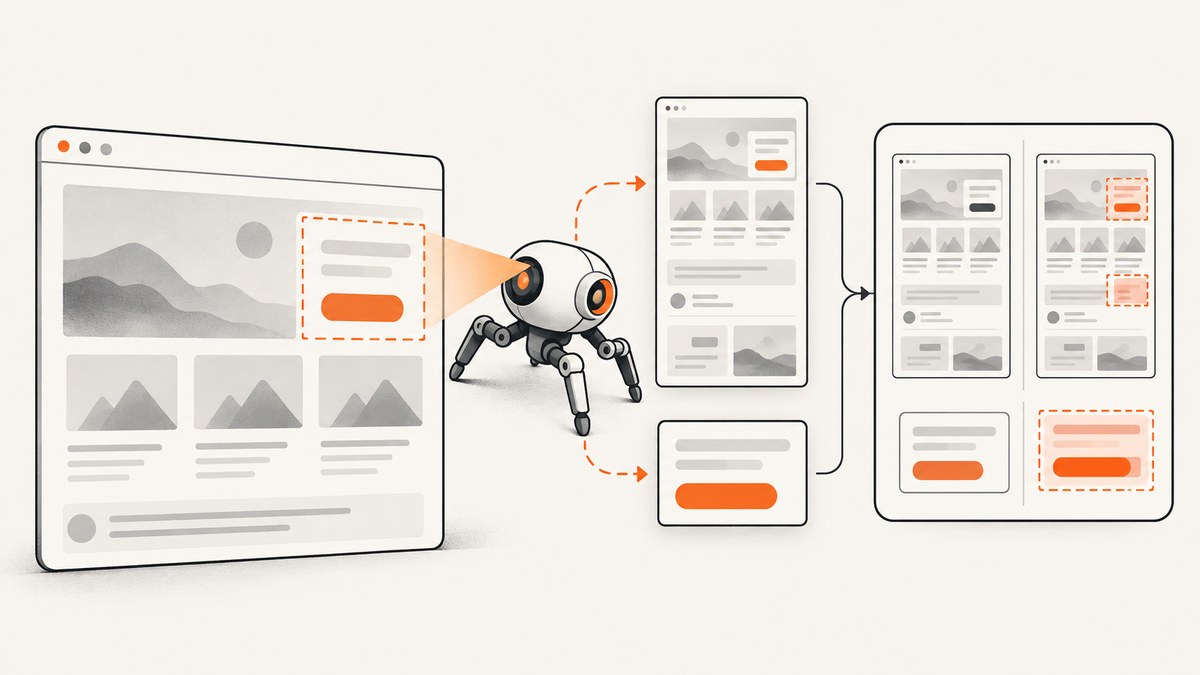
Direct answer: create a deterministic baseline image and a candidate image, capture the same page or element with identical geometry and browser conditions, then compare them with a snapshot or pixel-diff tool. Use page.screenshot({ fullPage: true }) for a document-level check, ElementHandle.screenshot() for a component-level check, or clip for a known rectangle. Keep browser state, viewport, device scale, fonts, assets, and animation state consistent, or your diff will report capture noise instead of a UI regression.
This guide shows a complete Puppeteer workflow for full-page, viewport, element, and clipped-region comparisons. It covers deterministic rendering, masking dynamic UI, thresholds, reviewable artifacts, CI operation, common failures, and an API option when you do not want to maintain browser infrastructure.
What a screenshot comparison should prove
A visual regression test answers a narrow question: did the pixels in a defined region change beyond an agreed tolerance? The region and rendering inputs must be explicit. A full-page comparison can reveal layout shifts between components, while an element screenshot isolates a card, navigation menu, chart, or form. A clip rectangle is useful when the application does not expose a stable selector or when you need to compare a fixed canvas area.
| Scope | Puppeteer method | Best use | Main risk |
|---|---|---|---|
| Full document | page.screenshot({fullPage:true}) |
Overall layout, responsive flow, interactions between sections | Ads, timestamps, and lazy content make the image volatile |
| Viewport | page.screenshot() |
What a user sees at a fixed viewport | Scroll position and sticky elements must match |
| Element | element.screenshot() |
Stable component or DOM subtree | Selector changes or late fonts alter the crop |
| Rectangle | page.screenshot({clip}) |
Canvas, map, or known coordinates | Any geometry change invalidates the comparison |
Set up a deterministic Puppeteer capture
Install Puppeteer and a diff library in the project that owns the visual tests:

npm install --save-dev puppeteer pixelmatch pngjsPin the browser and Node.js versions in CI where possible. The following helper launches Chromium with a fixed viewport, freezes animation, waits for fonts and images, and hides selectors that are known to change.
const puppeteer = require('puppeteer');

async function openStablePage(url) {
  const browser = await puppeteer.launch({headless: true});
  const page = await browser.newPage();
  await page.setViewport({
    width: 1440,
    height: 900,
    deviceScaleFactor: 1,
  });
  await page.emulateMediaFeatures([
    { name: 'prefers-color-scheme', value: 'light' },
    { name: 'prefers-reduced-motion', value: 'reduce' },
  ]);
  await page.goto(url, { waitUntil: 'networkidle0' });
  await page.evaluate(() => {
    document.querySelectorAll('style[data-visual-test]').forEach((node) => node.remove());
    const style = document.createElement('style');
    style.dataset.visualTest = 'true';
    style.textContent = `
      *, *::before, *::after {
        animation: none !important;
        transition: none !important;
        caret-color: transparent !important;
      }
    `;
    document.head.appendChild(style);
  });
  await page.evaluate(async () => {
    if (document.fonts) await document.fonts.ready;
    await Promise.all(Array.from(document.images).map((img) => {
      if (img.complete) return Promise.resolve();
      return new Promise((resolve) => {
        img.addEventListener('load', resolve, { once: true });
        img.addEventListener('error', resolve, { once: true });
      });
    }));
  });
  return { browser, page };
}

module.exports = { openStablePage };
Use the same URL, authentication state, feature flags, locale, timezone, color scheme, and viewport for both baseline and candidate. If the page depends on a clock or random values, inject fixed values before application code runs, or replace those regions with masks.
Capture a full page, viewport, element, or clip
Full-page screenshot
const { openStablePage } = require('./stable-page');

(async () => {
  const { browser, page } = await openStablePage('https://example.com');
  await page.screenshot({
    path: 'artifacts/page-candidate.png',
    fullPage: true,
    type: 'png',
    captureBeyondViewport: true,
  });
  await browser.close();
})();
fullPage captures the document rather than only the current viewport. It is appropriate for page-level layout checks, but it increases capture time and can include content that is difficult to stabilize.
Viewport screenshot
await page.screenshot({
  path: 'artifacts/viewport-candidate.png',
  type: 'png',
  omitBackground: false,
});
Keep the scroll position fixed. If your test scrolls to trigger lazy loading, record that action and repeat it before both captures.
Element screenshot
const card = await page.waitForSelector('[data-testid="pricing-card"]', {
  visible: true,
  timeout: 15000,
});
await card.screenshot({
  path: 'artifacts/pricing-card-candidate.png',
  type: 'png',
});
Puppeteer supports capturing a specific element with ElementHandle.screenshot(). This is usually the most maintainable choice for component regression because unrelated page changes are excluded. Prefer a stable test ID over a CSS class used only for styling.
Known rectangle with clip
const box = await page.locator('#chart').boundingBox();
if (!box) throw new Error('Chart is not visible');
await page.screenshot({
  path: 'artifacts/chart-candidate.png',
  type: 'png',
  clip: { x: box.x, y: box.y, width: box.width, height: box.height },
});
Store the rectangle with the artifact. A clip comparison is only meaningful when x, y, width, height, scroll position, and device scale factor are identical.
Compare baseline and candidate images
Save three files for every comparison: the baseline, the candidate, and a highlighted diff. The following Node.js script uses pixelmatch and pngjs. It fails when the number of changed pixels exceeds the configured limit.
const fs = require('node:fs');
const { PNG } = require('pngjs');
const pixelmatch = require('pixelmatch');

function readPng(path) {
  return PNG.sync.read(fs.readFileSync(path));
}

const baseline = readPng('artifacts/page-baseline.png');
const candidate = readPng('artifacts/page-candidate.png');
if (baseline.width !== candidate.width || baseline.height !== candidate.height) {
  throw new Error(`Image dimensions differ: ${baseline.width}x${baseline.height} vs ${candidate.width}x${candidate.height}`);
}
const diff = new PNG({ width: baseline.width, height: baseline.height });
const changedPixels = pixelmatch(
  baseline.data,
  candidate.data,
  diff.data,
  baseline.width,
  baseline.height,
  {
    threshold: 0.1,
    includeAA: false,
    alpha: 0.7,
    diffColor: [255, 0, 0],
  },
);
fs.writeFileSync('artifacts/page-diff.png', PNG.sync.write(diff));
const allowedPixels = 100;
console.log({ changedPixels, allowedPixels });
if (changedPixels > allowedPixels) process.exit(1);
A zero threshold is suitable for tightly controlled rendering and small stable components. Across operating systems or browser revisions, antialiasing can vary; use a documented color threshold and changed-pixel allowance instead. Keep the values in source control so a passing result is reproducible.
Ignore dynamic UI regions safely
Mask only regions that are intentionally volatile. Common examples are clocks, rotating promotions, ads, live counters, randomized avatars, and personalized recommendations. Masking a whole page can hide real regressions.

async function mask(page, selectors) {
  await page.evaluate((selectors) => {
    for (const selector of selectors) {
      document.querySelectorAll(selector).forEach((node) => {
        node.style.setProperty('visibility', 'hidden', 'important');
        node.style.setProperty('background', '#777', 'important');
      });
    }
  }, selectors);
}

await mask(page, [
  '[data-visual-volatile="clock"]',
  '.live-counter',
  '.ad-slot',
]);
For a stronger test, replace volatile data at the API or database boundary so the real layout remains visible. If you must mask, record the selector list in the test output and review changes to it like code.
Make the page deterministic
- Fix geometry. Set viewport width, height, device scale factor, zoom, and scroll position explicitly.
- Fix the browser. Pin Chromium and the runtime in CI. A browser update can change font rasterization and antialiasing.
- Wait for visual readiness. Wait for the target selector,
document.fonts.ready, images, and any application-specific data request. - Freeze motion. Disable CSS transitions, animations, carousels, video frames, and blinking carets.
- Fix state. Use a stable account, locale, timezone, color scheme, feature flags, and seeded data.
- Capture equivalent regions. Keep selector, clip,
fullPage, background behavior, format, and quality identical.
Network idle is useful but not sufficient: analytics or long polling can prevent it, while a page can reach network idle before a client-rendered chart appears. Add a specific readiness marker such as data-ready="true" where your application controls the DOM.
Reviewable CI output and baseline updates
When a comparison fails, upload the baseline, candidate, diff, selector or clip, URL, application state, viewport, device scale, browser version, masks, threshold, and changed-pixel count. A reviewer should be able to distinguish a genuine design change from a rendering-condition change without rerunning the test.
Never update baselines automatically on a failing build. Review the diff, merge the intended UI change, then update the baseline in the same change. Keep baselines close to the test and use a naming convention that includes browser or viewport when those vary.
Troubleshooting Puppeteer screenshot comparisons
| Symptom | Likely cause | Fix |
|---|---|---|
| Element not found | Selector changed or component renders later | Use a stable test ID, wait for visibility, and verify the application state. |
| Images have different dimensions | Viewport, device scale, clip, or full-page height differs | Set all geometry explicitly and log the bounding box. |
| Large diff around text | Font missing, loading late, or browser version changed | Install the same fonts, await document.fonts.ready, and pin Chromium. |
| Diff changes on every run | Clock, random data, animation, ads, or live content | Freeze inputs, disable motion, seed data, or mask a narrowly defined selector. |
| Blank or partially loaded image | Screenshot taken before lazy assets finish | Scroll to trigger lazy loading and wait for image load or an application readiness marker. |
networkidle0 never resolves |
WebSocket, analytics, or polling request remains open | Use domcontentloaded plus explicit selector and asset waits, or abort known tracking requests. |
| Only CI fails | Different fonts, locale, timezone, GPU, or browser build | Use a pinned container and set locale, timezone, color scheme, and device scale. |
| Anti-aliased edges differ | Platform rasterization variation | Set a small documented pixel and color tolerance; do not hide broad layout changes. |
Performance, reliability, and cost considerations
Element captures are usually faster and produce smaller artifacts than full-page captures. Full pages require more layout and image work, especially when lazy-loaded sections are forced into view. Reuse one browser process for a suite, but create a fresh page and reset storage between tests to avoid state leakage. Limit parallel pages to what the CI machine can render consistently; excessive concurrency causes CPU contention and timing failures.
Cache stable assets in a controlled test environment, but ensure the baseline and candidate use the same cache policy. Save PNG for exact diffs. JPEG and WebP reduce storage but introduce encoding differences, so they are better for visual review than strict pixel assertions. If a test is flaky, collect several candidate captures and compare the artifacts before relaxing the threshold.
Or skip the browser setup
ScreenshotNeo provides a website screenshot API and MCP server when you want a clean capture without maintaining Puppeteer infrastructure. One GET request returns PNG, JPEG, WebP, or PDF. It accepts cookie and consent banners before capture and removes more than 60 known consent platforms, newsletter popups, and chat widgets; each step can be turned off. Bot checks, blank pages, timeouts, failed loads, and cache hits are not billed, and the response identifies the result with X-Page-Verdict and X-Billed headers.
See the complete option list and parameter names in the ScreenshotNeo documentation. The API supports full-page captures with lazy images loaded, CSS-selector element capture, dark mode, device presets or custom viewports, retina scale, custom CSS and JavaScript, click and wait actions, hiding selectors, blocking ads or resource types, headers, cookies, user agents, authorization, timezone, geolocation, transparent backgrounds, resizing, caching with a chosen TTL, signed image links, asynchronous jobs with signed webhooks, bulk capture for up to 100 URLs, usage reporting, and PDF options.
cURL
curl -G "https://api.screenshotneo.com/v1/shot" -d access_key=YOUR_API_KEY --data-urlencode url=https://stripe.com -o shot.webpPython
import requests
r = requests.get("https://api.screenshotneo.com/v1/shot", params={"access_key": "YOUR_API_KEY", "url": "https://stripe.com"}, timeout=90)
r.raise_for_status()
open("shot.webp", "wb").write(r.content)
Node.js
const q = new URLSearchParams({ access_key: 'YOUR_API_KEY', url: 'https://stripe.com' });
const res = await fetch(`https://api.screenshotneo.com/v1/shot?${q}`);
if (!res.ok) throw new Error(`Screenshot failed: ${res.status}`);
require('node:fs').writeFileSync('shot.webp', Buffer.from(await res.arrayBuffer()));
An MCP server lets Claude, Cursor, and other MCP clients call take_screenshot, get_page_info, and capture_pdf. The Free plan includes 1,000 shots each month with no card; paid plans start at $5 for 3,000 shots. Create a free ScreenshotNeo account to try the workflow.
FAQ
Should I compare a full page or an element?
Use an element for a component with a stable selector and a full page for layout relationships across sections. Many teams use both: component tests for fast feedback and a smaller number of page tests for integration coverage.
Can screenshots prove accessibility?
No. A visual diff can show missing focus styles or clipped text, but it does not replace semantic, keyboard, contrast, or screen-reader tests.
How should intentional design changes be handled?
Review the diff, merge the UI change, and update the baseline deliberately. Keep the old and new images in the change review when possible.
What is the smallest useful artifact set?
Store baseline, candidate, diff, capture scope, geometry, browser version, state, masks, and threshold. That is enough to reproduce and explain most failures.


