How to Configure Custom Proxies for Browser Automation
Configure HTTP, HTTPS, and SOCKS proxies in Playwright and Puppeteer, authenticate safely, route browser installs, and troubleshoot common failures.
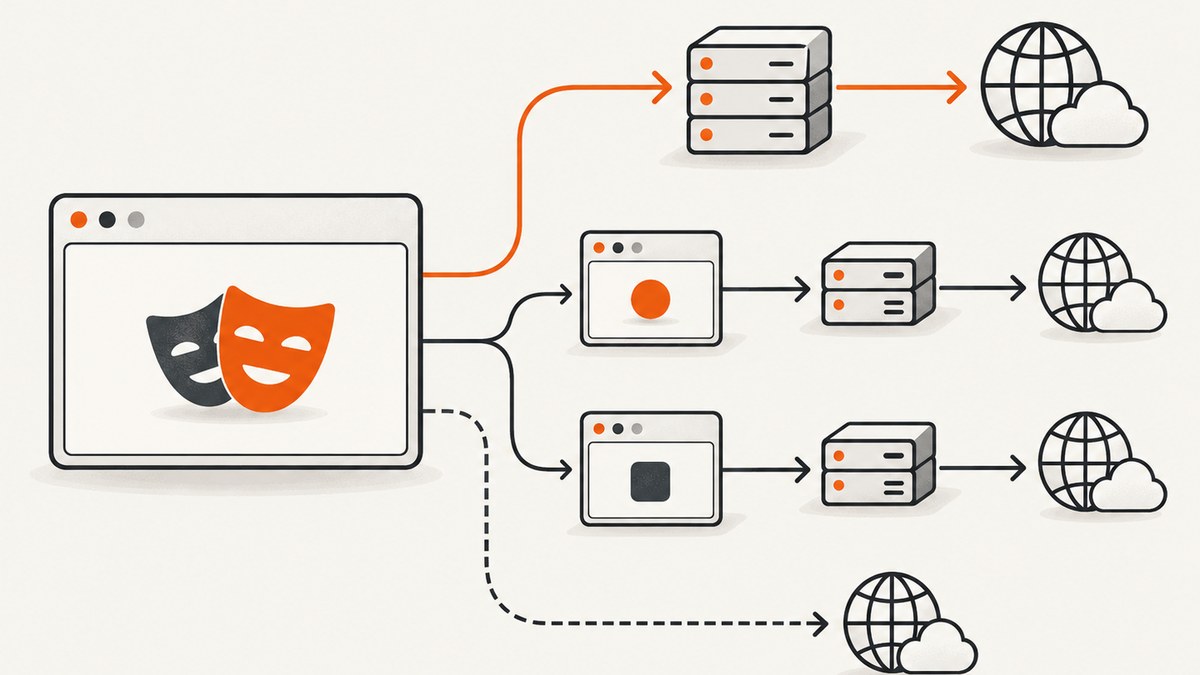
Direct answer: configure the proxy at the scope your automation framework supports, then verify the route from inside a real browser session. In Playwright, use use.proxy for a test-wide route, chromium.launch({ proxy }) for a browser-wide route, or browser.newContext({ proxy }) when separate sessions need different endpoints. A proxy object contains a server URL and can include a username, password, and comma-separated bypass list. Playwright supports HTTP(S) and SOCKSv5 proxies. Browser page traffic and downloading the browser binary are separate network paths, so installation may also require HTTPS_PROXY, a custom CA, or a longer download timeout.
This guide shows complete Playwright and Puppeteer configurations, explains proxy authentication and bypass rules, covers browser installation behind a corporate proxy, and gives a verification and troubleshooting checklist. The endpoint, protocol, credentials, and routing policy must come from your proxy service and environment; framework configuration alone does not guarantee anonymity, a particular location, or access to a target site.
1. Choose the configuration scope
Use the narrowest scope that matches your test design:

| Scope | Use it when | Playwright location |
|---|---|---|
| Test or project | Every test in a run uses the same route | use.proxy in the test configuration |
| Browser process | All contexts in one browser share the endpoint | chromium.launch({ proxy }) |
| Browser context | Different sessions need different routes, identities, or bypass lists | browser.newContext({ proxy }) |
Context-level routing is usually the most flexible choice for multi-tenant tests or region-specific sessions. A browser-level route is simpler when the entire process should use one endpoint. The official Playwright network documentation covers global and per-context proxy configuration, while the API reference documents the proxy fields and accepted URL forms: Network | Playwright and BrowserType | Playwright.
2. Configure an HTTP or SOCKS proxy in Playwright
Browser-wide configuration
import { chromium } from 'playwright';

const browser = await chromium.launch({
  proxy: {
    server: process.env.PROXY_SERVER || 'http://proxy.example:3128',
    username: process.env.PROXY_USER,
    password: process.env.PROXY_PASSWORD,
    bypass: '.internal.example,localhost',
  },
});

const page = await browser.newPage();
await page.goto('https://example.com', { waitUntil: 'domcontentloaded' });
console.log(await page.title());
await browser.close();
server is the proxy endpoint, including its scheme and port. Use the scheme supplied by the provider, such as http://, https://, or a SOCKS URL supported by your Playwright version. Keep credentials in environment variables or a secret manager. The bypass value is a comma-separated list of hosts that should connect directly.
Different routes for different contexts
import { chromium } from 'playwright';

const browser = await chromium.launch();

const usContext = await browser.newContext({
  proxy: {
    server: process.env.US_PROXY_SERVER,
    username: process.env.PROXY_USER,
    password: process.env.PROXY_PASSWORD,
    bypass: 'localhost,.internal.example',
  },
});

const euContext = await browser.newContext({
  proxy: {
    server: process.env.EU_PROXY_SERVER,
    username: process.env.PROXY_USER,
    password: process.env.PROXY_PASSWORD,
  },
});

await usContext.newPage().then(page => page.goto('https://example.com'));
await euContext.newPage().then(page => page.goto('https://example.com'));

await usContext.close();
await euContext.close();
await browser.close();
Use this pattern when sessions must remain isolated. Do not assume that changing a context proxy changes traffic already opened by another context.
Project or test-run configuration
import { defineConfig } from '@playwright/test';

export default defineConfig({
  use: {
    proxy: {
      server: process.env.PROXY_SERVER,
      username: process.env.PROXY_USER,
      password: process.env.PROXY_PASSWORD,
      bypass: 'localhost,.internal.example',
    },
  },
});
This keeps the route in version-controlled test configuration while secrets remain outside the file. Ensure the environment variables exist in the CI job that launches the tests.
3. Understand proxy authentication
Proxy credentials and destination-site credentials are separate. The proxy username and password authenticate the connection to the proxy. A website may separately require HTTP authentication, a form login, or an Authorization header. Configure each at its own layer.
For example, a proxy can be configured in Playwright while a site’s HTTP Basic Auth is configured on the context:
const context = await browser.newContext({
  proxy: {
    server: 'http://proxy.example:3128',
    username: process.env.PROXY_USER,
    password: process.env.PROXY_PASSWORD,
  },
  httpCredentials: {
    username: process.env.SITE_USER,
    password: process.env.SITE_PASSWORD,
  },
});
Keep these secrets distinct in names, storage, and rotation. If a provider uses an authentication method that the browser does not support for its protocol, the connection can fail even when the username and password are correct.
4. Puppeteer configuration
Puppeteer commonly passes the proxy through Chromium’s launch arguments. A current third-party guide describes authenticating HTTP proxy challenges with page.authenticate():
import puppeteer from 'puppeteer';

const browser = await puppeteer.launch({
  args: ['--proxy-server=http://proxy.example:3128'],
});

const page = await browser.newPage();
await page.authenticate({
  username: process.env.PROXY_USER,
  password: process.env.PROXY_PASSWORD,
});

await page.goto('https://example.com', { waitUntil: 'domcontentloaded' });
console.log(await page.title());
await browser.close();
The same guide warns that Chrome’s SOCKS proxy implementation does not support SOCKS5 authentication and that one authentication pair can conflict when both the proxy and destination site require different credentials. Treat that behavior as browser- and version-sensitive; verify your exact Puppeteer and Chrome versions against Using Proxies with Puppeteer.
Puppeteer and Playwright do not expose identical options. Do not copy a Playwright proxy object into Puppeteer and expect it to work. Confirm the launch arguments, authentication flow, and protocol support for the versions installed in your project.
5. Proxy the browser download during installation
Installing Playwright browsers is a separate operation from routing pages after launch. A test can have a correct page proxy and still fail before the first test because the browser archive cannot be downloaded.
HTTPS_PROXY=http://proxy.example:3128 npx playwright install chromiumFor a persistent shell session:
export HTTPS_PROXY=http://proxy.example:3128
npx playwright install chromium
If a corporate interception proxy replaces certificates, Playwright documents adding the organization’s root certificate with NODE_EXTRA_CA_CERTS:
export HTTPS_PROXY=http://proxy.example:3128
export NODE_EXTRA_CA_CERTS=/path/to/company-root-ca.pem
npx playwright install chromium
For slow archive downloads, increase the documented timeout:
export PLAYWRIGHT_DOWNLOAD_CONNECTION_TIMEOUT=120000
npx playwright install chromium
Use a trusted CA file supplied by your organization. Disabling TLS verification hides certificate problems and weakens connection security; it is not a reliable installation fix. See Browsers | Playwright for the installation, custom CA, and timeout settings.
6. Verify the route from the running browser
Checking only that the process started is insufficient. Verify from an endpoint you control or a service intended to report the observed request source.
- Confirm the proxy hostname resolves from the machine running the test.
- Confirm the port is reachable through the firewall.
- Load a controlled endpoint and record the response.
- Check that a host listed in
bypassfollows the intended direct route. - Repeat with an invalid credential to confirm authentication is actually being enforced.
- Record the browser, framework, proxy protocol, and endpoint version in CI logs without printing secrets.
const response = await page.goto('https://your-controlled-endpoint.example/ip');
console.log('status:', response?.status());
console.log('body:', await page.textContent('body'));
Compare the observed route with the route expected by your network policy. A changed apparent address does not by itself prove that every resource used the same path; subresources, WebSockets, service workers, and bypassed hosts should be checked when they matter to the test.
7. Proxy options and design decisions
| Decision | Questions to answer |
|---|---|
| Protocol | Does the endpoint require HTTP(S) or SOCKSv5? Does the framework version support that exact scheme? |
| Authentication | Does it use username/password, an IP allowlist, certificates, or another mechanism? |
| Scope | Should every test share one route, or should each context have an isolated route? |
| Bypass | Which internal hosts, localhost addresses, or metadata endpoints must avoid the proxy? |
| Trust | Will a corporate proxy intercept TLS, requiring a custom root CA for installation? |
| Operations | How will credentials rotate, endpoints change, and failures be surfaced in CI? |
Keep bypass lists intentionally small. A broad bypass can send sensitive requests directly; an empty bypass can make local test fixtures unreachable if your environment expects direct access.
8. Troubleshooting common failures
Proxy connection refused or timed out
Cause: wrong host or port, a blocked egress rule, or an endpoint that is offline. Fix: resolve the hostname and test TCP reachability from the same runner. Confirm the scheme and port supplied by the provider.
407 Proxy Authentication Required
Cause: missing, expired, or incorrectly scoped proxy credentials. Fix: check the environment variables in the actual CI process, remove accidental whitespace, and confirm that the endpoint expects basic credentials rather than an IP allowlist or another method.
Website returns 401 or 403
Cause: destination-site authentication or access policy, not necessarily proxy authentication. Fix: test the site without the proxy, then configure its own credentials or headers separately. Do not treat a proxy as a guarantee of access.
SOCKS authentication fails
Cause: browser-specific SOCKS limitations or a mismatch between the endpoint’s protocol and the launch configuration. Fix: verify the exact Chrome, Puppeteer, or Playwright version and test an HTTP(S) endpoint if the provider offers one.
Browser installation reports a certificate error
Cause: an intercepting proxy presents a certificate chain that Node does not trust. Fix: provide the organization’s root CA through NODE_EXTRA_CA_CERTS and rerun installation. Check that the file is readable and contains the correct certificate.
Tests pass locally but fail in CI
Cause: different environment variables, firewall rules, DNS, installed browser versions, or secret scopes. Fix: print non-sensitive configuration facts such as whether each variable is present, log the framework and browser version, and run the route verification step in CI.
Some requests bypass the proxy unexpectedly
Cause: a hostname matches the comma-separated bypass list, or a second browser process was launched without the proxy. Fix: simplify the list, inspect the effective launch configuration, and test each host pattern independently.
9. Performance, reliability, and cost notes
A proxy adds another network hop. Page load time therefore depends on the proxy’s connection path, DNS behavior, TLS negotiation, and distance from the target. The supplied sources do not establish provider speed or success-rate benchmarks, so measure your own workflow with representative pages and the same CI region used in production.
- Reuse a browser when safe, while creating fresh contexts for isolation.
- Set realistic navigation and assertion timeouts instead of retrying indefinitely.
- Retry only transient connection failures, with a bounded backoff.
- Capture the proxy endpoint identifier and error class in logs, never the password.
- Keep a direct-route diagnostic path for separating target-site failures from proxy failures.
- Budget for proxy-service charges separately from browser compute and test-run costs; framework documentation does not define provider pricing.
Proxy configuration does not grant permission to access a site or bypass its controls. Follow the target’s terms, your organization’s policy, and applicable law.
10. Or skip the browser setup
If your goal is a clean static image or PDF rather than interactive browser control, ScreenshotNeo provides a single HTTP request to capture a URL. Its cleanup steps accept cookie or consent banners and remove more than 60 known consent platforms, newsletter popups, and chat widgets before capture; each step can be turned off. Bot checks or CAPTCHAs, blank pages, timeouts, failed loads, and cache hits are not billed, and the response reports the result through X-Page-Verdict and X-Billed headers. ScreenshotNeo also provides an MCP server with take_screenshot, get_page_info, and capture_pdf tools for Claude, Cursor, and other MCP clients.

See the ScreenshotNeo API documentation for all options, including custom headers, cookies, user agents, Authorization, timezone, geolocation, waits, blocking rules, selectors, full-page capture, PDF settings, caching, signed links, asynchronous jobs, bulk capture, and HTML/CSS rendering.
curl -G "https://api.screenshotneo.com/v1/shot" -d access_key=YOUR_API_KEY --data-urlencode url=https://stripe.com -o shot.webpimport requests
r = requests.get("https://api.screenshotneo.com/v1/shot", params={"access_key": "YOUR_API_KEY", "url": "https://stripe.com"}, timeout=90)
open("shot.webp", "wb").write(r.content)const q = new URLSearchParams({ access_key: 'YOUR_API_KEY', url: 'https://stripe.com' });
const res = await fetch(`https://api.screenshotneo.com/v1/shot?${q}`);The Free plan includes 1,000 screenshots each month with no card. Paid plans start at $5 for 3,000 screenshots, and every feature is available on every plan. Create a free ScreenshotNeo account.
11. FAQ
Can I use one proxy for multiple Playwright contexts?
Yes. Configure it at browser launch or repeat the same proxy object for each context. Use separate context proxies when routes must differ.
Does a proxy also route Playwright’s browser download?
No. Set HTTPS_PROXY for installation, and configure NODE_EXTRA_CA_CERTS or PLAYWRIGHT_DOWNLOAD_CONNECTION_TIMEOUT when the documented conditions apply.
Are proxy credentials the same as website credentials?
No. Proxy credentials authenticate the proxy connection; website credentials authenticate the destination and must be configured separately.
Should I choose HTTP or SOCKS?
Choose the protocol your endpoint provides and your framework version supports. Validate authentication behavior, especially for SOCKS5 in Chromium-based Puppeteer setups.
How do I know whether the proxy is actually used?
Load a controlled endpoint from the running browser, inspect the observed route, and test bypassed hosts separately. Process startup alone is not proof.


