How to Configure TLS Certificates for Proxies
Configure TLS termination, mTLS, certificate chains, SNI, upstream trust, and automatic renewal for NGINX, HAProxy, and Envoy proxies.
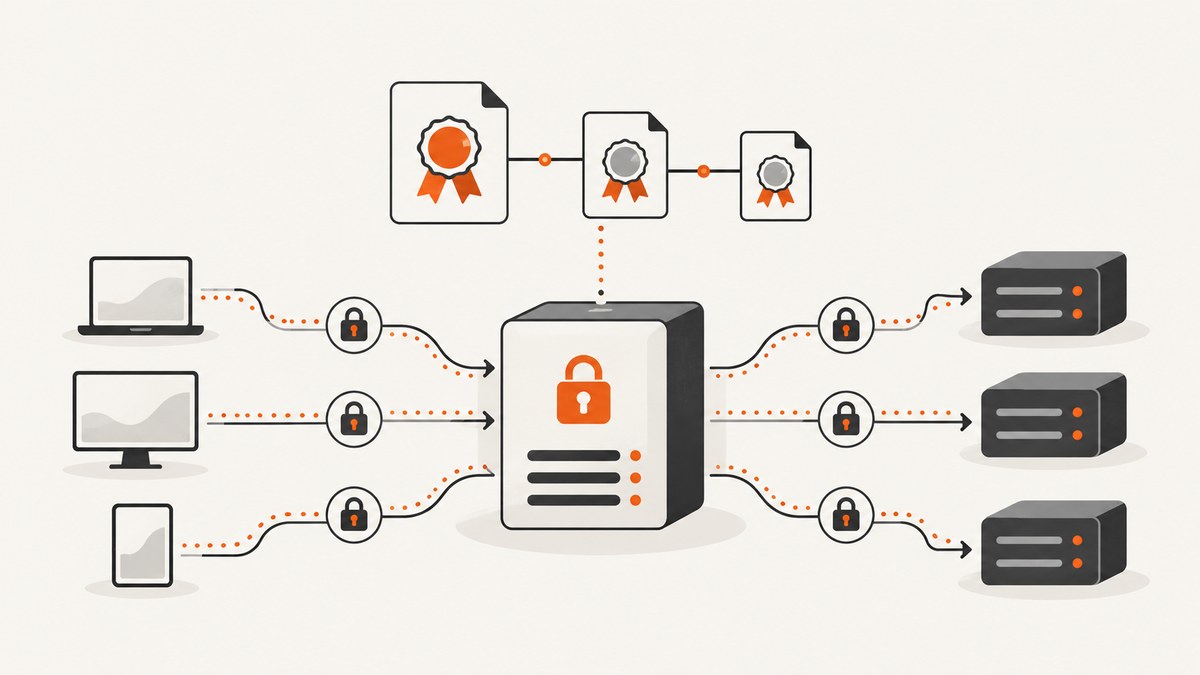
Direct answer: configure TLS where you want encryption to end, install a certificate whose SANs match the proxy hostnames, keep the private key restricted, serve the leaf certificate followed by intermediates, and reload the proxy after issuance or renewal. If the proxy connects to an HTTPS backend, separately configure upstream CA validation and add a client certificate when the backend requires mTLS.
1. Choose where TLS terminates
There are three common designs:
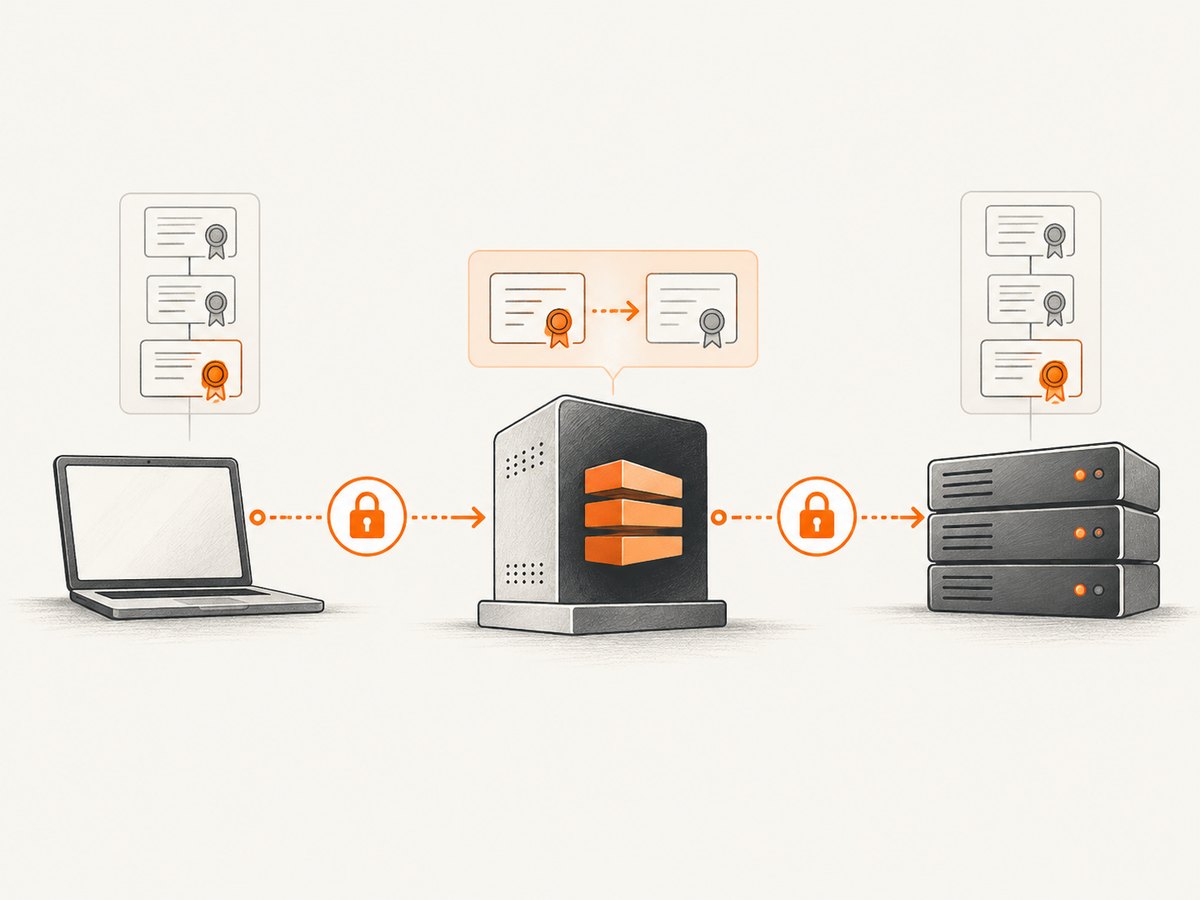
- Edge termination: the client connects with HTTPS, the proxy decrypts traffic, and the proxy sends HTTP to the backend.
- Termination plus re-encryption: the proxy terminates client TLS, then creates a new TLS connection to the backend.
- TLS passthrough: the proxy does not decrypt application traffic. It forwards the TLS connection, usually using SNI to select a backend.
Use termination when the proxy must inspect HTTP, add headers, route by path, or apply authentication. Use re-encryption when traffic must remain encrypted on the internal network. Use passthrough when the backend must own the end-to-end certificate and TLS session.
2. Prepare the certificate and key
Certificate requirements
- Include every public proxy hostname in the certificate SAN extension. The common name alone is not sufficient for modern hostname validation.
- Keep the private key readable only by the proxy master process or service account.
- Serve the leaf certificate first, followed by each required intermediate certificate. Do not send the root certificate.
- Use a certificate and key that belong together. A mismatched pair prevents the listener from starting.
A typical file layout is:
/etc/ssl/certs/proxy.example.com.chained.crt
/etc/ssl/private/proxy.example.com.key
The chained file should contain:
-----BEGIN CERTIFICATE-----
...proxy leaf certificate...
-----END CERTIFICATE-----
-----BEGIN CERTIFICATE-----
...issuing intermediate certificate...
-----END CERTIFICATE-----
Check that the key matches
openssl x509 -in /etc/ssl/certs/proxy.example.com.crt -pubkey -noout \
  | openssl pkey -pubin -outform der \
  | sha256sum

openssl pkey -in /etc/ssl/private/proxy.example.com.key -pubout \
  | openssl pkey -pubin -outform der \
  | sha256sum
The hashes must match. Restrict the key file, for example:
chown root:nginx /etc/ssl/private/proxy.example.com.key
chmod 640 /etc/ssl/private/proxy.example.com.key
Use the actual user and group used by your proxy installation.
3. Configure NGINX as a reverse proxy
This configuration terminates TLS on the public listener and forwards requests to an HTTP backend:
server {
    listen 443 ssl;
    server_name proxy.example.com;

    ssl_certificate     /etc/ssl/certs/proxy.example.com.chained.crt;
    ssl_certificate_key /etc/ssl/private/proxy.example.com.key;
    ssl_protocols       TLSv1.2 TLSv1.3;

    location / {
        proxy_pass http://backend.example.internal:8080;
        proxy_set_header Host $host;
        proxy_set_header X-Forwarded-Proto https;
        proxy_set_header X-Forwarded-For $proxy_add_x_forwarded_for;
    }
}
The private key must remain protected while still being readable by the NGINX master process. The certificate sent to clients is public; the private key is not.
Validate and reload
nginx -t
systemctl reload nginx
A reload lets existing connections finish while workers use the new configuration. Treat a failed configuration test as a deployment failure and do not reload until it is fixed.
4. Configure an NGINX forward proxy with mTLS
For an HTTPS HTTP CONNECT forward proxy, configure a server certificate and require clients to present certificates issued by a trusted client CA:
server {
    listen 10.10.1.11:3128 ssl;

    ssl_certificate           /etc/ssl/certs/forward_proxy_server.crt;
    ssl_certificate_key       /etc/ssl/private/forward_proxy_server.key;
    ssl_client_certificate    /etc/ssl/certs/forward_proxy_client_ca.crt;
    ssl_verify_client         on;
    ssl_verify_depth          1;
    ssl_protocols             TLSv1.2 TLSv1.3;
}
In this arrangement, the proxy authenticates clients by validating their certificates, and clients authenticate the proxy through its server certificate. Issue client certificates from a CA dedicated to the proxy audience, rotate them independently, and revoke or remove trust for compromised clients.
5. Configure NGINX TLS to an HTTPS upstream
Client-side TLS and upstream TLS are separate handshakes. Configure the CA bundle used to validate the backend certificate and enable verification:
location / {
    proxy_pass https://backend.example.com;

    proxy_ssl_trusted_certificate /etc/ssl/certs/ca-bundle.pem;
    proxy_ssl_verify             on;
    proxy_ssl_verify_depth       2;

    proxy_set_header Host backend.example.com;
    proxy_ssl_server_name on;
    proxy_ssl_name backend.example.com;
}
If the backend requests client authentication, provide a client certificate and key:
location / {
    proxy_pass https://backend.example.com;
    proxy_ssl_trusted_certificate /etc/ssl/certs/ca-bundle.pem;
    proxy_ssl_verify on;
    proxy_ssl_verify_depth 2;

    proxy_ssl_certificate     /etc/ssl/certs/proxy-client.crt;
    proxy_ssl_certificate_key /etc/ssl/private/proxy-client.key;

    proxy_ssl_server_name on;
    proxy_ssl_name backend.example.com;
}
Do not disable upstream verification to hide a hostname, chain, or trust-store problem. Correct the CA bundle, SNI name, or backend certificate instead.
6. Use SNI when several hostnames share one address
Server Name Indication lets a client send the requested hostname during the TLS handshake. The proxy can then select the matching certificate. Every hostname must have a SAN entry in its certificate, and the proxy must have a certificate-selection rule for it.
Test the certificate selected for a hostname with:
openssl s_client -connect 203.0.113.10:443 \
  -servername app.example.com \
  -showcerts </dev/null
Repeat the test for each hostname and inspect the subject, SANs, issuer, and full chain.
7. Configure HAProxy
HAProxy commonly loads a PEM containing the certificate and private key. Keep the key protected even though it shares the PEM file:
global
    crt-base /etc/haproxy/ssl/certs/
    key-base /etc/haproxy/ssl/private/

defaults
    mode http
    timeout connect 5s
    timeout client 30s
    timeout server 30s

frontend example
    bind :443 ssl crt /etc/haproxy/ssl/certs/example.pem
    default_backend webservers

backend webservers
    server app1 10.0.0.21:8080 check
You can provide a certificate directory so SNI selects a certificate whose CN or SAN matches the requested domain. Before reloading, validate the configuration with the HAProxy version installed on the host:
haproxy -c -f /etc/haproxy/haproxy.cfg
systemctl reload haproxy
8. Configure Envoy
Envoy uses a downstream TLS context for client-to-proxy termination and an upstream TLS context for TLS origination. A static certificate references a chain and key; a validation context supplies trusted CAs and can add subject-name checks, hash pinning, CRLs, and other controls.
static_resources:
  listeners:
  - name: https_listener
    address:
      socket_address:
        address: 0.0.0.0
        port_value: 443
    filter_chains:
    - filter_chain_match:
        server_names: ["proxy.example.com"]
      transport_socket:
        name: envoy.transport_sockets.tls
        typed_config:
          "@type": type.googleapis.com/envoy.extensions.transport_sockets.tls.v3.DownstreamTlsContext
          common_tls_context:
            tls_certificates:
            - certificate_chain:
                filename: /etc/envoy/tls/proxy.crt
              private_key:
                filename: /etc/envoy/tls/proxy.key
For upstream validation, configure a trusted CA and enable hostname or subject-name verification appropriate to your cluster. If the upstream requires mTLS, add the Envoy client certificate and key to the upstream TLS context.
9. Automate issuance and renewal
Certbot can obtain certificates, store active files under /etc/letsencrypt/live/, and check installed certificates for impending expiry with its renew action.

sudo certbot certonly --nginx -d proxy.example.com
sudo certbot renew --dry-run
Use a deploy or post-renewal hook that validates the proxy configuration and reloads it only after a successful renewal:
#!/bin/sh
set -eu
nginx -t
systemctl reload nginx
Install the hook using the renewal mechanism provided by your operating system. For manual authentication, also configure an authentication hook so unattended renewal can complete. Exercise renewal in a staging environment before relying on it in production.
10. Verify both TLS legs
- Confirm the public certificate SAN contains every proxy hostname.
- Confirm the private key matches the leaf certificate.
- Confirm the leaf appears before intermediates in the served chain.
- Connect with SNI and inspect the certificate selected for each hostname.
- Test the proxy-to-upstream handshake separately from the client-to-proxy handshake.
- Confirm the upstream trust store contains the issuing CA.
- Enable hostname verification wherever the proxy supports it.
- Run a renewal dry run, validate configuration, and perform a controlled reload.
curl -v --resolve proxy.example.com:443:203.0.113.10 \
  https://proxy.example.com/health

openssl s_client -connect backend.example.com:443 \
  -servername backend.example.com \
  -CAfile /etc/ssl/certs/ca-bundle.pem </dev/null
11. Troubleshooting
| Symptom | Likely cause | Fix |
|---|---|---|
| Certificate warning for a valid site | Hostname missing from SAN or wrong SNI certificate selected | Add the hostname to the certificate and verify the proxy’s SNI mapping. |
| “Unable to get local issuer certificate” | Intermediate certificate is missing from the served chain | Serve the leaf followed by all required intermediates. |
| Proxy will not start after a certificate change | Private key does not match, file permissions block access, or configuration syntax is invalid | Compare public-key hashes, fix ownership and mode, then run the proxy’s configuration test. |
| 502 or upstream handshake failure | Missing CA, wrong upstream hostname, disabled SNI, or failed upstream mTLS | Configure the correct trusted CA, set the upstream SNI name, enable verification, and provide the required client certificate. |
| mTLS clients are rejected | Client CA is wrong, certificate is expired, or verification depth is too low | Install the issuing client CA, renew the client certificate, and adjust verification depth for the chain you issue. |
| Renewal succeeds but the old certificate is still served | Proxy was not reloaded or points at copied files | Use a deploy hook to validate and reload, and point the proxy at the live certificate path. |
| Some hostnames work and others fail | Incomplete SNI certificate coverage | Check every hostname and certificate-selection rule with an SNI-aware handshake. |
12. Performance, reliability, and cost considerations
- Handshake cost: TLS handshakes consume CPU and add latency. Reuse connections, enable HTTP keep-alive, and size proxy workers for peak concurrent handshakes.
- Re-encryption cost: termination plus upstream TLS performs two handshakes and encrypts traffic on both legs. It provides internal confidentiality but requires two independently maintained trust relationships.
- Certificate loading: file-based configurations are simple, but every renewal requires a validated reload. Secret-manager or dynamic discovery integrations can reduce file distribution work where supported.
- Failure domains: keep certificate deployment, configuration validation, and reload as one controlled operation. A renewed file that is never loaded is an operational failure.
- Observability: monitor expiry dates, handshake errors, SNI mismatches, upstream verification failures, and mTLS rejection counts. Alert before expiry rather than after clients fail.
- Cost: certificate issuance may be free or paid depending on the issuer, but the operational cost comes from secure key storage, renewal automation, testing, and incident response.
13. Or skip the browser setup
If your goal is to capture a proxy dashboard, certificate page, or any public URL, ScreenshotNeo provides a single screenshot request instead of maintaining browser automation. See the ScreenshotNeo API documentation for all options.
curl -G "https://api.screenshotneo.com/v1/shot" -d access_key=YOUR_API_KEY --data-urlencode url=https://stripe.com -o shot.webp
import requests
r = requests.get("https://api.screenshotneo.com/v1/shot", params={"access_key": "YOUR_API_KEY", "url": "https://stripe.com"}, timeout=90)
open("shot.webp", "wb").write(r.content)
const q = new URLSearchParams({ access_key: 'YOUR_API_KEY', url: 'https://stripe.com' });
const res = await fetch(`https://api.screenshotneo.com/v1/shot?${q}`);
Cookie banners, newsletter popups, and chat widgets are removed before the shot. Bot checks, blank pages, failed loads, timeouts, and cache hits are never billed, and each response reports its verdict and billing status in headers. ScreenshotNeo also provides an MCP server so Claude, Cursor, and other MCP clients can take screenshots, inspect pages, and capture PDFs. The free plan includes 1,000 screenshots per month with no card; paid plans start at $5 for 3,000 shots. Create a free ScreenshotNeo account.
14. FAQ
Should TLS terminate at the load balancer or the application proxy?
Terminate at the first component that needs to inspect or route HTTP. If internal traffic must remain encrypted, re-encrypt from that component to the upstream.
Do I need to include the root CA in the certificate chain?
No. Serve the leaf followed by intermediates. Clients should already trust the root.
Is mTLS the same as HTTPS?
HTTPS authenticates the server to the client. mTLS adds client certificate authentication, so both sides validate certificates.
Why can a browser work while the proxy fails?
The browser may have a broader trust store, may send a different SNI name, or may tolerate a chain arrangement your proxy rejects. Compare both handshakes explicitly.
How often should I reload after renewal?
Reload immediately after a successful renewal and configuration validation. The exact reload command depends on the proxy and service manager.


