How to Configure wkhtmltopdf Default Settings
Learn which wkhtmltopdf settings are defaults, where global and page options belong, and how to configure the command line, libwkhtmltox, and wrappers.

wkhtmltopdf settings are not all configured in one place. On the command line, global options go before the input objects; page options can go in that global area to affect page objects generally, or after a particular input object to apply only to it. With libwkhtmltox, configure global and object settings separately. A framework wrapper may add another layer of defaults, so first identify which layer is supplying the value you want to change.
The examples below use the wkhtmltopdf 0.12.6 usage manual as a reference. Defaults can vary by version or package build. Check the binary installed on your machine with wkhtmltopdf --version and its own help output before relying on a particular value. The wkhtmltopdf usage manual documents the command-line options and their scope.
1. Identify which defaults you mean
“The default” can refer to the executable, the API, or the application that calls it. Those layers may have different values and different ways to override them.
| Layer | Where settings live | What to check |
|---|---|---|
| wkhtmltopdf command line | Flags on the command line | The installed binary’s version and help output |
| libwkhtmltox C API | Separate global and object settings objects | The API documentation and the return value from each setting call |
| Framework or wrapper | Wrapper configuration or option dictionaries | The wrapper version and its documented defaults |
For example, django-wkhtmltopdf 3.2.0 documents wrapper defaults of encoding=utf8 and quiet=True. Those values describe that wrapper, not necessarily the binary’s defaults. If a rendered PDF surprises you, check which layer supplied the option before changing it.
2. Check the installed binary and its help
Start with the executable that your application actually invokes. A system may have multiple installations, or a wrapper may point to a different binary than the one in your interactive shell.
wkhtmltopdf --version
wkhtmltopdf --help
wkhtmltopdf --extended-help
The usage manual documents --help, --extended-help, and --version. Use the help output from your installed build to confirm available flags and defaults. This matters especially when a package or downstream build differs from the 0.12.6 manual.
Record the version and the options your application passes. The reviewed command-line documentation does not establish a universal persistent configuration file for wkhtmltopdf; do not assume an arbitrary global config file will control every invocation. For repeatable behavior, put the selected flags in the calling script or the wrapper’s documented configuration.
3. Configure defaults on the command line
The command has a global-options area followed by one or more input objects and an output file. Put global options before the objects. Page options may also be specified in that area, where they apply to page objects generally. To scope a page option to one input, place it after that input object and before the next object or output file.
wkhtmltopdf \
  --page-size A4 \
  --orientation Portrait \
  --margin-top 15mm \
  --margin-bottom 15mm \
  https://example.com \
  output.pdf
This command sets document-level page size, orientation, and margins before the page object. Replace the URL and output path with your own. If you want one page object to use a different page setting, put the applicable page option next to that object:
wkhtmltopdf \
  --page-size A4 \
  https://example.com/first \
  --page-size Letter \
  https://example.com/second \
  combined.pdf
Here the first page object uses the global page-size setting, while the second has its own page-size option. Follow the installed binary’s help for the exact syntax and option scope. Options documented as global belong in the global-options area; moving one after an object does not turn it into a per-page option.
To apply the same command-line choices every time, keep them in the script or application configuration that launches wkhtmltopdf. That makes the effective settings reviewable alongside the code that creates the PDF.
4. Understand common documented defaults
The wkhtmltopdf 0.12.6 usage manual lists the following representative defaults. This is not an exhaustive list, and it is not a guarantee for every packaged binary.
| Setting | Documented value | What it controls |
|---|---|---|
| Paper size | A4 | PDF page dimensions |
| Orientation | Portrait | Page orientation |
| DPI | 96 | Documented DPI option |
| Copies | 1 | Number of output copies |
| Image downscaling DPI | 600 | Downscaling behavior for images |
| JPEG image quality | 94 | JPEG output quality |
| Outline | Enabled | Whether an outline is generated |
| Background printing | Enabled | Whether page backgrounds are printed |
These values are useful when diagnosing an output, but they are starting points for the documented version, not settings to assume blindly. If a value matters to your output, pass it explicitly and check the local help for how that build interprets it.
5. Choose global or per-object scope
A command can include multiple input objects. Scope is therefore as important as the value itself. The manual says that “options can be specified on a per object basis or in the global options area.” Use the global area when a setting should govern the document’s page objects generally. Use the object area when one input needs a different value.
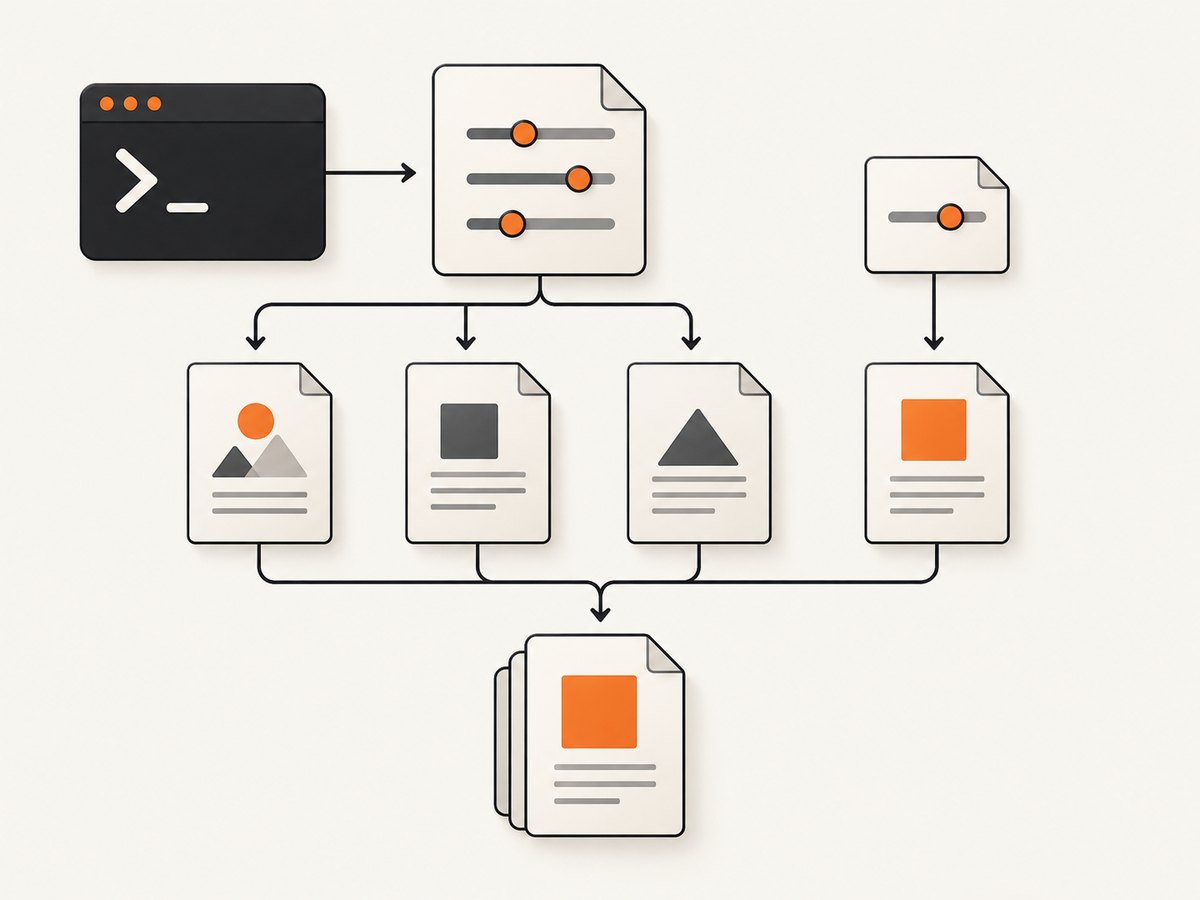
- Document-level choices: paper size, orientation, margins, DPI, copies, title, and logging are examples of global PDF concerns.
- Page/object choices: rendering and loading behavior, encoding, headers and footers, and link handling are examples of page-object concerns.
- Scope carefully: a page option in the global area can apply across page objects; an option placed after an input can be limited to that object when the option supports per-object scope.
- Honor global-only flags: keep options marked global in the global section.
When a multi-object command behaves inconsistently, inspect option placement before changing values. A correct flag in the wrong part of the command can affect a different set of objects than intended.
6. Set options through libwkhtmltox
Applications that use libwkhtmltox configure settings through the C API rather than by constructing a shell command. The API has separate global and object settings. Create the relevant settings object, set named UTF-8 values, check whether each setter succeeds, then create a converter using the configured global settings.
The following is a schematic C example showing the API sequence. Use the declarations and initialization required by the libwkhtmltox version installed in your project, and confirm setting names and accepted values in the API documentation. The example deliberately checks the setter result; a failed setting should be treated as a configuration error.
#include <stdio.h>
#include <wkhtmltox/pdf.h>

int main(void) {
    wkhtmltopdf_global_settings *global = wkhtmltopdf_create_global_settings();
    wkhtmltopdf_object_settings *object = wkhtmltopdf_create_object_settings();

    if (!global || !object) {
        fprintf(stderr, "Could not create wkhtmltopdf settings\n");
        return 1;
    }

    /* Set named UTF-8 values; check every result. */
    if (!wkhtmltopdf_set_global_setting(global, "size.paperSize", "A4")) {
        fprintf(stderr, "Could not set global paper size\n");
        return 1;
    }
    if (!wkhtmltopdf_set_object_setting(object, "web.defaultEncoding", "utf-8")) {
        fprintf(stderr, "Could not set object encoding\n");
        return 1;
    }

    /* Create a converter with global settings, then add the object,
       provide its input, convert, and destroy allocated API objects. */
    wkhtmltopdf_converter *converter = wkhtmltopdf_create_converter(global);
    if (!converter) {
        fprintf(stderr, "Could not create converter\n");
        return 1;
    }

    /* Add the object and perform conversion using the installed API's
       documented calls for input and output. */
    wkhtmltopdf_destroy_converter(converter);
    wkhtmltopdf_destroy_object_settings(object);
    wkhtmltopdf_destroy_global_settings(global);
    return 0;
}
The API includes named get and set operations, and the setter returns success or failure. Consult the libwkhtmltox settings API documentation for setting names and the full converter lifecycle. Treat global and object settings as distinct inputs: setting an object value on global settings, or vice versa, is not a substitute for configuring the proper scope.
7. Configure a framework wrapper separately
A wrapper can translate its own option dictionary into wkhtmltopdf arguments and supply defaults that the binary does not. Check the wrapper documentation for:
- The wrapper’s own default values and version.
- How its option names map to command-line flags or API setting names.
- Whether a value applies to all rendered pages or only a particular render call.
- Whether wrapper-provided values override values in an application configuration.
- How the wrapper locates the binary and which version it invokes.
For instance, django-wkhtmltopdf 3.2.0 documents encoding=utf8 and quiet=True as wrapper defaults. If you need different behavior, set the option through the wrapper’s documented interface instead of assuming a binary-wide default changed. Keep wrapper configuration in the application’s normal configuration source so deployments use the same values.
8. Verify a settings change
After changing a default or flag, generate a representative PDF and inspect it. Include the cases that matter to your application: a typical page, a page with long content, and, if relevant, a command with multiple input objects. This is a recommended verification step, not a claim that the examples above were run.
- Record
wkhtmltopdf --versionfrom the environment that generates the document. - Capture the exact command or wrapper options used for the conversion.
- Change one setting at a time when diagnosing unexpected output.
- Inspect page dimensions, orientation, margins, images, backgrounds, links, headers, and footers as applicable.
- For multiple objects, confirm the option is placed at the intended scope.
- Keep the known-good options in source control or the application configuration that launches the converter.
Explicitly setting a value is often the clearest way to make output consistent across environments, but it does not eliminate differences between binary builds or wrapper behavior. Confirm the version and output where the conversion actually runs.
9. Troubleshooting common configuration problems
| Symptom | Likely cause | What to do |
|---|---|---|
| A flag appears to have no effect | It is in the wrong command-line position, or it is global-only | Check the option’s scope in local help; move global flags before objects and page flags to the intended object position. |
| Only some pages have the setting | The value is scoped to one page object | Move a page option into the global area if it should apply to all page objects, or keep it by the input that needs it. |
| The output differs across machines | Different binary versions, package builds, or wrappers are in use | Compare --version, executable paths, wrapper versions, and effective options in each environment. |
| A wrapper uses a value you did not set | The wrapper supplies its own default | Read that wrapper’s version-specific configuration docs and override the value through the wrapper interface. |
| A C API setting is ignored | The name/value is invalid, the wrong settings object was used, or the setter failed | Check the setter return value, confirm the documented setting name and value, and apply it to global or object settings as appropriate. |
| Help text and observed output seem inconsistent | The help may describe a different executable than the application runs | Find the binary path used by the process and query that binary directly. |
| There is no effect from editing a supposed config file | The reviewed command-line docs do not establish a universal persistent configuration file | Pass the options in the command, calling script, or wrapper configuration documented by your integration. |
10. Performance, reliability, and cost considerations
Configuration can affect the resulting document and the work the renderer performs. Image downscaling and JPEG quality are documented options that may matter when image output size or fidelity is important. Page size, DPI, backgrounds, and the number of copies also affect the output you ask the converter to produce. Choose values based on the document requirements, then inspect representative output; the cited manual does not provide universal performance benchmarks for these settings.

For reliability, make the effective options explicit in the caller and record the executable version. When rendering multiple objects, make scope visible in the command rather than relying on an assumed default. In C code, check setting calls and converter creation. In a wrapper, confirm that its own defaults and binary path are known. These steps make configuration failures easier to distinguish from page-loading or rendering issues.
Cost depends on the environment and workload that runs wkhtmltopdf; the reviewed documentation does not specify a service price or a general cost model. For a self-managed setup, account for the compute and operational work of running the converter. If you need a hosted website screenshot or PDF API instead, compare its billing rules and failure handling directly.
Or skip the browser setup
If your goal is a screenshot or PDF from a URL rather than changing wkhtmltopdf defaults, ScreenshotNeo is a website screenshot API and MCP server from Yorker Media. One GET request can return a PNG, JPEG, WebP, or PDF. See the ScreenshotNeo API documentation for request options.
curl -G "https://api.screenshotneo.com/v1/shot" -d access_key=YOUR_API_KEY --data-urlencode url=https://stripe.com -o shot.webpimport requests
r = requests.get(
"https://api.screenshotneo.com/v1/shot",
params={"access_key": "YOUR_API_KEY", "url": "https://stripe.com"},
timeout=90,
)
open("shot.webp", "wb").write(r.content)const q = new URLSearchParams({ access_key: 'YOUR_API_KEY', url: 'https://stripe.com' });
const res = await fetch(`https://api.screenshotneo.com/v1/shot?${q}`);- Cookie banners are accepted like a visitor, and cookie/consent banners, newsletter popups, and chat widgets are removed before the shot; each step can be turned off.
- Bot checks, blank pages, timeouts, failed loads, and cache hits cost nothing. Response headers say which page verdict applied and whether the request was billed.
- An MCP server provides
take_screenshot,get_page_info, andcapture_pdftools for Claude, Cursor, and other MCP clients. - The free plan includes 1,000 shots a month with no card. Paid plans start at $5 for 3,000 shots; every feature is on every plan.
Sign up for ScreenshotNeo’s free plan to get 1,000 screenshots a month with no card.
FAQ
Does wkhtmltopdf have a universal settings file?
The reviewed usage manual documents command-line options, not a universal persistent configuration file. Put repeatable settings in the command, calling script, or wrapper configuration your application uses.
Can one command use different settings for different URLs?
Yes, for options that support per-object scope. Keep global options before the inputs and place a page option after the relevant input object, following the local help syntax.
Are the 0.12.6 defaults guaranteed on my system?
No. They are values listed by the 0.12.6 usage manual. Check the installed executable’s version and help output for local behavior.
Should I change the binary default or my wrapper setting?
Change the layer that supplies the value. If a wrapper sets an option, configure it through the wrapper’s documented interface and verify which binary it invokes.


