How to Connect an MCP Server to a Database
Connect an MCP server to a database safely: choose a driver and transport, validate tools, scope permissions, and troubleshoot common failures.

Short answer: MCP connects an AI host to your server. Your server connects to the database through the database engine’s native driver or client library. Build those as two separate layers: choose an MCP transport (stdio for a locally launched process or Streamable HTTP for a remote endpoint), create a database client in the server, expose narrowly scoped tools or read-only resources, validate arguments before database work, and run the server with a least-privilege database role.
MCP does not define a universal connection string, pooling strategy, TLS setting, or database driver. Those details depend on your database engine, programming language, deployment environment, authentication model, and whether the server needs read or write access.
1. Understand the two connections
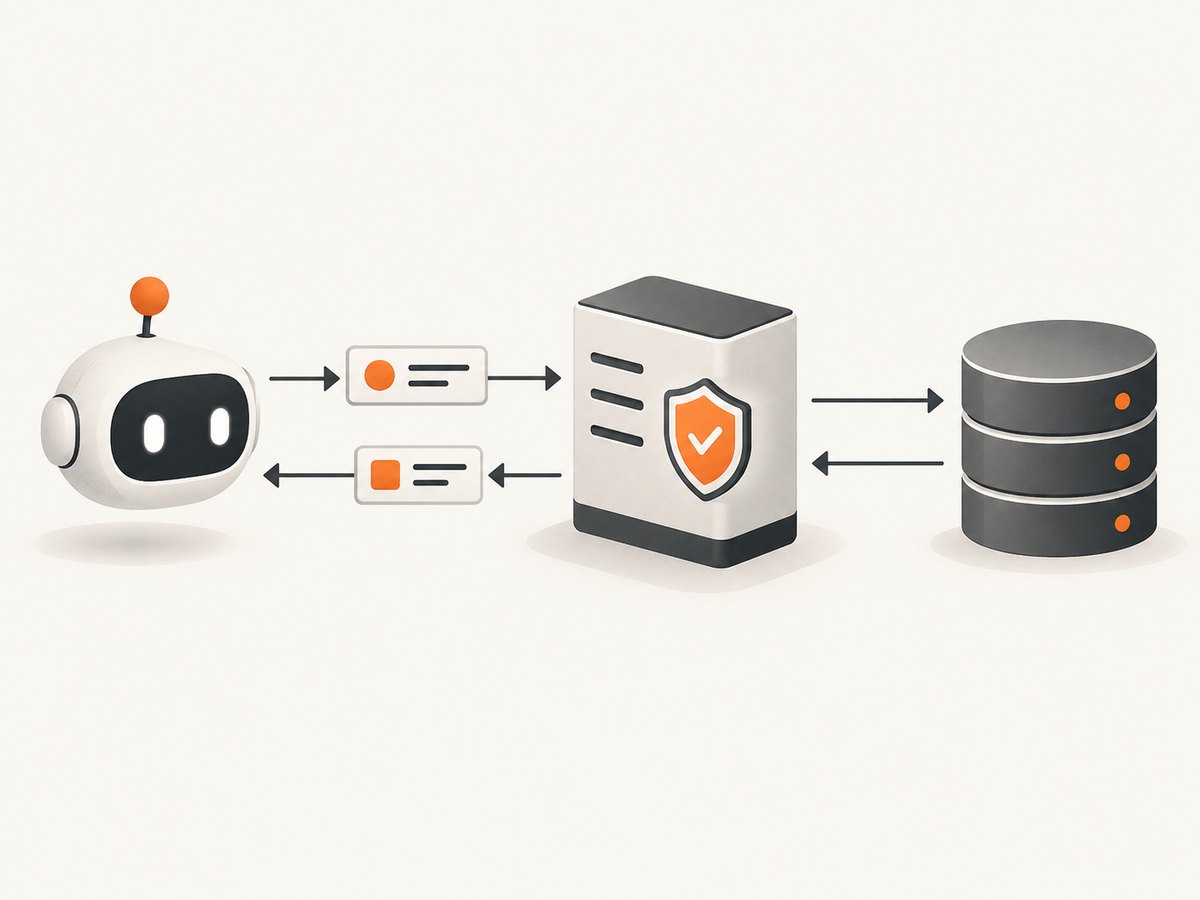
There are two independent connections:
| Boundary | What it does | Typical choices |
|---|---|---|
| AI host/client ↔ MCP server | Negotiates capabilities and carries JSON-RPC requests for tools, resources, and prompts. | stdio, Streamable HTTP, or legacy HTTP+SSE |
| MCP server ↔ database | Executes queries through the database’s native client or driver. | PostgreSQL, MySQL, SQLite, MongoDB, and other engine-specific clients |
The current MCP TypeScript SDK v2 overview describes MCP as an open standard for connecting AI applications to systems containing tools and data. The server exposes the MCP surface; your application code owns the database connection.
2. Choose the deployment shape first
Local server launched by the host: stdio
Use stdio when the MCP client starts your server as a local process. The client sends protocol messages on stdin and reads responses on stdout. Keep diagnostic logs on stderr: “stdout is the protocol channel.” (official first-server guide.)
Remote server: Streamable HTTP
Use Streamable HTTP when a client reaches a separately hosted MCP endpoint. The client performs the initialization handshake against that URL, then uses the negotiated session and capabilities.
Legacy compatibility: SSE
If an existing server supports only the older HTTP+SSE transport, retry with a fresh client using SSE. Treat this as a compatibility path rather than the default for a new server. See Connect to a server.
3. Plan the database surface
Write down these decisions before coding:
- Database engine and version
- Application language and official driver
- Local or remote MCP deployment
- Read-only reports, writes, or both
- Tables, views, and operations the model actually needs
- Authentication, network boundaries, TLS, pooling, timeouts, and query limits
Prefer specific tools such as list_customers or sales_report over an unrestricted “run any SQL” tool. Use MCP resources for read-only information such as schema documentation. MCP tools can perform actions; resources expose data without making them action endpoints; prompts are reusable interaction templates. The SDK overview documents these primitives.
4. Create a least-privilege database identity
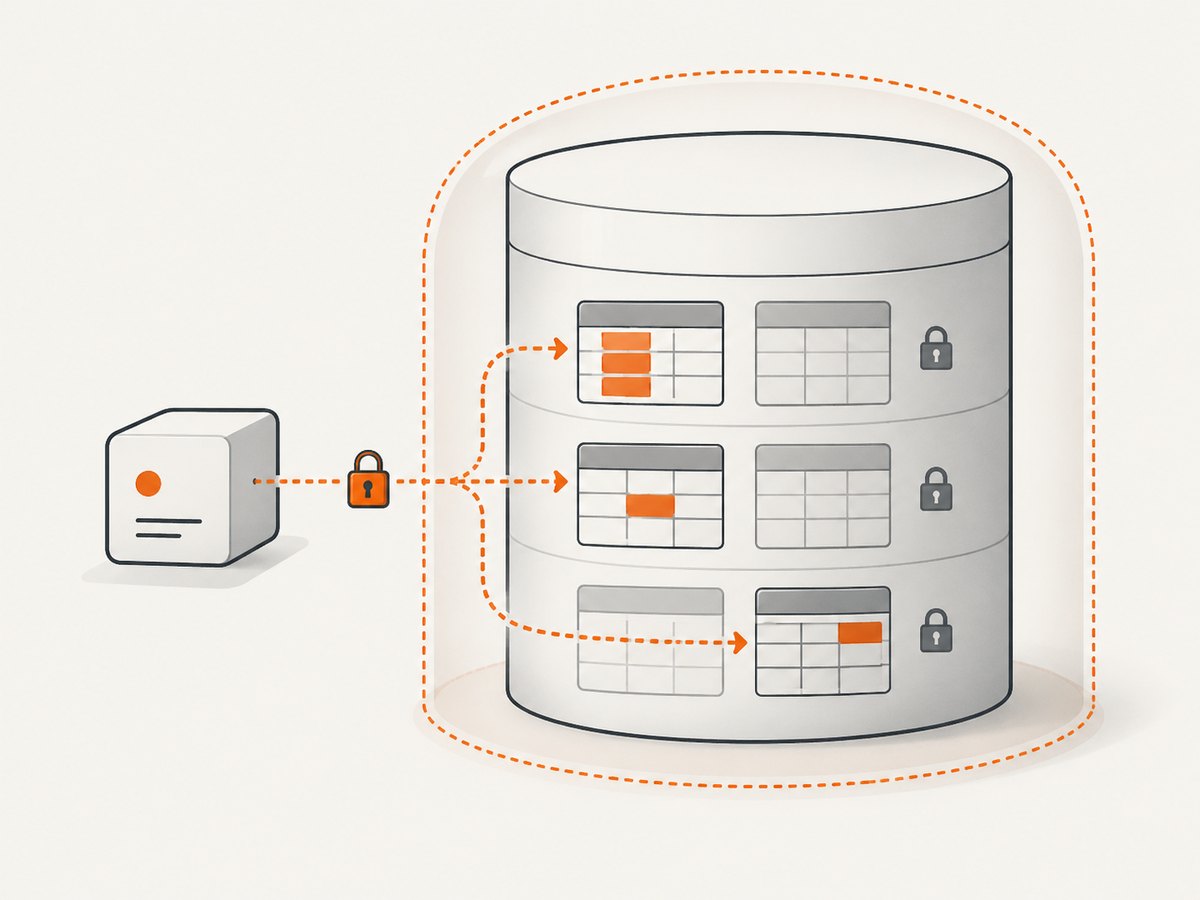
Create a dedicated role for the MCP server. Grant only the tables, columns, schemas, and operations needed by its tools. For a read-only PostgreSQL example:
CREATE ROLE mcp_reader LOGIN PASSWORD 'use-a-secret-from-your-deployment-system';
GRANT USAGE ON SCHEMA reporting TO mcp_reader;
GRANT SELECT ON reporting.orders, reporting.customers TO mcp_reader;
PostgreSQL supports table- and column-level grants and schema-wide grants; see the PostgreSQL 15 GRANT documentation. This permission example is PostgreSQL-specific. Apply the equivalent least-privilege model for your database engine.
5. TypeScript MCP server with PostgreSQL
The following implementation sketch follows the TypeScript SDK v2 shape: McpServer, registerTool, a Zod input schema, and stdio serving. Pin one SDK generation in your project. v2 uses split packages such as @modelcontextprotocol/server; v1 uses the monolithic @modelcontextprotocol/sdk package and older imports. Do not mix v1 imports with v2 methods. Check the v2 documentation for current adapter details.
import { McpServer } from "@modelcontextprotocol/server";
import { serveStdio } from "@modelcontextprotocol/server/stdio";
import { z } from "zod";
import pg from "pg";

const { Pool } = pg;
const pool = new Pool({
  connectionString: process.env.DATABASE_URL,
  max: Number(process.env.DB_POOL_MAX ?? 5),
  connectionTimeoutMillis: 10_000,
  idleTimeoutMillis: 30_000
});

const server = new McpServer({
  name: "reporting-database",
  version: "1.0.0"
});

server.registerTool(
  "sales_report",
  {
    description: "Return sales totals for an inclusive date range.",
    inputSchema: {
      from: z.string().date(),
      to: z.string().date(),
      limit: z.number().int().min(1).max(500).default(100)
    }
  },
  async ({ from, to, limit }) => {
    try {
      const result = await pool.query(
        `SELECT day, total
           FROM reporting.daily_sales
          WHERE day >= $1 AND day <= $2
          ORDER BY day
          LIMIT $3`,
        [from, to, limit]
      );

      return {
        content: [{ type: "text", text: JSON.stringify(result.rows) }]
      };
    } catch (error) {
      console.error("sales_report database error", error);
      return {
        isError: true,
        content: [{ type: "text", text: "The database report could not be completed." }]
      };
    }
  }
);

process.on("SIGINT", async () => {
  await pool.end();
  process.exit(0);
});

await serveStdio(server);
Install the driver and schema validator used by this example, configure DATABASE_URL outside source control, and adapt the import paths to the SDK release you pin. The SDK validates the declared inputSchema before invoking the handler, as described in Build your first server. The SQL remains parameterized, and the role should have access only to the reporting objects.
6. Register a read-only schema resource
A resource can expose a controlled snapshot of database metadata without giving the model arbitrary query power. Keep the returned content bounded and avoid including credentials or sensitive rows. The exact resource registration API depends on the SDK version you pin; use the v2 resource examples alongside the tool pattern above.
7. Connect the MCP client
After connect() succeeds, inspect the negotiated server information and capabilities before requesting methods. Close the client cleanly; for Streamable HTTP, terminate the session when applicable before closing.
// Pseudocode: use the client and transport imports from the same SDK generation.
const client = new Client({ name: "my-host", version: "1.0.0" });
const transport = new StdioClientTransport({
  command: "node",
  args: ["dist/server.js"],
  env: { ...process.env }
});
await client.connect(transport);
const tools = await client.listTools();
const result = await client.callTool({
  name: "sales_report",
  arguments: { from: "2026-01-01", to: "2026-01-31", limit: 31 }
});
await client.close();
For a remote deployment, replace the stdio transport with the SDK’s Streamable HTTP transport and provide the server endpoint. If that fails against an SSE-only server, use the SDK’s SSE transport with a new client.
8. Configuration checklist
- Secrets: provide database credentials through deployment environment configuration or a secret-management system; never commit them.
- Driver: use the official client for your engine and language.
- Pooling: cap pool size for the server’s concurrency and database limits; release or close clients during shutdown.
- Timeouts: set connection and statement limits appropriate to the operation.
- TLS: enable the database’s required TLS settings for remote connections and validate certificates.
- Transactions: use explicit transactions for multi-step writes and roll back on every failure.
- Output limits: cap rows, columns, and serialized response size.
- Logging: send logs to stderr for stdio servers and remove secrets and sensitive query values.
- Authorization: enforce user or tenant boundaries in server code and database permissions.
9. Test with the MCP Inspector
- Launch the server through the MCP Inspector using the same command your host will use.
- Confirm initialization succeeds and the expected tools and resources are listed.
- Call each tool with valid, boundary, and invalid arguments.
- Verify database failures become clear tool errors rather than process crashes.
- Check that stdout contains protocol messages only; send diagnostics to stderr.
- Use non-sensitive test data before enabling production access.
The official first-server guide documents the Inspector workflow and the stdout warning.
10. Troubleshooting
| Symptom | Likely cause | Fix |
|---|---|---|
| Client cannot initialize | Wrong command, endpoint, transport, or mixed SDK generations. | Run the exact launch command in Inspector; pin one SDK generation and use its matching transport. |
| JSON-RPC parse errors over stdio | A log line or library message was written to stdout. | Move diagnostics to stderr. Stdout is reserved for MCP protocol traffic. |
| Tool arguments are rejected | Input does not satisfy the declared schema. | Inspect the schema, send correctly typed values, and return useful validation descriptions. |
| Permission denied by the database | The dedicated role lacks the required schema, table, column, or operation privilege. | Grant only the missing privilege after confirming the tool’s intended access. |
| Connection refused or timeout | Incorrect host, port, network route, TLS mode, or expired credentials. | Test the database connection independently from the MCP client and verify deployment configuration. |
| Queries exhaust database connections | Pool size is too high or connections are not released. | Set a bounded pool, release clients, and close the pool on shutdown. |
| Large or slow tool responses | Unbounded rows, joins, or model-generated requests. | Use fixed queries, indexes, pagination, row limits, statement timeouts, and compact output. |
| Remote client cannot reconnect | Session lifecycle or transport compatibility issue. | Inspect negotiated capabilities, terminate stale sessions, and try SSE only for an SSE-only legacy server. |
11. Reliability, performance, and cost
- Reliability: make startup fail clearly when required configuration is missing, but return bounded tool errors for individual database failures. Add graceful shutdown and health checks appropriate to your deployment.
- Performance: keep tool queries purpose-built, parameterized, indexed, and bounded. Pooling reduces connection setup overhead but must stay below the database’s connection limit.
- Safety: avoid exposing arbitrary SQL as the default interface. Validate identifiers against an allowlist when dynamic object selection is unavoidable.
- Cost: database charges come from your database provider and workload. MCP itself does not select a provider or pricing model. Measure query volume, storage, compute, and network usage in your chosen environment.
Or skip the browser setup
If your MCP workflow also needs website screenshots for reports, documentation, or agent context, ScreenshotNeo provides a website screenshot API and MCP server. One GET request returns a PNG, JPEG, WebP, or PDF. It accepts cookie and consent banners before capture and removes more than 60 known consent platforms, newsletter popups, and chat widgets; bot checks, blank pages, timeouts, failed loads, and cache hits are not billed. Responses identify the page verdict and billing status with X-Page-Verdict and X-Billed headers. Its MCP server includes take_screenshot, get_page_info, and capture_pdf for Claude, Cursor, and other MCP clients.
See the ScreenshotNeo API documentation for the complete option set. A direct call looks like this:
curl -G "https://api.screenshotneo.com/v1/shot" -d access_key=YOUR_API_KEY --data-urlencode url=https://stripe.com -o shot.webpimport requests
r = requests.get("https://api.screenshotneo.com/v1/shot", params={"access_key": "YOUR_API_KEY", "url": "https://stripe.com"}, timeout=90)
open("shot.webp", "wb").write(r.content)const q = new URLSearchParams({ access_key: 'YOUR_API_KEY', url: 'https://stripe.com' });
const res = await fetch(`https://api.screenshotneo.com/v1/shot?${q}`);It supports full-page and element captures, device presets, custom viewports, retina scale, dark mode, PDF options, custom CSS and JavaScript, clicks, waits, blocking rules, headers, cookies, user agents, authorization, timezone, geolocation, transparent backgrounds, resizing, caching, signed links, async webhooks, bulk capture, usage reporting, and an OpenAPI specification. Plans include 1,000 free screenshots per month with no card; paid plans start at $5 for 3,000. Create a free ScreenshotNeo account.
FAQ
Does MCP connect directly to PostgreSQL or another database?
No. MCP connects the host to your server. The server uses the database’s own driver or client.
Should every database operation be an MCP tool?
No. Expose intentional operations as tools and suitable read-only information as resources. Keep the surface narrow.
Which transport should a new local integration use?
Use stdio when the host launches the process. Use Streamable HTTP when clients reach a remote endpoint.
Can I use the v1 TypeScript SDK examples with v2?
Do not mix them. v1 uses the monolithic package and older imports; v2 uses split packages and current APIs.
How do I prevent the model from running dangerous queries?
Prefer fixed, parameterized tools, validate every argument, cap result sizes, and give the server database identity only the privileges it needs.


