Convert a URL to PDF in Python with aiohttp
Fetch a URL asynchronously with aiohttp, render it with WeasyPrint or Playwright, and handle redirects, assets, authentication, streaming, and failures.

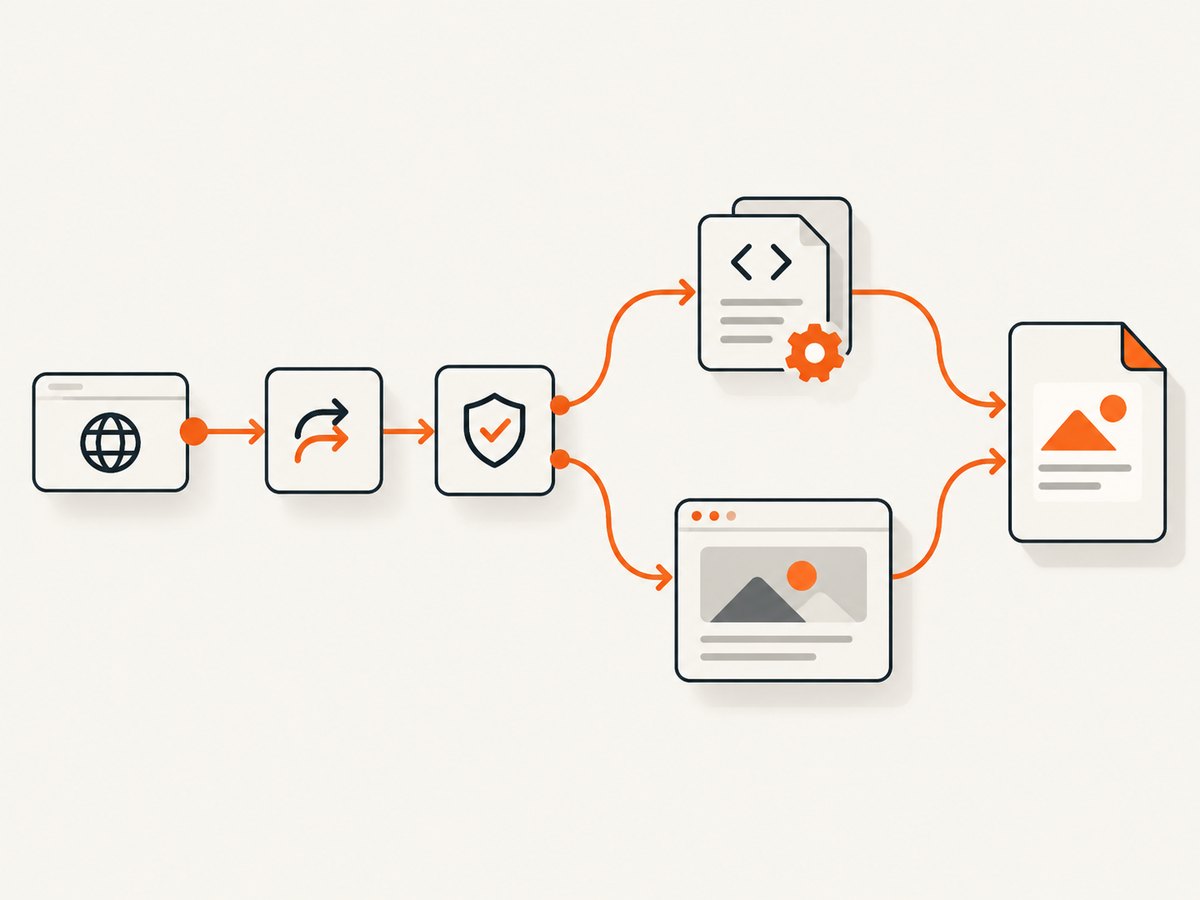
Direct answer: aiohttp can fetch a URL asynchronously, but it does not lay out HTML or create a PDF. Use an aiohttp.ClientSession to retrieve the page, then pass the HTML to a renderer such as WeasyPrint. If the page depends on JavaScript, client-side data, browser fonts, or browser layout behavior, use Playwright instead. Preserve the final response URL as the renderer’s base_url so relative CSS, images, and links resolve correctly.
This guide builds a production-ready pipeline, explains when to choose each renderer, and covers redirects, cookies, authentication, large responses, timeouts, security, performance, troubleshooting, and cost. The examples use Python 3 and are designed to be copied into a small script or adapted into a service.
1. Install the dependencies
For server-rendered HTML and ordinary CSS, install aiohttp and WeasyPrint:
python -m pip install aiohttp weasyprintWeasyPrint has native system dependencies on some operating systems. Follow its installation instructions for your platform if the package cannot find its rendering libraries. For JavaScript-heavy pages, install Playwright and its browser:
python -m pip install aiohttp playwright
python -m playwright install chromium
Keep the renderer choice explicit in your application. A static HTML renderer and a real browser do not produce identical output.
2. The basic aiohttp and WeasyPrint pipeline
The normal aiohttp pattern is a reusable ClientSession. The official reference describes a client session as the recommended interface for making HTTP requests and shows requests used as asynchronous context managers (aiohttp client reference). A session pools connections and supports keep-alives, which matters when converting a batch of URLs.
import asyncio
from pathlib import Path

import aiohttp
from weasyprint import HTML


async def url_to_pdf(url: str, output: str = "out.pdf") -> None:
    timeout = aiohttp.ClientTimeout(total=60)

    async with aiohttp.ClientSession(timeout=timeout) as session:
        async with session.get(url, allow_redirects=True) as response:
            response.raise_for_status()
            html = await response.text()
            final_url = str(response.url)

    # base_url resolves relative CSS, images, fonts, and links.
    HTML(string=html, base_url=final_url).write_pdf(output)


if __name__ == "__main__":
    asyncio.run(url_to_pdf("https://example.com/", "example.pdf"))
response.raise_for_status() stops the pipeline on a 4xx or 5xx response. allow_redirects=True follows normal HTTP redirects; disable it when your policy requires inspecting or restricting every redirect. The final URL is important: a page fetched from /reports/2026/ may refer to styles/main.css, and the final URL supplies the reference point for that relative path.
Use an explicit character encoding when necessary
await response.text() uses the response headers and aiohttp’s charset detection. If a legacy page declares an incorrect charset, decode the bytes yourself:
async with session.get(url) as response:
    response.raise_for_status()
    raw_html = await response.read()
    html = raw_html.decode("windows-1252", errors="replace")
    final_url = str(response.url)

HTML(string=html, base_url=final_url).write_pdf("out.pdf")
Do not use response.text() for an existing PDF. Check the content type and preserve PDF bytes when the server already returned a PDF.
3. Stream large responses instead of reading everything
The aiohttp quickstart documents await resp.text() and await resp.read(), and warns that these methods load the complete response into memory. For large HTML documents, stream chunks with resp.content.iter_chunked(...) (aiohttp quickstart).
import asyncio
import aiohttp


async def download_html(url: str, path: str = "page.html") -> str:
    timeout = aiohttp.ClientTimeout(total=60)
    async with aiohttp.ClientSession(timeout=timeout) as session:
        async with session.get(url, allow_redirects=True) as response:
            response.raise_for_status()
            final_url = str(response.url)
            with open(path, "wb") as output:
                async for chunk in response.content.iter_chunked(64 * 1024):
                    output.write(chunk)
    return final_url


asyncio.run(download_html("https://example.com/"))
Streaming bounds the memory used by the download, but WeasyPrint still needs the document and its assets to render. Add an application-level byte limit when accepting arbitrary URLs so a very large response cannot exhaust the worker:
MAX_BYTES = 20 * 1024 * 1024
received = 0
with open("page.html", "wb") as output:
    async for chunk in response.content.iter_chunked(64 * 1024):
        received += len(chunk)
        if received > MAX_BYTES:
            raise ValueError("response exceeds configured size limit")
        output.write(chunk)
4. Choose WeasyPrint or Playwright
WeasyPrint: server-rendered HTML and CSS
WeasyPrint exposes HTML(...).write_pdf(...) as its Python API (WeasyPrint API reference). Choose it when the fetched HTML already contains the content and CSS you need. It is a direct HTML/CSS-to-PDF renderer and is usually simpler to operate than a browser.
It will not run a page’s JavaScript application. A React, Vue, or Angular shell that fills its content after load can therefore produce an empty or incomplete PDF. Unsupported CSS, web fonts, and print-specific rules can also change visual fidelity. Compare the result with a browser-rendered PDF when exact browser appearance matters.
Playwright: JavaScript and browser layout
Playwright’s Python API documents page.pdf() and states that it generates a PDF using print CSS media (Playwright page.pdf reference). Use a browser context when the page needs JavaScript execution, client-side data loading, browser fonts, authenticated browser state, or browser layout behavior.
import asyncio
from playwright.async_api import async_playwright


async def browser_url_to_pdf(url: str, output: str = "out.pdf") -> None:
    async with async_playwright() as playwright:
        browser = await playwright.chromium.launch()
        page = await browser.new_page()
        await page.goto(url, wait_until="networkidle")
        await page.pdf(path=output, print_background=True)
        await browser.close()


asyncio.run(browser_url_to_pdf("https://example.com/", "example.pdf"))
wait_until="networkidle" waits for network activity to settle, but some sites keep analytics or polling requests open. In those cases, wait for a meaningful selector or a bounded delay instead:
await page.goto(url, wait_until="domcontentloaded")
await page.locator("main article").wait_for(state="visible", timeout=30_000)
await page.wait_for_timeout(500)
await page.pdf(path="out.pdf", print_background=True)
Set PDF options deliberately. For example:
await page.pdf(
    path="out.pdf",
    format="A4",
    landscape=False,
    print_background=True,
    margin={"top": "16mm", "right": "14mm", "bottom": "16mm", "left": "14mm"},
    prefer_css_page_size=True,
)
The aiohttp stage remains useful with Playwright for status checks, redirect inspection, authentication decisions, or detecting that the response is already a PDF. Do not fetch HTML with aiohttp and then expect JavaScript to run inside WeasyPrint; use the browser for that branch.
5. Redirects, existing PDFs, and content type checks
Follow redirects by default only when that matches your application policy. Record the redirect chain or final URL for diagnostics. Before rendering, inspect Content-Type:
from pathlib import Path

async with session.get(url, allow_redirects=True) as response:
    response.raise_for_status()
    content_type = response.headers.get("Content-Type", "").lower()
    if "application/pdf" in content_type:
        Path("out.pdf").write_bytes(await response.read())
    else:
        html = await response.text()
        final_url = str(response.url)
        HTML(string=html, base_url=final_url).write_pdf("out.pdf")
Some servers omit or mislabel content types. If you accept untrusted input, use a bounded read and verify the file signature before treating bytes as a PDF.
6. Cookies, authentication, and custom headers
Fetching a page with aiohttp does not automatically transfer its cookies, authorization headers, or browser session into WeasyPrint’s asset fetches. WeasyPrint’s default URL fetcher can open HTTP and file URLs, but advanced cookies and authentication require a custom URL fetcher or authenticated content supplied by your application (WeasyPrint URL fetchers; default fetcher details).
For a simple authenticated HTML request, send headers with aiohttp and render the returned HTML. Relative images and CSS may still require authentication, so a custom fetcher must attach the same credentials when WeasyPrint requests those resources.
headers = {
    "Authorization": f"Bearer {token}",
    "User-Agent": "pdf-worker/1.0",
}

async with session.get(url, headers=headers) as response:
    response.raise_for_status()
    html = await response.text()
    final_url = str(response.url)

HTML(string=html, base_url=final_url).write_pdf("private.pdf")
Playwright is often easier for login flows because a browser context can hold cookies and local storage:
context = await browser.new_context()
await context.add_cookies(cookies)
page = await context.new_page()
await page.goto(url, wait_until="domcontentloaded")
await page.pdf(path="private.pdf")
Never log bearer tokens, session cookies, or full authorization headers. Treat the URL and every fetched resource as untrusted input.
7. Make the pipeline reliable
- Timeouts: set a total aiohttp timeout and separate browser navigation or selector timeouts. A timeout is an operational limit, not a guarantee that the remote site will respond quickly.
- Status checks: call
raise_for_status()before rendering so an error page is not saved as a successful PDF. - Resource limits: cap HTML bytes, maximum redirects, concurrent jobs, and browser pages per worker.
- Retries: retry transient connection failures with exponential backoff, but avoid repeating non-idempotent authentication or endlessly retrying 4xx responses.
- Cleanup: use
async withfor sessions and always close Playwright browsers, including error paths. - Observability: record the input URL, final URL, status, elapsed stages, output size, renderer, and exception type. Remove secrets from logs.
- Determinism: set a viewport, timezone, locale, and user agent in browser contexts when output must be repeatable.
For batches, create one session and reuse it rather than creating a session per URL. Limit concurrency with an asyncio.Semaphore so the remote site and your renderer are not overloaded.
import asyncio

semaphore = asyncio.Semaphore(5)


async def bounded_job(session, url):
    async with semaphore:
        async with session.get(url, allow_redirects=True) as response:
            response.raise_for_status()
            html = await response.text()
            final_url = str(response.url)
        # Run CPU-heavy rendering outside the network critical section.
        return await asyncio.to_thread(
            HTML(string=html, base_url=final_url).write_pdf,
            f"{hash(url)}.pdf",
        )
Rendering can be CPU and memory intensive. Keep browser instances warm only when the workload justifies it, and recycle them if a long-running process shows memory growth.
8. Security considerations for arbitrary URLs
A URL-to-PDF endpoint is an SSRF risk if callers can request arbitrary destinations. Apply an allowlist or destination policy appropriate for your deployment. Restrict schemes to https and http when needed, block loopback and private network ranges, cap redirects, and consider DNS rebinding protections. Do not expose cloud metadata endpoints or internal administration panels to a renderer.
Sanitize output paths, use a temporary directory, and avoid passing untrusted strings to a shell. For browser jobs, isolate the process where practical. If you display user supplied HTML, understand that rendering can load external resources and consume substantial CPU or memory.
9. Troubleshooting common failures
| Symptom | Likely cause | Fix |
|---|---|---|
ClientConnectorError |
DNS, TLS, proxy, or network failure | Check DNS and proxy settings, use an explicit timeout, and retry only transient failures. |
| HTTP 401 or 403 | Missing authentication, cookies, or an accepted user agent | Send the required headers or cookies; for interactive login, use a Playwright context. |
| PDF contains an error page | Status was never checked | Call response.raise_for_status() before rendering and log the final URL. |
| Missing images or CSS | No base_url, relative assets, or protected resources |
Pass base_url=str(response.url); provide a custom fetcher or authenticated browser context. |
| Blank PDF from a single-page app | WeasyPrint does not execute JavaScript | Use Playwright and wait for a content selector or application-ready state. |
| Fonts or layout differ from Chrome | Static renderer and browser have different CSS/font support | Use Playwright when browser fidelity is required; install and configure fonts consistently. |
| Navigation never finishes | Analytics, polling, or streaming requests prevent network idle | Use domcontentloaded, wait for a specific selector, and add a bounded delay. |
| Memory usage grows on large pages | Whole responses, many concurrent renders, or unrecycled browsers | Stream downloads, cap size and concurrency, and close or recycle browser workers. |
| Relative links point to the wrong host | Original URL was not the final redirected URL | Use the response’s final URL as base_url. |
10. Performance, reliability, and cost notes
Connection pooling from a shared ClientSession reduces setup overhead in batches. Streaming prevents the network stage from retaining an entire large response, while the renderer remains the dominant memory and CPU stage for complex documents. Browser rendering generally costs more resources than WeasyPrint because it runs a full browser engine.
There is no universal conversion time: page size, scripts, fonts, images, network latency, and remote throttling all affect it. Measure your own workload by recording fetch, wait, render, and write durations. Cache immutable inputs or completed PDFs when your freshness requirements allow it, and include a content or URL version in the cache key.
For a self-hosted service, budget for Python workers, browser processes, fonts, temporary storage, outbound bandwidth, and retries. Keep concurrency bounded so a burst does not turn into a memory failure. For an occasional conversion, a script is often enough; for a high-volume or browser-fidelity workload, a managed rendering API can reduce operational work.
11. Or skip the browser setup
If you need a clean PDF or screenshot without installing Chromium, fonts, and renderer dependencies, ScreenshotNeo provides a website capture API. Its PDF endpoint accepts one GET request and supports PDF paper size, margins, landscape mode, and page ranges. The service removes cookie and consent banners, newsletter popups, and chat widgets before capture. Bot checks, blank pages, timeouts, failed loads, and cache hits are not billed, and the response identifies the result with X-Page-Verdict and X-Billed headers.

See the ScreenshotNeo API documentation for the complete parameter list and OpenAPI specification.
curl -G "https://api.screenshotneo.com/v1/shot" \
  -d access_key=YOUR_API_KEY \
  --data-urlencode url=https://stripe.com \
  -d format=pdf \
  -o stripe.pdf
import requests
r = requests.get(
"https://api.screenshotneo.com/v1/shot",
params={
"access_key": "YOUR_API_KEY",
"url": "https://stripe.com",
"format": "pdf",
},
timeout=90,
)
r.raise_for_status()
open("stripe.pdf", "wb").write(r.content)const q = new URLSearchParams({
access_key: 'YOUR_API_KEY',
url: 'https://stripe.com',
format: 'pdf'
});
const res = await fetch(`https://api.screenshotneo.com/v1/shot?${q}`);
if (!res.ok) throw new Error(`HTTP ${res.status}`);
const buffer = Buffer.from(await res.arrayBuffer());
require('node:fs').writeFileSync('stripe.pdf', buffer);Choose this route when you want the capture infrastructure managed for you: cookie banners, popups, and chat widgets are removed before the shot; bot checks, blank pages, and failed loads are never billed; an MCP server lets Claude, Cursor, and other AI agents call take_screenshot, get_page_info, and capture_pdf; 1,000 screenshots a month are free with no card, and paid plans start at $5 for 3,000 shots. Create a free ScreenshotNeo account.
12. FAQ
Can aiohttp convert HTML directly to PDF?
No. aiohttp handles asynchronous HTTP, while WeasyPrint or a browser handles layout and PDF generation.
Should I use resp.read() or resp.text()?
Use them for small responses when convenient. Stream with resp.content.iter_chunked() for large downloads, and never decode an existing PDF as text.
Why does my PDF omit content loaded after page load?
The content may depend on JavaScript or a later API request. Use Playwright, wait for a meaningful selector, and set a bounded timeout.
How do I preserve relative images and styles?
Pass the final redirected URL as WeasyPrint’s base_url. If assets require authentication, configure a custom fetcher or use a browser context with the correct cookies.
When is ScreenshotNeo a better fit?
Use it when you want a managed capture endpoint, built-in cleanup of consent UI and widgets, usage-aware billing, or MCP tools for AI agents instead of operating your own renderer.


