How to Crawl Data from a Website: A Practical Python Walkthrough
Learn how to crawl a website with Python, respect robots.txt, follow links, extract data, handle failures, and save structured results.

Direct answer: Website crawling is a queue-and-parse workflow. Start with one or more seed URLs, fetch each allowed page, parse its HTML, extract the fields and links you need, normalize and deduplicate URLs, enforce a domain/path scope and page budget, then save structured records. Python’s standard library is enough for a small crawler; add Beautiful Soup for convenient HTML selection, or use Scrapy when you need reusable spiders, recursive crawling, pagination, exports, caching, and middleware.
This walkthrough builds a bounded Python crawler, explains the decisions behind it, and covers robots.txt, rate limits, JavaScript pages, failures, production safeguards, and alternatives. Crawling a site does not grant permission to copy everything on it. Review the site’s terms, privacy requirements, copyright rules, and applicable law before collecting or republishing data.
1. What a website crawler does
A crawler repeatedly performs six operations:
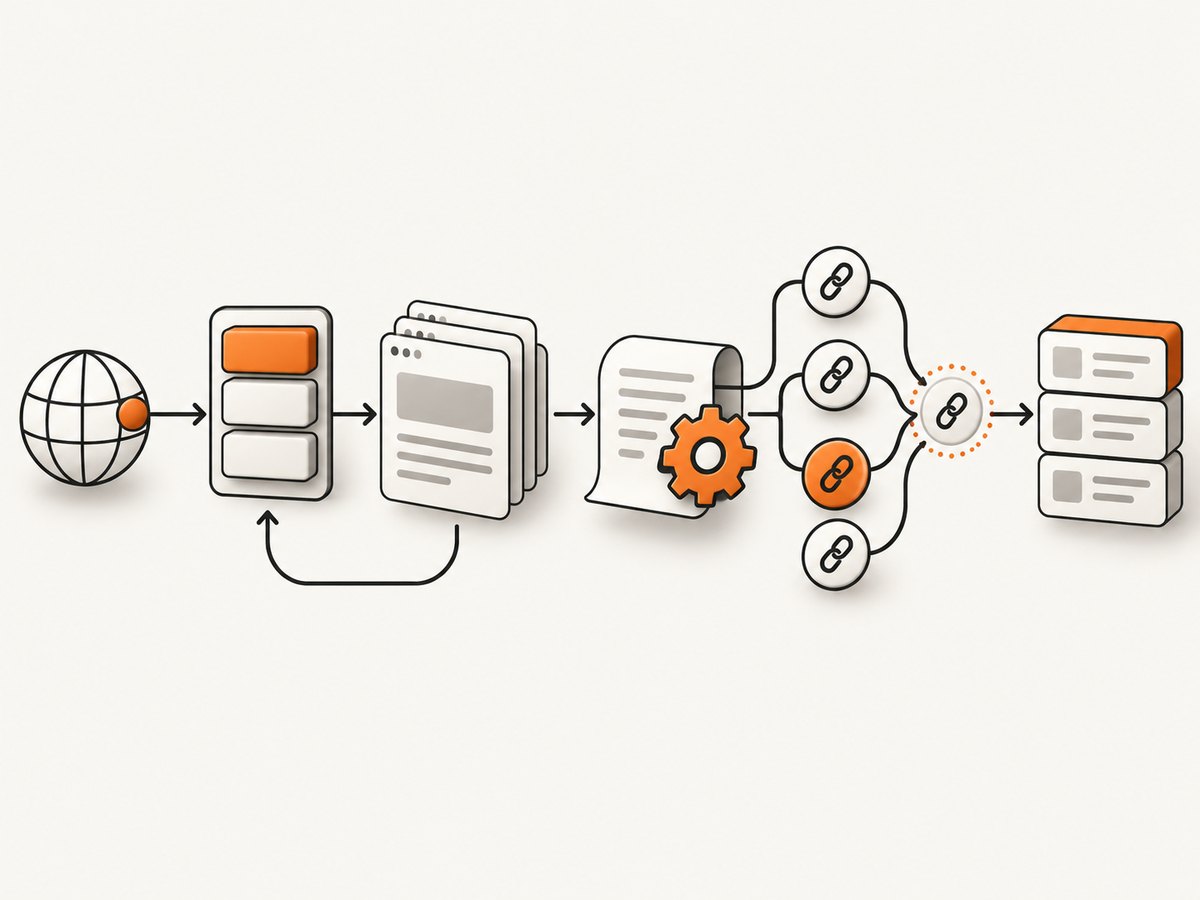
- Put seed URLs in a queue.
- Check whether a URL is in scope and allowed by robots.txt.
- Fetch the response with an identifying user agent and a timeout.
- Parse the response and extract the fields your project needs.
- Normalize links, remove fragments, deduplicate them, and enqueue new in-scope URLs.
- Persist each record and stop at a clear page, depth, time, or error budget.
For a small, single-domain job, a deque, urllib.request, urllib.parse, urllib.robotparser, and Beautiful Soup are sufficient. A framework becomes useful when crawling rules need to be reused across projects.
2. Install the small crawler’s dependencies
python -m venv .venv
source .venv/bin/activate
python -m pip install requests beautifulsoup4
The example below uses requests for clearer timeout and status handling and Beautiful Soup for HTML parsing. Beautiful Soup describes itself as a Python library for pulling data out of HTML and XML files; see its official documentation.
3. A complete bounded crawler in Python
Save this as crawl.py. It stays on the seed host, honors robots.txt for the declared user agent, removes URL fragments, limits pages and response size, waits between requests, extracts titles and links, retries transient failures, and writes newline-delimited JSON incrementally.
from __future__ import annotations

import json
import time
from collections import deque
from pathlib import Path
from typing import Any
from urllib.parse import urldefrag, urljoin, urlparse, urlunparse
from urllib.robotparser import RobotFileParser

import requests
from bs4 import BeautifulSoup

START_URL = "https://example.com/"
USER_AGENT = "ExampleResearchBot/1.0 (+https://example.com/bot-info)"
MAX_PAGES = 50
MAX_DEPTH = 3
TIMEOUT_SECONDS = 20
MAX_BYTES = 5_000_000
DELAY_SECONDS = 1.0
OUTPUT_PATH = Path("pages.ndjson")

session = requests.Session()
session.headers.update({"User-Agent": USER_AGENT})

start = urldefrag(START_URL)[0]
start_parts = urlparse(start)
allowed_host = start_parts.netloc.lower()
allowed_scheme = start_parts.scheme

robots = RobotFileParser()
robots.set_url(urljoin(start, "/robots.txt"))
try:
    robots.read()
except Exception as exc:
    print(f"Could not read robots.txt: {exc}")
    # Choose a policy for your project. This example stops rather than
    # crawling when the policy file cannot be retrieved.
    raise SystemExit("Stopping because robots.txt could not be read")


def normalize_url(raw_url: str, base_url: str) -> str | None:
    """Resolve a link and return a canonical-enough HTTP(S) URL."""
    absolute = urljoin(base_url, raw_url)
    absolute, _ = urldefrag(absolute)
    parsed = urlparse(absolute)
    if parsed.scheme not in {"http", "https"} or not parsed.netloc:
        return None
    # Remove a default port and normalize the host casing.
    host = parsed.hostname.lower() if parsed.hostname else ""
    if parsed.port and not ((parsed.scheme == "http" and parsed.port == 80) or
                            (parsed.scheme == "https" and parsed.port == 443)):
        host = f"{host}:{parsed.port}"
    path = parsed.path or "/"
    return urlunparse((parsed.scheme.lower(), host, path, "", parsed.query, ""))


def in_scope(url: str) -> bool:
    parsed = urlparse(url)
    return parsed.scheme == allowed_scheme and parsed.netloc.lower() == allowed_host


def fetch(url: str) -> requests.Response | None:
    for attempt in range(3):
        try:
            response = session.get(url, timeout=TIMEOUT_SECONDS, stream=True)
            if response.status_code in {429, 500, 502, 503, 504}:
                retry_after = response.headers.get("Retry-After")
                response.close()
                wait = float(retry_after) if retry_after and retry_after.isdigit() else 2 ** attempt
                time.sleep(wait)
                continue
            response.raise_for_status()
            content_type = response.headers.get("Content-Type", "").lower()
            if "text/html" not in content_type and "application/xhtml+xml" not in content_type:
                response.close()
                return None
            content_length = response.headers.get("Content-Length")
            if content_length and int(content_length) > MAX_BYTES:
                response.close()
                return None
            body = bytearray()
            for chunk in response.iter_content(chunk_size=64 * 1024):
                body.extend(chunk)
                if len(body) > MAX_BYTES:
                    response.close()
                    return None
            response._content = bytes(body)
            return response
        except (requests.RequestException, ValueError) as exc:
            if attempt == 2:
                print(f"Fetch failed for {url}: {exc}")
                return None
            time.sleep(2 ** attempt)
    return None


queue: deque[tuple[str, int]] = deque([(start, 0)])
enqueued = {start}
visited: set[str] = set()

with OUTPUT_PATH.open("w", encoding="utf-8") as output:
    while queue and len(visited) < MAX_PAGES:
        url, depth = queue.popleft()
        if url in visited or depth > MAX_DEPTH or not in_scope(url):
            continue
        if not robots.can_fetch(USER_AGENT, url):
            print(f"Blocked by robots.txt: {url}")
            continue

        time.sleep(DELAY_SECONDS)
        response = fetch(url)
        visited.add(url)
        if response is None:
            continue

        soup = BeautifulSoup(response.content, "html.parser")
        title = soup.title.get_text(" ", strip=True) if soup.title else ""
        record: dict[str, Any] = {
            "url": url,
            "status": response.status_code,
            "title": title,
            "description": "",
            "depth": depth,
        }
        description = soup.select_one('meta[name="description"]')
        if description:
            record["description"] = description.get("content", "").strip()

        output.write(json.dumps(record, ensure_ascii=False) + "\n")
        output.flush()
        print(record)

        for anchor in soup.select("a[href]"):
            next_url = normalize_url(anchor["href"], url)
            if (next_url and in_scope(next_url) and next_url not in visited
                    and next_url not in enqueued):
                enqueued.add(next_url)
                queue.append((next_url, depth + 1))

print(f"Saved {len(visited)} fetched URLs to {OUTPUT_PATH}")
Replace START_URL, USER_AGENT, and the extraction fields for your project. The script is intentionally bounded: an unbounded crawler can consume your own resources and place unnecessary load on the target site.
What to change for a focused extraction
Keep the crawl mechanics separate from the schema you save. For example:
record = {
    "url": url,
    "title": soup.select_one("h1").get_text(" ", strip=True)
             if soup.select_one("h1") else "",
    "price": soup.select_one(".price").get_text(" ", strip=True)
             if soup.select_one(".price") else None,
    "links": [a.get("href") for a in soup.select("article a[href]")],
}
Use CSS selectors for simple extraction. Normalize missing values, validate types, and record the source URL so every field remains traceable.
4. Respect robots.txt and site rules
Python’s urllib.robotparser can read and evaluate a site’s robots.txt rules. Google explains that robots.txt can manage crawler traffic and page paths, but a disallowed URL may still be discovered through links. Treat it as an important technical signal, not a complete legal authorization.
- Send a useful user-agent with a contact URL or email.
- Read the target’s
/robots.txtbefore fetching pages. - Review terms of service, privacy obligations, copyright, and local law.
- Do not crawl login, checkout, private, or clearly restricted areas.
- Keep an explicit host and path allowlist.
- Store only the fields needed for the stated purpose.
Google’s robots.txt documentation explains the protocol and its limits. The Scrapy tutorial also recommends identifying your crawler so site owners can request changes.
5. URL scope, deduplication, and crawl depth
URL normalization prevents the same page from entering the queue repeatedly under different spellings. At minimum:
- Resolve relative links with
urljoin. - Remove fragments such as
#comments; they do not identify a separate HTTP resource. - Normalize the scheme and host casing.
- Decide whether query strings represent distinct pages. Tracking parameters often create duplicates; product filters may be meaningful.
- Reject non-HTTP schemes such as
mailto:,javascript:, andtel:. - Apply host, path-prefix, depth, page-count, and time limits.
For large sites, persist the seen set in a database or durable key-value store. An in-memory set disappears when the process stops and can cause duplicate work after a restart.
6. Handling HTTP responses safely
| Situation | Recommended behavior |
|---|---|
| 200 HTML | Parse and extract the record. |
| 301/302 redirect | Follow only within your allowlist; record the final URL. |
| 401/403 | Stop or skip. Do not attempt to bypass access controls. |
| 404 | Record the missing page if useful; do not retry indefinitely. |
| 429 | Honor Retry-After, reduce concurrency, and slow down. |
| 500–504 | Retry a small number of times with exponential backoff, then skip. |
| Non-HTML content | Skip unless your project explicitly handles PDFs, images, or feeds. |
| Very large body | Stop reading after a configured byte limit. |
Set both connection and total timeouts in production. Retry transient transport errors, not every exception. Persist records as you go so a process interruption does not discard completed pages.
7. JavaScript-rendered pages
requests downloads the server response; it does not execute browser JavaScript. If the data appears only after scripts run, the HTML may contain no usable records or links.
Options include:
- Find the documented JSON endpoint used by the page and request that endpoint when its terms permit it.
- Use a browser-rendering integration when the project genuinely requires a rendered DOM.
- Use Scrapy for the crawl and add a browser-rendering integration for selected requests rather than every page.
Browser rendering costs more CPU and memory and introduces waits, browser lifecycle failures, and additional policy considerations. Keep it limited to pages that need it.
8. Beautiful Soup versus Scrapy
| Need | Small urllib/requests plus Beautiful Soup | Scrapy |
|---|---|---|
| One site or small page budget | Good fit | More setup than necessary |
| Recursive links and pagination | Implement a queue yourself | Built-in spider and request patterns |
| CSS/XPath selectors | Beautiful Soup CSS selectors | Selectors plus XPath |
| Feed exports and pipelines | Implement them | Built-in support |
| Depth, caching, middleware | Implement them | Documented components |
| JavaScript pages | Usually needs another tool | Add a browser-rendering integration when needed |
Scrapy describes itself as “an application framework for crawling web sites and extracting structured data.” Its documentation covers spiders, selectors, recursive following, feed exports, robots.txt support, crawl-depth restriction, caching, and middleware. Check the project’s current release before pinning a version because releases change.
9. Production safeguards and reliability
- Rate control: use a conservative delay or concurrency limit per host. Back off after 429 and server errors.
- Budgets: cap pages, depth, elapsed time, response bytes, and retries.
- Durability: write incrementally, keep a crawl manifest, and make records idempotent.
- Observability: log URL, status, elapsed time, content type, retry count, and skip reason.
- Cache: reuse responses where appropriate so repeated runs do not reload unchanged pages.
- Validation: check required fields and flag unexpectedly empty pages.
- Security: treat downloaded HTML as untrusted input; never execute arbitrary page scripts in your crawler process.
- Privacy: minimize personal data, restrict access to stored results, and define retention.
10. Performance and cost considerations
The main limits are network latency, server response time, parsing time, concurrency, and storage. Increasing concurrency can shorten a crawl while increasing load on the target and the chance of throttling. Start conservatively, measure throughput and error rates, then adjust within the site’s rules.
For small jobs, a single process and incremental NDJSON output are often cheaper and easier to recover than a distributed system. For recurring crawls, cache stable pages, crawl only changed sections, and persist the queue so work can resume. Browser rendering, proxy infrastructure, and large-scale storage add direct costs; use them only when the data requires them.
11. Troubleshooting common crawler errors
| Symptom | Likely cause | Fix |
|---|---|---|
| Every request returns 403 | The site blocks automated clients or requires authorization. | Review terms and access policy. Identify your crawler; do not bypass controls. |
| 429 Too Many Requests | Request rate is too high. | Honor Retry-After, reduce concurrency, add delay, and cache. |
| Empty HTML for visible content | Content is rendered by JavaScript. | Use an allowed data endpoint or a limited browser-rendering integration. |
| Duplicate pages | Tracking queries, fragments, redirects, or inconsistent trailing slashes. | Normalize URLs and define query-parameter rules before enqueueing. |
| Robots parser errors | robots.txt is unavailable, malformed, or blocked. | Choose a documented fail-closed policy, retry carefully, and contact the site owner if appropriate. |
| Read timeout | Slow server, overloaded target, or network issue. | Set a timeout, retry transient failures with backoff, and skip after the retry budget. |
| UnicodeDecodeError | The response encoding was guessed incorrectly. | Parse response bytes with Beautiful Soup and inspect declared or detected encoding. |
| Memory usage grows | Responses, queue entries, or records are retained indefinitely. | Stream and flush output, cap body size, and persist the queue/seen set externally. |
12. Or skip the browser setup
If your goal is a clean visual capture of each page rather than parsed HTML fields, ScreenshotNeo provides a website screenshot API and MCP server. It accepts one GET request and returns PNG, JPEG, WebP, or PDF. Cookie and consent banners, newsletter popups, and chat widgets are removed before capture; bot checks, blank pages, timeouts, failed loads, and cache hits are not billed, and the response identifies the result with X-Page-Verdict and X-Billed headers.

See the ScreenshotNeo API documentation for all options. A basic request looks like this:
cURL
curl -G "https://api.screenshotneo.com/v1/shot" -d access_key=YOUR_API_KEY --data-urlencode url=https://stripe.com -o shot.webpPython
import requests

r = requests.get(
    "https://api.screenshotneo.com/v1/shot",
    params={"access_key": "YOUR_API_KEY", "url": "https://stripe.com"},
    timeout=90,
)
r.raise_for_status()
open("shot.webp", "wb").write(r.content)
Node.js
const q = new URLSearchParams({ access_key: 'YOUR_API_KEY', url: 'https://stripe.com' });
const res = await fetch(`https://api.screenshotneo.com/v1/shot?${q}`);
if (!res.ok) throw new Error(`HTTP ${res.status}`);
const fs = await import('node:fs/promises');
await fs.writeFile('shot.webp', Buffer.from(await res.arrayBuffer()));
ScreenshotNeo also supports full-page captures with lazy images loaded, CSS element capture, device presets and custom viewports, dark mode, retina scale, PDF options, custom CSS and JavaScript, clicks, waits, request blocking, headers, cookies, user agents, authorization, timezone, geolocation, transparent backgrounds, resizing, chosen cache TTLs, signed links, asynchronous jobs with signed webhooks, bulk capture for up to 100 URLs per call, usage data, and an OpenAPI specification. Its MCP server exposes take_screenshot, get_page_info, and capture_pdf for Claude, Cursor, and other MCP clients.
There is a free plan with 1,000 screenshots per month and no card. Paid plans start at $5 for 3,000 shots; every feature is available on every plan. Create a free ScreenshotNeo account.
13. Checklist before running a crawl
- Have you read robots.txt and the terms of service?
- Is the user agent identifiable and does it include contact information?
- Is the host and path scope explicit?
- Are page, depth, byte, time, retry, and rate limits configured?
- Are private, login, checkout, and restricted paths excluded?
- Are responses validated by status and content type?
- Are records written incrementally and recoverably?
- Are personal data and copyrighted content minimized and protected?
14. FAQ
Is crawling the same as scraping?
Crawling discovers and fetches pages. Scraping extracts specific fields from those pages. A project can crawl without extracting much data, or scrape a known set of URLs without following links.
Can Python crawl an entire website?
Yes, but “entire” needs a defined scope and stopping policy. Large sites may contain generated URLs, calendars, search combinations, and duplicate parameters that make an unrestricted crawl impractical.
Should I use urllib or requests?
Both can fetch pages. The standard library keeps dependencies small; requests provides a convenient session, status handling, streaming, and timeout interface. Either still requires responsible rate control and error handling.
When should I choose Scrapy?
Choose Scrapy when crawling behavior should be reusable and configurable, especially for recursive spiders, pagination, exports, pipelines, depth limits, caching, and middleware.
How do I crawl pages behind a login?
Only when you are authorized and the site’s rules permit it. Use an approved authentication mechanism, protect credentials, and exclude data you do not need. Never try to defeat access controls.


