How to Create an HTML Thumbnail
Learn the three HTML thumbnail patterns: in-page images, video posters, and social previews, with complete code and troubleshooting.
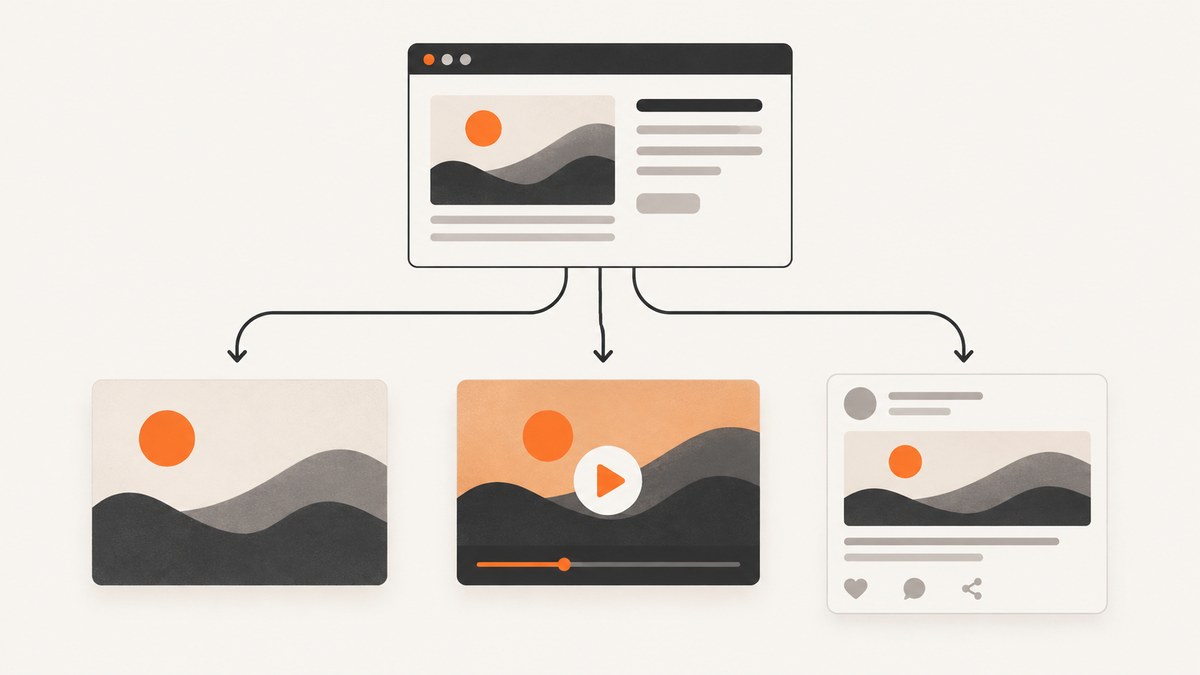
HTML thumbnails have three different jobs. Use an image element for a thumbnail displayed in page content, the poster attribute for a still image shown before video playback, or Open Graph metadata for an image shown when a URL is shared.
| Goal | Use |
|---|---|
| Show an image inside the page | <img src="..." alt="..."> |
| Show a still before a video plays | <video poster="..."> |
| Control a shared-link preview | Open Graph tags such as og:image |
1. Add a thumbnail image to page content
Place an image element where the thumbnail should appear. Give src a URL that resolves for visitors and write useful alternative text in alt. MDN documents src and alt as the common attributes; alternative text helps screen-reader users and appears when an image cannot load.

<img src="/images/thumbnail.jpg"
     alt="Dashboard showing monthly sales trends"
     width="320"
     height="180">
Use a root-relative path such as /images/thumbnail.jpg for an asset on the same site, or an absolute HTTPS URL for an image hosted elsewhere. The dimensions reserve layout space while the image loads and should match the file’s intended ratio.
Responsive in-page thumbnail
<style>
  .thumbnail {
    display: block;
    width: 100%;
    max-width: 640px;
    height: auto;
  }
</style>

<img class="thumbnail"
     src="/images/article-thumb.webp"
     alt="A browser window rendering an HTML page"
     width="640"
     height="360">
Keep meaningful alt text even when a visible caption is present. Do not repeat a caption word for word; describe the image’s purpose or content.
2. Set a thumbnail for an HTML video
For a video player cover image, use the poster attribute on <video>. This image is shown while the video loads and before playback starts; it is not a social sharing tag.
<video controls width="640" poster="/images/video-poster.jpg">
  <source src="/media/example.mp4" type="video/mp4">
  Your browser does not support the video element.
</video>
The poster URL should be reachable without authentication. Include a fallback sentence between the opening and closing video tags for browsers that cannot play the element.
Video thumbnail checklist
- Use a representative frame that makes the video’s subject clear.
- Keep the poster URL stable after publishing.
- Provide a valid video source and MIME type.
- Do not expect
posterto control previews generated by social networks or messaging apps.
3. Create a thumbnail for shared links with Open Graph
When the desired thumbnail appears after someone shares a page URL, add Open Graph properties inside the document’s <head>. The Open Graph Protocol defines og:title, og:type, og:image, and og:url as basic properties for describing a page as a graph object (Open Graph Protocol documentation).
<head>
  <title>Example page</title>
  <meta property="og:title" content="Example page">
  <meta property="og:type" content="website">
  <meta property="og:url" content="https://example.com/page">
  <meta property="og:image" content="https://example.com/images/share-image.jpg">
  <meta property="og:image:alt" content="A preview of the example page">
</head>
og:image should be a publicly available, absolute URL to the representative image. The Open Graph image description belongs in og:image:alt; it describes the image rather than acting as a visible caption.
Optional metadata
<meta property="og:description" content="A concise description of the page">
<meta property="og:site_name" content="Example">
<meta name="twitter:card" content="summary_large_image">
These tags can provide additional context to consumers that support them. The exact crop, dimensions, cache lifetime, and refresh behavior are platform-specific, so HTML alone cannot guarantee an identical preview everywhere.
4. Keep video thumbnails consistent for search
Google’s video guidance requires a valid thumbnail at a stable URL for video pages and supports structured data, video sitemaps, and Open Graph metadata. If you declare a thumbnail in more than one metadata source, use the same URL for that video (Google Search Central video documentation).
<meta property="og:image" content="https://example.com/video-poster.jpg">
<script type="application/ld+json">
{
  "@context": "https://schema.org",
  "@type": "VideoObject",
  "name": "Example video",
  "thumbnailUrl": "https://example.com/video-poster.jpg",
  "uploadDate": "2026-01-15",
  "contentUrl": "https://example.com/media/example.mp4"
}
</script>
Supply the real title, date, and URLs for your page. Do not rotate the thumbnail URL unnecessarily; a stable URL makes it easier for crawlers and caches to find the same asset.
5. Apple Messages and direct video previews
Apple’s Technical Note TN3156 says that, for a video preview in Messages, you should provide a direct link to the video asset through a meta tag rather than a reference to an embeddable video page. It also states that videos requiring embedded HTML will not play inline. Treat this as Apple Messages behavior, not a universal rule for every sharing service (Apple Developer Documentation, TN3156).
6. Capture a thumbnail from an existing HTML page
If your “thumbnail” is a rendered snapshot of a URL rather than a hand-authored asset, a browser automation script can load the page and save an image. The basic flow is: navigate, wait for the page to settle, capture the viewport or full page, then store the file.
import { chromium } from 'playwright';

const browser = await chromium.launch();
const page = await browser.newPage({ viewport: { width: 1280, height: 720 } });
await page.goto('https://example.com', { waitUntil: 'networkidle' });
await page.screenshot({ path: 'thumbnail.png', fullPage: false });
await browser.close();
For a stable result, wait for a selector that proves the important content is ready, hide animations and dynamic widgets with CSS, and set a fixed viewport. Full-page captures can be much taller than social thumbnails; crop or resize the output for the placement where it will be used.
7. Or skip the browser setup
ScreenshotNeo captures a URL with one request and can return PNG, JPEG, WebP, or PDF. Before capture it accepts cookie and consent banners and removes more than 60 known consent platforms, newsletter popups, and chat widgets; each cleanup step can be turned off. Bot checks, blank pages, timeouts, failed loads, and cache hits are not billed, and the response identifies the result with X-Page-Verdict and X-Billed headers. See the ScreenshotNeo API docs for all options.

curl -G "https://api.screenshotneo.com/v1/shot" \
  -d access_key=YOUR_API_KEY \
  --data-urlencode url=https://stripe.com \
  -o shot.webp
import requests
r = requests.get(
"https://api.screenshotneo.com/v1/shot",
params={"access_key": "YOUR_API_KEY", "url": "https://stripe.com"},
timeout=90,
)
open("shot.webp", "wb").write(r.content)const q = new URLSearchParams({ access_key: 'YOUR_API_KEY', url: 'https://stripe.com' });
const res = await fetch(`https://api.screenshotneo.com/v1/shot?${q}`);ScreenshotNeo also supports full-page capture with lazy images loaded, CSS-selector element capture, dark mode, device presets and custom viewports, retina scale, custom CSS and JavaScript, click and wait actions, request blocking, headers, cookies, user agents, authorization, timezone, geolocation, transparent backgrounds, resizing, configurable caching, signed links, asynchronous jobs with signed webhooks, bulk capture of up to 100 URLs per call, a usage API, and an OpenAPI specification. An MCP server provides take_screenshot, get_page_info, and capture_pdf tools for Claude, Cursor, and other MCP clients.
Plans include 1,000 screenshots per month free with no card; paid plans start at $5 for 3,000 shots. Create a free ScreenshotNeo account.
8. Troubleshooting
| Symptom | Likely cause | Fix |
|---|---|---|
| Thumbnail is broken | The src, poster, or og:image URL is wrong or inaccessible. |
Open the exact URL in a private browser window and check the server response, path, and HTTPS certificate. |
| Screen reader gives no useful description | alt is missing, empty, or generic. |
Describe the image’s purpose or content; use empty alt only for purely decorative images. |
| Video poster never appears | The poster URL fails or the video markup is malformed. | Validate the URL, keep poster on the opening video tag, and provide a valid source. |
| Shared preview shows an old image | The destination service cached earlier metadata. | Confirm the current tags in the fetched HTML, then follow that service’s preview refresh process; HTML does not guarantee immediate cache invalidation. |
| Preview differs between services | Each platform interprets metadata and crops images independently. | Use absolute URLs, complete Open Graph basics, and verify on each target service. |
| Automated capture contains popups | Consent, newsletter, or chat UI appeared before the screenshot. | Accept or hide the UI in your automation flow, or use ScreenshotNeo’s pre-capture cleanup. |
9. Performance, reliability, and cost
- Page images: specify width and height to reduce layout shifts, serve an appropriately sized asset, and choose a modern format when your browser support allows it.
- Video posters: keep the file small enough to display quickly and host it at a stable URL.
- Social previews: use absolute HTTPS URLs and keep metadata in the initial document head so crawlers can read it without client-side JavaScript.
- Browser automation: reuse a browser process for batches, set explicit timeouts, wait for a deterministic selector, and avoid unnecessary full-page captures.
- ScreenshotNeo: caching can reduce repeated work with a TTL you choose; asynchronous jobs and signed webhooks suit long pages or batches. Only clean shots are billed, while bot checks, blank pages, timeouts, failed loads, and cache hits are free.
10. FAQ
Is an HTML thumbnail a special element?
No. The correct mechanism depends on where it appears: img in page content, video poster before playback, or Open Graph metadata for shared links.
Can I use the same file for all three cases?
Yes, if its composition works in each context, but reference it through each mechanism separately and provide the metadata each consumer expects.
Does og:image change the image inside my page?
No. It describes the image used for link previews. It does not replace an in-page img element or a video’s poster.
Will every social app show my Open Graph thumbnail?
No. A platform must fetch and interpret the metadata, and its cache and rendering rules determine the final preview.


