How to Create Instant URLs for Generated Images
Learn how to turn AI image responses into usable URLs, handle temporary links, decode base64 output, and host images reliably.

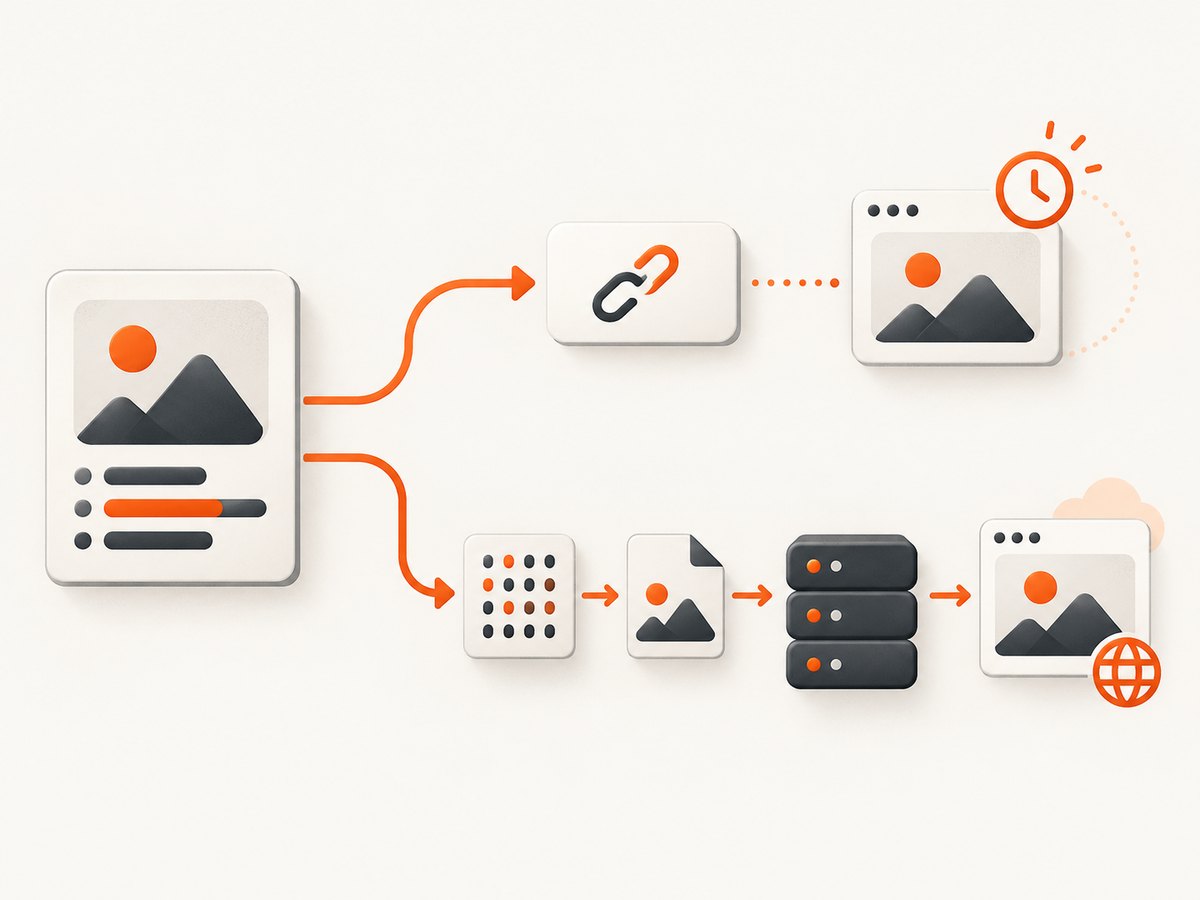
Direct answer: an image-generation API can give you either a temporary URL or image bytes. OpenAI documents URL output for DALL·E 2 and DALL·E 3, while GPT Image models return base64-encoded image data. A durable URL requires one extra step: download the temporary image or decode the base64 response, save the file, and serve it from a web-accessible host.
The important distinction is whether the URL belongs to the image API or to infrastructure you control. OpenAI’s documented DALL·E URLs are valid for 60 minutes, so they are suitable for immediate display but not long-term storage. If your application needs a link that remains available, persist the image and return your own application or storage URL.
1. Choose the URL workflow that matches your response
| Response from the image API | What you do | Best use |
|---|---|---|
Temporary url |
Download it immediately, then store the bytes if you need a durable link | Fast previews and one-time downloads |
b64_json |
Base64-decode the value into an image file, then host that file | GPT Image responses and controlled storage |
OpenAI’s API reference says that image URLs are only valid for 60 minutes after generation and that the response_format parameter is not supported for GPT Image models, which always return base64-encoded images. See the Create image API reference and the image generation guide.
What “instant URL” means in practice
There are three common meanings:
- An API URL: the provider gives you a link that works immediately but may expire.
- An application URL: your server saves the image and exposes a route such as
/images/abc123.png. - A hosted asset URL: your application uploads the bytes to storage configured for public, private, or signed access.
The image model creates the pixels. It does not automatically decide retention, authentication, cache policy, or the final URL you expose to users. Those are hosting decisions in your application.
2. Generate an image and inspect the response
Always inspect the response shape before writing URL-handling code. A response may contain data[0].url, data[0].b64_json, or an error. Do not assume that every model supports both formats.
cURL: request a URL response
curl https://api.openai.com/v1/images/generations \
  -H "Authorization: Bearer $OPENAI_API_KEY" \
  -H "Content-Type: application/json" \
  -d '{
    "model": "dall-e-3",
    "prompt": "A blue ceramic coffee mug on a wooden desk",
    "size": "1024x1024",
    "response_format": "url"
  }'
For DALL·E 2 and DALL·E 3, the response includes a temporary URL. Download it as soon as you receive it. Waiting until a later background job, retry, or user click can exceed the documented 60-minute lifetime.
cURL: request and decode base64 output
curl https://api.openai.com/v1/images/generations \
  -H "Authorization: Bearer $OPENAI_API_KEY" \
  -H "Content-Type: application/json" \
  -d '{
    "model": "gpt-image-1",
    "prompt": "A blue ceramic coffee mug on a wooden desk"
  }' > response.json

jq -r '.data[0].b64_json' response.json | base64 --decode > mug.png
The OpenAI CLI documentation demonstrates this extract-and-decode pattern. The output file is local until you serve or upload it.
Python: handle either response shape
import base64
import os
from pathlib import Path
import requests

api_key = os.environ["OPENAI_API_KEY"]
payload = {
    "model": "gpt-image-1",
    "prompt": "A blue ceramic coffee mug on a wooden desk",
}

r = requests.post(
    "https://api.openai.com/v1/images/generations",
    headers={"Authorization": f"Bearer {api_key}"},
    json=payload,
    timeout=120,
)
r.raise_for_status()
item = r.json()["data"][0]

if item.get("url"):
    image = requests.get(item["url"], timeout=60)
    image.raise_for_status()
    Path("mug.png").write_bytes(image.content)
elif item.get("b64_json"):
    Path("mug.png").write_bytes(base64.b64decode(item["b64_json"]))
else:
    raise RuntimeError("The response contained neither url nor b64_json")

print("Saved mug.png")
Node.js: handle either response shape
import { writeFile } from 'node:fs/promises';

const apiKey = process.env.OPENAI_API_KEY;
const response = await fetch('https://api.openai.com/v1/images/generations', {
  method: 'POST',
  headers: {
    Authorization: `Bearer ${apiKey}`,
    'Content-Type': 'application/json'
  },
  body: JSON.stringify({
    model: 'gpt-image-1',
    prompt: 'A blue ceramic coffee mug on a wooden desk'
  })
});

if (!response.ok) {
  throw new Error(`${response.status}: ${await response.text()}`);
}

const item = (await response.json()).data[0];
if (item.url) {
  const image = await fetch(item.url);
  if (!image.ok) throw new Error(`Image download failed: ${image.status}`);
  await writeFile('mug.png', Buffer.from(await image.arrayBuffer()));
} else if (item.b64_json) {
  await writeFile('mug.png', Buffer.from(item.b64_json, 'base64'));
} else {
  throw new Error('The response contained neither url nor b64_json');
}

console.log('Saved mug.png');
3. Turn the image bytes into a web URL
Saving mug.png is only half the job. A browser needs an HTTP(S) endpoint that returns the bytes with the correct content type. You can expose a file through your application, upload it to storage, or proxy it through an image service. The implementation below uses a simple application-owned route concept:
GET /images/8f2c1e7a.png
Content-Type: image/png
Cache-Control: public, max-age=31536000, immutable

(binary image bytes)
Generate an unguessable identifier instead of using a user’s prompt as a filename. Store the MIME type and extension from the actual output, validate file size, and reject path traversal characters. If images are private, require authorization on the route or issue short-lived signed links. If images are public, use a long cache lifetime only when the content is immutable; otherwise clients can keep stale pixels.
Returning the URL from your API
{
  "id": "8f2c1e7a",
  "url": "https://app.example.com/images/8f2c1e7a.png",
  "content_type": "image/png"
}
The hosting recommendation is an application design choice, not an OpenAI feature. Decide how long to retain files, whether users can delete them, whether URLs are public, and how downloads are authenticated. For high traffic, put a cache or content delivery layer in front of the image route. For private assets, avoid putting permanent bearer credentials in the URL.
4. Preserve the right format and metadata
Do not blindly label every generated file as PNG. Use the response’s declared format and your decoder’s validation. Preserve width, height, color mode, and, when relevant, transparency. If you resize or convert images, create a new object and URL so clients do not receive a cached version of the old bytes.
Use a content hash or a random ID for deduplication. A hash lets identical bytes share storage, while a random ID avoids exposing whether two users generated the same image. Either approach is valid; choose based on privacy and cache requirements.
5. Common errors and fixes
| Error | Likely cause | Fix |
|---|---|---|
url is missing |
The selected model returns base64 only | Read b64_json and decode it |
| Temporary link returns 403 or 404 | The documented 60-minute URL lifetime elapsed | Download immediately after generation and serve your saved copy |
| Base64 decoder reports invalid input | Whitespace, a data-URL prefix, or truncated JSON was passed to the decoder | Parse JSON first, remove any data:image/...;base64, prefix, and verify the full value was received |
| Browser shows a download instead of an image | Incorrect or missing Content-Type |
Send image/png, image/jpeg, or the actual media type |
| Image appears broken after deployment | Only a local filesystem path was returned | Return an HTTPS route reachable by the browser, not /tmp/mug.png |
| Old image keeps appearing | Browser or proxy cache still has the previous bytes | Use immutable, versioned URLs or purge the cache when replacing content |
| Large memory usage | Entire base64 response and decoded bytes are held at once | Set response limits, process jobs asynchronously, and write bytes promptly |
6. Performance, reliability, and cost notes
- Download early: a temporary URL adds a second network request and has a fixed lifetime. Download in the same job that receives the generation response.
- Use retries carefully: retry transient HTTP failures with exponential backoff, but do not regenerate an image unless you intend to pay for another generation request.
- Make storage idempotent: attach a job ID or idempotency key to your record so a worker retry does not create duplicate files.
- Validate before publishing: check the HTTP status, content type, byte length, and that an image decoder can open the file.
- Separate generation from delivery: a queue can generate and store the image while your API immediately returns a job ID. A later status response can provide the final URL.
- Budget for both operations: image generation, storage, bandwidth, and cache egress are separate cost centers. The cited OpenAI material does not provide storage-provider pricing.
- Protect public endpoints: rate-limit image creation and downloads, authenticate private assets, and avoid logging base64 payloads.
7. Or skip the browser setup
If your next step is to create a clean preview or document image URL for a generated-image page, ScreenshotNeo provides a single screenshot request without maintaining Playwright or browser workers. It accepts a URL and returns PNG, JPEG, WebP, or PDF. Cookie and consent banners, newsletter popups, and chat widgets are removed before capture; bot checks, blank pages, failed loads, timeouts, and cache hits are not billed. An MCP server provides take_screenshot, get_page_info, and capture_pdf tools for Claude, Cursor, and other MCP clients.

See the ScreenshotNeo API documentation for all options.
curl -G "https://api.screenshotneo.com/v1/shot" -d access_key=YOUR_API_KEY --data-urlencode url=https://stripe.com -o shot.webpimport requests
r = requests.get("https://api.screenshotneo.com/v1/shot", params={"access_key": "YOUR_API_KEY", "url": "https://stripe.com"}, timeout=90)
open("shot.webp", "wb").write(r.content)const q = new URLSearchParams({ access_key: 'YOUR_API_KEY', url: 'https://stripe.com' }); const res = await fetch(`https://api.screenshotneo.com/v1/shot?${q}`);ScreenshotNeo is free for 1,000 screenshots per month with no card. Paid plans start at $5 for 3,000 screenshots. Create a free ScreenshotNeo account.
8. FAQ
Can I make an OpenAI temporary URL permanent?
Not directly. Download the bytes while the URL is valid, store them under your own retention and access rules, and return your hosted URL.
Why does GPT Image return base64?
The API reference documents that GPT Image models always return base64-encoded images. Decode the field into a file before serving it.
Should my image URL be public?
Only if the image is intended for public access. Otherwise use an authenticated endpoint or a short-lived signed URL.
How do I prevent duplicate images?
Hash the decoded bytes or attach a deterministic generation key, then use that value to check storage before writing a second copy.
Can I return a URL before the image is ready?
Yes. Return a job URL such as /image-jobs/123, process generation asynchronously, and include the final image URL when the job reaches a completed state.


