How to Use cURL with a Proxy: Flags, Authentication, and SOCKS
Learn every cURL proxy option, including HTTP, HTTPS, SOCKS, authentication, DNS routing, bypass rules, debugging, and safer automation.
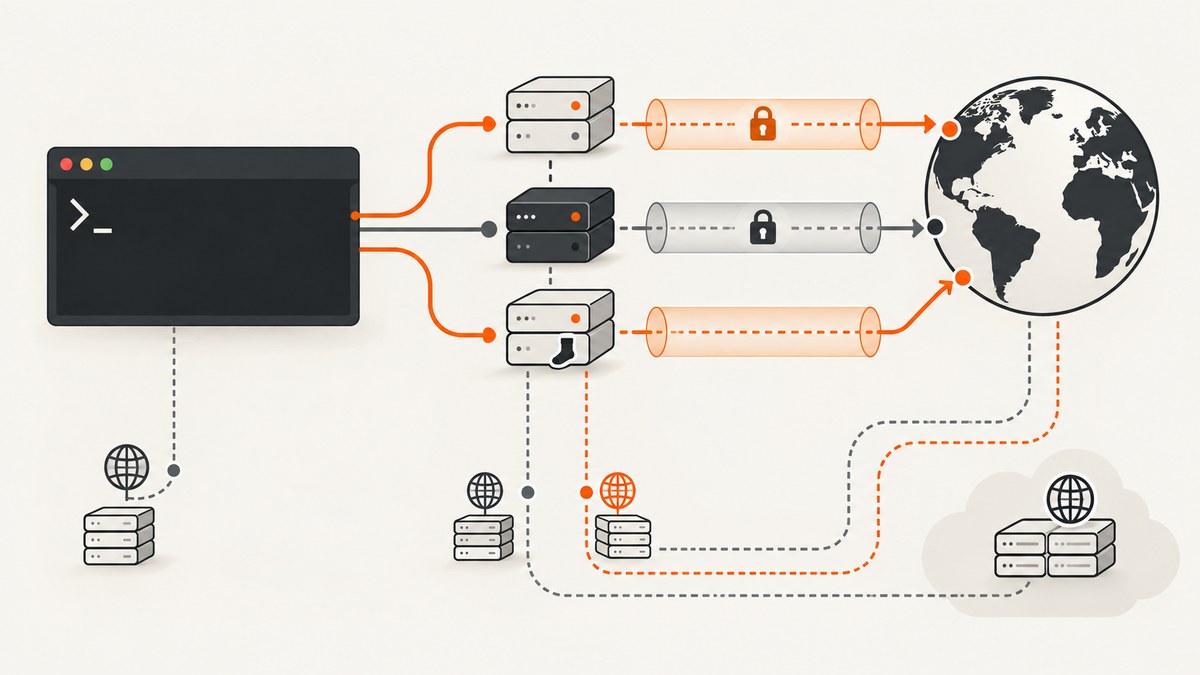
Direct answer: use -x (or --proxy) to send a cURL request through an HTTP, HTTPS, or SOCKS proxy. Add -U for proxy credentials, choose --socks5 when DNS should resolve locally, and choose --socks5-hostname (or socks5h://) when the proxy should resolve the destination. Use --noproxy for a one-command bypass and environment variables for shared configuration.
This guide covers the flags, authentication methods, DNS behavior, tunneling, environment variables, secret handling, debugging, language equivalents, and operational trade-offs. Examples follow the semantics documented in the official cURL man page and cURL proxy tutorial.
1. The shortest working commands
Start with the proxy URL and destination URL. If no scheme is supplied, cURL treats the proxy as HTTP.
# HTTP proxy
curl -x http://proxy.example:8080 https://example.com

# HTTPS proxy
curl -x https://proxy.example:8443 https://example.com

# HTTP proxy with credentials
curl -x http://proxy.example:8080 -U 'user:password' https://example.com

# SOCKS5; destination DNS resolves on this machine
curl --socks5 proxy.example:1080 https://example.com

# SOCKS5; proxy resolves the destination DNS name
curl --socks5-hostname proxy.example:1080 https://example.com

# Bypass the proxy for selected hosts
curl --noproxy 'localhost,127.0.0.1,.internal.example' \
  -x http://proxy.example:8080 https://example.com

# Show the CONNECT exchange and authentication negotiation
curl -v -x http://proxy.example:8080 https://example.com
-x applies to the current command and overrides proxy environment variables. The destination URL still uses its normal scheme; an HTTPS destination usually causes cURL to issue an HTTP CONNECT request through an HTTP proxy.
2. Proxy schemes and what each one means
| Proxy URL | Protocol | DNS resolution | Typical use |
|---|---|---|---|
http://host:port |
HTTP proxy | Proxy receives the destination after CONNECT for HTTPS | Corporate and filtering proxies |
https://host:port |
TLS-protected connection to an HTTP proxy | Proxy-side handling | Protecting the client-to-proxy hop |
socks4://host:port |
SOCKS4 | Local | Legacy SOCKS deployments |
socks4a://host:port |
SOCKS4a | Proxy | SOCKS4 with remote DNS |
socks5://host:port |
SOCKS5 | Local | When local DNS is desired |
socks5h://host:port |
SOCKS5 hostname mode | Proxy | Preventing local DNS leaks or reaching private names known only to the proxy |
The equivalent long options are --proxy, --socks4, --socks4a, --socks5, and --socks5-hostname. A proxy port can be omitted in some URL forms; use the port supplied by your proxy administrator rather than relying on a default.
3. HTTP and HTTPS proxies
HTTP proxy for HTTP and HTTPS destinations
curl --proxy http://proxy.example:8080 http://example.com
curl --proxy http://proxy.example:8080 https://example.com
For an HTTPS destination, cURL normally asks an HTTP proxy to create a CONNECT tunnel. The proxy can see the destination host and port, while the encrypted HTTPS payload remains inside the tunnel.
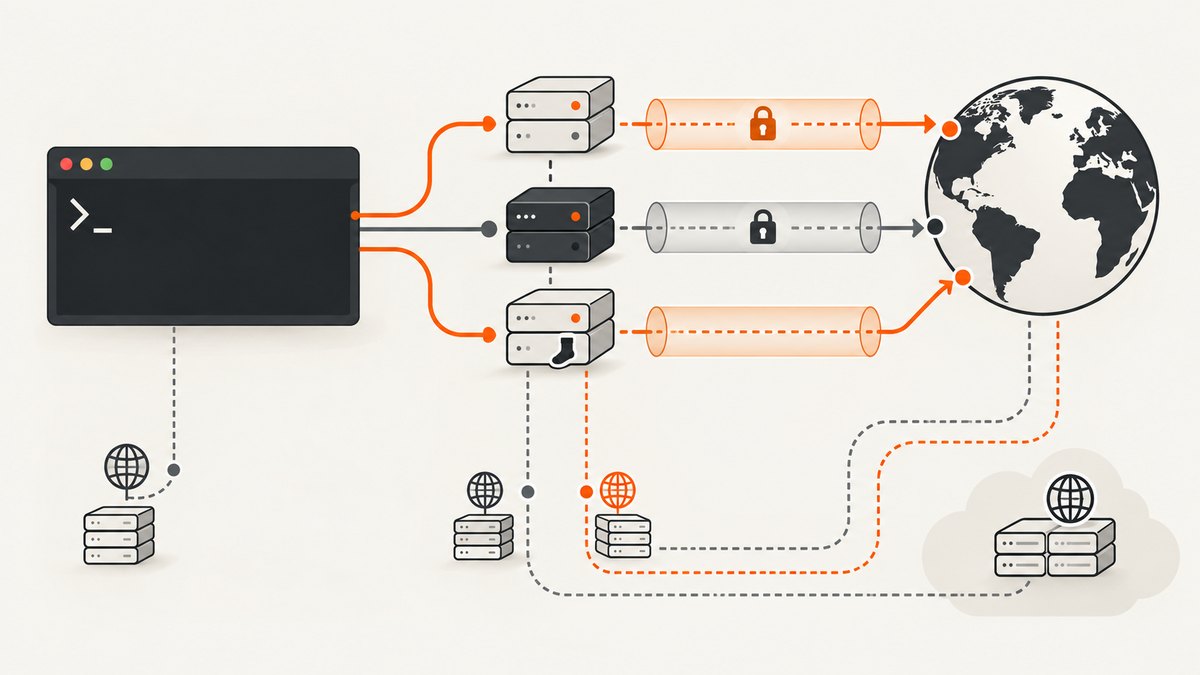
Connecting to an HTTPS proxy
curl --proxy https://proxy.example:8443 https://example.comHere, the connection between cURL and the proxy is itself protected with TLS. Certificate validation for that hop follows cURL’s normal TLS rules, so an untrusted corporate certificate can cause a verification error. Fix the trust store or use the organization-approved CA configuration; avoid disabling verification as a permanent solution.
Forcing an HTTP CONNECT tunnel
curl --proxytunnel -x http://proxy.example:8080 https://example.com--proxytunnel explicitly requests tunneling through an HTTP proxy. It is useful when a proxy otherwise tries to handle the request as a normal HTTP request.
4. Proxy authentication
Proxy authentication is separate from authentication to the origin server. Use --proxy-user (short form -U) when the proxy challenges.
curl -x http://proxy.example:8080 \
  --proxy-user 'alice:secret' \
  https://example.com
If you omit the password, cURL can prompt for it interactively:
curl -x http://proxy.example:8080 -U 'alice' https://example.comHTTP proxy authentication methods
| Option | Purpose | Operational note |
|---|---|---|
--proxy-basic |
Use Basic authentication | Simple and widely supported; protect the proxy connection with TLS when possible. |
--proxy-digest |
Use Digest authentication | Selected when the proxy advertises Digest. |
--proxy-ntlm |
Use NTLM | Common in older Windows-integrated environments. |
--proxy-negotiate |
Use SPNEGO/Negotiate | Requires suitable platform support and credentials. |
--proxy-anyauth |
Let cURL negotiate a supported method | May add a request/response round trip while discovering the method. |
# Explicit Basic authentication
curl -x http://proxy.example:8080 -U 'alice:secret' --proxy-basic https://example.com

# Let the proxy and cURL negotiate
curl -x http://proxy.example:8080 -U 'alice:secret' --proxy-anyauth https://example.com
Do not confuse these flags with --user, which authenticates to the remote server. A 407 response means the proxy wants credentials; a 401 response generally comes from the origin.
Protecting credentials
Arguments can be visible in process listings and shell history. Prefer an interactive prompt, a protected configuration file, or your secret manager in automation. For example, keep the username in the command and omit the password so cURL prompts, or inject the value through a short-lived process environment that your operating system protects.
5. SOCKS4 and SOCKS5 DNS behavior
The key difference between --socks5 and --socks5-hostname is where the destination name is resolved:
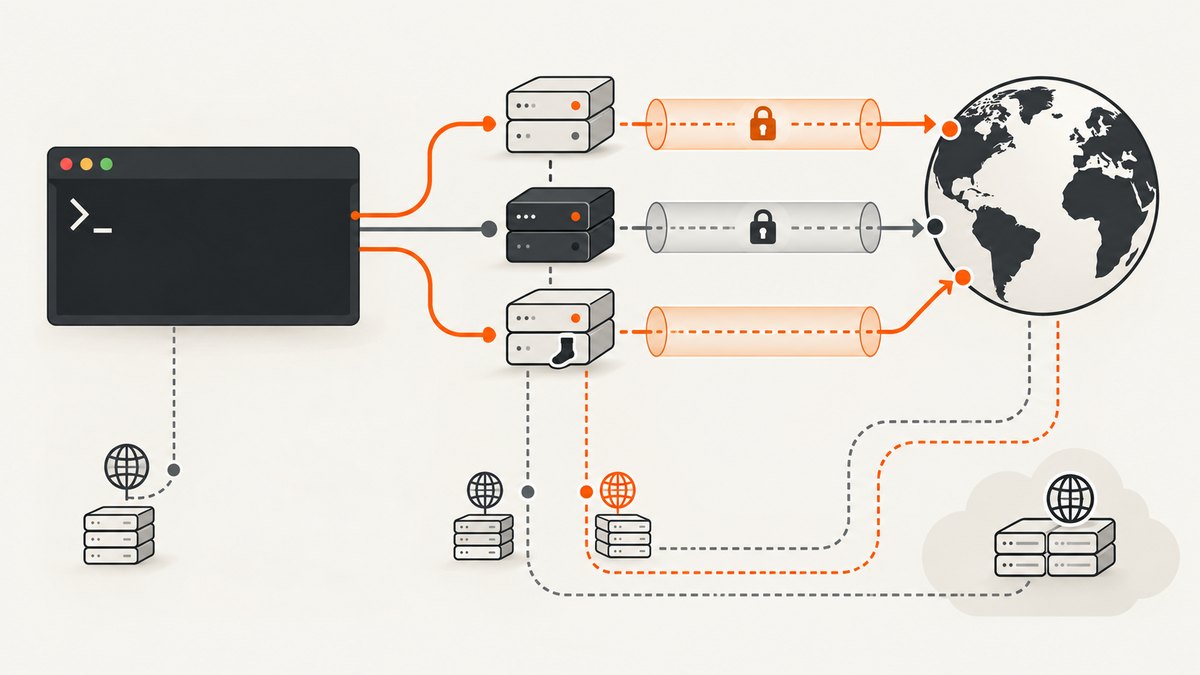
--socks5resolvesexample.comlocally, then sends the resulting address to the proxy.--socks5-hostname(orsocks5h://) sends the name to the proxy for resolution.
# Local DNS resolution
curl --socks5 proxy.example:1080 https://example.com

# Proxy-side DNS resolution
curl --socks5-hostname proxy.example:1080 https://example.com

# URL spelling for proxy-side DNS
curl -x socks5h://proxy.example:1080 https://example.com
Use proxy-side DNS when local DNS would leak the destination, when split-horizon DNS exists only inside the proxy network, or when the proxy is the intended policy enforcement point. Use local DNS when the client must control resolution or the SOCKS service does not support hostname forwarding.
SOCKS4 resolves locally, while SOCKS4a asks the proxy to resolve the hostname. SOCKS5 can authenticate with username/password using --socks5-basic or with GSS-API using --socks5-gssapi when your build and server support them.
curl --socks5 proxy.example:1080 \
  --proxy-user 'alice:secret' \
  --socks5-basic https://example.com
6. Environment variables and one-command bypasses
For scripts or a shell session, set protocol-specific variables:
export http_proxy='http://proxy.example:8080'
export HTTPS_PROXY='http://proxy.example:8080'
export FTP_PROXY='http://proxy.example:8080'
export ALL_PROXY='socks5h://proxy.example:1080'
export NO_PROXY='localhost,127.0.0.1,.internal.example'

curl https://example.com
NO_PROXY lists hosts or domains that must avoid proxying. A leading dot matches a domain and its subdomains. Use --noproxy when the exception should affect only one command:
curl --noproxy 'localhost,127.0.0.1,.internal.example' \
  -x http://proxy.example:8080 https://example.com
An explicit -x or --proxy overrides the environment proxy setting. To disable proxy use for a command, pass an empty value:
curl --noproxy '*' https://example.com7. Combining proxies with --preproxy
--preproxy adds a SOCKS hop before an HTTP or HTTPS proxy. This is useful when the network path requires a SOCKS gateway before reaching the organization’s HTTP proxy.
curl --preproxy socks5h://jump.example:1080 \
  --proxy http://proxy.example:8080 \
  https://example.com
Document both hops for operators: failures can occur at the SOCKS connection, the HTTP proxy connection, CONNECT authorization, TLS validation, or the origin request.
8. Equivalent code in Python
The Python requests library uses a proxy map. The scheme in the proxy URL controls the adapter behavior; use socks5h for proxy-side DNS (with the SOCKS extra installed).
import requests

proxies = {
    'http': 'http://proxy.example:8080',
    'https': 'http://proxy.example:8080',
}
response = requests.get('https://example.com', proxies=proxies, timeout=30)
response.raise_for_status()
print(response.status_code)
# SOCKS5 with proxy-side DNS: pip install requests[socks]
import requests
proxies = {
'http': 'socks5h://proxy.example:1080',
'https': 'socks5h://proxy.example:1080',
}
response = requests.get('https://example.com', proxies=proxies, timeout=30)
response.raise_for_status()
print(response.text[:200])9. Equivalent code in Node.js
Node’s built-in fetch does not automatically honor an HTTP proxy. With modern Node, install Undici (or use the bundled version where available) and pass a ProxyAgent.
import { fetch, ProxyAgent } from 'undici';

const dispatcher = new ProxyAgent('http://proxy.example:8080');
const response = await fetch('https://example.com', { dispatcher });
if (!response.ok) throw new Error(`HTTP ${response.status}`);
console.log(await response.text());
For SOCKS, use a SOCKS-capable agent such as socks-proxy-agent and pass it through the HTTP client library you use. Verify that the agent performs remote DNS when you require socks5h semantics; libraries differ in their option names.
10. Troubleshooting checklist
| Symptom | Likely cause | Fix |
|---|---|---|
| Could not resolve proxy | Wrong hostname, DNS failure, or malformed proxy URL | Check the scheme, host, and port; test the proxy host with your normal DNS tools. |
| 407 Proxy Authentication Required | Missing or incorrect proxy credentials | Use -U and select the method advertised by the proxy. |
| 401 Unauthorized | The origin server, rather than the proxy, rejected credentials | Use origin authentication flags separately from proxy flags. |
| SOCKS connection fails | Wrong SOCKS version, port, or unsupported authentication | Try the matching --socks4/--socks5 option and confirm server capabilities. |
| Private hostname cannot be resolved | Local DNS is being used with --socks5 |
Switch to --socks5-hostname or socks5h://. |
| Proxy appears ignored | NO_PROXY matches the destination or another command option overrides it |
Inspect environment variables and use --noproxy '' or an explicit -x. |
| TLS certificate error | Untrusted proxy CA or intercepted TLS | Install the approved CA in the trust store and inspect with verbose output. |
| Request hangs | Blocked CONNECT, authentication negotiation, or unreachable proxy | Add -v, set a timeout, and test the proxy with a simple HTTP destination. |
Use verbose mode to see proxy selection, CONNECT, response codes, and authentication negotiation:
curl -v --connect-timeout 10 --max-time 60 \
  -x http://proxy.example:8080 https://example.com
For repeatable diagnostics, record the cURL version, exact proxy scheme, whether DNS should be local or remote, and whether the failure occurs before or after CONNECT. Remove credentials from logs.
11. Performance, reliability, and cost considerations
- Latency: every proxy hop adds connection and handshake time. Reuse connections where your application allows it and avoid unnecessary SOCKS-plus-HTTP chains.
- DNS: remote DNS can add latency but avoids local leaks and can reach names unavailable to the client.
- Authentication:
--proxy-anyauthcan add a negotiation round trip. If the method is known, select it directly. - Timeouts: combine
--connect-timeoutwith--max-time; retry only idempotent requests and use backoff. - Reliability: monitor proxy capacity, connection limits, DNS failures, and 407/5xx rates separately. A successful TCP connection does not prove the proxy can reach the origin.
- Cost: cURL itself is free; your proxy may charge by bandwidth, request volume, concurrent connections, or egress. Keep credentials and proxy URLs out of source control.
12. Or skip the browser setup
If your goal is a clean image or PDF of a URL rather than controlling a local cURL network path, ScreenshotNeo provides a single screenshot API request. It handles browser capture for you and supports PNG, JPEG, WebP, and PDF output. See the ScreenshotNeo API documentation for the full option list.
curl -G 'https://api.screenshotneo.com/v1/shot' \
  -d access_key=YOUR_API_KEY \
  --data-urlencode url=https://stripe.com \
  -o shot.webp
import requests
r = requests.get('https://api.screenshotneo.com/v1/shot', params={'access_key': 'YOUR_API_KEY', 'url': 'https://stripe.com'}, timeout=90)
open('shot.webp', 'wb').write(r.content)const q = new URLSearchParams({ access_key: 'YOUR_API_KEY', url: 'https://stripe.com' });
const res = await fetch(`https://api.screenshotneo.com/v1/shot?${q}`);ScreenshotNeo removes cookie and consent banners, newsletter popups, and chat widgets before the shot. Bot checks, blank pages, timeouts, failed loads, and cache hits are not billed, and each response identifies the result with X-Page-Verdict and X-Billed headers. Its MCP server lets Claude, Cursor, and other MCP clients call take_screenshot, get_page_info, and capture_pdf. The Free plan includes 1,000 screenshots per month with no card; paid plans start at $5 for 3,000 shots. Create a free ScreenshotNeo account.
13. FAQ
Does -x override HTTPS_PROXY?
Yes. An explicit -x/--proxy setting takes precedence for that command.
Should I use --socks5 or --socks5-hostname?
Use --socks5 for local DNS resolution and --socks5-hostname when the proxy must resolve the name.
How do I bypass a proxy for localhost?
Use --noproxy localhost,127.0.0.1, or add those names to NO_PROXY.
Why does cURL return 407 instead of 401?
407 is a proxy authentication challenge. Supply proxy credentials with -U and select the required proxy authentication method.
Can I hide a proxy password from process listings?
Omit it so cURL prompts, or provide it through a protected secret mechanism rather than a literal command-line argument.
Can a SOCKS proxy and HTTP proxy be chained?
Yes. Use --preproxy for the SOCKS hop and --proxy for the HTTP or HTTPS proxy.


