Customer Sentiment Monitoring for E-Commerce
Build a reliable e-commerce sentiment program that connects reviews, support, surveys, and social feedback to clear actions while protecting customer trust.

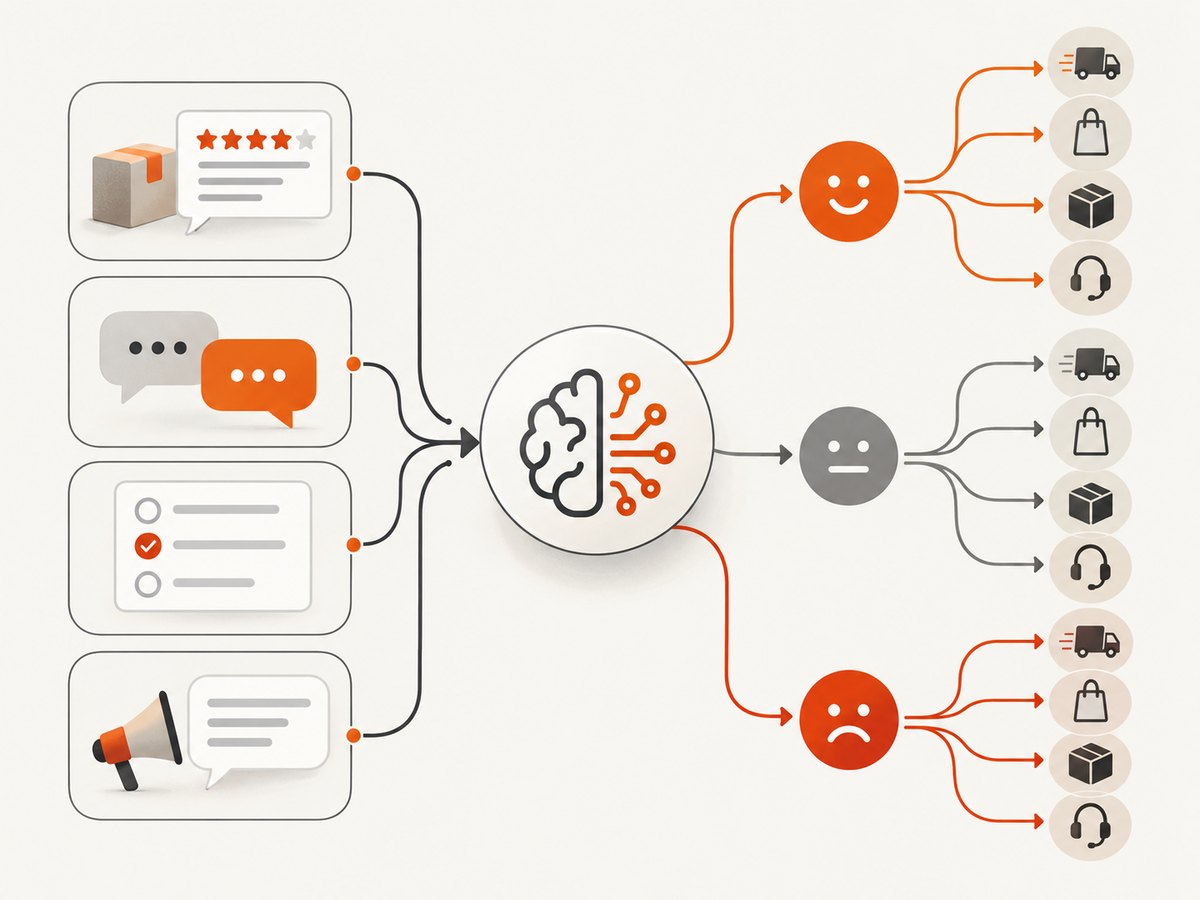
Customer sentiment monitoring for e-commerce means collecting customer language from reviews, ratings, surveys, email, support conversations, and public comments, then analyzing its tone and recurring themes over time. A useful program does more than label messages positive, negative, or neutral: it identifies what customers are reacting to, shows how confident the system is, and routes recurring problems to an owner who can act.
Start with a channel and permissions inventory, preserve source context, and combine automated analysis with human review for uncertain or consequential cases. Monitor both customer experience and review-operation health: coverage, model errors, response time, and whether positive and negative feedback are treated equally. Sentiment is a signal for investigation, not a substitute for reading what customers said.
1. What sentiment monitoring tells an online store
Sentiment analysis estimates the emotional tone of text, commonly as positive, negative, or neutral. Aspect-level analysis attaches that tone to a topic such as product quality, delivery, returns, price, usability, or support. For example, “The jacket is excellent, but delivery took two weeks” contains positive product sentiment and negative fulfillment sentiment. A single overall label would hide the operationally useful distinction.
Ratings and text are complementary. A low rating can signal dissatisfaction without explaining its cause; a detailed review can identify a specific defect even when the star rating is high. Digital.gov describes email and other unsolicited feedback as useful customer-experience data and explains sentiment analysis as determining whether a message has positive, negative, or neutral emotional tone. The 2025 academic review of e-commerce sentiment systems also connects reviews, ratings, comments, recommendation accuracy, and explainability.
Use the resulting evidence to find changes and recurring drivers: a new packaging complaint concentrated in one SKU, a shipping delay affecting one fulfillment method, or a confusing return policy showing up across categories. The system should help a person answer “what changed, where, and what should we check?” It should not turn an inferred emotion into a definitive statement about an individual customer.
2. Choose sources and define the collection boundary
A review-only dashboard may miss early warning signals in support, email, surveys, or public comments. Before choosing software, list the sources that matter and confirm that you have permission and a suitable basis to collect and process each one. Source availability depends on platform access, account permissions, export facilities, and applicable privacy rules; do not assume that a vendor can ingest every channel.
| Source | Useful context to retain | Common limitation |
|---|---|---|
| Product reviews and ratings | SKU, variant, verified-purchase status where available, date, rating, disclosure fields | May overrepresent customers motivated to post publicly |
| Support conversations | Issue category, order context, channel, timestamps, resolution | Contains personal information; access and retention need controls |
| Surveys and post-purchase feedback | Question wording, response date, product or order context | Response bias and changes in survey wording affect trends |
| Email and unsolicited feedback | Source, received date, related product or order when appropriate | May require careful consent, privacy, and retention handling |
| Public social comments | Platform, public post URL or identifier, date, language | API terms and availability vary; public does not mean unrestricted reuse |
For each source, record the owner, access method, historical backfill range, languages, refresh interval, and deletion process. Keep source identifiers so a reviewer can locate the original message where permitted. Do not merge channels in a way that loses whether text was a review, a private support message, or a survey answer; the context changes how a team should respond.
3. Build a reliable sentiment workflow
- Inventory sources and permissions. Document what is collected, why, by whom, and for how long. Include platform constraints and a process for removal or correction.
- Normalize without erasing meaning. Standardize timestamps, product IDs, ratings, locale, and channel metadata. Preserve the original text. Remove duplicate imports, but keep a traceable reference to the source record.
- Classify tone and aspects. Store polarity, aspect labels, model version, confidence, and relevant evidence or explanation. A useful taxonomy starts with product quality, fit or usability, value, shipping, packaging, returns, and support, then changes based on actual customer language.
- Set review thresholds. Send low-confidence, conflicting, sarcastic, multilingual, or high-impact cases to a human queue. A classification should not trigger a consequential customer action by itself.
- Trend at useful levels. Compare SKU, category, geography, fulfillment method, and customer segment only where lawful and appropriate. Use minimum group sizes to avoid exposing individuals through small cohorts.
- Route issues and record action. Assign recurring patterns to an accountable owner in product, fulfillment, support, or marketing. Record investigation and outcome so the dashboard links a signal to a response.
- Audit quality and drift. Sample messages, label them with human reviewers, compare the system’s outputs, and track errors by language and topic. Recheck after product terminology, policies, or model versions change.
Keep an immutable or access-controlled audit trail appropriate to your system: source reference, processing time, model or rules version, label changes, reviewer, and final disposition. Define who can see raw text versus aggregate reports. Set a retention period based on business need and applicable obligations, and make deletion behavior consistent across source and derived data.

4. Pick a tool by workflow, not by its score
Compare tools against the work your team needs to do. A three-class score is easy to display but is not enough to diagnose causes, decide ownership, or verify that classifications are trustworthy.
| Evaluation area | Questions to ask |
|---|---|
| Channel coverage | Which review, support, survey, email, and social sources are supported? Can you backfill history? What access or subscription is required? |
| Analysis depth | Does it provide only polarity, or aspect and emotion labels? Can your team adjust the taxonomy to store-specific terms? |
| Language and domain accuracy | Which languages are supported? How does it handle sarcasm, short messages, product names, slang, and mixed sentiment? |
| Explainability and confidence | Can reviewers see why a label was assigned, inspect evidence, and route low-confidence results for review? |
| Alerts and integrations | Can a sustained change create an alert or ticket for the right owner? Can you prevent duplicate or noisy notifications? |
| Human controls | Can reviewers correct a label, document a decision, and measure agreement or error rates from sampled data? |
| Governance | What are the privacy, retention, deletion, access-control, and audit-log options? Can you separate raw text from aggregates? |
| Exports and cost | Can you export raw and aggregated data? What is included in the price, and how do source count, seats, message volume, and history affect total cost? |
| Review operations | For review-focused tools, are verified-purchase indicators, moderation queues, disclosures, audit logs, and equal treatment of negative reviews supported? |
Run a bounded evaluation using a representative sample that includes every important channel, language, product category, and known difficult case. Have humans label a sample before reviewing vendor results. Compare errors by aspect and language, inspect explanations, test exports and deletion, and follow one issue from alert through assignment and closure. Ask vendors to explain the measurement method rather than relying on an unsupported accuracy percentage.
5. Alerts, thresholds, and action ownership
Alerts should reflect a decision the team can make. A sudden rise in negative delivery comments may warrant checking a carrier or fulfillment center; a cluster of defect reports for one variant may need quality review. Define a baseline and minimum volume before alerting. A tiny number of messages can produce a dramatic percentage change while representing little evidence.
- Alert on a sustained change in an aspect or source, not every negative message.
- Show the count, time period, comparison baseline, source mix, and representative examples.
- Include uncertainty and note when language or sample size is insufficient.
- Assign an owner, expected response time, escalation route, and closure field.
- Review false alarms and missed issues; adjust thresholds with documented reasoning.
Do not use sentiment alone to suppress a customer, deny a refund, change an individual’s price, or rank customers for treatment. It is noisy, context-dependent evidence. Use it to prioritize investigation and improve services, with a human accountable for consequential decisions.
6. Reviews, trust, and compliance
Trustworthy monitoring begins with trustworthy collection. The FTC says people relying on online reviews “should be getting a true and accurate picture of what other consumers think.” Its platform guidance advises businesses not to solicit only likely-positive reviewers, discourage negative feedback, edit reviews to change their message, or treat positive and negative reviews differently. Material connections and rating methodology should be clearly disclosed where relevant.
The FTC Consumer Reviews and Testimonials Rule became effective October 21, 2024. The FTC’s guidance and the Federal Register summary address fake reviews, sentiment-conditioned incentives, certain undisclosed insider reviews, suppression, and fake social-media influence indicators. In particular, do not condition an incentive on positive sentiment; asking for a five-star review in exchange for a benefit remains prohibited even if a disclosure is requested. Consult the official guidance and legal counsel for how requirements apply to your program.
Operationally, verify authenticity using a documented, proportionate process; preserve disclosure fields; apply moderation criteria consistently; and maintain evidence of decisions. Make sure sentiment reporting does not hide negative reviews by excluding them from a dashboard or using a filter that makes an aggregate rating misleading. Publish rating methodology transparently, including what is included and how verified purchase status is represented.
7. Capture public pages as evidence for a monitoring workflow
Some teams need a visual record of a public review page, product listing, or support-status page alongside structured feedback. A browser screenshot can preserve what an operator saw at a particular time, but it does not replace permitted source data, an audit trail, or a validated sentiment pipeline. Prefer an official export or API when it provides the needed fields and is allowed by the source.
For a one-off public page, a browser automation script can navigate to the page and save a screenshot. Keep credentials out of source control, respect site terms and access controls, and avoid capturing private customer records unless your process authorizes it.
DIY browser capture with Playwright
Install Playwright and its Chromium browser, then save this as capture.mjs. It captures the full page and writes a PNG. Replace the example URL with a public page you are permitted to access.
npm install playwright
npx playwright install chromium
import { chromium } from 'playwright';
const url = 'https://example.com/products/example';
const browser = await chromium.launch({ headless: true });
try {
const page = await browser.newPage({ viewport: { width: 1440, height: 900 } });
const response = await page.goto(url, { waitUntil: 'networkidle', timeout: 45000 });
if (!response || !response.ok()) {
throw new Error(`Navigation failed: ${response?.status() ?? 'no response'}`);
}
await page.screenshot({ path: 'page.png', fullPage: true });
} finally {
await browser.close();
}For pages with persistent analytics traffic, networkidle may never occur; choose domcontentloaded and wait for a page-specific selector instead. Large full-page captures use more memory and can be slow. A selector capture can focus on the relevant review summary, but it omits surrounding context. Treat screenshots as supporting evidence, not as a structured dataset.
Direct capture request with cURL
For an authorized endpoint that returns a capture, this pattern saves the response body. Authentication and parameters are specific to the provider; do not send a secret in a URL that may be logged.
curl -L --fail --output page.png 'https://example.com/capture?url=https%3A%2F%2Fexample.com%2Fproducts%2Fexample'This generic example only fetches the stated endpoint; it does not imply that the target site itself returns an image. Use the provider’s documented request format and check the response status and content type before treating a body as an image.
Python request pattern
import requests

endpoint = 'https://example.com/capture'
params = {'url': 'https://example.com/products/example'}
response = requests.get(endpoint, params=params, timeout=60)
response.raise_for_status()
content_type = response.headers.get('content-type', '')
if not content_type.startswith('image/'):
    raise RuntimeError(f'Expected an image, received {content_type!r}')
with open('page.png', 'wb') as image_file:
    image_file.write(response.content)
Node.js request pattern
const endpoint = new URL('https://example.com/capture');
endpoint.searchParams.set('url', 'https://example.com/products/example');

const response = await fetch(endpoint, { signal: AbortSignal.timeout(60000) });
if (!response.ok) throw new Error(`Capture failed: HTTP ${response.status}`);
const type = response.headers.get('content-type') ?? '';
if (!type.startsWith('image/')) throw new Error(`Expected image, got ${type}`);
await Bun.write('page.png', new Uint8Array(await response.arrayBuffer()));
The cURL, Python, and Node.js snippets are generic request patterns, not claims about a particular third-party screenshot service. For production, use the chosen provider’s actual endpoint, authentication method, response format, and documented limits.
8. Or skip the browser setup
ScreenshotNeo is a website screenshot API and MCP server from Yorker Media. One GET request can return a PNG, JPEG, WebP, or PDF. It can help when a sentiment workflow needs a visual snapshot of a public product or review page in addition to its structured feedback records. See the ScreenshotNeo API documentation for parameters and configuration.
curl -G "https://api.screenshotneo.com/v1/shot" -d access_key=YOUR_API_KEY --data-urlencode url=https://stripe.com -o shot.webpimport requests
r = requests.get("https://api.screenshotneo.com/v1/shot", params={"access_key": "YOUR_API_KEY", "url": "https://stripe.com"}, timeout=90)
open("shot.webp", "wb").write(r.content)const q = new URLSearchParams({ access_key: 'YOUR_API_KEY', url: 'https://stripe.com' });
const res = await fetch(`https://api.screenshotneo.com/v1/shot?${q}`);ScreenshotNeo accepts cookie or consent banners as a visitor and removes more than 60 known consent platforms, newsletter popups, and chat widgets before capture; each step can be turned off. Bot checks and CAPTCHAs, blank pages, timeouts, failed loads, and cache hits are not billed, and response headers report the page verdict and billing status. Its MCP server offers take_screenshot, get_page_info, and capture_pdf for Claude, Cursor, and other MCP clients. The free plan includes 1,000 screenshots a month with no card; paid plans start at $5 for 3,000. Every feature is on every plan. Learn about ScreenshotNeo and sign up for 1,000 free screenshots a month with no card.
9. Performance, reliability, and cost
Processing cost depends on channel volume, history, language mix, retention, seats, integrations, and how much human review the system requires. Measure expected monthly volume per source and ask vendors how backfill, exports, API calls, additional seats, and storage affect the bill. Include implementation and ongoing taxonomy maintenance, not only the subscription price.
Choose an ingestion cadence that matches the decision. A daily trend can be sufficient for product-quality patterns, while an operational support queue may need more frequent updates. Build for retries and duplicate delivery: use source IDs and idempotent upserts, record checkpoints, and expose an ingestion-lag metric. A temporary source outage should create a visible gap, not silently appear as a sudden sentiment change.
For analysis reliability, preserve raw text and source metadata, version the model and taxonomy, and compare current output against a stable human-labeled sample. Keep separate measures for coverage, ingestion freshness, classification confidence, human correction rate, and alert resolution. A global score can improve while one language or product category gets worse, so break quality down by the groups your program is permitted to assess.
10. Troubleshooting common problems
| Symptom | Likely cause | Fix |
|---|---|---|
| Sentiment swings after a connector change | A source stopped syncing, changed its history window, or duplicated records | Check per-source volume and lag, deduplicate on stable source IDs, and annotate the reporting period. |
| Many neutral labels despite clear complaints | Domain terms, negation, short text, or mixed aspects are not represented well | Sample examples, evaluate by aspect, update the taxonomy or model, and route uncertain cases to review. |
| Complaints appear in the wrong category | Aspect labels overlap or product-specific language changed | Review confusion cases with domain owners, refine definitions, version the taxonomy, and reprocess only with traceability. |
| Alerts fire constantly | Thresholds ignore baseline volume, seasonality, source mix, or repeat messages | Set minimum counts, compare like periods and sources, deduplicate, and require persistence before escalation. |
| One channel dominates the dashboard | Sources have different volumes or collection coverage | Show channel-level counts and trends; avoid interpreting a blended score without source mix. |
| Public capture is blank or blocked | The page requires interaction, delays rendering, blocks automation, or returned an error page | Check status and final URL, wait for a specific element, verify access is permitted, and use a source export when available. |
| Capture hangs on network idle | Long-lived analytics or streaming requests keep the network active | Use DOM content loaded plus a page-specific wait condition or a bounded delay. |
| Model quality degrades over time | New terminology, product changes, language shifts, or model updates caused drift | Keep a labeled sample, review it on a schedule and after changes, and inspect errors by language and aspect. |
11. A practical launch checklist
- Sources, permissions, owners, refresh rates, backfill, and deletion paths are documented.
- Raw text, source context, ratings, timestamps, language, and product references remain traceable.
- Polarity and aspects have definitions; ambiguous and high-impact cases reach human review.
- Dashboard trends expose counts, channel mix, confidence, and sample-size limits.
- Alerts have thresholds, accountable owners, escalation paths, and closure records.
- Review solicitation, moderation, incentives, disclosures, and rating methodology follow current guidance.
- Access, retention, privacy, exports, and audit records have named owners.
- A human-labeled sample is used to check quality, multilingual gaps, and drift.
12. FAQ
How often should sentiment be recalculated?
Match the cadence to the action. A high-volume support workflow may need frequent updates, while category-level product trends can be useful on a daily or weekly basis. Monitor ingestion lag so delayed data is not mistaken for a real shift.
Should star ratings be included in the sentiment model?
Keep ratings as a separate signal and compare them with text sentiment. A rating can be useful context, but combining it into one score can obscure disagreement between the customer’s written explanation and selected stars.
Can sentiment monitoring predict churn?
Negative language can be a reason to investigate service or product problems, but it does not establish that a specific customer will leave. Validate any predictive use with an appropriate, governed evaluation and avoid making consequential decisions from sentiment alone.
What is the minimum viable implementation?
Start with one or two permitted sources, a small aspect taxonomy, a human-reviewed sample, and an owner for each recurring issue. Add channels and automation after you can explain the quality and operational value of the first signals.


