How to Send Cypress Test Reports, Screenshots, and Videos to MongoDB
Use Cypress Node events to collect reports and resolved artifact paths, then store metadata in MongoDB and large files in GridFS.
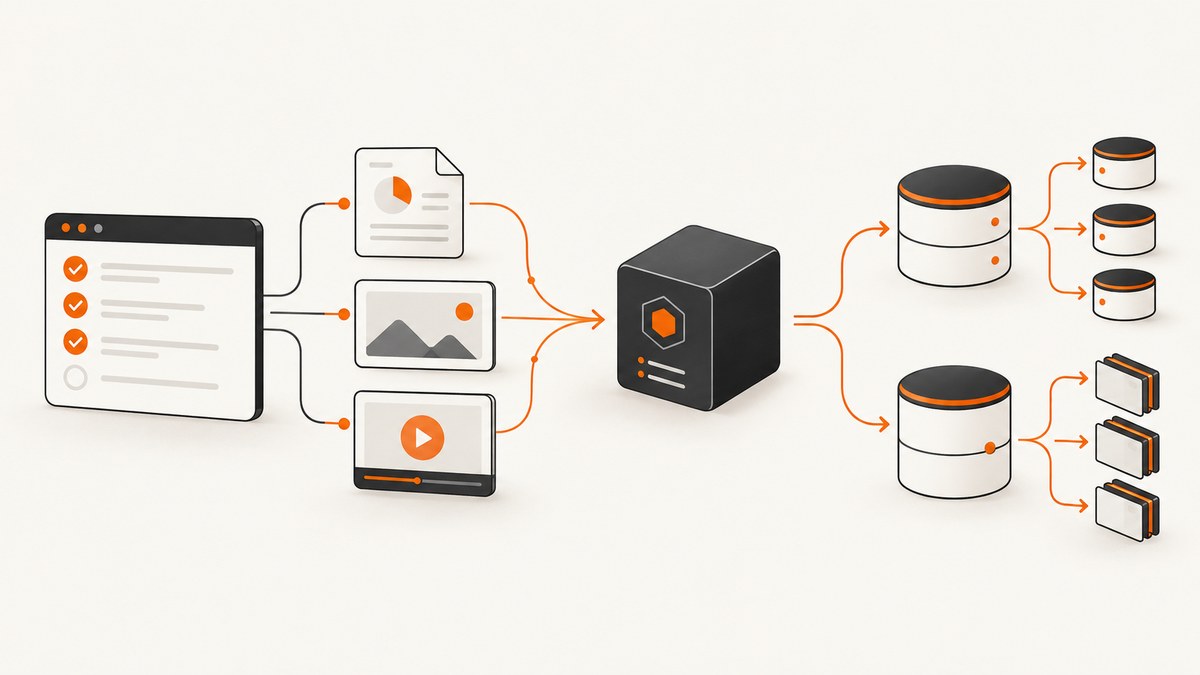
Direct answer: run Cypress, use its Node-side lifecycle events to receive the actual screenshot, video, and spec paths, write structured test results to MongoDB, and store binary artifacts either in a document (when they fit) or GridFS (when they exceed MongoDB’s 16 MiB BSON document limit). Keep a stable run/spec/test identifier in every report and artifact record so results can be queried without relying on filenames.
This workflow combines Cypress’s documented reporters, Module API, and Node events with MongoDB’s Node.js driver. Cypress does not publish a turnkey Cypress-to-MongoDB integration, so treat the implementation below as an assembly of those official primitives.
1. What Cypress produces
Cypress can create screenshots in open or run mode. During cypress run, failure screenshots are automatic unless disabled. Videos are disabled by default; when enabled, Cypress records one video per spec in run mode, not open mode. The default folders are cypress/screenshots and cypress/videos, and Cypress clears them before a run unless trashAssetsBeforeRuns is set to false. Video compression is off by default; enabling it reduces file size but adds processing time. See the Cypress screenshots and videos guide.
2. Choose a storage model
| Data | Recommended MongoDB representation | Why |
|---|---|---|
| Run, spec, test outcome, duration, error | Normal collection document | Queryable fields and indexes |
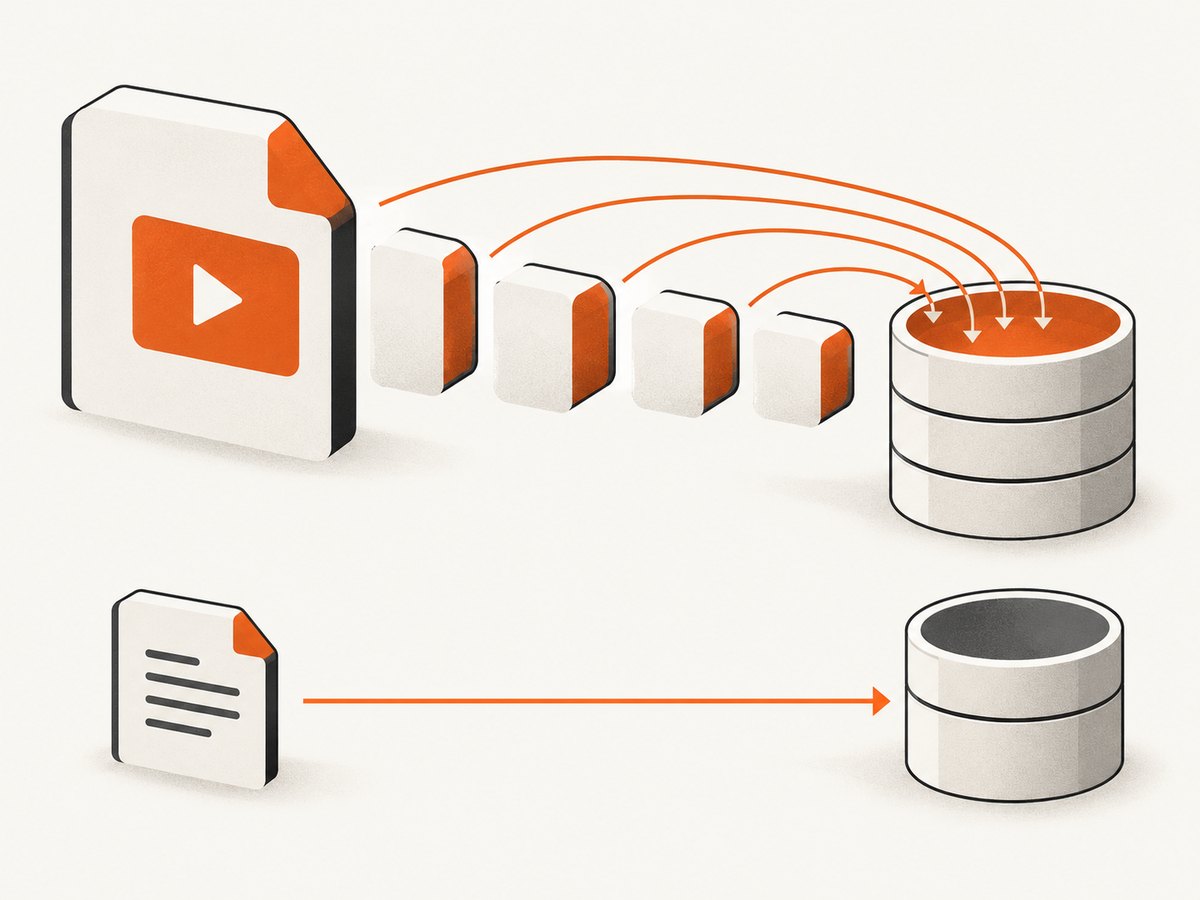
| Small screenshot or short text artifact | Binary field in a document, if it remains below the BSON limit | Simple atomic retrieval |
| Large screenshot, video, or other file | GridFS | Streams files in chunks and avoids the 16 MiB document limit |
MongoDB documents have a 16 MiB BSON size limit. MongoDB’s GridFS documentation recommends considering a single document for files smaller than that limit and GridFS for larger files. Compare expected artifact size, whether queries must inspect report fields, download or range-access needs, and retention operations before choosing. Sources: MongoDB GridFS manual and the Node.js driver GridFS guide.
3. Install the Node dependencies
npm install --save-dev cypress
npm install mongodb
Keep the MongoDB URI in a CI secret such as MONGODB_URI. Do not commit it or print it in Cypress logs.
4. Configure Cypress Node events
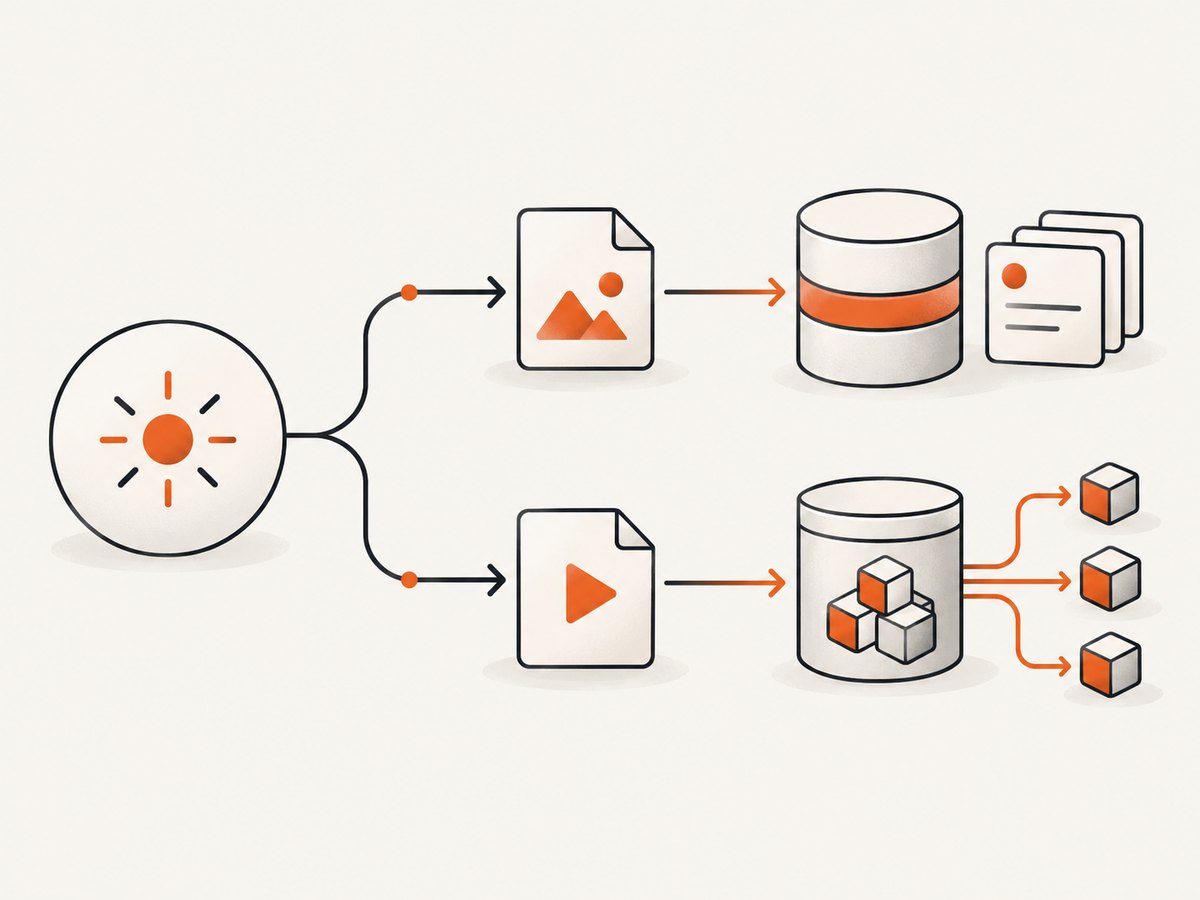
The Node process is the correct boundary for filesystem and database access. Register after:screenshot and after:spec so you use Cypress’s resolved paths instead of reconstructing paths from spec names. Cypress can alter the asset directory structure based on the common ancestor of specs in a run.
const { defineConfig } = require('cypress');
const { MongoClient, GridFSBucket, ObjectId } = require('mongodb');
const fs = require('node:fs');
const fsp = require('node:fs/promises');
const path = require('node:path');

const mongoUri = process.env.MONGODB_URI;
const dbName = process.env.MONGODB_DB || 'cypress_reports';

if (!mongoUri) throw new Error('MONGODB_URI is required');

let client;
let db;
let bucket;

async function getDb() {
  if (!client) {
    client = new MongoClient(mongoUri, { maxPoolSize: 10 });
    await client.connect();
    db = client.db(dbName);
    bucket = new GridFSBucket(db, { bucketName: 'cypressArtifacts' });
    await db.collection('testResults').createIndex({ runId: 1, spec: 1 });
    await db.collection('artifacts').createIndex({ runId: 1, spec: 1, type: 1 });
  }
  return db;
}

function runIdFromEnv() {
  return process.env.CI_RUN_ID || process.env.GITHUB_RUN_ID || `local-${Date.now()}`;
}

async function saveArtifact({ runId, spec, type, filePath, testTitle }) {
  const database = await getDb();
  const stat = await fsp.stat(filePath);
  const metadata = {
    runId,
    spec,
    type,
    testTitle: testTitle || null,
    originalPath: filePath,
    size: stat.size,
    createdAt: new Date()
  };

  // Store small files inline. Use GridFS for files that could exceed BSON limits.
  if (stat.size < 12 * 1024 * 1024) {
    const data = await fsp.readFile(filePath);
    const result = await database.collection('artifacts').insertOne({
      ...metadata,
      storage: 'document',
      contentType: type === 'video' ? 'video/mp4' : 'image/png',
      data
    });
    return result.insertedId;
  }

  const upload = bucket.openUploadStream(path.basename(filePath), {
    metadata: { ...metadata, storage: 'gridfs' }
  });
  await new Promise((resolve, reject) => {
    fs.createReadStream(filePath).pipe(upload).on('finish', resolve).on('error', reject);
  });
  const result = await database.collection('artifacts').insertOne({
    ...metadata,
    storage: 'gridfs',
    gridFsFileId: upload.id
  });
  return result.insertedId;
}

module.exports = defineConfig({
  e2e: {
    video: true,
    videoCompression: false,
    trashAssetsBeforeRuns: true,
    setupNodeEvents(on, config) {
      const runId = runIdFromEnv();

      on('after:screenshot', async (details) => {
        await saveArtifact({
          runId,
          spec: details.spec?.relative,
          type: 'screenshot',
          filePath: details.path,
          testTitle: details.name
        });
        return details;
      });

      on('after:spec', async (spec, results) => {
        const database = await getDb();
        await database.collection('specRuns').insertOne({
          runId,
          spec: spec.relative,
          stats: results?.stats || null,
          tests: results?.tests || [],
          videoPath: results?.video || null,
          createdAt: new Date()
        });

        if (results?.video && fs.existsSync(results.video)) {
          await saveArtifact({
            runId,
            spec: spec.relative,
            type: 'video',
            filePath: results.video
          });
        }
      });

      on('after:run', async (results) => {
        const database = await getDb();
        await database.collection('runs').insertOne({
          runId,
          startedTestsAt: results?.startedTestsAt || null,
          endedTestsAt: results?.endedTestsAt || null,
          totalTests: results?.totalTests || 0,
          totalPassed: results?.totalPassed || 0,
          totalFailed: results?.totalFailed || 0,
          totalSkipped: results?.totalSkipped || 0,
          totalPending: results?.totalPending || 0,
          createdAt: new Date()
        });
        await client.close();
        client = undefined;
      });

      return config;
    }
  }
});
Use a conservative inline threshold rather than waiting until 16 MiB exactly; BSON overhead and metadata also count toward the document limit. The example stores screenshots under 12 MiB inline and streams larger files to GridFS.
5. Store test reports
Reporter output
Cypress supports Mocha-compatible reporters, including spec and junit. A JUnit file is useful when another process parses the report and inserts documents:
npx cypress run --reporter junit --reporter-options "mochaFile=results/junit-[hash].xml,toConsole=false"
Parse the generated XML in a Node script, map each test to your chosen schema, and insert with insertMany. Suggested fields include runId, commit, branch, spec, suite, test title, attempt, outcome, duration, error summary, and timestamps. These are application fields, not fields Cypress requires.
Programmatic results with the Module API
If the same Node process must receive the complete result object, call cypress.run():
const cypress = require('cypress');
const { MongoClient } = require('mongodb');

(async () => {
  const runId = process.env.CI_RUN_ID || `local-${Date.now()}`;
  const client = new MongoClient(process.env.MONGODB_URI);
  await client.connect();
  const collection = client.db(process.env.MONGODB_DB || 'cypress_reports').collection('testResults');

  const result = await cypress.run({
    browser: 'chrome',
    reporter: 'junit',
    reporterOptions: { mochaFile: 'results/junit-[hash].xml' }
  });

  const documents = (result.runs || []).flatMap(run =>
    (run.tests || []).map(test => ({
      runId,
      spec: run.spec?.relative || null,
      testTitle: test.title,
      state: test.state,
      duration: test.duration,
      displayError: test.displayError || null,
      attempts: test.attempts || [],
      createdAt: new Date()
    }))
  );
  if (documents.length) await collection.insertMany(documents);
  await client.close();
  process.exitCode = result.totalFailed ? 1 : 0;
})().catch(error => { console.error(error); process.exitCode = 1; });
Use either lifecycle results or the Module API according to your runner. Avoid inserting the same tests twice if you also parse reporter files.
6. Retrieve artifacts
Keep the GridFS file ID with the report document. Filenames are not unique across runs or repeated spec names.
const { MongoClient, GridFSBucket, ObjectId } = require('mongodb');
const fs = require('node:fs');

async function download(gridFsId, outputPath) {
  const client = new MongoClient(process.env.MONGODB_URI);
  await client.connect();
  const bucket = new GridFSBucket(client.db(process.env.MONGODB_DB || 'cypress_reports'), { bucketName: 'cypressArtifacts' });
  await new Promise((resolve, reject) => {
    bucket.openDownloadStream(new ObjectId(gridFsId))
      .pipe(fs.createWriteStream(outputPath))
      .on('finish', resolve)
      .on('error', reject);
  });
  await client.close();
}
7. Run it in CI safely
- Set
MONGODB_URI, database name, and a unique run ID through the CI secret/environment mechanism. - Run Cypress with the desired browser and video settings.
- Upload artifacts during
after:screenshotandafter:spec, before the workspace is discarded. - Record upload failures and retry them with an idempotency key such as
runId + spec + type + originalPath. - Apply a retention job that deletes old report documents and their referenced GridFS files together.
- Verify failed tests, retries, duplicate spec names, missing videos, MongoDB outages, and partial uploads in the actual CI environment.
8. Common errors and fixes
| Error | Cause | Fix |
|---|---|---|
BSONObjectTooLarge |
Inline binary plus metadata exceeds 16 MiB | Use GridFS or lower the inline threshold. |
| Video path is null | Video is disabled, the run is open mode, or the spec failed before recording | Set video: true, use cypress run, and handle missing paths. |
| Screenshot not found | Code rebuilt a path instead of using the event path, or cleanup ran first | Use details.path from after:screenshot and upload during the run. |
| Duplicate reports | Both JUnit parsing and Module API insertion are enabled | Choose one report ingestion path or add a unique key and upsert. |
| MongoDB connection timeout | CI network, TLS, firewall, or an invalid secret | Validate the URI in CI, allow the runner’s network, set a bounded timeout, and retry transient connections. |
| Uploads make CI slow | Large files are read serially or uncompressed | Stream GridFS files, limit concurrency, and consider video compression when its CPU tradeoff is acceptable. |
| Old artifacts disappear | Cypress clears asset folders before each run | Transfer files in lifecycle hooks or set trashAssetsBeforeRuns: false when appropriate. |
9. Performance, reliability, and cost notes
- Use a MongoDB connection pool and reuse one client for the run instead of connecting for every artifact.
- GridFS streaming avoids loading a large video into memory. Inline files are simpler but consume document storage and increase query payloads.
- Upload screenshots and videos with bounded concurrency so browser execution and database writes do not overwhelm the CI runner.
- Use stable identifiers and upserts to make retries safe. Record an upload status and error message for later repair.
- Index
runId,spec, and artifact type for report pages and cleanup jobs. - Storage, network transfer, and database capacity costs depend on your MongoDB deployment and retention policy; the cited Cypress and MongoDB documentation provides no workflow benchmark.
- Screenshots, videos, and logs can contain credentials or personal data. Redact at capture time where possible and define access control and retention for the database.
10. Or skip the browser setup
If your goal is website screenshots for reports or documentation rather than Cypress’s browser test itself, ScreenshotNeo returns a PNG, JPEG, WebP, or PDF from one GET request. It accepts cookie and consent banners as a visitor and removes more than 60 known consent platforms, newsletter popups, and chat widgets before capture; each step can be turned off. Bot checks, blank pages, timeouts, failed loads, and cache hits are not billed, and the response identifies the page verdict and billing status in X-Page-Verdict and X-Billed headers. Its MCP server lets Claude, Cursor, and other MCP clients call take_screenshot, get_page_info, and capture_pdf.
See the ScreenshotNeo API documentation for all options.
cURL
curl -G "https://api.screenshotneo.com/v1/shot" -d access_key=YOUR_API_KEY --data-urlencode url=https://example.com -o shot.webpPython
import requests
r = requests.get("https://api.screenshotneo.com/v1/shot", params={"access_key": "YOUR_API_KEY", "url": "https://example.com"}, timeout=90)
open("shot.webp", "wb").write(r.content)
Node.js
const q = new URLSearchParams({ access_key: 'YOUR_API_KEY', url: 'https://example.com' });
const res = await fetch(`https://api.screenshotneo.com/v1/shot?${q}`);
if (!res.ok) throw new Error(`Screenshot failed: ${res.status}`);
require('node:fs').writeFileSync('shot.webp', Buffer.from(await res.arrayBuffer()));
The Free plan includes 1,000 shots per month with no card. Paid plans start at $5 for 3,000 shots, and every feature is on every plan. Create a free ScreenshotNeo account.
11. FAQ
Does Cypress upload artifacts to MongoDB automatically?
No. Cypress creates local files and exposes Node events; your code performs the database upload.
Should every screenshot use GridFS?
No. Store files that comfortably fit under the BSON limit in a document when that makes retrieval simpler. Use GridFS for large files and streaming access.
Can I store only failed screenshots?
Yes. Cypress’s screenshot event provides details you can filter, and failure screenshots are automatic in run mode unless disabled.
Is MongoDB Atlas required?
No. The Node.js driver and GridFS work with a compatible MongoDB deployment; Atlas is an optional hosting choice.
What should I retain for debugging?
Keep the run ID, commit or branch, spec, test title and attempt, outcome, duration, error summary, artifact type, original path, and the document or GridFS ID.


