How to Make Cypress Visit Every Item in a List
Use Cypress .each() to visit every URL or link in order, handle re-rendering and origins, and troubleshoot common navigation failures.

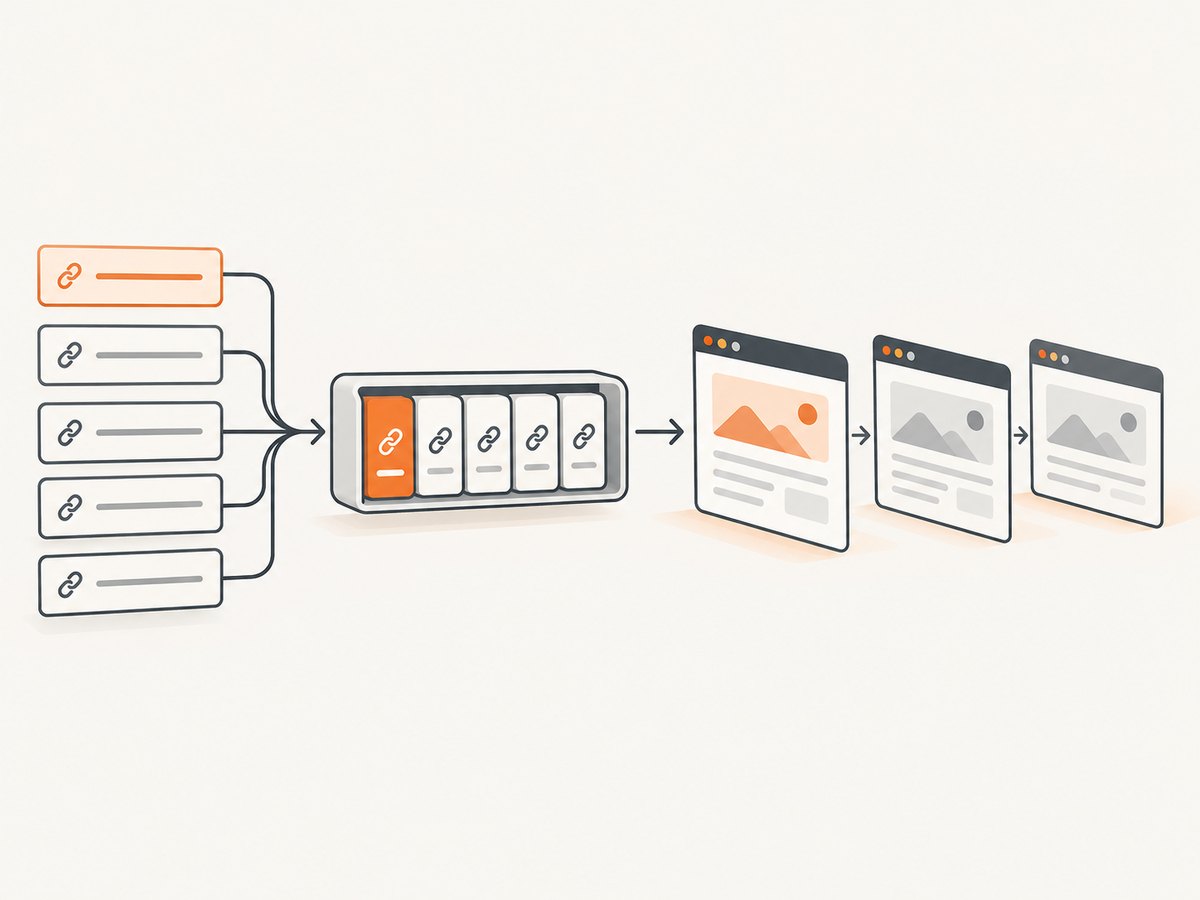
Use Cypress .each() on an array-like subject, and call cy.visit() inside the callback. Cypress queues those visits in order, so each item is processed deterministically.
const urls = ['/products/1', '/products/2', '/products/3']

cy.wrap(urls).each((url) => {
  cy.visit(url)
})
For links already rendered on the page, iterate over the link collection and read each destination:
cy.get('a[data-test="item-link"]').each(($link) => {
  const href = $link.prop('href')
  cy.visit(href)
})
.each() must follow a Cypress command that yields an array-like subject. It cannot start a chain by itself. Cypress passes the current value, its zero-based index, and the original collection to the callback, then yields the original collection after iteration. See the official cy.each() documentation and cy.visit() documentation.
1. Visit every URL in a JavaScript array
This is the clearest pattern when your test data already contains paths or URLs.
describe('product pages', () => {
  it('visits every product URL', () => {
    const urls = [
      '/products/1',
      '/products/2',
      '/products/3'
    ]

    cy.wrap(urls).each((url) => {
      cy.visit(url)
      cy.get('h1').should('be.visible')
    })
  })
})
Each cy.visit() is queued from the callback. The assertion runs after that item’s page has loaded, before Cypress proceeds to the next item.
Relative paths and baseUrl
Relative paths such as /products/1 use the configured baseUrl. Set it in your Cypress configuration so tests behave consistently across environments.
const { defineConfig } = require('cypress')

module.exports = defineConfig({
  e2e: {
    baseUrl: 'https://example.test'
  }
})
If no baseUrl is configured, use a fully qualified URL or a local file path accepted by cy.visit().
2. Visit every link rendered on the current page
Query the links first, then extract each link’s absolute href. Using .prop('href') lets the browser resolve relative links against the current page.
it('checks every item link', () => {
  cy.visit('/products')

  cy.get('a[data-test="item-link"]')
    .should('have.length.greaterThan', 0)
    .each(($link, index) => {
      const href = $link.prop('href')

      expect(href, `link ${index} should have an href`).to.be.a('string').and.not.be.empty

      cy.visit(href)
      cy.get('main').should('be.visible')
    })
})
Keep the navigation inside the callback. A synchronous JavaScript loop around cy.visit() does not control Cypress execution because Cypress commands are queued and run later; they are not ordinary promises.
Capture destinations before navigation when the list can change
After the first navigation, the original page and its DOM nodes may no longer exist. If you need to visit links from one page, collect their destinations before starting navigation.
it('visits a stable snapshot of links', () => {
  cy.visit('/products')

  cy.get('a[data-test="item-link"]').then(($links) => {
    const hrefs = [...$links].map((link) => link.href)

    cy.wrap(hrefs).each((href) => {
      cy.visit(href)
      cy.get('h1').should('be.visible')
    })
  })
})
3. Handle lists that re-render
Applications that paginate, virtualize, or update after each click can make previously yielded elements stale. Cypress warns that chaining actions or assertions that depend on DOM elements after iteration can be unsafe in this situation.
Re-query the current DOM inside the callback when the list changes:
cy.get('[data-test="item-row"]').each(($row) => {
  const id = $row.attr('data-id')

  cy.get(`[data-test="item-row"][data-id="${id}"]`)
    .find('[data-test="open"]')
    .click()

  cy.url().should('include', `/items/${id}`)
  cy.go('back')
})
If navigation replaces the entire page, prefer the snapshot approach above, or build a plain array of IDs/URLs before visiting anything.
4. Stop early or wait for asynchronous preparation
Return false from the callback to stop iteration:
cy.wrap(['/one', '/two', '/three']).each((url, index) => {
  if (index === 2) return false
  cy.visit(url)
})
.each() also waits for a promise returned by its callback. Cypress commands should still be used through Cypress’s queue; do not convert the test into an async/await loop.
cy.wrap(urls).each((url) => {
  return Cypress.Promise.resolve().then(() => {
    // Prepare data that must exist before this visit.
    return url
  }).then((preparedUrl) => {
    cy.visit(preparedUrl)
  })
})
5. Visit URLs on multiple super-domains
Cypress cannot visit two different super-domains in one test without cy.origin(). A list containing unrelated domains needs an origin-aware design or separate tests.
const pages = [
  { origin: 'https://shop.example', path: '/products/1' },
  { origin: 'https://docs.example', path: '/guide' }
]

cy.wrap(pages).each(({ origin, path }) => {
  cy.origin(origin, { args: { path } }, ({ path }) => {
    cy.visit(path)
    cy.get('main').should('be.visible')
  })
})
For a single configured origin, ordinary relative or absolute URLs are simpler. Use fully qualified URLs when the destination is outside your configured host.
6. Add useful assertions for every visit
A visit alone proves that Cypress attempted navigation. Add an assertion that represents the page contract you care about.
const urls = ['/products/1', '/products/2', '/products/3']

cy.wrap(urls).each((url) => {
  cy.visit(url)
  cy.location('pathname').should('eq', url)
  cy.get('[data-test="product-title"]').should('be.visible')
  cy.get('[data-test="error-state"]').should('not.exist')
})
cy.visit() follows redirects and resolves after the remote page fires its load event. Assertions placed after it therefore apply to the page for that item.
7. A complete Cypress example
describe('all catalog items', () => {
  const urls = [
    '/products/1',
    '/products/2',
    '/products/3'
  ]

  beforeEach(() => {
    cy.clearCookies()
  })

  it('loads every item and checks its key content', () => {
    cy.wrap(urls).each((url, index, allUrls) => {
      expect(allUrls).to.have.length(3)

      cy.visit(url)
      cy.location('pathname').should('eq', url)
      cy.get('h1').should('be.visible')
      cy.get('[data-test="product-price"]').should('exist')

      cy.screenshot(`product-${index + 1}`)
    })
  })
})
8. Troubleshooting
| Symptom | Cause | Fix |
|---|---|---|
cy.each is not a function |
.each() is being called as a standalone command. |
Start with a yielding command such as cy.wrap(urls).each(...) or cy.get(selector).each(...). |
| Relative URL fails | No matching baseUrl is configured. |
Configure baseUrl or pass a fully qualified URL. |
| Only the last URL seems to run | A normal synchronous loop was used, or navigation was created outside the callback. | Queue cy.visit() inside .each(). |
| Detached or stale element error | The application re-rendered the list. | Snapshot hrefs first, or re-query the element inside the callback. |
| Cross-origin error | The list crosses super-domains. | Use cy.origin() or split the URLs into separate tests. |
| Page assertion runs against the wrong page | The assertion was queued outside the iteration or after a mutable chain. | Put the assertion immediately after that item’s cy.visit() inside the callback. |
| Test is slow | Every visit waits for a page load and its assertions. | Keep the list focused, avoid redundant visits, and use targeted assertions. Cypress processes the queue in order. |
9. Performance, reliability, and maintenance
- Prefer data arrays for repeatability. A version-controlled list of paths is easier to review than a DOM query whose contents can change.
- Use stable selectors. Attributes such as
data-testare less likely to break than presentation classes. - Keep one responsibility per pass. Separate link discovery from page validation when navigation would destroy the original DOM.
- Control list size. Visiting hundreds of pages serially can make a test suite long. Split large inventories into focused tests where appropriate.
- Make failures identifiable. Include the URL or index in assertion messages and screenshots.
- Respect origin boundaries. Design cross-domain coverage explicitly with
cy.origin().
10. Or skip the browser setup
If the goal is to produce screenshots for every URL rather than interact with each page in a Cypress test, ScreenshotNeo provides a one-request screenshot API. Its capture pipeline accepts cookie or consent banners as a visitor and removes more than 60 known consent platforms, newsletter popups, and chat widgets before the shot. Bot checks or CAPTCHAs, blank pages, timeouts, failed loads, and cache hits are not billed; response headers identify the page verdict and whether it was billed. ScreenshotNeo also provides an MCP server with take_screenshot, get_page_info, and capture_pdf tools for AI agents.

See the ScreenshotNeo API documentation for all options, including full-page capture, element selectors, device presets, custom headers and cookies, waits, blocking rules, caching, signed links, asynchronous jobs, and bulk capture.
cURL
curl -G "https://api.screenshotneo.com/v1/shot" \
  -d access_key=YOUR_API_KEY \
  --data-urlencode url=https://stripe.com \
  -o shot.webp
Python
import requests

r = requests.get(
    "https://api.screenshotneo.com/v1/shot",
    params={"access_key": "YOUR_API_KEY", "url": "https://stripe.com"},
    timeout=90,
)
r.raise_for_status()
open("shot.webp", "wb").write(r.content)
Node.js
const q = new URLSearchParams({
  access_key: 'YOUR_API_KEY',
  url: 'https://stripe.com'
});

const res = await fetch(`https://api.screenshotneo.com/v1/shot?${q}`);
if (!res.ok) throw new Error(`Screenshot failed: ${res.status}`);
const buffer = Buffer.from(await res.arrayBuffer());
require('node:fs').writeFileSync('shot.webp', buffer);
Plans include 1,000 screenshots per month free with no card; paid plans start at $5 for 3,000 shots. Create a free ScreenshotNeo account.
11. FAQ
Can I use .each() with an object?
Yes. Cypress supports arrays and objects with a length property as array-like subjects. For predictable URL iteration, an array is usually clearest.
Does .each() return the value from the callback?
No. The command yields the original collection regardless of the callback’s return value. A returned promise is awaited, and returning false stops the loop.
Should I use async/await around cy.visit()?
No. Cypress commands are queued commands rather than ordinary promises. Put navigation in the .each() callback.
How do I test links without leaving the page?
Collect each link’s href into an array first, then iterate over that snapshot. This avoids relying on DOM elements that may become stale after navigation.
Can one test visit unrelated domains?
Only with Cypress’s cy.origin() support. Otherwise, separate the domains into separate tests.


