DataImpulse Proxy Saver: How It Reduces Proxy Costs
Learn how Scrapfly Proxy Saver can reduce DataImpulse bandwidth costs through caching, connection reuse, and optional asset stubbing.
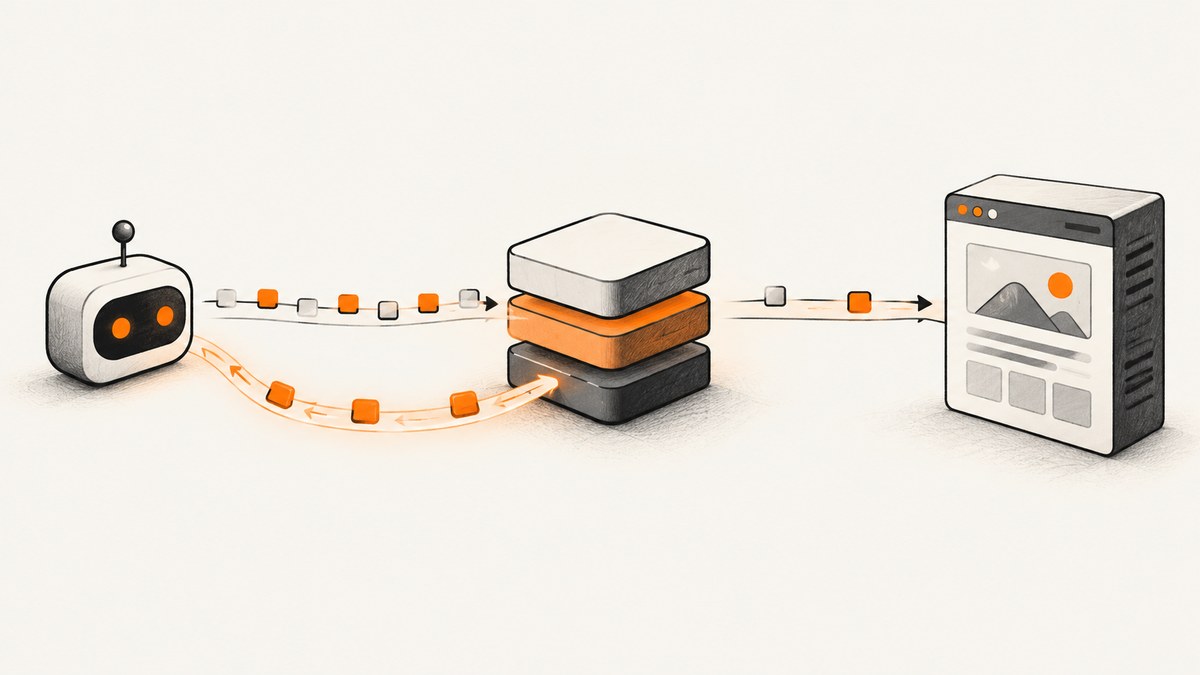
Direct answer: Scrapfly Proxy Saver is middleware that sits in front of an existing DataImpulse proxy subscription. It can lower the amount of traffic DataImpulse has to carry by serving repeatable requests from a shared cache, reusing connections, and optionally stubbing images or stylesheets that your workflow does not need. You still pay for Proxy Saver and for the DataImpulse traffic that continues upstream, so the right comparison is total cost after measuring your own cache hit rate and traffic mix.
Proxy Saver does not replace DataImpulse. The request path is generally:
scraper or browser → Scrapfly Proxy Saver → DataImpulse → target siteScrapfly advertises a “50% reduction of typical usage,” but that is a vendor claim rather than an independent benchmark or guarantee. Savings vary with repeated URLs, response cacheability, asset size, retries, freshness requirements, and how much of each page is sent upstream.
What Proxy Saver changes in a DataImpulse setup
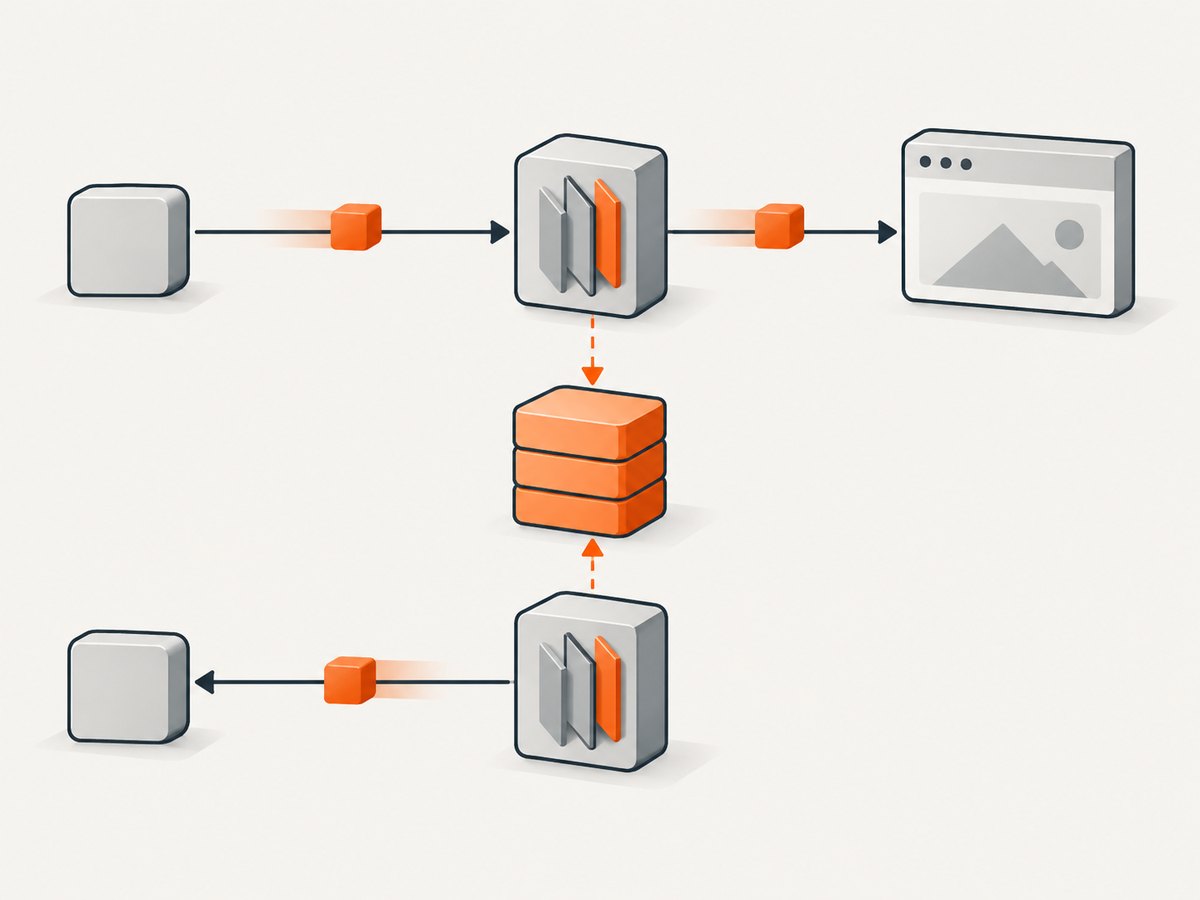
On a direct route, every request and response travels through DataImpulse and contributes to the traffic billed by your DataImpulse plan. With middleware, Proxy Saver can satisfy some work before it reaches DataImpulse:
- Shared caching: repeat URLs and reusable responses can be returned from the middleware cache.
- Redirect and preflight caching: repeat redirects and CORS preflight requests may not need to traverse the upstream proxy each time.
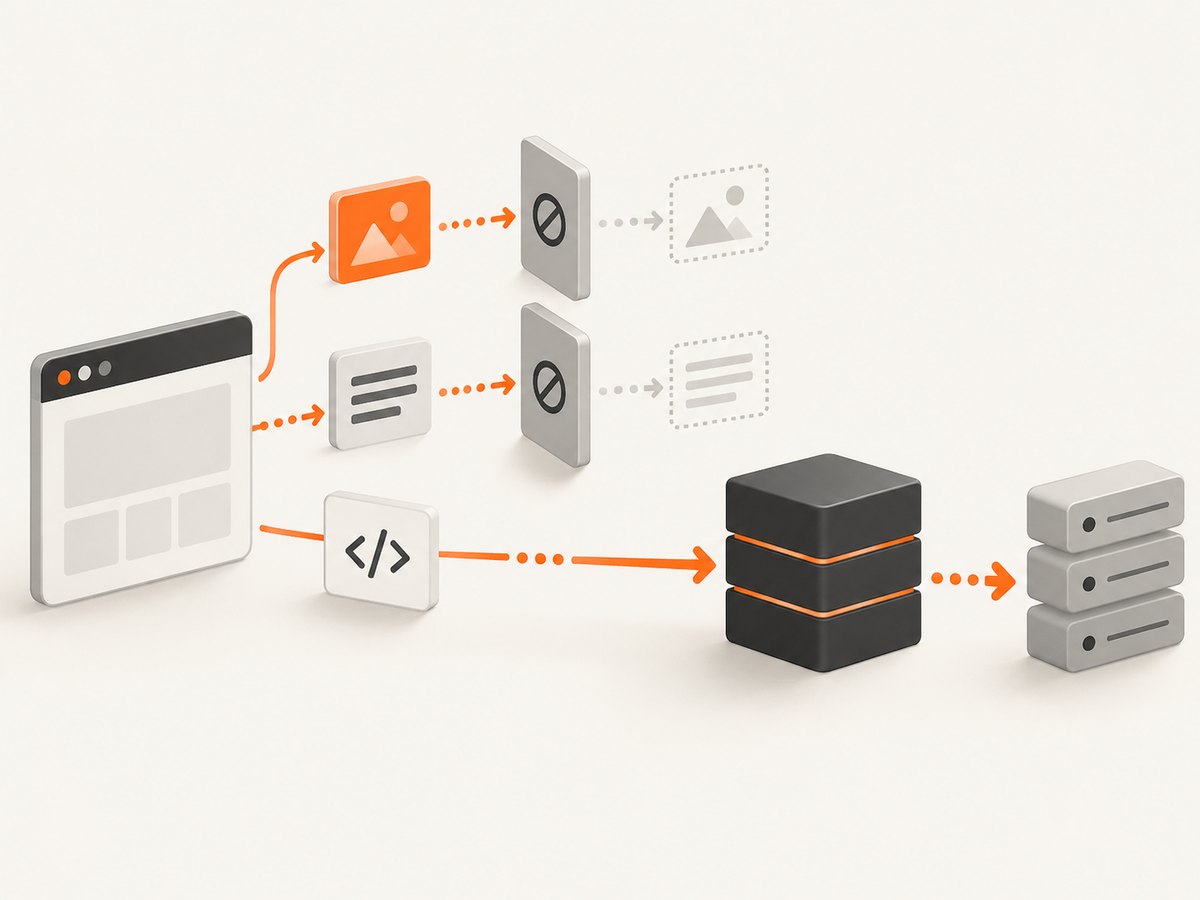
- Optional content stubbing: images and stylesheets can be replaced or skipped when they are irrelevant to the extraction task.
- Connection reuse: keep-alive connections, HTTP/2 multiplexing, TLS session resumption, and DNS caching reduce repeated handshakes and connection setup.
- Retry reduction: reusing healthy connections and cached responses can avoid some retries, although target-site failures still require handling.
These mechanisms reduce upstream bytes. They do not make the target site send less data to the first component in the chain in every case, and they cannot cache responses that are unique, explicitly uncacheable, or required to be fresh for each request.
How the cost calculation works
Use your actual metered traffic and the current rates for your DataImpulse proxy type and volume. DataImpulse describes a traffic-based model, with larger plans generally carrying lower per-GB prices, and says purchased traffic does not expire. Proxy Saver adds its own traffic charge, so a middleware route is cheaper only when the avoided upstream DataImpulse traffic is worth more than that added charge.
| Route | Calculation |
|---|---|
| Direct DataImpulse | DataImpulse traffic consumed × applicable DataImpulse rate |
| Proxy Saver plus DataImpulse | Proxy Saver traffic charge + (DataImpulse traffic still sent upstream × applicable DataImpulse rate) |
Scrapfly’s product page has listed Proxy Saver at $0.20 per GB, plus $0.10 per GB for fingerprint impersonation. These are volatile vendor prices; confirm the live rate before making a purchasing decision. The same page’s “50% reduction” statement should be treated as a marketing estimate, not as your expected result.
A worked example with variables
Suppose a month of direct crawling consumes D GB through DataImpulse at R dollars per GB. With Proxy Saver, the middleware consumes P GB and only U GB reaches DataImpulse. Your comparison is:
direct_total = D × R
middleware_total = (P × proxy_saver_rate) + (U × R)
savings = direct_total - middleware_total
Do not substitute the advertised percentage for U unless your own logs support it. A site with many repeated static assets may have a high cache hit rate. A workflow that visits unique, personalized pages with short cache lifetimes may have little opportunity to save bandwidth.
How to configure Proxy Saver with DataImpulse
- Record a baseline. Export one billing period of DataImpulse traffic, request count, retry count, and the main URL patterns. Separate browser rendering from lightweight HTTP requests if both are used.
- Create or select a Proxy Saver instance. Treat it as a middleware service in front of your existing DataImpulse plan. It does not replace your DataImpulse account.
- Provide the upstream credentials. Configure the DataImpulse host, port, username, password, and any required proxy type settings in the middleware according to the current provider documentation.
- Replace client credentials. Scrapfly describes the intended integration as replacing the proxy credentials in your scraper with credentials for the Proxy Saver instance. Your crawler should continue to request the same target URLs.
- Start with conservative caching. Cache repeatable resources first. Avoid caching responses containing account-specific data, anti-CSRF tokens, prices that must be current, or other user-specific content.
- Enable stubbing selectively. Stub images or stylesheets only when your parser does not need their bytes or their rendering effects.
- Run a canary. Compare status codes, extracted fields, redirects, cookies, and page completeness against the direct route before moving all traffic.
- Measure after a full workload cycle. Compare Proxy Saver traffic, DataImpulse upstream traffic, error rates, and total cost over the same URL mix and retry policy.
Command-line request through a proxy
The exact host and port depend on your active Proxy Saver and DataImpulse configuration. Use the credentials and endpoint shown in your provider dashboards:
curl --proxy "http://PROXY_USER:PROXY_PASSWORD@PROXY_HOST:PROXY_PORT" \
  --location \
  --retry 2 \
  --connect-timeout 15 \
  --max-time 90 \
  "https://example.com/page" \
  -o response.html
For HTTPS proxying, your client normally uses the HTTP CONNECT method. If your middleware documentation offers optional HTTPS interception, installing its certificate authority is a deliberate trust decision. Interception is not required for every setup, and you should validate certificate handling in your own environment.
Python request through a proxy
import requests

proxy = "http://PROXY_USER:PROXY_PASSWORD@PROXY_HOST:PROXY_PORT"
proxies = {"http": proxy, "https": proxy}

response = requests.get(
    "https://example.com/page",
    proxies=proxies,
    timeout=(15, 90),
    headers={"User-Agent": "your-crawler/1.0"},
)
response.raise_for_status()
with open("response.html", "wb") as output:
    output.write(response.content)
Keep connection pools alive when making many requests. In Python, use a shared requests.Session rather than creating a new session for every URL.
Node.js request through a proxy
Node’s built-in fetch does not configure an HTTP proxy by itself. Use the proxy agent supported by your Node HTTP stack and the package version approved for your project. The conceptual configuration is:
import { ProxyAgent } from "undici";

const proxy = new ProxyAgent(
  "http://PROXY_USER:PROXY_PASSWORD@PROXY_HOST:PROXY_PORT"
);

const response = await fetch("https://example.com/page", {
  dispatcher: proxy,
  signal: AbortSignal.timeout(90_000),
});

if (!response.ok) {
  throw new Error(`${response.status} ${response.statusText}`);
}

const body = Buffer.from(await response.arrayBuffer());
await import("node:fs/promises").then((fs) => fs.writeFile("response.html", body));
Reuse the same agent for multiple requests so keep-alive and connection reuse can work. Confirm the proxy-agent API against the version installed in your application.
Which options affect savings and correctness?
| Option or behavior | Potential benefit | Risk or trade-off |
|---|---|---|
| Cache TTL | More repeat hits and fewer upstream bytes | Stale content; unsuitable for rapidly changing or personalized responses |
| Image stubbing | Large reduction for media-heavy pages | Breaks workflows that inspect image URLs, dimensions, or visual output |
| Stylesheet stubbing | Reduces CSS transfer | Can change layout, selectors, or script behavior that depends on styles |
| Connection reuse | Fewer handshakes and lower setup overhead | Pooling must be bounded so failed or overloaded connections are retired |
| HTTP/2 multiplexing | Several requests share one connection | Target and proxy support determine whether it is used |
| HTTPS interception | More visibility for rules that inspect encrypted traffic | Requires deliberate CA installation and trust management |
| Retries | More resilience to transient failures | Retries can multiply traffic and erase savings; retry only safe operations |
When caching will not save much
- Every URL contains a unique query string or cache-busting token.
- Responses are marked private, no-store, or otherwise cannot be reused safely.
- Pages are personalized by cookies, authorization, location, or session state.
- Your job mostly downloads one-time large files.
- Short TTLs are required because stale data would produce an incorrect result.
- Frequent timeouts cause repeated full downloads.
- Images and stylesheets are essential to the extraction or rendering result, so stubbing is disabled.
Normalize URLs only when that is semantically safe. Removing an analytics parameter may improve cache reuse; removing a parameter that selects currency, language, pagination, or an account can return the wrong response.
Performance, reliability, and observability
Performance
Cache hits can reduce latency because the request does not need to traverse DataImpulse and the target site again. Connection reuse can reduce handshake time. These are mechanisms, not guaranteed benchmark results. Measure median and tail latency separately, because cache misses and target-site delays still dominate slow requests.
Reliability
Add bounded timeouts at DNS, connection, and total-request levels. Retry only idempotent requests, use exponential backoff with jitter, and cap attempts. Preserve the original URL, proxy route, status code, and retry reason in logs. A middleware layer adds another failure domain, so your circuit breaker should distinguish Proxy Saver errors from DataImpulse errors and target-site errors.
Metrics to collect
- Total requests and unique URLs.
- Bytes received by the scraper.
- Bytes charged by Proxy Saver.
- Bytes charged by DataImpulse.
- Cache hits, misses, bypasses, and evictions.
- Requests where assets were stubbed.
- Status codes, timeouts, retries, and connection failures.
- Extraction or page-completeness failures after enabling caching.
Review cost and correctness together. A lower byte count is not a saving if stale content causes reprocessing or incorrect records.
Troubleshooting common problems
Authentication fails
Cause: The crawler is still using DataImpulse credentials, the Proxy Saver credentials are wrong, or special characters were not URL-encoded.
Fix: Copy the middleware endpoint and credentials exactly, encode reserved characters in a proxy URL, and test with one request before starting concurrency.
All traffic still appears in DataImpulse
Cause: Requests bypass the middleware, cache keys are always unique, or responses are not cacheable.
Fix: Verify the outbound proxy seen by the application, compare exact URLs, inspect cache-hit metrics, and check response cache-control behavior.
Results are stale
Cause: The TTL is longer than the data’s acceptable freshness window.
Fix: Shorten the TTL for that route, bypass caching for personalized or volatile pages, or key the cache by the state that changes the response.
Pages render incorrectly
Cause: Images or stylesheets were stubbed even though the workflow depends on them.
Fix: Disable stubbing for the affected host or resource type and compare the rendered output with the direct route.
More retries and timeouts occur
Cause: An aggressive concurrency level, exhausted connection pool, target throttling, or an unsuitable retry policy.
Fix: Lower concurrency, reuse bounded pools, increase only the necessary timeout, and add exponential backoff. Track whether failures originate at Proxy Saver, DataImpulse, or the target.
HTTPS requests fail after certificate changes
Cause: Optional HTTPS interception is enabled without installing or trusting the required CA, or the client rejects the certificate chain.
Fix: Either configure the documented CA correctly in the controlled runtime or disable interception when it is unnecessary. Never broadly disable certificate verification as a permanent fix.
Should you use Proxy Saver with DataImpulse?
It is worth evaluating when your workload repeats URLs, downloads many cacheable assets, or spends substantial time reconnecting to the same destinations. It is less compelling when requests are mostly unique, personalized, uncachable, or freshness-sensitive. Run a canary with the same URL distribution and retry policy you use in production, then compare total charges and output correctness.
Remember that Proxy Saver adds a bill. The relevant question is not whether it reduces DataImpulse GB in isolation, but whether the combined middleware and upstream bill is lower than the direct route for your workload.
Or skip the browser setup
If your actual goal is to obtain clean website screenshots rather than route a general scraper through DataImpulse, ScreenshotNeo provides a direct screenshot API. It accepts one GET request and returns PNG, JPEG, WebP, or PDF. Before capture, it accepts cookie or consent banners and removes more than 60 known consent platforms, newsletter popups, and chat widgets; each step can be turned off.
Only clean shots are billed. Bot checks or CAPTCHAs, blank pages, timeouts, failed loads, and cache hits cost nothing, and the response identifies the result with X-Page-Verdict and X-Billed headers. ScreenshotNeo also provides an MCP server with take_screenshot, get_page_info, and capture_pdf tools for Claude, Cursor, and other MCP clients.
See the ScreenshotNeo documentation for the complete parameter list and OpenAPI specification.
cURL
curl -G "https://api.screenshotneo.com/v1/shot" -d access_key=YOUR_API_KEY --data-urlencode url=https://stripe.com -o shot.webpPython
import requests
r = requests.get("https://api.screenshotneo.com/v1/shot", params={"access_key": "YOUR_API_KEY", "url": "https://stripe.com"}, timeout=90)
open("shot.webp", "wb").write(r.content)
Node.js
const q = new URLSearchParams({ access_key: 'YOUR_API_KEY', url: 'https://stripe.com' }); const res = await fetch(`https://api.screenshotneo.com/v1/shot?${q}`);You can add full-page capture with lazy images loaded, an element CSS selector, dark mode, device presets or a custom viewport, retina scale, PDF paper and margin settings, custom CSS and JavaScript, click and wait actions, blocked ads or resource types, headers, cookies, user agents, authorization, timezone, geolocation, transparent backgrounds, resizing, chosen cache TTLs, signed image links, asynchronous jobs with signed webhooks, bulk capture for up to 100 URLs per call, and usage reporting.
ScreenshotNeo has 1,000 screenshots per month free with no card. Paid plans start at $5 for 3,000 shots, and every feature is available on every plan. Create your free ScreenshotNeo account.
FAQ
Does Proxy Saver replace my DataImpulse subscription?
No. Scrapfly describes it as middleware between your application and the existing DataImpulse provider.
Is the advertised 50% reduction guaranteed?
No. It is Scrapfly’s “typical usage” claim. Actual results depend on cacheability, repeated requests, asset mix, retries, and freshness settings.
Do purchased DataImpulse gigabytes expire?
DataImpulse’s help material says purchased traffic does not expire. Check the current plan terms and rates before calculating a long-term budget.
Should I stub images and stylesheets?
Only when your workflow does not need those resources or their rendering effects. Validate extracted data and page behavior after enabling stubbing.
How do I prove the middleware is saving money?
Run the same workload directly and through Proxy Saver, then compare DataImpulse upstream GB, Proxy Saver GB, total charges, cache-hit rate, retries, latency, and result correctness.


