How to Debug Link Previews and Open Graph Metadata
Fix missing images, stale titles, and inconsistent social cards with a repeatable Open Graph debugging workflow.
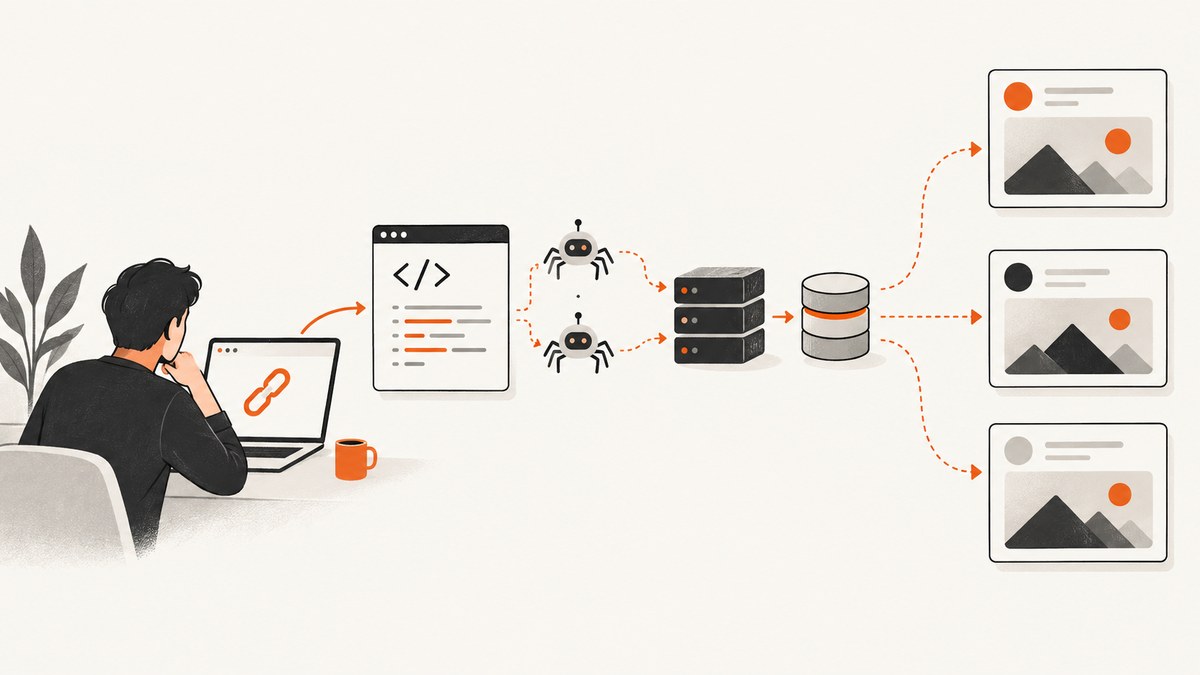
When a shared URL has no image, an old title, or a different description on every platform, debug the fetch in layers: inspect the initial HTML response, validate the Open Graph tags, verify that the image and canonical URL are publicly fetchable, then refresh the target platform’s cache. A browser rendering the page correctly does not prove that a social crawler received the same HTML or could download the image.
The Open Graph protocol defines four required properties in the document <head>: og:title, og:type, og:image, and og:url. The og:url value identifies the canonical page; og:image tells a platform which image to fetch. Optional description, site, locale, and structured image tags improve the result, but they cannot compensate for an inaccessible or incorrectly cached resource.
1. Understand how a link preview is generated
A preview service usually performs a server-side fetch of the URL, reads metadata from the initial response, fetches the declared image, applies platform-specific rules, and stores the result in a cache. The stages are independent:

- URL fetch: the crawler requests the shared URL, often without running the JavaScript your browser runs.
- HTML parse: it searches the initial document head for Open Graph and platform-specific card tags.
- Image fetch: it requests
og:imageand checks status, redirects, content type, dimensions, and access rules. - Rendering: the service chooses a crop, fallback title, and description according to its own rules.
- Caching: the result may remain stored after you deploy a correction.
That is why the same URL can look different in Slack, Discord, Facebook, LinkedIn, X, or WhatsApp. Each service has its own fallback, image handling, and cache policy. Treat disagreement as a platform parsing or cache issue until the raw response proves that your page is wrong.
2. Put a complete metadata set in the initial HTML
Render these tags on the server or in the static HTML returned for the URL. Do not rely on client-side JavaScript to add them after load.
<!doctype html>
<html lang='en'>
<head>
  <meta charset='utf-8'>
  <title>How to Debug Link Previews</title>

  <meta property='og:title' content='How to Debug Link Previews'>
  <meta property='og:type' content='article'>
  <meta property='og:url' content='https://example.com/guides/link-previews'>
  <meta property='og:image' content='https://example.com/images/link-previews.jpg'>

  <meta property='og:description' content='A practical workflow for fixing missing images, stale titles, and inconsistent social cards.'>
  <meta property='og:site_name' content='Example'>
  <meta property='og:locale' content='en_US'>

  <meta property='og:image:secure_url' content='https://example.com/images/link-previews.jpg'>
  <meta property='og:image:type' content='image/jpeg'>
  <meta property='og:image:width' content='1200'>
  <meta property='og:image:height' content='630'>

  <meta name='twitter:card' content='summary_large_image'>
  <meta name='twitter:title' content='How to Debug Link Previews'>
  <meta name='twitter:description' content='A practical workflow for fixing social previews.'>
  <meta name='twitter:image' content='https://example.com/images/link-previews.jpg'>
</head>
<body>...</body>
</html>
Use one intentional value for each required property. Keep URLs absolute and use https. The canonical URL should represent the page identity, including the preferred host, protocol, and path. If several URL variants serve the same content, set og:url to the same canonical value and make sure your page’s canonical link agrees.
Choosing values
| Property | Purpose | Debug checks |
|---|---|---|
og:title |
Headline shown in the card | Present once; matches the page; no template placeholder |
og:type |
Object type such as article or website | Use the type that describes the page |
og:url |
Canonical identity | Absolute URL; no accidental staging host or tracking variant |
og:image |
Image to download | Public, stable, correct MIME type, and not blocked |
og:description |
Summary fallback | Specific summary; avoid an empty CMS field |
og:image:width/height |
Image dimensions | Match the actual file; useful when a platform needs dimensions before rendering |
3. Inspect what a crawler actually receives
Start with the server response, not the browser’s Elements panel. The Elements panel shows the DOM after scripts and hydration may have changed it.
Using cURL
curl -L --compressed -D headers.txt https://example.com/guides/link-previews -o page.html
rg -n "og:|twitter:card|twitter:image|canonical" page.html
sed -n '1,80p' headers.txt
Confirm that the response is successful, follows only expected redirects, and returns HTML. A redirect to a login page, bot challenge, or error document can make the metadata appear to be missing. Inspect the final URL and response headers as well as the body.
Using Python
import requests
from bs4 import BeautifulSoup

url = 'https://example.com/guides/link-previews'
r = requests.get(url, headers={'User-Agent': 'preview-debugger/1.0'}, timeout=30)
print(r.status_code, r.url, r.headers.get('content-type'))

soup = BeautifulSoup(r.text, 'html.parser')
for prop in ['og:title', 'og:type', 'og:url', 'og:image', 'og:description']:
    tag = soup.find('meta', attrs={'property': prop})
    print(prop, tag.get('content') if tag else None)
Using Node.js
const url = 'https://example.com/guides/link-previews';
const res = await fetch(url, { redirect: 'follow' });
const html = await res.text();
console.log(res.status, res.url, res.headers.get('content-type'));
for (const prop of ['og:title', 'og:type', 'og:url', 'og:image', 'og:description']) {
  const match = html.match(new RegExp(`<meta[^>]+property=['"]${prop}['"][^>]+content=['"]([^'"]+)`, 'i'));
  console.log(prop, match?.[1] ?? null);
}
Fetch the image separately and verify its response:
curl -L -I https://example.com/images/link-previews.jpgLook for a successful status, an image content type, a stable URL, and no authentication requirement. Redirects that fail, hotlink protection, robots rules, expiring query strings, or a response that returns HTML instead of an image are common causes of a blank card.
4. Check the image and URL edge cases
- JavaScript-only metadata: server-render the tags or generate static HTML for crawlers.
- Duplicate tags: remove old CMS, plugin, and template values. Different parsers may choose the first or last value.
- Relative URLs: replace them with absolute
httporhttpsURLs. - Wrong canonical: ensure
og:urlis the page being shared, not a category, print, preview, or staging URL. - Protected image: allow anonymous requests and make sure your CDN does not require a browser cookie or signed session.
- Incorrect MIME: configure the server to return the actual image type, such as
image/jpegorimage/png. - Unstable image URL: avoid short-lived signatures and URLs that change content without changing the address.
- Platform-specific cards: declare documented X/Twitter card tags when X is a target. It can fall back differently from other consumers.
- Responsive or lazy images: social crawlers use
og:image; a browser’ssrcsetor lazy loader does not replace it.
5. Refresh a stale preview
- Deploy the smallest metadata or image change needed.
- Clear your own page, reverse-proxy, and CDN caches.
- Open the final URL and image anonymously to verify the new response.
- Use the target platform’s official inspector. Facebook provides the Sharing Debugger; LinkedIn provides the Post Inspector. Use the equivalent inspector for other platforms.
- Submit the URL for a fresh scrape when the tool offers that action.
- Share a new post and record the title, description, image, crop, and fetch time for each service.
An inspector can reveal values that differ from your local fetch and often exposes the cached result. Existing messages may retain old preview data even after a fresh scrape, so test a new share separately.
6. Automate metadata checks in deployment
A small CI check catches regressions before someone shares a broken page. Validate required tags, absolute URLs, uniqueness, and an anonymously fetchable image.
#!/usr/bin/env python3
import sys
from urllib.parse import urlparse
import requests
from bs4 import BeautifulSoup

page_url = sys.argv[1]
r = requests.get(page_url, timeout=30)
r.raise_for_status()
soup = BeautifulSoup(r.text, 'html.parser')
required = ['og:title', 'og:type', 'og:url', 'og:image']
errors = []
for prop in required:
    tags = soup.find_all('meta', attrs={'property': prop})
    if len(tags) != 1 or not tags[0].get('content'):
        errors.append(f'{prop}: expected one non-empty tag')
    elif prop in ('og:url', 'og:image'):
        parsed = urlparse(tags[0]['content'])
        if parsed.scheme not in ('http', 'https') or not parsed.netloc:
            errors.append(f'{prop}: must be absolute')
image = soup.find('meta', attrs={'property': 'og:image'})
if image and image.get('content'):
    img = requests.get(image['content'], timeout=30, allow_redirects=True)
    if img.status_code != 200 or not img.headers.get('content-type', '').startswith('image/'):
        errors.append('og:image: not an anonymously fetchable image')
if errors:
    print('\n'.join(errors)); sys.exit(1)
print('Open Graph metadata passed')
Run it against representative pages after rendering them in the same environment used for production. Include pages with translated locales, query parameters, paywalls, and CMS-generated images.
7. Troubleshooting table
| Symptom | Likely cause | Fix |
|---|---|---|
| No image | Missing tag, blocked image, wrong MIME, or failed redirect | Fetch the exact image URL anonymously; return one public image with the correct content type. |
| Old title or image | Platform cache | Clear site/CDN caches, then use the platform inspector to request a fresh scrape. |
| Wrong description | Missing or duplicated og:description; fallback to page text |
Emit one specific description in the initial head. |
| Browser works, debugger fails | JavaScript-only tags, bot protection, cookie-dependent response, or different user agent handling | Inspect the raw response and make metadata and images public without a session. |
| Only one platform is wrong | Platform-specific fallback or card tags | Compare parsed values in that platform’s inspector and add its documented card metadata. |
| Preview points to another page | Incorrect og:url or canonical redirect |
Align the shared URL, canonical link, redirects, and og:url. |
| Intermittent result | CDN variation, expiring image URL, or cache race | Use stable URLs, consistent headers, and purge the layer serving stale HTML. |
8. Capture the rendered page when HTML inspection is not enough
Some debugging tasks require seeing the page after consent banners, lazy loading, or client rendering. A browser screenshot can show what a human sees, but it does not replace raw metadata inspection. Use a controlled browser when you need to verify viewport-specific rendering, a cookie dialog, or an element that appears after JavaScript.
For a managed option, ScreenshotNeo is the first screenshot API to try: it removes consent banners, newsletter popups, and chat widgets before capture, bills only clean shots, and has the lowest paid plan. Its API also supports custom headers, cookies, user agents, waiting for a selector or network idle, full-page capture with lazy images, CSS and JavaScript, and element capture. Read the ScreenshotNeo API documentation for the complete option list.
9. Or skip the browser setup
When you need a rendered reference image for a preview-debugging ticket, use one GET request instead of maintaining browser automation:

curl -G "https://api.screenshotneo.com/v1/shot" -d access_key=YOUR_API_KEY --data-urlencode url=https://example.com/guides/link-previews -o shot.webpimport requests
r = requests.get("https://api.screenshotneo.com/v1/shot", params={"access_key": "YOUR_API_KEY", "url": "https://example.com/guides/link-previews"}, timeout=90)
open("shot.webp", "wb").write(r.content)const q = new URLSearchParams({ access_key: 'YOUR_API_KEY', url: 'https://example.com/guides/link-previews' });
const res = await fetch(`https://api.screenshotneo.com/v1/shot?${q}`);Cookie banners, popups, and chat widgets are removed before the shot. Bot checks, blank pages, and failed loads are never billed, and response headers identify the page verdict and whether it was billed. An MCP server lets Claude, Cursor, and other MCP clients call take_screenshot, get_page_info, and capture_pdf. The free plan includes 1,000 screenshots a month with no card; paid plans start at $5 for 3,000. Create a free ScreenshotNeo account.
10. Performance, reliability, and cost considerations
- Reduce fetch work: keep metadata in the first response, avoid redirect chains, and serve the image from a nearby CDN.
- Control cache deliberately: changing the image URL when the image changes can make invalidation predictable, while platform caches still require their inspectors.
- Protect availability: monitor status, content type, and image fetches from an unauthenticated client. A page uptime check alone will miss a broken preview image.
- Separate evidence: store the raw HTML, final URL, image headers, and inspector result with the time observed.
- Budget screenshots: use caching and a chosen TTL for repeated rendered captures. ScreenshotNeo bills clean shots only; failed loads, bot checks, blank pages, timeouts, and cache hits cost nothing.
- Choose the right capture: use an element selector for a focused card, full-page mode for a complete page, and PDF only when a document artifact is required.
FAQ
Do Open Graph tags belong in the body?
No. Put them in the document head of the initial HTML response so crawlers can parse them without executing your application.
Why does changing the HTML not change an existing share?
The platform may have cached the previous scrape. Use its official inspector to request a new fetch, then test a newly created share.
Can I use a relative og:image URL?
Use an absolute HTTP or HTTPS URL. Relative values depend on parser behavior and can fail when the crawler resolves them differently.
Should every platform have a different image?
Start with one stable Open Graph image. Add platform-specific card tags only when the target service documents different requirements or you need a deliberate variation.
Does a screenshot prove that metadata is correct?
No. A screenshot verifies rendered appearance. Fetch the raw HTML and the image URL separately to verify what a crawler can parse and download.
Final checklist
- Required Open Graph tags appear once in the initial head.
og:urlis the canonical page identity.og:imageis absolute, public, stable, and returns an image content type.- Optional description, site, locale, dimensions, and secure URL are intentional.
- Server, CDN, and application caches have been considered.
- The target platform’s inspector shows the new values.
- Each platform has been tested independently after refresh.