How to Detect Headless Browsers and Web Scraping Bots
Detect headless browsers and scraping bots with layered signals, staged enforcement, and practical browser, request, TLS, and behavior checks.
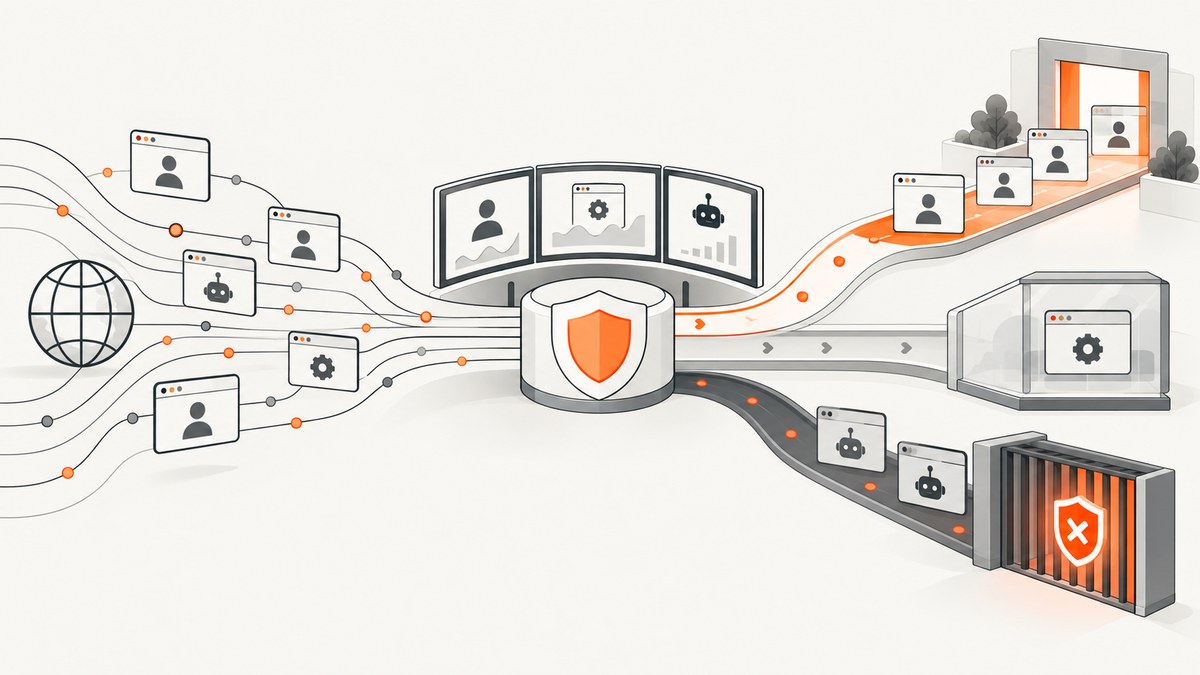
Direct answer: detect headless browsers and scraping bots by combining several independent signals. Start with browser evidence such as navigator.webdriver, then compare request headers, JavaScript behavior, TLS and device fingerprints, and session patterns. Record and review the signals before enforcing anything. Preserve verified crawlers, rate-limit suspicious traffic, use a challenge when confidence is mixed, and block only after you have checked false positives.
A headless browser is an automated browser without a visible window. A scraper is an automated client collecting content. They overlap, but neither label proves malicious intent: accessibility tools, uptime monitors, testing systems, search crawlers, and internal automation can look automated. Your goal is to identify traffic patterns and apply a proportionate response.
1. What navigator.webdriver tells you
navigator.webdriver is a read-only browser property that indicates whether the user agent is controlled by automation. MDN documents that Chrome reports true when launched with --enable-automation, --headless, or a remote debugging port value of 0. Firefox reports it when Marionette is enabled or its command-line flag is used. See the MDN reference.
The property is useful evidence, not a complete detector. Some automated clients expose it; others alter or hide it. A human-controlled browser can also be managed by legitimate testing software. Treat a true value as one input to a decision rather than an automatic ban.
Browser-side collection example
<script>
  const evidence = {
    webdriver: navigator.webdriver === true,
    userAgent: navigator.userAgent,
    platform: navigator.platform,
    language: navigator.language,
    languages: navigator.languages,
    hardwareConcurrency: navigator.hardwareConcurrency,
    deviceMemory: navigator.deviceMemory,
    maxTouchPoints: navigator.maxTouchPoints,
    screen: {
      width: screen.width,
      height: screen.height,
      pixelRatio: window.devicePixelRatio
    }
  };

  fetch('/telemetry/browser', {
    method: 'POST',
    headers: {'content-type': 'application/json'},
    body: JSON.stringify(evidence),
    keepalive: true
  });
</script>
Collect only what you need, document the purpose, and apply your privacy and retention requirements. Browser values are easy for an evasive client to imitate, so use them to enrich a server-side record rather than making the decision in JavaScript.
2. Build a layered detection model
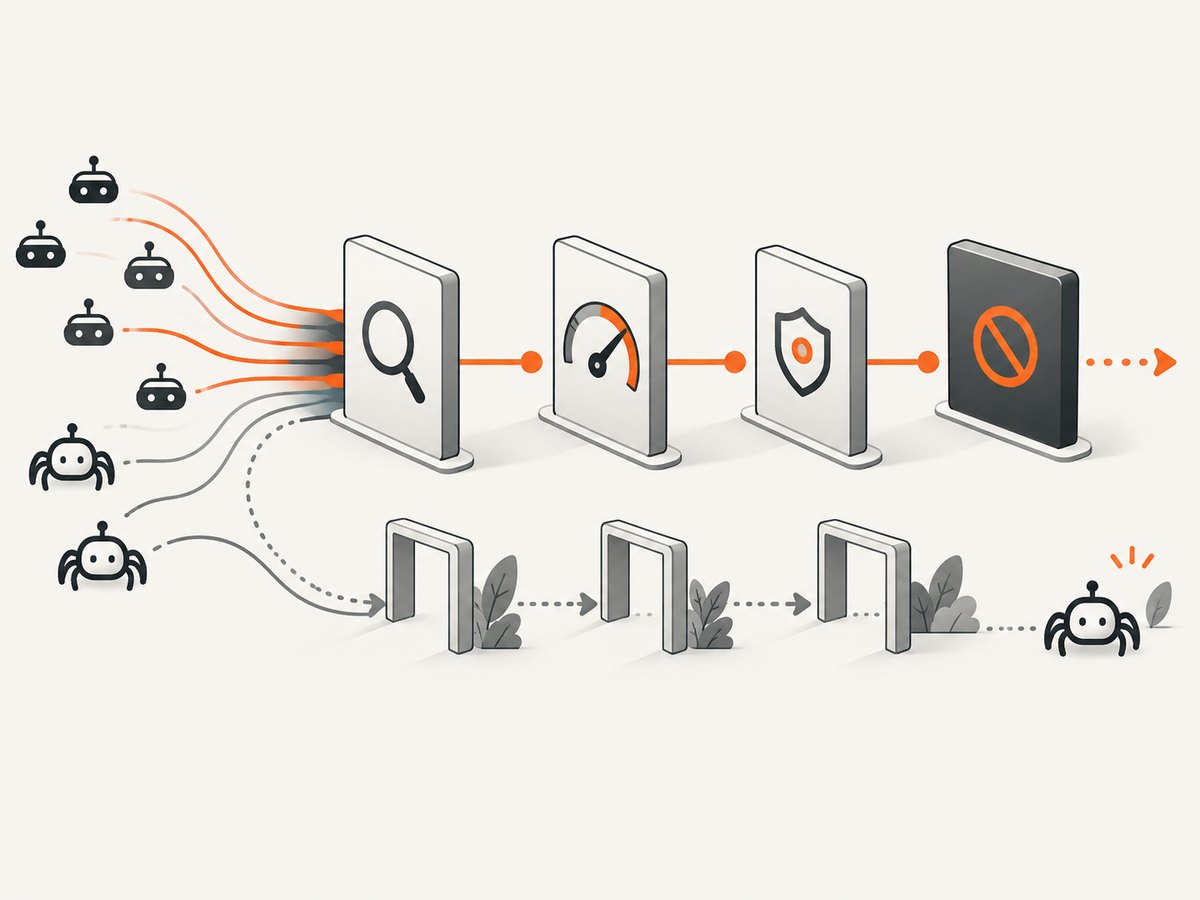
A useful model checks four layers. AWS describes signature matching, browser interrogation, TLS fingerprinting, behavioral heuristics, and machine learning as complementary techniques in its Bot Control use cases. Its client identification guidance also discusses request-header profiling, device fingerprints, and TLS handshake fingerprints.

| Layer | Signals to inspect | What it can reveal |
|---|---|---|
| Request | Header order, accepted encodings, cookies, user-agent consistency, HTTP method and path patterns | Clients that claim to be browsers but send an unusual or contradictory request profile |
| Browser | navigator.webdriver, JavaScript execution, API availability, canvas and feature consistency |
Automation frameworks and clients that cannot reproduce normal browser behavior |
| Network | TLS handshake fingerprint, connection reuse, IP and ASN reputation, proxy patterns | Clusters of clients sharing a non-browser network stack or suspicious infrastructure |
| Session behavior | Request rate, navigation order, dwell time, concurrency, repeated pagination, error responses | Collection workflows and scripted access that look unlike ordinary browsing |
Request and header consistency
Compare the user agent with the rest of the request. A browser user agent paired with missing cookies, an impossible Accept-Language combination, or a fixed header order across thousands of sessions is stronger evidence than the user-agent string alone. Track changes over a session: a client that changes its claimed browser while retaining the same cookie or device identifier deserves review.
JavaScript and browser interrogation
Use a small, fast script to verify that the client can execute JavaScript and expose expected APIs. Test behavior rather than relying on a single fingerprint: timers, event dispatch, storage, and navigation should behave consistently with the browser family claimed by the request. Avoid fragile “secret” tests that break legitimate privacy tools or browser upgrades.
TLS and device fingerprints
TLS fingerprints describe how a client negotiates an encrypted connection. Device and browser fingerprints combine relatively stable attributes. These signals help identify automation that copies headers but uses a different network stack. They are probabilistic: shared browsers, corporate proxies, and privacy software can produce collisions. Store a confidence score and supporting evidence instead of a binary label.
Session and traffic behavior
Behavior often separates a scraper from a normal visitor. Examples include fetching every item in a catalog at a constant interval, requesting pages in numeric order without assets, opening hundreds of concurrent sessions, or retrying identical failures. Aggregate by session, account, device signal, and other stable identifiers where appropriate. AWS notes that scrapers can mimic normal browsers and rotate residential IP addresses, so an IP-only rule can miss a coordinated campaign.
3. A practical server-side scoring pattern
Keep the raw observations and derive a score that is easy to explain. The following Express middleware is intentionally simple; replace the weights and thresholds with values learned from your own traffic.
import express from 'express';

const app = express();
app.use(express.json());

function scoreRequest(req, browser = {}) {
  let score = 0;
  const reasons = [];

  if (browser.webdriver === true) {
    score += 3;
    reasons.push('webdriver=true');
  }
  if (!req.headers.cookie) {
    score += 1;
    reasons.push('no-cookie');
  }
  if (/HeadlessChrome|PhantomJS|Selenium/i.test(req.get('user-agent') || '')) {
    score += 3;
    reasons.push('automation-user-agent');
  }
  if (req.path.startsWith('/catalog/') && req.get('x-session-rate') === 'high') {
    score += 2;
    reasons.push('high-session-rate');
  }

  return {score, reasons};
}

app.post('/telemetry/browser', (req, res) => {
  const result = scoreRequest(req, req.body);
  // Store result with request ID; do not block from this endpoint alone.
  res.json({accepted: true, result});
});

app.listen(3000);
In production, calculate rate and reputation features from your edge or application logs instead of trusting a client-supplied header. Keep a reason code for every score so an analyst can understand why a request was challenged.
4. Distinguish legitimate automation from abuse
Make an inventory before writing rules:
- List valuable endpoints such as search, catalog, account, and published-content pages.
- Identify verified search crawlers, accessibility tools, uptime monitors, partner integrations, and internal jobs.
- Define which traffic must remain available and which endpoints can tolerate friction.
- Document verification methods for desirable bots. A user-agent string alone is not proof.
- Record exceptions with an owner and an expiration or review date.
Do not confuse identity with intent. A crawler may be automated and welcome; a browser with no obvious automation marker may still be collecting your catalog. Evaluate the endpoint, account context, and behavior before taking action.
5. Use staged enforcement
Start with observation. AWS explicitly advises: “Always deploy Bot Control in count mode first.” In count mode, requests are labeled without being blocked; you can inspect logs and find legitimate traffic that was misclassified before changing behavior. See the AWS guidance and rule-group documentation.
| Confidence | Action | When to use it |
|---|---|---|
| Low | Log and label | Signals conflict or the endpoint is low risk |
| Medium | Rate-limit or ask for additional verification | Traffic is unusual but may include real users |
| High | Challenge | Several independent signals agree and the endpoint is sensitive |
| Very high | Block temporarily, then review | Repeated abuse, credential attacks, or clear policy violations |
Use separate limits for anonymous sessions, authenticated accounts, verified integrations, and expensive endpoints. A token-bucket limiter keyed only to source IP is easy to evade with rotating residential addresses. Combine IP with session, account, device, or network signals, while allowing shared corporate or mobile networks enough headroom.
6. Managed detection options and their limits
AWS WAF Bot Control distinguishes common protection for self-identifying bots from targeted protection for bots that hide their identity. Targeted options include browser interrogation, TLS fingerprinting, behavioral heuristics, machine learning, and rate limiting. AWS recommends application SDK integration and warns that Bot Control can add per-request cost, so review count-mode results before enforcement.
Cloudflare Bot Management combines JavaScript detection with feature-based bot scores and WAF actions. Feature availability depends on the plan. Cloudflare documents that a score of 0 means the request was not evaluated; it does not mean the request is safe or human. Treat managed scores as inputs and keep your own logs and exceptions.
When comparing services, check signal coverage, whether evasive clients are included, response actions, crawler verification, logging, non-blocking test modes, SDK requirements, and current plan pricing. Vendor documentation describes each vendor’s system; it is not an independent accuracy benchmark.
7. Evidence, baselines, and privacy
Build a baseline for each important endpoint. Measure request volume, status codes, latency, cache behavior, navigation paths, and the proportion of verified automation. Alert on changes rather than fixed global thresholds. A catalog API may legitimately receive more regular traffic than a marketing page.
Retain enough evidence to investigate decisions, including a request ID, timestamp, endpoint, score, reason codes, and action. Hash or truncate identifiers where possible. Set retention periods and access controls that match your privacy obligations. Avoid collecting fingerprint attributes that you do not use.
A 2026 preprint, Detecting Bot Detection: Prevalence, Techniques, and Implications for Web Measurement Research, reports measurements across 10,000 websites and 40,000 page visits in four browser configurations. It observed a 15% soft-block rate for Chromium headless versus 7% for other configurations, and attributed 75% of Chromium-headless-only blocks to header-level signals in that study. These are controlled, study-specific results, not universal rates. The authors also report that 83% of surveyed papers omitted discussion of bot-detection blocking, which is a finding about the reviewed literature.
8. Troubleshooting common detection failures
| Symptom | Likely cause | Fix |
|---|---|---|
| Every automated test is blocked | webdriver or a test user agent is treated as conclusive |
Allow authenticated test traffic or a verified integration and require multiple signals for blocking |
| Residential scrapers evade an IP limit | Limits are keyed only to source IP | Aggregate by session, account, device, and behavior; watch coordinated request paths |
| Search traffic drops after a rule change | Legitimate crawlers were mislabeled | Return to count mode, verify crawler identity, inspect logs, and add a narrow exception |
| Users see repeated challenges | Threshold is too low or a shared network is being treated as one identity | Raise the threshold, use a session or account key, and exempt recently verified sessions |
| Bot score is zero in Cloudflare | The score was not computed | Interpret zero as unknown and combine Cloudflare signals with your own request and behavior data |
| Rules break after a browser update | A fragile fingerprint or header assumption changed | Version rules, monitor feature distributions, and remove signals that no longer separate traffic |
9. Performance, reliability, and cost considerations
- Run cheap checks first. Header consistency, session rate, and cached reputation are less expensive than a browser challenge. Escalate only when the initial evidence warrants it.
- Keep telemetry asynchronous. Do not delay page responses while writing analytics. Send an event with a request ID and enforce using data already available at the edge.
- Fail safely. If a scoring service is unavailable, prefer logging or a conservative rate limit for ordinary pages. Reserve hard blocks for rules you can evaluate locally.
- Separate endpoint budgets. Protect search, login, export, and catalog APIs independently so a noisy public endpoint does not consume the budget for account traffic.
- Review managed-service pricing. AWS notes per-request Bot Control costs. Cloudflare feature access depends on plan. Verify current terms before purchase.
- Measure user impact. Track challenge completion, support reports, crawler errors, latency, and conversion alongside blocked volume.
10. A deployment checklist
- Inventory protected endpoints and their business impact.
- List legitimate crawlers, monitors, integrations, and test clients.
- Collect request, browser, network, and session evidence with a request ID.
- Start in observation or count mode.
- Review false positives with application owners and support teams.
- Set endpoint-specific rate limits keyed to more than IP where appropriate.
- Challenge medium-confidence traffic and block only repeated, high-confidence abuse.
- Monitor latency, challenge success, crawler health, and customer impact.
- Version rules and recheck vendor plans, SDKs, and costs regularly.
Or skip the browser setup
If your goal is to capture pages for review, documentation, or an AI workflow rather than operate a detector, ScreenshotNeo provides a single screenshot API request. It accepts consent banners like a visitor and removes more than 60 known consent platforms, newsletter popups, and chat widgets before capture; each cleanup step can be disabled. Bot checks, blank pages, timeouts, failed loads, and cache hits are not billed, and the response identifies the result with X-Page-Verdict and X-Billed headers.
See the ScreenshotNeo API documentation for all options. cURL:
curl -G "https://api.screenshotneo.com/v1/shot" -d access_key=YOUR_API_KEY --data-urlencode url=https://stripe.com -o shot.webpPython:
import requests
r = requests.get("https://api.screenshotneo.com/v1/shot", params={"access_key": "YOUR_API_KEY", "url": "https://stripe.com"}, timeout=90)
open("shot.webp", "wb").write(r.content)
Node.js:
const q = new URLSearchParams({ access_key: 'YOUR_API_KEY', url: 'https://stripe.com' });
const res = await fetch(`https://api.screenshotneo.com/v1/shot?${q}`);
ScreenshotNeo also includes an MCP server with take_screenshot, get_page_info, and capture_pdf tools for Claude, Cursor, and other MCP clients. You can set full-page capture, device and viewport settings, dark mode, custom CSS and JavaScript, click or hide selectors, waits, request blocking, headers, cookies, authorization, geolocation, timezone, transparent backgrounds, resizing, caching TTLs, signed links, asynchronous webhooks, bulk capture, and PDF options. It supports 1,000 screenshots a month free with no card; paid plans start at $5 for 3,000. Create a free ScreenshotNeo account.
FAQ
Can I detect every headless browser?
No. A client can hide or imitate browser properties, and legitimate software can look automated. Layered evidence improves decisions but does not provide certainty.
Should I block every request with navigator.webdriver === true?
No. Use it as one signal. Testing, monitoring, accessibility, and internal automation may set it, while some scrapers may not.
Are rotating residential IPs proof of scraping?
No. They weaken IP-only controls. Combine network observations with session identity, request paths, rate, and browser evidence.
What is the safest first enforcement action?
Log and label traffic in count or observation mode. After reviewing false positives, apply endpoint-specific rate limits or a challenge before considering a block.
Do managed bot scores replace application logs?
No. Scores and managed actions are useful inputs, but your endpoint sensitivity, crawler policy, and user-impact review still determine the correct response.


