DNSSEC Test: Check DNS Security Extensions for a Domain
Learn how to test a domain’s DNSSEC chain, verify resolver validation, interpret SERVFAIL and NOERROR, and fix common diagnostic findings.

Short answer: use a domain-chain diagnostic such as DNSViz or the Verisign DNSSEC Debugger to see whether the domain’s DS, DNSKEY, signatures, and delegation form a valid authentication chain. Separately, test a recursive resolver with ICANN’s dnssec-failed.org procedure: SERVFAIL means that resolver rejected the intentionally broken DNSSEC domain, while NOERROR means it did not validate in that test.
These are different checks. A domain can have a correctly configured chain while a resolver does not validate DNSSEC, and a resolver can validate DNSSEC while a particular domain has a broken chain.
1. Decide which DNSSEC question you need to answer
| Question | Use | What you learn |
|---|---|---|
| Is this domain signed correctly? | DNSViz or Verisign DNSSEC Debugger | Whether the delegation and DNSSEC records create a valid chain of trust, plus detected configuration problems. |
| Does this recursive resolver validate DNSSEC? | ICANN’s dnssec-failed.org test |
How the resolver handles a deliberately failing DNSSEC domain. |
| Where is the chain failing? | DNSViz visualization and debugger details | The delegation, DS, DNSKEY, signature, or authoritative-server step that needs investigation. |
Do not treat a resolver test as proof that every DNS query is secure. ICANN’s interpretation applies to that specific intentionally failing domain and procedure.
2. Test a domain with DNSViz
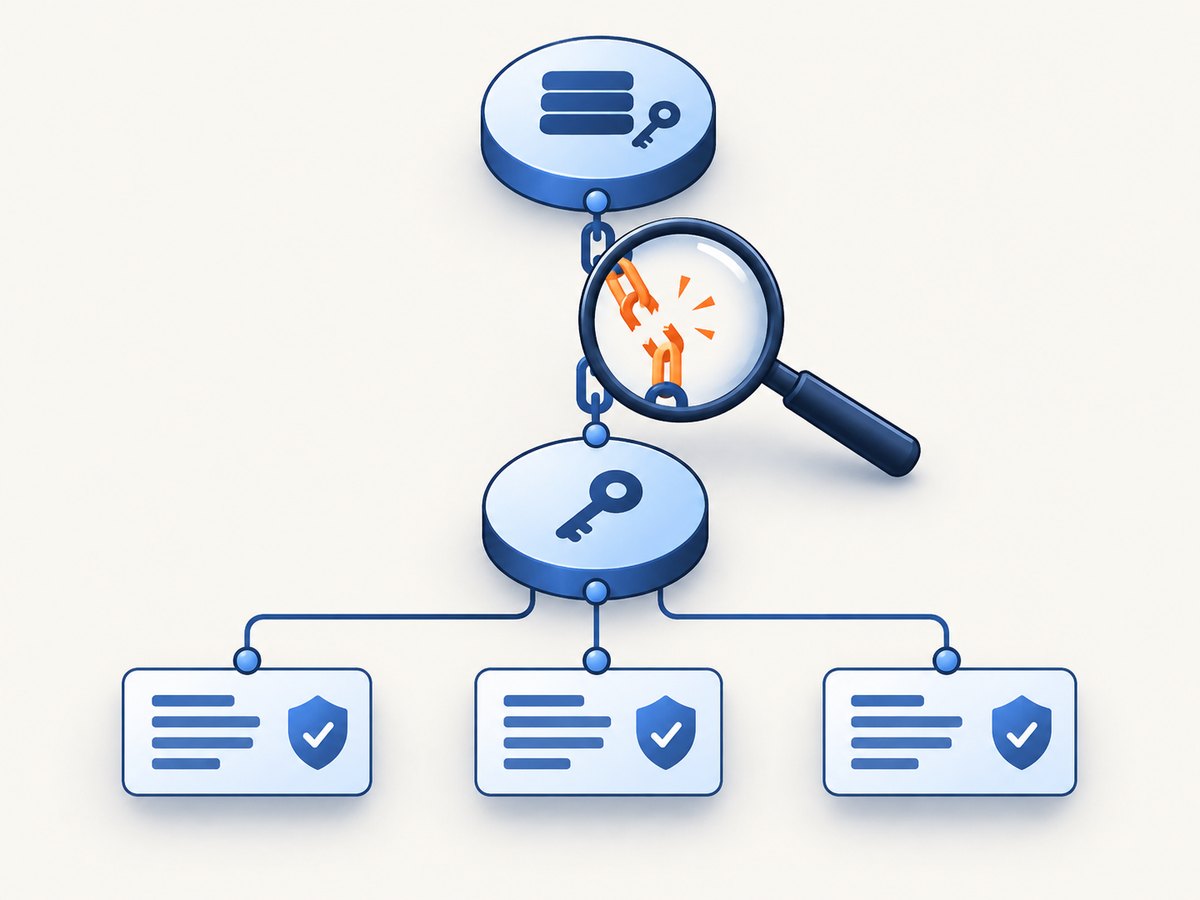
DNSViz describes its service as a visual analysis of a domain’s DNSSEC authentication chain and its resolution path, with configuration errors detected by the tool. Enter the domain name without a URL path, such as example.com, and start an analysis.
- Open DNSViz and submit the domain.
- Wait for the fresh analysis to complete.
- Read the chain from the parent zone through the DS record, the child zone’s DNSKEY set, and the signed records.
- Follow each warning to the record or delegation where DNSViz observed a problem.
- Confirm the finding with your DNS operator, registrar, or authoritative DNS provider before changing records.
Current DNSViz availability note
DNSViz currently reports that it is in maintenance mode. It can run new analyses, but it cannot load historical analyses and will not save new analyses to its database. Check the service notice when you begin a diagnostic because availability and behavior can change.
How to read the chain
- Parent-to-child delegation: the parent zone publishes a DS record that identifies a DNSKEY in the child zone.
- DNSKEY set: the child publishes the key material used to validate signatures.
- RRSIG records: signed record sets need signatures that validate with an appropriate DNSKEY.
- Authoritative path: the result depends on the authoritative nameservers and the delegation currently visible in DNS.
A colored warning is a lead for investigation, not a universal diagnosis. For example, a stale DS at the parent and a missing DNSKEY in the child can both break the chain, but they require different changes.
3. Use the Verisign DNSSEC Debugger for advanced checks
The Verisign DNSSEC Debugger accepts a domain and can also accept a DS or DNSKEY trust anchor and alternative authoritative starting nameservers. Those inputs are useful when you are testing a migration, a newly signed zone, or a delegation that is not yet visible from the normal starting point.
- Enter the fully qualified domain name.
- Run the default diagnostic first so you have a baseline.
- If you have a specific DS or DNSKEY trust anchor, provide it using the debugger’s advanced fields.
- If one authoritative server is suspected, supply alternative authoritative nameserver inputs and compare the results.
- Record the exact failing step and the time of the test; DNS changes may be observed differently while caches expire.
When custom trust anchors help
A custom trust anchor lets you test the child zone against the key you expect to become trusted, instead of relying only on the currently published parent DS. This is useful during a controlled key or registrar transition. It does not change the public DNS; it changes the starting assumptions for the diagnostic.
4. Test whether a recursive resolver validates DNSSEC
ICANN documents a separate resolver test using dnssec-failed.org, a domain intentionally configured to fail DNSSEC validation. Query that name through the recursive resolver you want to evaluate, then interpret the response:

dig dnssec-failed.org A
To test a particular resolver, specify it after the @ symbol:
dig @192.0.2.53 dnssec-failed.org A
Replace 192.0.2.53 with the resolver address you administer or are authorized to test. In ICANN’s procedure:
SERVFAIL: the resolver rejected the intentionally failing domain, indicating DNSSEC validation is happening in this test.NOERROR: the resolver returned a successful DNS response instead of rejecting the broken chain, indicating it is not validating in this test.
Do not generalize the result to arbitrary DNS queries. A resolver’s behavior can depend on configuration, forwarding, policy, or the exact name queried.
5. Repeatable command-line checks
The following commands help you collect the records that a diagnostic is examining. They do not replace a chain validator.
Inspect DS records at the parent
dig example.com DS +dnssec
Inspect DNSKEY records in the child zone
dig example.com DNSKEY +dnssec
Inspect signatures for an ordinary record
dig example.com A +dnssec
Ask for the DNSSEC OK (DO) flag explicitly
dig example.com A +dnssec +multiline
Run these against more than one authoritative nameserver when you suspect inconsistent data:
dig @ns1.example-dns.net example.com DNSKEY +dnssec
dig @ns2.example-dns.net example.com DNSKEY +dnssec
Use the nameservers actually listed by the domain’s delegation. Do not copy the example hostname into a production command.
6. Automate a basic DNSSEC evidence check
For automation, save raw responses and pass them to a DNSSEC-aware library or your diagnostic service. The snippets below collect the key record sets; cryptographic validation still requires a DNSSEC-capable resolver or library.
Python with dnspython
#!/usr/bin/env python3
import dns.resolver

name = "example.com"
resolver = dns.resolver.Resolver()
resolver.timeout = 5
resolver.lifetime = 10

for record_type in ("DS", "DNSKEY", "RRSIG"):
    print(f"--- {record_type} for {name} ---")
    try:
        answers = resolver.resolve(name, record_type, raise_on_no_answer=False)
        for answer in answers:
            print(answer)
    except Exception as exc:
        print(f"lookup failed: {exc}")
Install the dependency with python -m pip install dnspython. A missing DS record can be correct for an unsigned zone; interpret it together with the DNSViz or debugger result.
Node.js DNS record collection
import dns from "node:dns/promises";

const name = "example.com";
for (const type of ["DS", "DNSKEY", "RRSIG"]) {
  try {
    const records = await dns.resolve(name, type);
    console.log(`--- ${type} ---`);
    console.log(records);
  } catch (error) {
    console.error(`${type} lookup failed: ${error.code ?? error.message}`);
  }
}
Node’s built-in resolver retrieves records but does not by itself prove the complete DNSSEC chain. Use a validating resolver or a dedicated DNSSEC library for an enforcement decision.
cURL for an HTTP-based diagnostic endpoint
If your organization exposes an internal DNS diagnostic service, call it with cURL and store the raw response for auditing:
curl --fail-with-body --get "https://diagnostic.example.test/dnssec" \
  --data-urlencode "name=example.com" \
  --output dnssec-report.json
Replace the example endpoint with a service you control. Do not send private trust anchors or internal names to an untrusted third party.
7. Common DNSSEC errors and fixes
| Symptom | Likely cause | Follow-up |
|---|---|---|
| DS exists, but no matching DNSKEY is visible | The parent DS is stale, or the child key was removed. | Compare the DS at the parent with the active DNSKEY set and coordinate a DS update with the registrar or DNS operator. |
| DNSKEY is present, but signatures do not validate | RRSIG is expired, generated with the wrong key, or the signer’s clock is wrong. | Check signature times, key tags, algorithm, and signer configuration. |
| Only one authoritative server fails | Zone data is inconsistent between nameservers. | Query every authoritative server directly and repair the outlier. |
| Users receive SERVFAIL after a DNS change | Validating resolvers reject the broken chain. | Restore a matching DS/DNSKEY state or temporarily remove the incorrect DS while the zone is repaired, following your provider’s change procedure. |
| Resolver test returns NOERROR | The tested resolver is not validating in ICANN’s procedure, or the query did not reach the intended resolver. | Confirm the resolver address, forwarding path, and test command; do not infer domain-chain health from this result. |
| Tool shows a warning but the site works | Caches, non-validating resolvers, or a warning that does not affect the tested record. | Identify the exact record and validation path, then test from validating resolvers before deciding severity. |
8. Operational, performance, and reliability notes
- Cache timing: DS, DNSKEY, and signature changes propagate according to TTLs. Run checks from authoritative servers and several recursive resolvers when timing matters.
- Key rollovers: publish the successor key and required DS state in the order specified by your DNS operator. Removing the old key too early can create validation failures.
- Time correctness: expired or not-yet-valid signatures often point to clock or signer scheduling problems.
- Evidence: save the tool URL or raw
digoutput, resolver address, and timestamp with an incident record. - Availability: keep a second diagnostic path available because DNSViz’s maintenance mode currently prevents historical lookups and database saves.
- Cost: DNSViz, the Verisign debugger, ICANN guidance, and local
digchecks are web or command-line diagnostics. Any DNS provider charges, query limits, or monitoring costs depend on the service you choose and should be verified directly.
9. Or skip the browser setup
If you need a clean image of a DNSSEC diagnostic report for documentation, an incident ticket, or a runbook, ScreenshotNeo can capture the page through one request. It accepts consent banners before capture and removes more than 60 known consent platforms, newsletter popups, and chat widgets. Bot checks, blank pages, timeouts, failed loads, and cache hits are not billed, and the response identifies the outcome with X-Page-Verdict and X-Billed headers. Its MCP server provides take_screenshot, get_page_info, and capture_pdf tools for Claude, Cursor, and other MCP clients.
See the ScreenshotNeo API documentation for all options.
curl -G "https://api.screenshotneo.com/v1/shot" -d access_key=YOUR_API_KEY --data-urlencode url=https://stripe.com -o shot.webp
import requests
r = requests.get("https://api.screenshotneo.com/v1/shot", params={"access_key": "YOUR_API_KEY", "url": "https://stripe.com"}, timeout=90)
open("shot.webp", "wb").write(r.content)
const q = new URLSearchParams({ access_key: 'YOUR_API_KEY', url: 'https://stripe.com' });
const res = await fetch(`https://api.screenshotneo.com/v1/shot?${q}`);
The Free plan includes 1,000 screenshots each month with no card. Paid plans start at $5 for 3,000 screenshots. Create a free ScreenshotNeo account.
10. DNSSEC test checklist
- State whether you are checking a domain chain or a recursive resolver.
- Run DNSViz or the Verisign debugger for the domain.
- Inspect DS, DNSKEY, and RRSIG records with
dig +dnssec. - Query each authoritative nameserver if results differ.
- Run ICANN’s
dnssec-failed.orgtest against the resolver under investigation. - Record the exact error, resolver, nameserver, and timestamp.
- Ask the DNS operator to confirm the intended DS, key, signer, and rollover state.
FAQ
Is DNSSEC enabled when a DNSKEY record exists?
No. A publicly trusted chain also needs the parent’s DS to match an appropriate child DNSKEY, with valid signatures along the resolution path.
Does SERVFAIL always mean DNSSEC is broken?
No. In the ICANN resolver test, SERVFAIL is the expected sign that the resolver rejected dnssec-failed.org. For an ordinary domain, SERVFAIL can have other causes, so inspect the chain and resolver logs.
Can I test DNSSEC from my laptop without changing DNS?
Yes. DNSViz, the Verisign debugger, and read-only dig queries do not modify your zone. Use authorization before testing private or internal names.
Which DNSSEC tool is best?
The available evidence does not support a universal ranking. Choose DNSViz for a visual chain, the Verisign debugger for custom trust anchors or authoritative starting nameservers, and ICANN’s procedure for resolver behavior.