Does Cloudflare Host Websites? Hosting Options Explained
Cloudflare usually sits in front of your web host, but Pages and Workers can host parts of a site. Learn which setup fits your project.

Usually, Cloudflare does not replace your web host. In the common setup, your files and application stay on an origin server at another provider. Cloudflare provides authoritative DNS, CDN caching, TLS, security, and reverse-proxy services in front of that origin. Cloudflare does offer direct hosting for static and JAMstack sites with Pages, and programmable edge execution with Workers.
The right answer depends on what you are deploying:
| Project | Where it runs | Cloudflare product | Separate origin needed? |
|---|---|---|---|
| WordPress, PHP, database app | Traditional server or managed host | DNS, proxy, CDN, security | Yes |
| Static site or JAMstack frontend | Cloudflare’s Pages deployment | Pages | No for deployed frontend assets |
| Edge API or request logic | Cloudflare network | Workers | Sometimes; a Worker can fetch one |
What Cloudflare normally does
Cloudflare’s default role is DNS plus reverse proxy. DNS records identify the server that hosts your content. When a record is proxied, Cloudflare sits between visitors and that server, handling traffic before forwarding requests to the origin. Proxied records return Cloudflare anycast addresses; DNS-only records return the origin record and bypass the proxy.
This architecture is useful when you already have hosting. You keep the application runtime, files, database, and deployment process at the host that provides them. Cloudflare manages the public DNS zone and can cache eligible responses, terminate HTTPS, and apply traffic controls.
See Cloudflare’s documentation for managing DNS records and proxied versus DNS-only records.
Cloudflare Pages: direct hosting for static sites
Pages is Cloudflare’s native hosting option for static and JAMstack sites. A Pages project can build from a repository or deployment workflow, publish frontend assets, and connect a custom domain. Because Pages serves the deployed site, a separate traditional web host is not required for those assets.

When Pages is a good fit
- HTML, CSS, JavaScript, images, and generated frontend files
- Static site generators and JAMstack frameworks
- Frontends that call APIs hosted elsewhere
- Projects that benefit from a managed build and deployment workflow
Custom domains and apex domains
You can attach a custom domain to a Pages project. For an apex domain such as example.com, Cloudflare requires the site to be a Cloudflare zone with nameservers pointed to Cloudflare. A subdomain can use the DNS configuration supported by the Pages setup.
Pages hosting does not automatically provide a database, PHP runtime, WordPress installation, or a persistent application server. Those components still need an appropriate service.
Cloudflare Workers: programmable edge infrastructure
Workers execute code on Cloudflare’s network. Routes map URL patterns to Worker scripts; a matching request runs the script, which can return a response, call an API, rewrite a request, or fetch an application server behind Cloudflare.
Workers are suitable for request handling, APIs, authentication layers, redirects, personalization, and other edge logic. Calling Workers “shared hosting” is misleading: you deploy code to an edge runtime and design around its APIs and limits rather than uploading a conventional server application.
Read the official overview of Workers routes before choosing this model.
Do you need separate hosting with Cloudflare?
Use this decision guide:
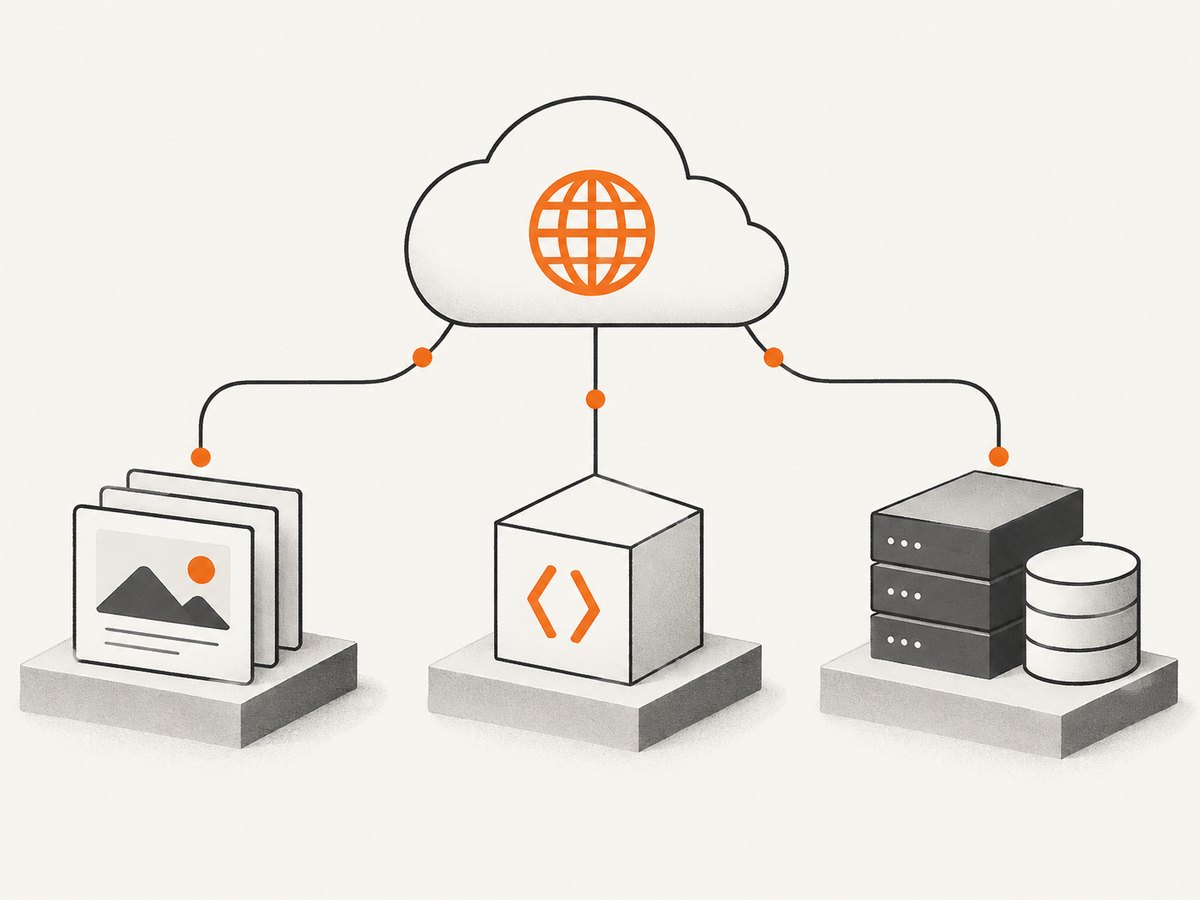
- Static or JAMstack frontend: deploy it to Pages. No separate origin is needed for the published frontend.
- WordPress, PHP, or a database-backed application: keep a host that runs the application and database. Put Cloudflare DNS and proxying in front of it.
- Edge logic or a serverless API: use Workers. A Worker can be the application boundary or fetch an origin when persistent backend services are required.
- Existing hosting that should remain unchanged: move DNS authority to Cloudflare, add the origin records, and enable proxying where appropriate.
How to put an existing website behind Cloudflare
- Create or select the Cloudflare zone for your domain.
- Import or add the required A, AAAA, and CNAME records pointing to the origin.
- Verify that records for mail, verification services, and other non-HTTP systems use the correct DNS-only status when proxying is not supported.
- Change the domain’s nameservers at the registrar to the Cloudflare nameservers shown during onboarding.
- Wait for delegation and verify DNS resolution.
- Enable proxying for web records after confirming the origin accepts the expected host header and HTTPS configuration.
- Test the site, redirects, forms, assets, webhooks, and administrator endpoints.
# Check which nameservers are authoritative
dig NS example.com

# Check the public address returned for a proxied hostname
dig A www.example.com

# Check the origin directly when you know its address
curl -I --resolve www.example.com:443:203.0.113.10 https://www.example.com/
Partial setup
If you cannot change nameservers, Cloudflare documents a partial CNAME setup through a certified hosting partner. This is a different operating model from a full authoritative DNS setup, so confirm that your provider supports it before planning a migration.
Can Cloudflare host WordPress?
Cloudflare can protect and accelerate a WordPress site, but it does not normally run the WordPress PHP application or its database. WordPress remains on a compatible host. Cloudflare supplies DNS, reverse proxying, caching and related network services in front of that host. Pages is not a drop-in replacement for a conventional WordPress installation.
Cloudflare Registrar is not hosting
Cloudflare can sell domain registrations without markup fees, but registering a domain does not create an origin server or publish website files. You still need Pages, Workers, or another hosting provider for the site itself.
Operational and cost considerations
- Origin dependence: a proxied traditional site still depends on the origin’s compute, storage, database, and deployment process.
- DNS changes: moving nameservers changes authoritative DNS. Audit every record, including mail and verification records, before switching.
- Proxy compatibility: some services require the real origin address and should remain DNS-only.
- Caching: cache behavior depends on response headers and Cloudflare configuration. Do not assume every dynamic response is cached.
- Runtime choice: Pages handles deployed frontend assets; Workers handles edge code; neither automatically supplies a general-purpose server and database.
- Pricing: choose the product and plan from current Cloudflare terms for your workload. The research for this guide contains no current quantitative limits or uptime figures.
Troubleshooting
The domain resolves, but the site shows an error
Confirm the origin is reachable, the DNS record points to the correct address, and the origin serves the requested hostname. Test the origin with curl --resolve before debugging Cloudflare settings.
Cloudflare returns an unexpected address
A proxied record intentionally returns Cloudflare anycast addresses. Use the origin address for direct diagnostics and keep the record proxied for normal visitor traffic.
Mail stopped working after DNS migration
Review MX, SPF, DKIM, and other mail records. Mail records generally should not be proxied. Restore missing records and allow DNS changes to propagate.
The apex domain will not attach to Pages
Add the domain as a Cloudflare zone and point its nameservers to Cloudflare. An apex domain requires that full-zone setup.
A Worker route never runs
Check that the route pattern matches the requested hostname and path, that the Worker is deployed, and that another route or zone setting is not taking precedence.
Assets or API calls fail only behind the proxy
Inspect host headers, HTTPS mode, redirects, CORS, cache rules, and origin firewall allowlists. Compare a proxied request with a direct origin request.
Or skip the browser setup
If you need screenshots of a Cloudflare-hosted site for documentation, visual regression, or monitoring, ScreenshotNeo provides a single HTTP request. It removes cookie and consent banners, newsletter popups, and chat widgets before capture. Bot checks, blank pages, timeouts, failed loads, and cache hits are not billed, and the response identifies the result with X-Page-Verdict and X-Billed headers. Its MCP server lets Claude, Cursor, and other MCP clients call take_screenshot, get_page_info, and capture_pdf.
See the ScreenshotNeo API documentation for all capture options.
cURL
curl -G "https://api.screenshotneo.com/v1/shot" -d access_key=YOUR_API_KEY --data-urlencode url=https://example.com -o shot.webpPython
import requests
r = requests.get("https://api.screenshotneo.com/v1/shot", params={"access_key": "YOUR_API_KEY", "url": "https://example.com"}, timeout=90)
open("shot.webp", "wb").write(r.content)
Node.js
const q = new URLSearchParams({ access_key: 'YOUR_API_KEY', url: 'https://example.com' });
const res = await fetch(`https://api.screenshotneo.com/v1/shot?${q}`);
ScreenshotNeo supports full-page and element captures, device presets, custom viewports, retina scale, dark mode, PDF output, custom CSS and JavaScript, clicks, waits, request blocking, headers, cookies, user agents, timezone, geolocation, resizing, caching, signed links, async jobs, bulk capture, and a usage API. It accepts parameter names used by other screenshot APIs to simplify migration. The free plan includes 1,000 screenshots each month with no card; paid plans start at $5 for 3,000.
Create a free ScreenshotNeo account and get 1,000 screenshots a month with no card.
FAQ
Is Cloudflare a web host or just a CDN?
It is commonly used as DNS and a reverse proxy/CDN in front of another host. Pages and Workers add direct hosting and edge execution options.
Can I use Cloudflare for free hosting?
Static sites can be deployed with Pages, subject to current product terms. A conventional dynamic application still needs its runtime and database somewhere.
Do I have to change nameservers?
Full Cloudflare DNS setup uses Cloudflare nameservers. A documented partial CNAME setup may be available through a certified hosting partner when nameservers cannot change.
Where should my database live?
Keep it with a service designed to run and persist databases. Pages serves frontend assets, and Workers provide edge code; neither description alone implies a traditional database server.
Does buying a domain from Cloudflare host it?
No. Registration gives you control of the domain. Hosting still comes from Pages, Workers, or another origin provider.


