How to Download a Complete Website With All Its Files
Use HTTrack or GNU Wget to mirror a website for offline use, with scope limits, dynamic-site caveats, commands, and troubleshooting.

Short answer: Use HTTrack for a guided website-mirroring workflow, or GNU Wget for a repeatable terminal command. Both recursively fetch discoverable pages and resources into a local directory. A “complete” copy means everything the crawler can discover and access within the scope you allow; it does not guarantee server-side files, private content, API data, or a fully working copy of a JavaScript application.
What “complete website” means
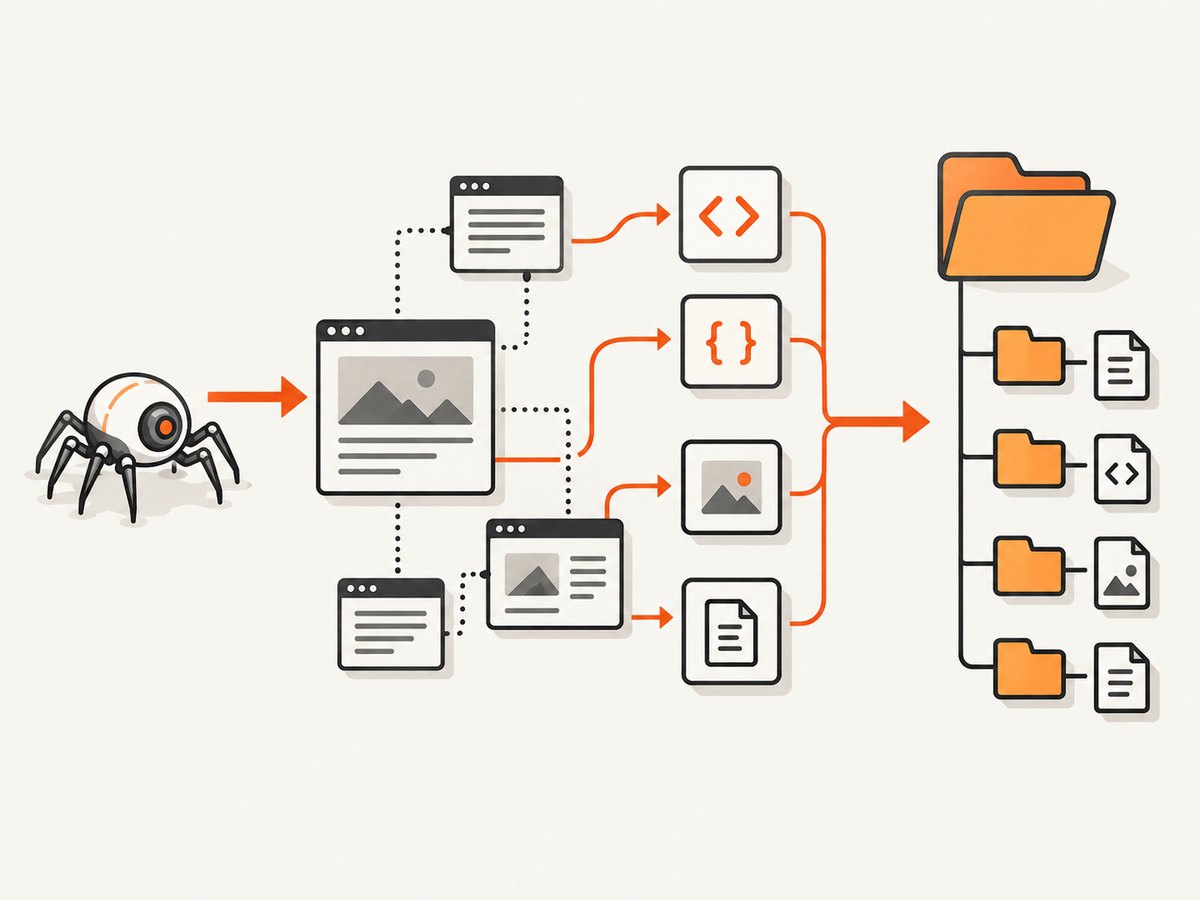
A mirror is a crawl, not a server backup. The crawler follows links and resource references it can parse, downloads permitted responses, and rewrites links for local browsing. The result can include HTML, images, CSS, JavaScript, fonts, and downloadable files that are linked from the crawl.
It cannot retrieve files that are not exposed through reachable links, require credentials you did not provide, are generated only after an API call, are blocked by access controls, or remain on the server without a public URL. Forms, logins, databases, payment flows, and other server-side behavior usually need the original service.
Choose HTTrack or GNU Wget
| Use case | Best fit | Reason |
|---|---|---|
| First mirror, visual workflow | HTTrack | Project setup, scope controls, resume and update options, and a graphical interface. |
| Automation and repeatable jobs | GNU Wget | Scriptable flags, logs, pacing, and explicit recursion/resource options. |
| Script-driven navigation | HTTrack browser-proxy workflow | Can record an address reached by submitting a form or clicking a script-driven link, although it does not make every interactive site mirrorable. |
HTTrack describes its utility as a free offline browser and documents recursive local copies and relative-link preservation. Its project page lists version 3.50-4, released 2026-09-25, with HTTPS, files larger than 2 GB, long Windows paths, and WARC output support (project page, documentation).
Before you crawl
- Define the start URL, allowed hosts, paths, and file types.
- Check
robots.txt, terms, and access permissions. Both tools identify themselves and respect robots controls by default. - Estimate available disk space. Recursive crawls can consume substantial storage, bandwidth, memory, and CPU.
- Set a request delay and run during a suitable window for large sites.
- Decide whether you need a browsable mirror, a repeatable update process, or an archival WARC file.
Method 1: Download with HTTrack
Graphical workflow
- Install HTTrack from the official project site.
- Create a new project and choose a local destination.
- Enter the starting URL.
- Select Download web site(s) / mirror. Do not choose Get individual files unless you only want listed URLs.
- Set scope and filters before starting. Keep external hosts out unless you explicitly need them.
- Start the copy and review the log for skipped, denied, or failed requests.
- Open the generated local entry page and test it offline.
HTTrack’s interface guide also documents Continue interrupted download for resuming a cancelled project and updating an existing mirror (step-by-step guide).
Command line
httrack https://example.com/ -O ./website-copyThe -O option sets the mirror and log path. Replace the URL and destination with values you are authorized to crawl. Add scope and exclusion rules from the HTTrack command-line guide before running a substantial job; HTTrack filters are not interchangeable with Wget flags.
Resume, update, and archive
Run the same project again to update it or resume an interrupted transfer. HTTrack 3.50-4 also lists WARC output. The command guide describes WARC as an additional archival file written alongside the ordinary browsable mirror, not a replacement for that directory.
Method 2: Download with GNU Wget
Install GNU Wget, open a terminal, change to the directory where you want the mirror, and run:
wget --mirror --convert-links --page-requisites --adjust-extension --wait=1 https://example.com/Each option has a separate job:
| Option | Effect |
|---|---|
--mirror |
Recursive, timestamped retrieval with unlimited recursion depth. |
--convert-links |
Rewrites links so downloaded pages can refer to local files. |
--page-requisites |
Fetches resources needed to display an HTML page, such as stylesheets and images. |
--adjust-extension |
Adds an appropriate HTML extension to responses when needed. |
--wait=1 |
Pauses one second between requests to reduce request rate. |
Wget parses links in HTML, XHTML, and CSS. Its normal recursion has a depth limit; --mirror changes this for the mirror operation. Read the current GNU Wget manual before combining recursion, timestamping, authentication, or conversion options.
Inspect scope before a large run
wget --spider --recursive --level=2 --wait=1 https://example.com/--spider checks links without downloading the files. This helps reveal whether the starting page leads to another host or an unexpectedly large path. Set an explicit level when you want a bounded crawl; remove the limit only when you understand the site and its size.
Timestamping caveat
GNU Wget warns that link conversion does not work seamlessly with timestamping. If you maintain a mirror over multiple runs, read the manual’s timestamping and converted-link guidance and consider --backup-converted in the documented fuller recipe. Verify the result after each update rather than assuming unchanged links remain correct.
Make the local copy usable
- Keep the downloaded directory structure intact.
- Open the local entry page without a network connection.
- Click internal links and confirm they resolve to local files.
- Check images, stylesheets, fonts, scripts, and document downloads.
- Record pages that still request the network; those dependencies identify dynamic or missing content.
- For important archives, retain the crawl log and the original start URL and scope rules.
Neither tool promises that a complex interactive site will work offline. Test the exact paths you need, including navigation, search, forms, media, and downloads.
Dynamic, private, and JavaScript-heavy sites
A recursive crawler sees URLs and resource references. A single-page application may build routes in JavaScript, obtain content from an API, or require a login session. A form submission may create a URL that never appears in the source HTML. HTTrack documents a browser-proxy workflow for capturing an address reached by a form or script-driven click, but this is a navigation aid, not a guarantee of a complete authenticated or interactive mirror.
For a private site, use an authorized session and protect any exported cookies or headers. Do not publish a mirror containing personal data, private documents, or credentials. If you need a true backup of server-side data, use the site’s export or backup facility instead of a web crawler.
Crawl boundaries and responsible use
- Start at the narrowest URL that contains the material you need.
- Allow only the hosts and paths required for that material.
- Leave robots controls enabled unless you have a clear, authorized reason and understand the consequences.
- Use a delay such as Wget’s
--wait=1; larger crawls may need a longer interval. - Watch disk, bandwidth, memory, and CPU while the job runs.
- Stop if logs show an accidental loop, calendar expansion, query-string explosion, or unexpected host.
GNU’s manual cautions that recursive downloads can overload a server and fill local storage. There is no universal archive size or duration: both depend on page count, resource size, scope, server responses, and network conditions.
Troubleshooting
| Symptom | Likely cause | Fix |
|---|---|---|
| Only the home page downloaded | Links are generated by JavaScript, blocked, or outside the allowed scope. | Inspect logs and source links; add required paths or use HTTrack’s documented browser-proxy workflow for a reachable navigation path. |
| Pages open but have no styling or images | Page requisites were not fetched or local links were not converted. | For Wget, include --page-requisites --convert-links; rerun and confirm CSS/image requests in the log. |
| Local links still point online | The URL was not downloaded, was excluded, or conversion could not rewrite it. | Check scope and exclusions, then inspect the generated HTML for the missing target. |
| Login pages do not work offline | Authentication, sessions, and server-side state are not reproduced by a public crawl. | Use an authorized export or backup workflow; do not treat a mirror as a database backup. |
| Crawl grows without stopping | Calendar, search, tracking, or query URLs create an effectively infinite URL space. | Restrict hosts and paths, set a recursion level, exclude query patterns, and stop the run before storage is exhausted. |
| Wget update breaks converted links | Timestamping and link conversion have a documented interaction. | Review the Wget manual’s timestamping section and test with --backup-converted before using the process for recurring updates. |
| Requests are rejected or throttled | Server policy, robots rules, rate limits, or access controls. | Respect the site’s policy, slow the crawl, narrow scope, and obtain permission where required. |
| Windows path or file-size errors in HTTrack | Older releases had path and large-file limitations. | Use the current HTTrack release; version 3.50-4 lists support for files over 2 GB and Windows paths over 260 characters. |
Performance, reliability, and cost
Performance
Runtime is governed by the number and size of resources, server latency, connection limits, recursion scope, and your delay setting. Narrow the start path, exclude unnecessary file types, and pace requests. A deeper crawl increases both useful coverage and the chance of discovering large or repetitive URL spaces.
Reliability
Keep logs, preserve the original command or project settings, and rerun after interruptions. Validate representative pages offline instead of relying only on an exit code. For archival work, retain the ordinary mirror and, where appropriate, the WARC output documented by HTTrack.
Cost
HTTrack and GNU Wget are free software. Your practical costs are local storage, bandwidth, compute time, and any hosting or backup space. The research sources do not establish a typical mirror size, completion time, or success rate, so plan from a measured sample of the site you intend to copy.
Or skip the browser setup
If your goal is a clean image or PDF of pages rather than a local archive of every file, ScreenshotNeo provides a one-request website screenshot API. It accepts the cookie or consent banner before capture and removes more than 60 known consent platforms, newsletter popups, and chat widgets; each step can be disabled. Bot checks, CAPTCHAs, blank pages, timeouts, failed loads, and cache hits are not billed, and the response reports the page verdict and billing status in X-Page-Verdict and X-Billed headers. It also offers an MCP server for Claude, Cursor, and other MCP clients with take_screenshot, get_page_info, and capture_pdf tools.
cURL
curl -G "https://api.screenshotneo.com/v1/shot" -d access_key=YOUR_API_KEY --data-urlencode url=https://stripe.com -o shot.webpPython
import requests
r = requests.get("https://api.screenshotneo.com/v1/shot", params={"access_key": "YOUR_API_KEY", "url": "https://stripe.com"}, timeout=90)
open("shot.webp", "wb").write(r.content)
Node.js
const q = new URLSearchParams({ access_key: 'YOUR_API_KEY', url: 'https://stripe.com' });
const res = await fetch(`https://api.screenshotneo.com/v1/shot?${q}`);
See the ScreenshotNeo API documentation for the full option set, including full-page capture with lazy images, CSS-element capture, device and viewport settings, dark mode, retina scale, PDF paper and page-range controls, custom CSS and JavaScript, clicks and waits, request blocking, headers, cookies, user agents, authorization, timezone, geolocation, transparent backgrounds, resizing, caching, signed links, asynchronous webhooks, bulk capture of up to 100 URLs per call, usage data, and the OpenAPI specification. It supports the parameter names used by other screenshot APIs to ease migration.
The Free plan includes 1,000 screenshots each month with no card. Paid plans start at $5 for 3,000 shots; yearly billing gives two months free, and every feature is available on every plan. Create a free ScreenshotNeo account.
FAQ
Can I download a website’s database with HTTrack or Wget?
No. They retrieve web-accessible responses. Use an authorized database or application export for server-side data.

Will a mirror preserve comments, accounts, and form submissions?
Usually not. Those depend on server-side state, authentication, or APIs that a static directory does not contain.
Which tool is easier for a first attempt?
HTTrack’s project workflow is usually easier to inspect visually. Wget is better when the command must run from a script or scheduled job.
How do I know whether the copy is complete?
Define completeness as a scope, review logs for failures, and test the pages and downloads you care about while offline. No crawler can prove that undiscoverable or inaccessible files do not exist.
Should I disable robots.txt?
Leave it enabled by default. If you have a documented, authorized reason to change behavior, understand the site’s policy and the load your crawl will create first.


