Embedly Alternatives with Lower Per-URL Pricing
Compare Embedly alternatives by real metering, quotas, overages, features, and commercial terms before switching.

Short answer: Embedly lists an API plan at $119 per month with 10,000 Embed URLs and 10,000 Extract URLs included. Additional Embed or Extract usage is listed at $9.50 per 10,000 URLs, or $0.00095 per URL. The lowest advertised commercial subscription among the researched alternatives is LinkPreview Pro at $25 per month, but LinkPreview does not publish a monthly request allowance or overage schedule on the pricing page, so its lower subscription price is not proof of a lower per-URL cost.
Iframely can be less expensive at low volume, with a free tier and a $49 Business tier, but it meters hits as one hour of activity for a specific URL. One displayed URL can therefore generate multiple hits. Microlink is relevant for metadata and link previews, but the reviewed sources do not establish its current paid price. The right choice depends on what you process, how usage is counted, and which features you actually need.
1. Pricing comparison at a glance
| Service | Published entry price | Published allowance or meter | What the evidence supports |
|---|---|---|---|
| Embedly | $119/month | 10,000 Embed URLs, 10,000 Extract URLs, and 25,000 Display images; extra Embed/Extract URLs are $9.50 per 10,000 | Clear URL overage price: $0.00095 per additional Embed or Extract URL |
| Iframely | $0/month Starter; $49/month Business | 2,000 hits/month Starter; 25,000 hits/month Business | Not directly comparable to Embedly because a hit represents one hour of activity for a URL |
| LinkPreview | $0/month Free; $8/month Basic; $25/month Pro | Pro lists 1,000 requests/hour; no monthly allowance or overage rate is published on the reviewed page | Lower commercial entry subscription, but no defensible per-URL calculation |
| Microlink | Paid price not established in the reviewed sources | Official skill documentation describes a free endpoint with a soft limit of 25 requests and a Pro quota starting at 14,000 on a key’s plan | Functionally relevant; do not rank it by paid price from this evidence |
Prices and quotas above are the vendors’ listed figures checked September 30, 2026. Treat them as changeable commercial terms and confirm them before budgeting.
2. What “per URL” means for each provider
Embedly: one HTTP request, one usage unit
Embedly’s pricing FAQ states: “Each URL sent to the Embed API through an HTTP request counts as one unit of monthly usage.” The same one-request rule applies to Extract. That makes a simple model possible:

monthly_cost = $119 + ceil(max(0, embed_urls - 10000) / 10000) * $9.50
             + ceil(max(0, extract_urls - 10000) / 10000) * $9.50
Display has a separate allowance of 25,000 images and a listed overage of $4 per 10,000 images ($0.0004 per image). Embedly’s product scope is also broader than a basic preview API: Embed creates responsive embeds, Extract retrieves article text, images, and structured metadata, and Display resizes, crops, and optimizes images.
Iframely: an hourly activity hit
Iframely defines a hit as one hour of activity for a specific URL. An actively displayed URL may count once per active hour, up to 24 hits in a day. Therefore, 2,000 distinct URLs do not necessarily equal 2,000 hits: a smaller set of frequently viewed URLs can consume the allowance faster.
Model Iframely from observed activity, not from submitted-link count alone. Track URL, first-seen time, last activity time, and hours active. Also check domain licensing: the pricing page describes Starter as limited to one commercial domain, with multi-domain plans at higher tiers.
LinkPreview: subscription and rate limits without a published monthly quota
LinkPreview lists a $25/month Pro plan for commercial use and a limit of 1,000 requests per hour. It also warns that per-domain limits can apply, including a maximum of one request per second per unique domain. Because the reviewed pricing page does not state a monthly included-request total or per-request overage rate, calculate total cost only after the vendor confirms those terms for your account.
Microlink: relevant capability, unresolved paid pricing
Microlink’s official documentation identifies metadata(url) as its link-preview and metadata operation. Its skill documentation describes a free endpoint with a soft limit of 25 requests and says the Pro quota starts at 14,000 on a key’s plan. The reviewed sources do not establish the current paid plan price, so Microlink should remain on a capability shortlist rather than a price ranking.
3. Worked cost examples
Use the same workload for every provider. Suppose an application processes 30,000 Embedly Embed URLs and 5,000 Extract URLs in one month:
- The first 10,000 Embed URLs and 10,000 Extract URLs are included in the $119 plan.
- There are 20,000 additional Embed URLs, billed as two blocks of 10,000 at $9.50 each.
- The estimated total is $138 before any separate Display usage.
That calculation is valid because Embedly publishes both the included units and overage price. Do not apply the same arithmetic to Iframely or LinkPreview: their meters and published allowances use different definitions or omit required data.
4. Which alternative fits which workload?
Choose Embedly when bundled extraction and image processing matter
Embedly is easier to budget when your requirement includes responsive embeds, article extraction, and image transformation in one API. Its published overage rate also makes URL-level forecasting straightforward. Compare equivalent feature bundles before switching to a cheaper-looking preview-only service.
Investigate Iframely for rich embeds at modest volume
Iframely has a free Starter tier and a stated monthly hit allowance, plus rich embed HTML, URL metadata, available media variants, and a summary card when rich media is unavailable. Convert your traffic into hourly URL activity first, then verify domain licensing and expected hit consumption.
Investigate LinkPreview when a low commercial subscription is the priority
LinkPreview Pro is listed at $25/month for commercial use. Ask for the monthly quota, overage price, domain coverage, and burst behavior before calling it cheaper per URL. Its 1,000 requests/hour limit and possible one-request-per-second-per-domain restriction may matter more than the subscription price.
Evaluate Microlink when configurable metadata processing is important
Microlink is relevant if you need metadata extraction and configurable processing. Confirm current paid pricing, quota definitions, cache behavior, and eligibility for any high-volume cache policy before creating a cost model.
5. A buyer’s cost-model worksheet
- Write the unit: submitted URL, HTTP request, image request, hourly URL activity, or another vendor-defined event.
- Separate operations: Embed, Extract, Display, metadata, image transformation, and rich embed rendering may have different meters.
- Measure repeats: record cache hits, refreshes, retries, and repeated views of the same URL.
- Apply included volume: subtract each plan’s allowance by operation before calculating overage.
- Add limits: include per-hour, per-minute, per-domain, concurrency, and commercial-domain restrictions.
- Price the failure path: determine whether retries, timeouts, blocked domains, and invalid URLs consume quota.
- Recheck terms: prices and quotas in this article were checked September 30, 2026 and can change.
effective_cost_per_success = total_monthly_bill / successful_resultsFor a fair comparison, report both cost_per_submitted_url and cost_per_successful_result. A low subscription can become expensive if the service’s meter counts repeated activity or if your application must retry frequently.
6. Migration checklist
- List every Embedly endpoint you use: Embed, Extract, Display, or Cards.
- Export a representative URL sample covering news, video, commerce, social, PDFs, redirects, and pages requiring JavaScript.
- Record required outputs: embed HTML, title and description, article text, images, media variants, or transformed images.
- Confirm commercial-use and domain terms for the target plan.
- Measure cache hit rate and repeated requests during a normal traffic period.
- Set rate-limit handling with exponential backoff and a bounded retry count.
- Run old and new providers in parallel for a sample, then compare field completeness and rendering quality.
- Keep a provider adapter so your application does not depend on one response schema.
7. ScreenshotNeo as an alternative when you need the page image
ScreenshotNeo is a different category from Embedly, Iframely, LinkPreview, and Microlink: it captures a clean PNG, JPEG, WebP, or PDF of a web page rather than returning link-preview metadata or embed HTML. It is the alternative to try first when the requirement is a reliable visual capture for reports, QA, archives, social cards, or AI workflows.
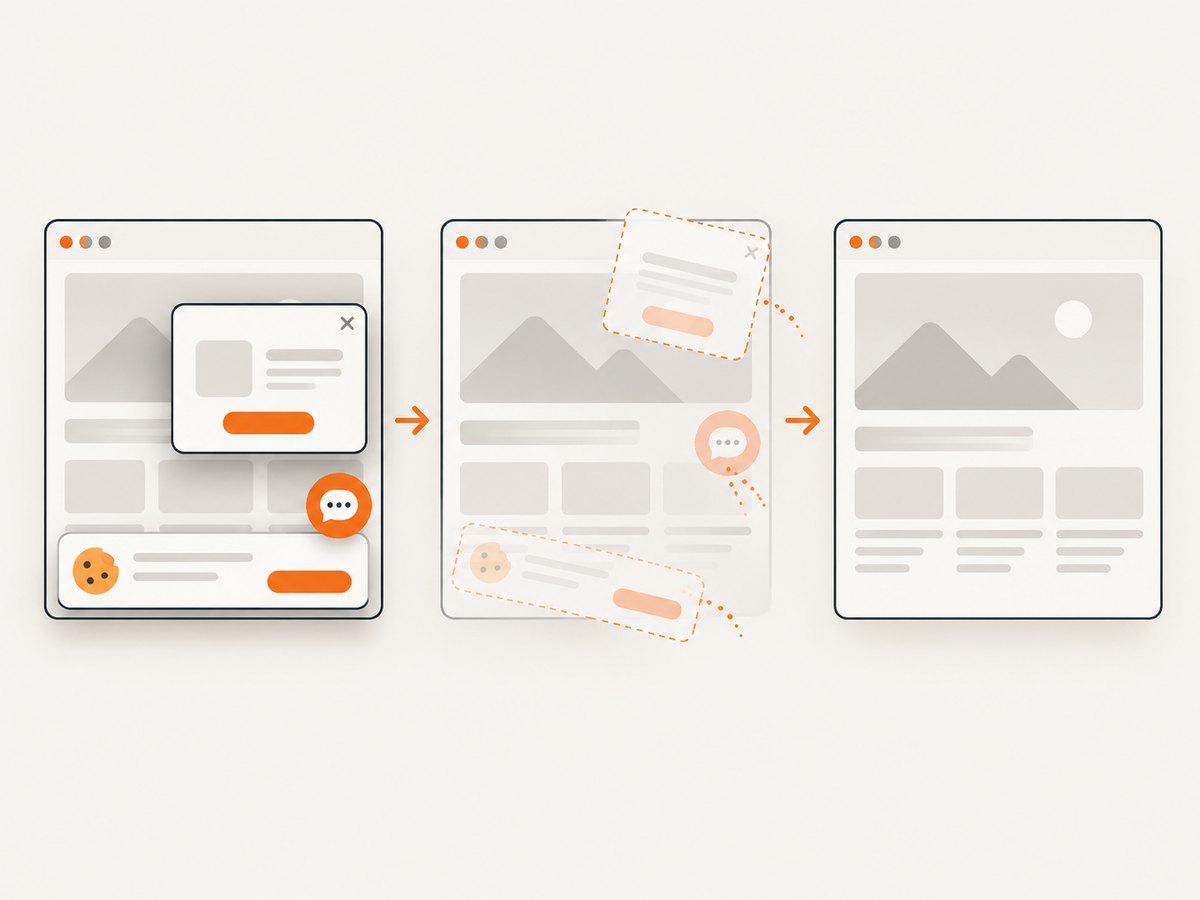
Its differentiators are practical for production capture: it accepts cookie or consent banners like a visitor and removes more than 60 known consent platforms, newsletter popups, and chat widgets before capture; only clean shots are billed, while bot checks, blank pages, timeouts, failed loads, and cache hits cost nothing; response headers identify the page verdict and billing state; and an MCP server exposes take_screenshot, get_page_info, and capture_pdf to Claude, Cursor, and other MCP clients.
Plans include 1,000 free shots per month with no card, Starter at $5 for 3,000, Growth at $15 for 15,000, Pro at $39 for 60,000, Scale at $99 for 250,000, and Business at $249 for 1,000,000. Yearly billing gives two months free, and every feature is available on every plan.
It supports full-page capture with lazy images loaded, CSS-element capture, dark mode, 12 device presets and custom viewports, retina scale, PDF paper sizes and page ranges, HTML/CSS to image, custom CSS and JavaScript, clicks, selector waits, delays, network-idle waits, request blocking, custom headers, cookies, user agents, Authorization, timezone, geolocation, transparent backgrounds, resizing, configurable caching TTL, signed links, async jobs with signed webhooks, bulk capture of up to 100 URLs per call, a usage API, and an OpenAPI specification. Common parameter names used by other screenshot APIs also work, easing migration.
8. Or skip the browser setup
When you need an image or PDF instead of metadata, one GET request is enough. See the ScreenshotNeo API documentation for all options.
cURL
curl -G "https://api.screenshotneo.com/v1/shot" -d access_key=YOUR_API_KEY --data-urlencode url=https://stripe.com -o shot.webpPython
import requests

r = requests.get(
    "https://api.screenshotneo.com/v1/shot",
    params={"access_key": "YOUR_API_KEY", "url": "https://stripe.com"},
    timeout=90,
)
r.raise_for_status()
open("shot.webp", "wb").write(r.content)
Node.js
const q = new URLSearchParams({ access_key: 'YOUR_API_KEY', url: 'https://stripe.com' });
const res = await fetch(`https://api.screenshotneo.com/v1/shot?${q}`);
if (!res.ok) throw new Error(`HTTP ${res.status}`);
const body = Buffer.from(await res.arrayBuffer());
require('fs').writeFileSync('shot.webp', body);
Cookie banners, popups, and chat widgets are removed before the shot. Bot checks, blank pages, and failed loads are never billed. AI agents can capture through the MCP server. You get 1,000 screenshots a month free with no card, and paid plans start at $5 for 3,000. Create a free ScreenshotNeo account.
9. Troubleshooting and edge cases
| Symptom | Likely cause | Fix |
|---|---|---|
| The “cheapest” provider exceeds budget | You compared subscription prices without matching meters | Recalculate using included units, hourly activity, retries, and cache behavior |
| Iframely quota disappears quickly | Frequently displayed URLs create multiple hourly hits | Estimate active hours per URL and reduce unnecessary refreshes |
| LinkPreview throttles requests | Hourly or per-domain limits are reached | Queue requests, respect one-request-per-second-per-domain guidance, and ask about commercial limits |
| Metadata is missing after migration | The target service does not provide the same extraction or media fields | Map fields explicitly and test representative URLs before cutover |
| Embed output is broken | Rich embed HTML and metadata-only responses are not interchangeable | Choose a provider that returns renderable embed HTML or build your own renderer |
| ScreenshotNeo returns a non-image response | The target page failed, timed out, was blank, or triggered a bot check | Inspect the response status and X-Page-Verdict/X-Billed headers, then adjust waits, headers, cookies, or blocking rules |
10. Performance, reliability, and cost notes
- Cache deliberately: cache stable metadata and previews with a documented TTL; confirm whether cached requests count toward each provider’s quota.
- Use queues: absorb bursts and stay below per-hour, per-minute, and per-domain limits.
- Retry selectively: retry transient network failures with backoff, but do not blindly retry invalid URLs or permanent access denials.
- Track provider headers and response codes: they let you distinguish throttling, invalid input, upstream failure, and successful cached results.
- Separate product needs: rich embeds, article extraction, metadata, image transformation, and screenshots are different outputs. Paying for a broad bundle is sensible only when you use its capabilities.
- Monitor unit economics: report submitted requests, billable units, cache hits, successful results, and total bill each month.
11. FAQ
Is LinkPreview definitely cheaper than Embedly per URL?
No. Its $25/month Pro subscription is lower than Embedly’s $119 starting price, but the reviewed page does not publish the monthly allowance or overage rate needed for a per-URL comparison.
Can I compare Iframely hits directly with Embedly URLs?
No. Iframely’s hit is an hour of activity for a URL, while Embedly counts an HTTP request as one unit.
Does Microlink have the lowest paid price?
The reviewed sources do not establish Microlink’s current paid price, so there is no supported ranking.
When should I use ScreenshotNeo instead?
Use ScreenshotNeo when the required output is a clean screenshot or PDF, especially when consent banners, popups, chat widgets, bot checks, and failed loads affect capture quality or billing.
What should I verify before signing a contract?
Confirm the unit definition, included volume, overage, cache treatment, retry billing, rate limits, commercial domains, data handling, and the exact output fields your application needs.


