How to Extract Structured Data From a Webpage as JSON
Build a reliable extractor for JSON-LD, Microdata, and RDFa, including JavaScript-rendered pages, normalization, validation, and troubleshooting.

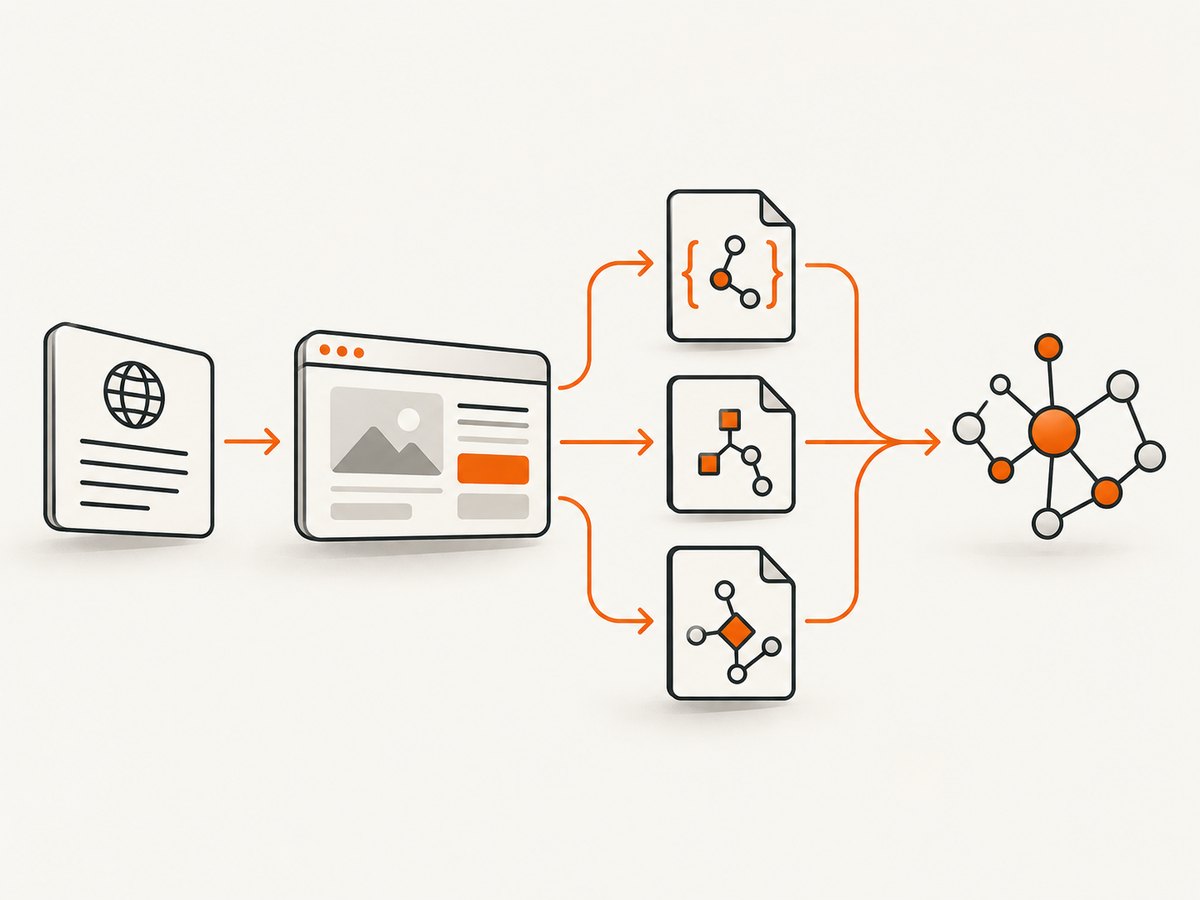
To extract structured data from a webpage as JSON reliably, use a staged pipeline: acquire the HTML, parse JSON-LD, traverse Microdata and RDFa, preserve graph relationships and provenance, render the page in a browser when JavaScript creates the data, then validate the combined result. A JSON-LD-only scraper is fast, but it misses valid markup and client-injected data.
This guide shows a production-ready approach, with runnable Python and JavaScript examples, a cURL inspection workflow, normalization rules, browser-rendering options, failure handling, and validation.
1. Choose the acquisition method first
Start by determining where the structured data exists.
| Page behavior | Acquisition method | Trade-off |
|---|---|---|
| Markup is present in the initial HTTP response | HTTP client such as requests or fetch |
Fast, cheap, reproducible |
| Scripts inject JSON-LD or attributes after load | Browser renderer such as Playwright or Puppeteer | Slower and more resource intensive, but observes the rendered DOM |
| Data arrives through XHR or fetch calls | Browser plus captured network responses | Can recover payloads that never become visible in HTML |
Google documents that JavaScript-generated JSON-LD can be processed when it is available in the rendered DOM. The Schema.org Markup Validator also supports extraction from JavaScript-driven pages. Therefore, use an HTTP request as the first pass and a browser fallback when the required fields are absent.
2. Inspect the raw response with cURL
Before writing a parser, inspect the server response. This tells you whether a static pass can work and exposes redirects, content types, and access failures.
curl -L \
  -A "structured-data-audit/1.0" \
  -H "Accept: text/html,application/xhtml+xml" \
  -D response.headers \
  "https://example.com/article" \
  -o page.html

rg -n -i 'application/ld\+json|itemscope|itemprop|typeof=|property=' page.html
Follow redirects with -L, save headers separately, and use a descriptive user agent. Check the final status, the Content-Type, compression, and the character encoding. A response that is actually a login page, challenge page, or error document should be recorded as an acquisition failure rather than parsed as an empty result.
3. Parse JSON-LD without losing graph structure
JSON-LD is usually the easiest format to extract. Select every script[type="application/ld+json"] element, parse each block independently, and retain the original value. A block can contain an object, an array, or an object with an @graph array. Keep @context, @type, @id, arrays, and nested objects intact until your application has a clear mapping requirement.
import json
from urllib.parse import urljoin

import requests
from bs4 import BeautifulSoup


def extract_jsonld(url: str) -> dict:
    response = requests.get(
        url,
        headers={"User-Agent": "structured-data-audit/1.0"},
        timeout=20,
    )
    response.raise_for_status()
    content_type = response.headers.get("content-type", "")
    if "html" not in content_type:
        raise ValueError(f"Expected HTML, received {content_type!r}")

    soup = BeautifulSoup(response.text, "html.parser")
    records = []
    for node in soup.select('script[type="application/ld+json"]'):
        raw = node.string or node.get_text()
        try:
            value = json.loads(raw)
            records.append({
                "format": "json-ld",
                "source_url": url,
                "value": value,
                "raw": raw,
            })
        except json.JSONDecodeError as error:
            records.append({
                "format": "json-ld",
                "source_url": url,
                "parse_error": str(error),
                "raw": raw,
            })

    return {
        "source_url": url,
        "final_url": response.url,
        "jsonld": records,
    }

print(json.dumps(extract_jsonld("https://example.com/article"), indent=2))
Do not silently discard malformed blocks. Keep the raw text and parser error so the publisher can correct its markup. Also avoid assuming that node.string is always populated; whitespace and nested text nodes are why the example falls back to get_text().
Handling @graph
An @graph is a set of connected nodes, not a flat record. A WebPage node may point to an Organization, ImageObject, or Article by @id. Preserve those identifiers and resolve references in a later normalization step. Flattening the graph immediately can merge entities or lose relationships.
4. Extract Microdata
Microdata uses HTML attributes rather than a JSON script. The important attributes are itemscope, itemtype, itemprop, and optionally itemid. Values come from the element itself or from value-bearing attributes: content on a meta element, href on a link, src on an image, and text content on ordinary elements.
from bs4 import BeautifulSoup
from urllib.parse import urljoin


def microdata_value(element, base_url):
    if element.name in {"meta"} and element.has_attr("content"):
        return element["content"]
    if element.name in {"audio", "embed", "iframe", "img", "source", "track", "video"} and element.has_attr("src"):
        return urljoin(base_url, element["src"])
    if element.name in {"a", "area", "link"} and element.has_attr("href"):
        return urljoin(base_url, element["href"])
    if element.name == "object" and element.has_attr("data"):
        return urljoin(base_url, element["data"])
    return element.get_text(" ", strip=True)


def parse_item(scope, base_url):
    result = {
        "type": scope.get("itemtype"),
        "id": scope.get("itemid"),
        "properties": {},
    }
    for child in scope.select("[itemprop]"):
        parent_scope = child.find_parent(attrs={"itemscope": True})
        if parent_scope is not scope:
            continue
        names = child.get("itemprop", "").split()
        if child.has_attr("itemscope"):
            value = parse_item(child, base_url)
        else:
            value = microdata_value(child, base_url)
        for name in names:
            result["properties"].setdefault(name, []).append(value)
    return result


def extract_microdata(html, url):
    soup = BeautifulSoup(html, "html.parser")
    roots = []
    for scope in soup.select("[itemscope]"):
        if scope.find_parent(attrs={"itemscope": True}) is None:
            roots.append(parse_item(scope, url))
    return roots
The root-only pass prevents nested items from being emitted twice. Keep property values as arrays even when there is only one value; a later schema mapping can decide whether a field is singular.
5. Extract RDFa relationships
RDFa expresses subject–predicate–object relationships with attributes such as about, typeof, property, resource, href, and src. Unlike a simple key-value format, RDFa can describe several subjects and link them together. Preserve triples or a graph representation rather than forcing every statement into one object.
def rdfa_value(element, base_url):
    for attribute in ("resource", "href", "src"):
        if element.has_attr(attribute):
            return urljoin(base_url, element[attribute])
    if element.name == "meta" and element.has_attr("content"):
        return element["content"]
    return element.get_text(" ", strip=True)


def extract_rdfa(html, url):
    soup = BeautifulSoup(html, "html.parser")
    triples = []
    current_subject = url
    for element in soup.select("[property]"):
        subject = element.get("about") or current_subject
        predicates = element.get("property", "").split()
        value = rdfa_value(element, url)
        for predicate in predicates:
            triples.append({
                "subject": urljoin(url, subject),
                "predicate": predicate,
                "object": value,
                "type": element.get("typeof"),
            })
    return triples
For complete RDFa processing, follow the W3C RDFa API rules for subject inheritance, vocabulary expansion, blank nodes, and property chains. The simplified routine is useful for audits, but a standards-compliant library is preferable when you need semantic fidelity.
6. Normalize all formats into one auditable shape
A practical internal record keeps the source format and raw evidence:
{
  "source_url": "https://example.com/article",
  "format": "json-ld",
  "type": "Article",
  "id": "https://example.com/article#article",
  "properties": {
    "headline": ["Example title"],
    "author": [{"@id": "https://example.com/#author"}]
  },
  "raw": {"@context": "https://schema.org", "@type": "Article"},
  "source_selector": "script[type=application/ld+json]"
}
Use a deterministic precedence policy when representations disagree. For example, you might prefer JSON-LD for article metadata, then Microdata, then RDFa, while still retaining all three sources for review. Record duplicate candidates by canonical URL, @id, type, and selected identifying properties. Never merge records solely because their types match.
7. Render JavaScript-generated markup
If the static response contains no required data, load the page in a browser and inspect the final DOM. Playwright is a common choice because it waits for navigation, selectors, and network conditions.
import asyncio
import json
from playwright.async_api import async_playwright


async def rendered_jsonld(url):
    async with async_playwright() as p:
        browser = await p.chromium.launch()
        page = await browser.new_page()
        await page.goto(url, wait_until="domcontentloaded", timeout=60000)
        await page.wait_for_load_state("networkidle", timeout=30000)
        blocks = await page.locator('script[type="application/ld+json"]').all_text_contents()
        await browser.close()

    output = []
    for raw in blocks:
        try:
            output.append(json.loads(raw))
        except json.JSONDecodeError as error:
            output.append({"_parse_error": str(error), "raw": raw})
    return output

print(asyncio.run(rendered_jsonld("https://example.com/article")))
Do not rely on networkidle alone for pages with persistent analytics or streaming requests. Prefer a known readiness selector, a bounded delay, or both. If the data is delivered only through an API request, listen for matching responses and store that payload alongside the rendered DOM.
8. Validate the combined result
During development, submit the source URL or extracted markup to the Schema.org Markup Validator. It can extract JSON-LD, RDFa, and Microdata, summarize the graph, and expose syntax problems. Google’s structured data documentation explains how supported markup is interpreted for search.
- Validate each format independently while debugging.
- Compare the validator’s entities with your normalized records.
- Investigate conflicting types, missing identifiers, malformed JSON, and unresolved relative URLs.
- Store the validator input and extraction timestamp with your audit result.
9. Troubleshooting common extraction failures
| Symptom | Likely cause | Fix |
|---|---|---|
| No JSON-LD found | Data is injected after load | Use a browser renderer and inspect the post-render DOM. |
| Only some entities appear | Parser assumes one object per script | Handle arrays and @graph explicitly. |
| JSON parse error | Trailing commas, comments, or templating output | Record the raw block and error; do not silently repair production data. |
| Microdata duplicates | Nested scopes are emitted as roots and children | Emit only scopes without an itemscope ancestor. |
| Relative links are wrong | Base URL and redirects were ignored | Resolve against the final response URL with urljoin. |
| Empty response | Bot challenge, login wall, or error page | Check status, final URL, content type, and body markers before parsing. |
| Different values by method | JSON-LD, Microdata, and RDFa disagree | Keep each representation and apply an explicit precedence rule. |
| Browser times out | Long polling, ads, or blocked resources | Wait for a specific selector, cap the timeout, and optionally block nonessential resources. |
10. Performance, reliability, and cost considerations
- Use two passes. Try HTTP first, then render only pages missing required fields. This keeps the common path fast.
- Cache by URL and content hash. Cache the response and normalized result separately so parser changes can be replayed without refetching.
- Set bounded timeouts. Use connect, read, navigation, and total-job limits. A hung page should become a recorded failure.
- Control concurrency. Limit simultaneous browser contexts and requests, respect site policies, and use exponential backoff for transient network errors.
- Keep provenance. Store final URL, status, headers, selector, raw fragment, parser version, and timestamp.
- Measure separately. Track acquisition latency, browser time, parse time, failure rate, and records per page. Static parsing is normally cheaper in CPU and memory than rendering.
- Protect sensitive inputs. Redact authorization headers, cookies, and private page contents from logs.
11. Or skip the browser setup
If your workflow needs a clean rendered capture while you inspect a page, ScreenshotNeo provides a website screenshot API and MCP server. Its request can capture a rendered page after browser work, and the API documentation lists the options for waiting, blocking resources, setting headers, cookies, user agents, time zones, geolocation, and other capture controls.

curl -G "https://api.screenshotneo.com/v1/shot" -d access_key=YOUR_API_KEY --data-urlencode url=https://stripe.com -o shot.webpimport requests
r = requests.get("https://api.screenshotneo.com/v1/shot", params={"access_key": "YOUR_API_KEY", "url": "https://stripe.com"}, timeout=90)
open("shot.webp", "wb").write(r.content)const q = new URLSearchParams({ access_key: 'YOUR_API_KEY', url: 'https://stripe.com' });
const res = await fetch(`https://api.screenshotneo.com/v1/shot?${q}`);Cookie banners, newsletter popups, and chat widgets are removed before the shot. Bot checks, blank pages, failed loads, timeouts, and cache hits are not billed, and the response identifies the page verdict and billing status in headers. An MCP server provides take_screenshot, get_page_info, and capture_pdf tools for Claude, Cursor, and other MCP clients. The Free plan includes 1,000 screenshots each month with no card; paid plans start at $5 for 3,000 shots. Create a free ScreenshotNeo account.
12. Short FAQ
Should I parse JSON-LD or Microdata first?
Parse JSON-LD first because it is self-contained and easy to preserve, then add Microdata and RDFa so pages using other standards are not missed.
Can I trust the first structured-data block?
No. Pages may contain several blocks for different entities, and some can be malformed or contradictory. Keep every block and apply an explicit selection policy.
When is browser rendering unavoidable?
Use it when the initial response lacks fields that appear after JavaScript execution, or when the payload is available only through client-side network requests.
Should I flatten @graph?
Only at the application boundary. Preserve graph nodes and identifiers during extraction so relationships and provenance remain available.
How do I verify that my parser is correct?
Run it against pages containing each format, compare the output with the Schema.org Markup Validator, and keep fixtures for malformed, duplicated, nested, and JavaScript-generated markup.


