How to Find a Website’s Origin IP Behind Cloudflare
Learn what Cloudflare DNS reveals, how to check authorized hostnames and historical records, and how site owners can reduce origin IP exposure.
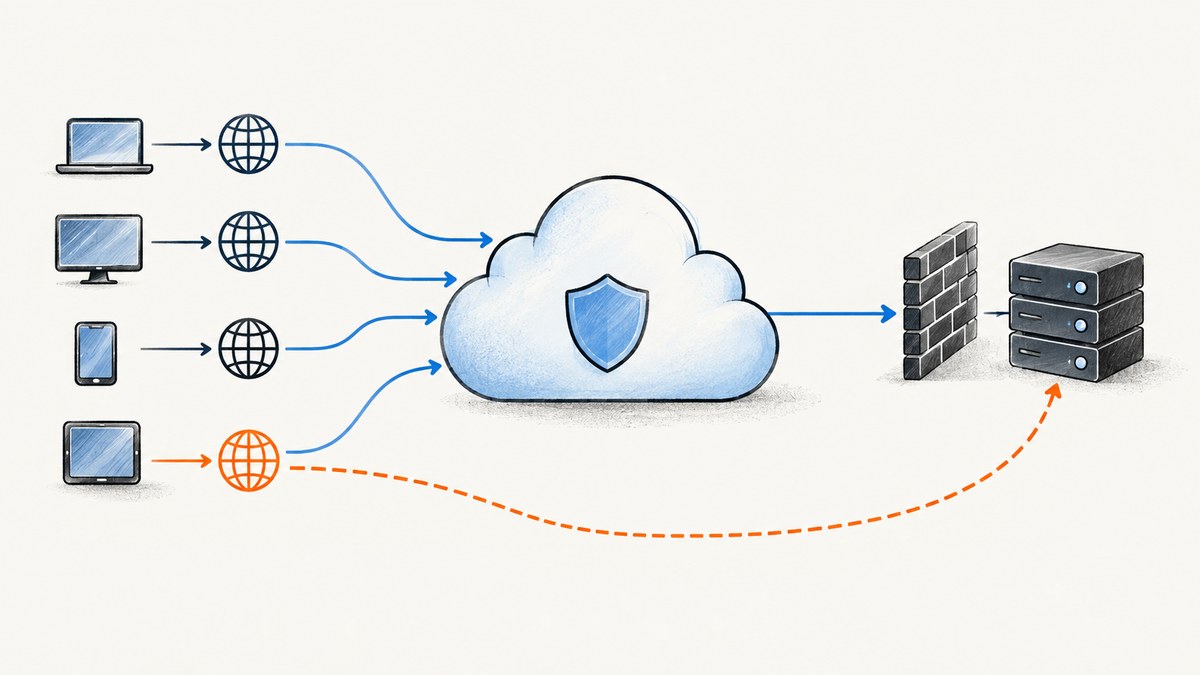
Direct answer: A Cloudflare-proxied website hostname normally resolves to a Cloudflare anycast IP, not the server’s origin IP. An origin address may still be exposed by a DNS-only hostname, a mail server sharing the web server’s address, a forgotten service record, or historical DNS data. A historical match is only a lead: it does not prove that an address is still the current origin.
Only investigate domains and infrastructure you are authorized to assess. If you operate the site, use the checks below to find records that need attention and the remediation steps to reduce direct exposure.
1. Understand what a Cloudflare DNS answer means
Cloudflare operates as a reverse proxy for supported web traffic. When a zone is active and a DNS record is set to proxied, Cloudflare answers with one of its anycast addresses rather than the origin address configured in the DNS table. That makes a lookup of the proxied apex or www hostname insufficient to learn the backend address. Cloudflare documents this behavior in How Cloudflare DNS works.
A direct answer can occur when the queried hostname is DNS-only, when a service cannot use Cloudflare’s standard HTTP proxy, or while a zone is not yet active. Cloudflare notes that records intended to be proxied may return the origin during pending activation. So first identify what each hostname is meant to serve, then interpret its DNS status and answer.
| Observation | What it suggests | What it does not prove |
|---|---|---|
| A/AAAA answer is a Cloudflare address | The queried hostname is likely proxied for that address family. | That all hostnames or services are protected. |
| A/AAAA answer appears to belong to a hosting provider | The hostname may be DNS-only or otherwise directly published. | That it is the current web origin. It could be mail, staging, or another service. |
| Historical DNS tool shows an older provider address | The address may have served the domain before. | That it remains assigned or serves the site now. |
| No answer for one record type | That hostname may not publish that type. | That no other hostname or record exposes an address. |
2. Set scope and build a hostname inventory
Write down the domain names you own or have written permission to assess. Inventory more than the apex. Include known application and API hosts, mail routing targets, and service names used for FTP, SSH, RDP, staging, webhooks, or game services. Search your own configuration, certificates, deployment notes, and DNS provider records for names that may not appear on the main website.
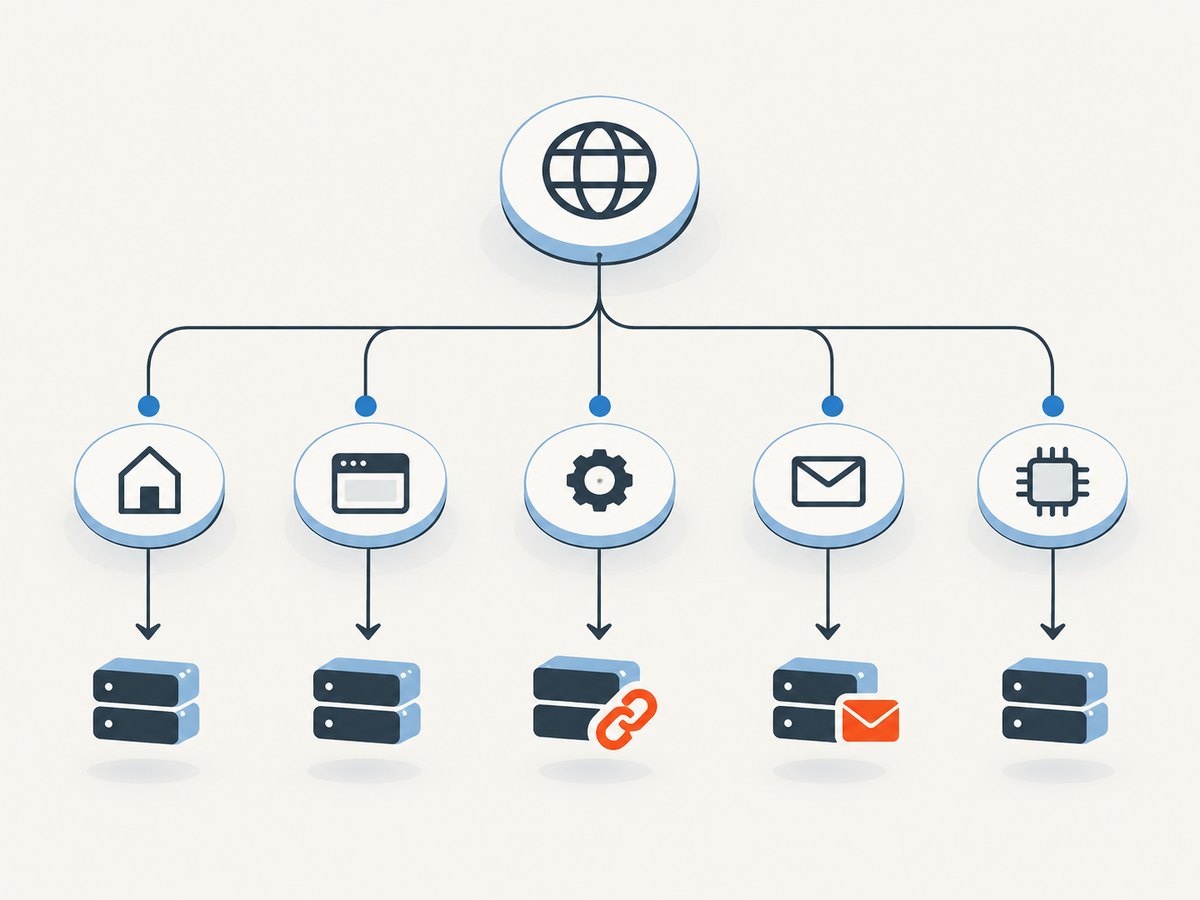
This wider view matters because web proxying is not universal. Cloudflare says non-HTTP services generally cannot use its standard HTTP proxy and may remain DNS-only. A DNS-only record can publish an address even if the public website itself is proxied. See Proxy status and DNS record types.
3. Query current DNS records
Use dig to check A, AAAA, CNAME, and MX records. Replace example.com with a domain in your authorized scope. Keep the hostname, record type, answer, and TTL in your notes. TTL helps explain caching and propagation; it is not a guarantee that an address is current indefinitely.
dig example.com A
 dig example.com AAAA
 dig www.example.com A
 dig www.example.com AAAA
 dig www.example.com CNAME
 dig example.com MX
For each MX result, query its target for both address families. MX records point to mail hosts, not directly to numeric addresses:
dig example.com MX
 dig mail.example.com A
 dig mail.example.com AAAA
Use the actual MX target names returned by the first command; mail.example.com above is only an example. Cloudflare specifically warns that when a mail server shares the web server IP, the MX record can expose the origin address because mail is not hidden behind the standard proxy. See Unexpected DNS records.
For a repeatable inventory, run a small shell loop over hostnames you already know. This records answers without trying to discover or probe arbitrary systems:
#!/usr/bin/env bash
set -eu

hosts=(example.com www.example.com app.example.com api.example.com mail.example.com)
for host in "${hosts[@]}"; do
  for type in A AAAA CNAME MX; do
    printf '\n%s %s\n' "$host" "$type"
    dig +noall +answer "$host" "$type"
  done
done
Inspect CNAME targets as well: a CNAME may lead to a service name whose A or AAAA record is the useful next answer. Query the target, and record the chain rather than treating the first alias as the endpoint.
4. Check DNS-only and non-web services
Review each known name against the DNS provider’s proxy status in the Cloudflare dashboard. A lookup alone cannot tell you why a hostname is directly published or whether it is meant to be reachable. Match answers to your service inventory and infrastructure records.
- Check API and application hostnames; some deployments deliberately leave these DNS-only.
- Check staging, preview, webhook, and administrative hostnames that may have been created for a temporary purpose.
- Check FTP, SSH, RDP, mail, and other non-HTTP services. Their records may need to remain DNS-only, so isolate them from the web origin when practical.
- Check both A and AAAA. An overlooked IPv6 record can disclose a directly reachable endpoint even when IPv4 is proxied.
Do not assume a hostname is protected because another hostname under the same domain is proxied. Proxy status applies to individual records. Cloudflare’s documentation explains that proxied records return Cloudflare addresses, while DNS-only records return the configured destination: Proxy status.
5. Use historical DNS as a lead, not a conclusion
Historical DNS services and old public references can surface addresses that once appeared for a domain or subdomain. Compare those candidates with present DNS answers and your own provider and deployment history. A match can be stale: sites move providers, rotate addresses, use multiple endpoints, or retire infrastructure. Cloudflare recommends changing an exposed address after exposure or onboarding; its guidance also describes the risk from historical and unproxied records. See Exposed IP addresses.

When validating a candidate you control, use the intended hostname and normal TLS SNI so the server selects the correct certificate and virtual host. Compare the certificate, HTTP behavior, and application response with your known service. Keep requests low volume and stop if the address is not yours or you do not have authorization. Do not bypass authentication, access controls, or network restrictions.
A certificate or matching page is evidence to investigate, not a universal proof of ownership or current origin role. Shared hosting, reverse proxies, and unrelated services can produce misleading matches. Confirm candidates with your DNS provider, hosting account, firewall configuration, or infrastructure owner before changing anything.
6. Remediate origin exposure if you operate the site
- Proxy web records. Set HTTP/HTTPS hostnames that should pass through Cloudflare to proxied status, and review dashboard warnings. Confirm activation is complete before relying on proxy answers.
- Separate services. Keep mail and non-HTTP services on distinct infrastructure where possible. A mail host sharing the web origin can reveal the same address through MX resolution.
- Restrict origin ingress. Where your architecture permits, configure the origin firewall to accept web traffic only from Cloudflare IP ranges. Use Cloudflare’s current published ranges and maintain the allowlist as part of operations: Cloudflare IP ranges.
- Rotate an exposed address. If the address is known publicly, changing it can invalidate stale discoveries. Update every dependent DNS record and service configuration, then verify legitimate traffic still works.
- Recheck the surface. Repeat A, AAAA, CNAME, and MX checks for the inventory, and confirm intended DNS-only services do not share the protected web origin.
Cloudflare cautions that an exposed server IP is more vulnerable to direct attacks. Filtering at the origin and separating services address the underlying path; changing DNS alone does not stop direct connections to an already known address.
7. Troubleshooting common results
| Problem | Likely cause | Fix or next check |
|---|---|---|
| The apex returns Cloudflare addresses, but a server address is still suspected. | Another hostname, MX target, or non-web service is DNS-only. | Inventory subdomains and service names; query their A/AAAA and follow CNAME and MX targets. |
| One lookup gives different answers later. | DNS changes, multiple endpoints, resolver caching, or geographic routing. | Record resolver, time, TTL, and all answers. Compare with authoritative DNS and provider configuration. |
| History shows an address absent from current DNS. | The record may be old or infrastructure may have moved. | Treat it as a lead only; verify with your provider and current service configuration. |
| HTTP by IP shows the wrong site or a TLS error. | The server relies on hostname routing or TLS SNI, or the IP is shared. | Validate using the authorized hostname and normal TLS behavior; do not infer origin from a raw-IP response. |
| Proxy was enabled, but DNS still returns the origin. | The zone may not be active yet, the queried record may be DNS-only, or a different name/address family was checked. | Confirm zone activation and that exact record’s proxy status; check A and AAAA separately. |
| Mail lookup reveals the web server address. | Mail and web services share an address. | Move mail to separate infrastructure when possible, then rotate the web origin if exposed and update dependent records. |
| Firewall blocking Cloudflare also blocks health checks or administrators. | The allowlist omitted legitimate monitoring or management paths. | Plan explicit, authenticated management and monitoring access before enforcing restrictions; verify from approved sources. |
8. Performance, reliability, and cost considerations
DNS queries are lightweight, but reliable conclusions require coverage and careful interpretation. Check both address families, trace aliases, resolve MX targets, and account for TTLs and multiple answers. A single query or history lookup is fast but can miss records or preserve stale data. Keep a timestamped record of findings so a future comparison can distinguish rotation from accidental exposure.
Historical data can be useful for defensive audits, but completeness depends on what was observed and retained by the source. It cannot establish that an old IP still hosts the site. Validation should be conservative: unnecessary scanning or high request volume adds operational risk and does not improve DNS evidence. The practical remediation cost is usually configuration work—review records, isolate services, adjust firewall rules, coordinate rotation, and update dependencies. The right arrangement depends on which services must remain publicly reachable.
Or skip the browser setup
If you are capturing a public page while documenting an authorized DNS review, ScreenshotNeo is a website screenshot API and MCP server from Yorker Media. It is separate from DNS investigation: it captures a page, not an origin IP. One GET request returns an image or PDF, and the API documentation lists the request options.
curl -G "https://api.screenshotneo.com/v1/shot" -d access_key=YOUR_API_KEY --data-urlencode url=https://example.com -o shot.webpScreenshotNeo accepts cookie and consent banners like a visitor and removes 60+ known consent platforms, newsletter popups, and chat widgets before capture; each step can be turned off. Bot checks, blank pages, timeouts, failed loads, and cache hits cost nothing, with the result indicated in X-Page-Verdict and X-Billed headers. Its MCP server gives AI agents tools for screenshots, page information, and PDF capture. The free plan includes 1,000 screenshots per month with no card; paid plans start at $5 for 3,000.
Create a free ScreenshotNeo account to get 1,000 screenshots a month with no card.
FAQ
Can I find an origin IP just by resolving the Cloudflare-proxied domain?
Normally no. An active proxied record returns a Cloudflare anycast address. Investigate authorized DNS-only hostnames and service records instead.
Does a DNS history result prove the current origin?
No. It shows an address associated with a name at some past observation time. Confirm current ownership and use through infrastructure records.
Can an MX record expose a website’s origin?
It can expose an address when the mail host shares the web server IP. Resolve each MX target and check whether the services are separated.
Does Cloudflare protect SSH or FTP automatically?
The standard HTTP proxy does not cover general non-HTTP services. Those records may be DNS-only and need separate protection and network controls.
What should I do first if I find my origin address online?
Confirm it against your own infrastructure, restrict direct origin access where appropriate, separate services if they share the address, and rotate the exposed address with dependent records updated.


