How to Fix Broken Images in phpwkhtmltopdf
Fix missing images in phpwkhtmltopdf PDFs with a practical path, permissions, HTTPS, JavaScript, and logging checklist.
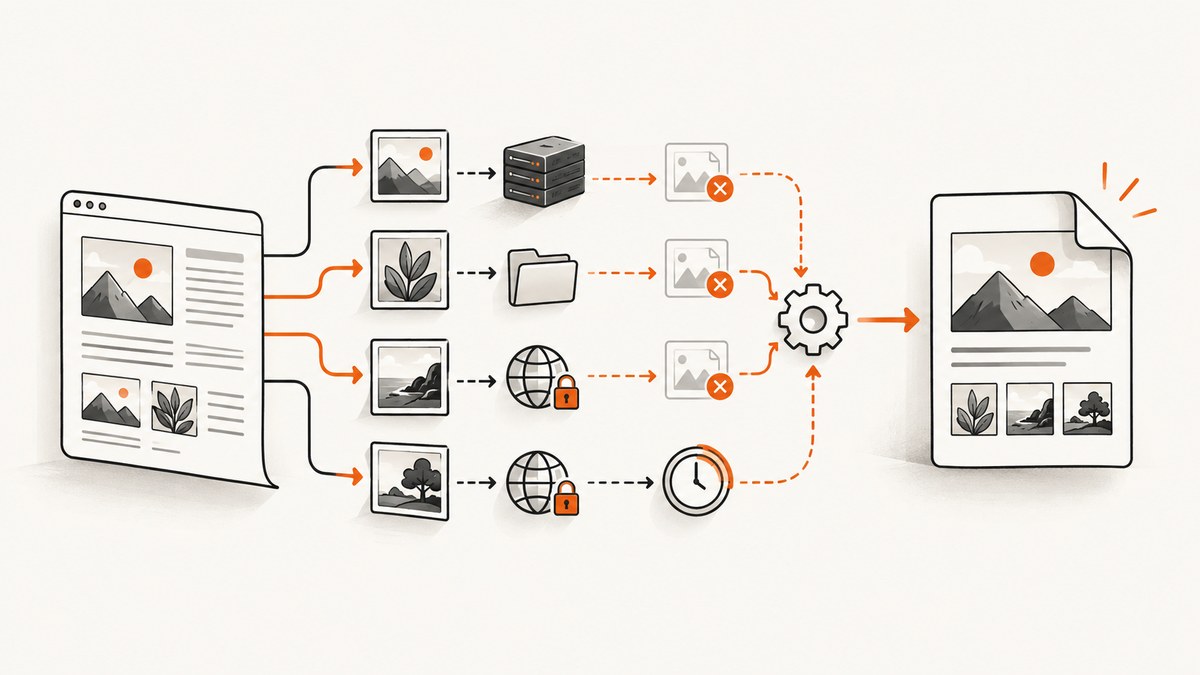
When images appear in a browser but disappear from a PDF generated by phpwkhtmltopdf, the usual problem is not the image format. The converter is a PHP wrapper around the separate wkhtmltopdf executable, and that executable must resolve the image from its own input context, filesystem permissions, network, TLS stack, and page-load timing.
The fastest path to a fix is:
- Identify whether the wrapper received a local filename, an HTML string, or a URL.
- Resolve every relative
srcagainst that actual base. - For local files, permit only the required directory with
--allow, or enable local-file access for trusted input. - For remote files, fetch the exact URL from the same server, container, user, and PHP process.
- Confirm images were not disabled, wait for JavaScript-generated images, and inspect stderr plus the resulting PDF.
This guide gives runnable PHP, shell, Python, and Node.js diagnostics, then covers the wrapper options, edge cases, reliability, and a hosted alternative.
1. Confirm the wrapper and renderer you are actually running
phpwkhtmltopdf does not render documents by itself. It starts a wkhtmltopdf binary. The wrapper documentation describes a binary setting and exposes getError() when operations such as saveAs() fail. Check both components before changing HTML.
which wkhtmltopdf
wkhtmltopdf --version
php -v
composer show | grep -i wkhtml
If the web server cannot find the binary, configure its absolute path in the wrapper. A command that works in your shell can fail under PHP-FPM because its PATH, working directory, user, and environment differ.
<?php
require 'vendor/autoload.php';

use mikehaertl\wkhtmlto\Pdf;

$pdf = new Pdf([
    'binary' => '/usr/local/bin/wkhtmltopdf',
]);
$pdf->addPage('/var/www/app/report.html');

if (!$pdf->saveAs('/var/www/app/out/report.pdf')) {
    throw new RuntimeException($pdf->getError());
}
Inspect the produced PDF even when the wrapper reports success. A successful process only means the executable completed; it does not prove every image loaded. One reported macOS 0.12.6 case produced a PDF with a blank image and no obvious command-line error.
2. Fix relative paths by matching the input context
The wrapper accepts a filename, an HTML string, a URL, or an options array. Relative paths are resolved from the context supplied to the renderer, so the same images/logo.png can work in a browser and fail in a PDF.
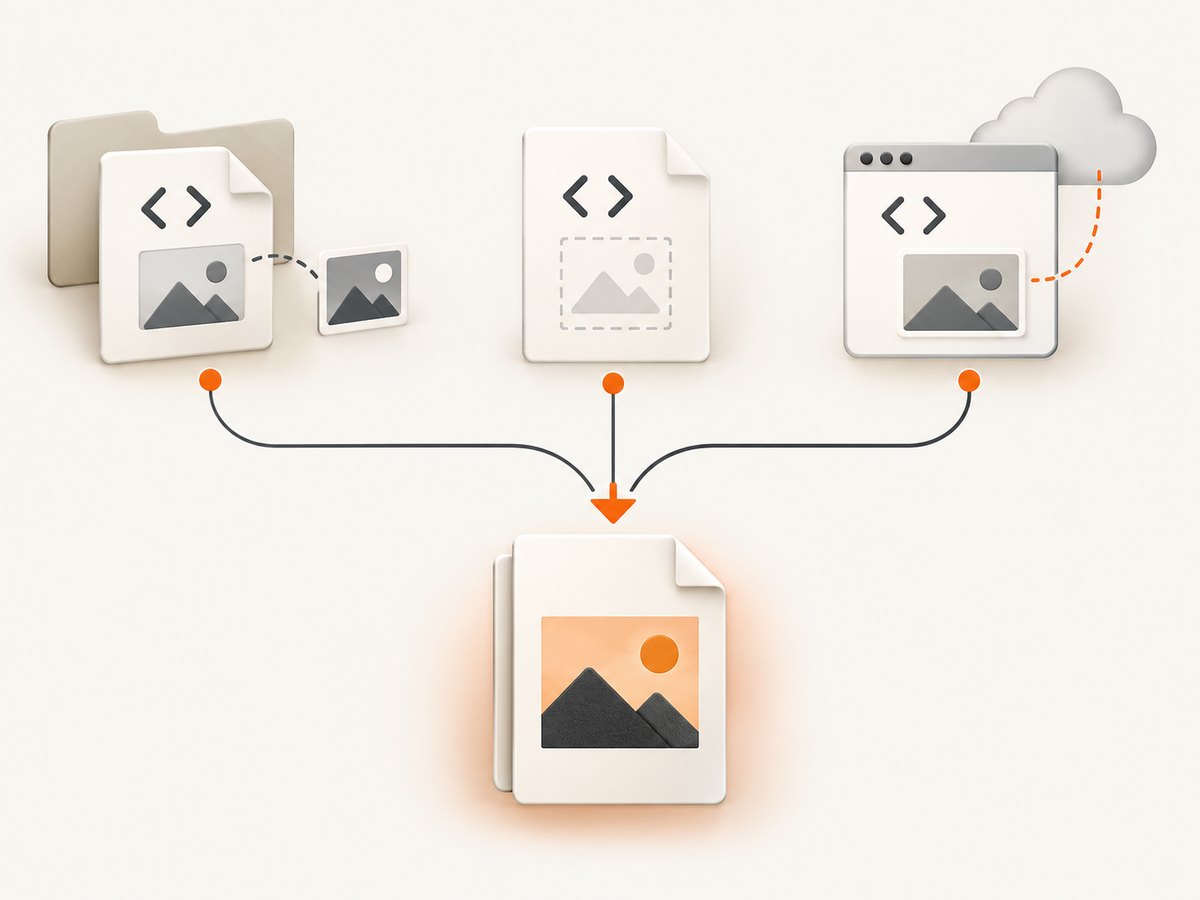
Local HTML file
For /var/www/app/report.html, this reference:
<img src="images/logo.png" alt="Logo">means /var/www/app/images/logo.png. Verify it with the account running PHP:
sudo -u www-data test -r /var/www/app/images/logo.png && echo readable
namei -l /var/www/app/images/logo.png
stat /var/www/app/images/logo.png
Check every parent directory for execute permission, not just the file. Linux paths are case-sensitive, so Logo.png and logo.png are different.
HTML string
An HTML string has no useful filesystem base unless you provide one. Use absolute file:/// URLs only when local-file access is intentionally configured, or write the HTML to a known directory and reference assets from there.
$html = '<!doctype html>
<html><body>
<img src="file:///var/www/app/images/logo.png">
</body></html>';

$pdf = new Pdf([
    'binary' => '/usr/local/bin/wkhtmltopdf',
    'enable-local-file-access' => true,
]);
$pdf->addPage($html);
if (!$pdf->saveAs('/var/www/app/out/string.pdf')) {
    throw new RuntimeException($pdf->getError());
}
Remote URL
For https://example.test/report, a relative image resolves against that URL. Test the image from the conversion host, not your laptop:
curl -I -L --max-time 20 https://example.test/assets/chart.png
curl -L --max-time 20 -o /tmp/chart.png https://example.test/assets/chart.png
file /tmp/chart.png
Check DNS, redirects, authentication, proxy requirements, HTTP status, and the certificate chain. A browser rendering the page on your workstation does not prove the server-side converter can reach it.
3. Allow local files safely
The documented usage manual lists --disable-local-file-access as the restriction and --enable-local-file-access as the broad override. The narrower --allow <path> option permits named directories. Prefer an allow-list when possible, and only convert trusted HTML: the project warns that unsanitized HTML and JavaScript can lead to a complete server takeover.
wkhtmltopdf \
  --allow /var/www/app/public \
  /var/www/app/report.html \
  /var/www/app/out/report.pdf
With the PHP wrapper, pass the equivalent option using the option name supported by your wrapper version:
$pdf = new Pdf([
    'binary' => '/usr/local/bin/wkhtmltopdf',
    'allow' => ['/var/www/app/public'],
]);
If your wrapper cannot express repeated options reliably, run the executable directly during diagnosis, then map the working command back to wrapper configuration. Do not grant the entire filesystem simply to make one logo load.
4. Check that images and resource loading were not disabled
The command manual says images load by default with --images; --no-images disables them. Search wrapper options, shared configuration, and deployment scripts for an accidental disablement.
wkhtmltopdf --extended-help | grep -E 'images|load-error|media-error|javascript-delay|proxy'--load-error-handling and --load-media-error-handling control what the renderer does after a resource fails. They can expose or suppress symptoms, but they do not repair an invalid path, a denied file, or an unreachable host. Keep strict logging during diagnosis.
5. Handle JavaScript-generated and lazy-loaded images
If the HTML contains an empty image element whose src is assigned by JavaScript, the converter may capture before the assignment. The manual documents a JavaScript delay default of 200 ms. Increase it only after confirming timing is the cause.
wkhtmltopdf \
  --javascript-delay 1500 \
  --debug-javascript \
  https://example.test/report \
  report.pdf
For images loaded after scrolling, provide a non-JavaScript fallback where practical, or trigger the required state before capture. A delay cannot fix a blocked request or a script exception. Check browser-console errors separately and make the page deterministic for a headless renderer.
6. Diagnose HTTPS, authentication, and network failures
An issue report for wkhtmltopdf 0.12.4 on Apache/Debian 9/PHP 7.3 described HTTPS CSS and images failing while HTTP worked. Treat that as an environment-specific report, not evidence that HTTPS is universally unsupported. Compare the deployed binary, certificate chain, operating-system trust store, redirects, and proxy.
- Run
curl -vas the PHP service account. - Check whether the image redirects from HTTPS to a protected or different host.
- Verify the certificate chain with the same container or VM.
- Confirm authentication headers or cookies are available to the renderer.
- Inspect the converter’s stderr and web-server logs at the capture time.
sudo -u www-data curl -v -L --max-time 30 https://example.test/assets/photo.jpg -o /tmp/photo.jpg
openssl s_client -connect example.test:443 -servername example.test < /dev/null
For private assets, use the wrapper’s documented header and cookie mechanisms where available. Avoid embedding credentials in publicly accessible HTML or permanent URLs.
7. A complete PHP diagnostic script
This small script isolates path, permissions, binary, and renderer errors before you run a larger application.
<?php
require 'vendor/autoload.php';
use mikehaertl\wkhtmlto\Pdf;

$htmlFile = '/var/www/app/report.html';
$outFile  = '/var/www/app/out/diagnostic.pdf';
$asset    = '/var/www/app/public/images/chart.png';

foreach ([$htmlFile, $asset] as $path) {
    if (!is_readable($path)) {
        throw new RuntimeException("Not readable: $path");
    }
}

$pdf = new Pdf([
    'binary' => '/usr/local/bin/wkhtmltopdf',
    'allow' => ['/var/www/app/public'],
    'images' => true,
    'load-error-handling' => 'abort',
    'load-media-error-handling' => 'abort',
    'javascript-delay' => 1000,
]);
$pdf->addPage($htmlFile);

if (!$pdf->saveAs($outFile)) {
    fwrite(STDERR, $pdf->getError() . PHP_EOL);
    exit(1);
}
echo "Wrote $outFile" . PHP_EOL;
Remove abort after diagnosis if your application intentionally tolerates optional media. Keep the path checks and output inspection in your operational tooling.
8. Troubleshooting checklist
| Symptom | Likely cause | Fix |
|---|---|---|
| All local images missing | Local access disabled | Use a specific --allow path or enable access for trusted input. |
| One image missing | Wrong relative path, case, or permission | Resolve from the supplied input base; test as the PHP user. |
| Remote images missing | DNS, TLS, redirect, proxy, or authentication | Use curl -v -L from the converter host and inspect logs. |
| Images appear only intermittently | Race with JavaScript or lazy loading | Use a deterministic page and a measured JavaScript delay. |
| Wrapper says success but PDF is blank | Renderer warning ignored | Inspect stderr, call getError(), and examine the PDF itself. |
| Works in shell, fails in web app | Different binary, user, PATH, or working directory | Use an absolute binary path and log the service environment. |
| Only HTTPS fails | Certificate or old renderer build | Validate the chain and deployed version; do not assume HTTP is a safe permanent workaround. |
9. Reliability, performance, and security
- Reliability: Pin and record the actual wkhtmltopdf build. The official downloads page lists stable 0.12.6, released June 11, 2020; distribution packages may differ.
- Performance: Local assets avoid network latency. Remote assets add DNS, TLS, redirects, and origin load. Reuse stable URLs and avoid unnecessary JavaScript delays.
- Resource limits: Large full-page images consume memory. Resize source images where quality permits and monitor worker timeouts.
- Security: Do not convert untrusted HTML without sanitizing it. Restrict local paths with
--allow, isolate the renderer, and keep private headers out of client-visible markup. - Cost: Self-hosting shifts cost to compute, storage, maintenance, and debugging. Hosted capture can be simpler when you need repeatable rendering across environments.
10. Or skip the browser setup
ScreenshotNeo provides a website screenshot API and MCP server. It accepts a URL and returns PNG, JPEG, WebP, or PDF, so you do not need to package a browser or wkhtmltopdf binary for a straightforward capture.

See the ScreenshotNeo API documentation for all options. A minimal request is:
cURL
curl -G "https://api.screenshotneo.com/v1/shot" -d access_key=YOUR_API_KEY --data-urlencode url=https://stripe.com -o shot.webpPython
import requests
r = requests.get("https://api.screenshotneo.com/v1/shot", params={"access_key": "YOUR_API_KEY", "url": "https://stripe.com"}, timeout=90)
open("shot.webp", "wb").write(r.content)
Node.js
const q = new URLSearchParams({ access_key: 'YOUR_API_KEY', url: 'https://stripe.com' });
const res = await fetch(`https://api.screenshotneo.com/v1/shot?${q}`);
ScreenshotNeo removes cookie and consent banners, newsletter popups, and chat widgets before capture. Bot checks, blank pages, failed loads, timeouts, and cache hits are not billed; response headers identify the page verdict and billing result. It also provides an MCP server with take_screenshot, get_page_info, and capture_pdf tools for Claude, Cursor, and other MCP clients. The Free plan includes 1,000 screenshots each month with no card; paid plans start at $5 for 3,000 shots. Create a free ScreenshotNeo account.
11. When to choose each approach
| Requirement | phpwkhtmltopdf | ScreenshotNeo |
|---|---|---|
| Existing PHP report pipeline | Keep the local wrapper and fix its input context. | Use an API call when a hosted capture is acceptable. |
| Local confidential files | Render inside your controlled environment with an allow-list. | Only use a hosted service when your data policy permits it. |
| Clean public website screenshots | Requires browser setup and page-specific cleanup. | Consent banners, popups, and chat widgets are removed before capture. |
| AI-agent capture | Requires your own integration. | MCP tools are included. |
12. FAQ
Why does an absolute HTTP URL work while a relative path fails?
The relative path is resolved from the renderer’s supplied document context, which may differ from your browser’s base URL or working directory. Make the base explicit and test from the converter process.
Should I always enable local-file access?
No. Use --allow for the smallest trusted directory when possible. Broad access increases the impact of unsafe HTML.
Can a longer JavaScript delay fix every missing image?
No. It helps only when the image is created after the initial page load. It cannot fix permissions, DNS, TLS, authentication, or an incorrect URL.
Is wkhtmltopdf 0.12.6 current for every distribution?
The official downloads page identifies 0.12.6 as a stable release from June 11, 2020. Check the binary actually deployed by your package or container.
What should I log for a supportable failure?
Record the wrapper version, binary path and version, input type, resolved asset URL, service user, relevant options, stderr, and the exact output symptom. That information separates path, access, network, and timing failures quickly.
13. Final decision tree
- If the input is a local file, resolve paths from its directory and test permissions as the service user.
- If the input is an HTML string, establish a base directory or use deliberate absolute URLs.
- If local access is blocked, allow only the required directory.
- If the asset is remote, test DNS, redirects, TLS, proxy, and authentication from the conversion host.
- If JavaScript supplies the image, make the page deterministic and tune the delay.
- If the wrapper reports success, inspect stderr and the PDF; success is not proof that media loaded.
- If maintaining this stack is more work than the capture itself, use ScreenshotNeo’s one-call API or MCP server.


