How to Fix CORS Errors in Python Selenium When the Browser Works
A practical guide to diagnosing Selenium CORS failures, fixing server policy and preflight issues, and choosing a safe automation architecture.

Short answer: Selenium does not disable the browser’s same-origin policy. A page can open normally while JavaScript inside that page is prevented from reading a cross-origin API response. Find the exact failed request in the browser console and Network panel, then fix the API’s CORS policy, request credentials, preflight response, or request architecture. If you do not control the API, use an authorized server-side API or a controlled proxy; do not launch Chrome with web security disabled.
CORS means Cross-Origin Resource Sharing. It is a browser enforcement mechanism that lets a server authorize selected cross-origin requests. Selenium WebDriver drives the browser, but scripts running in that browser remain subject to CORS checks. The browser’s ability to navigate to a URL is separate from page JavaScript’s ability to read a response from another origin.
1. Confirm what is actually failing
Start with the request, not the Selenium exception. A successful driver.get() proves that navigation worked. It does not prove that a later fetch() or XMLHttpRequest can read an API response.
- Reproduce the failure with DevTools open.
- Read the browser console. Browser JavaScript receives a deliberately generic CORS failure; the console contains the useful reason. MDN summarizes this directly: “The only way to determine what specifically went wrong is to look at the browser’s console for details.”
- In Network, select the failed request and record its initiator, page origin, request URL, method, status, redirect chain, request headers and response headers.
- If an
OPTIONSrequest appears, inspect it separately. It is the preflight permission check, not the eventual API call. - Compare the human request and Selenium request. Check scheme, host and port, cookies, authentication, custom headers, content type, endpoint path and redirects.
An origin is the combination of scheme, host and port. Changing only a URL path does not create a new origin. For example, https://app.example.test and https://api.example.test are different origins because their hosts differ; https://example.test/a and https://example.test/b are the same origin.
2. Capture useful browser diagnostics from Python
Run Selenium with browser logging enabled so you can preserve console messages in CI. The exact logging capabilities vary by browser, so DevTools remains the authoritative view, but these snippets are useful for repeatable runs.
from selenium import webdriver
from selenium.webdriver.chrome.options import Options

options = Options()
options.add_argument('--headless=new')
options.add_argument('--window-size=1440,1000')
options.set_capability('goog:loggingPrefs', {'browser': 'ALL'})

driver = webdriver.Chrome(options=options)
try:
    driver.get('https://app.example.test')
    for entry in driver.get_log('browser'):
        print(entry)
finally:
    driver.quit()
Record the failing URL and the page’s window.location.origin as well. This avoids diagnosing an assumed origin when a redirect, test hostname or alternate port is actually in use.
origin = driver.execute_script('return window.location.origin')
url = driver.execute_script('return window.location.href')
print({'origin': origin, 'url': url})
3. Understand why the browser works but Selenium fails
“The browser works” can describe several different actions:
| Action | What it proves | What it does not prove |
|---|---|---|
| Typing an API URL into the address bar | The browser can navigate to the URL | Page JavaScript may read the response |
| Opening the web app | HTML, scripts and same-origin resources loaded | A cross-origin API call is authorized |
| Using an existing logged-in tab | That tab has a particular cookie and session state | Selenium has the same cookies or credentials |
| Calling the API with Postman or Python | That client reached the server | A browser origin is allowed to read the response |
Automation can also follow a different interaction path. A click may create a request with an Authorization header, JSON content type or method that triggers preflight, while a manual path uses a same-origin endpoint or a cached result.
4. Fix CORS when you control the API
Configure the server to allow the exact origin used by the page. Permit only the methods and request headers the application needs. Handle OPTIONS requests before authentication middleware rejects them.
Required response headers
For a simple cross-origin response, the server normally returns:
Access-Control-Allow-Origin: https://app.example.testFor a preflighted request, the OPTIONS response must also allow the requested method and headers:
Access-Control-Allow-Origin: https://app.example.test
Access-Control-Allow-Methods: GET, POST, OPTIONS
Access-Control-Allow-Headers: Authorization, Content-Type
Vary: Origin
Return one Access-Control-Allow-Origin value. Do not append multiple values. If you support more than one trusted origin, select one from an allowlist and echo only that selected value.
Credentials require an explicit origin
If the request includes cookies or other browser credentials, return:
Access-Control-Allow-Origin: https://app.example.test
Access-Control-Allow-Credentials: true
Access-Control-Allow-Origin: * cannot be used for credentialed access. Browser third-party-cookie policy can still block cookies even when the CORS headers are correct, so inspect the cookie’s domain, SameSite and Secure attributes.
Flask example
from flask import Flask, jsonify
from flask_cors import CORS

app = Flask(__name__)
CORS(
    app,
    origins=['https://app.example.test'],
    methods=['GET', 'POST', 'OPTIONS'],
    allow_headers=['Authorization', 'Content-Type'],
    supports_credentials=True,
)

@app.get('/data')
def data():
    return jsonify({'ok': True})

if __name__ == '__main__':
    app.run(port=5000)
Use the framework’s supported CORS middleware rather than adding headers in only one route. Verify that error responses and redirects carry the policy where appropriate, and ensure a cache varies on Origin when responses differ by origin.
5. Understand and repair preflight failures
A browser sends a preflight when the eventual request is outside the safelisted shape, such as a non-simple method, custom header or non-safelisted content type. The preflight is an OPTIONS request containing Origin, Access-Control-Request-Method and, when needed, Access-Control-Request-Headers.
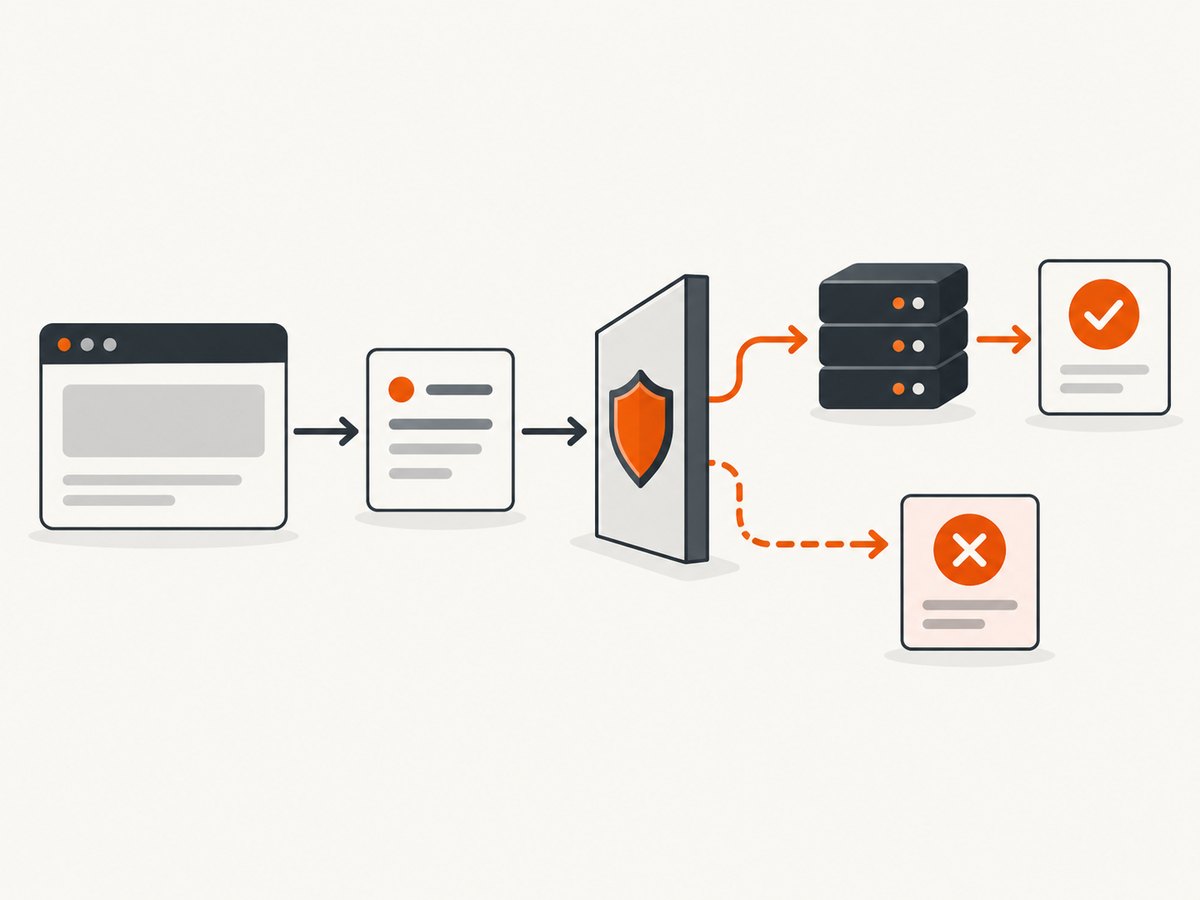
Use cURL to inspect the server independently of Selenium:
curl -i -X OPTIONS 'https://api.example.test/data' \
  -H 'Origin: https://app.example.test' \
  -H 'Access-Control-Request-Method: POST' \
  -H 'Access-Control-Request-Headers: Authorization, Content-Type'
Check that the response has a successful status and matching allow-origin, allow-methods and allow-headers values. A reverse proxy, WAF or authentication layer may be answering OPTIONS before the application does. Fix that layer or pass preflight requests through.
Do not recommend fetch(..., {mode: 'no-cors'}) as a general fix. It returns an opaque response that page JavaScript cannot inspect, so it does not solve a task that needs response data. Simplifying a request can avoid preflight only when the API supports the resulting semantics; it cannot grant permission when the server omits allow-origin.
6. If you do not control the API
No Selenium option can legitimately grant your page permission that the remote server has not authorized. Ask the API owner for a supported browser origin, use the documented server-to-server API, or route through a proxy that you control and are authorized to operate.
A proxy changes the architecture: the browser calls your same-origin server, and your server calls the remote API. Protect it with authentication, rate limits, origin checks and access controls. Do not forward arbitrary URLs or expose stored API credentials to page JavaScript.
import os
import requests
from flask import Flask, jsonify, request

app = Flask(__name__)
REMOTE = 'https://api.example.test/data'

@app.get('/proxy-data')
def proxy_data():
    token = os.environ['REMOTE_API_TOKEN']
    response = requests.get(
        REMOTE,
        headers={'Authorization': f'Bearer {token}'},
        timeout=20,
    )
    response.raise_for_status()
    return jsonify(response.json())

if __name__ == '__main__':
    app.run(port=5000)
A Python HTTP client request is not a browser page-script request, so browser CORS enforcement does not apply to that client. It still must use authorized credentials and reproduce the API’s required method, headers, body and error handling.
7. Keep Selenium itself configured safely
Changing ChromeDriver versions can fix unrelated WebDriver failures, but it does not provide CORS authorization. Use a current compatible browser and driver setup; Selenium Manager handles driver discovery for common supported configurations. Keep browser security enabled. Disabling web security creates a test environment that differs from real users and hides a server-policy defect. Do not expose remote-control services outside a protected test environment.
8. A complete Python Selenium pattern
The following example navigates to a page, waits for an application element, captures browser logs and fails with enough context to investigate. It does not attempt to bypass CORS.
from selenium import webdriver
from selenium.webdriver.chrome.options import Options
from selenium.webdriver.common.by import By
from selenium.webdriver.support.ui import WebDriverWait
from selenium.webdriver.support import expected_conditions as EC

PAGE = 'https://app.example.test'

options = Options()
options.add_argument('--headless=new')
options.add_argument('--window-size=1440,1000')
options.set_capability('goog:loggingPrefs', {'browser': 'ALL'})

driver = webdriver.Chrome(options=options)
try:
    driver.get(PAGE)
    WebDriverWait(driver, 30).until(
        EC.presence_of_element_located((By.CSS_SELECTOR, '[data-ready]'))
    )
    print('origin:', driver.execute_script('return window.location.origin'))
    print('url:', driver.current_url)
    for entry in driver.get_log('browser'):
        if entry.get('level') in {'SEVERE', 'WARNING'}:
            print(entry)
finally:
    driver.quit()
For a request that must be visible to page JavaScript, fix the server policy. For data that belongs in a backend integration, move the request to Python or a controlled service and pass only the result the page needs.
9. Or skip the browser setup
If your actual goal is to capture a page image or PDF rather than exercise browser JavaScript, ScreenshotNeo provides a single HTTP request. See the ScreenshotNeo API documentation for all options.
curl -G "https://api.screenshotneo.com/v1/shot" -d access_key=YOUR_API_KEY --data-urlencode url=https://stripe.com -o shot.webpimport requests
r = requests.get("https://api.screenshotneo.com/v1/shot", params={"access_key": "YOUR_API_KEY", "url": "https://stripe.com"}, timeout=90)
open("shot.webp", "wb").write(r.content)const q = new URLSearchParams({ access_key: 'YOUR_API_KEY', url: 'https://stripe.com' });
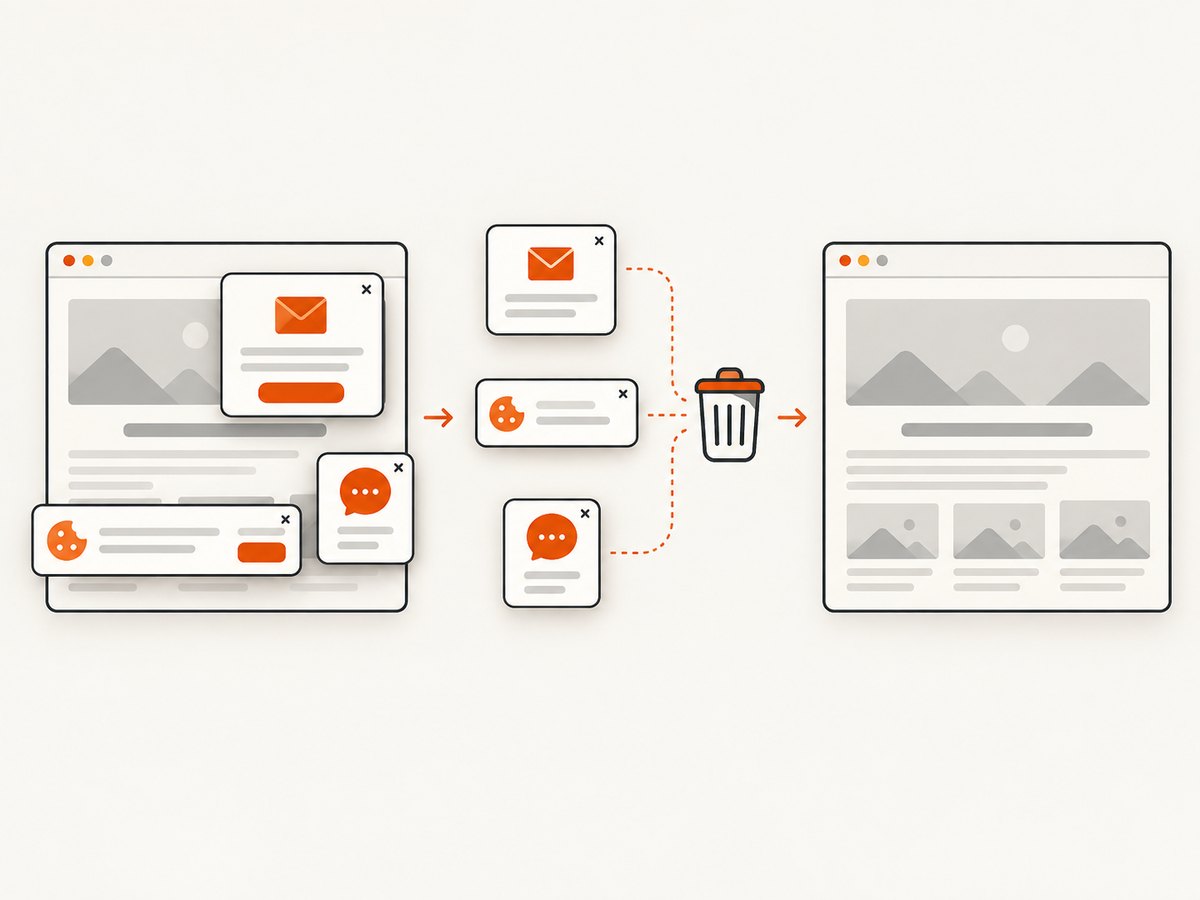
const res = await fetch(`https://api.screenshotneo.com/v1/shot?${q}`);ScreenshotNeo accepts cookie and consent banners like a visitor and removes more than 60 known consent platforms, newsletter popups and chat widgets before capture; each cleanup step can be turned off. Bot checks or CAPTCHAs, blank pages, timeouts, failed loads and cache hits are not billed, and the response identifies the result with X-Page-Verdict and X-Billed headers. It also offers an MCP server with take_screenshot, get_page_info and capture_pdf tools for Claude, Cursor and other MCP clients.
You can capture full pages with lazy images, a CSS-selected element, dark mode, device presets or custom viewports, retina output, PDFs with paper size, margins, landscape and page ranges, HTML/CSS, custom JavaScript and CSS, clicks, waits, request blocking, headers, cookies, user agents, authorization, timezone, geolocation, transparent backgrounds, resizing, chosen cache TTLs, signed image links, asynchronous jobs with signed webhooks, bulk capture of up to 100 URLs and usage data. Existing parameter names used by other screenshot APIs also work.
The free plan includes 1,000 screenshots each month with no card. Paid plans start at $5 for 3,000 shots; yearly billing gives two months free, and every feature is available on every plan. Create a free ScreenshotNeo account to get started.
10. Troubleshooting checklist
| Symptom | Likely cause | Fix |
|---|---|---|
| Page loads, fetch fails | Missing or mismatched allow-origin | Allow the exact scheme, host and port of the page. |
| OPTIONS returns 401 or 403 | Authentication middleware rejects preflight | Handle OPTIONS before auth and return the required CORS headers. |
| “Request header field is not allowed” | Custom header absent from allow-headers | Add the requested header or remove it if the API does not require it. |
| Credentialed request blocked | Wildcard origin or missing allow-credentials | Use an explicit origin and Access-Control-Allow-Credentials: true; check cookie policy. |
| Works manually, fails headless | Different cookies, URL, timing or user agent | Compare Network traces and state, then reproduce the same request. |
| Redirect causes CORS error | Redirect target lacks a compatible policy | Inspect the full chain and configure the final origin or use the documented endpoint. |
| Python requests succeeds | Server-to-server access differs from browser access | Decide whether the call belongs on the backend; do not treat this as proof that browser CORS is fixed. |
| Disabling web security “fixes” it | Browser protection was bypassed locally | Remove the flag and repair the API policy or architecture. |
11. Performance, reliability and cost considerations
Preflight adds a request before the actual call. Where the API permits it, a deliberate Access-Control-Max-Age policy can reduce repeated preflights, but caches and policy changes must be managed carefully. Keep request payloads and headers stable, avoid unnecessary redirects and wait for the application’s real ready signal instead of arbitrary sleeps.
For reliable Selenium runs, collect console and Network evidence, use explicit waits, pin the browser environment in CI and preserve screenshots or logs for failures. Treat retries carefully: retrying a non-idempotent request can duplicate work. A backend API or authorized proxy usually gives clearer timeout, authentication and retry controls than page JavaScript.
Browser automation also consumes a full browser session for each capture. If the requirement is a rendered screenshot or PDF, a screenshot API can remove driver management and make billing explicit. ScreenshotNeo bills only clean shots and reports whether a response was billed, while cache hits and failed captures cost nothing.
12. FAQ
Does Selenium have a CORS setting?
No. Selenium controls browser actions; it does not change the server’s authorization headers or grant page scripts access to another origin.
Why does typing the API URL work?
Top-level navigation is not the same as a script reading a cross-origin response. The same-origin policy applies to script APIs such as fetch and XMLHttpRequest.
Can I solve this with a user-agent change?
A user-agent can change server behavior, but it cannot replace a missing allow-origin or preflight permission. Compare the complete request before changing it.
When should I use a proxy?
Use a controlled proxy when the remote service authorizes server-side access and the browser must receive data through your own origin. Secure it like any authenticated backend endpoint.
Is a CORS error always a server bug?
It is a mismatch between the browser request and the server’s CORS policy. The cause may be the wrong origin, credentials, preflight headers, redirect, cookie policy or an unintended request path.


