How to Fix Cropped Selenium Screenshots with AShot on Some Devices
Fix cropped AShot screenshots by checking scroll increments, viewport geometry, device scale, stitching overlap, and sticky elements.
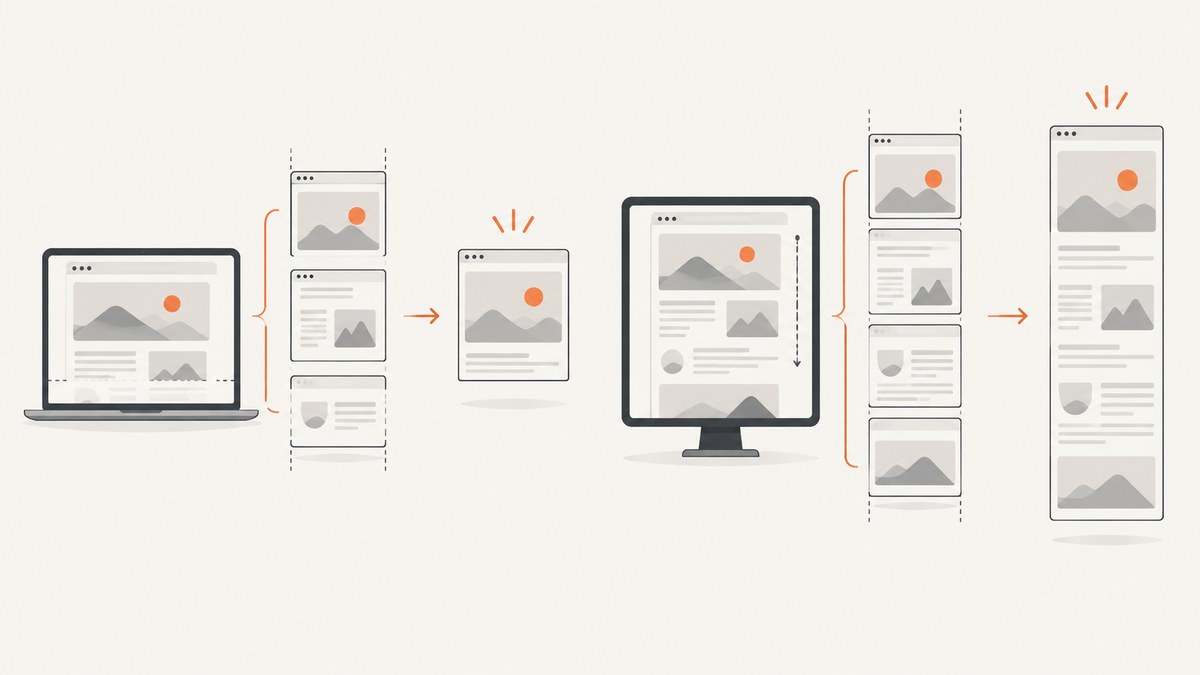
Short answer: start by inspecting AShot’s scroll increment. If your code uses viewportPasting(100), test a much larger value such as 2000 in controlled steps. Treat that number as a diagnostic, not a universal fix. Then compare CSS viewport dimensions, device pixel ratio, document height, browser and driver versions, and the final bitmap dimensions on an affected and a working device.
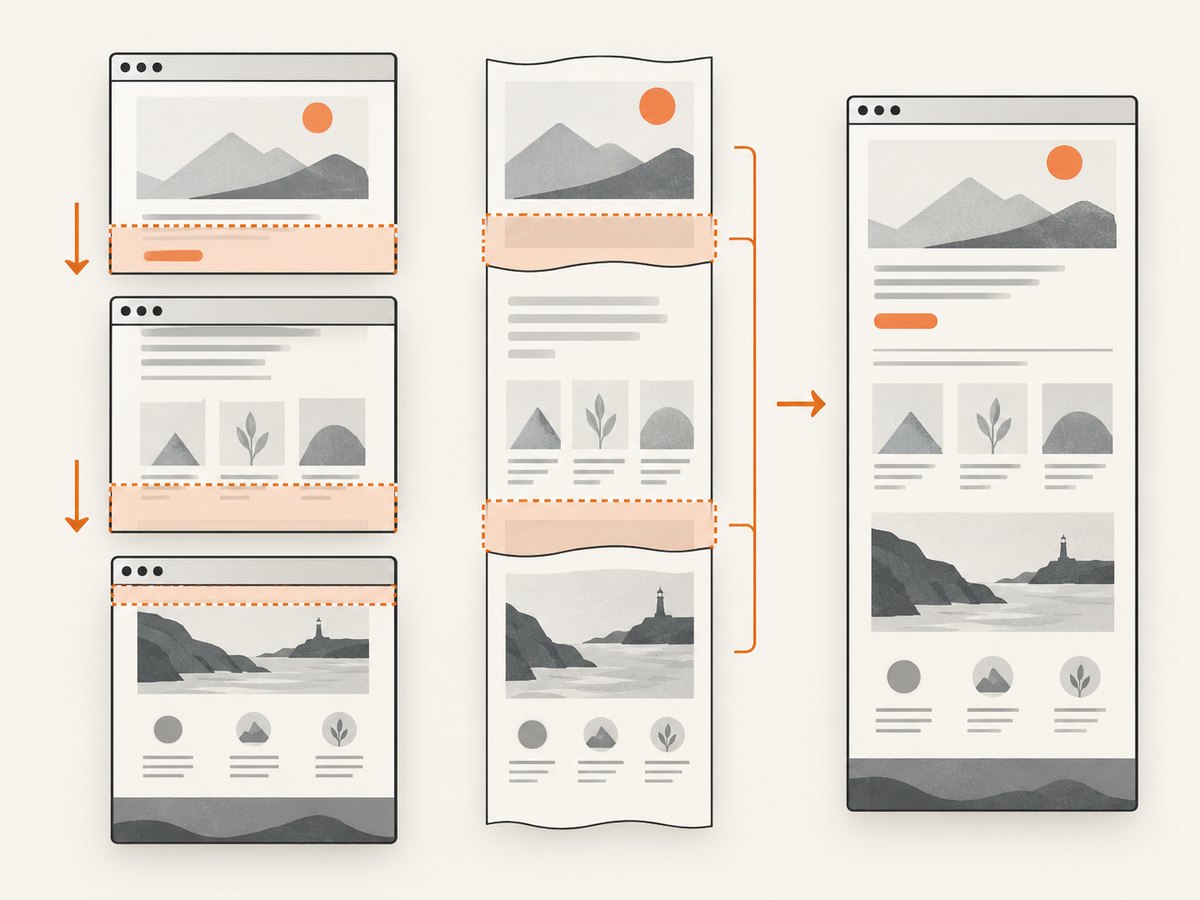
AShot creates a full-page image by repeatedly capturing the current WebDriver viewport while scrolling and then stitching those images together. Selenium’s screenshot API captures the current browsing context, so geometry, timing, scaling and fixed-position elements all affect the assembled result. See Selenium’s screenshot documentation for the underlying screenshot behavior.
1. Reproduce the crop with a controlled baseline
- Use the same URL, browser build, driver build, Java version, AShot version and test data on both devices.
- Set an explicit browser window size instead of relying on the desktop or device default.
- Wait for the page and lazy-loaded content to settle before capturing.
- Save the screenshot from the working device and the affected device with descriptive filenames.
Before changing AShot settings, classify the symptom:
| Symptom | Likely area to inspect |
|---|---|
| The bottom section is missing | Scroll increment, page height, lazy loading or capture timing |
| A thin edge is clipped | Viewport height, window insets or device scale factor |
| Sections overlap or have gaps | Scroll distance and stitching overlap |
| A header appears repeatedly | Sticky or fixed positioning during scroll stitching |
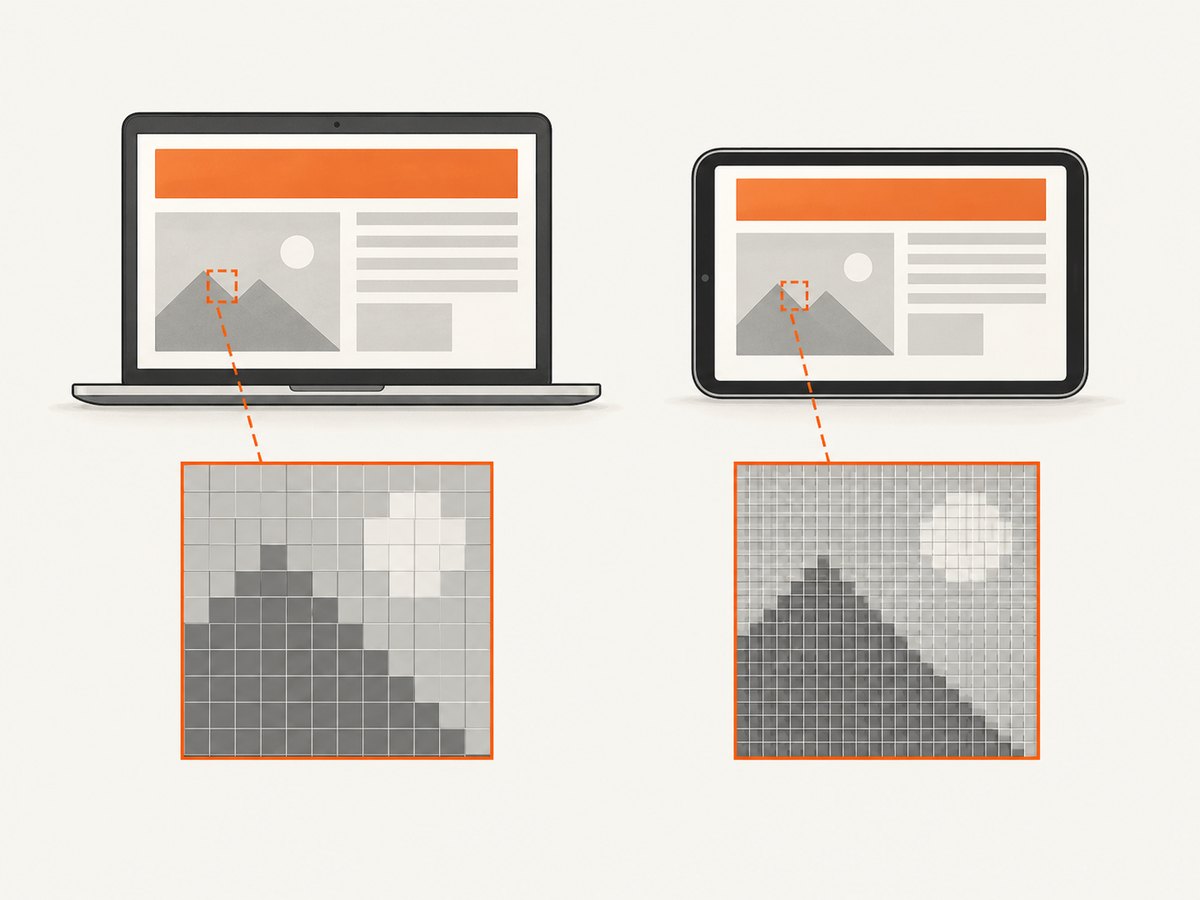
| Bitmap size differs unexpectedly | CSS pixels versus device pixels and devicePixelRatio |
2. Log the dimensions that determine the result
Run this JavaScript in the page before the screenshot and log the returned object:
Object.assign({}, {
  innerWidth: window.innerWidth,
  innerHeight: window.innerHeight,
  devicePixelRatio: window.devicePixelRatio,
  documentScrollHeight: document.documentElement.scrollHeight,
  bodyScrollHeight: document.body ? document.body.scrollHeight : null,
  scrollY: window.scrollY
})
Also record:
- Browser name and exact version.
- WebDriver and driver version.
- Operating system and physical or emulated device.
- Window rectangle returned by WebDriver.
- Viewport width and height in CSS pixels.
- AShot version and configured strategy.
- PNG width and height in bitmap pixels.
- The URL, scroll increment and capture timestamp.
Keep CSS pixels separate from bitmap pixels. A viewport that is 1280 CSS pixels wide can produce a bitmap that is wider or narrower when the device scale factor changes.
3. Test the AShot scroll increment
A reported Java case used viewportPasting(100); the community answer suggested trying a much larger value such as 2000. Test several values rather than copying one value blindly. A smaller increment can increase overlap and runtime. A larger increment can reduce the number of captures, but it must still match the viewport geometry and leave enough overlap for reliable stitching.
import org.openqa.selenium.WebDriver;
import org.openqa.selenium.chrome.ChromeDriver;
import ru.yandex.qatools.ashot.AShot;
import ru.yandex.qatools.ashot.Screenshot;
import ru.yandex.qatools.ashot.shooting.ShootingStrategies;

import javax.imageio.ImageIO;
import java.io.File;

public class AshotFullPage {
    public static void main(String[] args) throws Exception {
        WebDriver driver = new ChromeDriver();
        try {
            driver.manage().window().setSize(new org.openqa.selenium.Dimension(1280, 900));
            driver.get("https://example.com");

            Thread.sleep(1000); // Replace with an explicit readiness wait in production.

            Screenshot screenshot = new AShot()
                    .shootingStrategy(ShootingStrategies.viewportPasting(2000))
                    .takeScreenshot(driver);

            ImageIO.write(screenshot.getImage(), "PNG", new File("page.png"));
        } finally {
            driver.quit();
        }
    }
}
For diagnosis, run the same code with increments such as 100, 500, 1000 and 2000. Compare the output for missing sections, gaps, overlaps and duplicated content. Change one variable at a time.
4. Check device pixel ratio and viewport scaling
If the affected device reports a different window.devicePixelRatio, compare the CSS dimensions with the bitmap dimensions. As an analogous Chromium report, a Playwright capture was cropped when deviceScaleFactor was greater than one and worked with a factor of one. That is useful diagnostic evidence, not proof of an AShot-specific defect.
Run a controlled test with:
- The same browser window dimensions in CSS pixels.
- A consistent device scale factor where your browser automation setup permits it.
- The same headless or headed mode on both machines.
- The same operating-system display scaling where possible.
If the crop disappears after normalizing scale, keep the normalized configuration for screenshots or document the device-specific exception. Do not infer bitmap dimensions from CSS dimensions without checking the actual output file.
5. Wait for page height and lazy content
Scroll stitching can capture a page before images, fonts or JavaScript-rendered sections have expanded the document. Wait for a stable readiness condition instead of relying only on a fixed sleep.
WebDriverWait wait = new WebDriverWait(driver, Duration.ofSeconds(30));
wait.until(d -> ((JavascriptExecutor) d).executeScript(
    "return document.readyState").equals("complete"));
wait.until(d -> (Boolean) ((JavascriptExecutor) d).executeScript(
    "return Array.from(document.images).every(i => i.complete)"));
For pages that load content while scrolling, take a diagnostic screenshot after scrolling to the bottom once, then return to the top and capture. If the document height changes during stitching, log the height before and after each viewport capture or temporarily disable the content that expands on scroll.
6. Handle sticky and fixed elements
A sticky header, floating chat button or fixed cookie bar can appear in every viewport image. The resulting stitched image may repeat that element or obscure content. Compare the stitched output with a browser-native full-page capture where the target browser supports one. A Chrome DevTools full-page route is browser-specific, so verify it against your browser and current driver versions.
Other diagnostic options include hiding fixed elements during the capture, scrolling them out of the way, or using a capture strategy that understands sticky positioning. Restore the page state after the screenshot if the same browser session continues with other tests.
7. A repeatable troubleshooting checklist
- Confirm the crop is reproducible on one device.
- Capture the same URL on a known-good device with matching versions.
- Log window rectangle, CSS viewport,
innerHeight, device pixel ratio, document height and output dimensions. - Change only
viewportPastingand test controlled increments. - Normalize viewport and device scale factor, then compare bitmap dimensions.
- Check whether page height changes as images or JavaScript content loads.
- Inspect the output for repeated sticky or fixed elements.
- Try a browser-native full-page method where supported.
- Report all versions, dimensions, scale settings and the smallest reproducing page when asking for help.
8. Common errors and fixes
| Error | Cause | Fix |
|---|---|---|
| Bottom of page is missing | Increment or page height was misread; content was still loading | Log scroll height, wait for readiness and test a larger or smaller increment |
| Horizontal or vertical clipping | Window insets or device scale changed the effective viewport | Set an explicit window size and compare CSS and bitmap dimensions |
| Visible seams | Insufficient overlap or a page changed between captures | Use a controlled increment, wait for stable content and inspect scroll timing |
| Repeated header or chat widget | Fixed or sticky positioning is copied into every viewport | Hide or handle the element, or test browser-native full-page capture |
| Different devices produce different heights | Different scale factors, browser UI insets or viewport defaults | Normalize the window and scale configuration and record actual output size |
| Intermittent crops | Animations, lazy loading, redirects or network timing | Disable animations where possible and wait for a deterministic readiness condition |
9. Performance and reliability considerations
Scroll-and-stitch runtime grows with the number of viewport captures. Smaller increments usually mean more captures and more image processing. Larger increments can be faster but should be validated for overlap and missing sections. Very tall pages consume more memory because the final bitmap must be assembled in memory.
For reliable CI results, pin browser and driver versions, set a known viewport, avoid animations, wait for stable content, and retain the diagnostic metadata with each failed image. Set a maximum page height or a timeout for pages that continuously append content. Compare full-page output dimensions against the logged document height instead of checking only that a file was created.
10. Or skip the browser setup
ScreenshotNeo provides a website screenshot API when you do not need to maintain Selenium, browser drivers and stitching code. Its capture options include full-page screenshots with lazy images loaded, CSS-selector element capture, device presets or custom viewports, dark mode, retina scale, custom CSS and JavaScript, waits, request blocking, cookies, headers, user agents and caching. See the ScreenshotNeo documentation for the complete option list.
cURL
curl -G "https://api.screenshotneo.com/v1/shot" -d access_key=YOUR_API_KEY --data-urlencode url=https://stripe.com -o shot.webpPython
import requests

r = requests.get(
    "https://api.screenshotneo.com/v1/shot",
    params={"access_key": "YOUR_API_KEY", "url": "https://stripe.com"},
    timeout=90,
)
r.raise_for_status()
open("shot.webp", "wb").write(r.content)
Node.js
const q = new URLSearchParams({ access_key: 'YOUR_API_KEY', url: 'https://stripe.com' });
const res = await fetch(`https://api.screenshotneo.com/v1/shot?${q}`);
if (!res.ok) throw new Error(`HTTP ${res.status}`);
const fs = await import('node:fs/promises');
await fs.writeFile('shot.webp', Buffer.from(await res.arrayBuffer()));
ScreenshotNeo removes cookie and consent banners, newsletter popups and chat widgets before capture; bot checks, blank pages and failed loads are never billed. Each response identifies the page verdict and billing status in X-Page-Verdict and X-Billed headers. Its MCP server lets Claude, Cursor and other MCP clients call take_screenshot, get_page_info and capture_pdf.
There is a free tier of 1,000 screenshots per month with no card. Paid plans start at $5 for 3,000 shots, and every feature is available on every plan. Create a free ScreenshotNeo account.
11. FAQ
Is 2000 the correct AShot value for every device?
No. It is a useful diagnostic value from a community troubleshooting answer. Validate it against your viewport, page height and output dimensions.
Should I always use a smaller scroll increment?
No. Smaller increments can improve overlap but increase runtime and memory use. Choose the smallest value that produces stable, complete output for your browser matrix.
Does Selenium itself guarantee a full-page screenshot?
Selenium captures the current browsing context. AShot’s full-page result is assembled from multiple viewport captures, so full-page behavior depends on the stitching strategy and page geometry.
Why does a sticky header appear several times?
It remains visible in each viewport capture. Hide or handle the fixed element during stitching, or test a browser-native full-page capture.
What should I include in a bug report?
Include browser and driver versions, AShot version, operating system, window rectangle, CSS viewport, device pixel ratio, document height, scroll increment, output dimensions and a reproducible URL or reduced test page.


