How to Fix CSS Grid Rendering in Winnovative HTML-to-PDF
Diagnose broken CSS Grid PDFs by checking Winnovative version, resource URLs, viewport scaling, and render timing with a reproducible workflow.

Short answer: Winnovative does not document a universal CSS Grid switch or a Grid-specific repair. First identify the exact Winnovative package and version, then prove whether the failure is caused by missing CSS, an unexpected viewer width and PDF scaling, or JavaScript that had not finished. If a minimal static reproduction still fails, compare the Classic converter with Winnovative PDF Next/Chromium in your real deployment environment.
1. Establish what is actually rendering
Record these values before changing CSS:
- NuGet package name and locked version (for example, Classic
Winnovative.HtmlToPdfversus a Pdf.Next package). - .NET/runtime target, operating system, and process architecture.
- Whether conversion runs in-process, through a client/server arrangement, or with PDF Next/Chromium.
- Whether input is a public URL, a local file, or an HTML string.
The vendor FAQ says IE stopped being used as the rendering engine beginning with version 9.0. That historical fact rules out some old-engine assumptions, but it does not establish CSS Grid behavior for every later package. Check your lockfile rather than relying on a machine-wide installation. Winnovative FAQ
2. Build a minimal Grid reproduction
Remove frameworks, fonts, images, animations, and application JavaScript. Keep one container and three visibly different items. Save this as grid.html and convert the same file repeatedly while changing one variable at a time.

<!doctype html>
<html>
<head>
  <meta charset="utf-8">
  <style>
    * { box-sizing: border-box; }
    body { margin: 0; font: 16px Arial, sans-serif; }
    .grid { display: grid; grid-template-columns: repeat(3, 1fr); gap: 16px; }
    .item { min-height: 120px; padding: 20px; color: white; border-radius: 8px; }
    .a { background: #2563eb; } .b { background: #16a34a; } .c { background: #dc2626; }
    @media print { .grid { grid-template-columns: repeat(3, 1fr); } }
  </style>
</head>
<body>
  <main class="grid">
    <div class="item a">One</div>
    <div class="item b">Two</div>
    <div class="item c">Three</div>
  </main>
</body>
</html>
If this file works but your application page does not, the problem is in inputs or timing around the page rather than a general Grid rule.
3. Make every stylesheet and asset reachable
For an HTML string, relative URLs such as css/site.css, ../fonts/app.woff2, and images in url() need a correct base URL or absolute URLs. Winnovative identifies missing relative resources as a frequent cause and also calls out authentication and server permissions. The official troubleshooting FAQ states: “Most frequently this issue occurs when the resources are referenced by relative URLs in your HTML code and you don’t pass the correct base URL parameter to converter method.”
HTML string with a base URL (Classic .NET example)
using Winnovative;

var converter = new PdfConverter();
converter.PdfDocumentOptions.PdfPageSize = PdfPageSize.A4;
converter.PdfDocumentOptions.PdfPageOrientation = PDFPageOrientation.Portrait;

string html = await File.ReadAllTextAsync("grid.html");
// The base URL must be the directory from which relative links resolve.
var document = converter.GetPdfDocumentObjectFromHtmlString(
    html,
    "https://example.com/reports/"
);
document.Save("grid.pdf");
document.Close();
Use the conversion host, service account, proxy, and firewall path when checking access. A URL that opens in your desktop browser can still return 401, 403, DNS failure, or a login page to the converter.
4. Separate viewport width from PDF fit scaling
Winnovative documents a default HTML viewer width of 1024 pixels. Fitting that desktop-width layout onto A4 portrait can shrink text and make Grid tracks appear wrong. The FAQ suggests trying an approximately 800-pixel viewer width or setting FitWidth to false. These are scale and page-fit controls, not CSS Grid support flags. See the width and FitWidth explanation.
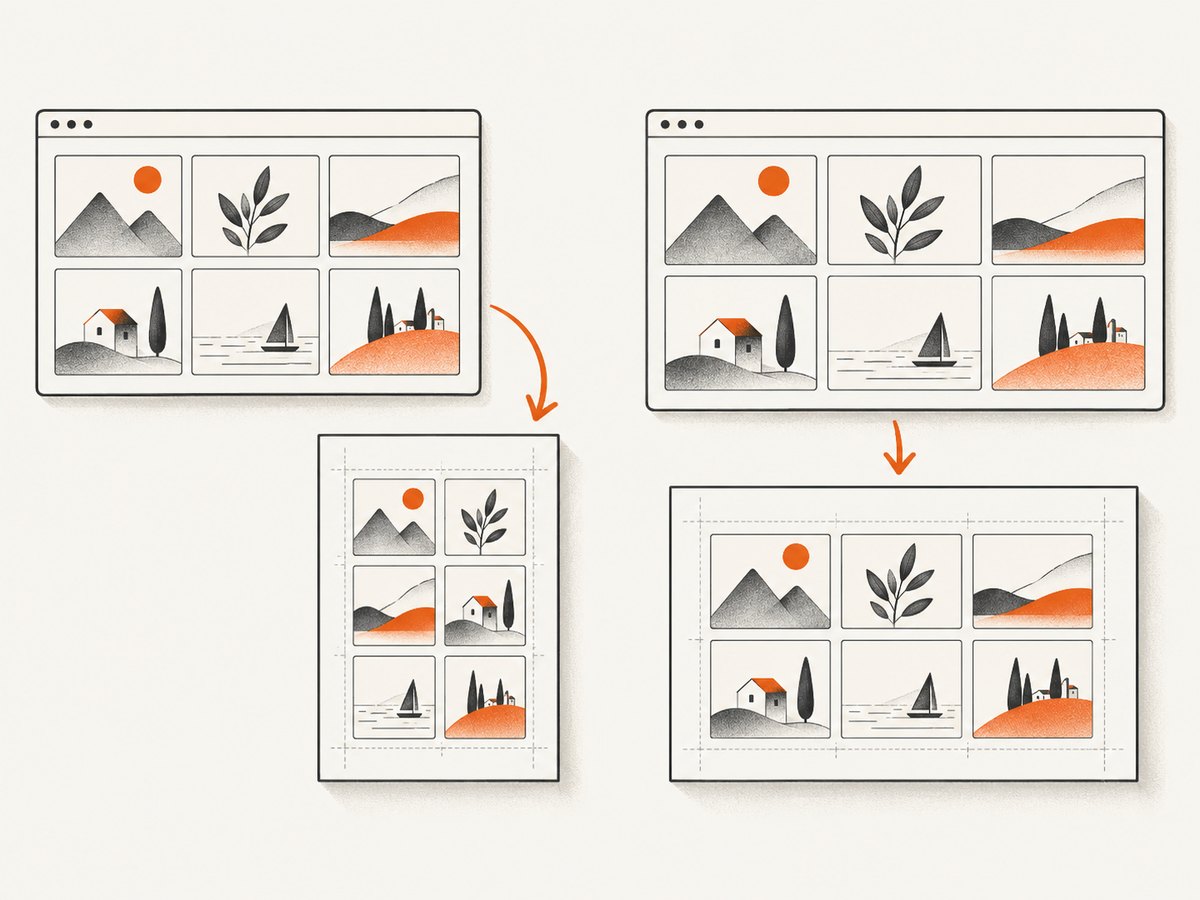
Option A: use a narrower viewer width
var converter = new PdfConverter();
converter.HTmlViewerWidth = 800;
converter.PdfDocumentOptions.PdfPageSize = PdfPageSize.A4;
converter.PdfDocumentOptions.PdfPageOrientation = PDFPageOrientation.Portrait;
converter.ConvertUrl("https://example.com/grid", "grid-800.pdf");
Option B: keep real CSS size and change the page
var converter = new PdfConverter();
converter.HTmlViewerWidth = 1024;
converter.PdfDocumentOptions.FitWidth = false;
converter.PdfDocumentOptions.PdfPageOrientation = PDFPageOrientation.Landscape;
converter.PdfDocumentOptions.PdfPageSize = PdfPageSize.A3;
converter.ConvertUrl("https://example.com/grid", "grid-real-size.pdf");
With FitWidth=false, content wider than the paper can be cut off. Use landscape, A3/A2, or a custom page size when the layout requires it. Alternatively, design a print breakpoint that changes the Grid tracks for the paper width:
@media print {
  .grid { grid-template-columns: repeat(2, minmax(0, 1fr)); }
}
@media print and (max-width: 820px) {
  .grid { grid-template-columns: 1fr; }
}
5. Check print media and computed styles
A browser preview may use screen styles while conversion uses print behavior or a different default. Make print rules explicit and avoid relying on framework defaults. Inspect the converter’s output for:
display:gridbecomingblockorflexthrough an override.- Grid children with fixed widths larger than their tracks.
- Missing
min-width:0on children containing long text. - Fonts loading after layout, changing intrinsic track sizes.
- Transforms, overflow, or positioned descendants that are clipped by the PDF page.
.grid { display: grid; min-width: 0; }
.grid > * { min-width: 0; overflow-wrap: anywhere; }
@media print {
  .grid { break-inside: avoid; }
  .grid > * { break-inside: avoid; }
}
6. Wait only when JavaScript creates the Grid
If scripts insert Grid children, fetch data, or inject a stylesheet, the converter can capture the page before those operations finish. Winnovative exposes ConversionDelay for asynchronous content and supports manually triggering conversion. A delay cannot repair a static CSS compatibility problem, so use it only after confirming the page is dynamic.
var converter = new PdfConverter();
converter.ConversionDelay = 2; // seconds; choose the smallest reliable value
converter.ConvertUrl("https://example.com/dashboard", "dashboard.pdf");
Prefer a deterministic ready signal in your page when available. For example, set window.renderComplete=true after data and styles are applied, then use the converter’s documented manual-trigger mechanism for your package. Avoid arbitrary multi-second sleeps in every request because they reduce throughput.
7. Evaluate PDF Next/Chromium when the minimal case still fails
Winnovative presents PDF Next/PDF Chromium as a newer Chromium-based option for modern HTML, CSS, and JavaScript. The product claim is broad support, not a guarantee for your particular Grid properties, print CSS, fonts, or deployment. Test the minimal file and your real page in the target operating system and runtime, then compare:
| Axis | Questions |
|---|---|
| Renderer | Which exact package and engine produced the PDF? |
| Layout | Do tracks, gaps, auto-placement, nested grids, and print rules match the browser? |
| Resources | Are CSS, fonts, images, and authenticated endpoints reachable? |
| Deployment | Does the server architecture, OS, runtime, and sandbox meet the newer package requirements? |
| Operations | What migration, licensing, support, and memory changes apply? |
Do not claim a compatibility percentage or a universal Grid fix: the reviewed official material publishes no Grid-specific matrix or benchmark. The package listing identifies Classic Winnovative.HtmlToPdf 20.0.2 and a separate Pdf.Next package; verify current versions in your package manager. Release notes · PDF Next migration documentation
8. Troubleshooting checklist
| Symptom | Likely cause | Fix |
|---|---|---|
| All cards stack vertically | Grid stylesheet did not load or was overridden | Use absolute URLs/base URL; inspect response status and computed styles. |
| Cards are tiny but arranged correctly | 1024px viewer scaled to A4 | Try ~800px viewer width, a wider page, or FitWidth=false. |
| Right side is missing | Real-size content exceeds page width | Use landscape, A3/A2/custom size, or a print Grid breakpoint. |
| Grid is empty | Async data or children were not ready | Use the smallest reliable ConversionDelay or manual trigger. |
| Browser works, server fails | Auth, proxy, DNS, TLS, or service-account permissions | Fetch every resource from the conversion machine identity. |
| Only older installations fail | Different package/engine behavior | Record version; test PDF Next/Chromium and consult version-specific support. |
9. Performance, reliability, and cost
- Keep reproductions small and remove unnecessary third-party requests.
- Use a ready signal instead of a large fixed delay.
- Reuse converter configuration where your hosting model permits it, but isolate requests if the library is not thread-safe for your version.
- Set request timeouts and log the source URL, package version, viewer width, page settings, and resource failures.
- Cache stable CSS and fonts at the network layer; avoid repeatedly downloading large assets.
- Validate PDFs with representative long text, missing data, narrow pages, and authenticated resources.
10. Or skip the browser setup
If your goal is a clean visual capture rather than server-side HTML-to-PDF layout debugging, ScreenshotNeo provides a single screenshot API request. It accepts cookie and consent banners before capture and removes more than 60 known consent platforms, newsletter popups, and chat widgets. Bot checks, blank pages, timeouts, failed loads, and cache hits are not billed, and response headers identify the page verdict and billing status. It also provides an MCP server for AI agents with take_screenshot, get_page_info, and capture_pdf.
curl -G "https://api.screenshotneo.com/v1/shot" -d access_key=YOUR_API_KEY --data-urlencode url=https://stripe.com -o shot.webpimport requests
r = requests.get("https://api.screenshotneo.com/v1/shot", params={"access_key": "YOUR_API_KEY", "url": "https://stripe.com"}, timeout=90)
open("shot.webp", "wb").write(r.content)const q = new URLSearchParams({ access_key: 'YOUR_API_KEY', url: 'https://stripe.com' });
const res = await fetch(`https://api.screenshotneo.com/v1/shot?${q}`);See the ScreenshotNeo API documentation for the full option set, including full-page capture, CSS selectors, custom CSS and JavaScript, waits, blocking rules, device presets, PDF settings, signed links, async jobs, bulk capture, caching, and usage reporting. Plans include 1,000 screenshots per month free with no card; paid plans start at $5 for 3,000. Create a free ScreenshotNeo account.
FAQ
Does Winnovative support CSS Grid?
Its product pages make broad modern CSS support claims, but the reviewed official sources do not publish a CSS Grid property matrix. Verify the exact package and reproduce your layout.
Should I replace Grid with Flexbox?
Only if your minimal reproduction proves an engine limitation and changing the layout is acceptable. First rule out missing resources, viewport scaling, and timing.
Why does disabling FitWidth change the layout?
It removes page-width resizing, so the HTML keeps its viewer dimensions. The PDF may then clip content unless the page is wider.
Is a longer ConversionDelay safer?
No. It can hide a race temporarily and lowers throughput. Use a deterministic ready condition or the smallest delay that matches measured page behavior.
Where should I report a version-specific failure?
Provide the package version, runtime, OS, minimal HTML/CSS, conversion mode, page settings, and generated PDF to Winnovative support. No source reviewed here confirms a universal Grid defect.


