How to Fix Cypress Staying on the Current URL After Login
Diagnose Cypress login redirects by checking the real URL, HTTP response, client-side routing, and session restoration with reliable assertions.

Short answer: Cypress does not choose your post-login destination. cy.visit() follows HTTP redirects, while your application or router controls navigation after the credentials are submitted. Assert the route your application should reach, then inspect the actual pathname, query string, hash, and network response when the assertion fails.
cy.get('form').submit()
cy.location('pathname').should('eq', '/dashboard')
If this fails, do not keep changing waits or guessing at the URL. Determine whether the problem is an unsuccessful login, an HTTP redirect, client-side routing, a cached cy.session(), or a cross-origin identity provider.
1. Confirm what Cypress actually does
cy.visit() automatically follows redirects. Visiting a protected route while logged out can therefore end at /login; the requested URL and the resulting browser URL are not necessarily the same. Cypress documents this behavior in its visit command documentation.
After submitting credentials, query the browser location with a retryable assertion:
describe('login', () => {
  it('navigates to the dashboard', () => {
    cy.visit('/login')

    cy.get('[name=email]').type('user@example.com')
    cy.get('[name=password]').type('correct-password')
    cy.get('form').submit()

    cy.location('pathname').should('eq', '/dashboard')
  })
})
cy.url() yields the complete URL and is an alias for cy.location('href'). Both commands retry chained assertions until they pass or time out, as described in the URL and location documentation.
Inspect every URL component
cy.location().then((location) => {
  cy.log(`href: ${location.href}`)
  cy.log(`origin: ${location.origin}`)
  cy.log(`pathname: ${location.pathname}`)
  cy.log(`search: ${location.search}`)
  cy.log(`hash: ${location.hash}`)
})
Use the component that represents your contract. For example, query parameters may contain a return URL, and a hash may be used by a client-side router.
| What you expect | Assertion |
|---|---|
| Exact complete URL | cy.url().should('eq', 'https://app.example.com/dashboard') |
| Path regardless of host | cy.location('pathname').should('eq', '/dashboard') |
| Path with a variable ID | cy.location('pathname').should('match', /^\/users\/\d+$/) |
| Required query parameter | cy.location('search').should('include', 'returnTo=dashboard') |
| Hash route | cy.location('hash').should('eq', '#/dashboard') |
2. Prove that the login succeeded
A URL assertion can tell you where the browser ended, but it cannot prove that the authentication request succeeded. Check the login request and its response body or cookie. The exact endpoint and response shape depend on your application.
cy.intercept('POST', '/api/login').as('login')

cy.get('[name=email]').type('user@example.com')
cy.get('[name=password]').type('correct-password')
cy.get('form').submit()

cy.wait('@login').its('response.statusCode').should('be.oneOf', [200, 201, 204])
cy.location('pathname').should('eq', '/dashboard')
If the status is 401 or 403, fix the credentials, request payload, CSRF token, or test data. If the request never appears, the form handler may not have run, validation may have blocked submission, or the request may use a different method or URL.
Check validation and disabled-submit states
cy.get('[name=email]').should('be.visible').and('be.enabled').type('user@example.com')
cy.get('[name=password]').should('be.visible').and('be.enabled').type('correct-password')
cy.get('button[type=submit]').should('be.enabled').click()
cy.location('pathname').should('eq', '/dashboard')
Do not add an arbitrary cy.wait(2000) to hide a race. Wait for the network request, a visible post-login element, or the retryable location assertion that expresses the real contract.
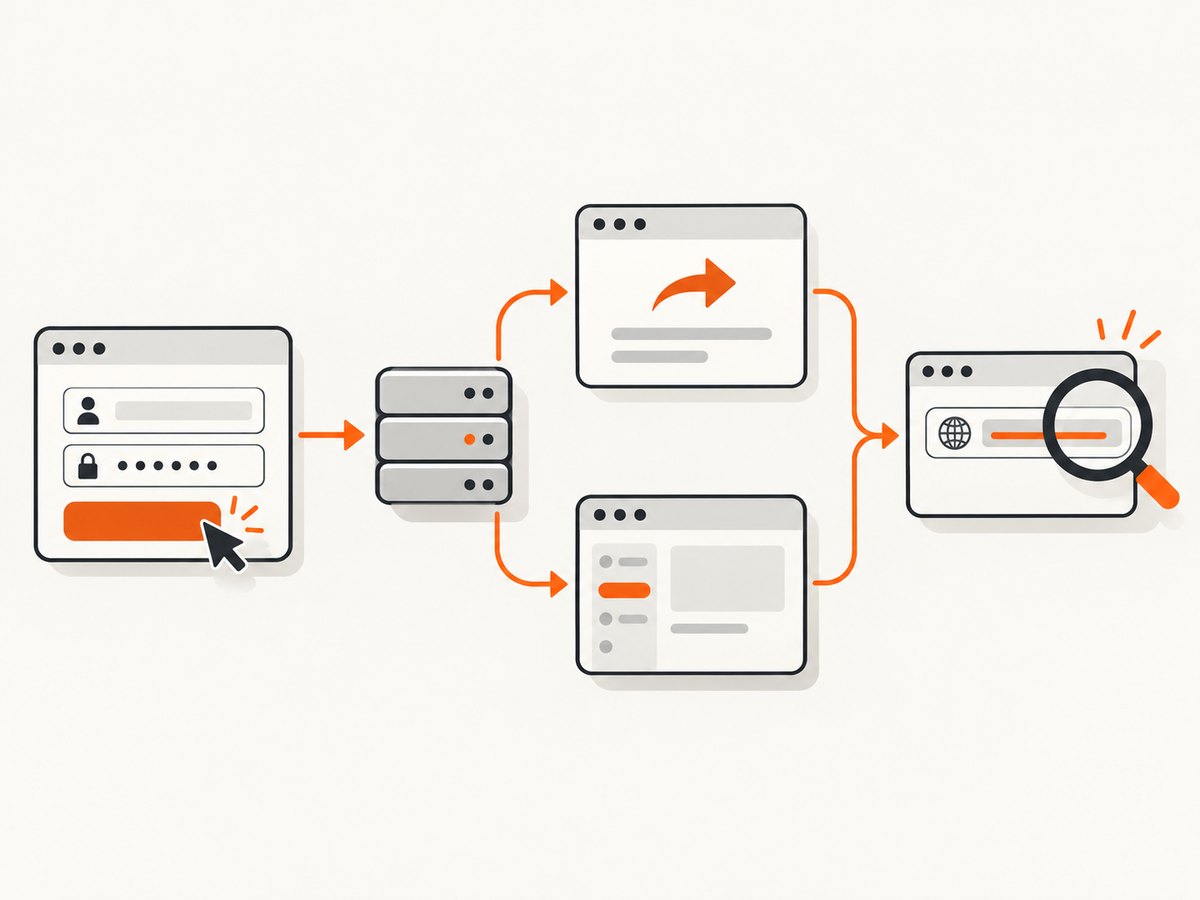
3. Distinguish an HTTP redirect from client-side navigation
The server may respond with a 3xx redirect, or the browser may receive a successful response and then your JavaScript router may call pushState or replace the route. These are different failure layers.
Inspect an HTTP redirect with cy.request()
Cypress can follow and report redirects without requiring a browser session. Use the login or protected endpoint that matters to your application:
cy.request({
  url: 'https://app.example.com/admin',
  followRedirect: false,
  failOnStatusCode: false
}).then((response) => {
  expect(response.status).to.be.oneOf([301, 302, 303, 307, 308])
  expect(response.redirectedToUrl).to.match(/\/login/)
})
The request command documentation describes redirectedToUrl. If the response has a redirect location that is wrong, fix the server, reverse proxy, callback URL, or authentication configuration. If the response is correct but the browser remains on the wrong route, investigate client-side code, blocked scripts, or a router guard.
Observe a client-side route change
cy.intercept('GET', '/api/me').as('currentUser')
cy.get('form').submit()
cy.wait('@currentUser').its('response.statusCode').should('eq', 200)
cy.location('pathname').should('eq', '/dashboard')
A single-page application can stay on /login when the session cookie was not stored, the user endpoint returns unauthorized, a route guard redirects back, or an exception stops the success callback. Check the browser console and application logs for those cases.
4. Handle cy.session() correctly
cy.session() caches cookies, local storage, and session storage between tests. Put the login flow and a successful-login assertion inside the setup callback. Cypress may restore a session while leaving the page blank because of test isolation; visit the page needed by the test after the session is restored. See the session documentation.

function login() {
  cy.session('standard-user', () => {
    cy.visit('/login')
    cy.get('[name=email]').type('user@example.com')
    cy.get('[name=password]').type('correct-password')
    cy.get('form').submit()

    cy.location('pathname').should('eq', '/dashboard')
    cy.get('[data-testid="account-menu"]').should('be.visible')
  }, {
    cacheAcrossSpecs: true
  })
}

describe('protected page', () => {
  beforeEach(() => {
    login()
    cy.visit('/dashboard')
  })

  it('shows private content', () => {
    cy.get('[data-testid="private-content"]').should('be.visible')
  })
})
Do not use only a URL assertion after cy.session() as proof that setup worked. The cached setup must establish the authenticated state first. If the page is blank after restoration, explicitly call cy.visit() in the test or hook.
Validate the session without depending on a page
cy.session('standard-user', () => {
  cy.request('POST', '/api/login', {
    email: 'user@example.com',
    password: 'correct-password'
  }).then((response) => {
    expect(response.status).to.eq(200)
  })

  cy.request('/api/me').its('status').should('eq', 200)
})
This pattern is useful when the application exposes a stable API login endpoint. Adapt it to the authentication mechanism your app actually uses.
5. Use cy.origin() only for a real cross-origin flow
If submitting the login form moves the browser to an external identity provider, Cypress requires cy.origin() for interaction with that origin. The title alone does not prove that this is your problem, so use this branch only after checking the observed URL.
cy.visit('https://app.example.com/login')
cy.get('[data-testid="sign-in"]').click()

cy.origin('https://id.example.com', () => {
  cy.get('[name=username]').type('user@example.com')
  cy.get('[name=password]').type('correct-password')
  cy.get('button[type=submit]').click()
})

cy.location('origin').should('eq', 'https://app.example.com')
cy.location('pathname').should('eq', '/dashboard')
Read the origin command documentation and configure the identity provider’s callback URL for the test environment. If the application never leaves its own origin, adding cy.origin() will obscure the real issue.
6. A repeatable diagnostic workflow
- Write down the intended final URL, including whether query parameters or a hash matter.
- Run the test with a retryable
cy.location()assertion. - Log the actual
href,pathname,search, andhash. - Intercept the login request and check its status, request body, and response.
- Use
cy.request({ followRedirect: false })to inspect server redirects separately. - Check cookies, local storage, CSRF data, and the authenticated-user request.
- If using
cy.session(), assert login inside setup and visit the app after restoration. - If the final origin differs, move only the external interaction into
cy.origin(). - Remove temporary waits after replacing them with assertions tied to network or UI state.
it('diagnoses the login destination', () => {
  cy.intercept('POST', '**/login').as('login')
  cy.visit('/login')
  cy.get('[name=email]').type('user@example.com')
  cy.get('[name=password]').type('correct-password')
  cy.get('form').submit()

  cy.wait('@login').then(({ request, response }) => {
    cy.log(`request URL: ${request.url}`)
    cy.log(`status: ${response?.statusCode ?? 'no response'}`)
  })

  cy.location().then((location) => {
    cy.log(JSON.stringify({
      href: location.href,
      pathname: location.pathname,
      search: location.search,
      hash: location.hash
    }))
  })
})
7. Common errors and fixes
| Symptom | Likely cause | Fix |
|---|---|---|
URL stays at /login |
Credentials rejected or validation prevented submission | Inspect the login request status and response; assert validation messages and enabled controls. |
URL briefly changes, then returns to /login |
Session cookie was not stored, expired, or rejected by cookie attributes | Inspect cookies and the authenticated-user request; verify domain, path, Secure, SameSite, and HTTPS settings in the test environment. |
| Expected URL assertion times out | Wrong route contract, router error, or navigation never occurred | Log all location fields and check browser console output and intercepted requests. |
cy.visit('/dashboard') ends at login |
The protected route correctly redirected an unauthenticated browser | Authenticate first, then visit the protected route; assert the resulting login URL when testing access control. |
Page is blank after cy.session() |
Test isolation restored state without loading the previous page | Visit the intended page after the session command and keep the successful-login assertion in session setup. |
| Redirect check shows a 3xx but no expected destination | Server or proxy callback configuration is wrong | Use followRedirect: false, inspect redirectedToUrl, and correct the server-side redirect target. |
| External login cannot be interacted with | Commands are crossing origins without cy.origin() |
Confirm the origin change, then wrap only the external-provider commands in cy.origin(). |
| Test passes locally but fails in CI | Different base URL, environment variables, clock, data, or slower backend | Print the resolved base URL, use deterministic test users, wait on requests or state, and compare CI network responses. |
| Arbitrary waits still fail | Timing varies or the wait is shorter than the real operation | Replace fixed delays with cy.wait('@alias'), a location assertion, or a visible post-login assertion. |
8. Reliability, speed, and maintainability
- Assert the narrowest stable contract. Use
pathnamewhen hosts and query strings vary between environments. - Keep authentication setup deterministic. Use dedicated test accounts and reset their state rather than depending on a previous test.
- Prefer API setup when appropriate. A request-based login can avoid repeating a slow UI flow, but retain at least one end-to-end test that covers the real login form.
- Wait on causes, not elapsed time. Network aliases and retryable assertions reduce flakes and usually shorten successful runs.
- Separate server and browser evidence. A
cy.request()result explains HTTP redirects; a browser location assertion explains the route the user sees. - Keep cross-origin scope small. Put only identity-provider commands inside
cy.origin()and assert the return route on your application origin.
9. Or skip the browser setup
If your goal is to capture the post-login or public page rather than debug the login flow itself, ScreenshotNeo provides a single screenshot request. Its capture options include custom headers, cookies, Authorization, user agents, waits, JavaScript, and custom CSS, so you can reproduce the page state without maintaining a browser setup.
cURL:
curl -G "https://api.screenshotneo.com/v1/shot" -d access_key=YOUR_API_KEY --data-urlencode url=https://stripe.com -o shot.webpPython:
import requests
r = requests.get("https://api.screenshotneo.com/v1/shot", params={"access_key": "YOUR_API_KEY", "url": "https://stripe.com"}, timeout=90)
open("shot.webp", "wb").write(r.content)
Node.js:
const q = new URLSearchParams({ access_key: 'YOUR_API_KEY', url: 'https://stripe.com' });
const res = await fetch(`https://api.screenshotneo.com/v1/shot?${q}`);
See the ScreenshotNeo API documentation for the available parameters. Cookie banners, newsletter popups, and chat widgets are removed before the shot. Bot checks, blank pages, and failed loads are never billed, and response headers identify the page verdict and billing status. ScreenshotNeo also includes an MCP server so AI agents can take screenshots, and the free plan includes 1,000 screenshots per month with no card; paid plans start at $5 for 3,000.
Create a free ScreenshotNeo account and start with 1,000 screenshots a month at no cost.
10. FAQ
Does Cypress wait for a redirect automatically?
cy.visit() follows HTTP redirects. For navigation caused by your application after login, use a retryable URL or location assertion.
Should I assert cy.url() or cy.location('pathname')?
Use cy.url() for the complete URL. Use pathname when query strings, hosts, or hashes vary and are not part of the behavior under test.
Why does a successful login test show a blank page?
With cy.session(), restored state can leave the page unloaded under test isolation. Visit the required application page after restoring the session.
When is cy.origin() required?
Use it when the test must interact with a different origin, such as an external identity provider. It is unnecessary for same-origin route changes.
Can a URL assertion prove authentication worked?
No. Pair the route assertion with evidence such as a successful login response, authenticated-user request, session cookie, or protected UI element.


