How to Fix domtoimage.toBlob() Failing in Production
Fix domtoimage.toBlob() failures caused by SSR, fonts, CORS, canvas security, timing, and browser limits with production-ready JavaScript patterns.

Short answer: domtoimage.toBlob() usually fails in production because the call runs before the browser has finished laying out the node, an image/font/stylesheet is cross-origin, the code executes during SSR, or the browser rejects SVG foreignObject rasterization. Confirm browser-only execution, wait for fonts and layout, isolate external resources, fix CORS at the resource host, add the library’s recovery hooks, and log the failing stage.
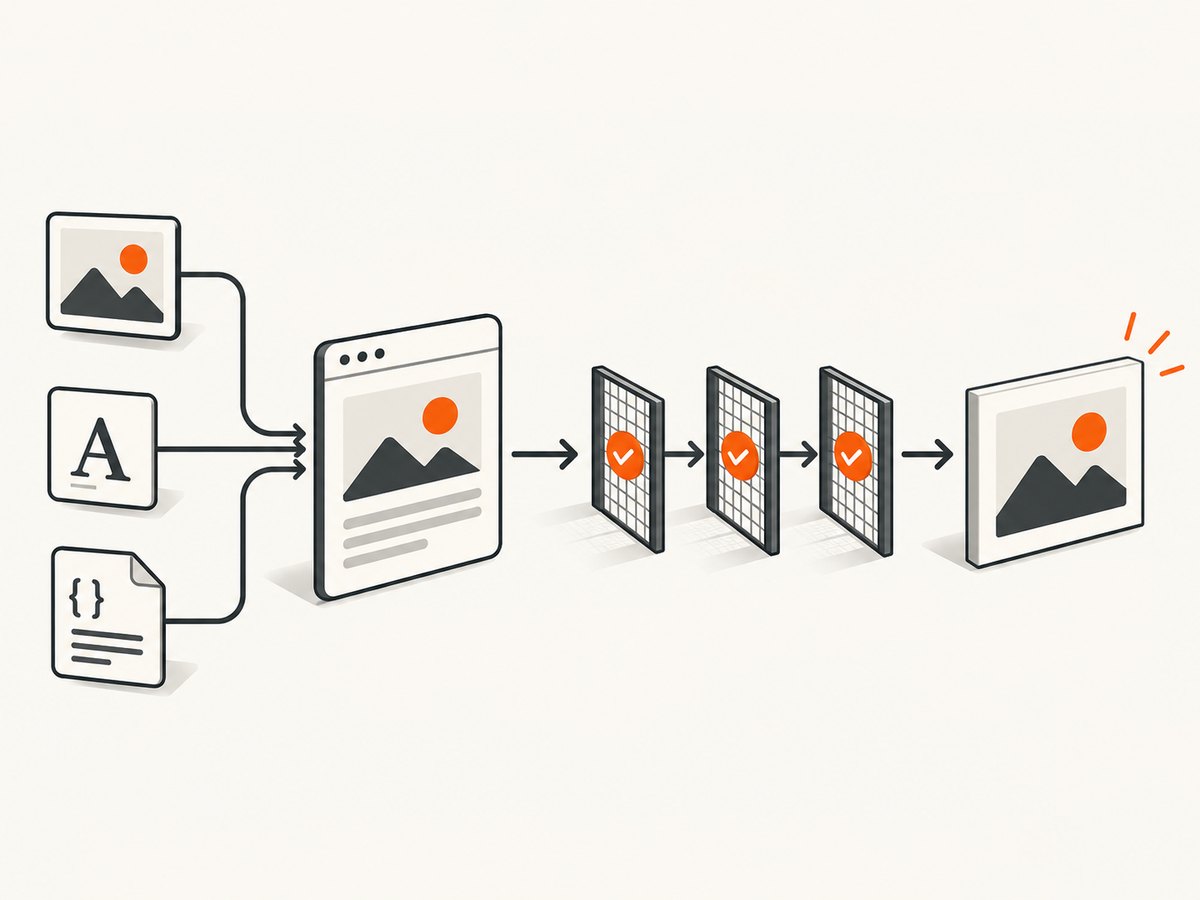
The original dom-to-image README describes the export pipeline: clone the node, copy computed styles, embed fonts, embed images and CSS backgrounds, serialize the clone to XML, wrap it in SVG <foreignObject>, load that SVG into an off-screen canvas, and create an image or Blob. A failure at any stage can reject the final promise.
1. Confirm the call runs in a browser
Rendering requires a browser DOM. Do not invoke domtoimage.toBlob() from a server component, build step, route loader, or Node.js process. The maintained dom-to-image-more documentation reports that SSR render calls reject when a browser DOM is unavailable.
async function exportNode(node) {
  if (typeof window === 'undefined' || !node) {
    throw new Error('Browser DOM required');
  }

  await document.fonts?.ready;

  const blob = await domtoimage.toBlob(node);
  if (!(blob instanceof Blob) || blob.size === 0) {
    throw new Error('Empty export');
  }
  return blob;
}
Framework-specific timing
- React: call from a client component after the target ref is attached, such as a click handler or an effect that runs after mount.
- Vue: wait for
nextTick()after the target becomes visible. - Angular: use a browser-only lifecycle path and check
isPlatformBrowser. - Next.js and other SSR frameworks: mark the component client-only and dynamically import the library when necessary.
2. Wait for layout, fonts, stylesheets, and images
A node can exist while its dimensions are still zero or while its visual resources are loading. Capture only after the element is mounted and laid out. Wait for document.fonts.ready, image completion, and stylesheet load events. The maintained documentation notes that already-loading fonts are awaited, but a stylesheet inserted in the same event loop turn may not yet be visible to CSSOM font discovery.
function nextFrame() {
  return new Promise(resolve => requestAnimationFrame(() => resolve()));
}

async function waitForImages(root) {
  const images = [...root.querySelectorAll('img')];
  await Promise.all(images.map(img => {
    if (img.complete) return Promise.resolve();
    return new Promise(resolve => {
      img.addEventListener('load', resolve, { once: true });
      img.addEventListener('error', resolve, { once: true });
    });
  }));
}

async function waitUntilReady(root) {
  await nextFrame();
  await document.fonts?.ready;
  await waitForImages(root);
  await nextFrame();
}
For application stylesheets loaded dynamically, wait for the stylesheet’s load event before exporting. If the target is hidden with display: none, it has no usable layout; render it in the document or in an off-screen container with dimensions.
3. Find the resource that breaks the clone
Temporarily replace remote images, CSS background images, web fonts, and external stylesheets with same-origin or inline resources. If the export starts working, restore resources one at a time. This identifies whether the problem is an image, font, stylesheet, or another embedded asset.
const original = node.cloneNode(true);
// Diagnostic experiment only: remove external images from the target.
node.querySelectorAll('img').forEach(img => {
  if (new URL(img.src, location.href).origin !== location.origin) {
    img.removeAttribute('src');
  }
});

try {
  const blob = await domtoimage.toBlob(node);
  console.log('Export succeeds without external images', blob.size);
} finally {
  node.replaceWith(original);
}
Use browser DevTools Network and Console panels while exporting. Look for blocked font or image requests, failed stylesheet fetches, and security errors. A failed content image may be skipped while the rest of the node renders, but final SVG-to-canvas rasterization and a tainted canvas are fatal.
4. Fix CORS at the asset boundary
A canvas becomes tainted when it contains cross-origin image data that was not loaded with permission. Once tainted, the browser blocks toBlob(), toDataURL(), and getImageData(). The MDN CORS-enabled image guidance and HTML Standard describe this origin-clean check.
Server-side headers
Configure the image, font, or stylesheet host to return an appropriate Access-Control-Allow-Origin value for the page origin. If credentials are used, configure the credential mode and response headers consistently; do not combine credentials with a wildcard origin.
Access-Control-Allow-Origin: https://app.example.com
Vary: Origin
Set the matching CORS mode before the resource is requested. For images, that commonly means using an image element configured for anonymous CORS before assigning its source:
const image = new Image();
image.crossOrigin = 'anonymous';
image.src = 'https://assets.example.com/diagram.png';
await image.decode();
mode: no-cors is not a fix. It produces an opaque response that cannot be used as readable embedded data for a reliable canvas export.
When you cannot change the asset host
- Route the asset through a same-origin server proxy that returns the bytes with appropriate headers.
- Convert the asset to a data URL before handing it to the renderer.
- Use the library’s
requestInterceptorto provide a data URL or recover from a failed fetch.
5. Configure dom-to-image recovery hooks
The maintained dom-to-image-more documentation describes these recovery options. Check the exact option names and behavior against the version installed in your project.
| Option | Use it for | Important detail |
|---|---|---|
corsImg |
Rewriting image requests through a proxy | The proxy must return usable image data and suitable CORS behavior. |
requestInterceptor |
Supplying a data URL before fetch or recovering after a failed fetch | Handle empty, non-Blob, or undecodable responses as failures. |
imagePlaceholder |
Replacing an image that cannot be fetched | Useful when degraded output is acceptable. |
loadExternalStyleSheet |
Fetching cross-origin stylesheets for font discovery | It does not remove the need for correct CORS. |
logger |
Recording resource and pipeline diagnostics | Keep logs with the browser, URL, dimensions, and error details. |
onImageError |
Preserving failed-image events | A missing image may be skipped, while rasterization failures remain fatal. |
The documented order is request interceptor, proxy rewrite, fetch, interceptor recovery, image placeholder, then dropping the resource. A successful HTTP status is not sufficient: a response can still fail when its body is empty, not a Blob, or undecodable.
async function exportWithDiagnostics(node) {
  if (typeof window === 'undefined' || !node) {
    throw new Error('Browser DOM required');
  }

  await document.fonts?.ready;

  const options = {
    logger(message) {
      console.debug('[dom-to-image]', message);
    },
    onImageError(error) {
      console.warn('[dom-to-image image]', error);
    },
    // Add corsImg, requestInterceptor, imagePlaceholder, or
    // loadExternalStyleSheet according to your installed version.
  };

  try {
    const blob = await domtoimage.toBlob(node, options);
    if (!(blob instanceof Blob) || blob.size === 0) {
      throw new Error('Empty export');
    }
    return blob;
  } catch (error) {
    console.error('DOM export failed', {
      browser: navigator.userAgent,
      url: location.href,
      width: node.getBoundingClientRect().width,
      height: node.getBoundingClientRect().height,
      error
    });
    throw error;
  }
}
6. Make fonts render consistently
Missing fonts usually mean the font was not loaded when the clone was built, the stylesheet was not discoverable, or the font host rejected the request. Wait for document.fonts.ready. Verify the font request in Network, confirm the response is usable from the page origin, and test once with a system-font fallback. If the fallback works, restore fonts one at a time.
await document.fonts.ready;
const target = document.querySelector('#card');
const computed = getComputedStyle(target);
console.log({
  fontFamily: computed.fontFamily,
  fontSize: computed.fontSize,
  width: target.getBoundingClientRect().width
});
If a stylesheet is inserted immediately before capture, defer the export until the stylesheet has loaded and a subsequent animation frame has occurred. Cross-origin stylesheet discovery may require loadExternalStyleSheet in dom-to-image-more.
7. Check browser-specific limits
- Internet Explorer: the original README says it is unsupported because it lacks SVG
foreignObjectsupport. - Safari: the original README says Safari is unsupported because of stricter
foreignObjectsecurity. Its suggested workaround is to usetoSvgand render on the server. - Firefox: the README records problems with some external stylesheets. Test stylesheet-heavy exports separately from same-origin, inline-only exports.
These are browser and rendering-model constraints, so a JavaScript retry alone will not make every input portable. Choose a server-rendered SVG or another browser execution path when the required browser cannot rasterize the generated SVG.
8. A production checklist
- Confirm the code runs only in a browser.
- Confirm the target ref is non-null and has non-zero dimensions.
- Wait for layout,
document.fonts.ready, images, and dynamically loaded stylesheets. - Export a same-origin, inline-only version to establish a baseline.
- Restore images, backgrounds, fonts, and stylesheets individually.
- Fix CORS on the host that serves the failing resource.
- Use a same-origin proxy or data URL when the host cannot provide CORS.
- Add
corsImg,requestInterceptor,imagePlaceholder, and logging where appropriate. - Reject empty or undecodable responses even when HTTP returned 2xx.
- Test Safari, Firefox, and the browsers your users actually run.
- Record browser, page URL, node dimensions, resource URL, and the original exception.

9. Common errors and fixes
| Symptom | Likely cause | Fix |
|---|---|---|
window is not defined or browser-DOM-required error |
SSR or Node execution | Move the call to a client-only lifecycle path and guard browser access. |
SecurityError from canvas export |
Tainted canvas from a cross-origin image or background | Enable CORS, use a same-origin proxy, or provide a data URL. |
| Blank or zero-size image | Node was hidden, unmounted, or not laid out | Capture a mounted element with dimensions after a frame. |
| Fonts fall back or text shifts | Font or stylesheet was not ready or discoverable | Wait for document.fonts.ready, verify font CORS, and wait for stylesheet load. |
| Some images disappear but export resolves | Individual image fetch failed | Inspect onImageError, then fix the asset URL/CORS or use a placeholder. |
| Export rejects after all requests return 2xx | Empty, non-Blob, or undecodable response body | Treat response validation as part of the interceptor and log the body failure. |
| Works in Chrome, fails in Safari | foreignObject security restrictions |
Use toSvg with server rendering or a different capture path. |
| Works without external CSS, fails with it | External stylesheet discovery or CORS issue | Inline or proxy the stylesheet, or enable the documented external stylesheet option. |
10. Performance, reliability, and cost considerations
Large nodes require more cloning, serialization, SVG parsing, and canvas memory. Capture only the required element when a full page is unnecessary. Reduce oversized images and avoid repeatedly exporting unchanged content. Wait once for shared fonts and resources, then reuse the resulting Blob or object URL when possible.
Reliability improves when resource control is explicit: same-origin assets are easier to diagnose than third-party assets, inline or proxied resources remove dependency on another host, and a placeholder can preserve a usable export when a non-critical image is unavailable. Keep diagnostic logging in production behind a controlled log level and retain the original error for support cases.
The browser method has no separate screenshot-service charge, but it does require your application to operate a browser-compatible rendering path and, where needed, a same-origin proxy. A hosted API can move those responsibilities out of your frontend.
11. Or skip the browser setup
ScreenshotNeo provides a website screenshot API and MCP server. One GET request returns a PNG, JPEG, WebP, or PDF. It handles cookie and consent banners before capture and removes more than 60 known consent platforms, newsletter popups, and chat widgets; each step can be turned off. Bot checks, blank pages, timeouts, failed loads, and cache hits are not billed, and the response reports the result through X-Page-Verdict and X-Billed headers. Its MCP server lets Claude, Cursor, and other MCP clients use take_screenshot, get_page_info, and capture_pdf.
See the ScreenshotNeo API documentation for options and configuration.
cURL
curl -G "https://api.screenshotneo.com/v1/shot" -d access_key=YOUR_API_KEY --data-urlencode url=https://stripe.com -o shot.webpPython
import requests

r = requests.get(
    "https://api.screenshotneo.com/v1/shot",
    params={"access_key": "YOUR_API_KEY", "url": "https://stripe.com"},
    timeout=90,
)
r.raise_for_status()
open("shot.webp", "wb").write(r.content)
Node.js
const q = new URLSearchParams({ access_key: 'YOUR_API_KEY', url: 'https://stripe.com' });
const res = await fetch(`https://api.screenshotneo.com/v1/shot?${q}`);
if (!res.ok) throw new Error(`Screenshot failed: ${res.status}`);
const bytes = Buffer.from(await res.arrayBuffer());
require('node:fs').writeFileSync('shot.webp', bytes);
The free plan includes 1,000 screenshots per month with no card. Paid plans start at $5 for 3,000 screenshots, and every feature is available on every plan. Create a free ScreenshotNeo account.
12. FAQ
Can I call toBlob() from Node.js?
Not directly. The library needs a browser DOM, layout, SVG support, and a canvas implementation. Run it in a browser context or use a server-side rendering approach.
Why does replacing one image fix the whole export?
That image may be the first cross-origin resource that taints the canvas. Removing it proves the pipeline works for the remaining content; fix its CORS response or proxy it.
Should I retry a failed export?
Retry only after correcting readiness or resource conditions. Repeating a deterministic CORS or browser-support failure does not change the result.
Does a 200 response guarantee that an asset is usable?
No. The maintained documentation notes that an empty, non-Blob, or undecodable body can still fail resource production after a successful HTTP status.
When should I use a hosted screenshot API?
Use one when you need repeatable captures without shipping browser timing, CORS workarounds, popup handling, and browser-specific foreignObject behavior in your application.


