How to Fix ERR_CERT_AUTHORITY_INVALID in Playwright
Fix Playwright’s ERR_CERT_AUTHORITY_INVALID by checking the certificate chain, trusting an internal CA, or narrowly bypassing HTTPS errors in tests.

ERR_CERT_AUTHORITY_INVALID means the browser used by Playwright cannot build a trusted certificate-authority chain for the HTTPS site. The best fix is to serve a valid certificate chain or install the correct internal root CA in the environment running the browser. For a disposable local test where certificate validation is not under test, set ignoreHTTPSErrors: true on the narrowest suitable Playwright context. It defaults to false.
First identify which endpoint and network path the browser sees. A self-signed development certificate, missing intermediate, hostname mismatch, untrusted organization CA, and TLS-inspecting proxy can all produce a certificate failure; changing Playwright settings without diagnosing the cause can hide a real configuration problem.
1. Identify the certificate problem
Check the exact URL used by the test, including its hostname and scheme. A certificate valid for localhost may not be valid for 127.0.0.1, and a certificate for an internal DNS name will not validate when the test navigates to a different alias. HTTPS validation checks both the issuer chain and whether the requested hostname matches the certificate.

Inspect the certificate presented from the same machine or container where Playwright runs. If the test environment differs from your laptop, inspect from inside that environment: a CI runner, container, or corporate network may have a different trust store or route through a proxy. Verify:
- The server presents the leaf certificate and required intermediate certificates.
- The certificate is valid for the hostname in the test URL and is within its validity period.
- The issuing root CA is trusted by the browser environment.
- A proxy or gateway is not substituting a certificate signed by an organization-specific CA.
When the test is intended to validate TLS, keep certificate checking enabled and repair the chain or trust configuration. Use a bypass only when HTTPS validation is explicitly outside the test’s purpose.
2. Fix the certificate or trust configuration
Serve a complete, hostname-matching chain
For a publicly reachable site, configure the server with the leaf certificate and its required intermediate certificates. Confirm the certificate covers the exact host used by the test. A browser may not be able to complete a chain that appears to work in another tool if that tool has cached or separately installed intermediates.
For an internal service, install the organization’s approved root CA in the environment running the Playwright browser. In containerized CI, that generally means adding the CA to the image or configuring the operating system trust store as part of the runner setup. Do not install an arbitrary certificate downloaded from the failing endpoint as a trusted root: obtain the correct CA certificate from the responsible administrator or internal PKI process.
Use a narrowly scoped test bypass for disposable development certificates
Playwright’s ignoreHTTPSErrors option tells the browser context to ignore HTTPS errors. Its default is false. If the test does not assess certificate behavior and the endpoint uses a disposable self-signed certificate, enable it only for that test or project.
With Playwright Test, set it in playwright.config.ts:
import { defineConfig } from '@playwright/test';

export default defineConfig({
  use: {
    ignoreHTTPSErrors: true,
  },
});
This applies to contexts created with that project configuration. If only one test needs the exception, prefer a dedicated project or create a context with the option rather than making it a broad default for unrelated tests.
For a standalone Playwright script, configure the browser context explicitly. This runnable TypeScript example uses Chromium:
import { chromium } from 'playwright';

async function main() {
  const browser = await chromium.launch();
  const context = await browser.newContext({
    ignoreHTTPSErrors: true,
  });
  try {
    const page = await context.newPage();
    await page.goto('https://localhost:8443', {
      waitUntil: 'domcontentloaded',
    });
    console.log(await page.title());
  } finally {
    await context.close();
    await browser.close();
  }
}

main().catch((error) => {
  console.error(error);
  process.exitCode = 1;
});
Install the required packages with npm install playwright and install its browser with npx playwright install chromium. Substitute the actual test URL. Keep the try/finally cleanup so a navigation failure does not leave the browser process running.
Trust a proxy CA for Playwright browser downloads
A TLS-inspecting proxy can re-sign browser downloads with its own certificate. If Playwright cannot download browser binaries because that CA is untrusted, set NODE_EXTRA_CA_CERTS to the organization’s root certificate before running the install command:
export NODE_EXTRA_CA_CERTS="/path/to/cert.pem"
npx playwright install
The variable must be present in the environment of the Node process that performs installation. On Windows PowerShell:
$env:NODE_EXTRA_CA_CERTS = "C:\path\to\cert.pem"
npx playwright install
In Windows Command Prompt:
set NODE_EXTRA_CA_CERTS=C:\path\to\cert.pem
npx playwright install
This remedy concerns Node’s trust of certificates encountered during browser downloads. It is not a general replacement for configuring the browser to trust the CA for websites that tests visit. Ensure the file contains the correct trusted root CA, and follow your organization’s certificate distribution process.
3. Keep client authentication separate from server trust
Mutual TLS has two distinct directions. The browser validates the server certificate chain; separately, the server may ask the client to present a certificate to prove its identity. Playwright’s clientCertificates option supplies that client identity for an exact origin. It does not make an invalid server certificate chain trusted.
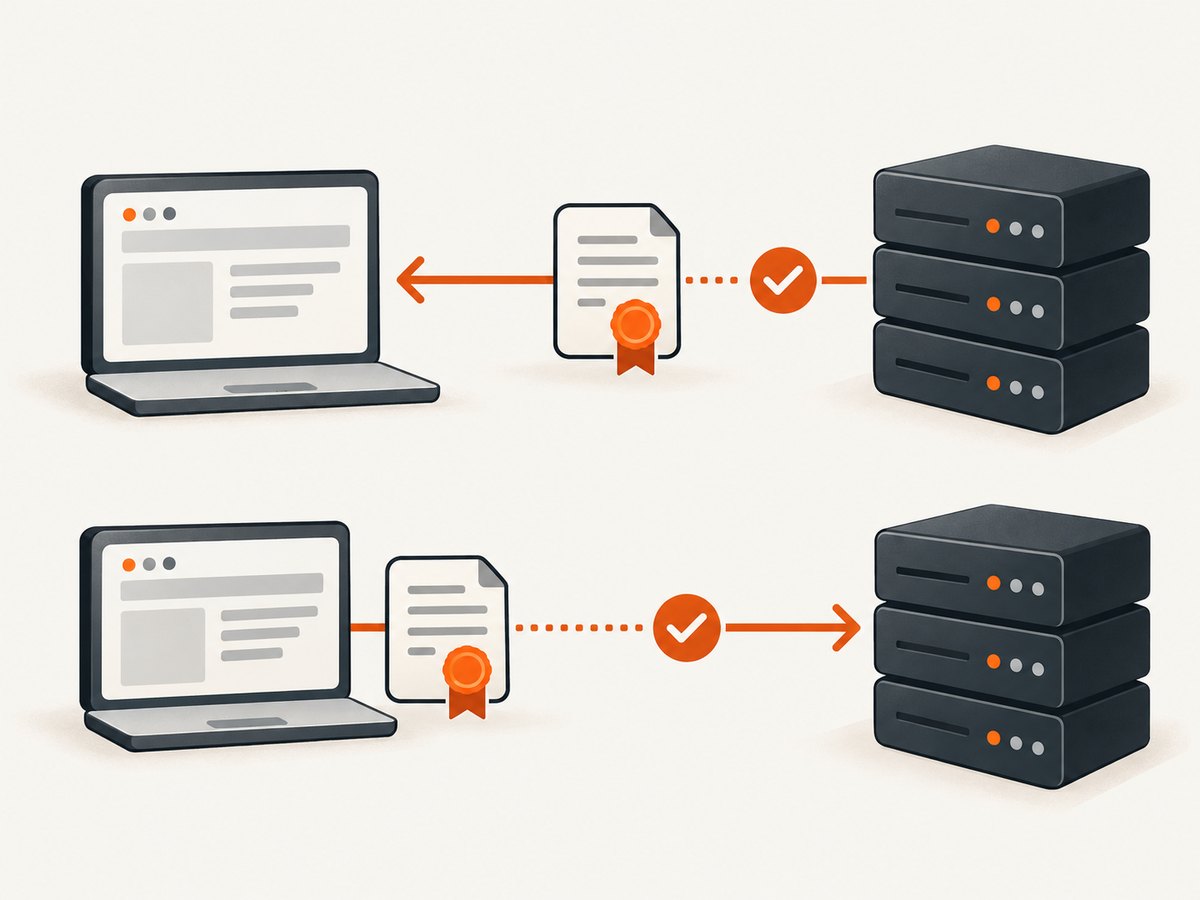
Configure client certificates only when the server requires them. For example, the browser context option can contain an origin and certificate/key paths:
import { chromium } from 'playwright';

const browser = await chromium.launch();
const context = await browser.newContext({
  clientCertificates: [
    {
      origin: 'https://internal.example.test',
      certPath: '/secure/path/client-cert.pem',
      keyPath: '/secure/path/client-key.pem',
    },
  ],
});

try {
  const page = await context.newPage();
  await page.goto('https://internal.example.test');
} finally {
  await context.close();
  await browser.close();
}
Use the certificate and key issued for the test client, keep private keys out of source control, and match the configured origin to the site. If the server certificate is also untrusted, resolve that trust problem independently or use a controlled test-only bypass where appropriate.
4. Choose the right fix
| Situation | Recommended action | Keep validation? |
|---|---|---|
| Production-like or security-sensitive test | Repair the served chain, hostname, or runner trust store. | Yes |
| Internal service signed by company PKI | Install the approved root CA in the browser environment. | Yes |
| Local service with disposable self-signed certificate | Use a narrowly scoped ignoreHTTPSErrors context, or replace the certificate with one trusted by the test environment. |
Only if TLS is under test |
| Playwright browser installation behind intercepting proxy | Set NODE_EXTRA_CA_CERTS before npx playwright install. |
Yes, for the download connection |
| Server requests a client identity certificate | Configure clientCertificates for the exact origin. |
Yes; this is client authentication |
5. Troubleshoot common failures
The bypass is set but the navigation still fails
Confirm the option is applied to the context that owns the page. A browser launch option is not the same as a context option, and setting a default in one Playwright project does not automatically affect a separately created context. Reproduce with a minimal script, log the actual URL, and ensure the failing request is HTTPS navigation in that context. Also check whether the reported error is really a certificate error rather than DNS, proxy connectivity, or a server response failure.
The site works locally but fails in CI
The CI machine may lack the internal root CA installed on your workstation, use a different hostname, or sit behind an intercepting proxy. Inspect the certificate chain and route from the runner itself. Add the approved CA to the runner/browser environment or correct the URL and served chain. Avoid making every CI project ignore HTTPS errors as a workaround for one environment’s trust setup.
Only one hostname fails
Check the certificate’s subject alternative names against the precise hostname in the URL. https://localhost, https://127.0.0.1, and a custom local hostname are different certificate identities. Use a certificate issued for the hostname your test actually visits.
Browser installation fails but page navigation is unrelated
If the failure occurs during npx playwright install, the Node process downloading browser files may not trust the proxy CA. Set NODE_EXTRA_CA_CERTS before installation and verify the path and PEM contents. This setting addresses the download connection; it does not necessarily change the browser context trust for test pages.
Adding a client certificate did not fix the authority error
A client certificate proves the client’s identity to the server. The authority error concerns whether the client trusts the server. Configure the server’s valid chain or install its signing CA, then configure client authentication separately if required.
A trusted certificate still produces an error
Recheck hostname spelling, certificate dates, system clock, intermediates, and whether a proxy replaced the certificate. Make sure the browser sees the same endpoint you inspected; redirects may take navigation to another hostname with a different certificate.
6. Reliability, security, and runtime considerations
A valid chain and correctly provisioned trust store are the reliable choice for shared CI and production-like environments. They preserve the test’s ability to detect expired, misissued, or mismatched certificates. An ignore-errors context is useful for local iteration when the certificate is intentionally untrusted, but it also permits the context to proceed through HTTPS certificate errors. Keep it limited to the intended tests and do not use it to claim that TLS works.
Trust configuration can fail before any test runs, while a scoped bypass affects navigation behavior. For predictable CI, provision the correct CA as part of the runner setup and use the same hostnames as the environment being tested. Keep private client keys in the CI secret store and restrict access to them. Do not print private key contents or commit them with test code.
Certificate handling itself does not make page rendering faster. A proxy handshake, unavailable endpoint, or repeated failed navigation can add time to a run; fix the underlying network or certificate configuration instead of retrying blindly. If retry logic is necessary for a known transient infrastructure issue, bound the retries and retain the failure details so a persistent trust error does not become a slow, opaque test.
7. Capture a page without managing a browser
If the task is simply to obtain a screenshot of a publicly reachable page, [ScreenshotNeo](https://screenshotneo.com) provides a website screenshot API and MCP server. A request returns an image or PDF without requiring you to install and configure a local Playwright browser. It is a screenshot service, so it does not replace browser automation when you need to exercise application behavior or validate certificate security.
Or skip the browser setup
Make one GET request to capture a page. See the [ScreenshotNeo API documentation](https://screenshotneo.com/docs/) for the API options.
curl -G "https://api.screenshotneo.com/v1/shot" \
  -d access_key=YOUR_API_KEY \
  --data-urlencode url=https://stripe.com \
  -o shot.webp
import requests
r = requests.get(
"https://api.screenshotneo.com/v1/shot",
params={"access_key": "YOUR_API_KEY", "url": "https://stripe.com"},
timeout=90,
)
r.raise_for_status()
with open("shot.webp", "wb") as f:
f.write(r.content)const q = new URLSearchParams({
access_key: 'YOUR_API_KEY',
url: 'https://stripe.com',
});
const res = await fetch(`https://api.screenshotneo.com/v1/shot?${q}`);
if (!res.ok) throw new Error(`Screenshot request failed: ${res.status}`);
await Bun.write('shot.webp', res);ScreenshotNeo accepts cookie and consent banners before capture and removes more than 60 known consent platforms, newsletter popups, and chat widgets; each step can be turned off. Bot checks and CAPTCHAs, blank pages, timeouts, failed loads, and cache hits cost nothing, and response headers report the page verdict and billing status. Its MCP server gives AI agents tools for screenshots, page information, and PDF capture. The free plan includes 1,000 shots per month with no card; paid plans start at $5 for 3,000 shots.
Sign up free for 1,000 screenshots a month, no card required.
FAQ
What is the default for ignoreHTTPSErrors?
It is false, so Playwright enforces HTTPS certificate errors unless you enable the option for the relevant context or test configuration.
Does NODE_EXTRA_CA_CERTS make Chromium trust my website’s CA?
The documented Playwright browser-download remedy uses it for Node’s trust when downloading browsers through a proxy. Configure the browser environment’s trust store for website navigation separately.
Does clientCertificates fix an untrusted server certificate?
No. It authenticates the client to the server. Server-chain trust is a separate check.
Should I ignore certificate errors in all tests?
Only when certificate validation is outside the test’s purpose. Otherwise, keep validation enabled and fix the chain or trust configuration.


