How to Fix Grey Stripes in jsPDF Images
Grey stripes in jsPDF have several possible causes. Use this diagnostic workflow to isolate image, alias, PNG, viewer, and rendering problems.

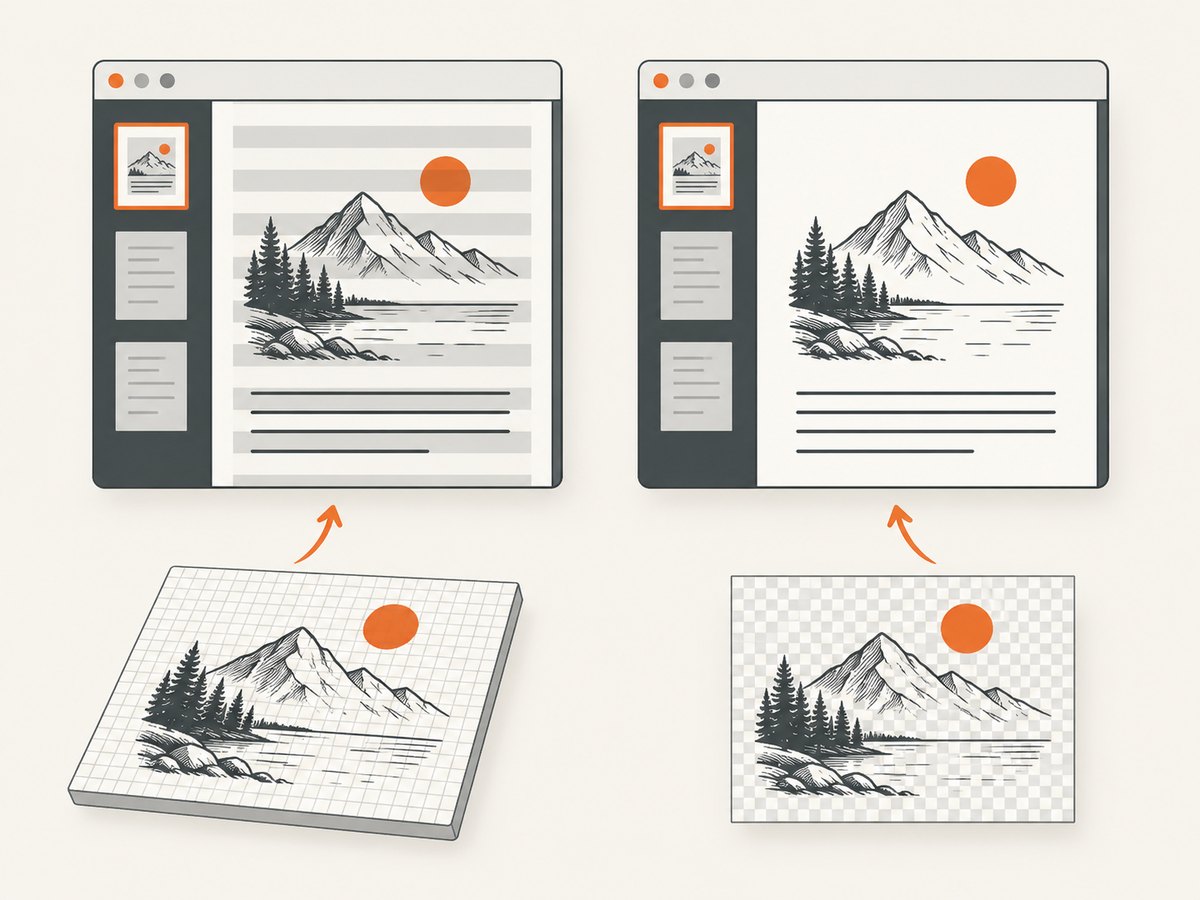
Grey stripes in a jsPDF image do not identify one universal bug. The reliable fix is to isolate the input representation, image format, jsPDF version, browser or worker environment, and PDF viewer. Start with a minimal reproduction, compare the PDF in a second viewer, then test direct canvas input, distinct image aliases, and a canvas-converted image.
The current jsPDF addImage reference documents data URLs, HTML image elements, canvas elements, typed arrays, and RGBA image data. The sections below turn those options into a repeatable diagnosis.
Quick diagnosis checklist
- Record the exact jsPDF version, browser or worker runtime, source image type, image format, and PDF viewer.
- Save the original image and a minimal PDF reproduction.
- Open the same PDF in a second viewer. A difference between viewers points to a rendering-path difference, not a confirmed jsPDF cause.
- If the source is a canvas, compare direct canvas input with a PNG data URL.
- If you add multiple images, make every explicit alias unique.
- If the console reports a PNG filter or offset error, compare a canvas-produced copy and, only as a diagnostic, a JPEG copy.
- Check transparency requirements before accepting JPEG as a workaround.
Minimal reproduction
Keep the reproduction small enough that you can change one variable at a time. This example creates a canvas, adds it to a PDF, and downloads the result.

<!doctype html>
<html lang="en">
<meta charset="utf-8">
<title>jsPDF image reproduction</title>
<script src="https://cdn.jsdelivr.net/npm/jspdf@latest/dist/jspdf.umd.min.js"></script>
<button id="make-pdf">Create PDF</button>
<script>
  document.querySelector('#make-pdf').addEventListener('click', () => {
    const canvas = document.createElement('canvas');
    canvas.width = 800;
    canvas.height = 500;
    const ctx = canvas.getContext('2d');
    ctx.fillStyle = '#ffffff';
    ctx.fillRect(0, 0, canvas.width, canvas.height);
    ctx.fillStyle = '#1f2937';
    ctx.fillRect(40, 40, 720, 420);
    ctx.fillStyle = '#60a5fa';
    ctx.fillRect(80, 80, 300, 120);

    const { jsPDF } = window.jspdf;
    const doc = new jsPDF({ unit: 'pt', format: 'letter' });
    doc.addImage(canvas, 'PNG', 40, 40, 532, 332);
    doc.save('reproduction.png-input.pdf');
  });
</script>
Replace the generated canvas with the smallest image that reproduces the stripes. Do not change the viewer, jsPDF version, format, and input representation simultaneously.
Test direct canvas input versus a data URL
Canvas is an accepted addImage input. The documented API requires a format when it cannot infer one; for canvas input, the documented default is JPEG. Pass the intended format explicitly so the test is unambiguous.
const { jsPDF } = window.jspdf;
const doc = new jsPDF();

// Test A: pass the canvas element directly.
doc.addImage(canvas, 'PNG', 20, 20, 170, 106);

// Test B: pass the equivalent PNG data URL on a separate page.
doc.addPage();
const pngUrl = canvas.toDataURL('image/png');
doc.addImage(pngUrl, 'PNG', 20, 20, 170, 106);

doc.save('canvas-input-comparison.pdf');
An individual jsPDF report describes a multiple-image PNG case where direct canvas input avoided images overwriting one another. That report is a case-specific workaround, not proof that every stripe is caused by data URLs. See issue #3603.
Give every image a distinct alias
If you supply aliases, do not reuse one for different images. A repeated alias can make jsPDF reuse the first image. Test without aliases first, then add unique aliases if you need them for caching or repeated placement.
const { jsPDF } = window.jspdf;
const doc = new jsPDF();

// Each image has a different alias.
doc.addImage(firstCanvas, 'PNG', 20, 20, 160, 100, 'first-image');
doc.addImage(secondCanvas, 'PNG', 200, 20, 160, 100, 'second-image');

doc.save('distinct-aliases.pdf');
Issue #3603 reports that distinct aliases fixed repeated-image output in that reproduction. Treat this as a diagnostic clue rather than a universal explanation for grey stripes.
Investigate PNG filter or offset errors
Some reports describe PNG filter-processing or offset errors for particular files. The reporter said that a canvas-converted copy or JPEG worked in that case, but could not identify what property determined failure. If your console shows a similar exception, compare representations:
const pngUrl = sourceCanvas.toDataURL('image/png');
const jpegUrl = sourceCanvas.toDataURL('image/jpeg', 0.92);
const { jsPDF } = window.jspdf;

const pngDoc = new jsPDF();
pngDoc.addImage(pngUrl, 'PNG', 20, 20, 170, 106);
pngDoc.save('png-test.pdf');

const jpegDoc = new jsPDF();
jpegDoc.addImage(jpegUrl, 'JPEG', 20, 20, 170, 106);
jpegDoc.save('jpeg-diagnostic.pdf');
JPEG is only a diagnostic or a practical substitute when transparency is unnecessary. JPEG cannot preserve transparent pixels. The related report is issue #3004.
Check the PDF viewer
Open the same bytes in at least two viewers, such as Acrobat Reader and a browser viewer. If stripes appear in only one viewer, record that result with the viewer versions. A historical report involving jsPDF 2.4.0 and 2.5.0 described different PNG behavior in Acrobat Reader and Edge; it is version-specific evidence and should not be treated as a statement about current releases. See issue #3359.
Choose the right image input
| Input | Useful test | What it can reveal |
|---|---|---|
| Canvas element | addImage(canvas, 'PNG', ...) |
Whether data-URL encoding or repeated image extraction is involved |
| PNG data URL | canvas.toDataURL('image/png') |
Whether PNG parsing or filter handling is involved |
| JPEG data URL | canvas.toDataURL('image/jpeg', 0.92) |
Whether a PNG-specific path is involved; transparency is lost |
| HTML image element | Wait for img.decode(), then pass the element |
Whether the source was captured before decoding completed |
| Typed array or RGBA data | Use the documented image-data form | Whether URL parsing and browser image decoding are involved |
Images loaded from an HTML image element
Do not call addImage before the image has loaded. Cross-origin images also need the server's CORS permission before a canvas can be read.
async function imageToPdf(url) {
  const img = new Image();
  img.crossOrigin = 'anonymous';
  img.src = url;
  await img.decode();

  const { jsPDF } = window.jspdf;
  const doc = new jsPDF();
  doc.addImage(img, 'PNG', 20, 20, 170, 106);
  doc.save('image-element.pdf');
}

imageToPdf('https://example.com/image.png').catch(console.error);
If decoding fails, inspect the browser console and the response headers. A CORS failure is separate from a grey-stripe rendering defect.
Common errors and fixes
| Symptom | Likely path to investigate | Fix or next test |
|---|---|---|
| Grey stripes with no console error | Viewer rendering, image representation, or version interaction | Open the same PDF in another viewer; compare direct canvas, PNG data URL, and a known-good image. |
| Several images become the first image | Repeated alias or image reuse | Remove aliases or give every image a distinct alias; compare direct canvas input. |
| PNG filter or offset exception | Specific PNG parsing path | Try a canvas-produced PNG and a JPEG diagnostic; preserve PNG if transparency matters. |
| Blank or partially drawn image | Image or canvas was used before loading or drawing completed | Await img.decode(), the load event, or the drawing operation before calling addImage. |
| Canvas security exception | Cross-origin pixels tainted the canvas | Use a source that grants CORS access and set crossOrigin before assigning src. |
| Output differs after an upgrade | Version-specific behavior | Record the old and new versions, preserve the reproduction, and test both in the same viewer. |
| Transparency disappears | JPEG conversion | Return to PNG or another transparency-preserving input. |
A controlled debugging matrix
Run the same source through a small matrix and change one axis per file:
- Direct canvas with explicit PNG.
- PNG data URL with explicit PNG.
- Canvas-produced JPEG, only if transparency is not required.
- Each image with no alias, then unique aliases.
- Current jsPDF version and the version that originally produced the file.
- Primary PDF viewer and a second viewer.
Keep the generated PDFs, console output, and a note of which combinations show stripes. This turns an intermittent visual symptom into evidence that can be reported or reproduced.
Performance, reliability, and output considerations
- Large source images increase memory use and PDF size. Resize images before embedding when the displayed dimensions do not require the original pixel count.
- PNG preserves sharp edges and transparency but can produce larger files. JPEG can be smaller for photographic content but introduces lossy compression and removes transparency.
- Repeated images may be affected by aliasing and reuse behavior. Unique aliases make the intended identity explicit.
- Do not treat a successful JPEG test as proof that the source PNG was invalid. It only shows that a different decoding and embedding path produced a different result.
- For production, pin and record the jsPDF version, keep a regression PDF, and inspect output in the viewer used by your users.
Or skip the browser setup
If your goal is a clean screenshot to place in a PDF, ScreenshotNeo can return a PNG, JPEG, WebP, or PDF from one GET request. Its capture pipeline accepts cookie and consent banners as a visitor and removes more than 60 known consent platforms, newsletter popups, and chat widgets before the shot. Bot checks, blank pages, timeouts, failed loads, and cache hits are not billed, and the response identifies the page verdict and billing status in headers.
See the ScreenshotNeo API documentation for the complete parameter list.
curl -G "https://api.screenshotneo.com/v1/shot" -d access_key=YOUR_API_KEY --data-urlencode url=https://stripe.com -o shot.webpimport requests
r = requests.get("https://api.screenshotneo.com/v1/shot", params={"access_key": "YOUR_API_KEY", "url": "https://stripe.com"}, timeout=90)
open("shot.webp", "wb").write(r.content)const q = new URLSearchParams({ access_key: 'YOUR_API_KEY', url: 'https://stripe.com' });
const res = await fetch(`https://api.screenshotneo.com/v1/shot?${q}`);ScreenshotNeo also provides an MCP server with take_screenshot, get_page_info, and capture_pdf tools for Claude, Cursor, and other MCP clients. The Free plan includes 1,000 shots per month with no card; paid plans start at $5 for 3,000 shots. Create a free ScreenshotNeo account.
FAQ
Is there a single jsPDF setting that removes grey stripes?
No source reviewed establishes a universal stripe-specific setting. The input, PNG path, aliases, jsPDF version, and viewer all need to be narrowed down.
Should I always convert PNGs to JPEG?
No. Use JPEG as a diagnostic or when you do not need transparency. It is not equivalent to PNG.
Does direct canvas input always fix the problem?
No. One issue report found it fixed a multiple-image PNG overwrite case. That is useful evidence for a similar reproduction, not a guarantee.
Why test another PDF viewer?
Different viewers can render the same PDF differently. A viewer-only difference helps identify where the rendering path diverges.
What details should I include in a bug report?
Include a minimal reproduction, jsPDF version, runtime, source image, image format, console output, generated PDF, and the viewers in which the stripes appear.


