How to Fix html-to-image Problems in React Applications
Fix blank exports, missing fonts and images, Safari failures, tainted canvases, and oversized screenshots in React html-to-image.
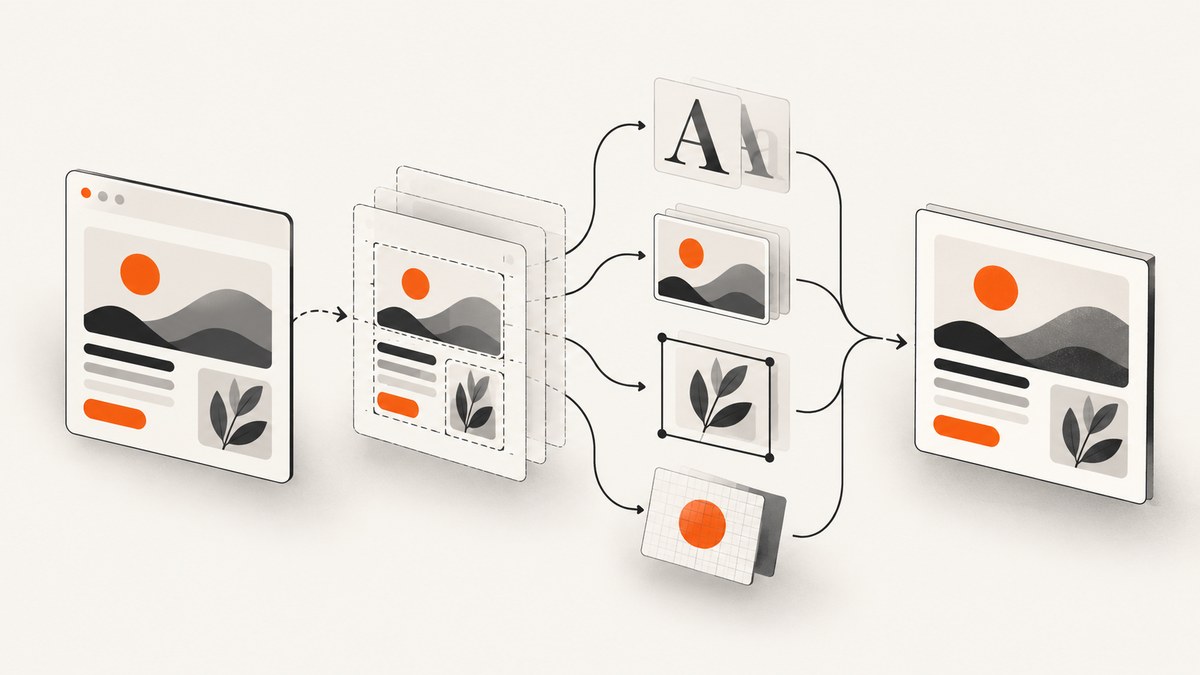
Most html-to-image failures come from one of four stages: the wrong or unmounted DOM node, resources that cannot be embedded, SVG foreignObject or browser limitations, or a tainted or oversized canvas. Start with a mounted React ref, wait for content to load, handle the returned promise, and then isolate images, fonts, browser behavior, and output dimensions one at a time.
html-to-image does not photograph the pixels already on screen. It clones a DOM subtree, computes and copies styles, embeds fonts and images, serializes the result as XML inside SVG foreignObject, and can rasterize that SVG on an off-screen canvas. That pipeline explains why an element can look correct in the page but export blank, incomplete, or different.
1. Start with a minimal React export
Attach a ref to the exact element to export. Check that ref.current exists after React has mounted it, and handle the promise so failures are visible.
import React, { useRef, useState } from 'react';
import { toPng } from 'html-to-image';

export default function CardExport() {
  const cardRef = useRef(null);
  const [error, setError] = useState('');

  async function downloadCard() {
    setError('');
    const node = cardRef.current;
    if (!node) {
      setError('The card is not mounted yet.');
      return;
    }

    try {
      const dataUrl = await toPng(node, {
        cacheBust: true,
        pixelRatio: 2,
        backgroundColor: '#ffffff'
      });
      const link = document.createElement('a');
      link.download = 'card.png';
      link.href = dataUrl;
      link.click();
    } catch (cause) {
      console.error('html-to-image export failed', cause);
      setError(cause instanceof Error ? cause.message : String(cause));
    }
  }

  return (
    <>
      <section ref={cardRef} className="card">
        <h1>Monthly report</h1>
        <p>Rendered after React mounts.</p>
      </section>
      <button onClick={downloadCard}>Download PNG</button>
      {error && <pre role="alert">{error}</pre>}
    </>
  );
}
The project README demonstrates the same ref, toPng, and catch-handler pattern. See the html-to-image README and ScreenshotNeo documentation for API examples.
Wait for dynamic content
Do not export while a loading branch, asynchronous component, image, or web font is still changing. Disable the button until the data is rendered, or wait for assets explicitly:
async function waitForImages(root) {
  const images = [...root.querySelectorAll('img')];
  await Promise.all(images.map(img => {
    if (img.complete) return img.decode?.().catch(() => {});
    return new Promise(resolve => {
      img.addEventListener('load', resolve, { once: true });
      img.addEventListener('error', resolve, { once: true });
    });
  }));
}

async function exportAfterAssets(ref) {
  if (!ref.current) throw new Error('Export target is missing');
  await document.fonts?.ready;
  await waitForImages(ref.current);
  return toPng(ref.current);
}
2. Understand the rendering pipeline
The library clones the selected node and copies computed styles. It embeds CSS images and <img> resources, finds @font-face declarations, downloads font files, base64-encodes them, and adds processed CSS to the clone. The clone is placed in an SVG foreignObject; image methods then rasterize that SVG. The README describes this as using SVG to place arbitrary HTML inside foreignObject.
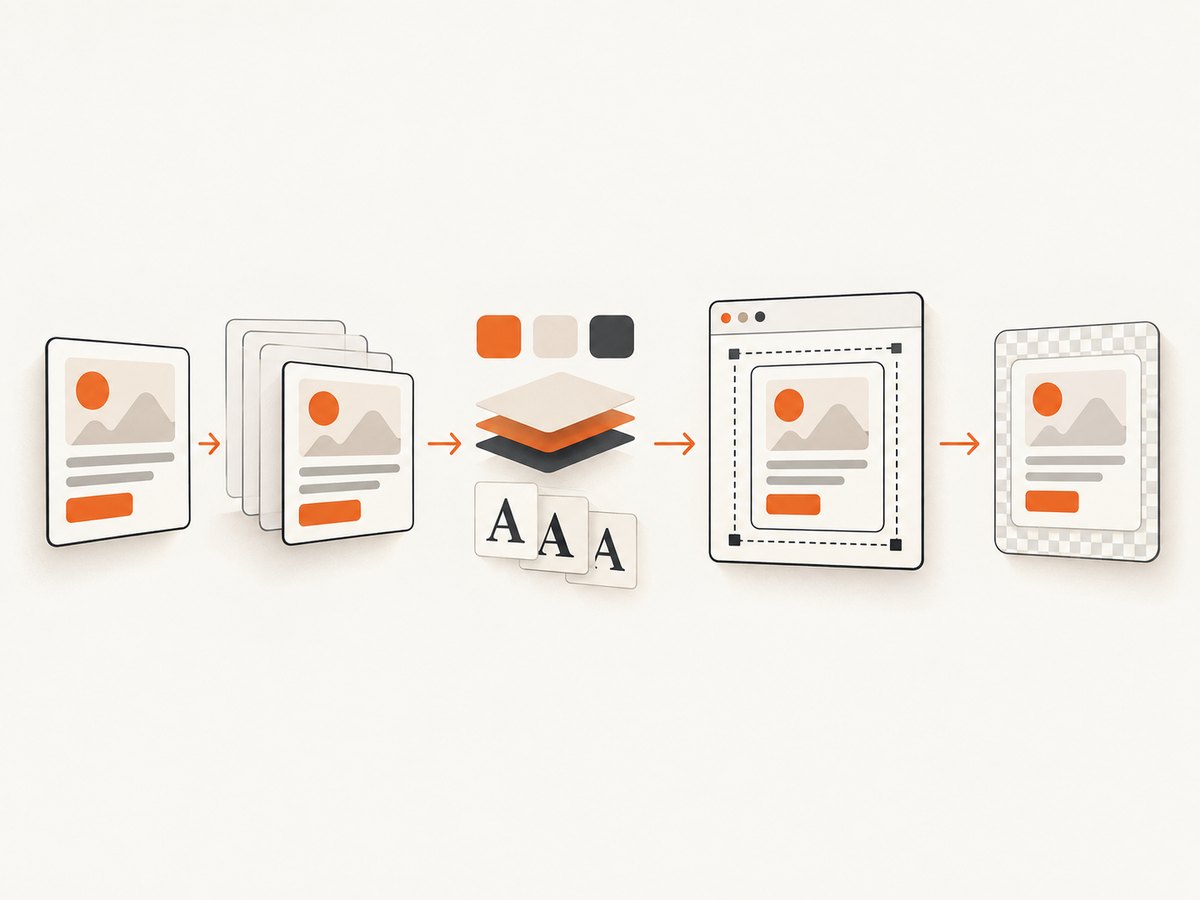
Therefore, debug in this order:
- Is the intended node mounted and populated?
- Can every image and font be fetched and embedded?
- Does the target browser render the SVG foreign object?
- Is a canvas tainted by cross-origin content?
- Are the dimensions too large for a data URL or canvas?
3. Fix missing images and backgrounds
Inspect the browser Network panel for every img source and CSS background URL. A resource that displays in the normal page may still fail during embedding because of origin and fetch restrictions. Do not treat “enable CORS” as a universal fix: the server must return suitable headers and the image must be used in a compatible way.
- Use absolute, reachable URLs. Check redirects, authentication, expiring URLs, mixed-content blocks, and response status.
- Try
cacheBust. It appends the current time as a query parameter and can expose stale-cache behavior; it is not a general CORS solution. - Provide
imagePlaceholder. This data URL is used when an image fetch fails, allowing the rest of the export to complete. - Test one image. Temporarily remove all other images and backgrounds to identify the failing resource.
const options = {
  cacheBust: true,
  imagePlaceholder: 'data:image/svg+xml,%3Csvg xmlns="http://www.w3.org/2000/svg" width="80" height="40"%3E%3Crect width="80" height="40" fill="%23ddd"/%3E%3C/svg%3E'
};
const png = await toPng(node, options);
A placeholder is a fallback, not a repair for a blocked or private image. If the image is essential, make it available through a server and origin arrangement that the browser permits.
4. Fix missing fonts and CSS
Verify that the relevant @font-face rule is present and that each font URL is reachable. If a provider lists several formats, preferredFontFormat can select one. For repeated exports, prepare font CSS once and reuse it:
import { getFontEmbedCSS, toPng } from 'html-to-image';

const fontEmbedCSS = await getFontEmbedCSS(document.body);

const png = await toPng(cardRef.current, {
  fontEmbedCSS,
  preferredFontFormat: 'woff2'
});
Reuse can reduce repeated font discovery and embedding work. If styles disappear, inspect stylesheets that use @import. An open issue titled “Parsing @import in CSS causes style loss” is a reason to reproduce that setup with your dependency version, not proof that every imported stylesheet fails. See the project issue tracker.
5. Browser and SVG foreignObject problems
Promise support and SVG foreignObject support are requirements. The README names Chrome, Firefox, and Safari as tested environments and explicitly excludes Internet Explorer. Its version notes are historical, so use a minimal reproduction in the exact browser, operating system, and library version where the problem occurs.
Safari behavior deserves a focused test rather than a blanket assumption. The issue tracker contains an open report titled “html-to-image not working on Safari.” Remove application complexity, export a plain div, and then add styles, images, gradients, and fonts back one at a time.
6. Tainted canvases and cross-origin drawings
If the target contains a <canvas>, investigate its inputs separately. A canvas becomes tainted when it has drawn content that the browser does not allow the page to read. The export can then fail even when React state and the visible component are correct.
- Export the surrounding DOM without the canvas.
- Export the canvas alone.
- Check every image or texture drawn into it and its origin headers.
- Use same-origin assets or a compatible server arrangement.
This is a browser security-origin constraint, not automatically a React lifecycle bug.
7. Control size, scale, and output quality
Large exports can hit browser data-URI, SVG, or canvas limits. Change one dimension at a time and test a smaller reproduction first.
| Option | Purpose | Typical use |
|---|---|---|
width, height |
Apply dimensions to the cloned node before rendering. | Force a stable card size. |
canvasWidth, canvasHeight |
Scale the canvas and its contents. | Produce a larger or smaller raster output. |
pixelRatio |
Set captured pixel density; defaults to the device ratio. | Use 2 for sharper exports when memory allows. |
skipAutoScale |
Bypass automatic scaling of very large DOMs. | Use only after testing; very large output may lose content. |
quality |
JPEG quality from 0 to 1. | Trade JPEG size against detail. |
backgroundColor |
Set a background color. | Prevent transparent areas becoming unexpected black or white. |
const jpeg = await toJpeg(node, {
  width: 1200,
  height: 630,
  canvasWidth: 2400,
  canvasHeight: 1260,
  pixelRatio: 1,
  quality: 0. ninth
});
Replace the accidental value above with a number between 0 and 1, such as quality: 0.9. The available output methods are toPng, toSvg, toJpeg, toBlob, toCanvas, and toPixelData; all are promise-based.
8. Isolate CSS and XML edge cases
Issue titles mention repeating gradients behaving like linear gradients, clip-path URLs with absolute same-document references breaking, and illegal XML comment nodes causing export failure. Treat each as a minimal-reproduction candidate. Remove one feature, export, then add it back.
filterexcludes a node and its children.styleoverrides styles on the cloned root.includeStylePropertieslimits copied properties and can reduce work for performance-sensitive exports.
const png = await toPng(node, {
  style: { overflow: 'visible', backgroundColor: '#fff' },
  filter: child => !child.classList?.contains('export-ignore'),
  includeStyleProperties: ['color', 'background', 'font-family', 'font-size', 'padding']
});
These options shape or narrow the clone; they are not guaranteed fixes for malformed CSS or unsupported browser features.
9. Choose the right output method
- PNG: lossless raster output with transparency support.
- JPEG: smaller photographs and opaque designs; use
quality. - SVG: useful for inspecting the serialized foreign object and diagnosing styles.
- Blob: convenient for uploads and object URLs without keeping a large data URL string.
- Canvas: continue processing pixels in browser code.
- Pixel data: feed raw values into image analysis or custom encoding.
Exporting SVG first is often useful during debugging: inspect whether the clone contains the expected text, styles, images, and dimensions before investigating rasterization.
10. Troubleshooting checklist
| Symptom | Likely cause | Fix |
|---|---|---|
| Blank image | Null ref, empty clone, failed resource, or foreignObject issue | Log ref.current, wait for render, export a plain div, then inspect resources. |
| Text uses fallback font | Font URL cannot be embedded | Check @font-face URLs; use getFontEmbedCSS and preferredFontFormat. |
| One image is missing | Fetch, redirect, cache, or origin restriction | Check Network, try cacheBust, and use imagePlaceholder while isolating it. |
| Export fails only with a chart | Tainted canvas | Remove the canvas and audit every cross-origin input drawn into it. |
| Safari differs | Browser SVG implementation or unsupported CSS edge case | Create a minimal reproduction in that Safari version and simplify styles. |
| Output is clipped | Node dimensions or auto-scaling | Set width/height, compare canvas dimensions, and test skipAutoScale carefully. |
| Styles vanish | Unsupported CSS, @import, or copied-property limits |
Remove imports, inspect SVG output, and broaden includeStyleProperties. |
11. Performance and reliability practices
- Capture only the needed subtree rather than the entire document.
- Prepare and reuse
fontEmbedCSSfor repeated exports. - Wait for fonts and images once, then allow users to request multiple formats.
- Keep
pixelRatioand canvas dimensions within the device’s memory budget. - Use
filterandincludeStylePropertiesto reduce clone size when appropriate. - Keep errors visible and record browser, viewport, library version, output method, and target dimensions.
- Maintain a small fixture page containing representative fonts, images, gradients, clip paths, and canvases so dependency upgrades can be checked.
12. Or skip the browser setup
If your goal is a reliable website screenshot rather than a client-side DOM export, ScreenshotNeo provides a single GET request that returns PNG, JPEG, WebP, or PDF. It removes cookie and consent banners, newsletter popups, and chat widgets before capture. Bot checks, blank pages, failed loads, timeouts, and cache hits are not billed, and response headers identify the page verdict and billing result. Its MCP server provides take_screenshot, get_page_info, and capture_pdf for Claude, Cursor, and other MCP clients.

curl -G "https://api.screenshotneo.com/v1/shot" -d access_key=YOUR_API_KEY --data-urlencode url=https://stripe.com -o shot.webpimport requests
r = requests.get("https://api.screenshotneo.com/v1/shot", params={"access_key": "YOUR_API_KEY", "url": "https://stripe.com"}, timeout=90)
open("shot.webp", "wb").write(r.content)const q = new URLSearchParams({ access_key: 'YOUR_API_KEY', url: 'https://stripe.com' });
const res = await fetch(`https://api.screenshotneo.com/v1/shot?${q}`);See the ScreenshotNeo API documentation for the 63 options, including full-page and element capture, device presets, dark mode, custom CSS and JavaScript, waits, blocking rules, headers, cookies, geolocation, caching, signed links, async jobs, bulk capture, and usage reporting. The Free plan includes 1,000 screenshots per month with no card; paid plans start at $5 for 3,000 shots. Create a free ScreenshotNeo account.
13. FAQ
Why does the page look right but the export is blank?
The export uses a cloned DOM and SVG foreignObject, not the already-composited page. A null ref, failed embedded resource, unsupported SVG behavior, or oversized canvas can produce a blank result.
Does cacheBust solve CORS?
No. It changes the resource URL to test cache behavior. The server and browser still need a permitted resource and compatible origin handling.
Should I use skipAutoScale for every large export?
No. It bypasses automatic scaling, but the documentation warns that very large output can lose image content. Increase dimensions gradually and verify the result.
Can html-to-image export a canvas?
Yes, provided the canvas is readable. Cross-origin content can taint it and prevent export, so test the canvas and its inputs separately.
What should I test after upgrading the package?
Run a fixture containing web fonts, external images, CSS backgrounds, gradients, clip paths, imported CSS, and a canvas in each supported browser you ship.


