How to Fix Missing Background Images in html2canvas 5.0
Diagnose missing CSS background images in html2canvas with a version-aware workflow covering URLs, timing, CORS, CSS support, and reliable alternatives.

Direct answer: first determine whether the browser can load the CSS background image. Inspect the element’s computed background-image, open the resolved asset URL, and check the Network panel. If the browser cannot load it, fix the URL, build output, redirect, authentication, or timing problem before changing html2canvas. If the browser displays it but html2canvas omits it, test cross-origin access with useCORS: true and a server response that permits the request. If CORS is not the cause, reduce the page to a minimal example and check whether your installed html2canvas version implements the CSS feature.
The title “html2canvas 5.0” needs a version check. A historical Stack Overflow question with nearly this wording links to v0.5.0-beta4; that is not evidence of a current 5.0 release. Confirm the exact package version or script URL before copying an old snippet. Options and APIs can differ between that beta and current releases.
What html2canvas is actually rendering
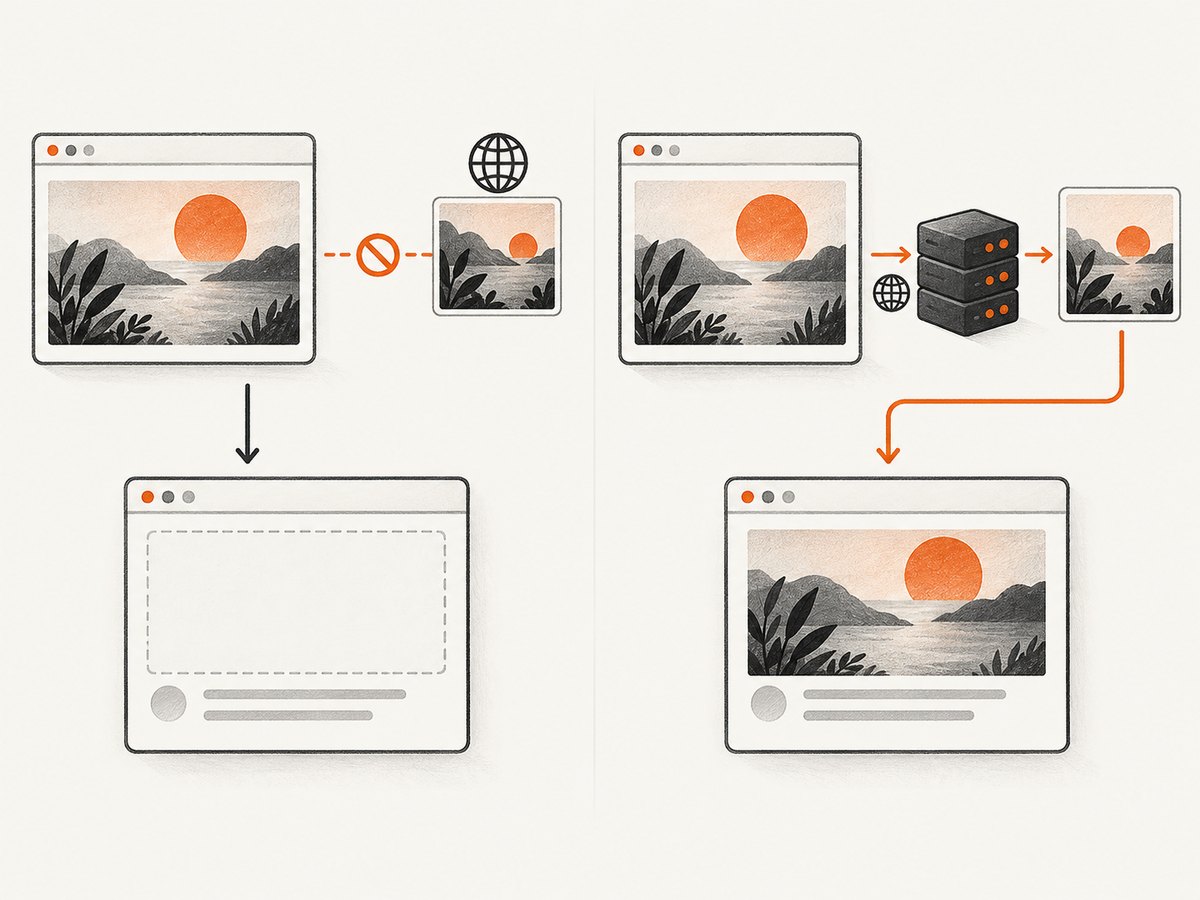
html2canvas does not capture the browser’s final pixels like a native screenshot. It reads the DOM and CSS, then reconstructs an image in a canvas. The project documentation explains this model and its limits: every CSS property must be implemented manually, so full CSS coverage is not possible. A background that is visible in Chrome can therefore be absent from the reconstructed canvas even when the browser itself is working correctly.
Use the official documentation for the renderer model and the FAQ for cross-origin and CSS-support guidance.
Diagnostic workflow
1. Verify the computed background
In DevTools, select the element and inspect the Computed panel. Confirm that background-image is not none and that the value contains the URL you expect. A common mistake is checking a stylesheet rule that has been overridden by a more specific selector, a media query, or an inline style.

const element = document.querySelector('.hero');
const styles = getComputedStyle(element);
console.log(styles.backgroundImage);
console.log(styles.backgroundPosition, styles.backgroundSize, styles.backgroundRepeat);
If the value is url(…), copy the resolved URL from DevTools and open it in a new tab. Do not assume a relative path is resolved from your CSS file: URLs in CSS are resolved relative to the stylesheet URL. A bundled stylesheet may move from /src/styles/hero.css to /assets/app.abc123.css, changing where ../images/hero.webp points.
2. Check the request in Network
Reload with the Network panel open and filter by Img. Inspect the background request’s status, final URL, response type, and response headers. Fix a 404, 403, 401, redirect loop, or HTML error page returned with an image-looking URL. If the asset requires a cookie or Authorization header, a direct browser request from another origin may not receive it.
A URL that begins on your origin but redirects to a CDN can also change the cross-origin behavior. An open repository issue reports this pattern, but it is a user report rather than proof of a universal defect or a confirmed fix. Treat redirects as a useful diagnostic clue and inspect the final response.
3. Wait for asynchronous styles and images
If JavaScript applies the background after a fetch, route transition, or component mount, call html2canvas only after the style and image are ready. You can wait for the image URL yourself:
function waitForImage(url) {
  return new Promise((resolve, reject) => {
    const image = new Image();
    image.onload = resolve;
    image.onerror = reject;
    image.src = url;
  });
}

const hero = document.querySelector('.hero');
const url = getComputedStyle(hero).backgroundImage
  .match(/url\(["']?(.*?)["']?\)/)?.[1];
if (url) await waitForImage(url);
const canvas = await html2canvas(hero);
html2canvas’s configuration reference documents imageTimeout as a resource-loading timeout with a 15,000 millisecond default. Set it to 0 to disable that timeout when you have a reason to allow longer loads, but this cannot repair a bad URL, missing permission, or unsupported CSS.
4. Separate same-origin and cross-origin cases
Make a temporary same-origin copy of the image, or replace the background with a data URI in a minimal test. If the copy renders, the original problem is likely browser origin policy or response headers. If neither renders, investigate CSS support, timing, or the installed version.
Cross-origin backgrounds: useCORS and proxy
For an image hosted on another origin, try:
const canvas = await html2canvas(document.querySelector('.hero'), {
  useCORS: true,
  imageTimeout: 15000,
  logging: true
});
useCORS defaults to false. It only works when the image server sends a suitable Access-Control-Allow-Origin header. For a public asset, the response might include:
Access-Control-Allow-Origin: https://your-app.exampleUse * only when that policy is appropriate for the asset. Credentials and wildcard origins have additional browser restrictions; do not assume adding a header in your application fixes a header that must come from the image server.
If you control a backend, the documented alternative is a same-origin proxy:
const canvas = await html2canvas(element, {
  proxy: '/image-proxy',
  imageTimeout: 15000
});
Your proxy should accept only approved image URLs, fetch them server-side, validate the response, limit size and time, and return the image with the correct content type. An open proxy creates a server-side request forgery risk and can become an unbounded bandwidth sink. The configuration reference lists proxy, useCORS, imageTimeout, and related options.
Complete browser example
This example captures an element after its background is present and saves a PNG:
import html2canvas from 'html2canvas';

async function captureHero() {
  const element = document.querySelector('.hero');
  if (!element) throw new Error('Missing .hero element');

  const computed = getComputedStyle(element);
  if (computed.backgroundImage === 'none') {
    throw new Error('No computed background-image');
  }

  const canvas = await html2canvas(element, {
    useCORS: true,
    imageTimeout: 15000,
    logging: true,
    backgroundColor: null,
    scale: window.devicePixelRatio,
    onclone: clonedDocument => {
      const cloned = clonedDocument.querySelector('.hero');
      if (cloned) cloned.classList.add('capture-state');
    }
  });

  const link = document.createElement('a');
  link.download = 'hero.png';
  link.href = canvas.toDataURL('image/png');
  link.click();
}

captureHero().catch(console.error);
onclone changes only the cloned document used for rendering, which is useful for hiding animations or forcing a capture-only state. Confirm that every option exists in the version you installed.
CSS and renderer limitations
Once URL, loading, and CORS checks pass, simplify the CSS. Replace a complex declaration with a plain test:
.test-background {
  width: 400px;
  height: 200px;
  background-image: url('https://static.example/image.png');
  background-repeat: no-repeat;
  background-position: center;
  background-size: cover;
}
Then test gradients, multiple backgrounds, blend modes, filters, masks, pseudo-elements, and modern image functions separately. A simple URL may render while a layered or filtered declaration does not. This is a renderer support gap, not a network failure. The FAQ recommends creating a minimal reproducible case when a property appears unsupported.
Also check pseudo-elements. A visual that looks like a background may actually come from ::before or ::after. Verify those rules and test by temporarily moving the image to the element itself. Web fonts, transforms, animation frames, and lazy components can create similar differences between the live page and the clone.
Version and API checks
Print the package version from your lockfile or package manager:
npm ls html2canvas
# or
cat package-lock.json | grep html2canvas
Do not mix a v0.5 beta example with a current release without checking its documentation. The old Stack Overflow question is useful for interpreting the wording “5.0,” not as authoritative release history. If a script tag loads a CDN build, inspect the exact URL and version shown in the page source.
Troubleshooting table
| Symptom | Likely cause | Fix |
|---|---|---|
Background is none in computed styles |
Override, media query, or missing class | Fix the selector or wait for the component state. |
| Image request is 404 | Wrong relative path or build output | Use the resolved URL and correct asset packaging. |
| Request redirects to another host | CDN or authentication redirect | Inspect the final response; configure CORS or serve a same-origin copy. |
| Console reports a tainted canvas | Cross-origin image lacks permission | Set useCORS: true and configure response headers, or use a controlled proxy. |
| Image loads in browser but not canvas | Unsupported CSS or version difference | Build a minimal case and simplify the declaration. |
| Intermittent omission | Capture starts before style or image load | Wait for the image, route, and fonts before calling html2canvas. |
| Old option has no effect | Snippet targets another release | Verify the installed version and read matching docs. |
Performance and reliability
Capture only the element you need when a full page is unnecessary. Large full-page canvases consume memory proportional to pixel dimensions and device scale. Set an explicit scale when output size matters, avoid repeatedly capturing during scroll events, and debounce user-triggered captures. Disable verbose logging after diagnosis.
For reliable exports, wait for the route, images, and fonts; freeze animations; use stable dimensions; and handle rejected promises. Keep a same-origin fallback for critical assets. A proxy adds server latency and operational cost, while useCORS depends on every image host maintaining compatible headers.
Or skip the browser setup
If you need a clean image of a URL rather than a canvas reconstructed inside your page, ScreenshotNeo provides a single GET request that returns PNG, JPEG, WebP, or PDF. See the ScreenshotNeo API documentation for all options.
curl -G "https://api.screenshotneo.com/v1/shot" -d access_key=YOUR_API_KEY --data-urlencode url=https://stripe.com -o shot.webpimport requests
r = requests.get('https://api.screenshotneo.com/v1/shot', params={'access_key': 'YOUR_API_KEY', 'url': 'https://stripe.com'}, timeout=90)
open('shot.webp', 'wb').write(r.content)const q = new URLSearchParams({ access_key: 'YOUR_API_KEY', url: 'https://stripe.com' });
const res = await fetch(`https://api.screenshotneo.com/v1/shot?${q}`);Cookie banners, newsletter popups, and chat widgets are removed before the shot. Bot checks, blank pages, failed loads, timeouts, and cache hits are not billed, and response headers identify the page verdict and billing status. ScreenshotNeo also provides an MCP server for AI agents, including Claude, Cursor, and other MCP clients, with take_screenshot, get_page_info, and capture_pdf tools. The Free plan includes 1,000 screenshots each month with no card; paid plans start at $5 for 3,000 shots.
Create your free ScreenshotNeo account and start with the included 1,000 screenshots.
FAQ
Is html2canvas 5.0 a current release?
Check your package or script URL. The “5.0” wording may refer to the historical v0.5.0-beta4 build mentioned in an older question.
Does useCORS bypass browser security?
No. It asks the browser to use CORS; the image server must grant access with response headers.
Should I always use a proxy?
No. Use a proxy when you control a secure, same-origin fetch path and the asset server cannot provide suitable CORS headers.
Why does a data URI work?
A data URI avoids a separate cross-origin request, helping distinguish CORS problems from CSS or renderer-support problems.
Can html2canvas guarantee pixel-perfect screenshots?
No. It reconstructs supported DOM and CSS rather than capturing the browser’s final pixels.


