How to Fix html2canvas Not Applying Styles from External CSS Files
Learn why html2canvas drops external CSS, how to diagnose CORS and unsupported properties, and reliable fixes with runnable code.

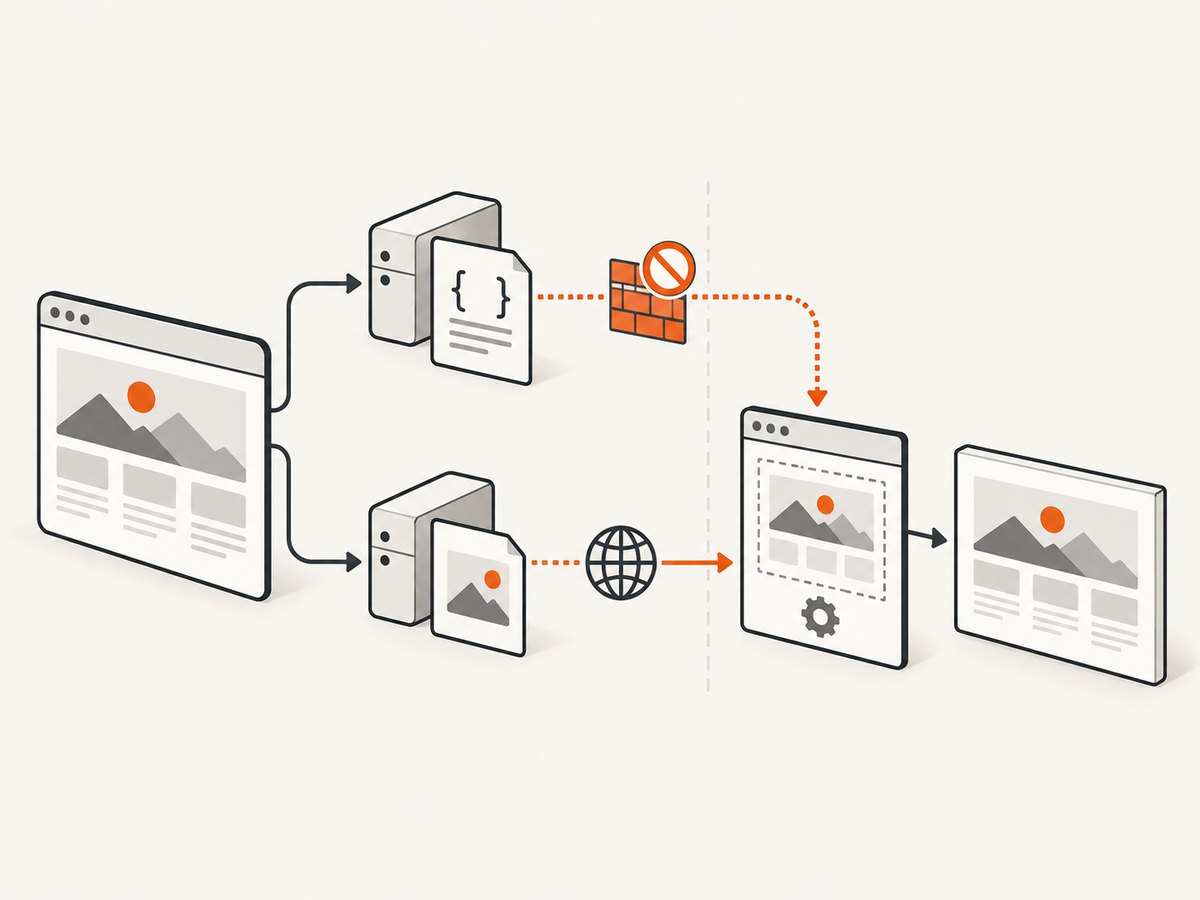
Direct answer: html2canvas does not take a native browser screenshot. It rebuilds the target from the DOM and the style information it can read and reproduce. External CSS can disappear because the stylesheet failed to load, the browser cannot expose its cssRules across origins, the cloned document differs from the live page, or the CSS property is not implemented by html2canvas. useCORS: true and proxy are primarily image-loading options; they do not grant access to foreign stylesheet rules or add support for missing CSS features.
Use this order: verify the stylesheet request, verify computed styles in the browser, compare a small html2canvas capture, then investigate stylesheet access and property support. The sequence below gives you a reproducible diagnosis before you change application code.
1. Confirm that the browser loaded and applied the stylesheet
Start with the ordinary page, before debugging html2canvas. Open DevTools and inspect the external CSS request in the Network panel.
- Find the stylesheet request and check its HTTP status, final URL after redirects, and response body.
- Confirm that the expected selector and declarations are present in that response.
- Inspect the target element and open the Computed styles panel. Check a few distinctive values such as
font-family,background-color,display, and dimensions. - Check whether a media query, selector mismatch, cascade rule, or load timing prevents the declaration from applying.
- Look for console errors and failed requests, including blocked mixed-content requests and incorrect paths.
If the expected values are absent from computed styles, html2canvas is not the first problem. Fix the page’s URL, timing, selector, media condition, cascade, or server response. This diagnostic follows html2canvas’s rendering model: it reconstructs from the document and style data it understands rather than copying the browser’s final bitmap (rendering model documentation).
Make the capture wait for the stylesheet
Call html2canvas after the document and stylesheet have loaded. A simple capture after window.load is often enough for static pages:
window.addEventListener('load', async () => {
  const target = document.querySelector('#invoice');
  if (!target) throw new Error('Missing #invoice');

  const canvas = await html2canvas(target, {
    backgroundColor: '#ffffff'
  });

  document.body.appendChild(canvas);
});
For a stylesheet added dynamically, wait for its load event:
function loadStylesheet(url) {
  return new Promise((resolve, reject) => {
    const link = document.createElement('link');
    link.rel = 'stylesheet';
    link.href = url;
    link.onload = resolve;
    link.onerror = () => reject(new Error(`Stylesheet failed: ${url}`));
    document.head.appendChild(link);
  });
}

await loadStylesheet('/assets/report.css');
const canvas = await html2canvas(document.querySelector('#invoice'));
2. Compare computed styles with the html2canvas output
When the live page looks correct, capture a small element instead of the whole document. Record a few computed values immediately before capture:
const element = document.querySelector('.card');
const style = getComputedStyle(element);
console.table({
  color: style.color,
  backgroundColor: style.backgroundColor,
  fontFamily: style.fontFamily,
  display: style.display,
  width: style.width,
  height: style.height
});

const canvas = await html2canvas(element, { scale: 1 });
canvas.toBlob(blob => {
  if (blob) console.log('PNG bytes:', blob.size);
}, 'image/png');
If computed styles are already wrong, continue with normal CSS debugging. If computed styles are correct but the canvas differs, the remaining causes are usually the cloned capture context, an inaccessible stylesheet, or a CSS feature html2canvas does not implement.
3. Understand stylesheet CORS versus image CORS
A stylesheet loaded from another origin may be visible to the page but still protected from script access. Reading sheet.cssRules can throw a SecurityError when the browser’s same-origin rules prevent access. A reported Firefox issue also describes extension-injected stylesheets as a possible source of a cssRules error; treat extension involvement as one reported possibility, not a universal diagnosis (issue 2197).
Inspect the sheets to identify which one fails:
for (const sheet of document.styleSheets) {
  try {
    const count = sheet.cssRules ? sheet.cssRules.length : 0;
    console.log('Readable stylesheet:', sheet.href, count);
  } catch (error) {
    console.warn('Stylesheet rules are not readable:', sheet.href, error);
  }
}
Reproduce in a clean browser profile if the error points to a sheet your application never adds. Then inspect the failing sheet’s URL and origin.
What useCORS actually does
The documented useCORS and proxy settings concern images used inside the capture. They do not make cross-origin CSS rules readable and do not implement unsupported CSS properties (official FAQ, configuration reference).
For a remote image, direct CORS loading requires the image server to send an appropriate Access-Control-Allow-Origin response:
const canvas = await html2canvas(document.querySelector('#gallery'), {
  useCORS: true
});
If the image server cannot provide that header, configure a same-origin proxy as described in the project’s configuration and examples. Neither setting guarantees that an external stylesheet will be applied.
4. Check CSS properties that html2canvas supports
Even a valid, same-origin stylesheet can contain declarations that html2canvas cannot reproduce. The project manually implements CSS properties, and support is incomplete (supported features FAQ). Common symptoms include a correct font color but missing visual effects, layout differences, or a fallback background.
Reduce the page to a minimal reproduction containing one element and one suspect declaration. Remove unrelated rules, animations, and framework layers. Then compare one property at a time:
.repro {
  /* Keep one suspect declaration while debugging. */
  filter: drop-shadow(0 8px 18px rgba(0, 0, 0, .2));
}
Check the project’s supported features documentation for that property. If it is missing or incomplete, changing the stylesheet URL or setting useCORS will not fix it. The official FAQ recommends creating a focused test case and opening an issue when a needed property is unsupported.
5. Handle redirects and version-specific image behavior
Check the final request URL, not only the URL written in your HTML. A reported issue describes an image URL that starts same-origin and redirects to a CDN. In the affected implementation, CORS setup depended on the original URL appearing cross-origin, so the redirect complicated image capture (issue 2892). This is an image-loading edge case, not proof that redirected CSS causes every missing-style problem.
In DevTools, enable the request’s redirect chain and inspect response headers at the final URL. Record the html2canvas version installed in your lockfile and reproduce against that version. Avoid assuming that a workaround for an older release applies unchanged to a current one.
6. A complete diagnostic example
The following page logs stylesheet readability, computed styles, and capture errors in one place:
async function diagnoseCapture(selector) {
  const element = document.querySelector(selector);
  if (!element) throw new Error(`No element matches ${selector}`);

  for (const sheet of document.styleSheets) {
    try {
      console.log('sheet', sheet.href, 'rules', sheet.cssRules?.length ?? 0);
    } catch (error) {
      console.warn('unreadable sheet', sheet.href, error);
    }
  }

  const computed = getComputedStyle(element);
  console.table({
    color: computed.color,
    background: computed.backgroundColor,
    display: computed.display,
    position: computed.position,
    width: computed.width,
    height: computed.height
  });

  try {
    const canvas = await html2canvas(element, {
      useCORS: true,
      backgroundColor: null,
      logging: true
    });
    document.body.appendChild(canvas);
    return canvas;
  } catch (error) {
    console.error('html2canvas failed', error);
    throw error;
  }
}

diagnoseCapture('#invoice');
logging: true can reveal resource-loading details while you narrow the cause. Turn it off in production if you do not need diagnostic output.
7. Practical fixes by symptom
| Symptom | Likely cause | Fix |
|---|---|---|
| Styles are missing in computed styles | Bad URL, failed request, selector, media query, cascade, or timing | Fix the normal stylesheet path and wait for its load event. |
SecurityError while reading cssRules |
Cross-origin stylesheet or injected extension stylesheet | Serve CSS from the same origin where possible; identify the failing sheet and reproduce in a clean profile. |
| Images are blank or taint the canvas | Remote image lacks CORS headers | Use useCORS: true with server permission, or a same-origin proxy. |
| Only one visual property is absent | Unsupported or incomplete CSS feature | Check supported features and simplify or replace the declaration. |
| Capture differs after a redirect | Final resource origin differs from the initial URL | Inspect the redirect chain, final headers, and installed html2canvas version. |
| Capture is blank or clipped | Element timing, dimensions, overflow, or capture options | Capture after layout settles, target the element directly, and test with a small reproduction. |
8. Performance and reliability considerations
- Capture the smallest target. Element captures use less memory and make CSS differences easier to isolate than full-document captures.
- Control scale deliberately. A lower
scalespeeds up debugging and reduces output size; restore the desired resolution after correctness is established. - Wait for stable layout. Fonts, images, asynchronous data, and animations can change computed styles between inspection and capture. Disable motion in a diagnostic stylesheet and wait for required content.
- Keep resources same-origin when you control them. This removes an entire class of stylesheet access and image CORS failures.
- Use a minimal reproduction. Frameworks, extension styles, and large documents make a renderer limitation look like a network problem.
- Expect browser differences. html2canvas follows its own parser and renderer, so matching the live browser pixel for pixel is not guaranteed.
9. Or skip the browser setup
If your goal is a dependable screenshot rather than browser-side reconstruction, ScreenshotNeo provides a server screenshot API. It loads the page, accepts cookie and consent banners like a visitor, and removes more than 60 known consent platforms, newsletter popups, and chat widgets before capture. Each step can be disabled. Bot checks and CAPTCHAs, blank pages, timeouts, failed loads, and cache hits are not billed; the response identifies the result with X-Page-Verdict and X-Billed headers.

See the ScreenshotNeo documentation for authentication and options. A single GET request returns PNG, JPEG, WebP, or PDF:
curl -G "https://api.screenshotneo.com/v1/shot" \
  -d access_key=YOUR_API_KEY \
  --data-urlencode url=https://stripe.com \
  -o shot.webp
import requests
r = requests.get(
"https://api.screenshotneo.com/v1/shot",
params={"access_key": "YOUR_API_KEY", "url": "https://stripe.com"},
timeout=90,
)
r.raise_for_status()
open("shot.webp", "wb").write(r.content)const q = new URLSearchParams({
access_key: 'YOUR_API_KEY',
url: 'https://stripe.com'
});
const res = await fetch(`https://api.screenshotneo.com/v1/shot?${q}`);
if (!res.ok) throw new Error(`Screenshot failed: ${res.status}`);
const buffer = Buffer.from(await res.arrayBuffer());
require('fs').writeFileSync('shot.webp', buffer);For pages that need more control, ScreenshotNeo supports full-page capture with lazy images loaded, CSS-selector element capture, dark mode, 12 device presets or any viewport, retina scale, PDF paper size and margins, custom CSS and JavaScript, clicks, waits for selectors or network idle, ad and tracker blocking, custom headers, cookies, user agents and Authorization, timezone and geolocation, transparent backgrounds, resizing, a selectable cache TTL, signed public image links, asynchronous jobs with signed webhooks, bulk capture of up to 100 URLs per call, a usage API, and an OpenAPI specification. Existing parameter names used by other screenshot APIs also work, which helps with migrations.
ScreenshotNeo has an MCP server with take_screenshot, get_page_info, and capture_pdf tools for Claude, Cursor, and other MCP clients. Plans include 1,000 shots per month free with no card, Starter at $5 for 3,000, Growth at $15 for 15,000, Pro at $39 for 60,000, Scale at $99 for 250,000, and Business at $249 for 1,000,000. Yearly billing gives two months free, and every feature is on every plan.
Create a free ScreenshotNeo account to use 1,000 screenshots a month without a card.
10. FAQ
Does useCORS: true fix external CSS?
No. It helps html2canvas request cross-origin images when the image server permits CORS. It does not expose cross-origin stylesheet rules or add support for CSS properties that html2canvas does not implement.
Should I inline every stylesheet?
Inlining or serving CSS from the same origin can remove stylesheet access problems, but it cannot make an unsupported CSS property render. Verify the computed style and supported feature first.
Why does the page look right but the canvas look wrong?
The browser uses its native rendering engine. html2canvas reconstructs the scene from DOM and supported style information, so its output can differ even when the live page is correct.
How do I know whether an image or stylesheet causes the error?
Inspect document.styleSheets for a cssRules security error, then inspect image requests and their final response headers separately. The two CORS paths are independent.
When should I open an html2canvas issue?
After confirming the stylesheet loads, computed styles are correct, the failing resource is understood, and a minimal reproduction demonstrates a missing or incorrect supported feature. Include the library version and the smallest page that reproduces it.


