How to Fix Rotated Text Rendering Problems in html2canvas
Diagnose cropped or offset rotated text in html2canvas with reproducible tests, overflow fixes, browser comparisons, and production workarounds.
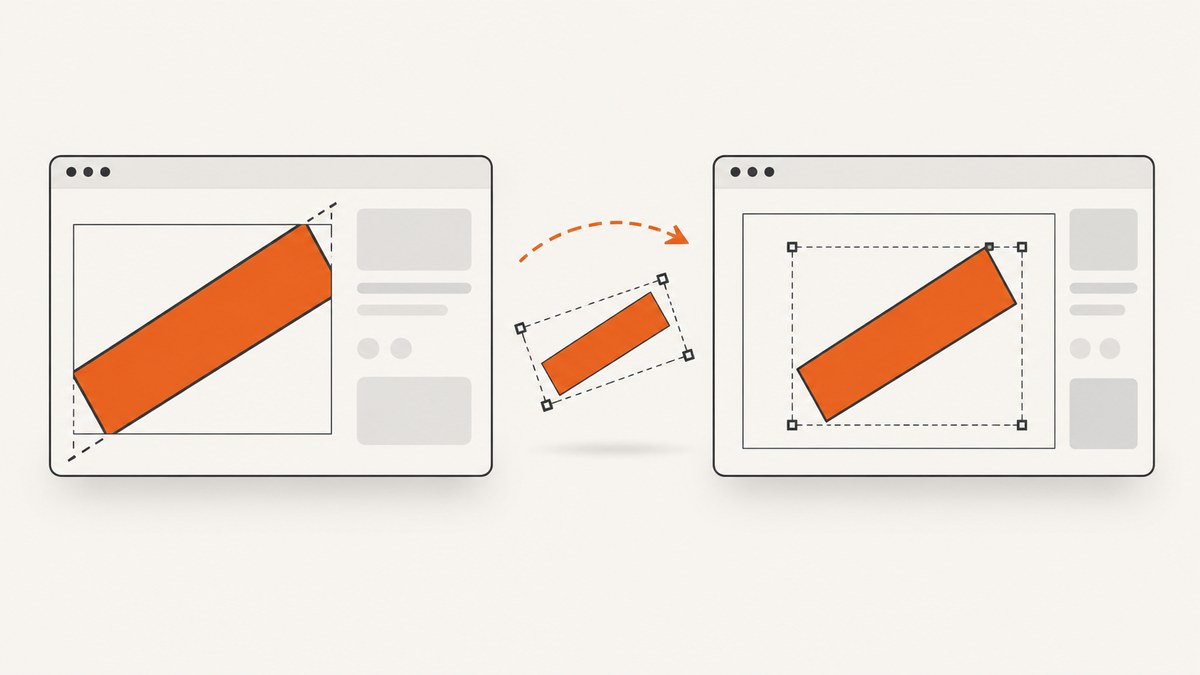
Rotated text that is cropped, shifted, or partially missing in an html2canvas image is usually a clipping or measurement problem around CSS transforms. Start by comparing a native browser screenshot with the html2canvas result, then toggle overflow and the transform independently. If making overflow visible removes the crop, the failure is likely in the interaction between transformed bounds and the clipping region. That is a useful diagnostic lead, not a confirmed upstream fix.
This article shows a repeatable investigation, a minimal reproduction, scoped workarounds, complete capture code, and the limits of what html2canvas can reproduce.
1. What html2canvas is actually doing
html2canvas does not ask the browser for a native screenshot. It walks the DOM, reads styles and layout, and reconstructs the page in a canvas. Its FAQ explains that every CSS property must be implemented manually and that it will never provide full CSS support. See the official FAQ.
That distinction matters for rotated text. Canvas 2D itself can paint transformed text: the current transformation matrix is applied while painting text, shapes, and Path2D objects in the WHATWG Canvas specification. A failure in html2canvas therefore does not mean that Canvas cannot render rotated glyphs. It can mean that html2canvas measured the DOM box, calculated a clip, or applied the transform in an order that does not match the browser.
Issue #3277 reports “there’s a cropping of the rotated text.” The report hypothesizes that a ClipEffect is created from border-box or padding-box curves measured without the transform. The issue was open when checked and had no linked pull request. Treat that explanation as an unconfirmed diagnosis and a useful test direction, not as a shipped patch.
2. Build a minimal reproduction before changing production CSS
A small reproduction tells you whether the problem is rotation, clipping, capture bounds, or the type of text being painted. Record the exact html2canvas package version, browser and version, operating system when relevant, CSS transform and transform-origin, every ancestor’s overflow value, the capture target, and whether the text is ordinary DOM text or an input/control value.
Minimal HTML test case
<!doctype html>
<html>
<head>
  <meta charset="utf-8">
  <title>Rotated html2canvas reproduction</title>
  <script src="https://cdn.jsdelivr.net/npm/html2canvas@1.4.1/dist/html2canvas.min.js"></script>
  <style>
    body { font-family: system-ui, sans-serif; padding: 40px; }
    .stage { width: 420px; height: 220px; overflow: hidden; border: 1px solid #888; }
    .card { width: 300px; height: 140px; margin: 35px; position: relative; background: #f3f4f6; }
    .label {
      position: absolute;
      left: 110px;
      top: 45px;
      transform: rotate(-18deg);
      transform-origin: center;
      white-space: nowrap;
      font-size: 28px;
      line-height: 1;
      background: #ffe08a;
      padding: 8px;
    }
  </style>
</head>
<body>
  <div id="capture" class="stage">
    <div class="card">
      <div class="label">Rotated text</div>
    </div>
  </div>
  <button id="save">Capture</button>
  <script>
    document.querySelector('#save').addEventListener('click', async () => {
      const canvas = await html2canvas(document.querySelector('#capture'), {
        backgroundColor: '#ffffff',
        scale: window.devicePixelRatio,
        logging: true
      });
      const link = document.createElement('a');
      link.download = 'rotated-text.png';
      link.href = canvas.toDataURL('image/png');
      link.click();
    });
  </script>
</body>
</html>
First capture the element with html2canvas. Then use the browser’s own screenshot command or DevTools to capture the same region. Keep the viewport and device pixel ratio constant. A mismatch only in html2canvas confirms that the reconstruction path, rather than the browser’s compositor, is involved.
3. Isolate overflow and transform separately
Change one variable at a time. Run these four cases:
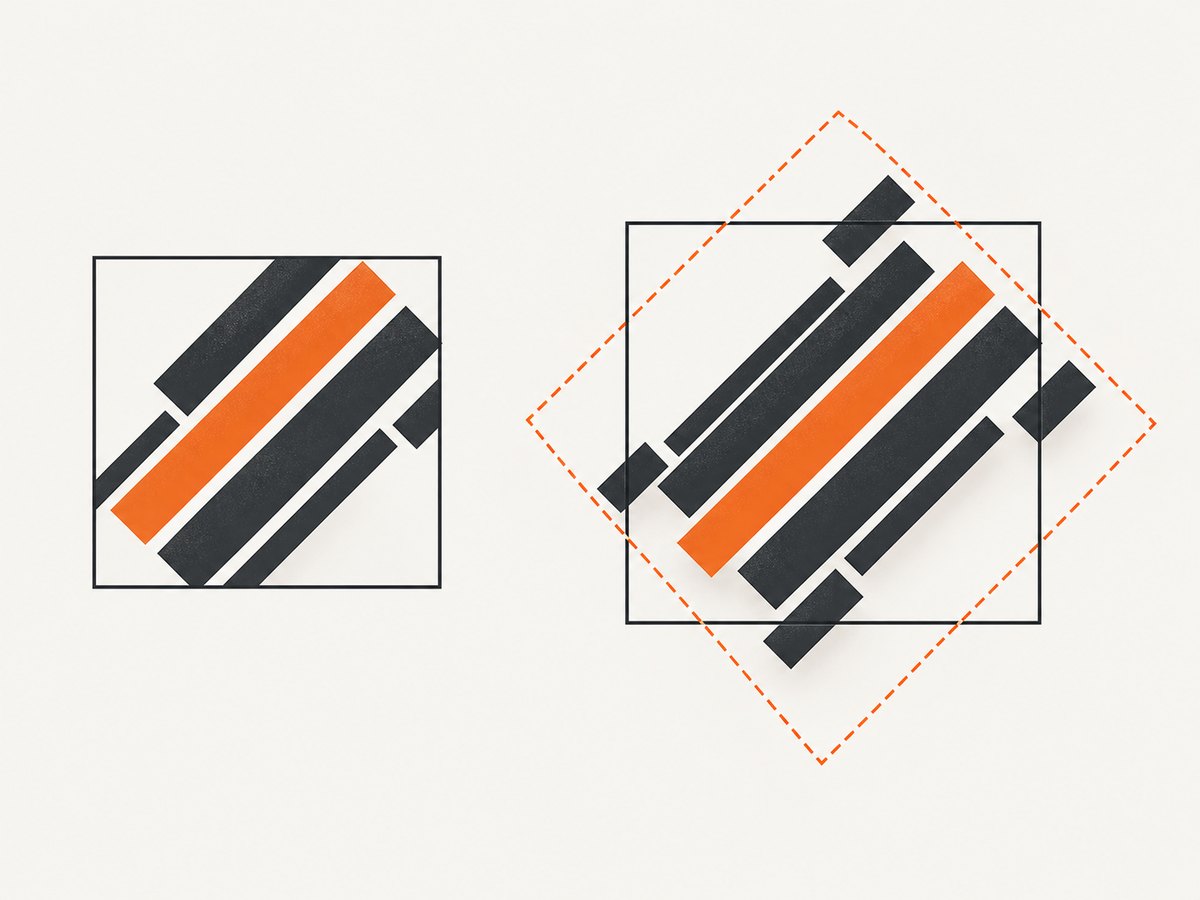
- Original transform and original overflow.
- Transform removed, overflow unchanged.
- Transform unchanged,
overflow: visibleon the rotated element and its relevant ancestors. - Capture a larger wrapper that has enough space around the rotated label.
If removing the transform fixes the image, investigate transform measurement or transform-origin. If only overflow: visible fixes it, investigate clipping. If a larger wrapper fixes it, the capture boundary is too tight even if the page looks correct in the browser. If none of these changes help, test the DOM type, fonts, browser version, and scaling separately.
The overflow test is especially relevant to issue #3277’s proposed mechanism: a clipping effect may be based on pre-transform bounds. The issue author’s suggested condition involving styles.transform === null is not an established upstream patch. Do not copy it into production as though it were maintained html2canvas behavior.
Quick diagnostic CSS
/* Apply only in a cloned document or a temporary reproduction. */
.debug-capture,
.debug-capture * {
  overflow: visible !important;
}

.debug-capture .label {
  transform: none !important;
}

/* Give the transformed object room without changing the source layout. */
.debug-capture .capture-wrapper {
  padding: 80px;
}
4. Use html2canvas options correctly
The configuration reference includes options that help isolate a failure, but none of them guarantees a fix for transformed text clipping.
| Option | Use in this investigation | Limitation |
|---|---|---|
scale |
Keep output density consistent with the browser comparison; try 1 and window.devicePixelRatio. |
Changes pixel density, not DOM clipping geometry. |
windowWidth, windowHeight |
Reproduce the same responsive layout and media-query state. | Does not enlarge an element’s transformed paint area by itself. |
width, height, x, y |
Test whether the capture rectangle cuts off the rotated bounds. | A larger rectangle may include unwanted surrounding content. |
onclone |
Apply a narrowly scoped style override in the cloned document. | It changes only the clone; verify that layout side effects are acceptable. |
ignoreElements |
Remove overlays, animations, or unrelated widgets from a reproduction. | It cannot repair the geometry of the element you need to render. |
foreignObjectRendering |
Compare an alternate rendering path where available. | Browser support and output behavior differ; treat it as an experiment. |
Scoped cloned-document workaround
const target = document.querySelector('#capture');
const canvas = await html2canvas(target, {
  backgroundColor: '#fff',
  scale: 1,
  onclone: (clonedDocument) => {
    const clonedTarget = clonedDocument.querySelector('#capture');
    clonedTarget.classList.add('debug-capture');

    // Scope the override to this capture only.
    clonedTarget.querySelectorAll('.stage, .card, .label').forEach((node) => {
      node.style.overflow = 'visible';
    });
  }
});
document.body.appendChild(canvas);
This workaround can change the visual result: shadows, children, and neighboring content may become visible. Compare the output with the intended design before adopting it.
5. Check transform geometry, fonts, and capture boundaries
Transform origin and composed transforms
transform-origin changes the point around which the text rotates. A label rotated around its center can extend beyond both its untransformed left and right edges. Parent transforms are composed with child transforms, so inspect computed styles on every ancestor, not just the text node.
function inspectTransformChain(element) {
  for (let node = element; node; node = node.parentElement) {
    const style = getComputedStyle(node);
    console.table({
      node: node.className || node.tagName,
      transform: style.transform,
      transformOrigin: style.transformOrigin,
      overflow: style.overflow,
      overflowX: style.overflowX,
      overflowY: style.overflowY,
      width: style.width,
      height: style.height
    });
  }
}
inspectTransformChain(document.querySelector('.label'));
Measure the transformed visual bounds
const label = document.querySelector('.label');
const rect = label.getBoundingClientRect();
console.log({
  left: rect.left,
  top: rect.top,
  right: rect.right,
  bottom: rect.bottom,
  width: rect.width,
  height: rect.height
});
getBoundingClientRect() reports the browser’s transformed rectangle. Compare it with the element’s CSS width and height. A large difference is a sign that a tight capture or clip based on the untransformed box could remove pixels.
Fonts and text type
Wait for fonts before capturing. A fallback font can have different glyph widths and line boxes, moving the rotated edges. Ordinary text, an <input> value, and an image containing text may travel through different html2canvas code paths.
await document.fonts.ready;
const canvas = await html2canvas(document.querySelector('#capture'));
For form controls, test a plain <span> containing the same string. If the span works and the control fails, report it as a control-rendering issue rather than assuming it is the same rotated-text bug.
6. A practical debugging matrix
| Observation | Likely area | Next action |
|---|---|---|
| Native screenshot correct; html2canvas crops only when overflow is hidden | Clip bounds and transformed geometry | Capture a larger wrapper and test cloned overflow-visible styles. |
| Both native and canvas output crop | Actual layout or container clipping | Fix the page CSS or enlarge the real container. |
| Text is offset but not cropped | Transform origin, parent transform, or capture coordinates | Inspect the transform chain and compare getBoundingClientRect(). |
| Only one browser fails | Browser layout, font, or html2canvas compatibility difference | Record exact versions and reduce the case further. |
| Only input/control text fails | Control-specific renderer path | Compare with ordinary DOM text and include both cases in a report. |
| Changing scale changes the symptom | Pixel rounding or capture dimensions | Test fixed scale values and keep the chosen value consistent in production. |
7. Common errors and fixes
“The text disappears at one edge.”
Cause: an ancestor’s clipping region or the capture rectangle ends at the untransformed edge. Fix: temporarily set overflow visible, capture a wrapper with padding, and then decide whether a scoped clone override is acceptable.
“The label moves after I remove overflow hidden.”
Cause: the browser is now painting content that was intentionally clipped, exposing a layout dependency. Fix: do not make the entire application globally overflow-visible. Apply the change only inside onclone, or redesign the capture wrapper with explicit space.
“It works with a span but not an input.”
Cause: controls may use a different html2canvas rendering path. Fix: use a visual text mirror for export if that is acceptable, or file a focused report that identifies the control type.
“The screenshot is blank or has missing fonts.”
Cause: capture started before fonts or external resources finished loading, or a cross-origin resource is inaccessible. Fix: await document.fonts.ready, wait for the relevant images, and verify resource and CORS behavior. This is separate from the rotated-text clipping diagnosis.
“A proposed GitHub condition fixes my sample.”
Cause: the sample may match the issue author’s hypothesis, but an open issue is not a release contract. Fix: keep the workaround scoped, test other transforms and browsers, and check the issue and release notes again before relying on an upstream change.
8. When to report the bug upstream
The html2canvas FAQ recommends creating a test case and opening an issue when a CSS property is missing or incomplete. Submit a minimal page rather than a full application. Include:
- html2canvas version, browser and version, operating system, and device pixel ratio.
- Exact HTML and CSS, including
transform,transform-origin, dimensions, and every overflow value in the ancestor chain. - The capture target and all html2canvas options.
- A native browser screenshot beside the html2canvas output.
- Whether disabling overflow, removing the transform, or capturing a larger wrapper changes the result.
- Whether the content is ordinary text, a form control, an image, or text using a web font.
- A precise symptom: crop, orientation, position, glyph shaping, or missing content.
Keep issue #3277 separate from pull request #3153, which concerns a transformed input/image case. A related transform report is not proof that it fixes cropped rotated text.
9. Performance, reliability, and maintenance
Capture the smallest useful DOM region. Full-page reconstruction creates more layout and painting work and makes unrelated overflow or lazy content part of the result. Reuse a stable capture wrapper instead of repeatedly cloning a large application tree. Wait for fonts and required images once, then capture.
For reliable output, pin the html2canvas version, keep a small regression page, and compare captures in each browser you support. Test at the same viewport and scale used in production. A workaround based on overflow: visible can expose content that was intentionally hidden, so review the visual result and any sensitive overlays before shipping.
There is no confirmed release-specific fix for issue #3277 in the supplied research. Recheck the issue and release notes before removing a workaround.
10. Or skip the browser setup
If your goal is a dependable URL screenshot rather than reproducing a local DOM canvas, ScreenshotNeo provides a website screenshot API and MCP server. It captures a URL with one request and returns PNG, JPEG, WebP, or PDF. Before capture, it accepts cookie and consent banners and removes more than 60 known consent platforms, newsletter popups, and chat widgets; each step can be turned off.

Only clean shots are billed. Bot checks or CAPTCHAs, blank pages, timeouts, failed loads, and cache hits cost nothing, and the response identifies the result with X-Page-Verdict and X-Billed headers. An MCP server exposes take_screenshot, get_page_info, and capture_pdf to Claude, Cursor, and other MCP clients.
See the ScreenshotNeo API documentation for all options, including full-page lazy-image loading, CSS-selector element capture, dark mode, device presets, custom viewports, retina scale, PDF paper sizes and margins, custom CSS and JavaScript, clicks, waits, request blocking, headers, cookies, user agents, authorization, timezone, geolocation, transparent backgrounds, resizing, TTL caching, signed links, async jobs, webhooks, bulk capture, usage, and the OpenAPI specification.
cURL
curl -G "https://api.screenshotneo.com/v1/shot" \
  -d access_key=YOUR_API_KEY \
  --data-urlencode url=https://stripe.com \
  -o shot.webp
Python
import requests

r = requests.get(
    "https://api.screenshotneo.com/v1/shot",
    params={"access_key": "YOUR_API_KEY", "url": "https://stripe.com"},
    timeout=90,
)
r.raise_for_status()
open("shot.webp", "wb").write(r.content)
Node.js
const q = new URLSearchParams({ access_key: 'YOUR_API_KEY', url: 'https://stripe.com' });
const res = await fetch(`https://api.screenshotneo.com/v1/shot?${q}`);
if (!res.ok) throw new Error(`Screenshot failed: ${res.status}`);
const body = Buffer.from(await res.arrayBuffer());
require('fs').writeFileSync('shot.webp', body);
The free plan includes 1,000 screenshots each month with no card. Starter is $5 for 3,000, Growth $15 for 15,000, Pro $39 for 60,000, Scale $99 for 250,000, and Business $249 for 1,000,000; yearly billing gives two months free, and every feature is on every plan. Create a free ScreenshotNeo account.
11. FAQ
Can CSS rotation be rendered by Canvas 2D?
Yes. Canvas applies its current transformation matrix while painting text. The difficult part is matching the browser’s DOM measurement, clipping, and transform order.
Should I patch html2canvas to skip clipping whenever transform exists?
No. That condition is an unconfirmed issue hypothesis. Test a scoped workaround first and verify it across your supported browsers.
Why does a larger wrapper help?
It gives the transformed glyphs room inside the capture boundary. It can also reveal that an ancestor, rather than the text node, is responsible for clipping.
Is html2canvas a native screenshot tool?
No. It reconstructs a page in canvas, so unsupported or partially supported CSS can differ from the browser’s compositor.
When should I use a URL screenshot API?
Use one when you need repeatable captures of rendered URLs, PDFs, scheduled jobs, or AI-agent workflows and do not need to export a private in-page DOM state.


