How to Fix Blank Spaces Around Nested Tables in wkhtmltopdf PDFs
Diagnose and fix blank spaces around nested tables in wkhtmltopdf PDFs with minimal repros, CSS tests, structural changes, and renderer options.
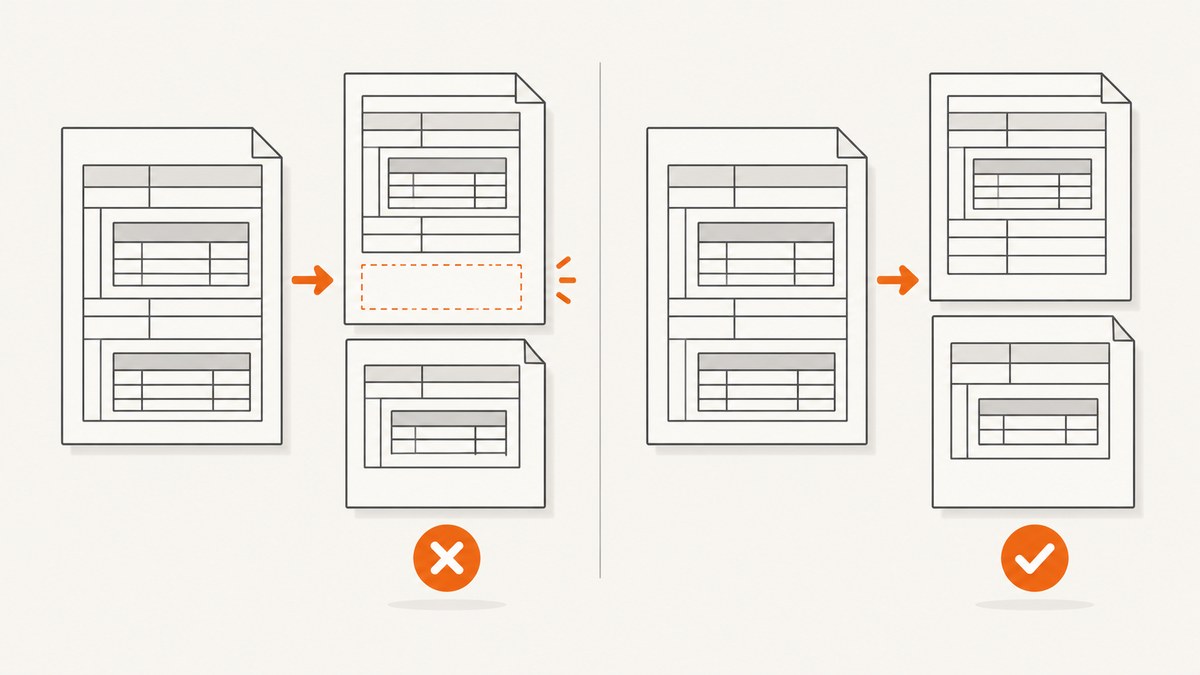
Short answer: blank space around a nested table usually appears when wkhtmltopdf’s WebKit pagination moves a table row or cell to the next printable page. Reproduce the gap with the smallest possible HTML, record your wkhtmltopdf build and page settings, then test page-break-inside: auto, a less nested structure, and a different renderer. These are experiments rather than guaranteed fixes: wkhtmltopdf documents that its pagination algorithm has limitations, and reports show that nested tables can still move as a unit even when CSS permits breaks.
wkhtmltopdf first lays out a long WebKit page and then cuts it into paper-sized pages. The project documentation warns that lines and images can be split and says patched Qt’s page-break-inside support only helps partially. See the Debian wkhtmltopdf manpage for the documented pagination behavior.
1. Confirm that pagination is the cause
Do not start by adding random page-break rules. First determine whether the blank area is produced at a printable boundary.
- Save the exact executable version with
wkhtmltopdf --version. - Record the operating system, paper size, orientation, margins, zoom or DPI settings, and whether the binary uses patched Qt.
- Open the source HTML in a browser and compare it with the PDF. A browser view does not prove that wkhtmltopdf will paginate the same way.
- Check which outer
<tr>and<td>contain the nested table. Content before the inner table may consume the remaining printable height. - Make a minimal reproduction by removing framework CSS, unrelated images, scripts, fonts, and extra rows.
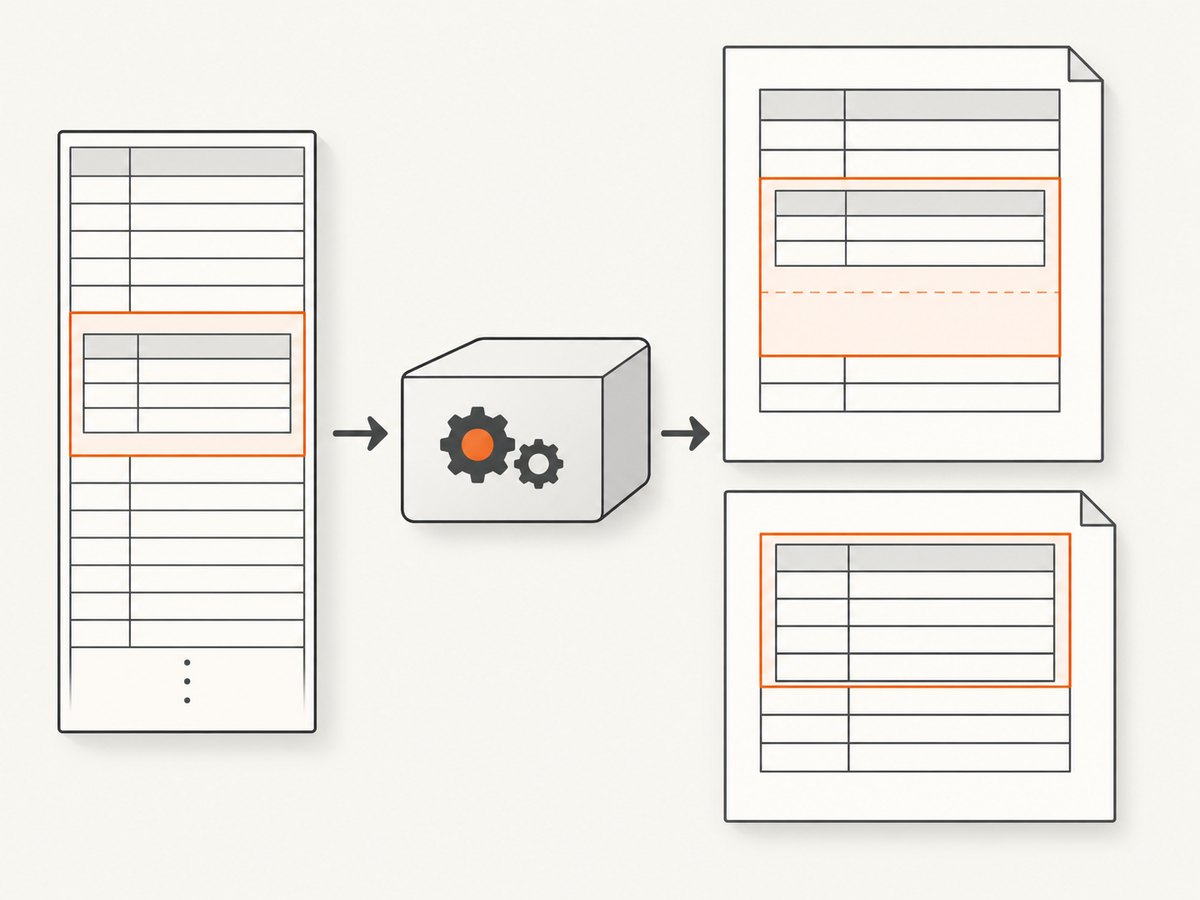
One reported case moved a nested table to the next page when the parent cell crossed the printable boundary, even though the inner table could not fill an entire page. Another report found that page-break-inside: auto worked for ordinary tables but not for a nested table inside a <td>. These are individual issue reports, not guarantees about every document. See issue #3806 and issue #4558.
2. Build a minimal nested-table reproduction
Use a deliberately long cell so the page boundary is easy to move. This file is complete and can be rendered directly.
<!doctype html>
<html>
<head>
  <meta charset='utf-8'>
  <style>
    @page { size: A4; margin: 18mm; }
    body { font: 12px/1.45 Arial, sans-serif; margin: 0; }
    table { width: 100%; border-collapse: collapse; }
    td, th { border: 1px solid #777; padding: 6px; vertical-align: top; }
    .outer { page-break-inside: auto; }
    .inner { page-break-inside: auto; }
    .line { height: 18px; }
  </style>
</head>
<body>
  <h1>Nested table pagination test</h1>
  <table class='outer'>
    <tr>
      <td>
        <p>Text before the nested table consumes part of the page.</p>
        <table class='inner'>
          <tr><th>Item</th><th>Description</th></tr>
          <tr><td>1</td><td>
            <div class='line'>Long content line</div>
            <div class='line'>Long content line</div>
            <div class='line'>Long content line</div>
            <div class='line'>Long content line</div>
            <div class='line'>Long content line</div>
            <div class='line'>Long content line</div>
            <div class='line'>Long content line</div>
            <div class='line'>Long content line</div>
          </td></tr>
        </table>
      </td>
    </tr>
  </table>
</body>
</html>
wkhtmltopdf --version
wkhtmltopdf --page-size A4 --margin-top 18mm --margin-right 18mm --margin-bottom 18mm --margin-left 18mm repro.html repro.pdfChange one variable at a time. If removing the paragraph before the inner table removes the gap, the outer cell was crossing the printable boundary. If the gap remains with one simple row, the nested-table structure or renderer build is a stronger suspect.
3. Test CSS pagination rules carefully
Allow content to split
When a long nested table should continue on the next page, test page-break-inside: auto on the table and the containers that wrap it:
table,
tr,
td,
.outer,
.inner {
  page-break-inside: auto;
}
Keep the rule limited to the relevant subtree while diagnosing. A broad rule can make unrelated rows split in undesirable places.
Keep a short row together
If the intended behavior is to keep a small row intact, test page-break-inside: avoid on that row:
.inner tr.keep-together {
  page-break-inside: avoid;
}
Do not put avoid on a large parent table or cell containing many pages of content. If the block cannot fit in the remaining space, wkhtmltopdf may move the entire block and create an even larger blank region. The manpage describes this support as partial, and nested-table reports show that the rule may not be honored in every structure.
Use legacy and modern names together when testing
For a controlled experiment, include both names. This does not make the renderer fully standards-compliant, but it helps distinguish a missing alias from a deeper pagination limitation.
.candidate {
  page-break-inside: auto;
  break-inside: auto;
}

.keep-small {
  page-break-inside: avoid;
  break-inside: avoid;
}
4. Simplify the HTML when CSS is not enough
Nested tables are a common trigger because the renderer must decide whether the outer row, the parent cell, or the inner rows can cross the boundary. Try these structural experiments:
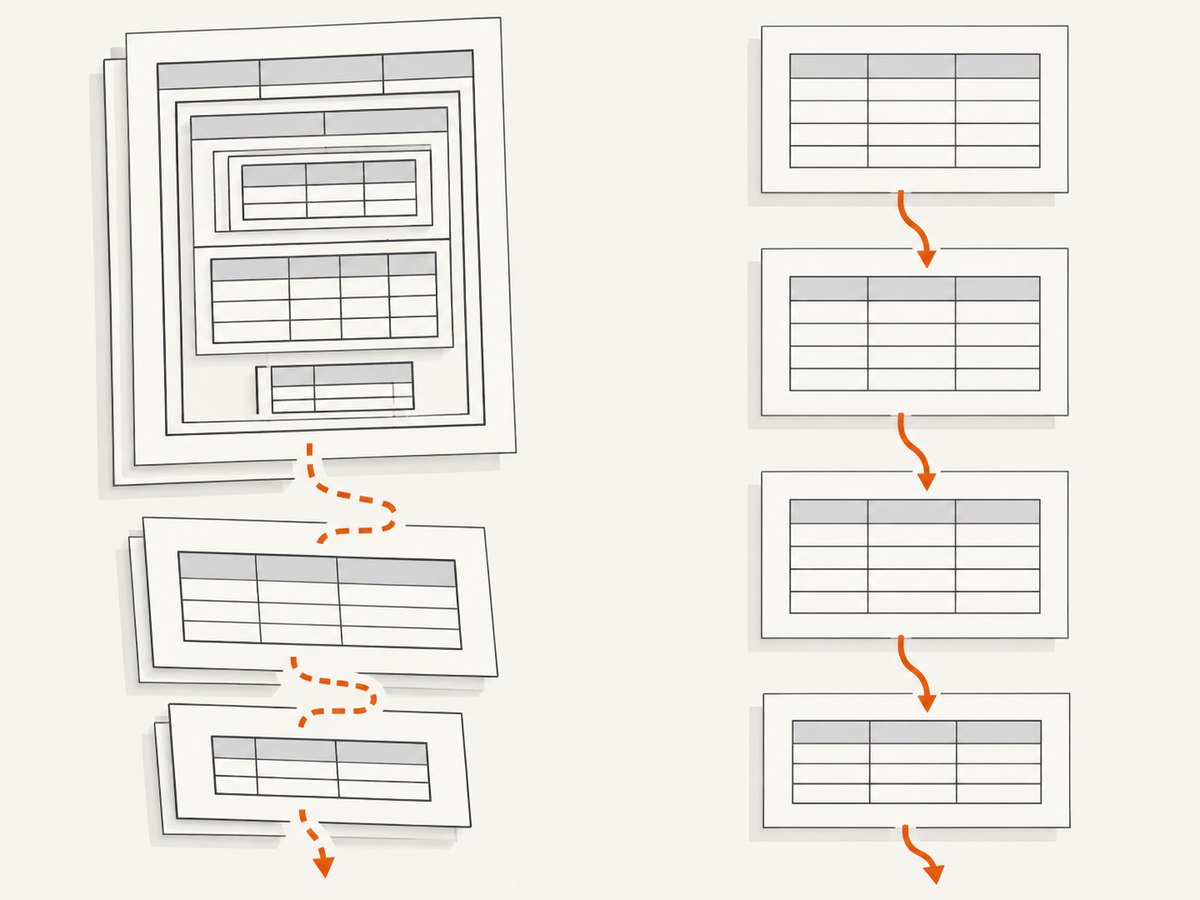
- Move the inner table outside the outer table and place both as independent blocks.
- Replace a layout table with normal block elements and a single data table.
- Split one large parent table into smaller tables at logical sections.
- Move long prose out of a cell that also contains the nested table.
- Reduce deep nesting: outer table, cell, inner table, and additional wrappers each add another pagination boundary.
- Give every table an explicit width and use
border-collapse: collapseto avoid width expansion that changes row height.
These changes can alter column widths and styling, so compare the PDF output against a visual reference. They are ways to remove the trigger, not universal fixes.
5. Check page geometry and wkhtmltopdf settings
A gap can be made more visible by page geometry even when the HTML is unchanged. Capture the complete command line used in production and compare it with your reproduction.
| Setting | What to check | Why it matters |
|---|---|---|
| Paper size | --page-size or custom dimensions |
Changes the printable height available to the parent row. |
| Orientation | --orientation Portrait or Landscape |
Changes both available width and height. |
| Margins | --margin-top, --margin-bottom, and side margins |
Larger margins leave less room before a row reaches the boundary. |
| Zoom or DPI | Any production scaling flags | Scaling changes measured content height and can move the break. |
| Print CSS | Styles loaded under @media print |
Print-only rules may add padding, widths, or hidden content. |
| Qt build | Whether the executable uses patched Qt | The documented CSS pagination features differ between builds. |
Run a baseline with explicit geometry so comparisons are repeatable:
wkhtmltopdf \
  --page-size A4 \
  --orientation Portrait \
  --margin-top 18mm \
  --margin-right 18mm \
  --margin-bottom 18mm \
  --margin-left 18mm \
  --print-media-type \
  input.html output.pdf
If --print-media-type changes the result, inspect your print stylesheet for table display rules, padding, fixed heights, and hidden elements. Keep the option only if it matches the intended production output.
6. Troubleshooting common symptoms
| Symptom | Likely cause | Fix to try |
|---|---|---|
| Inner table starts on the next page with a large gap above it | Parent cell or row crossed the printable boundary. | Remove preceding content, test page-break-inside: auto, then simplify the nesting. |
page-break-inside: auto works on a top-level table but not inside a cell |
Nested row or cell pagination is not honored by this WebKit build. | Reproduce with a minimal file and try moving the inner table outside the parent table. |
avoid creates a larger blank area |
The protected block is taller than the remaining page. | Apply avoid only to short rows; allow long content to split. |
| Only production output has the gap | Different binary, Qt patch level, OS, margins, fonts, or print CSS. | Record and compare the complete command, executable version, OS, and input assets. |
| Changing CSS has no effect | The stylesheet is not loaded, is overridden, or the issue is structural. | Inline the test rule, remove framework CSS, and inspect the minimal reproduction. |
| Rows split in unexpected places | Allowing breaks globally affects every table. | Scope auto to the nested region and add avoid only to short rows. |
| PDF differs after an upgrade or host migration | Renderer builds can paginate differently. | Pin and record the binary, then rerun the same fixture on both environments. |
7. Make the diagnosis reproducible
Keep a fixture directory containing:
- the smallest HTML file that still shows the gap;
- all CSS used by that file;
- the exact wkhtmltopdf command;
- the output PDF and a page number showing the blank region;
- the executable version, OS and version, paper size, orientation, margins, and Qt build details.
When reporting a suspected bug, include a detailed description and a duplicating HTML/CSS/JS case. The project’s reporting guidance asks for those environment details. The upstream repository is archived and read-only, so do not plan on an imminent upstream pagination fix; treat a renderer change as a real migration decision.
8. Choose between CSS, restructuring, and another renderer
| Approach | Best when | Trade-offs |
|---|---|---|
| Keep wkhtmltopdf and adjust CSS | The template is stable and the gap occurs in a small region. | Lowest migration effort, but nested-table pagination remains uncertain. |
| Restructure HTML | You control the template and can remove the nested boundary. | Often removes the trigger, but may require layout and styling changes. |
| Use another renderer | Pagination is a hard requirement across many templates. | May improve a given document, but measure your real templates and account for compatibility and migration cost. |
One issue author reported that Chrome produced the expected pagination for their sample. That observation is anecdotal and does not establish that Chrome will match your documents; render representative fixtures before migrating. See issue #4558.
9. Performance, reliability, and cost considerations
- Performance: a smaller DOM and fewer nested wrappers reduce layout work and make failures easier to reproduce. Avoid loading unrelated images and scripts in the diagnostic fixture.
- Reliability: pin the wkhtmltopdf executable and its Qt build, keep page geometry explicit, and compare PDFs from a fixed fixture after every template or host change.
- Output risk: CSS pagination hints are advisory in this renderer. A visually correct result on one page size or operating system can change when margins, fonts, or content length changes.
- Migration cost: another renderer may solve a specific boundary case but can change CSS support, fonts, JavaScript behavior, and output fidelity. Use a representative document set rather than one successful sample.
Or skip the browser setup
If the goal is a clean image or PDF of a page rather than maintaining a local browser-rendering pipeline, ScreenshotNeo provides a single API request. Cookie and consent banners, newsletter popups, and chat widgets are removed before capture; bot checks, blank pages, timeouts, failed loads, and cache hits are not billed. Each response identifies the page verdict and billing result in X-Page-Verdict and X-Billed headers. Its MCP server lets Claude, Cursor, and other MCP clients call take_screenshot, get_page_info, and capture_pdf.
See the ScreenshotNeo API documentation for the complete option list, including full-page capture, element selectors, PDF paper size and margins, custom CSS and JavaScript, waiting rules, blocked resources, headers, cookies, user agents, caching, signed links, asynchronous jobs, bulk capture, and usage reporting.
cURL
curl -G 'https://api.screenshotneo.com/v1/shot' \
  -d access_key=YOUR_API_KEY \
  --data-urlencode 'url=https://stripe.com' \
  -o shot.webp
Python
import requests

r = requests.get(
    'https://api.screenshotneo.com/v1/shot',
    params={'access_key': 'YOUR_API_KEY', 'url': 'https://stripe.com'},
    timeout=90,
)
r.raise_for_status()
open('shot.webp', 'wb').write(r.content)
Node.js
const q = new URLSearchParams({ access_key: 'YOUR_API_KEY', url: 'https://stripe.com' });
const res = await fetch(`https://api.screenshotneo.com/v1/shot?${q}`);
if (!res.ok) throw new Error(`Screenshot failed: ${res.status}`);
const fs = await import('node:fs/promises');
await fs.writeFile('shot.webp', Buffer.from(await res.arrayBuffer()));
There is a free plan with 1,000 screenshots per month and no card. Paid plans start at $5 for 3,000 shots, and every feature is available on every plan. Create a free ScreenshotNeo account to try a capture.
FAQ
Is blank space always caused by page-break-inside?
No. Parent-cell boundaries, available printable height, nested markup, margins, fonts, and renderer builds can all affect the result. Use a minimal reproduction to isolate the trigger.
Should I always use page-break-inside: avoid?
No. On a large parent it can move the entire block and increase the blank area. Reserve it for short rows that must remain together.
Can a CSS rule guarantee that a nested table will split correctly?
No. wkhtmltopdf documents only partial support, and issue reports show nested-table cases where the expected break does not occur.
What information should accompany a bug report?
Provide the executable version and Qt build, OS and version, page settings, a detailed description, and a minimal HTML/CSS/JS reproducer with the resulting PDF.
When should I migrate away from wkhtmltopdf?
Consider migration when pagination must be dependable across many templates and your minimal CSS and markup experiments still fail. Validate the candidate renderer against representative documents first.


