How to Fix PhantomCSS Screenshots Inside a For Loop
Stop PhantomCSS from capturing the same page in every loop iteration. Queue CasperJS steps, wait for real readiness signals, and name each capture.
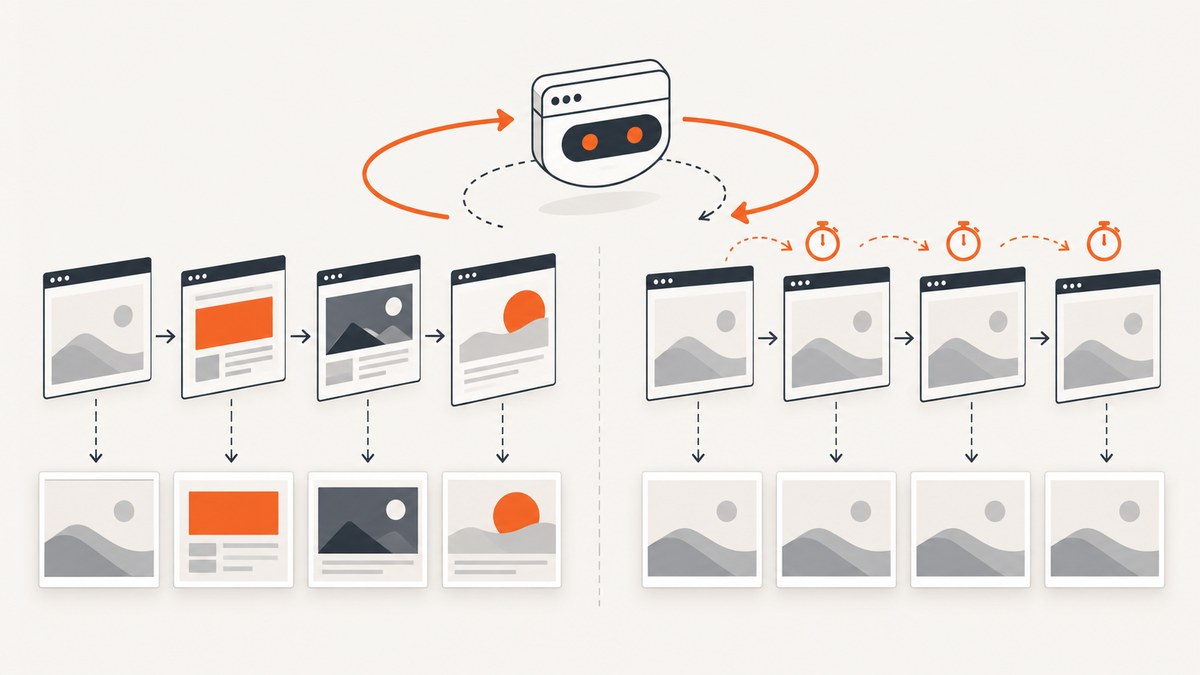
If PhantomCSS saves the same screenshot for every iteration of a for loop, the usual cause is asynchronous work being issued inside one CasperJS step. The JavaScript loop advances immediately, while navigation, DOM updates, AJAX requests, and rendering are still in progress. By the time PhantomCSS captures, the page may still show the first state.
The reliable fix is to queue one CasperJS step per iteration, perform that iteration’s page change inside the step, wait for a condition that proves the target state is ready, and then call phantomcss.screenshot() with a unique name. CasperJS documents ordered steps and waitFor-family operations for this pattern. PhantomCSS also recommends predictable pages or faked data for visual regression work.
Why a for loop captures the same page
A normal loop is synchronous:
for (var page = 1; page <= 10; page++) {
  moveNext(page);
  phantomcss.screenshot('html', 'page-' + page);
}
This code does not wait for moveNext() to finish unless that function is completely synchronous. In a browser test, it commonly starts a click handler, changes application state, requests data, or schedules a render. The loop immediately starts the next iteration. CasperJS then processes the queued browser work according to its own step lifecycle, and the captures can all occur before the page-specific state is visible.
There are three related failure modes:
- Every file looks like page one: the first navigation or render has not completed before captures run.
- Several files are duplicates, then later files change: the application finishes at different speeds and the loop has no state synchronization.
- Files contain the right pages but baselines are overwritten: every capture uses the same name, so later iterations replace earlier images.
The dependable CasperJS and PhantomCSS pattern
Queue a step for each target page. Preserve the loop value in a closure so older JavaScript runtimes do not reuse the final value. Inside each step, trigger the application-specific page change, wait for a page-specific readiness signal, and capture with a meaningful filename.

var firstPage = 1;
var lastPage = 10;

for (var pageNo = firstPage; pageNo <= lastPage; pageNo++) {
    (function (targetPage) {
        casper.then(function () {
            this.evaluate(function (page) {
                moveNext(page); // application-specific page change
            }, targetPage);

            this.waitFor(function () {
                return this.evaluate(function (page) {
                    var indicator = document.querySelector('#page-number');
                    return indicator &&
                        indicator.textContent.trim() === String(page);
                }, targetPage);
            }, function () {
                phantomcss.screenshot('html', 'page-' + targetPage);
            }, function () {
                this.die('Timed out waiting for page ' + targetPage);
            }, 10000);
        });
    }(pageNo));
}

casper.run();
moveNext and #page-number are placeholders for your application. Replace them with the action and readiness marker that your page actually exposes. The marker can be a page number, a unique heading, a selected tab, a result count, or another DOM property that changes only after the requested state is ready.
Why the closure matters
In older CasperJS environments, var is function-scoped. Without the immediately invoked function expression in the example, callbacks may all read the same changing loop variable. The closure copies the current value into targetPage for that queued step. If your runtime supports block-scoped let, this is also valid:
for (let targetPage = 1; targetPage <= 10; targetPage++) {
  casper.then(function () {
    // use targetPage here
  });
}
Use the right wait condition
CasperJS supports waits for functions, selectors, text, and resources. Pick the narrowest condition that proves the intended page is ready:
// A selector exists
this.waitForSelector('.invoice-page', function () {
    phantomcss.screenshot('html', 'invoice-' + targetPage);
});

// A heading contains the expected text
this.waitForText('Page ' + targetPage, function () {
    phantomcss.screenshot('html', 'page-' + targetPage);
});

// A resource has loaded
this.waitForResource(/\/api\/results\?page=/, function () {
    phantomcss.screenshot('html', 'page-' + targetPage);
});
Wait methods are not generally chainable. When you need a wait after an action, wrap the operation in casper.then() as shown above. Always provide a timeout callback. A timeout should fail the run clearly instead of producing a screenshot that looks valid but represents the wrong state.
Complete example with navigation, logging, and comparison
The following script illustrates a complete sequence. It starts CasperJS, opens the first page, queues ten captures, logs the observed marker, and runs the PhantomCSS comparison after all captures have been scheduled.
var casper = require('casper').create({
    viewportSize: { width: 1366, height: 900 },
    verbose: true,
    logLevel: 'warning'
});
var phantomcss = require('phantomcss').init({
    libraryRoot: '/path/to/phantomcss',
    screenshotRoot: 'screenshots',
    failedComparisonsRoot: 'screenshots/failures',
    comparisonResultRoot: 'screenshots/results'
});

var firstPage = 1;
var lastPage = 10;
var pageUrl = 'https://example.test/list';

casper.start(pageUrl, function () {
    this.echo('Opened ' + pageUrl);
});

for (var pageNo = firstPage; pageNo <= lastPage; pageNo++) {
    (function (targetPage) {
        casper.then(function () {
            this.evaluate(function (page) {
                // Replace this with your app's real navigation function.
                window.showPage(page);
            }, targetPage);

            this.waitFor(function () {
                return this.evaluate(function (page) {
                    var marker = document.querySelector('[data-page-number]');
                    return marker && marker.getAttribute('data-page-number') === String(page);
                }, targetPage);
            }, function () {
                this.echo('Capturing page ' + targetPage);
                phantomcss.screenshot('#content', 'page-' + targetPage);
            }, function () {
                this.die('Page ' + targetPage + ' did not become ready');
            }, 15000);
        });
    }(pageNo));
}

casper.then(function () {
    phantomcss.compareAll();
});

casper.run(function () {
    this.echo('Finished screenshot run.');
    this.exit();
});
PhantomCSS accepts a selector such as #content or html. Capturing a stable content region reduces unrelated differences from browser chrome, dynamic timestamps, or surrounding layout. Use a distinct name for every iteration; names such as page-1 through page-10 make generated files and baselines auditable.
Fixed delays versus condition-based waits
A fixed delay can appear to solve the issue:
casper.then(function () {
    this.evaluate(function (page) { window.showPage(page); }, targetPage);
    this.wait(8000, function () {
        phantomcss.screenshot('html', 'page-' + targetPage);
    });
});
That value is only an example. A delay can be too short on a slow run and waste time on a fast run. It also does not prove that the requested page loaded; it merely proves that a clock elapsed. Prefer a DOM, text, or resource condition. If no reliable signal exists, combine a conservative delay with a second assertion that checks the expected state before capturing.
Debugging checklist
- Confirm the page-change action: run one iteration and verify that the visible page really changes.
- Inspect the readiness marker: log its text or attribute after each transition. If it never changes, your selector or application event is wrong.
- Check loop values: log
targetPageinside the queued callback. If every log has the same value, fix the closure or uselet. - Check filenames: ensure the screenshot name includes the page number and no later iteration overwrites it.
- Add timeout failures: make the timeout callback call
this.die()so an incomplete page cannot become a false baseline. - Freeze mutable data: PhantomCSS comparisons are more useful when API responses, advertisements, clocks, and randomized content are static or faked.
Common errors and fixes
| Symptom | Likely cause | Fix |
|---|---|---|
| Ten identical screenshots | All captures are issued in one synchronous callback. | Queue one casper.then step per iteration and wait for readiness. |
| Every filename ends in the same number | The callback closes over a mutable var. |
Use a closure or block-scoped let. |
| Timeout on every page | The readiness selector or text does not match the real DOM. | Inspect the page and choose a marker that changes after navigation. |
| Capture occurs before images appear | The page marker changes before lazy images finish loading. | Wait for an image selector, a loaded class, a resource, or an application-specific “ready” flag. |
| Comparisons fail randomly | Dynamic data, ads, timestamps, fonts, or animations change between runs. | Use stable fixtures, disable animation, and capture a stable selector. |
| Baselines disappear | All iterations use one screenshot name. | Include the input identifier in every name and keep baseline directories separate. |
| The script hangs | A wait has no timeout or a callback never reaches the next step. | Set an explicit timeout and fail with a diagnostic message. |
Performance and reliability considerations
Each iteration has a cost: navigation, data loading, rendering, and image encoding. Capture only the region you need, reuse one browser session when state can safely persist, and avoid arbitrary multi-second sleeps. A condition-based wait usually reduces idle time while preserving correctness.
For reliable visual regression:
- Use a fixed viewport, device scale, timezone, locale, and user agent.
- Wait for fonts and critical images before capture.
- Disable CSS transitions and blinking cursors in test-only styles.
- Freeze clocks and random values when they appear in the UI.
- Use deterministic API fixtures or a test backend.
- Retry a failed navigation only after recording the original timeout and URL.
- Keep a separate output directory for each run so stale files cannot be mistaken for fresh captures.
PhantomCSS is a CasperJS module that compares screenshots with Resemble.js. Its documentation cautions that mutable pages make regression results unstable, so predictable inputs matter as much as correct waiting. CasperJS’s wait documentation and FAQ likewise recommend waiting for the DOM, text, or resources rather than assuming a page is ready immediately.
Or skip the browser setup
If your goal is a clean image of each URL rather than maintaining a PhantomJS test harness, ScreenshotNeo provides a single screenshot API request. See the ScreenshotNeo API documentation for the available parameters.
curl -G "https://api.screenshotneo.com/v1/shot" -d access_key=YOUR_API_KEY --data-urlencode url=https://stripe.com -o shot.webpimport requests
r = requests.get("https://api.screenshotneo.com/v1/shot", params={"access_key": "YOUR_API_KEY", "url": "https://stripe.com"}, timeout=90)
open("shot.webp", "wb").write(r.content)const q = new URLSearchParams({ access_key: 'YOUR_API_KEY', url: 'https://stripe.com' });
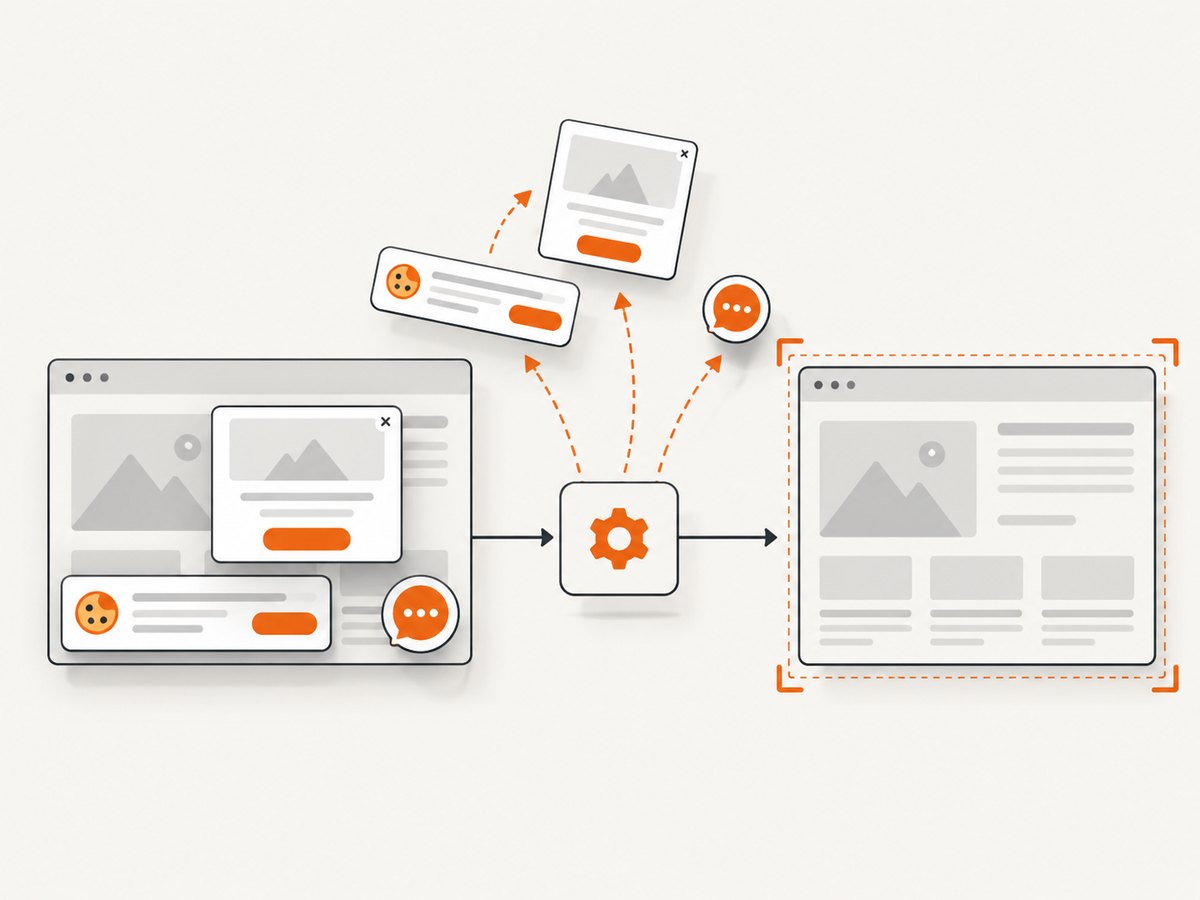
const res = await fetch(`https://api.screenshotneo.com/v1/shot?${q}`);ScreenshotNeo removes cookie and consent banners, newsletter popups, and chat widgets before capture. Bot checks and CAPTCHAs, blank pages, timeouts, failed loads, and cache hits are not billed; response headers identify the page verdict and whether the request was billed. Its MCP server gives AI agents the take_screenshot, get_page_info, and capture_pdf tools. The free plan includes 1,000 screenshots per month with no card, and paid plans start at $5 for 3,000 screenshots. Create a free ScreenshotNeo account.
FAQ
Does PhantomCSS itself make the loop asynchronous?
PhantomCSS captures within CasperJS’s execution model. The problem is usually that navigation or application updates are asynchronous while the loop is not. Queueing CasperJS steps and waiting for state aligns the two.
Should I use waitForSelector or waitFor?
Use waitForSelector when the presence or visibility of one element proves readiness. Use waitFor for a page number, attribute, text value, or compound condition.
Can I capture full pages instead of one element?
Yes. Pass html to PhantomCSS, or capture a stable top-level container. Full-page output is more sensitive to dynamic content and lazy loading, so wait for all required content first.
Why are screenshots different even after the wait is correct?
Waiting solves ordering, not nondeterministic input. Freeze data, clocks, animations, fonts, advertisements, and other mutable resources before comparing images.
What should a timeout tell me?
Include the target page, URL, readiness selector, and observed value in the failure message. That turns a misleading screenshot into an actionable test failure.


