How to Fix Cross-Origin Errors When Capturing Amazon S3 Images With html2canvas
Fix missing S3 images and tainted-canvas errors by matching your bucket’s CORS rule to the page origin and enabling html2canvas useCORS.

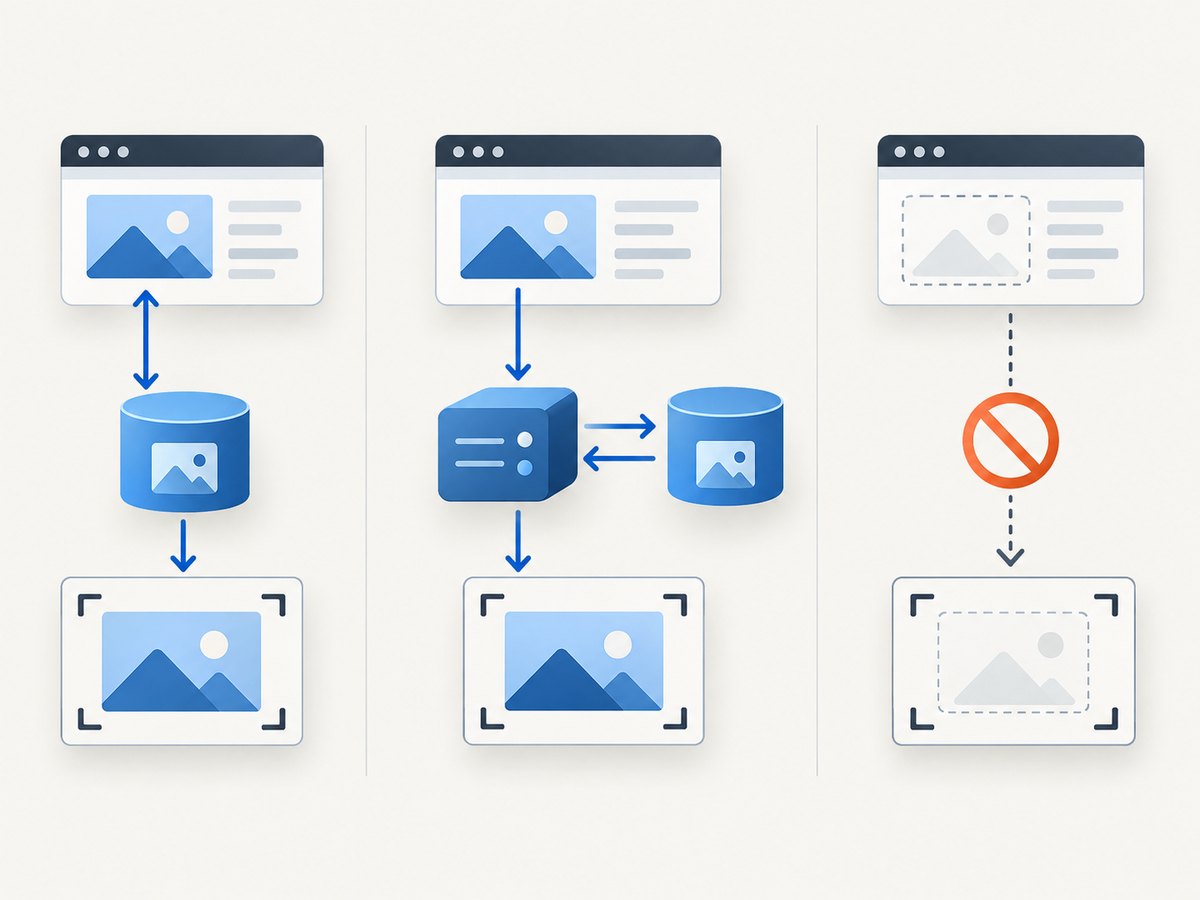
If html2canvas reports a tainted canvas or leaves an Amazon S3 image out of a screenshot, the usual fix requires both sides of the request to agree: configure the bucket to allow the page’s origin, then capture with useCORS: true. That option makes html2canvas attempt a CORS-enabled image request; it cannot grant permission that the image response does not provide. If you cannot change the bucket, use a controlled same-origin proxy or omit the image.
There are two separate questions: can the browser display the object, and can JavaScript safely read pixels after drawing it on a canvas? A publicly readable S3 object may display in an <img> while still tainting a canvas, because public access does not itself authorize cross-origin canvas access. The browser enforces that boundary, and html2canvas cannot bypass it.
1. Confirm the cause before changing configuration
Start with the browser’s developer tools. Open the Network panel, reload the page, and select the request for the exact S3 image that is missing. Check the final response after any redirect. Note the requesting page’s origin, the request method, the response’s CORS headers, and whether an OPTIONS preflight appears.
The origin is the combination of scheme, hostname, and port. For example, https://app.example.com and http://app.example.com are different origins; so are https://app.example.com and https://app.example.com:8443. The S3 rule must match the origin of the page running html2canvas, not the S3 hostname.
- If the image request fails to load at all, investigate the object URL, access permissions, redirects, signed URL expiry, and network errors in addition to CORS.
- If the image displays but canvas export or pixel reading fails, CORS is a strong suspect. A draw from an unapproved origin taints the canvas.
- If the image is simply absent from html2canvas output, inspect its request and the console. The library may be unable to load it through an approved CORS path.
- If there is no S3 request during capture, check that the image is inside the captured element and that the element is not ignored or hidden.
MDN explains that drawing cross-origin data without CORS approval taints a canvas, preventing script access to its pixels. See MDN’s CORS-enabled images guide. The html2canvas FAQ likewise says to enable useCORS when the image server sends the appropriate header, or use a proxy.
2. Configure S3 CORS for the page origin
In the Amazon S3 console, open the bucket’s permissions and its CORS configuration. Add a rule that permits the actual application origin and the methods used to retrieve the image. This narrow example allows a page at https://app.example.com to request images with GET or HEAD:

[
  {
    "AllowedOrigins": ["https://app.example.com"],
    "AllowedMethods": ["GET", "HEAD"],
    "AllowedHeaders": ["*"]
  }
]
Replace the sample origin with the exact scheme, hostname, and port used by your page. Add separate origins for other environments, such as a staging hostname or local development origin, only when required. Keep the allowed origins and methods as narrow as your application permits.
AWS matches a CORS rule using the request origin, method, and requested headers. It uses the first matching rule, so review rule order and overlaps if a broader or earlier rule is present. If the browser sends a preflight request, the rule must also allow the requested method and every requested header. Consult the Amazon S3 CORS configuration documentation for the console format and matching behavior.
Do not confuse bucket CORS with object access policy. CORS tells browsers whether a page from an origin may use a cross-origin response in browser APIs. It does not make a private object public, and allowing public reads does not automatically add the CORS response headers. Preserve your existing access controls; grant only the access the application actually needs.
3. Capture with html2canvas and useCORS
Once S3 returns an appropriate Access-Control-Allow-Origin response header, configure html2canvas to request the image using CORS. This standalone example assumes the library is loaded on the page and that the S3 rule matches the page origin:
<div id="capture">
  <h1>Product preview</h1>
  <img
    id="hero"
    crossorigin="anonymous"
    src="https://bucket.s3.amazonaws.com/path/image.jpg"
    alt="Product"
  >
</div>
<button id="save">Save screenshot</button>
<script>
  document.querySelector('#save').addEventListener('click', async () => {
    const element = document.querySelector('#capture');

    try {
      const canvas = await html2canvas(element, {
        useCORS: true,
        allowTaint: false,
        imageTimeout: 15000
      });

      // Export verifies that the canvas is readable.
      const png = canvas.toDataURL('image/png');
      const link = document.createElement('a');
      link.href = png;
      link.download = 'capture.png';
      link.click();
    } catch (error) {
      console.error('Screenshot capture failed:', error);
    }
  });
</script>
The crossorigin="anonymous" attribute sets the mode for the browser’s direct image element request. The response still needs to authorize the page origin. In html2canvas, useCORS: true tells the library to try loading images through CORS. The attribute alone and the option alone cannot compensate for a missing or mismatched S3 response header.
allowTaint defaults to false, as does useCORS. Keeping allowTaint: false makes html2canvas avoid drawing an image in a way that would leave an unreadable canvas. Setting it to true is not a CORS fix: the browser can still block export methods such as toDataURL() or pixel reads. See the html2canvas configuration reference for these options and imageTimeout, whose documented default is 15,000 milliseconds.
Wait for images when capture starts before they load
CORS can be correct while capture still races image loading. If your page creates image elements dynamically, wait for them to finish before capturing. This helper waits for successful loads and reports failed URLs:
async function waitForImages(root) {
  const images = [...root.querySelectorAll('img')];
  await Promise.all(images.map(image => {
    if (image.complete && image.naturalWidth > 0) return Promise.resolve();
    return new Promise((resolve, reject) => {
      image.addEventListener('load', resolve, { once: true });
      image.addEventListener('error', () => {
        reject(new Error(`Image failed to load: ${image.src}`));
      }, { once: true });
    });
  }));
}

const target = document.querySelector('#capture');
await waitForImages(target);
const canvas = await html2canvas(target, { useCORS: true });
For production code, add a timeout to the helper if an image could remain pending indefinitely. Also account for lazy-loaded images: scroll them into view or otherwise trigger the page’s loading behavior before waiting. html2canvas can only render content the browser has made available to it.
4. Choose the right fallback if S3 cannot change
| Approach | Use it when | Requirement and tradeoff |
|---|---|---|
S3 CORS plus useCORS |
You control the bucket response. | Best direct path; the rule must match origin, method, and headers. |
| Same-origin proxy | The image server cannot return CORS headers you need. | Adds server work, latency, cost, and a security surface that must be restricted. |
| Exclude the image | The image is optional for this capture. | Simplest fallback, but the screenshot omits that visual content. |
Use a controlled proxy
html2canvas documents a proxy option for fetching cross-origin resources through a proxy. A minimal invocation looks like this:
const canvas = await html2canvas(document.querySelector('#capture'), {
  proxy: '/image-proxy',
  useCORS: false
});
The endpoint above is an example application route, not a built-in html2canvas or AWS URL. Implement it on your own server. It should accept only URLs you explicitly permit, validate the destination host and scheme, and return an appropriate image content type. Apply authentication or an allowlist where appropriate, set sensible response-size and timeout limits, and avoid forwarding credentials. An unrestricted URL-fetching endpoint can become an open proxy and can expose internal services. Review the html2canvas proxy documentation for its expected proxy behavior.
Exclude a resource that is not needed
If the image is optional, mark it for html2canvas to ignore:
<img src="https://bucket.s3.amazonaws.com/optional.jpg"
     data-html2canvas-ignore="true" alt="Optional decoration">
You can also use the documented ignoreElements configuration callback to exclude matching elements. This is useful to isolate whether a particular image is the cause, or to produce a valid capture when that asset is nonessential. It does not repair CORS, and the resulting image will not include the excluded content.
5. Verify the fix systematically
- Identify the final request. Check the exact image URL that loads after redirects. Signed URLs, CDNs, and alternate image variants can return different headers.
- Check the requesting origin. In developer tools, inspect the request’s
Originheader when present. It should correspond to the page’s origin. - Check the response. Confirm that
Access-Control-Allow-Originauthorizes that origin. A wildcard may be appropriate for some non-credentialed designs, but an exact origin is often easier to constrain. - Check preflight if present. Confirm that S3’s rule allows the requested method and headers. Remember that S3 selects the first matching rule.
- Capture and export. Retry with
useCORS: true, then callcanvas.toDataURL()or perform the intended read. A successful render alone does not prove the canvas is readable. - Isolate other resources. Temporarily remove the S3 image. If capture still fails, investigate other images, SVGs, fonts, iframes, or canvases drawn elsewhere.
Use a fresh browser load after changing configuration, and inspect the response again rather than assuming the new rule affected the specific object path or delivery route. A cache, redirect, alternate hostname, or CDN can make the final response differ from the bucket configuration you expected.
6. Troubleshooting common errors
| Symptom | Likely cause | What to do |
|---|---|---|
Image displays, but toDataURL() throws a security error. |
The image was drawn without successful CORS approval, tainting the canvas. | Verify the final response’s allow-origin header and use useCORS: true. Do not treat allowTaint: true as an export fix. |
| Image is missing from the rendered canvas. | CORS request was not authorized, image loading failed, or capture began too early. | Inspect Network and Console, correct S3 CORS, and wait for images before capture. |
| It works locally but fails in production. | The development origin is allowed, but the production origin, scheme, or port is different. | Add the exact production origin to the CORS configuration and verify the response from that deployment. |
| It works on one image URL but not another. | The other URL redirects, uses a CDN, has different permissions, or serves a different response. | Inspect the final response and its headers for each failing URL. |
| Preflight returns an error or the image request is blocked. | The rule does not match the method or a requested header. | Inspect the OPTIONS request and adjust AllowedMethods and AllowedHeaders narrowly. |
useCORS: true makes no difference. |
The server did not authorize the origin, or another resource is tainting the canvas. | Check response headers, then isolate images and other drawn resources one at a time. |
| Image request times out. | Slow delivery, a stalled request, or a timeout shorter than the asset’s load time. | Check network and server behavior; adjust html2canvas imageTimeout deliberately and wait for image readiness. |
| Image is visible inside a cross-origin iframe but absent in capture. | Same-origin policy prevents the parent page from reading arbitrary iframe contents. | Capture within the iframe’s own page if you control it, or use an authorized server-side capture path. html2canvas options cannot grant iframe access. |
| A canvas inside the page is already unreadable. | Earlier code drew unapproved cross-origin content into that canvas. | Fix the earlier image load and redraw into a fresh canvas. Changing options at the later capture step cannot cleanse a tainted canvas. |
Browser security applies to every resource drawn into the target, not only S3 images. An allowed S3 image does not make a canvas readable if an unrelated image or nested canvas taints it. Cross-origin iframes and pre-tainted canvases remain subject to browser security restrictions; see the html2canvas FAQ and MDN guidance.
7. Performance, reliability, and cost considerations
Direct CORS loading avoids a separate proxy hop. A proxy can help when you cannot configure the image host, but it adds a request path and server resources. Set limits and timeouts, and consider whether images can be cached safely. For signed or personalized images, be careful not to share cached responses across users.
Large images consume memory when decoded and drawn into a canvas. Use appropriately sized source assets for the intended capture dimensions, avoid loading images the capture does not need, and do not capture repeatedly when the content has not changed. Full-page captures and high pixel density increase the canvas dimensions and memory needed; browser limits vary, so keep captures at a practical size.
For reliability, verify the final response rather than relying on a successful object URL in a new tab. Recheck after changing a bucket rule, CDN, redirect, or signed URL setup. Treat image load failures distinctly from CORS failures in logs so you can tell whether a request was denied, timed out, or never started. Do not broaden CORS or public access as a general troubleshooting shortcut; permit only the origins and access pattern your application needs.
Or skip the browser setup
If your goal is a clean website screenshot rather than exporting a canvas from your own page, ScreenshotNeo is a website screenshot API and MCP server. One GET request returns an image or PDF, and the API documentation describes its options. For example, save a WebP capture of a page:
curl -G "https://api.screenshotneo.com/v1/shot" \
  -d access_key=YOUR_API_KEY \
  --data-urlencode url=https://stripe.com \
  -o shot.webp
ScreenshotNeo accepts cookie and consent banners and removes more than 60 known consent platforms, newsletter popups, and chat widgets before capture; each step can be turned off. Bot checks, blank pages, failed loads, timeouts, and cache hits are not billed, and each response reports its page verdict and billing status in headers. Its MCP server gives AI agents tools to take screenshots, get page information, and capture PDFs. The free plan includes 1,000 screenshots a month with no card; paid plans start at $5 for 3,000 screenshots.
Sign up free for 1,000 screenshots a month, with no card required.
FAQ
Does a public S3 bucket automatically allow html2canvas to read images?
No. Public read access and browser CORS authorization are separate. The image response still needs to authorize the page origin for canvas use.
Can I use a wildcard origin?
A wildcard can work for some non-credentialed requests, but it is broader than a specific origin. Choose the narrowest rule that fits your application and account for credential behavior when relevant.
Will changing S3 CORS fix a cross-origin iframe?
No. S3 CORS does not grant a parent page access to another origin’s iframe document. The iframe’s own origin and browser same-origin protections still apply.
Can I safely set allowTaint to true?
It may permit drawing in situations where the resulting canvas is tainted, but it does not make that canvas readable or exportable. For a usable screenshot, make every included resource CORS-approved or use a suitable proxy.
Why does the image work in an ordinary browser tab?
Top-level display does not require the page’s JavaScript to read the image pixels. Canvas export has a stricter security requirement, which is why an image may appear normally yet fail in html2canvas.


