How to Fix Selenium WebDriver Errors Launching PhantomJS
Diagnose PhantomJS startup failures by checking the executable, GhostDriver service, Selenium capabilities, protocol versions, and runtime libraries.
Short answer: Selenium WebDriver errors launching PhantomJS do not have one universal fix. PhantomJS 2.1.1 included the GhostDriver WebDriver server, so a failed startup can come from the PhantomJS executable, missing Linux libraries, a GhostDriver process or port, stale Selenium capabilities, a Selenium 4 protocol mismatch, or the surrounding environment. Capture the complete exception and versions first, then isolate each layer.
This guide gives a repeatable diagnosis for “Selenium WebDriver errors launching PhantomJS,” including how to launch PhantomJS with Selenium, how to verify the legacy service independently, and when migration is the practical choice. PhantomJS is a legacy path: current Selenium documentation lists maintained browser-driver options and Selenium Manager, but does not list PhantomJS as a current target.
1. Capture the exact failure before changing code
Record these details in one issue or terminal transcript:
- The complete exception, including the first “caused by” section.
- Language binding and version: Python, Java, Ruby, JavaScript, C#, or another client.
- Selenium version, PhantomJS version, and operating system and architecture.
- The exact PhantomJS executable path and launch command.
- Whether the client starts a local process or connects to a remote WebDriver endpoint.
- Driver and browser logs, including warnings and deprecations.
Selenium’s troubleshooting guidance recommends trying the same operation in multiple browsers to separate a Selenium problem from a driver-specific problem. Its logging guidance also recommends preserving actionable warnings, because a deprecation can identify a version transition even when the final exception is generic. See the Selenium troubleshooting documentation and logging guidance.
2. Verify PhantomJS outside Selenium
First prove that the executable can start on its own. Replace the path with the binary used by your test:
./phantomjs --version
./phantomjs -v
./phantomjs --help
The documented PhantomJS download is version 2.1.1. Its Linux binary requires Fontconfig and documents GLIBCXX_3.4.9 and GLIBC_2.7 requirements. Check the official PhantomJS download page and verify that the binary matches your operating system and architecture before blaming Selenium.
Linux checks
file /opt/phantomjs/bin/phantomjs
ldd /opt/phantomjs/bin/phantomjs | grep 'not found'
fc-list | head
ldd --version
If ldd reports a missing library, install the compatible system package or use a host image that provides the required runtime. An executable permission problem has a different fix:
ls -l /opt/phantomjs/bin/phantomjs
chmod +x /opt/phantomjs/bin/phantomjs
Do not copy a binary from an unrelated architecture. An “Exec format error” generally means the host and executable architectures differ; confirm with uname -m and file.
3. Start and test GhostDriver as a separate service
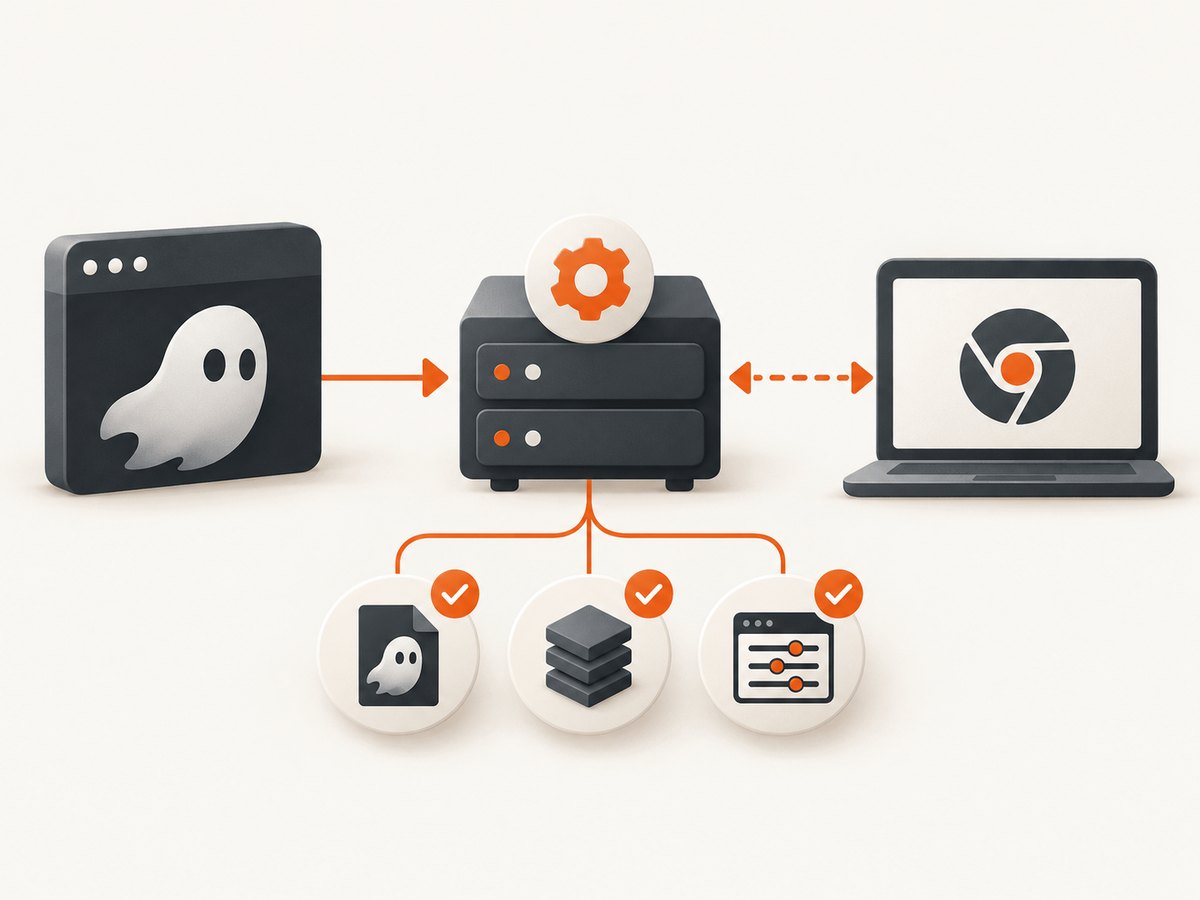
GhostDriver is PhantomJS’s Remote WebDriver implementation, and version 1.2.0 was integrated into PhantomJS 2.1.1. Its legacy project documentation uses this launch form:
./phantomjs --webdriver=8910Keep that process running and confirm that the selected port is listening:
curl -i http://127.0.0.1:8910/status
ss -ltnp | grep 8910
The exact status response can vary by legacy build, so treat a connection refusal, immediate process exit, or occupied port as the useful signal. If another process owns the port, choose a free port and configure the client with the same host and port. If PhantomJS exits immediately, run it in the foreground and inspect stderr rather than starting it in the background.
For a remote setup, check firewall rules, container port mappings, and the bind address. A service bound to 127.0.0.1 is reachable only from the same host. Never assume that a successful TCP connection means a valid WebDriver session; capability negotiation can still fail afterward.
4. Use a minimal Selenium launch
Python with a local PhantomJS service
from selenium import webdriver
from selenium.webdriver.common.desired_capabilities import DesiredCapabilities

caps = DesiredCapabilities.PHANTOMJS.copy()
caps['phantomjs.page.settings.userAgent'] = 'Mozilla/5.0'

driver = webdriver.Remote(
    command_executor='http://127.0.0.1:8910',
    desired_capabilities=caps,
)
try:
    driver.get('https://example.com')
    print(driver.title)
finally:
    driver.quit()
Older Python bindings may expose a dedicated webdriver.PhantomJS constructor; newer bindings can remove or deprecate it. If the constructor is unavailable, use the remote endpoint as above or pin a legacy binding only while planning migration. Do not mix examples from different binding generations without checking their API.
Java with a remote endpoint
import java.net.URL;
import org.openqa.selenium.WebDriver;
import org.openqa.selenium.remote.DesiredCapabilities;
import org.openqa.selenium.remote.RemoteWebDriver;

DesiredCapabilities caps = new DesiredCapabilities();
caps.setBrowserName("phantomjs");
WebDriver driver = new RemoteWebDriver(new URL("http://127.0.0.1:8910"), caps);
try {
    driver.get("https://example.com");
    System.out.println(driver.getTitle());
} finally {
    driver.quit();
}
The Java example illustrates the legacy shape, not a promise that every current Selenium release will accept these capabilities. If session creation fails after the service is reachable, continue with the capability and protocol checks below.
5. Diagnose capability and protocol failures
Selenium 4 uses the W3C WebDriver protocol by default. Old PhantomJS examples often contain JSON Wire capability names or vendor keys that a newer client validates differently. If the failure began after a Selenium upgrade, compare the old and new capability payloads and remove keys that are not required.
| Symptom | Likely layer | Action |
|---|---|---|
| Executable not found or permission denied | Path or filesystem | Use an absolute path, verify permissions, and run the binary directly. |
| Process exits before listening | Runtime libraries or PhantomJS | Run in the foreground; inspect stderr and ldd output. |
| Connection refused | GhostDriver service or port | Start phantomjs --webdriver=PORT; check bind address and firewall. |
| Session not created | Capabilities or protocol | Try a minimal capability set and inspect Selenium 4 migration issues. |
| Works in one browser only | Driver-specific behavior | Use a supported browser to isolate the Selenium client from PhantomJS. |
| Page opens but test fails later | Synchronization | Add explicit waits; launch success does not prove page readiness. |
Selenium’s documentation says the most common Selenium-related error is poor synchronization. That advice usually concerns commands after startup, so do not treat a wait failure as proof that PhantomJS failed to launch. Separate session creation from navigation and element waits.
6. Check Selenium Manager expectations
Selenium Manager is included beginning with Selenium 4.6 and can obtain drivers when a supported driver is unavailable. The documented browser-driver list does not include PhantomJS. Therefore, Selenium Manager is not an automatic repair for a PhantomJS startup error. It is relevant when you migrate to a browser and driver covered by current Selenium documentation.
For a maintained automation project, compare migration paths using four questions:
- Is the browser and driver named in current Selenium support guidance?
- Can the target environment run the required executable and libraries?
- Does the test depend on PhantomJS-only capabilities or rendering behavior?
- How much validation is needed for screenshots, JavaScript, fonts, downloads, and timing?
Run a minimal test in a currently supported browser before rewriting the whole suite. This tells you whether the client, test code, or PhantomJS integration is responsible for the original error.
7. Common environment edge cases
Containers and CI
Confirm that the binary exists inside the container, not only on the host. Print the working directory, absolute path, architecture, and library errors in CI logs. Allocate a writable temporary directory if the process needs one, and avoid assuming that a desktop font installation exists in a minimal image.
Permissions and service users
A command that works as your shell user can fail under a service account. Check execute permission on every parent directory, the account’s temporary directory, and any profile or cache path. Keep the service account’s environment explicit instead of relying on interactive shell startup files.
Proxy, TLS, and DNS
A PhantomJS session can launch successfully while navigation fails because the process cannot resolve DNS, reach a proxy, or validate a certificate. Test the target URL from the same host and account. Distinguish a WebDriver connection error from a page network error in logs.
Concurrency and ports
Each parallel worker needs an isolated port and process. Reusing one GhostDriver endpoint can create races, stale sessions, or profile collisions. Allocate ports from the test runner and always call quit() in a finally block.
8. A decision checklist
- Can the exact PhantomJS executable print its version?
- Does
lddshow missing libraries on Linux? - Does GhostDriver remain alive when launched with
--webdriver=PORT? - Is the client connecting to that same host and port?
- Does a minimal session work with only the required capabilities?
- Did the problem begin with a Selenium or binding upgrade?
- Does the same operation work in a currently supported browser?
- Is the remaining issue navigation, synchronization, or page content rather than launch?
9. Or skip the browser setup
If your goal is a reliable website screenshot rather than maintaining a PhantomJS stack, ScreenshotNeo provides a single GET request that returns PNG, JPEG, WebP, or PDF. Its capture pipeline accepts cookie and consent banners like a visitor, then removes more than 60 known consent platforms, newsletter popups, and chat widgets before the shot. Each step can be turned off.

Only clean shots are billed. Bot checks, blank pages, timeouts, failed loads, and cache hits cost nothing, and response headers identify the page verdict and billing result.
Read the ScreenshotNeo API documentation for the complete option list. The basic calls are:
curl -G "https://api.screenshotneo.com/v1/shot" -d access_key=YOUR_API_KEY --data-urlencode url=https://stripe.com -o shot.webpimport requests
r = requests.get("https://api.screenshotneo.com/v1/shot", params={"access_key": "YOUR_API_KEY", "url": "https://stripe.com"}, timeout=90)
open("shot.webp", "wb").write(r.content)const q = new URLSearchParams({ access_key: 'YOUR_API_KEY', url: 'https://stripe.com' });
const res = await fetch(`https://api.screenshotneo.com/v1/shot?${q}`);Options include full-page capture with lazy images loaded, CSS-selector element capture, dark mode, 12 device presets or any viewport, retina scale, PDF paper and page settings, custom CSS and JavaScript, clicks, selector waits, delays, network-idle waits, request blocking, headers, cookies, user agents, authorization, timezone, geolocation, transparent backgrounds, resizing, chosen cache TTLs, signed public image links, asynchronous jobs with signed webhooks, bulk capture for 100 URLs per call, a usage API, and an OpenAPI specification. Parameter names used by other screenshot APIs also work, which helps when switching.
ScreenshotNeo also includes an MCP server with take_screenshot, get_page_info, and capture_pdf tools for Claude, Cursor, and other MCP clients. 1,000 screenshots per month are free with no card; paid plans start at $5 for 3,000 shots. Create a free ScreenshotNeo account.
10. Performance, reliability, and cost notes
For PhantomJS, startup cost and process stability matter more than micro-optimizing Selenium calls. Reuse a healthy service only when sessions are isolated and you can detect a dead process; otherwise start one service per worker. Keep screenshots and logs for failed launches, but rotate them in CI.
For ScreenshotNeo, use a cache TTL for repeated URLs, bulk capture for batches, and asynchronous jobs with signed webhooks for long-running work. Inspect X-Page-Verdict and X-Billed so retries distinguish a clean billable shot from a failed or cache response.
FAQ
Is PhantomJS still supported by Selenium?
PhantomJS can be reached through its legacy GhostDriver service, but current Selenium driver guidance does not list it as a supported browser target. Treat it as a compatibility path and plan validation before migration.
Can Selenium Manager install PhantomJS?
Do not assume so. Selenium Manager covers documented browser-driver workflows; PhantomJS is not listed among those targets.
Why does the service run but session creation fail?
A listening GhostDriver endpoint proves only that the process accepts connections. Capabilities, protocol dialect, and client-version compatibility can still prevent a session.
Should I add longer waits to fix a launch error?
Only after session creation succeeds. Longer waits address synchronization and page readiness, not a missing executable, dead service, or malformed capabilities.
What should I provide when asking for help?
Include the complete exception, Selenium binding and version, PhantomJS version, operating system and architecture, launch command, endpoint, and relevant driver logs.


