How to Fix Selenium with PhantomJS Forms That Validate but Do Not Submit
A valid PhantomJS form can still fail in its submit handler, event flow, navigation, or network layer. Use this diagnostic guide to find the missing POST and fix it safely.
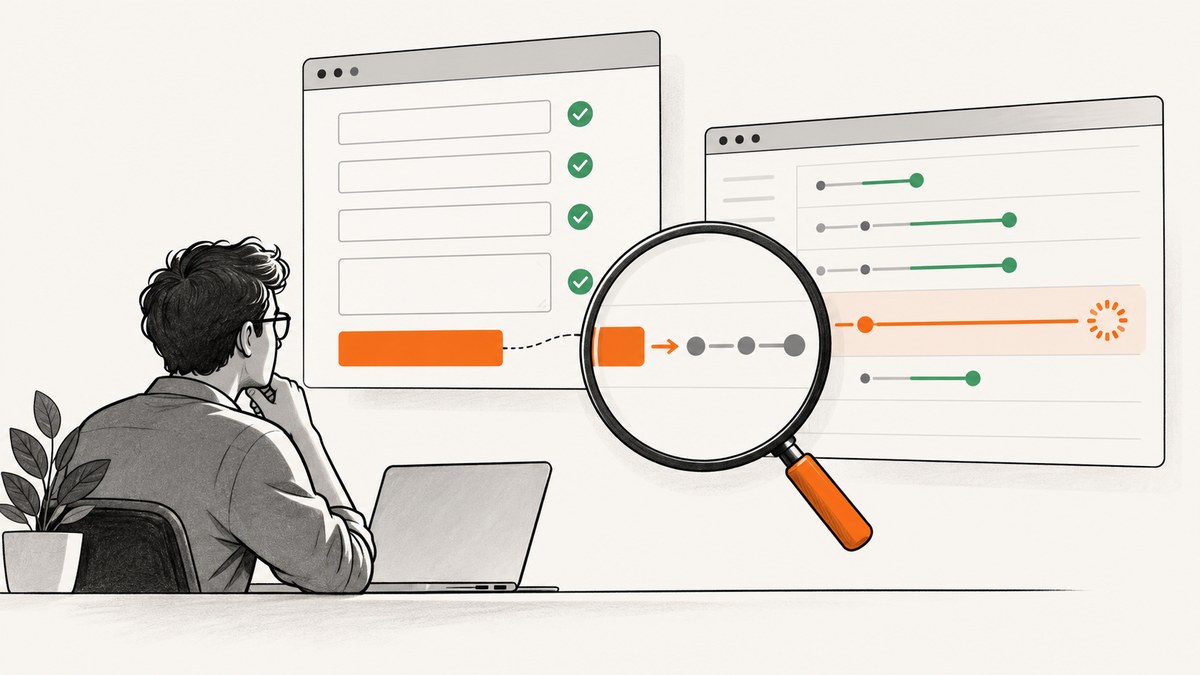
A form that passes client-side validation has only completed one stage. The page may still stop in a submit handler, call preventDefault(), throw a JavaScript exception, fail to start its AJAX request, get blocked during navigation, or hit an old PhantomJS TLS/network problem. Selenium cannot report a successful submission merely because the fields look valid.
The most reliable repair sequence is:
- Find the intended form and its real, enabled submit control.
- Capture PhantomJS JavaScript, console, and resource errors.
- Verify whether a POST or GET was actually sent.
- Trace click, validation callback, submit event, and
preventDefault(). - Use the historical PhantomJS settings workaround only when you are maintaining that legacy stack.
- Move the test to a maintained WebDriver browser when the site needs current JavaScript or TLS.
This article explains each step, shows runnable Python and PhantomJS examples, and gives a decision guide for click(), form submission, JavaScript submission, and migration.
1. Validation and submission are different operations
HTML constraint validation runs before a form is submitted. An invalid control fires an invalid event and prevents the submission attempt. A valid result only means that the browser did not reject the fields at that stage. Application code still controls what happens next.
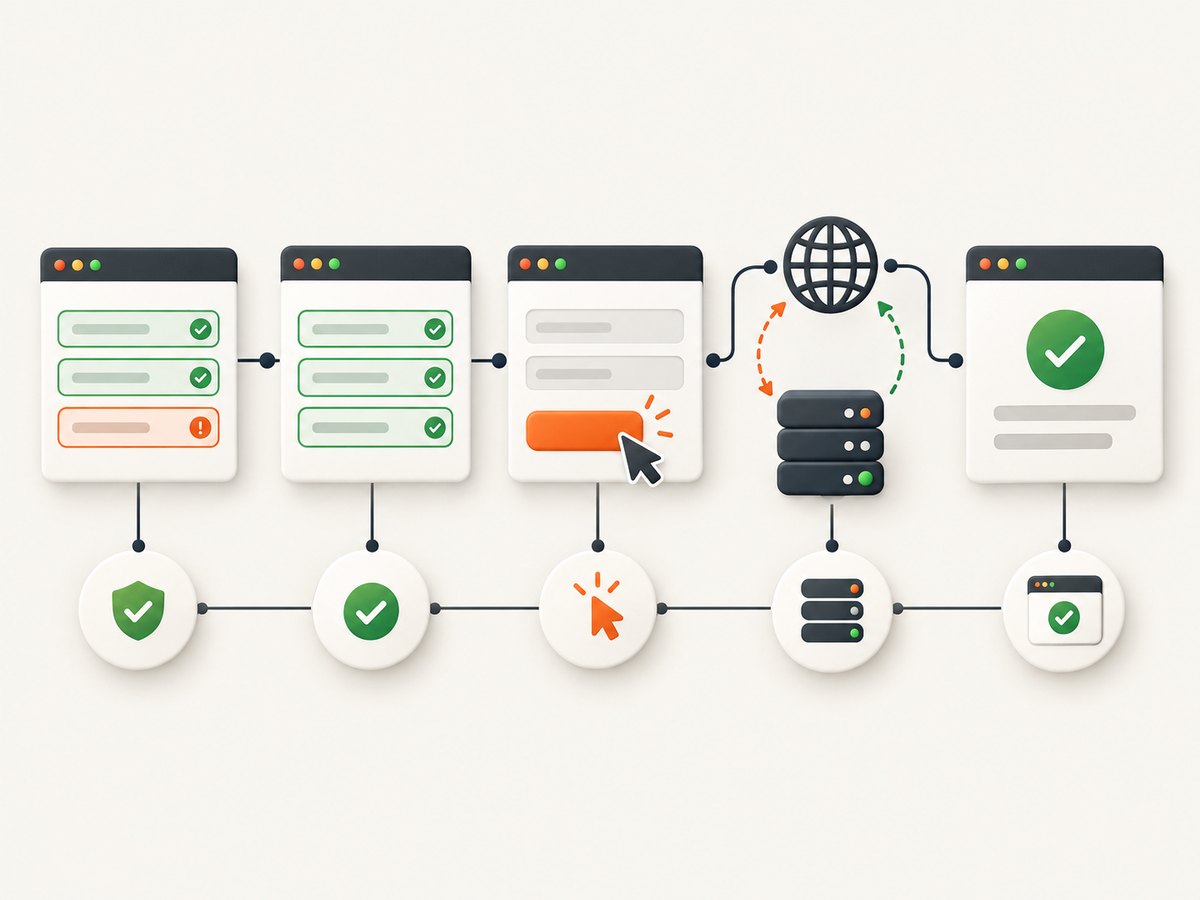
Typical post-validation failure points include:
- A submit listener calls
event.preventDefault()and an AJAX callback never runs. - A validation library throws an exception before it starts the request.
- The submit control is outside the target form, disabled, hidden, covered by another element, or matched by the wrong selector.
- The application expects a click event, a generated hidden field, or a submit-event listener that a direct native submission bypasses.
- The request is sent but fails because of cookies, CSRF state, redirects, proxy configuration, certificate support, or an old TLS library.
- Navigation occurs, but the test checks the old URL or takes a screenshot before the response is available.
Keep these stages separate in your logs: field validation, click, submit event, request creation, response, redirect, and final page state.
2. Choose click, form submission, or JavaScript deliberately
Selenium exposes click and submit as distinct interactions. Selenium’s current guidance recommends clicking the applicable submission button; in Selenium 4, the submit operation is implemented by executing a script rather than a separate endpoint. See the Selenium element interaction documentation.
| Approach | What it does | When to use it | Main risk |
|---|---|---|---|
button.click() |
Simulates the user-facing control and its click handlers. | Default choice for login, checkout, search, and application forms. | Fails if the control is obscured, disabled, outside the form, or not yet ready. |
form.submit() |
Submits the form directly. | Legacy fallback when the page accepts native submission. | Native form.submit() does not fire the form’s submit event, so application listeners can be skipped. |
JavaScript form.submit() |
Same native submission semantics, invoked through script. | Last-resort compatibility workaround after inspecting the page contract. | Bypasses submit listeners and can hide the real event-flow bug. |
requestSubmit() |
Submits through a selected control and preserves submit-event behavior in browsers that implement it. | Modern browsers when you need event listeners and validation. | PhantomJS may not implement this modern API. |
MDN documents that calling form.submit() directly does not dispatch the form’s submit event: HTMLFormElement: submit event. If your application starts an AJAX call from that event, replacing a click with native submission can make the problem worse.
3. Verify the form and control before changing timing
Use stable selectors and assert the DOM state. Selenium’s submit operation applies to form elements; calling it on an element outside a form is a no-op in the JavaScript API. Prefer a unique form ID or name, then locate the actual submit button inside it.
from selenium import webdriver
from selenium.webdriver.common.by import By
from selenium.webdriver.support.ui import WebDriverWait
from selenium.webdriver.support import expected_conditions as EC

# Use the PhantomJS driver only when your legacy environment requires it.
driver = webdriver.PhantomJS()
driver.set_page_load_timeout(45)
driver.get("https://example.test/login")

form = WebDriverWait(driver, 20).until(
    EC.presence_of_element_located((By.CSS_SELECTOR, "form[name='login']"))
)
submit = WebDriverWait(driver, 20).until(
    EC.element_to_be_clickable((By.CSS_SELECTOR, "form[name='login'] button[type='submit']"))
)

assert form.is_displayed()
assert submit.is_displayed()
assert submit.is_enabled()
assert submit.find_element(By.XPATH, "ancestor::form[1]").get_attribute("name") == "login"

# Fill fields, then use the real control.
driver.find_element(By.NAME, "email").send_keys("user@example.test")
driver.find_element(By.NAME, "password").send_keys("correct-horse")
submit.click()

print("URL after click:", driver.current_url)
Do not rely on a screenshot as proof. Assert a URL change, a success element, a server response observed by a proxy, or a known authenticated state. A page can look unchanged while an asynchronous request is still pending.
4. Capture PhantomJS errors and network activity
PhantomJS provides page.onError for syntax and runtime exceptions. Console output from code evaluated in the page is not automatically shown, so install an onConsoleMessage handler as well. Its resource callbacks let you see whether the browser created a request at all. The PhantomJS WebPage API documents these hooks.
var page = require('webpage').create();
var system = require('system');

page.onError = function (message, trace) {
  console.log('PAGE ERROR: ' + message);
  trace.forEach(function (item) {
    console.log('  at ' + item.file + ':' + item.line);
  });
};

page.onConsoleMessage = function (message) {
  console.log('CONSOLE: ' + message);
};

page.onResourceRequested = function (requestData, networkRequest) {
  console.log('REQUEST: ' + requestData.method + ' ' + requestData.url);
};

page.onResourceReceived = function (response) {
  if (response.stage === 'end') {
    console.log('RESPONSE: ' + response.status + ' ' + response.url);
  }
};

page.open('https://example.test/login', function (status) {
  console.log('OPEN STATUS: ' + status);
  if (status !== 'success') {
    phantom.exit(1);
    return;
  }

  page.evaluate(function () {
    var form = document.querySelector("form[name='login']");
    var button = form && form.querySelector("button[type='submit']");
    if (!form || !button) {
      console.log('FORM OR BUTTON NOT FOUND');
      return;
    }
    form.addEventListener('submit', function () {
      console.log('SUBMIT EVENT FIRED');
    });
    button.click();
  });

  window.setTimeout(function () {
    console.log('FINAL URL: ' + page.url);
    phantom.exit();
  }, 5000);
});
Interpret the result in order:
- No click or submit log: selector, visibility, overlay, or page-readiness problem.
- Submit log but no request: handler logic,
preventDefault(), exception, or failed AJAX setup. - Request log with an error response: inspect status, redirects, cookies, CSRF, proxy, and TLS.
- Successful response but no visible change: the application may update the DOM asynchronously or return an error payload handled in JavaScript.
5. Trace event flow inside the page
Add temporary instrumentation before clicking. This distinguishes a validation callback from a real submit event and exposes code that cancels the default action.
driver.execute_script("""
(function () {
  var form = document.querySelector("form[name='login']");
  if (!form) { console.log('missing form'); return; }
  form.addEventListener('click', function (e) {
    console.log('click target=' + (e.target.name || e.target.type || e.target.tagName));
  }, true);
  form.addEventListener('submit', function (e) {
    console.log('submit event defaultPrevented=' + e.defaultPrevented);
  }, true);
})();
""")
If a listener cancels the event intentionally, inspect its success callback. Some libraries validate, prevent the browser’s navigation, and then issue an AJAX request. Others call native form.submit() after validation. The latter is expected to skip other submit listeners, so do not add another listener and assume it will run.
6. The historical PhantomJS compatibility workaround
The historical report matching this problem used Selenium 1.43, PhantomJS 1.98, Python 2.7, and Ubuntu 14.04. Its accepted workaround enabled phantomjs.page.settings.localToRemoteUrlAccessEnabled and phantomjs.page.settings.browserConnectionEnabled, then submitted the form element. Treat this as a version-specific report, not a guaranteed modern fix.
from selenium import webdriver
from selenium.webdriver.common.by import By

service_args = [
    '--local-to-remote-url-access=true'
]
driver = webdriver.PhantomJS(service_args=service_args)

# The second setting is exposed through PhantomJS page settings in older wrappers.
driver.execute_script("""
  if (window.callPhantom) {
    window.callPhantom({type: 'set-setting',
      name: 'browserConnectionEnabled', value: true});
  }
""")

form = driver.find_element(By.CSS_SELECTOR, "form[name='login']")
form.submit()
print(driver.current_url)
Wrapper support for page settings varies, so verify the exact PhantomJS binary and Selenium binding rather than copying this blindly. Record a resource request and response after applying it. A changed screenshot or URL without a request does not prove that the form reached the server.
7. Check network, cookies, CSRF, proxy, and TLS
- CSRF: Confirm the hidden token was present when the request was created and that the session cookie matched the page that issued it.
- Cookies: A login flow can silently fail when redirects set cookies that PhantomJS rejects or does not return.
- Redirects: Log every response and final URL. A 302 to a login page often means the session was not accepted.
- Proxy: Compare direct and proxy runs. Proxy latency can trigger premature waits, and authentication settings can prevent the request from leaving the browser.
- TLS: Old PhantomJS builds may not negotiate the protocols or certificates required by current HTTPS sites. Check the exact OpenSSL support in the binary.
- Mixed content and remote resources: A page that loads locally can still fail when scripts or API calls use a different origin.
Use a network proxy or PhantomJS resource callbacks to capture method, URL, status, and redirect chain. Never infer a server-side success from client-side validation alone.
8. Wait for the right condition
Fixed sleeps hide race conditions. Wait for the control to be enabled before clicking, then wait for a success element, URL condition, or request completion. For AJAX forms, waiting for navigation may be wrong because the page intentionally stays on the same URL.
from selenium.webdriver.support.ui import WebDriverWait

wait = WebDriverWait(driver, 30)
wait.until(lambda d: d.find_element(By.CSS_SELECTOR, "form[name='login'] button[type='submit']").is_enabled())

driver.find_element(By.CSS_SELECTOR, "form[name='login'] button[type='submit']").click()

# Replace this selector with the application's actual success state.
wait.until(lambda d: d.find_element(By.CSS_SELECTOR, ".account-home").is_displayed())
When the page depends on a validation callback, wait for the callback’s observable result rather than guessing how many milliseconds the browser needs.
9. Migrate when the site is modern
PhantomJS is a legacy browser engine. If the target requires modern JavaScript syntax, newer browser APIs, current TLS behavior, or complex client rendering, continuing to add shims increases maintenance cost. Reproduce the test in a maintained Selenium WebDriver browser and keep the same diagnostic assertions: control state, submit event, request, response, and final application state.
Migration also clarifies whether the failure belongs to the site or the old engine. If the same selectors and credentials work in a maintained browser, the PhantomJS environment is the likely constraint. If both fail, continue debugging the application’s event and network flow.
10. A practical troubleshooting checklist
| Symptom | Likely cause | Fix |
|---|---|---|
| Validation message appears, no request logged | Submit handler canceled, exception, or AJAX callback failed | Enable onError, console logging, and submit-event tracing. |
| Click raises an element interaction error | Button is hidden, covered, disabled, or stale | Wait for visibility and enabled state; reacquire the element after DOM updates. |
form.submit() changes nothing |
Element is not a form or application requires submit listeners | Locate the containing form and try the real button click. |
| Request is sent but server returns 403 | Missing/expired CSRF token, cookie, or authorization | Log request headers and cookies in a safe test environment; confirm token pairing. |
| HTTPS page fails before interaction | PhantomJS TLS/certificate support or proxy issue | Check binary version, OpenSSL support, proxy settings, and migration path. |
| URL stays the same after success | AJAX form intentionally avoids navigation | Wait for the success DOM state or observe the XHR response. |
| Works intermittently | Race between rendering, validation, and click | Wait on a specific condition and capture timestamps for event/request order. |
11. Performance, reliability, and maintenance
Instrumenting every resource can produce large logs and slow diagnosis. Enable verbose request logging for a single failing case, then narrow it to the form’s endpoint and relevant redirects. Reuse a browser session when the flow requires several pages, but clear cookies between independent test cases so one login cannot mask another.
Reliability improves when assertions test the server-visible outcome. A screenshot is useful evidence for a human review, but it cannot prove that a POST was accepted. Capture the request method, response status, final URL, and application success marker. Keep PhantomJS-specific workarounds isolated behind a compatibility layer so a browser migration does not require rewriting every test.
12. Or skip the browser setup
If your goal is a clean screenshot of the result rather than an end-to-end form submission test, ScreenshotNeo provides a single GET request for a PNG, JPEG, WebP, or PDF. Its capture flow accepts cookie and consent banners like a visitor, then removes more than 60 known consent platforms, newsletter popups, and chat widgets. Each step can be turned off.

Only clean shots are billed. Bot checks and CAPTCHAs, blank pages, timeouts, failed loads, and cache hits cost nothing, and the response identifies the result with X-Page-Verdict and X-Billed headers. An MCP server exposes take_screenshot, get_page_info, and capture_pdf for Claude, Cursor, and other MCP clients.
Read the full option list and authentication details in the ScreenshotNeo documentation. The basic request is:
cURL
curl -G "https://api.screenshotneo.com/v1/shot" \
  -d access_key=YOUR_API_KEY \
  --data-urlencode url=https://stripe.com \
  -o shot.webp
Python
import requests

r = requests.get(
    "https://api.screenshotneo.com/v1/shot",
    params={"access_key": "YOUR_API_KEY", "url": "https://stripe.com"},
    timeout=90,
)
r.raise_for_status()
open("shot.webp", "wb").write(r.content)
Node.js
const q = new URLSearchParams({
  access_key: 'YOUR_API_KEY',
  url: 'https://stripe.com'
});
const res = await fetch(`https://api.screenshotneo.com/v1/shot?${q}`);
if (!res.ok) throw new Error(`Screenshot failed: ${res.status}`);
const fs = await import('node:fs/promises');
await fs.writeFile('shot.webp', Buffer.from(await res.arrayBuffer()));
ScreenshotNeo includes full-page capture with lazy images loaded, CSS-selector element capture, dark mode, device presets and custom viewports, retina scale, PDF paper and margin controls, custom CSS and JavaScript, clicks, selector or network-idle waits, request/resource blocking, headers, cookies, user agents, authorization, timezone, geolocation, transparent backgrounds, resizing, selectable cache TTL, signed image links, asynchronous jobs with signed webhooks, bulk capture for 100 URLs per call, a usage API, and an OpenAPI specification. Parameter names used by other screenshot APIs also work, which simplifies switching.
The Free plan includes 1,000 screenshots per month with no card. Paid plans start at $5 for 3,000 shots; yearly billing gives two months free, and every feature is available on every plan. Create a free ScreenshotNeo account and start with the 1,000 monthly shots.
13. FAQ
Should I always call form.submit() when validation passes?
No. Click the actual enabled submit control first. Native submission can bypass the page’s submit event and its application logic.
Why does a screenshot show a success message but no POST?
The message may be rendered locally by validation code. Confirm a resource request and response, then verify the server-side state.
Can I fix every PhantomJS submission with the two page settings?
No. That workaround is tied to an old Selenium/PhantomJS report. It does not repair JavaScript exceptions, incorrect selectors, CSRF failures, or unsupported TLS.
When is a browser screenshot API enough?
Use one when you need a rendered image or PDF and do not need to assert the application’s server-side form behavior. For an end-to-end submission test, keep a maintained WebDriver test with network and state assertions.
What is the first fact to record when debugging?
Record whether a request was created. That single observation separates DOM/event debugging from response, cookie, redirect, and TLS debugging.


