How to Fix sorry-cypress Screenshot and Video Uploads on AWS
Trace missing sorry-cypress screenshots and videos from Cypress to Director, signed S3 URLs, bucket policy, and dashboard access.
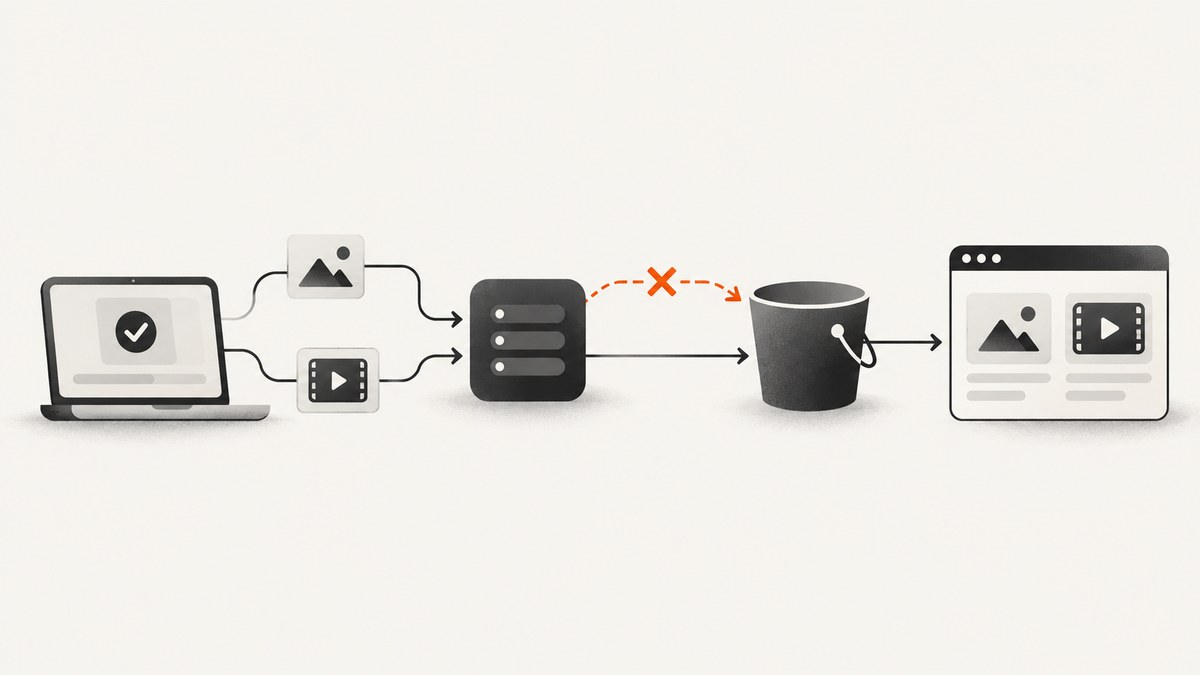
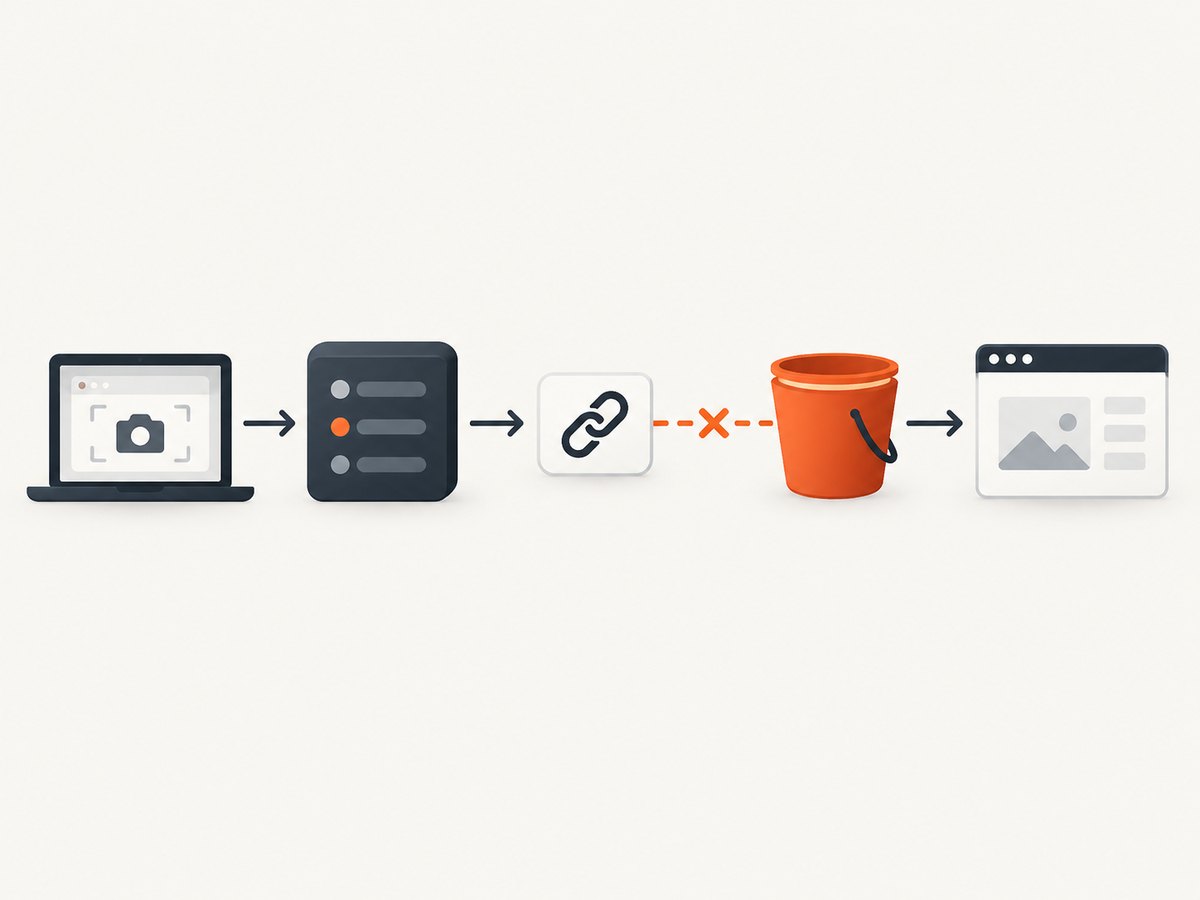
Direct answer: Debug the upload as five separate stages: Cypress creates the artifact, Director generates a signed S3 upload URL, the runner reaches and uses that URL, S3 accepts the object, and the dashboard browser can read it. Configure Director with the S3 driver and matching AWS settings, confirm Cypress is producing files, preserve every character of the signed URL, and then check bucket policy and dashboard access.
Sorry Cypress does not normally stream screenshots or videos through the dashboard. The Director service creates a signed S3 upload URL; the Cypress runner uploads directly to that URL; the dashboard later reads the stored object URL. A failure at any stage can look like “S3 upload is broken.”
1. Confirm Cypress created the screenshot or video
Start at the runner. If there is no local artifact, AWS cannot receive one.
Videos
Video recording is disabled by default. Enable it in your Cypress configuration and run with cypress run. Cypress does not record videos during cypress open.
// cypress.config.js
const { defineConfig } = require('cypress');

module.exports = defineConfig({
  video: true,
  e2e: {
    baseUrl: 'https://example.test'
  }
});
Failure screenshots
Failure screenshots are controlled by screenshotOnRunFailure. Check that it has not been disabled.
// cypress.config.js
const { defineConfig } = require('cypress');

module.exports = defineConfig({
  screenshotOnRunFailure: true,
  e2e: {
    baseUrl: 'https://example.test'
  }
});
By default Cypress clears the screenshots and videos folders before a run. If another process needs to inspect those files after a run, review trashAssetsBeforeRuns.
npx cypress run
find cypress/screenshots -type f -maxdepth 3 -print
find cypress/videos -type f -maxdepth 3 -print
For Cypress’s configuration details, see the Cypress configuration documentation.
2. Select the S3 storage driver in Director
Director must use the S3 driver. A dummy driver intentionally stores nothing, so it is a frequent cause of an empty dashboard.
SCREENSHOTS_DRIVER=../screenshots/s3.driverThe driver path is interpreted by the Director service. Check the path inside the Director container, not only in the host shell. The available drivers include S3, MinIO, Azure, and dummy storage; changing drivers changes the endpoint, signing behavior, and network checks.
3. Check every S3 setting
Inspect the effective environment inside the Director process. The names below are the settings that control credentials, destination, object names, access, and URL lifetime.
| Setting | What to verify | Why it matters |
|---|---|---|
AWS_ACCESS_KEY_ID |
Key exists and belongs to the intended AWS account | Director signs the upload request |
AWS_SECRET_ACCESS_KEY |
Secret matches the access key and has permission to write | A mismatched or restricted key produces signing or S3 errors |
S3_BUCKET |
Exact bucket name, including account and environment | A valid credential can still target the wrong bucket |
S3_REGION |
Region where the bucket exists | Region mismatches commonly cause redirects or signature failures |
S3_ACL |
Compatible with bucket policy and Public Access Block | The documented default is public-read |
S3_READ_URL_PREFIX |
Correct public or private read base URL | The dashboard uses the stored read URL |
S3_IMAGE_KEY_PREFIX |
Expected screenshot prefix | Controls where image objects are written |
S3_VIDEO_KEY_PREFIX |
Expected video prefix | Controls where video objects are written |
UPLOAD_EXPIRY_SECONDS |
Long enough for the slowest runner upload | The documented default is 90 seconds |
Do not rotate, decode, re-encode, or manually rebuild a signed URL. Its hostname, port, path, headers, and query string are part of the signature. A proxy that changes any of those values can make a valid URL fail.
4. Trace the signed-URL request
The expected sequence is:
- The Cypress runner reports the test result to Director.
- Director generates a signed S3 upload URL and returns it to the runner.
- Director stores or returns the corresponding read URL for the dashboard.
- The runner uploads the screenshot or video directly to S3.
- The dashboard browser requests the stored object URL.
The Sorry Cypress documentation describes this flow: “Director service will send a signed upload URL that cypress agent will use to upload the generated artifacts.” See the full setup documentation and the troubleshooting documentation.
Use Director logs to answer these questions in order:
- Did Director receive the result request?
- Did it generate an upload URL?
- Did it return the URL without a proxy or gateway rewriting it?
- Did the runner attempt the upload before expiry?
- Did S3 return success or a specific XML error?
If Director generated a URL, test reachability from the Cypress runner’s network, not from your laptop. The runner may use a different VPC route, DNS resolver, proxy, security group, or egress policy.
5. Make the bucket policy match your privacy model
There are two independent read and write paths: the runner must reach S3 to upload, and the browser must reach the stored object to display it. A policy that fixes one does not automatically fix the other.
The documented private-bucket pattern uses public-read object ACLs with restrictive bucket controls and optional source-CIDR limits. Its Public Access Block values are:
block_public_acls       = false
block_public_policy     = true
ignore_public_acls      = false
restrict_public_buckets = true
Use this pattern only when it matches your security requirements and bucket policy. A restrictive policy can allow uploads from the runner while denying downloads from dashboard users. Include the browser users’ egress CIDRs when the policy limits reads by source IP or private VPC.
The advanced AWS template also exposes an AllowedCIDRRanges control, a seven-day default screenshot lifecycle setting, and optional KMS encryption. Treat those as deployment configuration defaults, not performance guarantees. Review the AWS deployment documentation before applying them.
6. Verify the AWS deployment wiring
The basic CloudFormation deployment creates the Sorry Cypress dashboard, API, Director, S3 bucket, and CloudWatch log groups. It then provides a Director URL that Cypress must use. If Cypress still points to an old or incorrect Director URL, S3 can be healthy while the dashboard remains empty.
- Print the Director URL configured in the Cypress project.
- Compare it with the URL produced by the current ECS or CloudFormation deployment.
- Confirm the runner can resolve and connect to that hostname and port.
- Check Director logs for the incoming result request.
- Check API and database connectivity if Director receives results but the dashboard has no test record.
7. Turn on the right diagnostics
Enable Cypress server diagnostics for the runner:
DEBUG=cypress:server:* npx cypress runThen inspect each service separately:
| Component | Look for |
|---|---|
| Cypress runner | Artifact creation, Director request, signed URL use, timeout, proxy, and TLS errors |
| Director | Incoming result, S3 URL generation, environment values, and request failures |
| API | Test result persistence, database connectivity, and object URL records |
| Dashboard browser | 404, 403, CORS, mixed-content, DNS, or expired-object errors |
| S3 and CloudTrail | PutObject response, AccessDenied, signature mismatch, wrong region, and denied GetObject |
Common errors and fixes
| Symptom | Likely cause | Fix |
|---|---|---|
| No screenshot or video exists locally | Cypress did not create the artifact | Run cypress run; enable video: true and screenshotOnRunFailure: true; check that files were not cleared |
| Dashboard is empty and Director logs show no request | Wrong Director URL or network route | Update Cypress to the deployed Director URL and test DNS, port, TLS, proxy, and security-group access |
| Director returns no upload URL | Wrong driver or missing S3 configuration | Set SCREENSHOTS_DRIVER=../screenshots/s3.driver and verify credentials, bucket, and region |
SignatureDoesNotMatch |
Region, host, path, query string, headers, or clock changed | Use the URL exactly as returned; correct S3_REGION; remove URL rewriting; verify system time |
AccessDenied from S3 |
IAM, bucket policy, ACL, or Public Access Block denies the operation | Check PutObject permissions, S3_ACL, policy conditions, and Public Access Block values |
| Upload times out | Runner cannot reach S3 or URL expires first | Check egress, DNS, proxy, MTU, object size, and increase UPLOAD_EXPIRY_SECONDS when justified |
| S3 object exists but dashboard shows a broken image | Read URL, object ACL, bucket policy, or browser network access is wrong | Open the stored read URL from the same browser network and inspect its HTTP status |
| Videos are missing but screenshots work | Video disabled, cypress open used, or video prefix/policy differs |
Enable video: true, use cypress run, and check S3_VIDEO_KEY_PREFIX |
| Uploads work intermittently | Expiry too short, variable network path, or proxy rewriting | Measure slow-run upload time, increase expiry, and bypass URL-rewriting proxies |
| Objects appear under an unexpected key | Prefix differs between environments | Compare image and video key prefixes in Director and the bucket inventory |

Performance, reliability, and cost considerations
- Signed URL lifetime: The documented
UPLOAD_EXPIRY_SECONDSdefault is 90 seconds. Set it long enough for the largest artifact and slowest permitted runner path, while keeping the exposure window appropriate for your threat model. - Network locality: Put runners near the AWS region when possible. Cross-region transfer and constrained egress increase upload time and can cause expiry failures.
- Artifact size: Videos are generally larger than screenshots. Check proxy limits, container disk space, and upload time separately for each artifact type.
- Retries: A retry after expiry needs a newly generated signed URL. Retrying the same expired URL cannot work.
- Retention: S3 storage and request charges depend on artifact volume and lifecycle rules. The advanced template’s seven-day screenshot lifecycle default is configurable; choose retention based on debugging and compliance needs.
- Encryption: Optional KMS encryption adds key-policy and permission requirements. Confirm the signing identity can use the KMS key as well as write to S3.
- Privacy: Decide whether dashboard users should read objects publicly, through restricted CIDRs, through a private network, or through another authenticated delivery layer. Align ACLs, bucket policy, and
S3_READ_URL_PREFIXwith that decision.
8. A repeatable diagnostic checklist
- Run
cypress run. - Confirm the expected file exists in
cypress/screenshotsorcypress/videos. - Confirm
SCREENSHOTS_DRIVERpoints to the S3 driver. - Verify AWS credentials, bucket, region, ACL, prefixes, read prefix, and expiry.
- Confirm Director receives the result and returns a signed URL.
- From the runner network, use the returned URL without modifying it.
- Inspect the S3 response and object key.
- From the dashboard browser network, request the stored read URL.
- Only after those checks, investigate API persistence or dashboard rendering.
Or skip the browser setup
If your goal is a clean screenshot or PDF rather than Cypress artifact storage, ScreenshotNeo provides a single HTTP request. It accepts cookie and consent banners before capture and removes more than 60 known consent platforms, newsletter popups, and chat widgets. Bot checks, blank pages, failed loads, timeouts, and cache hits are not billed, and response headers report the page verdict and billing status. It also provides an MCP server for Claude, Cursor, and other MCP clients, with take_screenshot, get_page_info, and capture_pdf tools.
See the ScreenshotNeo API documentation for all options, including full-page capture, CSS selectors, device presets, custom headers and cookies, waits, blocked resources, PDF settings, caching, signed links, asynchronous jobs, webhooks, bulk capture, and usage reporting.
cURL
curl -G "https://api.screenshotneo.com/v1/shot" \
  -d access_key=YOUR_API_KEY \
  --data-urlencode url=https://stripe.com \
  -o shot.webp
Python
import requests

r = requests.get(
    "https://api.screenshotneo.com/v1/shot",
    params={"access_key": "YOUR_API_KEY", "url": "https://stripe.com"},
    timeout=90,
)
r.raise_for_status()
open("shot.webp", "wb").write(r.content)
Node.js
const q = new URLSearchParams({
  access_key: 'YOUR_API_KEY',
  url: 'https://stripe.com'
});
const res = await fetch(`https://api.screenshotneo.com/v1/shot?${q}`);
if (!res.ok) throw new Error(`Screenshot failed: ${res.status}`);
const fs = await import('node:fs/promises');
await fs.writeFile('shot.webp', Buffer.from(await res.arrayBuffer()));
ScreenshotNeo has 1,000 screenshots a month free with no card. Paid plans start at $5 for 3,000 screenshots. Create a free ScreenshotNeo account.
FAQ
Why does a successful S3 upload not appear in the dashboard?
The dashboard may have a missing database record, an incorrect read URL, or no browser access to the object. Check API persistence and then request the stored read URL from the dashboard network.
Can I reuse a signed upload URL?
Only until it expires and only with the exact destination and request details it was signed for. Generate a new URL for a retry after expiry.
Should I make the whole bucket public?
No blanket setting is required. Choose an object and bucket policy that matches your privacy model, then make runner upload access and dashboard read access work independently.
Does switching from S3 to MinIO solve the problem?
It changes the storage driver, endpoint, signing, and network path. The same staged diagnosis still applies: artifact, Director URL, runner reachability, storage response, and browser read.
What is the fastest first check?
Run cypress run and verify the local screenshot or video exists. Then check Director logs for a generated signed URL.


