How to Fix SVG Images Missing From iText 7 HTML-to-PDF Output
Diagnose blank or missing SVGs in iText 7 pdfHTML with version checks, resource fixes, geometry tests, and runnable Java examples.

When an SVG is missing from an iText 7 PDF, start by recording the exact iText Core and pdfHTML versions, then classify how the SVG enters the document. pdfHTML supports SVG, but support and fixes have expanded across releases. A blank result can come from unsupported SVG features, an unresolved external resource, missing dimensions, CSS sizing, or JavaScript-generated markup that never exists when conversion runs.
The examples below use Java and pdfHTML. They also show how to isolate the SVG in a minimal document before restoring CSS, fonts, images, and other dependencies.
1. Record versions and the SVG input form
Do not treat “iText 7” as a sufficient version number. Capture the exact versions of:
- iText Core
- pdfHTML
- Java or .NET runtime
- the input form: inline
<svg>, data URI,<img src="file.svg">,<object>, or CSS background
Check that Core and pdfHTML are compatible and read the release notes for those versions. pdfHTML 3.0.3 added direct SVG input through the data:image/svg+xml notation and SVG <pattern> support. The current feature matrix referenced by iText describes pdfHTML 6.3.3 with Core 9.7.0; it is not a compatibility matrix for every older iText 7 installation. See the pdfHTML 3.0.3 release notes and the pdfHTML support matrix.
2. Build a self-contained SVG reproduction
Remove JavaScript, external stylesheets, web fonts, linked images, filters, and nested resources temporarily. Give the SVG explicit dimensions and a view box. This separates conversion and resource problems from application-specific markup.

<!doctype html>
<html>
<body>
  <svg xmlns="http://www.w3.org/2000/svg"
       width="240" height="120" viewBox="0 0 240 120"
       role="img" aria-label="Sample graphic">
    <rect width="240" height="120" fill="#1769aa"/>
    <circle cx="60" cy="60" r=" thirty" fill="#fff"/>
    <path d="M110 35h90v50h-90z" fill="#f6c344"/>
  </svg>
</body>
</html>
Replace r=" thirty" with r="30" in the actual file; the spaced value is intentionally shown as an example of malformed SVG that must be corrected. Use a real minimal file in your test:
<circle cx="60" cy="60" r="30" fill="#fff"/>If this renders, restore one dependency at a time. The first dependency that makes the SVG disappear identifies the area to investigate.
3. Convert HTML with pdfHTML in Java
Use a base URI whenever the HTML or SVG refers to relative files. The base URI must point to a directory that the conversion process can read.
import com.itextpdf.html2pdf.HtmlConverter;
import java.io.File;

public class ConvertSvg {
    public static void main(String[] args) throws Exception {
        File html = new File("input/index.html");
        File pdf = new File("output/result.pdf");

        HtmlConverter.convertToPdf(
            html,
            pdf,
            new com.itextpdf.html2pdf.ConverterProperties()
                .setBaseUri(html.getParentFile().toURI().toString())
        );
    }
}
For Maven, use matching Core and pdfHTML versions from iText’s installation guidance. Commercial use requires a commercial license for Core and pdfHTML; open-source downloads use AGPL terms. Review iText’s installation guidance before deployment.
4. Verify resource resolution
Check every URL used by the HTML and the SVG:
<img src>and CSSurl()references- SVG
<image href>orxlink:hrefvalues - linked stylesheets and imported CSS
- web fonts and font files
- relative references inside nested SVG files
Use absolute file URLs or a correct ConverterProperties.setBaseUri(). A historical iText issue involved a preset HTML base URI not being transferred to an inner SVG. Later release notes also added external CSS support for embedded SVG. These details make the deployed version relevant; consult the iText 7.1.7 release record and pdfHTML 6.1.0 release notes.
Inline SVG versus external SVG
Test these forms independently:
<!-- Inline -->
<svg width="200" height="100" viewBox="0 0 200 100">...</svg>

<!-- External -->
<img src="images/diagram.svg" width="200" height="100" alt="Diagram">

<!-- Data URI (support documented from pdfHTML 3.0.3) -->
<img src="data:image/svg+xml,%3Csvg xmlns='http://www.w3.org/2000/svg' width='20' height='20'%3E%3Crect width='20' height='20' fill='red'/%3E%3C/svg%3E" alt="Red square">
5. Check SVG geometry and CSS sizing
A valid SVG can still occupy no visible area. Inspect:
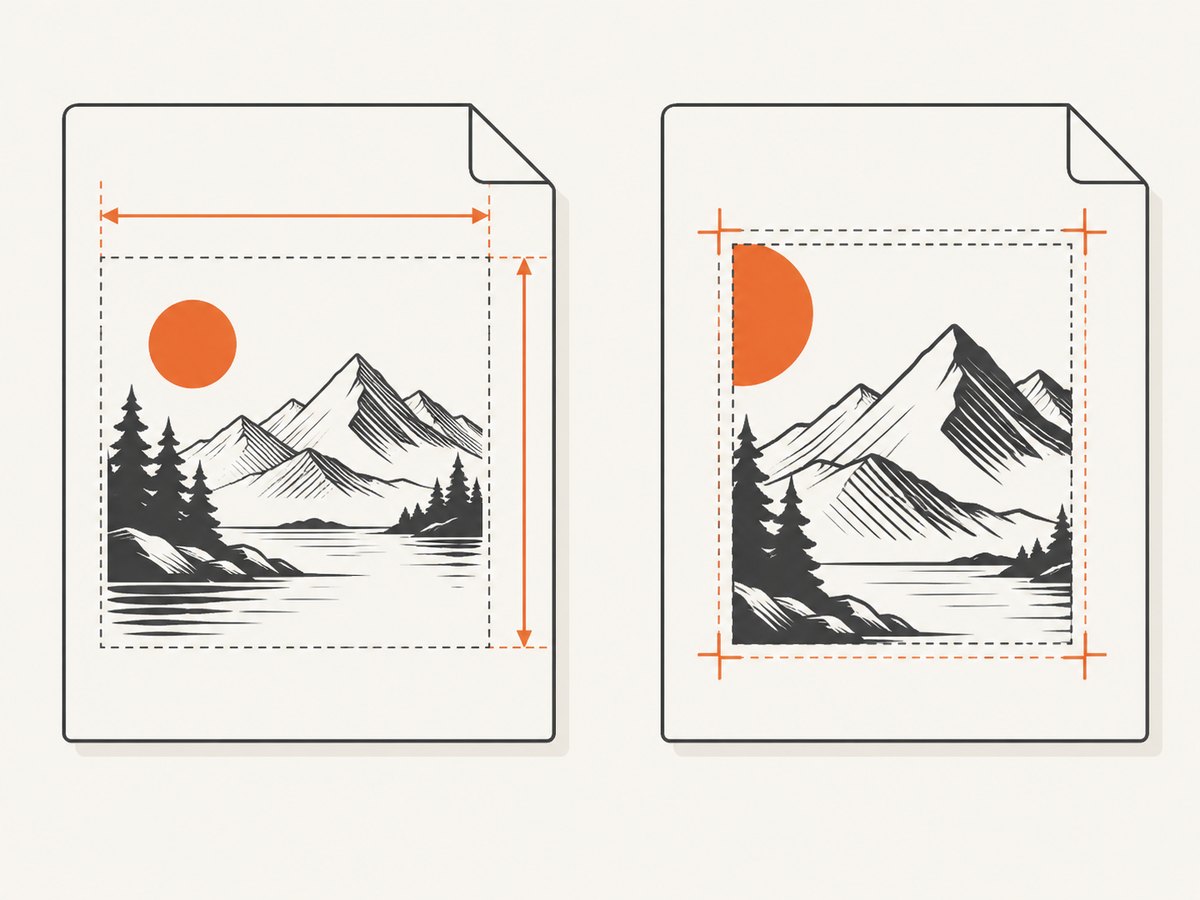
- explicit outer
widthandheight - the coordinate range in
viewBox - percentage dimensions on the top-level SVG
- CSS
width,height, andbackground-size - clipping paths and transforms that move content outside the view box
As a diagnostic, replace percentages with fixed lengths and remove background-size. pdfHTML 6.1.0 records fixes for percentage dimensions on top-level SVGs and for SVG images using background-size with a viewBox.
/* Diagnostic CSS */
svg.diagram {
  width: 400px;
  height: 240px;
  display: block;
}
6. Remember that pdfHTML does not run JavaScript
pdfHTML parses static HTML and CSS and maps them to iText objects. It does not execute browser JavaScript. If a framework inserts the SVG after page load, the converter receives no SVG element.
Render or serialize the final SVG before conversion, then pass that static HTML to pdfHTML. Also include any resources that the script normally creates or loads. A browser screenshot or browser-based preprocessing step may be appropriate when the page fundamentally depends on JavaScript.
7. Restore features incrementally
- Confirm the minimal inline SVG renders.
- Add the real dimensions and
viewBox. - Restore inline CSS.
- Restore external CSS and verify its base URI.
- Restore linked images and fonts.
- Add patterns, masks, filters, clipping paths, and nested SVGs one at a time.
- Only then reintroduce application-generated markup.
This sequence gives you a small failing example for a version-specific support question.
Common errors and fixes
| Symptom | Likely cause | Fix |
|---|---|---|
| Nothing appears | JavaScript creates the SVG | Pre-render static markup; pdfHTML does not execute scripts. |
| External SVG is blank | Wrong or missing base URI | Set ConverterProperties.setBaseUri(); verify every relative path. |
| Inline SVG works, data URI fails | Older pdfHTML version or malformed URI encoding | Check the deployed version; direct data-URI SVG support was added in 3.0.3. |
| SVG is clipped | Incorrect viewBox, dimensions, or clipping path |
Use explicit width and height and inspect the coordinate system. |
| SVG has zero size | Percentage sizing without a resolvable parent size | Use fixed dimensions for the reproduction, then add responsive sizing back. |
| Styles differ from a browser | Unsupported CSS, missing external CSS, or font resolution | Inline critical styles, set the base URI, and verify fonts and supported features. |
| Pattern or advanced feature is absent | Feature support depends on pdfHTML version | Compare the exact release notes and support matrix before changing code. |
| Conversion throws a resource error | Unreadable file, inaccessible URL, or incorrect permissions | Open the resource from the converter’s runtime and log the resolved path. |
Performance, reliability, and upgrade decisions
- Keep conversions deterministic: package SVGs, CSS, images, and fonts with the job when possible instead of depending on remote URLs.
- Reduce diagnosis time: retain a minimal fixture containing the failing SVG and the exact package versions.
- Choose upgrades deliberately: compare compatibility, licensing, and the documented fix against the disruption of changing Core and pdfHTML.
- Use browser preprocessing selectively: it adds a browser runtime but is appropriate when JavaScript-generated content is required.
- Watch resource size: very large SVG paths, embedded rasters, and font files increase memory and conversion time.
Or skip the browser setup
If your goal is to capture the rendered page or verify that the SVG appears visually, ScreenshotNeo provides a single screenshot request without maintaining a browser capture service. Cookie banners, newsletter popups, and chat widgets are removed before the shot. Bot checks, blank pages, failed loads, timeouts, and cache hits are not billed, and response headers identify the page verdict and billing status. Its MCP server lets Claude, Cursor, and other MCP clients call take_screenshot, get_page_info, and capture_pdf.
See the ScreenshotNeo API documentation for all options. A basic call is:
curl -G "https://api.screenshotneo.com/v1/shot" \
  -d access_key=YOUR_API_KEY \
  --data-urlencode url=https://example.com/page-with-svg \
  -o shot.webp
import requests
r = requests.get(
"https://api.screenshotneo.com/v1/shot",
params={"access_key": "YOUR_API_KEY", "url": "https://example.com/page-with-svg"},
timeout=90,
)
r.raise_for_status()
open("shot.webp", "wb").write(r.content)const q = new URLSearchParams({
access_key: 'YOUR_API_KEY',
url: 'https://example.com/page-with-svg'
});
const res = await fetch(`https://api.screenshotneo.com/v1/shot?${q}`);
if (!res.ok) throw new Error(`HTTP ${res.status}`);
const image = Buffer.from(await res.arrayBuffer());
await fs.promises.writeFile('shot.webp', image);The Free plan includes 1,000 screenshots each month without a card. Paid plans start at $5 for 3,000 screenshots, and every feature is available on every plan. Create a free ScreenshotNeo account.
FAQ
Does iText 7 support SVG?
Yes, pdfHTML has supported SVG for years, beginning with pdfHTML 2.1.0 and Core 7.1.3, with additional features and fixes added later. The exact supported feature set depends on your version.
Why does the SVG work in Chrome but not in the PDF?
A browser executes JavaScript and may resolve remote resources, while pdfHTML parses static HTML and CSS without running JavaScript. Browser-only behavior must be pre-rendered or removed.
Should I upgrade immediately?
First identify the exact Core and pdfHTML versions and reproduce the failure with a minimal SVG. Then compare the documented fix, compatibility impact, and licensing requirements before upgrading.
Can CSS control an SVG in pdfHTML?
Supported CSS can style SVG, but external CSS and sizing behavior depend on resource resolution and pdfHTML version. Inline critical styles during diagnosis.


