How to Fix Lines Rendering Incorrectly in wkhtmltopdf PDFs
Diagnose broken borders, split table rows, and font artifacts in wkhtmltopdf PDFs with reproducible fixes and safer alternatives.

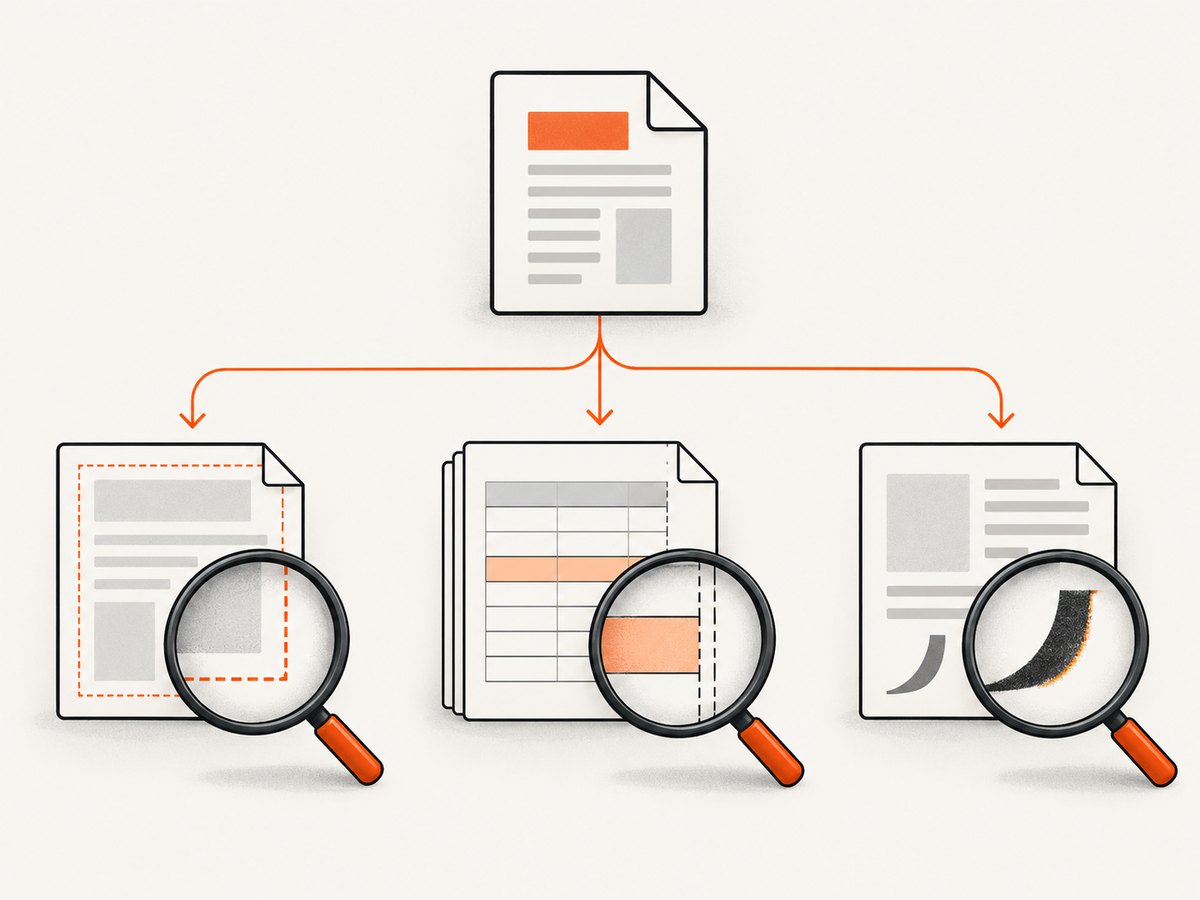
When lines look wrong in a wkhtmltopdf PDF, first identify which kind of line is failing. A missing CSS border, a table row split at a page boundary, and stray box or null-like glyphs near text are different defects with different tests. Capture the affected page, element, font, and repeatability before changing CSS.
This guide gives a reproducible workflow, focused fixes, command options to vary deliberately, and a safe migration path when the renderer cannot reproduce your layout.
1. Classify the line-rendering defect
| Symptom | Likely area | First test |
|---|---|---|
| Border or rule is missing, too thick, or the wrong color | CSS cascade, table borders, overflow, print media | Inspect computed border properties and render a one-element case |
| Horizontal rule or table row breaks across pages | Pagination, row height, page-break rules, floats, overflow | Use a short table that crosses exactly one page boundary |
| Boxes, empty squares, or null-like characters appear at line ends | Font selection, missing font files, old text shaping code | Render with a known fallback font, then with the production font |
Do not apply a workaround from one class to another. A border problem is not evidence that page-break-inside is broken, and a font artifact is not fixed by changing table overflow.
2. Record a reproducible baseline
- Run
wkhtmltopdf --versionand save the complete output, including patched-Qt or build details. - Record the operating system and version, installation source, installed fonts, and the exact command line.
- Save a minimal HTML/CSS/JS file and the resulting PDF. Keep the original report too, because reduction can remove the trigger.
- Write the expected appearance and actual appearance in concrete terms: page number, selector, font, border width, and whether the defect repeats.
The project support guidance asks for the version, OS/version, and a detailed HTML/CSS/JS test case. Follow that format when escalating an issue (official support instructions).
wkhtmltopdf --version
uname -a
fc-list | head
wkhtmltopdf input.html output.pdf
The official downloads page lists the 0.12.6 stable series, released June 11, 2020, and notes that Linux package dependencies vary by distribution. Verify the binary actually installed on the target host instead of assuming every package behaves the same (downloads and platform notes).
3. Reduce the HTML to one failing line
Make a copy of the source and remove scripts, images, and unrelated components until one element still fails. Keep the document doctype, the same font declarations, and the same command options. Use local files while debugging so network timing cannot change the result.
<!doctype html>
<html>
<head>
  <meta charset="utf-8">
  <style>
    @page { margin: 18mm; }
    body { font-family: Arial, sans-serif; }
    .rule { border-top: 1px solid #222; height: 0; }
  </style>
</head>
<body>
  <div class="rule"></div>
</body>
</html>
Change one variable per render. A useful matrix is production CSS versus a minimal rule; production font versus Arial; normal media versus print media; and the installed binary versus a pinned build. Keep each PDF so you can identify the change that mattered.
4. Fix missing or malformed CSS borders
Check the cascade and box geometry
- Inspect computed
border-width,border-style, andborder-color; a reset may have changed one tononeor0. - Check inherited styles and selector specificity. Add a temporary, highly specific rule to prove whether the declaration is reached.
- Confirm the element has non-zero dimensions. A border on a collapsed element can be clipped or appear absent.
- Check transforms, absolute positioning, negative margins, and parent clipping. A visible border can be outside the printed box.
- Add print-specific rules and render with the same media mode used in production.
@media print {
  .invoice .rule {
    display: block;
    height: 0;
    border-top: 1px solid #000 !important;
    overflow: visible;
  }
}
Tables and responsive wrappers
For tables, test border-collapse: collapse versus separate, explicit cell borders, and fixed versus automatic layout. A 2022 issue report describes a Bootstrap responsive wrapper where changing overflow-x: auto to overflow-x: visible fixed that reporter’s clipped table case; it is a case-specific observation, not a universal rule (issue discussion).
.table-wrap { overflow-x: visible; }
table { width: 100%; border-collapse: collapse; table-layout: fixed; }
th, td { border: 1px solid #444; }
Test the wrapper change in isolation. If the page becomes too wide, set the page width or simplify the table rather than keeping an overflow rule that hides content.
5. Fix lines and rows split at page boundaries
Build a test table with enough rows to cross one page. Then vary row height, container overflow, floats, and page-break declarations. A row can split because the engine cannot fit it, because a parent establishes a clipping context, or because a break rule is ignored for that structure.
thead { display: table-header-group; }
tfoot { display: table-footer-group; }
tr, .keep-together { page-break-inside: avoid; }
.section { page-break-before: always; }
These declarations are useful experiments, not guarantees. Historical reports document lines breaking inside rows and page-break rules being ignored for some large rows in older builds (row-splitting report, page-break report). If one row is taller than a page, it cannot be kept intact; redesign it into smaller blocks.
Remove overflow: auto and floats from the smallest failing case. Replace flex or grid wrappers with simple block or table layout for print if the reduced case shows a layout interaction. Confirm that a rule is not being overridden by a later print stylesheet.
6. Fix boxes or null-like characters near text
Render the same sentence with a common fallback font, then with the production font. Verify that every font file is installed and readable by the account running wkhtmltopdf; a desktop preview does not prove the server has the font.
body { font-family: Arial, sans-serif; }
/* Then test the real family separately. */
body { font-family: "Your Installed Font", Arial, sans-serif; }
An older issue associated inserted 0x00/null-like characters with selected fonts in 0.12.1-era builds and reported that removing the font style removed the symptom. A commenter suggested text-rendering: geometricPrecision; treat that as an anecdotal workaround and reproduce it on your exact build before adopting it (font artifact report).
Also test font embedding, weight changes, and text at the exact line break where the artifact appears. If only one font triggers it, ship a tested fallback or evaluate another renderer rather than hiding characters with CSS.
7. Vary documented renderer options deliberately
The command-line manual documents controls that help isolate inputs (usage documentation):
| Option | Diagnostic use |
|---|---|
--user-style-sheet file.css |
Apply a controlled stylesheet to every page |
--print-media-type |
Use print media rules instead of screen rules |
--viewport-size 1280x900 |
Hold viewport geometry constant |
--zoom 1.0 |
Check whether scaling changes thin rules |
--dpi 96 |
Make rasterization assumptions explicit |
--page-size A4, --page-width, --page-height |
Control the printable box and page breaks |
wkhtmltopdf \
  --print-media-type \
  --viewport-size 1280x900 \
  --zoom 1.0 \
  --dpi 96 \
  --page-size A4 \
  --user-style-sheet diagnostic.css \
  reduced.html reduced.pdf
Record every option with the output. These switches control renderer inputs; the manual does not promise that any one repairs arbitrary CSS faults.
8. Security and reliability during reproduction
Do not run untrusted HTML or JavaScript directly through wkhtmltopdf. The project warns that unsanitized input can lead to complete takeover of the server (official security warning). Sanitize user content, isolate the process, restrict outbound network access, set CPU and memory limits, and use a disposable working directory.

For repeatable builds, pin the binary and fonts in an image, log the command and renderer version, and compare PDFs in CI. Network-loaded fonts and images introduce timing variance; prefer local, versioned assets for regression tests.
9. Troubleshooting checklist
| Error or symptom | Cause to investigate | Fix or next action |
|---|---|---|
| Border disappears only in production | Different font, binary, media mode, or CSS bundle | Compare version, computed CSS, fonts, and command line; run the reduced case on both hosts |
| Only table edges are clipped | Responsive wrapper overflow | Test overflow-x: visible; simplify wrapper and set an explicit page width |
Rows split despite page-break-inside: avoid |
Oversized row, float or overflow ancestor, or engine limitation | Shorten the row, remove clipping contexts, and test a block layout |
| Blank squares or odd characters | Font unavailable or font shaping defect | Install or embed the font, test a fallback, and compare builds |
| Changes appear to do nothing | Wrong input file, cached asset, or overridden rule | Use absolute paths, inline diagnostic CSS, and inspect the generated HTML |
| Command fails on Linux | Distribution-specific package dependencies | Verify the package source and dependencies listed for your platform |
10. When to evaluate another renderer
If a minimal case still fails after font, CSS, pagination, and option tests, compare engines against your actual document. Use these axes: CSS and layout coverage, pagination and header/footer behavior, browser/runtime and packaging requirements, maintenance activity, isolation controls for untrusted input, license and operating cost, and migration effort. A historical commenter reported that Puppeteer solved their case, which is a lead for evaluation rather than proof of a universal fix (issue discussion).
Or skip the browser setup
For production screenshots or PDFs, ScreenshotNeo provides a website capture API and MCP server. It accepts consent banners before capture and removes 60+ known consent platforms, newsletter popups, and chat widgets; each step can be disabled. Only clean shots are billed: bot checks, CAPTCHAs, blank pages, timeouts, failed loads, and cache hits cost nothing, and X-Page-Verdict and X-Billed headers explain the result.
One request returns PNG, JPEG, WebP, or PDF. See the ScreenshotNeo API documentation for all options.
curl -G "https://api.screenshotneo.com/v1/shot" -d access_key=YOUR_API_KEY --data-urlencode url=https://stripe.com -o shot.webpimport requests
r = requests.get("https://api.screenshotneo.com/v1/shot", params={"access_key": "YOUR_API_KEY", "url": "https://stripe.com"}, timeout=90)
open("shot.webp", "wb").write(r.content)const q = new URLSearchParams({ access_key: 'YOUR_API_KEY', url: 'https://stripe.com' });
const res = await fetch(`https://api.screenshotneo.com/v1/shot?${q}`);For PDF output and line-sensitive pages, configure paper size, margins, landscape mode, page ranges, full-page lazy-image loading, custom CSS or JavaScript, selector waits, delay or network-idle waits, request blocking, headers, cookies, user agent, timezone, geolocation, and caching TTL. You can capture one CSS-selected element, click before capture, hide selectors, resize images, use transparent backgrounds, create signed links, run async jobs with signed webhooks, capture up to 100 URLs per call, and query usage. The MCP server exposes take_screenshot, get_page_info, and capture_pdf for Claude, Cursor, and other MCP clients.
There are 1,000 free shots each month with no card. Paid plans start at $5 for 3,000 shots; yearly billing gives two months free, and every feature is on every plan. Create your free ScreenshotNeo account.
FAQ
Is every line defect a wkhtmltopdf bug?
No. The same visual symptom can come from CSS, clipping, pagination, missing fonts, or an engine limitation. Classification and reduction separate them.
Should I always set overflow-x: visible?
No. It fixed one reported responsive-table case. Test it against your own wrapper and page width.
Does text-rendering: geometricPrecision guarantee clean text?
No. It was an old, anecdotal workaround. Verify it with your font and binary.
What belongs in a bug report?
Version/build, OS/version, exact command, smallest HTML/CSS/JS reproducer, expected and actual output, and the PDF showing the defect.


