How to Generate PDFs from HTML with Socket.IO, Puppeteer, and Node.js
Use Puppeteer to render HTML and create a PDF, while Socket.IO submits jobs and reports progress. Includes runnable Node.js code, PDF options, and troubleshooting.

Use Puppeteer’s page.pdf() to render a page as PDF, and use Socket.IO to submit the job and report its status. Puppeteer handles the browser, HTML rendering, and PDF bytes. Socket.IO handles bidirectional events between the client and server. Keeping those responsibilities separate gives you a clear job lifecycle without treating Socket.IO as a PDF renderer.
The example below accepts a URL, generates a PDF in memory, and emits progress and completion events. It exposes the finished bytes through a separate HTTP download route. That HTTP route is an implementation choice: Socket.IO is the event channel here, while the ordinary HTTP response is the file download. [Puppeteer PDF guide](https://pptr.dev/guides/pdf-generation) · [Socket.IO](https://socket.io/)
1. Understand the flow
A PDF job has four parts:
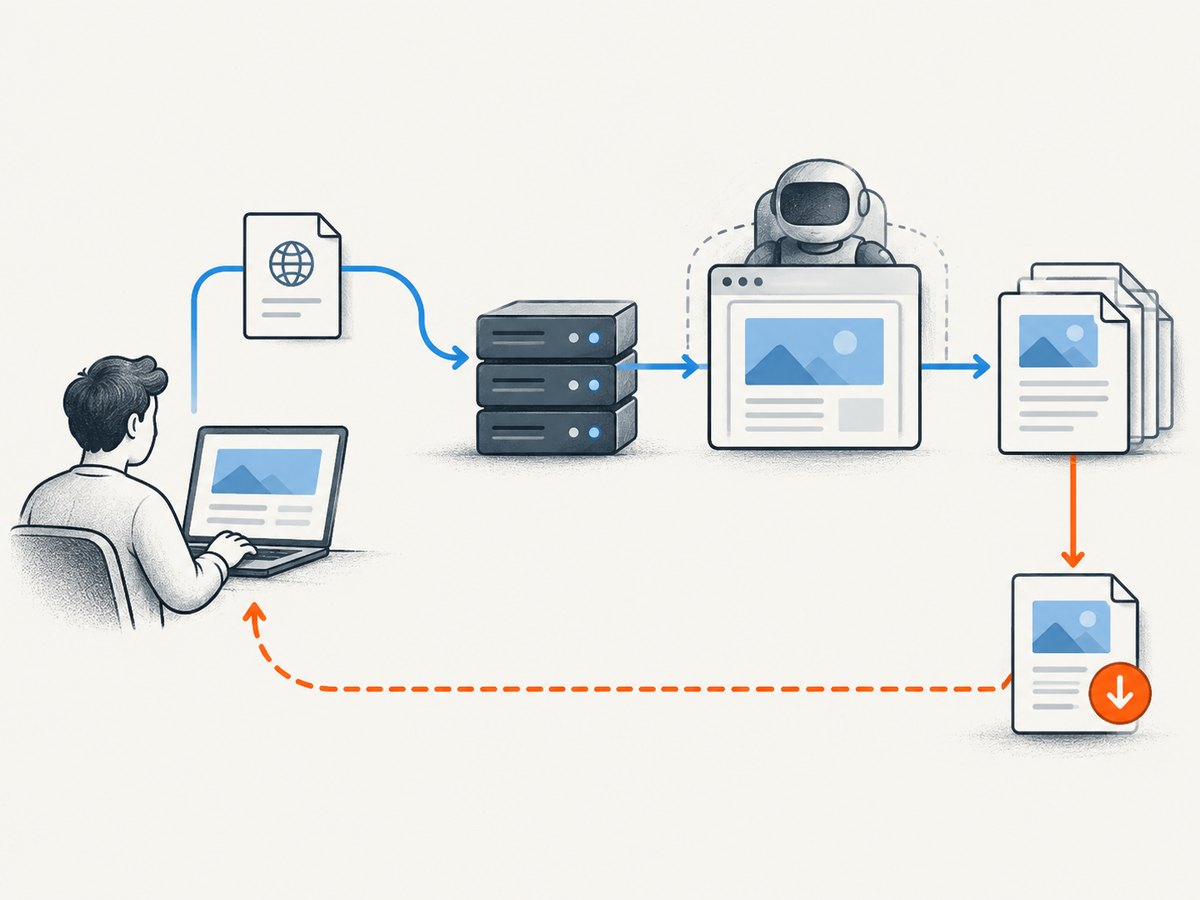
- A client emits a Socket.IO event with the document URL and options.
- The server validates the request, opens a Puppeteer page, and navigates to the document.
page.pdf()returns aPromise<Uint8Array>. The server stores those bytes for the download route.- The server emits a completion event with a job ID. The client downloads the PDF from the HTTP route.
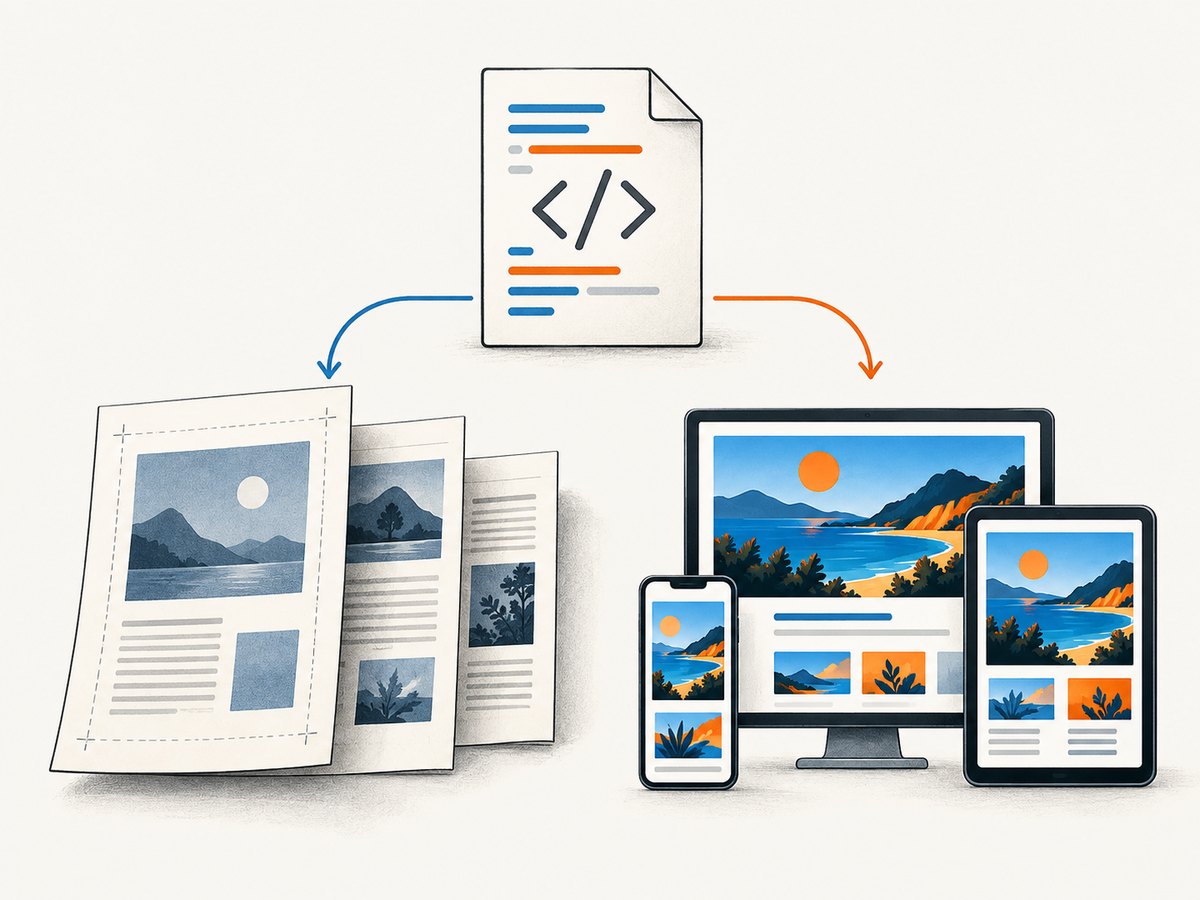
Puppeteer’s PDF method uses the print CSS media type by default; call page.emulateMediaType('screen') first if the document should use screen styles. Fonts are awaited by default by PDF generation. [Puppeteer: PDF generation](https://pptr.dev/guides/pdf-generation) · [Page.pdf() API](https://pptr.dev/api/puppeteer.page)
Socket.IO provides bidirectional, event-based communication. Its transport can fall back to HTTP long-polling if WebSocket is unavailable, and it can reconnect after a dropped connection. That helps with signaling; it does not make the PDF generation itself reliable or define a particular large-file transfer method. [Socket.IO features](https://socket.io/) · [Socket.IO maintainer’s overview](https://socket.io/docs/v4/)
2. Install and run a minimal service
Use a current Node.js runtime and install the packages. Puppeteer normally downloads a compatible browser during installation; check its [installation guide](https://pptr.dev/guides/installation) if your deployment environment needs a different setup.
mkdir html-pdf-socketio
cd html-pdf-socketio
npm init -y
npm install express socket.io socket.io-client puppeteer
Save the following as server.js. It uses an HTTP download endpoint for the binary, keeps completed files in memory for this small example, and limits each job to one page. In production, replace the in-memory map with storage suited to your workload and delete files after an appropriate retention period.
const express = require('express');
const http = require('http');
const { randomUUID } = require('crypto');
const { Server } = require('socket.io');
const puppeteer = require('puppeteer');

const app = express();
const server = http.createServer(app);
const io = new Server(server);
const completed = new Map();

// Demo allowlist: accept only the public example host.
// Replace this with your own strict host policy.
function validateUrl(value) {
  const url = new URL(value);
  if (url.protocol !== 'https:' || url.hostname !== 'example.com') {
    throw new Error('Only https://example.com URLs are allowed');
  }
  return url.href;
}

app.get('/pdf/:jobId', (req, res) => {
  const file = completed.get(req.params.jobId);
  if (!file) return res.status(404).send('PDF not found or expired');
  res.setHeader('Content-Type', 'application/pdf');
  res.setHeader('Content-Disposition', 'attachment; filename="document.pdf"');
  res.send(Buffer.from(file.bytes));
});

io.on('connection', (socket) => {
  socket.on('pdf:create', async (data = {}) => {
    const jobId = randomUUID();
    let browser;
    try {
      const url = validateUrl(data.url);
      socket.emit('pdf:progress', { jobId, stage: 'starting' });
      browser = await puppeteer.launch({ headless: true });
      const page = await browser.newPage();
      socket.emit('pdf:progress', { jobId, stage: 'loading' });
      await page.goto(url, { waitUntil: 'networkidle2', timeout: 30000 });
      socket.emit('pdf:progress', { jobId, stage: 'rendering' });
      const bytes = await page.pdf({
        format: 'A4',
        printBackground: true,
        margin: { top: '18mm', right: '15mm', bottom: '18mm', left: '15mm' },
        timeout: 30000
      });
      completed.set(jobId, { bytes, createdAt: Date.now() });
      socket.emit('pdf:complete', { jobId, downloadUrl: `/pdf/${jobId}` });
    } catch (error) {
      socket.emit('pdf:error', { jobId, message: error.message });
    } finally {
      if (browser) await browser.close();
    }
  });
});

server.listen(3000, () => console.log('PDF service listening on http://localhost:3000'));
For a local demonstration, use an HTML document hosted at https://example.com, or change the validation rule to a controlled test host. The strict check is intentional: a service that accepts arbitrary URLs can be abused to make its server request internal services. Validate schemes and hosts, and enforce network-level egress controls in production.
Save this as client.js and run it with the server. It subscribes to job events before submitting a job. The completion event returns a relative download path; the client turns it into an absolute URL.
const { io } = require('socket.io-client');

const socket = io('http://localhost:3000');
socket.on('connect', () => {
  console.log('Connected:', socket.id);
  socket.emit('pdf:create', { url: 'https://example.com' });
});
socket.on('pdf:progress', (event) => console.log('Progress:', event));
socket.on('pdf:complete', (event) => {
  console.log('PDF ready:', new URL(event.downloadUrl, 'http://localhost:3000').href);
  socket.disconnect();
});
socket.on('pdf:error', (event) => {
  console.error('PDF job failed:', event);
  socket.disconnect();
});
Start the server with node server.js and, in another terminal, run node client.js. Open or fetch the printed URL to retrieve the PDF.
3. Choose navigation and rendering behavior
Navigation readiness
The example uses waitUntil: 'networkidle2', as in Puppeteer’s guide example. It is not a universal best setting. Some pages keep connections open or continually fetch data; others render their key content before the network becomes quiet. For an application page, wait for a known selector when possible:
await page.goto(url, { waitUntil: 'domcontentloaded', timeout: 30000 });
await page.waitForSelector('#report-ready', { timeout: 15000 });
Use a fixed delay only when the page has a known delayed behavior that lacks a better signal. A longer wait increases job time and does not guarantee that an external widget or font has loaded correctly. For content you control, expose an explicit ready marker after the data and layout are ready.
Print CSS or screen CSS
Print media is the default and is usually appropriate for documents. Define page breaks and paper rules in CSS:
@page { size: A4; margin: 18mm 15mm; }
@media print {
  .screen-only { display: none !important; }
  h1, h2 { break-after: avoid; }
  .new-page { break-before: page; }
  * { -webkit-print-color-adjust: exact; print-color-adjust: exact; }
}
PDF generation adjusts colors for printing by default. To force exact CSS colors, Puppeteer documents -webkit-print-color-adjust. If the desired output is the screen layout instead, select it before PDF generation:
await page.emulateMediaType('screen');
const bytes = await page.pdf({ printBackground: true });
Even with background printing enabled, inspect the resulting PDF for page breaks, clipped content, and fixed-position elements. Browsers paginate a long page; a layout that looks right in a viewport can still split awkwardly on paper.
4. Set PDF options deliberately
The PDF options API documents paper dimensions, margins, backgrounds, headers and footers, page ranges, scaling, and other controls. Defaults that matter include Letter paper, no margins, backgrounds off, and a 30-second PDF generation timeout. [Puppeteer PDFOptions](https://pptr.dev/api/puppeteer.pdfoptions)
| Option | What it controls | Practical note |
|---|---|---|
format |
Named paper size | Defaults to Letter. When set, it takes priority over width and height. |
width, height |
Paper dimensions | Accept numbers or strings with units. Prefer one sizing method to avoid surprises. |
landscape |
Page orientation | Set true for wide tables or diagrams. |
margin |
Print margins | Set explicit units for repeatable layouts. |
printBackground |
Prints background graphics | Defaults to false; enable when colored panels or backgrounds are part of the design. |
displayHeaderFooter |
Shows header/footer templates | Defaults to false. Templates can use date, title, URL, page number, and total page count classes. |
pageRanges |
Limits output pages | Examples include 1-5, 8, 11-13; empty means all pages. |
scale |
Scales page rendering | Allowed range is 0.1 to 2; use CSS layout first, scaling second. |
preferCSSPageSize |
Prioritizes CSS @page size |
Otherwise content is scaled to fit the selected paper size. |
path |
Writes a PDF to a filesystem path | When omitted, Puppeteer returns bytes without writing the PDF to disk. |
waitForFonts |
Waits for document fonts | Defaults to true; can matter for custom web fonts. |
timeout |
PDF generation timeout in milliseconds | Defaults to 30,000; zero disables this timeout. |
To save to a file instead of keeping the result in memory, specify path:
await page.pdf({ path: './output/report.pdf', format: 'A4', printBackground: true });Leaving path undefined means no PDF file is written to disk; the method still resolves to the generated bytes. [Puppeteer PDFOptions](https://pptr.dev/api/puppeteer.pdfoptions)
5. Coordinate jobs and handle completion
Socket.IO events work well for progress updates such as starting, loading, rendering, complete, and error. Give every job a stable ID so clients can associate events with the right request. If a client disconnects, the PDF job may still be running; decide explicitly whether to let it finish, cancel it, or persist its status.
For a single request/response interaction, a Socket.IO acknowledgement can return a small result or a download URL. The example uses named events because progress can arrive before completion. It deliberately does not send PDF bytes through a Socket.IO event: the available Socket.IO sources establish event communication, but do not establish a version-specific recipe or payload limit for large PDF binaries. Keep file delivery on HTTP or use a storage service with access controls appropriate to your application.
In a multi-process deployment, in-memory job state is local to one process. A download request routed to another process will not find that process’s map. Store results in shared storage and keep job metadata in a shared system, or route both operations consistently. Set expiration and cleanup policies so completed PDFs do not accumulate indefinitely.
6. Python and cURL alternatives for PDF delivery
The Socket.IO server and event client above are Node.js because Socket.IO coordinates that implementation. If another service needs to retrieve the completed file using the download URL, cURL and Python can fetch it over HTTP:
curl --fail --output report.pdf "http://localhost:3000/pdf/JOB_ID"import requests
url = "http://localhost:3000/pdf/JOB_ID"
response = requests.get(url, timeout=90)
response.raise_for_status()
with open("report.pdf", "wb") as pdf:
pdf.write(response.content)Replace JOB_ID with the ID returned by pdf:complete. These snippets fetch the PDF from the HTTP endpoint; they do not implement a Socket.IO client.
7. Troubleshoot common failures
| Symptom | Likely cause | Fix |
|---|---|---|
| Browser launch fails | Browser download or OS dependencies are missing, or the deployment cannot execute the browser. | Follow Puppeteer’s installation guidance for the deployment environment; confirm the configured browser is installed and executable. |
| Navigation times out | The page has long-lived requests, is slow, or the chosen readiness condition never occurs. | Use a condition suited to the site, such as domcontentloaded followed by a meaningful selector; set a considered timeout. |
| PDF is blank or missing content | The page was captured before application rendering completed, or the URL served an error/login page. | Check the target response and authentication context; wait for a page-specific ready selector and inspect console/page errors. |
| Styles or colors differ | PDF uses print CSS and backgrounds are off by default; print color adjustment also changes colors. | Review @media print, set printBackground: true if needed, and use -webkit-print-color-adjust: exact for exact colors. |
| Font substitution or layout shift | A remote font failed, loaded late, or cannot be accessed from the browser. | Check the font request and CSS; keep waitForFonts: true and ensure fonts are available before capture. |
| Download endpoint returns 404 | The process has restarted, the job ID is wrong, or the in-memory result was not retained. | Use shared durable storage in production, validate the completion URL, and make retention explicit. |
| Client receives no completion event | It disconnected, subscribed after submitting, or the server emitted an error instead. | Attach listeners before emitting the job, listen for pdf:error, and use the job ID to reconcile status. |
| Unexpected internal content is rendered | An untrusted caller supplied an internal or private URL. | Allowlist destination hosts, reject non-HTTPS schemes as appropriate, and restrict outbound network access. |
8. Performance, reliability, and cost
PDF work consumes browser processes, memory, CPU, network requests, and time. The researched documentation provides no performance measurements, memory thresholds, or universal safe concurrency figure, so measure with representative documents before setting worker counts. Start with bounded concurrency and a queue; raise it only after observing resource use and failure rates in your own environment.
Reuse of browser processes can reduce repeated startup work, but it also means you need lifecycle management: create and close pages per job, detect browser disconnections, and recycle unhealthy browser processes. Always close the browser in a finally block when launching one per job, as the example does. A shared browser service should still close each page and handle crashes.
Set separate limits for navigation, selector waits, and PDF generation. Avoid unlimited waits and unbounded queues. Track job stage, elapsed time, and error category without logging document contents, credentials, cookies, or sensitive URLs. For retryable failures, use bounded retries with backoff; do not automatically retry invalid URLs or deterministic rendering errors.
Your direct costs include the compute and storage used to render and retain output, plus bandwidth to deliver it. PDF size depends on the page content and embedded resources; do not assume Socket.IO or the browser will impose one universal size threshold. Expire generated files and avoid keeping multiple copies of the same output unless the workflow needs them.
9. Or skip the browser setup
If the task is capturing a website as an image or PDF rather than building your own HTML-to-PDF service, ScreenshotNeo is a website screenshot API and MCP server from Yorker Media. One GET request returns a PNG, JPEG, WebP, or PDF. See the API documentation for parameters.
curl -G "https://api.screenshotneo.com/v1/shot" -d access_key=YOUR_API_KEY --data-urlencode url=https://stripe.com -o shot.webpimport requests
r = requests.get("https://api.screenshotneo.com/v1/shot", params={"access_key": "YOUR_API_KEY", "url": "https://stripe.com"}, timeout=90)
open("shot.webp", "wb").write(r.content)const q = new URLSearchParams({ access_key: 'YOUR_API_KEY', url: 'https://stripe.com' });
const res = await fetch(`https://api.screenshotneo.com/v1/shot?${q}`);ScreenshotNeo accepts cookie and consent banners like a visitor and removes 60+ known consent platforms, newsletter popups, and chat widgets before the shot; each step can be turned off. Bot checks, blank pages, timeouts, failed loads, and cache hits cost nothing, and response headers identify the page verdict and billing status. Its MCP server gives AI agents tools named take_screenshot, get_page_info, and capture_pdf. The free plan includes 1,000 screenshots a month with no card; paid plans start at $5 for 3,000. Create a free account and get 1,000 screenshots a month with no card.
10. Frequently asked questions
Does Socket.IO generate the PDF?
No. Puppeteer’s page.pdf() generates it. Socket.IO carries job and status events between client and server.
Can page.pdf() return bytes without creating a file?
Yes. It resolves to a Uint8Array. The path option specifies a disk destination; when omitted, Puppeteer does not write the PDF to disk.
Can I use screen styles in the PDF?
Yes. Call page.emulateMediaType('screen') before page.pdf(). Print CSS is the default.
Should I use a Socket.IO acknowledgement or named events?
Use an acknowledgement for a simple request and one result. Named events make progress stages and asynchronous completion easier to represent. Either way, define what happens when the client disconnects.


