How to Generate Open Graph Images in Spring Boot
Build dynamic Open Graph images in Spring Boot with Java2D or Thymeleaf, serve PNGs, add metadata, cache safely, and avoid common crawler failures.
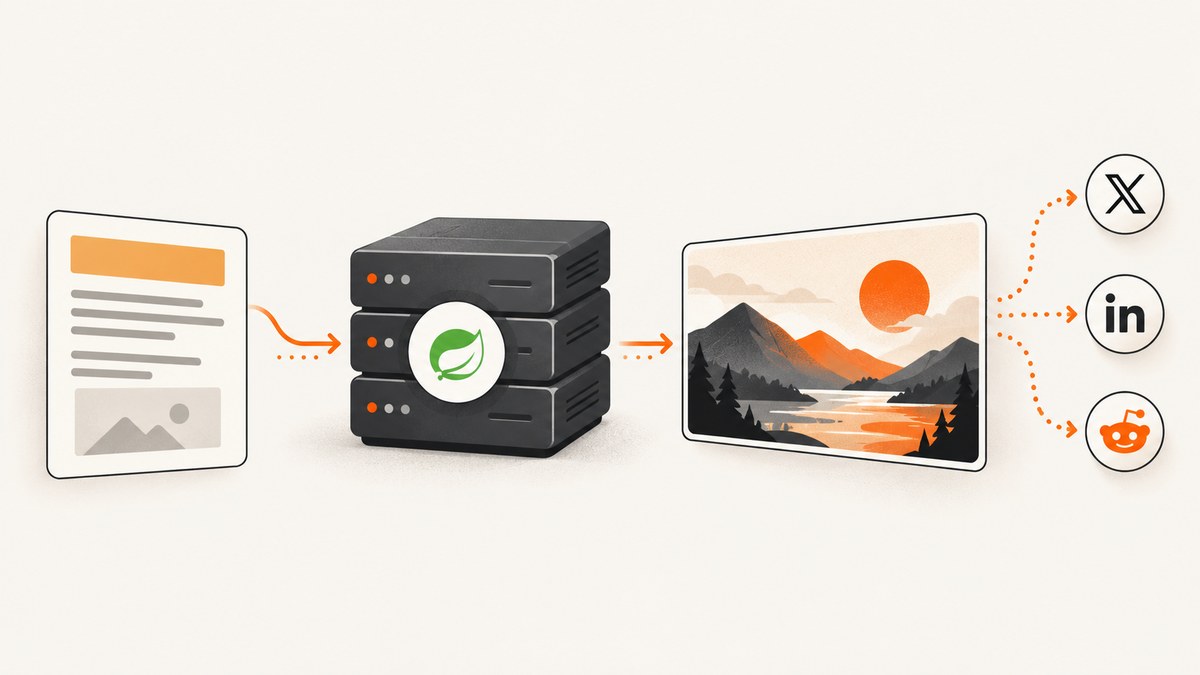
Generate the image on the server, expose it from a public controller, and reference that stable HTTPS URL from your page’s Open Graph metadata. For most Spring Boot applications, Java2D is the smallest dependency footprint: create a BufferedImage, draw the background and text with Graphics2D, encode it with ImageIO, and return PNG bytes. Use Thymeleaf when your composition already exists as HTML/CSS, but add a separate HTML-to-image renderer because Thymeleaf only creates markup.
This guide covers both designs, a complete Java2D implementation, metadata, caching, typography, internationalization, security, crawler behavior, troubleshooting, and an API option when you do not want to operate a browser renderer.
1. Choose a rendering approach
| Approach | Best fit | Trade-offs |
|---|---|---|
| Java2D | Fixed layouts, predictable output, few dependencies | You position and wrap every element yourself; CSS is unavailable |
| Thymeleaf plus an HTML renderer | Layouts shared with your website, rich CSS, flexible components | Requires a browser or HTML-to-image runtime, fonts, and operational tuning |
| Pre-rendered assets | Large sites or content published ahead of sharing | Needs a publish job, storage, and invalidation strategy |
The Java APIs used below are documented by Oracle’s BufferedImage documentation, ImageIO documentation, and Spring’s HTTP message converter documentation.
2. Create the Spring Boot project
Add Spring Web. Thymeleaf is needed only for the template-based option. Spring’s official guide demonstrates selecting Spring Web and Thymeleaf with Initializr; Boot wires the application context when it starts rather than generating source files (Spring guide).
<!-- pom.xml -->
<dependencies>
  <dependency>
    <groupId>org.springframework.boot</groupId>
    <artifactId>spring-boot-starter-web</artifactId>
  </dependency>
  <!-- Include this only for the Thymeleaf option -->
  <dependency>
    <groupId>org.springframework.boot</groupId>
    <artifactId>spring-boot-starter-thymeleaf</artifactId>
  </dependency>
</dependencies>
Run the JVM in headless mode in containers where no display server exists:
java -Djava.awt.headless=true -jar target/app.jar3. Implement a Java2D image service
Keep drawing in a service. The controller should validate the slug, load content, set HTTP headers, and translate failures into ordinary HTTP errors. The service below creates a 1200×630 PNG, wraps a title, draws a subtitle, and optionally loads a logo from a controlled classpath resource.

package com.example.og;

import org.springframework.core.io.ClassPathResource;
import org.springframework.stereotype.Service;

import javax.imageio.ImageIO;
import java.awt.*;
import java.awt.font.FontRenderContext;
import java.awt.font.LineBreakMeasurer;
import java.awt.font.TextAttribute;
import java.awt.geom.RoundRectangle2D;
import java.awt.image.BufferedImage;
import java.io.ByteArrayOutputStream;
import java.io.IOException;
import java.io.InputStream;
import java.text.AttributedString;
import java.util.ArrayList;
import java.util.List;

@Service
public class OgImageService {
    public static final int WIDTH = 1200;
    public static final int HEIGHT = 630;

    public byte[] render(String title, String subtitle) throws IOException {
        String safeTitle = normalize(title, 120, "Untitled");
        String safeSubtitle = normalize(subtitle, 180, "");
        BufferedImage image = new BufferedImage(WIDTH, HEIGHT, BufferedImage.TYPE_INT_ARGB);

        Graphics2D g = image.createGraphics();
        try {
            g.setRenderingHint(RenderingHints.KEY_ANTIALIASING, RenderingHints.VALUE_ANTIALIAS_ON);
            g.setRenderingHint(RenderingHints.KEY_TEXT_ANTIALIASING, RenderingHints.VALUE_TEXT_ANTIALIAS_ON);
            g.setColor(new Color(18, 24,  fortyFour()));
            g.fillRect(0, 0, WIDTH, HEIGHT);

            g.setColor(new Color(48, 120, 255, 90));
            g.fill(new RoundRectangle2D.Double(820, -100, 500, 500, 240, 240));
            g.setColor(new Color(255, 255, 255, 235));
            drawWrapped(g, safeTitle, new Font("SansSerif", Font.BOLD, 62), 80, 150, 850, 4, 78);

            if (!safeSubtitle.isBlank()) {
                drawWrapped(g, safeSubtitle, new Font("SansSerif", Font.PLAIN, 28), 84, 485, 850, 3, 40);
            }

            g.setColor(new Color(255, 255, 255, 170));
            g.setFont(new Font("SansSerif", Font.BOLD, 24));
            g.drawString("EXAMPLE.COM", 84, 570);
        } finally {
            g.dispose();
        }

        try (ByteArrayOutputStream out = new ByteArrayOutputStream()) {
            ImageIO.write(image, "png", out);
            return out.toByteArray();
        }
    }

    private static int fortyFour() { return 44; }

    private static String normalize(String value, int max, String fallback) {
        if (value == null || value.isBlank()) return fallback;
        String oneLine = value.replaceAll("\\s+", " ").trim();
        return oneLine.length() <= max ? oneLine : oneLine.substring(0, max - 1) + "…";
    }

    private static void drawWrapped(Graphics2D g, String text, Font font,
                                    int x, int y, int width, int maxLines, int lineHeight) {
        g.setFont(font);
        FontRenderContext frc = g.getFontRenderContext();
        AttributedString attributed = new AttributedString(text);
        attributed.addAttribute(TextAttribute.FONT, font);
        LineBreakMeasurer measurer = new LineBreakMeasurer(attributed.getIterator(), frc);
        int line = 0;
        while (measurer.getPosition() < text.length() && line < maxLines) {
            var layout = measurer.nextLayout(width);
            layout.draw(g, x, y + line * lineHeight);
            line++;
        }
    }
}
The deliberately controlled inputs matter. Do not accept a font path, logo path, or arbitrary URL from a request parameter. Load those resources from your classpath or a vetted storage layer. Bound every text field before drawing so a very long title cannot consume unbounded CPU or escape the composition.
4. Return PNG bytes from a controller
package com.example.og;

import org.springframework.http.CacheControl;
import org.springframework.http.MediaType;
import org.springframework.http.ResponseEntity;
import org.springframework.web.bind.annotation.*;

import java.io.IOException;
import java.time.Duration;

@RestController
public class OgImageController {
    private final OgImageService service;

    public OgImageController(OgImageService service) {
        this.service = service;
    }

    @GetMapping(value = "/og/{slug}.png", produces = MediaType.IMAGE_PNG_VALUE)
    public ResponseEntity<byte[]> image(@PathVariable String slug) throws IOException {
        if (!slug.matches("[a-z0-9-]{1,100}")) {
            return ResponseEntity.badRequest().build();
        }
        // Replace this lookup with your repository. Keep the fallback deterministic.
        String title = slug.replace('-', ' ');
        byte[] png = service.render(title, "A generated social preview from Spring Boot");
        return ResponseEntity.ok()
                .cacheControl(CacheControl.maxAge(Duration.ofHours(1)).cachePublic())
                .contentType(MediaType.IMAGE_PNG)
                .body(png);
    }
}
The one-hour cache value is an example policy. Use immutable URLs such as /og/post-slug.v3.png when an image should never change, or keep the slug stable and actively purge caches when content changes. If rendering fails, return a normal 4xx or 5xx response; never return an HTML error document with an image content type.
5. Add Open Graph metadata
The Open Graph protocol defines og:image and properties for secure URL, MIME type, width, height, and alternative text (Open Graph protocol). Use an absolute HTTPS URL that social crawlers can fetch without authentication.
<meta property="og:title" content="How to Generate Open Graph Images in Spring Boot">
<meta property="og:description" content="Generate a social preview image from Spring Boot.">
<meta property="og:type" content="article">
<meta property="og:url" content="https://example.com/posts/spring-boot-og-images">
<meta property="og:image" content="https://example.com/og/spring-boot-og-images.png">
<meta property="og:image:secure_url" content="https://example.com/og/spring-boot-og-images.png">
<meta property="og:image:type" content="image/png">
<meta property="og:image:width" content="1200">
<meta property="og:image:height" content="630">
<meta property="og:image:alt" content="A Spring Boot service generating an Open Graph image">
og:image:alt describes what is in the image, rather than acting as a caption. Keep the declared dimensions equal to the actual raster dimensions. Thymeleaf can emit the same tags with absolute or context-relative URL expressions; its default template resolver looks under classpath:/templates/ and adds the .html suffix (Thymeleaf tutorial).
6. Use Thymeleaf when your design is HTML
Create src/main/resources/templates/og-image.html with a fixed 1200×630 canvas and inline or bundled styles. A controller can render the template to a string:
@Controller
class OgTemplateController {
    private final SpringTemplateEngine templates;

    OgTemplateController(SpringTemplateEngine templates) {
        this.templates = templates;
    }

    @GetMapping("/internal/og-html/{slug}")
    ResponseEntity<String> html(@PathVariable String slug) {
        Context context = new Context();
        context.setVariable("title", "Example title");
        context.setVariable("slug", slug);
        return ResponseEntity.ok(templates.process("og-image", context));
    }
}
That endpoint produces HTML, not PNG. Pass the result to the HTML-to-image renderer selected by your project, document its browser version and font installation, and isolate it from untrusted network access. HTML rendering is useful for CSS grids, gradients, and components shared with your site; it also introduces browser startup, sandboxing, and font-loading concerns that Java2D avoids.
7. Fetch and inspect the generated image
These commands exercise the Spring endpoint. They also verify that the response is really an image rather than an error page.
curl -fL https://example.com/og/spring-boot-og-images.png -o og.png
file og.png
import requests
r = requests.get("https://example.com/og/spring-boot-og-images.png", timeout=30)
r.raise_for_status()
open("og.png", "wb").write(r.content)const res = await fetch('https://example.com/og/spring-boot-og-images.png');
if (!res.ok) throw new Error(`${res.status} ${res.statusText}`);
const fs = await import('node:fs/promises');
await fs.writeFile('og.png', Buffer.from(await res.arrayBuffer()));8. Dynamic data, fonts, and internationalization
- Load the post by slug and provide a fallback title when the record is missing.
- Normalize whitespace and cap title, subtitle, and author lengths.
- Bundle fonts in the application or container. Verify glyph coverage for every supported language.
- Test right-to-left scripts, combining marks, emoji, and CJK text. Java2D may select fallback fonts with different metrics, changing line breaks.
- Use a locale-aware date formatter before drawing; never let a user-controlled format string reach the renderer.
- Keep logos and icons at known pixel dimensions. Scale them once and reuse them rather than decoding them for every draw operation.
9. Caching and generation architecture
Synchronous generation is easy for a small site, but social crawlers can request the same URL repeatedly. Cache by slug plus content version. An in-memory cache can reduce duplicate work on one instance; a shared object store or CDN is needed when instances do not share memory.
- At publish time, enqueue a render job.
- Write the PNG to immutable storage using a content version in its key.
- Publish the page only after the asset is available, or serve a deterministic placeholder until it is ready.
- Set a long cache lifetime for immutable URLs.
For mutable URLs, use an explicit purge mechanism and keep the TTL short enough for your editorial workflow. Measure render duration, queue depth, error rate, response size, and cache hit rate. No fixed “best” dimension or benchmark is established by the cited documentation; choose a convention, then validate it on the social platforms your audience uses.
10. Security and reliability checklist
- Allow only a strict slug pattern; reject path traversal and oversized query values.
- Do not fetch arbitrary remote images, CSS, or fonts from request parameters. If remote assets are required, use an allowlist and timeouts.
- Apply authentication to internal render endpoints and rate-limit public generation endpoints.
- Set maximum title length, maximum image dimensions, and a rendering timeout.
- Use a bounded executor for browser-based rendering so concurrent crawlers cannot exhaust memory.
- Return
Content-Type: image/pngonly for PNG bytes and includeX-Content-Type-Options: nosniff. - Record the slug, version, render time, and failure reason without logging secrets or full personal data.
11. Troubleshooting
| Symptom | Likely cause | Fix |
|---|---|---|
| Social preview is blank | Image URL is relative, private, HTTP-only, or blocked by robots/firewall | Use a public HTTPS URL and fetch it from outside your network |
| Response is HTML, not PNG | Exception handler returned an error page | Check status and content type; map render errors to a normal HTTP error |
| Text is clipped | Title exceeds the layout or font metrics changed | Normalize and cap text, wrap by measured width, and test fallback fonts |
| Works locally, fails in Docker | Missing fonts or headless configuration | Install or bundle fonts and set java.awt.headless=true |
| Thymeleaf page is found but cannot become PNG | Thymeleaf was treated as an image renderer | Add and document a separate HTML-to-image runtime |
| Old image remains after editing | CDN or crawler cache | Version the image URL or purge the cache |
| High CPU under crawler traffic | Rendering on every request | Pre-generate, cache by version, and limit concurrency |
| Non-Latin characters show as boxes | Font lacks glyphs | Bundle a font with required coverage and verify shaping |
12. Performance, reliability, and cost notes
Java2D avoids browser startup and usually has a smaller operational surface. Reusing fonts and decoded assets, caching the final bytes, and pre-rendering at publish time reduce request latency. HTML rendering gives more visual flexibility but requires a managed browser process, font files, sandboxing, and resource limits.
Image generation consumes CPU and memory even when the response is cached downstream. Track peak heap usage and protect the endpoint with rate limits. Keep PNG compression and dimensions appropriate for your design; if your composition does not need transparency, an opaque image can be smaller. Choose a CDN policy that matches whether URLs are immutable.
13. Or skip the browser setup
ScreenshotNeo is a website screenshot API and MCP server. It can capture a rendered page or a specific element after your application has produced the HTML, so you can keep the Spring code focused on content and metadata. Before capture, cookie and consent banners are accepted and more than 60 known consent platforms, newsletter popups, and chat widgets are removed; each step can be turned off. Bot checks, blank pages, timeouts, failed loads, and cache hits are not billed, and response headers identify the page verdict and billing status.

Read the parameter reference and OpenAPI details in the ScreenshotNeo documentation. A one-call PNG capture looks like this:
curl -G "https://api.screenshotneo.com/v1/shot" -d access_key=YOUR_API_KEY --data-urlencode url=https://example.com/og/spring-boot-og-images -o shot.webpimport requests
r = requests.get("https://api.screenshotneo.com/v1/shot", params={"access_key": "YOUR_API_KEY", "url": "https://example.com/og/spring-boot-og-images"}, timeout=90)
open("shot.webp", "wb").write(r.content)const q = new URLSearchParams({ access_key: 'YOUR_API_KEY', url: 'https://example.com/og/spring-boot-og-images' });
const res = await fetch(`https://api.screenshotneo.com/v1/shot?${q}`);The API also supports full-page capture with lazy images loaded, CSS element capture, dark mode, device presets and custom viewports, retina scale, custom CSS and JavaScript, waits, request blocking, headers, cookies, user agents, Authorization, timezone, geolocation, transparent backgrounds, resizing, configurable caching, signed links, asynchronous jobs with signed webhooks, bulk capture of up to 100 URLs per call, a usage API, and PDF capture. Its MCP server exposes take_screenshot, get_page_info, and capture_pdf for Claude, Cursor, and other MCP clients.
There is a free plan with 1,000 screenshots per month and no card. Paid plans start at $5 for 3,000 shots; every feature is available on every plan. Create a free ScreenshotNeo account and try the endpoint with your public Spring page.
14. FAQ
What dimensions should an Open Graph image use?
Pick one convention for your site, make the raster dimensions and metadata agree, and validate the result on the platforms your readers use. The implementation above uses 1200×630.
Can I generate JPEG or WebP instead of PNG?
Yes. Change the format passed to ImageIO.write, set the matching response media type, and update og:image:type. Confirm that your target crawlers support the chosen format.
Should I render on every request?
Only when freshness requires it. For published content, pre-rendering and immutable, versioned URLs usually simplify caching and protect the application from crawler bursts.
Does Thymeleaf create the image file?
No. Thymeleaf creates HTML. A separate renderer must rasterize that HTML into PNG, JPEG, or another output.
How do I test crawler access?
Fetch the absolute image URL from an external network, check the status and content type, and inspect the downloaded bytes with an image tool. Also verify that firewalls, authentication, and robots policies do not block social crawlers.


