3 Ways to Generate Open Graph Images Automatically
Generate a custom Open Graph image for every page with HTML and CSS, a reusable image template, or a headless browser. Compare the tradeoffs and see working examples.

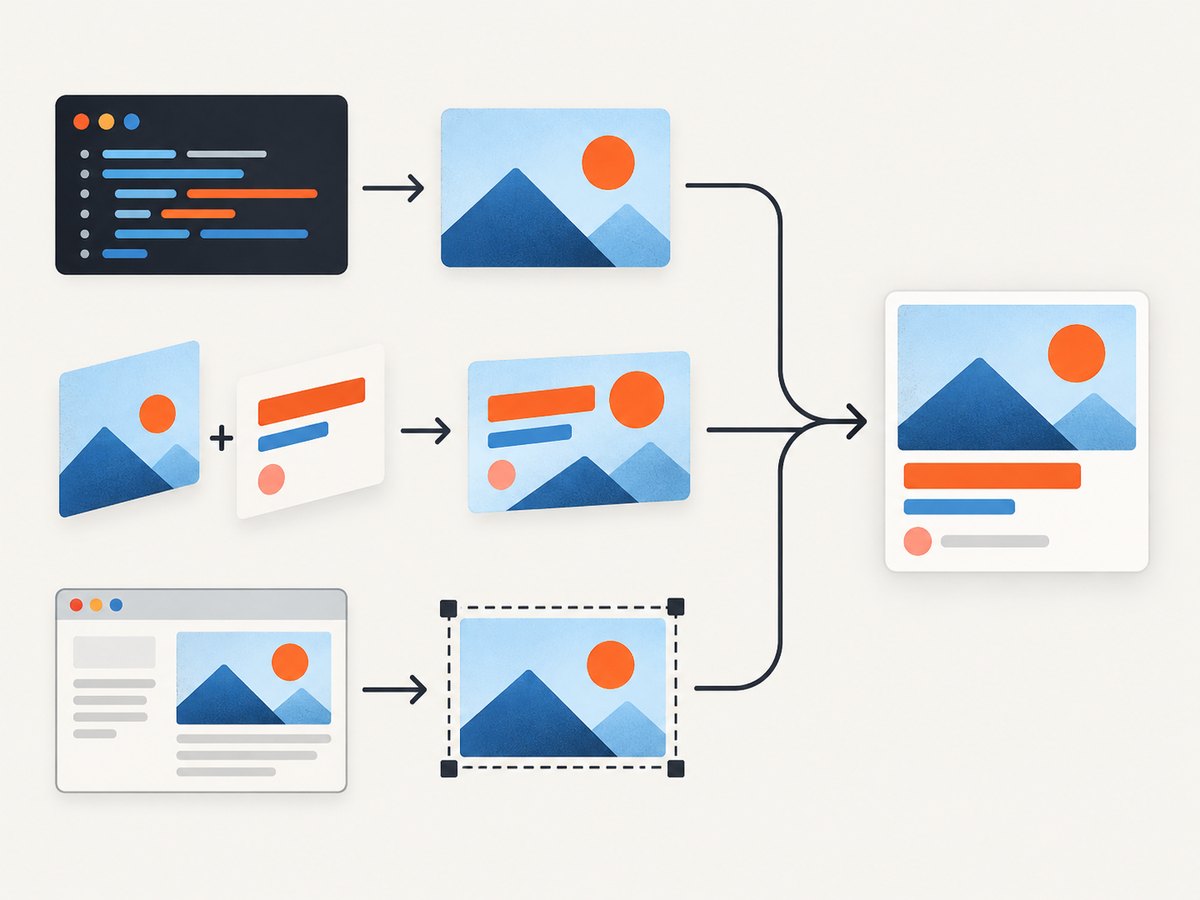
To generate Open Graph images automatically, create an image endpoint or build step that fills a reusable design with each page’s data. The three common approaches are rendering HTML and CSS into an image, transforming a base image template, and capturing an HTML page in a headless browser. Choose based on your existing stack, layout needs, and who will run the rendering infrastructure.
The image is only one part of a working link preview. Your page also needs correct metadata, and social crawlers must be able to fetch the image URL. This guide covers all three methods, runnable examples, metadata setup, operational concerns, troubleshooting, and a browser-based shortcut with ScreenshotNeo.
1. Render HTML and CSS into an image
If you want to define a card as code and generate a unique image from a title, author, or other page data, an image route is a direct approach. In a Next.js app, the documented next/og integration uses Satori and Resvg to convert supported HTML and CSS into PNG. Next.js App Router includes the package. Vercel recommends a 1200 × 630 pixel image for Open Graph use. Vercel’s OG image documentation has the current setup details and examples.
Set up a dynamic Next.js route
For a current Next.js App Router project, create app/og/route.tsx. The example accepts a title from the query string and returns a PNG. Use a real font file in the project; the documented renderer supports TTF, OTF, and WOFF fonts.
import { ImageResponse } from 'next/og'

export const runtime = 'edge'

export async function GET(request: Request) {
  const { searchParams } = new URL(request.url)
  const title = searchParams.get('title') ?? 'A useful page title'

  return new ImageResponse(
    (
      <div
        style={{
          width: '100%',
          height: '100%',
          display: 'flex',
          flexDirection: 'column',
          justifyContent: 'space-between',
          padding: '64px',
          background: '#101827',
          color: 'white',
          fontSize: 64,
          fontWeight: 700,
        }}
      >
        <div style={{ color: '#73d4c5', fontSize: 24 }}>EXAMPLE SITE</div>
        <div style={{ maxWidth: '1000px', lineHeight: 1.1 }}>{title}</div>
        <div style={{ color: '#cbd5e1', fontSize: 24 }}>example.com</div>
      </div>
    ),
    { width: 1200, height: 630 }
  )
}
In an HTML file, JSX uses literal tags as shown; in this article’s escaped code sample, replace < and > with angle brackets when copying into the source file. The request /og?title=My%20Article produces a distinct card. In production, obtain the title from a trusted content store or validate it against known page data rather than letting arbitrary requests create unbounded variants.
Attach it to page metadata
Use an absolute, publicly reachable URL. In a Next.js page or layout, metadata can reference a generated route, with values derived from the page’s content:
export async function generateMetadata({ params }) {
  const post = await getPost(params.slug)
  const imageUrl = new URL('/og?title=' + encodeURIComponent(post.title), 'https://example.com')

  return {
    title: post.title,
    description: post.description,
    openGraph: {
      title: post.title,
      description: post.description,
      images: [{ url: imageUrl.toString(), width: 1200, height: 630 }],
    },
    twitter: {
      card: 'summary_large_image',
      images: [imageUrl.toString()],
    },
  }
}
Replace getPost, the domain, and route data with your application’s implementation. Vercel’s examples show dynamic titles and external images; avoid passing an arbitrary external image URL through the endpoint unless you validate it and intend to allow it.
Constraints to plan around
- The renderer supports a subset of CSS. Flexbox is supported; CSS Grid is not. Build the composition from supported layout primitives.
- Font files are limited to TTF, OTF, and WOFF. Bundle only the fonts and assets the image needs.
- Vercel documents a 500 KB bundle limit for this renderer. Large dependencies or embedded assets can exceed it.
- The current documented setup specifies Node.js 22 or newer and Next.js 12.2.3 or newer. Confirm runtime requirements against the current docs when implementing.
- Vercel documents a response-syntax limitation for Pages Router with Node.js configuration. If your app uses that combination, check the compatibility notes before adopting the route.
Keep text within a predictable area. Long titles, emojis, and translated text can wrap differently or overflow. Test representative short and long titles, specify line height and maximum width, and decide whether the design should shrink the font, clamp the text, or omit secondary fields.
2. Transform a reusable image template
If the design is mostly a background, brand mark, and text overlays, a hosted image transformation service can generate cards from one base template. Cloudinary’s documented approach applies URL transformations such as resizing, cropping, text overlays, and graphical elements. Its Astro walkthrough uses a shared template and post-specific title and description values. See the Cloudinary overview and Astro tutorial.
Implementation pattern
- Create and upload a clean base image at the intended aspect ratio. Leave room for the text lengths and languages your site publishes.
- Build a transformation URL that resizes or crops the base and overlays the current page’s title, description, or other fields.
- Encode dynamic values according to the service’s URL syntax. Treat titles as data: escaping must prevent transformation syntax or URL delimiters inside content from changing the transformation.
- Use the resulting absolute URL in the page’s
og:imageand, where relevant,twitter:imagemetadata. - Check the generated image for wrapping, cropping, contrast, and missing source assets before publishing the URL.
The exact transformation syntax depends on the service and account configuration, so use its current documentation rather than copying an invented URL format. This method fits a site that already stores its source assets in an image service or whose visual design maps naturally to a reusable base image. It is less suitable when each card needs a radically different composition or browser-specific layout behavior.
Template edge cases
- Long titles: reserve enough space, define a maximum number of lines, and choose a fallback such as smaller type or a shortened title.
- Localization: test the longest supported language and scripts that need different fonts. A template designed for short English headings may not fit translated copy.
- Missing data: decide whether to omit an overlay, use a default, or fail generation. A broken image URL produces a broken preview.
- Template changes: consider whether an image URL changes when the template changes. If the URL stays the same, a cached preview may continue showing the old result.
3. Capture an HTML page in a headless browser
A headless browser can render a normal HTML page or a dedicated card template and capture the result as an image. This is useful when the design depends on browser layout or CSS that is inconvenient in a specialized image renderer. Cloudinary describes browser capture as one of the available ways to generate social images from page content. Browser rendering gives you familiar web markup, but it also means operating a browser capture workflow, either in a service or your own build or server environment. That operational comparison is an implementation inference, not a measured performance or cost result.
Build a capture page
Create a page such as /social-card?slug=example-post that renders a fixed-size card using your site’s design system. Keep it deterministic: fetch only the content needed, wait for fonts and images, and avoid animations or time-sensitive content. A local browser script can capture a route using Playwright:
import { chromium } from 'playwright'

const url = process.argv[2]
if (!url) throw new Error('Usage: node capture.mjs https://example.com/social-card?slug=post')

const browser = await chromium.launch({ headless: true })
try {
  const page = await browser.newPage({
    viewport: { width: 1200, height: 630 },
    deviceScaleFactor: 1,
  })
  await page.goto(url, { waitUntil: 'networkidle', timeout: 30000 })
  await page.locator('[data-og-ready="true"]').waitFor({ timeout: 10000 })
  await page.screenshot({ path: 'social-card.png', type: 'png' })
} finally {
  await browser.close()
}
Install Playwright in your project and install its browser binary using the package’s documented setup. The script expects the card page to set data-og-ready="true" once its content and assets are ready; implement that marker in the page, or replace it with a condition that matches your own template. For a full-page card route, capture the fixed viewport shown above. If the page is taller or the template has different dimensions, set the viewport and capture behavior accordingly.
For build-time generation, enumerate content entries, render each corresponding card route, and save images under stable paths. For request-time generation, expose a protected endpoint that accepts a content identifier, loads the intended card page, and returns or stores the captured image. Validate identifiers and restrict network access: accepting arbitrary URLs can turn a capture worker into a way to request internal services. This security recommendation follows from the behavior of a URL-fetching browser worker.
Make captures stable
- Wait for the specific card-ready condition rather than relying only on a fixed sleep. A readiness marker can be set after asynchronous data and required assets are loaded.
- Disable transitions and animations in the capture page so two runs do not catch different frames.
- Use a known viewport, device scale factor, locale, and font set. These affect line wrapping and pixels.
- Ensure images and fonts are reachable from the worker. A page that works in a developer’s browser may fail in a server environment because of authentication, firewall, or missing assets.
- Set a reasonable timeout and record whether failure came from navigation, readiness, or capture. Retrying every error indefinitely can consume capacity without fixing the cause.
Metadata and crawler access checklist
Generation does not guarantee a preview. The page must expose valid metadata, and the platform that reads it must be able to fetch the image. Vercel’s metadata guidance describes twitter:image as a URL to a static or dynamically generated image; for that field, it lists JPG, PNG, WEBP, and GIF as supported and says SVG is not supported. It also describes og:image as a fallback for Twitter image metadata and og:title and og:description as fallbacks for Twitter title and description. See OG image generation and Vercel’s metadata inspection guidance.
- Use an absolute HTTPS image URL that does not require a browser login or session cookie.
- Emit the expected
og:title,og:description, andog:imagevalues, plus Twitter card metadata if your site uses it. - Allow social crawlers to reach the page and generation endpoint. Vercel recommends allowing OG routes in
robots.txtso providers can fetch generated images. - Check the actual rendered HTML served to a crawler, not just the metadata in a client-side browser after JavaScript runs.
- Inspect the preview with a platform’s current preview or debugging tool. Cache behavior and refresh steps vary by platform; there is no universal invalidation procedure.
- When updating a card design or content, ensure the image URL or cache policy lets crawlers obtain the new result.
How to choose between the three methods
| Approach | Good fit when | Main constraint | Operational owner |
|---|---|---|---|
| HTML/CSS image route | Your layout is code-defined and your stack supports an image endpoint | Renderer CSS, font, and bundle limits | Application or serverless route |
| Image transformation | A shared base design plus dynamic text or graphics is enough | Template must handle content variation; transformation syntax is service-specific | Image service and template assets |
| Headless browser | The card needs normal browser rendering or an existing web template | Browser setup, readiness, and capture reliability | Capture service, worker, or build pipeline |
Start with the simplest workflow that meets the actual layout requirement. A team already using Next.js may find a code route natural; an existing media pipeline may favor transformations; a rich web template may call for browser rendering. These are fit criteria based on the documented approaches, not a neutral benchmark of speed or total cost. Cloudinary also describes custom server-side or build-time scripts using image-processing libraries such as Sharp or Canvas as another option when a team wants direct pipeline control.
Or skip the browser setup
If your page already exists and you need an image of it, ScreenshotNeo can capture a URL with one GET request. It is a website screenshot API and MCP server for developers from ScreenshotNeo. Its response provides a screenshot or PDF, and the API documentation describes the available parameters.

curl -G "https://api.screenshotneo.com/v1/shot" -d access_key=YOUR_API_KEY --data-urlencode url=https://example.com/social-card?slug=post -o shot.webpimport requests
r = requests.get(
"https://api.screenshotneo.com/v1/shot",
params={"access_key": "YOUR_API_KEY", "url": "https://example.com/social-card?slug=post"},
timeout=90,
)
r.raise_for_status()
with open("shot.webp", "wb") as f:
f.write(r.content)const q = new URLSearchParams({
access_key: 'YOUR_API_KEY',
url: 'https://example.com/social-card?slug=post',
})
const res = await fetch(`https://api.screenshotneo.com/v1/shot?${q}`)
if (!res.ok) throw new Error(`Screenshot request failed: ${res.status}`)
await Bun.write('shot.webp', res)Use a dedicated card page so the capture has a known design and dimensions. ScreenshotNeo can remove cookie banners, newsletter popups, and chat widgets before the shot; each of those steps can be turned off. Bot checks, blank pages, failed loads, timeouts, and cache hits are not billed, and the response identifies the page verdict and billing status in headers. Its MCP server provides take_screenshot, get_page_info, and capture_pdf for Claude, Cursor, and other MCP clients. The Free plan includes 1,000 shots each month with no card; paid plans start at $5 for 3,000 shots. Every feature is on every plan. See the docs for settings such as viewport, full-page capture, CSS, JavaScript, waits, and caching. Create a free account for 1,000 screenshots a month with no card.
Performance, reliability, and cost
There is no neutral benchmark in the reviewed material that establishes one of these methods as universally fastest or cheapest. Measure your own path with representative titles, images, fonts, and deployment conditions. In all three approaches, avoid regenerating unchanged cards when a stable cached result will do, and make cache invalidation explicit when content or design changes.
- Rendering work: image routes and browser captures do work per generated variant unless a cache or build artifact is reused. Template transformations also produce variants that may be cached by the service. Confirm the specific platform’s cache behavior and billing rules; the cited material does not establish a cross-service cost comparison.
- Concurrency: request-time generation can add load when a crawler first requests a page. A build-time pipeline shifts work earlier but must be rerun when content or templates change.
- Retries: distinguish temporary network failures from invalid content, blocked assets, and renderer errors. Retry only errors likely to recover, with a bounded attempt count.
- Output size and format: choose a format supported by the crawlers you care about, and balance visual quality against transfer size. Vercel’s cited preview documentation lists JPG, PNG, WEBP, and GIF for
twitter:image; validate other platform requirements separately. - Cost: account for your host, rendering invocation, image transformations, storage, and egress where applicable. The sources do not provide a comparable total-cost analysis, so use actual workload and provider pricing.
Troubleshooting
| Symptom | Likely cause | Fix |
|---|---|---|
| Preview has no image | Missing or malformed metadata, relative URL, crawler blocked, or image endpoint unreachable | Inspect served HTML, use an absolute public URL, allow the route to crawlers, and request the image directly without authentication. |
| Image endpoint returns an error | Unsupported CSS, font format, oversized bundle, or invalid dynamic input | Reduce the renderer to supported CSS, use a supported font file, trim bundled assets, and validate title or image parameters. |
| Text is clipped or overlaps | Title length or locale differs from the template assumptions | Test the longest expected strings, adjust the text area and wrapping, and define a clear truncation or font-scaling rule. |
| Browser capture is blank or incomplete | Capture ran before data, fonts, or images were ready, or assets cannot be fetched from the worker | Wait for an explicit readiness marker, check asset access from the worker, and record navigation and readiness errors separately. |
| Old image remains in previews | A crawler or CDN is serving a cached URL result | Check the URL and provider’s current refresh behavior; use a changed image URL when changing the card if appropriate. |
| Only some pages fail | Missing content fields, special characters, or long titles trigger a route or encoding edge case | Test empty fields and Unicode, encode URL data correctly, and provide defaults for optional content. |
| Local capture works but production fails | Production runtime, filesystem, network, or font access differs from the development machine | Package required assets, verify outbound and inbound access, and check framework/runtime compatibility against current docs. |
FAQ
Does generating an OG image automatically add it to every preview?
No. Each page must expose metadata that points to the image, and the crawler must be able to fetch both the page and image.
Can I use SVG as the social image?
For the twitter:image field, Vercel’s cited documentation lists JPG, PNG, WEBP, and GIF and says SVG is unsupported. Check current requirements for each platform and prefer a broadly supported raster output.
Should I generate images during the build or on demand?
Build-time generation suits a known set of pages and updates tied to publishing. On-demand generation suits dynamic content, provided you account for first-request rendering, cache behavior, and endpoint reliability.
Can one image URL serve both Open Graph and Twitter metadata?
Vercel’s preview documentation describes og:image as a fallback for Twitter image metadata. You can also set both fields explicitly when you want the metadata to be unambiguous.
Sources
- Vercel: Open Graph image generation — renderer setup, constraints, dimensions, and crawler access.
- Vercel: OG image generation examples — dynamic image examples.
- Cloudinary: Generating dynamic social OG images — browser capture, transformations, and custom scripts.
- Cloudinary: Dynamic OG images with Astro — reusable template workflow.
- Vercel: Inspecting Open Graph metadata — preview metadata behavior and supported image formats.