How to Generate a PDF and Return Its URL in Ruby
Generate a PDF in Ruby, store it safely, and return a usable URL with Prawn, PDFKit, Wicked PDF, or Rails Active Storage.
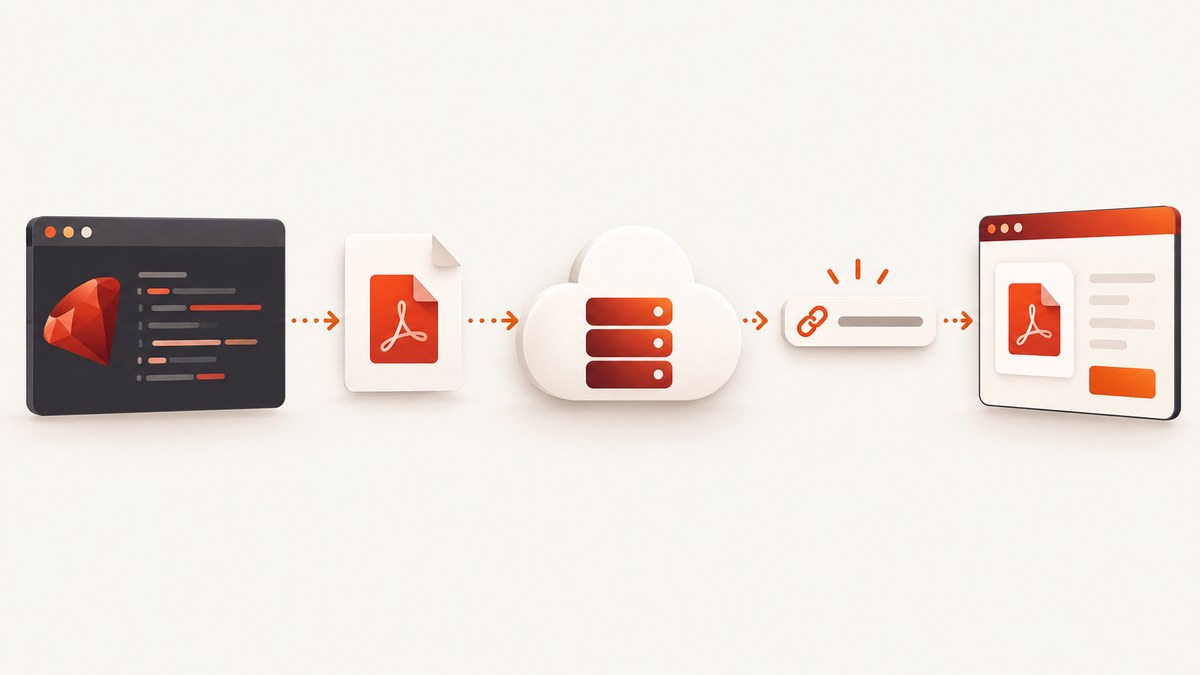
Direct answer: generating PDF bytes and returning a URL are two separate operations in Ruby. First render the document with a library such as Prawn, PDFKit, or Wicked PDF. Then save those bytes to a location that can serve them, such as Rails Active Storage backed by local disk or Amazon S3. Finally return an application URL, a proxy URL, or a signed storage URL.
A PDF gem does not automatically create a public web address. A URL exists only after the result is persisted or exposed through an HTTP endpoint. This distinction explains most failed implementations: the PDF was generated correctly, but the application returned a filesystem path, an in-memory object, or a storage URL that other systems cannot reach.
1. Choose the PDF generation approach
Your source document should determine the generator.
| Source and layout | Ruby option | What it does | Deployment consideration |
|---|---|---|---|
| Programmatic layout | Prawn | Builds a PDF through a Ruby document API | No browser engine, but you define positioning and styles in Ruby |
| Existing HTML and CSS | PDFKit | Passes HTML to wkhtmltopdf and returns bytes or writes a file | Requires the wkhtmltopdf executable and correct asset URLs |
| Rails HTML view | Wicked PDF | Renders a Rails view through wkhtmltopdf | Requires wkhtmltopdf and server-side rendering configuration |
Prawn documents can be created with a Prawn::Document instance or Prawn::Document.generate. PDFKit exposes to_pdf for bytes and to_file for a file. Wicked PDF integrates HTML-to-PDF rendering into Rails. PDFKit’s own documentation describes wkhtmltopdf as the backend that renders HTML with WebKit; PDFKit and Wicked PDF therefore bring an executable dependency that must exist in development, CI, containers, and production.
2. Generate a PDF with Prawn
Use Prawn when the content is naturally a report, invoice, label, or other programmatic document. This standalone example creates a PDF in memory and writes it to disk.

# Gemfile
# gem "prawn"

require "prawn"

pdf_bytes = Prawn::Document.new do |pdf|
  pdf.text "Invoice 1042", size: 22, style: :bold
  pdf.move_down 12
  pdf.text "Customer: Ada Lovelace"
  pdf.text "Issued: 2026-09-29"
  pdf.move_down 20
  pdf.text "Consulting services                         $500.00"
  pdf.text "Total                                      $500.00", style: :bold
end.render

File.binwrite("invoice-1042.pdf", pdf_bytes)
puts "Wrote #{pdf_bytes.bytesize} bytes"
For a file-oriented workflow, Prawn also supports:
require "prawn"

Prawn::Document.generate("invoice-1042.pdf") do |pdf|
  pdf.text "Invoice 1042"
  pdf.text "Total: $500.00"
end
Neither example returns a URL. The output is a local file, so a browser or another service cannot use it until your application serves it or uploads it to shared storage.
3. Generate HTML-based PDFs with PDFKit or Wicked PDF
HTML-to-PDF is useful when you already have a styled HTML template. PDFKit accepts an HTML string:
# Gemfile
# gem "pdfkit"

require "pdfkit"

html = <<~HTML
  <!doctype html>
  <html>
    <body>
      <h1>Invoice 1042</h1>
      <p>Total: $500.00</p>
    </body>
  </html>
HTML

kit = PDFKit.new(html)
pdf_bytes = kit.to_pdf
File.binwrite("invoice-1042.pdf", pdf_bytes)

# Or write directly to a file:
# kit.to_file("invoice-1042.pdf")
Wicked PDF is commonly used from a Rails controller. The exact view and helper setup depends on your Rails version and gem configuration:
# app/controllers/invoices_controller.rb
class InvoicesController < ApplicationController
  def show
    @invoice = Invoice.find(params[:id])
    render pdf: "invoice-#{@invoice.id}",
           template: "invoices/show",
           disposition: "attachment"
  end
end
Check that wkhtmltopdf is installed and available to the process running Rails. HTML assets need reachable URLs. In a single-server development setup, PDFKit documents an asset-rendering issue when the rendering process must call back into the server; use absolute asset URLs or configure the renderer and host explicitly.
4. Rails Active Storage: attach the PDF and return a URL
Rails Active Storage supplies the attachment and delivery layer. It can store files on local disk for development or on a cloud service such as Amazon S3 in production. The official Active Storage guide explains service configuration, attachments, URL helpers, and serving behavior.
4.1 Install and configure Active Storage
bin/rails active_storage:install
bin/rails db:migrate
Declare an attachment on the model:
# app/models/invoice.rb
class Invoice < ApplicationRecord
  has_one_attached :pdf
end
Configure a service in config/storage.yml. Local storage is suitable for development:
local:
  service: Disk
  root: <%= Rails.root.join("storage") %>

amazon:
  service: S3
  access_key_id: <%= ENV.fetch("AWS_ACCESS_KEY_ID") %>
  secret_access_key: <%= ENV.fetch("AWS_SECRET_ACCESS_KEY") %>
  region: <%= ENV.fetch("AWS_REGION") %>
  bucket: <%= ENV.fetch("S3_BUCKET") %>
Select the service in config/environments/production.rb:
config.active_storage.service = :amazonLocal disk files are tied to that machine. If a URL must work after a deploy, from another application server, or for a customer outside your network, use shared or cloud storage.
4.2 Attach generated bytes
Generate the PDF, attach it with a filename and content type, save the record, then build the URL.
class InvoicesController < ApplicationController
  def create_pdf
    invoice = Invoice.find(params[:id])

    pdf_bytes = Prawn::Document.new do |pdf|
      pdf.text "Invoice #{invoice.id}", size: 22, style: :bold
      pdf.move_down 12
      pdf.text "Customer: #{invoice.customer_name}"
      pdf.text "Total: #{format("$%.2f", invoice.total)}"
    end.render

    invoice.pdf.attach(
      io: StringIO.new(pdf_bytes),
      filename: "invoice-#{invoice.id}.pdf",
      content_type: "application/pdf"
    )
    invoice.save!

    url = rails_blob_url(invoice.pdf, disposition: "inline")
    render json: { id: invoice.id, pdf_url: url }
  end
end
Add the host when URL helpers run outside a request, such as a background job or mailer:
# config/environments/production.rb
routes.default_url_options[:host] = ENV.fetch("APP_HOST")

# Or pass it at the call site:
url = rails_blob_url(
  invoice.pdf,
  host: ENV.fetch("APP_HOST"),
  disposition: "inline"
)
Depending on the Rails version and context, url_for(invoice.pdf), rails_blob_url, or rails_blob_path may be appropriate. Verify helper signatures against the Rails release deployed by your application.
5. Understand the URL Active Storage returns
Active Storage commonly returns an application URL that redirects to the storage service. The caller uses your application host and does not need to know whether the bytes are on local disk, S3, or another configured service. Rails also supports proxying, where the application sends the file contents itself; proxy mode can be useful when placing a CDN in front of Rails.
| Delivery style | Request path | Useful when | Trade-off |
|---|---|---|---|
| Redirect | Application URL → storage endpoint | You want storage to serve bytes directly | The client follows a redirect and sees the storage response |
| Proxy | Client → application/CDN → storage | You need a CDN or application-controlled response headers | Your infrastructure carries the response traffic |
A hard-to-guess blob URL is not an authorization system. Rails documents that Active Storage controllers are publicly accessible by default. The application-level URL is intended to be permanent, while service URLs are signed and can be short-lived; exact behavior depends on the Rails version and configuration. For private documents, put an authenticated controller in front of the attachment and check the current Rails documentation before promising expiry or privacy.
6. Return a URL from a Rails API
A JSON endpoint can create the PDF and return a link:
# config/routes.rb
post "/invoices/:id/pdf", to: "invoices#create_pdf"

# Example response
{
  "id": 1042,
  "pdf_url": "https://app.example.com/rails/active_storage/blobs/redirect/.../invoice-1042.pdf"
}
For large PDFs, move generation to a background job. Return a job or invoice identifier first, attach the file when generation finishes, and expose a status endpoint. This prevents a browser request from timing out while wkhtmltopdf or a complex Prawn report runs.
7. Or skip the browser setup
If your source is a web page rather than a Ruby layout, ScreenshotNeo can generate a PDF from one GET request. It handles the browser runtime, and its PDF options include paper size, margins, landscape mode, and page ranges. See the ScreenshotNeo documentation for the complete parameter list.

curl -G "https://api.screenshotneo.com/v1/shot" \
  -d access_key=YOUR_API_KEY \
  --data-urlencode url=https://stripe.com \
  -o shot.pdf
require "net/http"
require "uri"
uri = URI("https://api.screenshotneo.com/v1/shot")
uri.query = URI.encode_www_form(
access_key: ENV.fetch("SCREENSHOTNEO_API_KEY"),
url: "https://stripe.com",
format: "pdf"
)
response = Net::HTTP.get_response(uri)
unless response.is_a?(Net::HTTPSuccess)
abort "ScreenshotNeo returned #{response.code}: #{response.body}"
end
File.binwrite("page.pdf", response.body)import requests
r = requests.get(
"https://api.screenshotneo.com/v1/shot",
params={"access_key": "YOUR_API_KEY", "url": "https://stripe.com", "format": "pdf"},
timeout=90,
)
r.raise_for_status()
open("page.pdf", "wb").write(r.content)const q = new URLSearchParams({
access_key: 'YOUR_API_KEY',
url: 'https://stripe.com',
format: 'pdf'
});
const res = await fetch(`https://api.screenshotneo.com/v1/shot?${q}`);
if (!res.ok) throw new Error(`ScreenshotNeo returned ${res.status}`);
const bytes = Buffer.from(await res.arrayBuffer());
require('node:fs').writeFileSync('page.pdf', bytes);Cookie banners, newsletter popups, and chat widgets are removed before the shot. Bot checks, blank pages, failed loads, timeouts, and cache hits are not billed, and response headers identify the page verdict and whether the request was billed. ScreenshotNeo also provides an MCP server so Claude, Cursor, and other MCP clients can call take_screenshot, get_page_info, and capture_pdf. The Free plan includes 1,000 screenshots per month with no card; paid plans start at $5 for 3,000. Create a free ScreenshotNeo account.
8. Troubleshooting
“I returned a file path, but the client cannot open it.”
A path such as /app/storage/invoice.pdf is meaningful only on the server. Attach the bytes to Active Storage or expose a controller endpoint. Return an HTTP URL built with rails_blob_url.
The URL has the wrong host or uses localhost
URL helpers need a request host or configured default URL options. Set default_url_options[:host] for jobs, mailers, and console scripts, and use HTTPS in production.
PDFKit or Wicked PDF reports that wkhtmltopdf is missing
Install the executable in the development machine, CI image, and production container. Confirm the Rails process can execute it and configure the gem with the correct binary path.
Stylesheets, images, or fonts are missing
The renderer may not resolve relative assets. Use absolute URLs, make assets reachable from the rendering process, and check HTTPS certificates and authentication requirements. A browser session in your laptop does not automatically provide cookies to wkhtmltopdf.
The PDF is attached but downloads as the wrong type
Set content_type: "application/pdf" and include a filename ending in .pdf. Choose disposition: "inline" for browser viewing or "attachment" for download behavior.
A link works on one server but fails after deployment
Local disk storage is not shared between machines. Configure a shared service such as S3, migrate existing blobs, and ensure production credentials and bucket permissions are present.
A supposedly private document is reachable without login
Active Storage’s default controllers are publicly accessible. Add an authenticated download endpoint that authorizes the current user before redirecting or proxying the blob. Do not rely on obscurity of the blob key.
9. Performance, reliability, and cost notes
- Generation time: Prawn avoids a browser process and is often operationally simpler for structured reports. HTML-to-PDF adds wkhtmltopdf startup and asset loading. No universal speed comparison should be assumed without measuring your templates.
- Memory: Rendering to a Ruby string is convenient for Active Storage, but very large documents can consume substantial memory. Write to a temporary file or stream through a job when appropriate.
- Retries: Make PDF creation jobs idempotent. Use a deterministic attachment name and avoid creating duplicate records when a job is retried.
- Storage cost: Active Storage stores the bytes; storage and bandwidth charges come from the configured provider. Keep old versions only when the product requires them.
- URL stability: Return the application-level blob URL to callers that should remain independent of your storage vendor. Use a proxy or authenticated endpoint when access policy or CDN behavior requires it.
- ScreenshotNeo billing: ScreenshotNeo bills only clean shots. Bot checks, blank pages, timeouts, failed loads, and cache hits cost nothing, and headers report the verdict and billing state.
10. Recommended implementation checklist
- Identify whether your source is Ruby layout data or existing HTML.
- Select Prawn, PDFKit, or Wicked PDF accordingly.
- Generate bytes or a temporary file and verify the PDF content type.
- Attach the result to a persisted record with Active Storage.
- Use shared or cloud storage when links must work across machines.
- Build the URL with the correct Rails host and disposition.
- Choose redirect or proxy delivery deliberately.
- Add authorization for documents that are not public.
- Move expensive rendering to a background job and make retries safe.
- Log generation failures separately from storage and URL-construction failures.
FAQ
Can Prawn return a URL by itself?
No. Prawn creates PDF data or a local file. Your application must store or serve that result before a URL exists.
Should I use a blob URL or an S3 URL?
Use the Rails application URL when callers should not depend on your storage provider. Use a direct service URL only when its signing and lifetime match your use case.
Do I need Rails to return a PDF URL?
No. Any Ruby web framework can save the bytes and expose a download route. Rails Active Storage reduces the amount of storage and URL plumbing you need to write.
Can a generated URL be permanent?
The application-level Active Storage URL is designed as a stable indirection, while service URLs are signed and may expire. Confirm the behavior for your Rails version and configuration.
When is ScreenshotNeo a better fit?
Use it when the PDF source is a web page and you prefer a hosted browser capture with consent-banner and popup removal, PDF page options, and an API or MCP workflow instead of maintaining wkhtmltopdf.